LG V20

lgmw33

Senior Member
Joined
Apr 19, 2014
Messages
772
Reaction score
0
Hi guys, did your v20 gets hot for no reason when u just leave it idle there. I encountered few times liao and only restart the phone solve the problem. *********

Sent from LGE LG-H990 using GAGT

Better remove battery, then restart. At times, battery connection issue. I was told to do that when happened to my previous phone. It helped.
 
Last edited:

teoph04

Senior Member
Joined
Aug 12, 2010
Messages
1,369
Reaction score
56
Hi may I know where you guys download flac music to enjoy with this beast? Thanks in advance
 

Gaminator

Supremacy Member
Joined
Jul 21, 2004
Messages
8,627
Reaction score
691
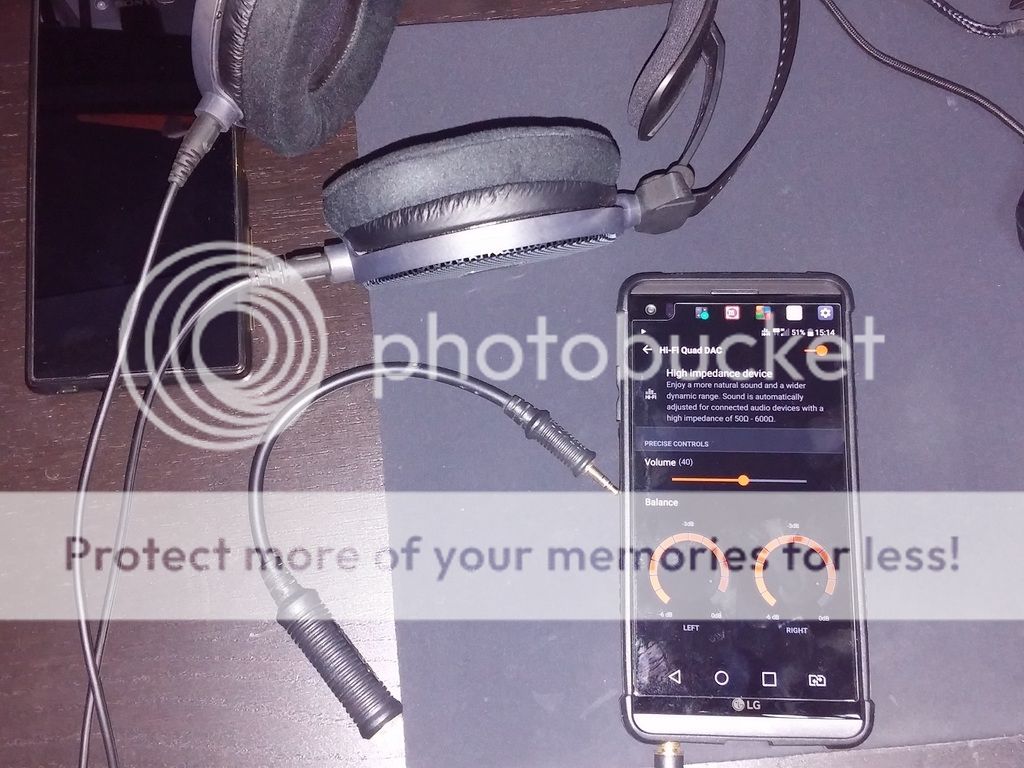
This was covered in HF, not sure if it was covered here in the previous posts, but regardless, here's a trick to get the V20 to stay in 'High Impedance' mode even when you're using a low impedance headphone (don't advise this for IEM's though). Here's a pic of my ATH -R70x (470 Ohm) headphone attached to my V20, it IS in 'High Impedance' mode naturally.
r70x%20v20_zps71mmdawv.jpg

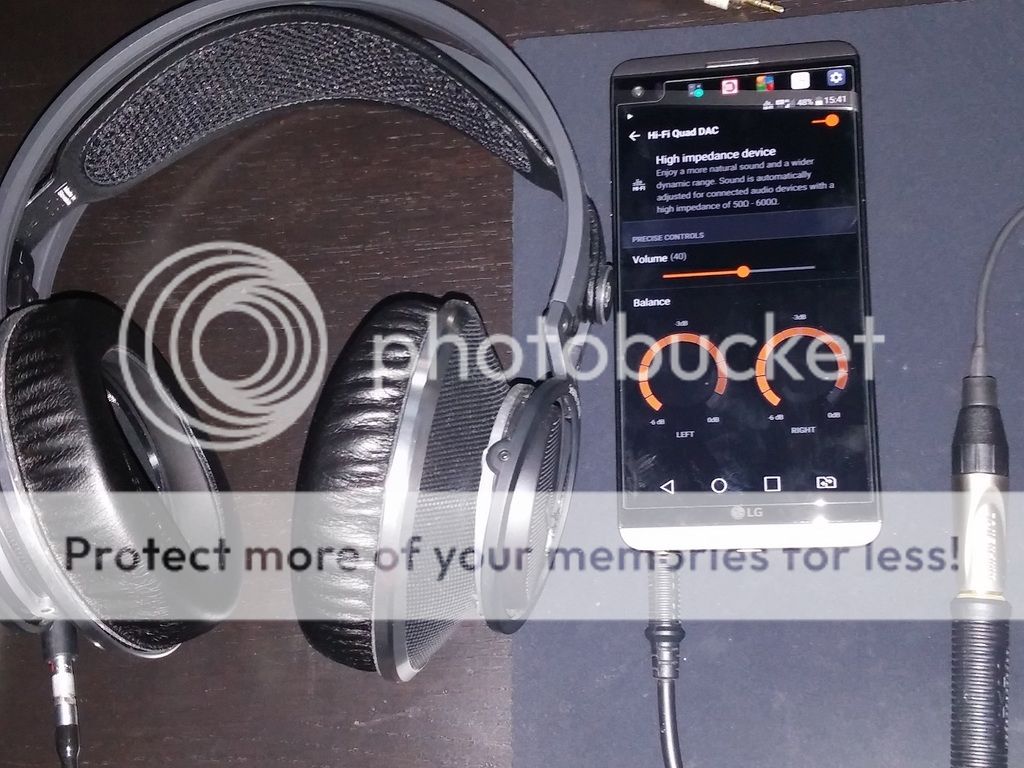
Use a 3.5mm to 6.3mm adapter (your 50 ohm or higher headphones MUST be attached) and plug them into the V20. The V20 will kick into 'High Impedance' mode, you can now detach the headphone from the adapter BUT leave the adapter connected to the V20 to keep it in 'High Impedance' mode. You can now attach a lower impedance can (like the K812 in the pic below which is only 32 Ohm) and the V20 will play music in 'High Impedance' mode.
k812%20v20_zps4barkqf0.jpg


Even if you have only the adapter w/o a high impedance headphone, you can still plug in the adapter to the V20 (don't connect the adapter to a headphone yet, leave the adapter unconnected). You'll note that the V20 goes into 'External Device' mode, you can now attach the headphone and it'll stay in 'External Device' mode. From what I've gathered, 'External Device' mode loudness is somewhere between 'High Impedance' and 'Normal Audio' mode.

 

lunaraven

Senior Member
Joined
Dec 4, 2007
Messages
519
Reaction score
1
I am using the external mode with an IEM (Sony XBA A2). To me, it sounds better this way.
This was covered in HF, not sure if it was covered here in the previous posts, but regardless, here's a trick to get the V20 to stay in 'High Impedance' mode even when you're using a low impedance headphone (don't advise this for IEM's though). Here's a pic of my ATH -R70x (470 Ohm) headphone attached to my V20, it IS in 'High Impedance' mode naturally.
r70x%20v20_zps71mmdawv.jpg

Use a 3.5mm to 6.3mm adapter (your 50 ohm or higher headphones MUST be attached) and plug them into the V20. The V20 will kick into 'High Impedance' mode, you can now detach the headphone from the adapter BUT leave the adapter connected to the V20 to keep it in 'High Impedance' mode. You can now attach a lower impedance can (like the K812 in the pic below which is only 32 Ohm) and the V20 will play music in 'High Impedance' mode.
k812%20v20_zps4barkqf0.jpg


Even if you have only the adapter w/o a high impedance headphone, you can still plug in the adapter to the V20 (don't connect the adapter to a headphone yet, leave the adapter unconnected). You'll note that the V20 goes into 'External Device' mode, you can now attach the headphone and it'll stay in 'External Device' mode. From what I've gathered, 'External Device' mode loudness is somewhere between 'High Impedance' and 'Normal Audio' mode.
 

mister38

Arch-Supremacy Member
Joined
Aug 15, 2002
Messages
14,952
Reaction score
569
External sound much better then Normal mode..:eek: :s12:

thanks for sharing Gaminator :D
 
Last edited:

stupidog

Arch-Supremacy Member
Joined
Feb 15, 2005
Messages
23,235
Reaction score
10,199
finally jumped the gun.

for dual sim users,

main line at sim 1

sec line at sim 2

i go into the dial pad, where to choose which line to call ?

previously when using other dual sim phones,

there is a choice to choose sim 1 or 2 after u keyed in the number.

for this phone where is the option ??
 

260Wolskel

Senior Member
Joined
Dec 4, 2011
Messages
809
Reaction score
54
finally jumped the gun.

for dual sim users,

main line at sim 1

sec line at sim 2

i go into the dial pad, where to choose which line to call ?

previously when using other dual sim phones,

there is a choice to choose sim 1 or 2 after u keyed in the number.

for this phone where is the option ??

Swept your finger from the top of the screen down will drag open the pull down Manuel. There is option for SIM 1 & SIM 2 selection there.

Sent from LGE LG-H990 using GAGT
 

lgmw33

Senior Member
Joined
Apr 19, 2014
Messages
772
Reaction score
0
finally jumped the gun.

for dual sim users,

main line at sim 1

sec line at sim 2

i go into the dial pad, where to choose which line to call ?

previously when using other dual sim phones,

there is a choice to choose sim 1 or 2 after u keyed in the number.

for this phone where is the option ??

Make use of the home touch button. Go setting, add switch sim shortcut to home touch button. Switching sim is instant.
 
Last edited:

tohchr

Arch-Supremacy Member
Joined
Oct 7, 2004
Messages
13,777
Reaction score
2,233
finally jumped the gun.

for dual sim users,

main line at sim 1

sec line at sim 2

i go into the dial pad, where to choose which line to call ?

previously when using other dual sim phones,

there is a choice to choose sim 1 or 2 after u keyed in the number.

for this phone where is the option ??
Are u using one sim for data and one sim for calls? If yes, please put the data sim on sim 1 and calling sim on sim 2. This way, u can lock or force 4G LTE always on.
 

Sansara

Junior Member
Joined
Oct 1, 2007
Messages
45
Reaction score
0
This was covered in HF, not sure if it was covered here in the previous posts, but regardless, here's a trick to get the V20 to stay in 'High Impedance' mode even when you're using a low impedance headphone (don't advise this for IEM's though). Here's a pic of my ATH -R70x (470 Ohm) headphone attached to my V20, it IS in 'High Impedance' mode naturally.
r70x%20v20_zps71mmdawv.jpg

Use a 3.5mm to 6.3mm adapter (your 50 ohm or higher headphones MUST be attached) and plug them into the V20. The V20 will kick into 'High Impedance' mode, you can now detach the headphone from the adapter BUT leave the adapter connected to the V20 to keep it in 'High Impedance' mode. You can now attach a lower impedance can (like the K812 in the pic below which is only 32 Ohm) and the V20 will play music in 'High Impedance' mode.
k812%20v20_zps4barkqf0.jpg


Even if you have only the adapter w/o a high impedance headphone, you can still plug in the adapter to the V20 (don't connect the adapter to a headphone yet, leave the adapter unconnected). You'll note that the V20 goes into 'External Device' mode, you can now attach the headphone and it'll stay in 'External Device' mode. From what I've gathered, 'External Device' mode loudness is somewhere between 'High Impedance' and 'Normal Audio' mode.

slightly off topic but i was just wondering is it normal to experience a "hollowness" in the music quality after enabling the DAC? i'm usually on my bluetooth headphones but i tried plugging in my plantronics backbeat pro via the audio cables but my songs ends up sounding hollow with the vocals completely overshadowed by the instrumental music which usually is in the background. i can never hear the vocals when the DAC is activated even when i play flac files...

is that a typical experience with the DAC or am i doing something wrong?

any advice appreciated

thanks
 

stupidog

Arch-Supremacy Member
Joined
Feb 15, 2005
Messages
23,235
Reaction score
10,199
Are u using one sim for data and one sim for calls? If yes, please put the data sim on sim 1 and calling sim on sim 2. This way, u can lock or force 4G LTE always on.

main sim for calls and data.

sec sim for Banks OTP nia
 
Important Forum Advisory Note
This forum is moderated by volunteer moderators who will react only to members' feedback on posts. Moderators are not employees or representatives of HWZ Forums. Forum members and moderators are responsible for their own posts. Please refer to our Community Guidelines and Standards and Terms and Conditions for more information.
Top