M1 FIBRE BROADBAND DISCUSSION - Part 2

loganrunning

Master Member
Joined
May 12, 2017
Messages
3,230
Reaction score
1,965
Sorry for not stating that. My house is a 4rm HDB (old resale so its bigger).
I installed the Opennet point/router right in the middle of the house, so I guess connection is still stable throughout the flat.

I replaced my old Samsung Home connect mesh APs with this AX50 as some of my smart switches can't maintain a stable connection to the Samsung AP.

my guess is if your house is regular shaped, and not laid out in the linear style (aka "condo layout"), the GT-AX6000 (if placed in the centre) should be able cover all. in my old place, odd boomerang shaped 1600sqft, my RT-AX88U (also AX6000) in the centre was able to cover everywhere, at worst, -70dbm - that location was carefully selected so that there was only a max of 2 walls inbetween.

if your unit is "condo layout" eg entrance-hall-br3-br2-mbr, and if you can have wire backhaul, then a mesh will be better in providing more even coverage.
 

loganrunning

Master Member
Joined
May 12, 2017
Messages
3,230
Reaction score
1,965
On the topic of 2X1gbps plan from M1.
Anybody had configured the 2 WANs on a single router like the Tplink AX90?
Can you configure it in load balancing mode?
Or can it merge the 2 WANs to work like a single WAN?

yes, you can find a thread dedicated to this topic.
 

loganrunning

Master Member
Joined
May 12, 2017
Messages
3,230
Reaction score
1,965
hmm currently with singtel at my parents, will be shifting to my new place. hence, looking for a new ISP

ah, ok. was asking because if youre at m1 or sh, if you are happy with the service, better to stay.

i'm an m1 user for many years, no complaints.
for routers, m1 gives a decent model. if you want to upgrade to say, GT-AX6000, m1 appears to give a better discounted price. the "affordable" GT-AX6000 units on carousell, are generally sold by m1 users who got them at a discount. so, something to thank m1 for :)

i heard that there are also many satisfied SH users, although many are not happy with the nokia routers provided.

In terms of sevice, i think both are generally ok.
 

kaikai1805

Member
Joined
Jun 3, 2011
Messages
280
Reaction score
0
ah, ok. was asking because if youre at m1 or sh, if you are happy with the service, better to stay.

i'm an m1 user for many years, no complaints.
for routers, m1 gives a decent model. if you want to upgrade to say, GT-AX6000, m1 appears to give a better discounted price. the "affordable" GT-AX6000 units on carousell, are generally sold by m1 users who got them at a discount. so, something to thank m1 for :)

i heard that there are also many satisfied SH users, although many are not happy with the nokia routers provided.

In terms of sevice, i think both are generally ok.
yep, was considering the m1 2x1gbps cus of the 5mths free + GT-AX6000, seems more worth it than SH 1gbps plan + buying a GT-AX6000 from carousell? but my concern was the stability, as i heard few frds mention they encounter issues in the past.

anyway does it makes a difference, PC to modem compared PC to AX6000 to modem?

am open to more suggestions/recommendations.
 

loganrunning

Master Member
Joined
May 12, 2017
Messages
3,230
Reaction score
1,965
yep, was considering the m1 2x1gbps cus of the 5mths free + GT-AX6000, seems more worth it than SH 1gbps plan + buying a GT-AX6000 from carousell? but my concern was the stability, as i heard few frds mention they encounter issues in the past.

anyway does it makes a difference, PC to modem compared PC to AX6000 to modem?

am open to more suggestions/recommendations.

I'm on m1 for about 8-10 years. left sh and st after subscription for many years, due to increasing number of network outages and problems back then. I guess everyone will have their own experiences which can lead to biases :)

reading the forums, each telco seems to do well in certain places, and have problem areas. if your place is same as your friends and they say good results with sh and bad with m1, it might make sense to follow them.

pc to modem? you mean ONT? if you dun need to share the connection....
i only use this for diagnostics. generally, i dun find a noticible performance difference thru an adequate router, since i dun really need to use the line capacity. even for 1 user, i would still recommend a router. it provides at least 1 layer of defence. plus, with a decent router, you can install additional apps for additional security.

for consumer routers, i'm partial to asus. but if you want to go techie route, a lot more options are available.
 

kaikai1805

Member
Joined
Jun 3, 2011
Messages
280
Reaction score
0
I'm on m1 for about 8-10 years. left sh and st after subscription for many years, due to increasing number of network outages and problems back then. I guess everyone will have their own experiences which can lead to biases :)

reading the forums, each telco seems to do well in certain places, and have problem areas. if your place is same as your friends and they say good results with sh and bad with m1, it might make sense to follow them.

pc to modem? you mean ONT? if you dun need to share the connection....
i only use this for diagnostics. generally, i dun find a noticible performance difference thru an adequate router, since i dun really need to use the line capacity. even for 1 user, i would still recommend a router. it provides at least 1 layer of defence. plus, with a decent router, you can install additional apps for additional security.

for consumer routers, i'm partial to asus. but if you want to go techie route, a lot more options are available.
ahh i see, any m1 user here near amk-bishan area. Hows the m1 network so far?
 

knave

Master Member
Joined
Jan 1, 2000
Messages
3,154
Reaction score
44
Decided to sign up as 1gbps instead of 500mbps.
- New signup for 500mbps needs to pay registration fee + no router
- New signup for 1gbps no need to pay registration + free AX72 router + free 3 mth (IT show promo).

so taking the 1gbps works out better. Think I’ll keep and use the AX72 instead since I’m still “ok” on my existing AX50. The AX72 will be an upgrade over my current AX50 and I don’t see the top up of $312 (2 yrs) worth it for the Asus AX6000.
 

cybertech

Arch-Supremacy Member
Joined
Dec 3, 2000
Messages
16,234
Reaction score
1,412
I signed up M1 500Mbps in Feb time there isn't any registration fee. No router I am aware of or maybe I signed up thru' M1 Shop Telesales so no registration fee.
 

rapcon

Member
Joined
Dec 25, 2010
Messages
208
Reaction score
2
I wanted to sign up for my new 4room HDB (standard layout). Will place my router on the TV console there. Occasionally play CS. Saw M1 got both tp-link ax11000 and asus gt-ax6000 at the same price. Which router should I get?
 

Milo-Dino

Great Supremacy Member
Joined
May 15, 2009
Messages
68,709
Reaction score
27,986
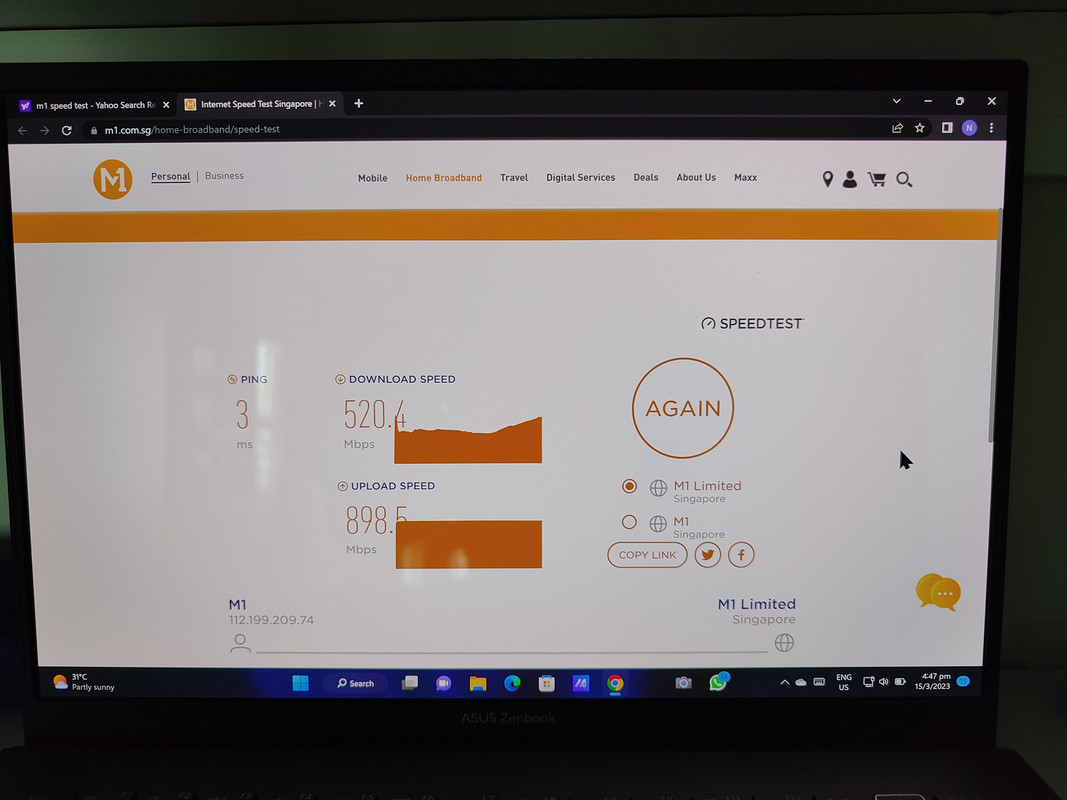
I wanted to ask u guys if you all experienced slow speed for your m1?

I'm on 1 gbps in punggol and I get a large speed drop usually during working hours. It does affect wfh setup from time to time

IMG20230315164656.jpg


I got 520 mbps via wired connection directly to ONT (to test the network)
I ever seen it drop to 300+ before also...

After that I test at 7pm.. The speed goes back to 800-900+

M1 can only advise me to keep monitoring..
 

loganrunning

Master Member
Joined
May 12, 2017
Messages
3,230
Reaction score
1,965
I wanted to ask u guys if you all experienced slow speed for your m1?

I'm on 1 gbps in punggol and I get a large speed drop usually during working hours. It does affect wfh setup from time to time

IMG20230315164656.jpg


I got 520 mbps via wired connection directly to ONT (to test the network)
I ever seen it drop to 300+ before also...

After that I test at 7pm.. The speed goes back to 800-900+

M1 can only advise me to keep monitoring..

500Mbps plan in serangoon central (same north east corridor).
working hours, ranges between 420-450Mbps.
after dinner, 480-500 (occasionally up to 510).
 

Milo-Dino

Great Supremacy Member
Joined
May 15, 2009
Messages
68,709
Reaction score
27,986
500Mbps plan in serangoon central (same north east corridor).
working hours, ranges between 420-450Mbps.
after dinner, 480-500 (occasionally up to 510).
Means I should downgrade my plan? Lol

Well its my wife complaining that her cloud connection to office folders are obnoxiously slow ob several days these past 2 months. Getting dc from meetings too
 

loganrunning

Master Member
Joined
May 12, 2017
Messages
3,230
Reaction score
1,965
Means I should downgrade my plan? Lol

that's a thought ;)

Well its my wife complaining that her cloud connection to office folders are obnoxiously slow ob several days these past 2 months. Getting dc from meetings too

Many possible causes, some are less obvious, it could be the cloud service provider, and/or their location.
as an example, about a year ago, eastern usa amazonaws was knocked out due to a datacentre incident. it was not just storage that was affected, but services and even not-obvious apps. One local company was using a PABX-as-a-service hosted on AmazonAWS -- their phone system was down too.
also, the location and routing to the office. if using office vpn on computer, that could also be a problem, eg issues on vpn server.

hard to easily pinpoint a root cause, as there could be many non-obvious causes.

my suggestion, if internet is crucial, talk to office to pay for another line, preferably a business line with SLA.
run the business line as primary connection, and the other as the backup/failover.

during covid, i was running 2 telcos (m1 and wc), no downtime, no slowdown. maybe i was lucky, or maybe both were 500Mbps :)
 
Important Forum Advisory Note
This forum is moderated by volunteer moderators who will react only to members' feedback on posts. Moderators are not employees or representatives of HWZ. Forum members and moderators are responsible for their own posts.

Please refer to our Community Guidelines and Standards, Terms of Service and Member T&Cs for more information.
Top