
You are using an out of date browser. It may not display this or other websites correctly.
You should upgrade or use an alternative browser.
You should upgrade or use an alternative browser.
[Maylyn's Review] ASUS RT-AC3200 Router
- Thread starter maylyn
- Start date
More options
Who Replied?
Ah-Pin-Kor
Great Supremacy Member
- Joined
- Apr 2, 2008
- Messages
- 55,964
- Reaction score
- 2,294
Hi all, i just jump into this marvellous modem and I am wondering is there anyway to limit the guest bandwidth at the WRT ???
RMerlin said coming in future but no ETA:
http://www.snbforums.com/threads/asuswrt-merlin-feature-suggestions.26377/

evilster
Supremacy Member
- Joined
- Nov 20, 2006
- Messages
- 9,853
- Reaction score
- 68
RMerlin said coming in future but no ETA:
http://www.snbforums.com/threads/asuswrt-merlin-feature-suggestions.26377/
thanks bro. Looks like i need to wait before it is finally out...
evilster
Supremacy Member
- Joined
- Nov 20, 2006
- Messages
- 9,853
- Reaction score
- 68
Sorry just to ask, what is the effective range of the modem in a local hdb setting? I realise i place the router in the living directly infront of the alley that connects to the doors. I can get full wifi signal for my devices but once i enter my room. all wifi totally lost man. I am intrigued by it. Tried to put it higher. I dont know why there is no signal in the 2nd room... the Last room still okay coz the antenna are directly aiming inside.
any idea what i suppose to do

any idea what i suppose to do

renfred89
Arch-Supremacy Member
- Joined
- Nov 11, 2007
- Messages
- 17,520
- Reaction score
- 19
Sorry just to ask, what is the effective range of the modem in a local hdb setting? I realise i place the router in the living directly infront of the alley that connects to the doors. I can get full wifi signal for my devices but once i enter my room. all wifi totally lost man. I am intrigued by it. Tried to put it higher. I dont know why there is no signal in the 2nd room... the Last room still okay coz the antenna are directly aiming inside.
any idea what i suppose to do
There is no rule for this, though generally we know that it's structurally dependent. Try placing your router higher up if possible, if not, play around with your furniture. .


BestPilot
Senior Member
- Joined
- Dec 1, 2012
- Messages
- 2,039
- Reaction score
- 1
yea the HDB walls are "thick"
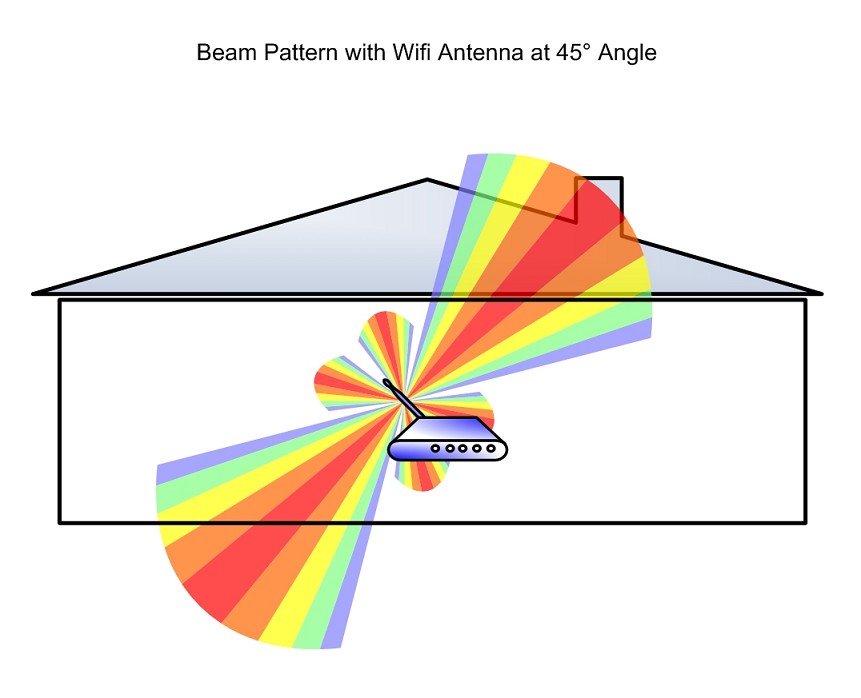
btw for hdbs, your router antennas should be all upright (not slanted) since we are only storey flat (the signal is like a 360° donut)
Hi JK, able to validate the above claim?

ten_david197
Banned
- Joined
- Apr 10, 2009
- Messages
- 15,872
- Reaction score
- 2
Bookmarked.

evilster
Supremacy Member
- Joined
- Nov 20, 2006
- Messages
- 9,853
- Reaction score
- 68
There is no rule for this, though generally we know that it's structurally dependent. Try placing your router higher up if possible, if not, play around with your furniture. .
yea the HDB walls are "thick"
btw for hdbs, your router antennas should be all upright (not slanted) since we are only storey flat (the signal is like a 360° donut)
my router quite high alr... if higher need mounting lor =x

ASUS@SG
Suspended
- Joined
- Jul 26, 2011
- Messages
- 7,579
- Reaction score
- 3
You only adjust 45 degree unless you want to share with your good friend from below
Best regard,
JK
ASUS@SG
Suspended
- Joined
- Jul 26, 2011
- Messages
- 7,579
- Reaction score
- 3
yea the HDB walls are "thick"
btw for hdbs, your router antennas should be all upright (not slanted) since we are only storey flat (the signal is like a 360° donut)
Hi JK, able to validate the above claim?
Dear BestPilot,
Please place your antenna like this

Best regard,
JK

AshSim
Master Member
- Joined
- May 11, 2015
- Messages
- 4,228
- Reaction score
- 0
Dear BestPilot,
Please place your antenna like this
Best regard,
JK
HAHAHAHAH, good one! but I kana scolding when I place the antennas of my other brand router this way leh... -.- mum say she still alive...
Chey ..... you can say it is for mum's mum .............HAHAHAHAH, good one! but I kana scolding when I place the antennas of my other brand router this way leh... -.- mum say she still alive...
Well......... you need a repeater .............my router quite high alr... if higher need mounting lor =x

lyknah
Senior Member
- Joined
- Sep 15, 2004
- Messages
- 1,677
- Reaction score
- 3
For my own understanding, after reading all the posts here, can I summarise that ASUS RT-AC3200 is able to work with Singtel TV, as long as I change the Port 4 to "Singtel-others" & the updated firmware?
If I need to do configuration, do I need to access ASUS website or 192.162.1.154 (Singtel) website?
I am on the 1Gbps Home Bundle Plan.
Thanks.
If I need to do configuration, do I need to access ASUS website or 192.162.1.154 (Singtel) website?
I am on the 1Gbps Home Bundle Plan.
Thanks.
renfred89
Arch-Supremacy Member
- Joined
- Nov 11, 2007
- Messages
- 17,520
- Reaction score
- 19
For my own understanding, after reading all the posts here, can I summarise that ASUS RT-AC3200 is able to work with Singtel TV, as long as I change the Port 4 to "Singtel-others" & the updated firmware?
If I need to do configuration, do I need to access ASUS website or 192.162.1.154 (Singtel) website?
I am on the 1Gbps Home Bundle Plan.
Thanks.
Yes. You need to set the iptv profile to Singtel others. From there, connect your set top box to port 4 and port 4 will only work with singtel TV, not offering you any Internet access apart from singtel TV.
You will need to enter the Asus Web UI. which is 192.168.1.1, no longer 192.192.168. 1.254
Yes. You need to set the iptv profile to Singtel others. From there, connect your set top box to port 4 and port 4 will only work with singtel TV, not offering you any Internet access apart from singtel TV.
You will need to enter the Asus Web UI. which is 192.168.1.1, no longer 192.192.168. 1.254
Cool, between all those AC3200 routers, does it mean that ASUS one come up on top?
Another thing will be wifi, I had problems previously on Aztech router provided by singtel on 500mbps. The router is at my room, and when i go to the master bed room, which is 1 room apart, the connection is slow and sometimes cant even connected to the wifi. How does ASUS AC3200 fare on wifi?
AshSim
Master Member
- Joined
- May 11, 2015
- Messages
- 4,228
- Reaction score
- 0
Cool, between all those AC3200 routers, does it mean that ASUS one come up on top?
Another thing will be wifi, I had problems previously on Aztech router provided by singtel on 500mbps. The router is at my room, and when i go to the master bed room, which is 1 room apart, the connection is slow and sometimes cant even connected to the wifi. How does ASUS AC3200 fare on wifi?
So far, Asus is one of the better brands out there. They put in a lot of R&D. If you are looking at AC3200 routers, u may want to check the link below because it features the top 10 routers of the year:
http://asia.pcmag.com/wireless-networking-products/5349/guide/the-10-best-wireless-routers-of-2015
Important Forum Advisory Note
This forum is moderated by volunteer moderators who will react only to members' feedback on posts. Moderators are not employees or representatives of HWZ Forums. Forum members and moderators are responsible for their own posts.
Please refer to our Community Guidelines and Standards and Terms and Conditions for more information.
