
You are using an out of date browser. It may not display this or other websites correctly.
You should upgrade or use an alternative browser.
You should upgrade or use an alternative browser.
Microsoft Surface
- Thread starter Letovv
- Start date
More options
Who Replied?

darkgod123
Member
- Joined
- Apr 9, 2008
- Messages
- 229
- Reaction score
- 0
The price is fixed at this point...
ah okay thanks!
Cyberboy128
Senior Member
- Joined
- Aug 20, 2000
- Messages
- 835
- Reaction score
- 0
Mine gotten its skin today ... loving it 


noobzpro
Arch-Supremacy Member
- Joined
- Mar 13, 2010
- Messages
- 12,153
- Reaction score
- 124
Mine gotten its skin today ... loving it
wow cool lolz
xXshad0wXx
Senior Member
- Joined
- Jan 8, 2010
- Messages
- 565
- Reaction score
- 0
Mine gotten its skin today ... loving it
wow where did u get it from?


danielgohww
Member
- Joined
- Sep 26, 2007
- Messages
- 160
- Reaction score
- 0
Got link for the case?
The case is quite similar to the one I got from Qoo10
Price + Shipping = S$30.98 + S$3.30 = S$34.28
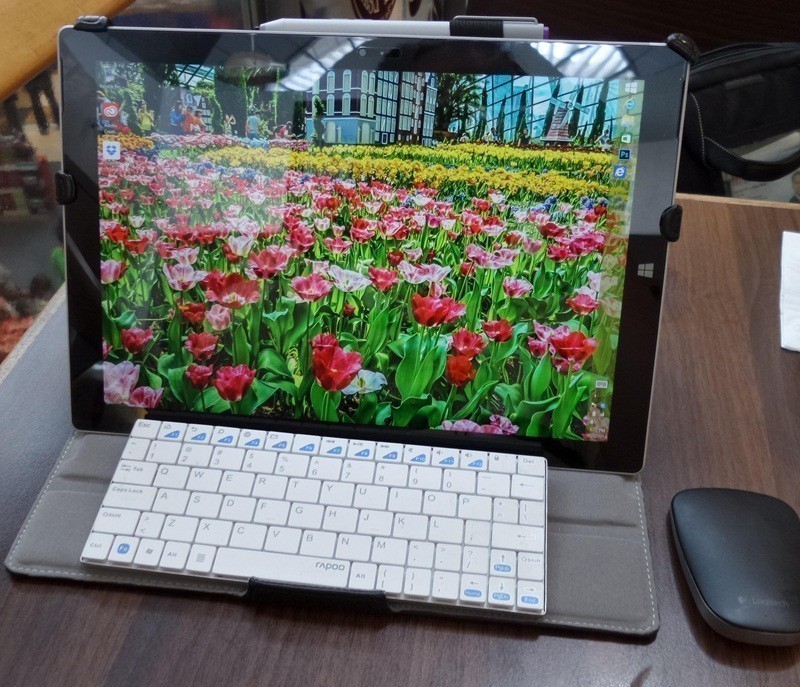
Yeah, i reckon they are the same from the pics. Quality is not bad.
noobzpro
Arch-Supremacy Member
- Joined
- Mar 13, 2010
- Messages
- 12,153
- Reaction score
- 124
Installed... now with driver 3907
Set it for max battery performance.. no noticeable improvement, except got the new intel HD graphic Control Panel...
See how it goes...
Be careful with the Intel drivers. I used Intel's drivers for my SP1 for a while before realizing that they cause a higher battery drain in return for that extra performance, although that performance was quite significant. Useful for gaming, especially when I was playing DotA 2 on that thing (about a 5-10 fps increase), but eventually I reverted to Microsoft's drivers for the SP1. Microsoft's drivers are supposedly customized versions of the Intel drivers for the Surfaces after all.
Anyway, there's a rather large firmware update for the SP3 that I just downloaded. One of the problems it's supposed to solve is WiFi instability and throttling. Since my SP3 never encountered that problem, I'll have to leave it to the other folks here to judge whether the update is successful or not
I am also contemplating which model to buy. Waiting for the restock coz everywhere sold out.
Though I wanted so much the 512GB (knowing I got more space to install ore program, the i7 price is too steep like what u mention. And also I read about the heat issue for i7. Thus with that, I'm considering something in between... i5 256GB. Hopefully it is sufficient in long run... and i5 allows me to do at least photoshop application smoothly.
Not sure if ever there will be free type cover thrown in during x'mas sales.... but I think I better grab the student 10% deals before it ends..... get some help for that ...
Any other advice for SP3. I've been a Mac user (switch from window last time). Now going back again to try ....
Though I wanted so much the 512GB (knowing I got more space to install ore program, the i7 price is too steep like what u mention. And also I read about the heat issue for i7. Thus with that, I'm considering something in between... i5 256GB. Hopefully it is sufficient in long run... and i5 allows me to do at least photoshop application smoothly.
Not sure if ever there will be free type cover thrown in during x'mas sales.... but I think I better grab the student 10% deals before it ends..... get some help for that ...
Any other advice for SP3. I've been a Mac user (switch from window last time). Now going back again to try ....
First off, you need to know your needs first.. the amount of programs you need to install, the type of programs and amount of memories required.. You choose that first, cause if you need 8GB of memories, you need to choose the i5/8GB/256GB.
If 4GB RAM is ok for you, how much space does your programs takes? You don't install it outside the SP3 to your external HDD.. programs should stay with your SP3. So if your programs are bigger than 30GB, please don't get the i3/4GB/64GB version... Just go for the i5/4GB/128GB version instead..
i5 may get hot, but there are ways to work around it. (like you can manually throttle it down)
but if you get the i3 and you ran out of space to install your programs, pushing it to microSD is slower, but you still face data space constrain.
Your HDD is great as a home dock desktop mode for the sp3.. but not to install programs in it.. to hold your movies, your huge collections of art and many large stuffs...
Looking at the heat issue, its not too much of a problem if you don't mind slowing it down.. i5 can be cool by not letting it clock up. The throttling issue you hear is the system forcing the i5 to slow down as its getting too hot, so it only gets hot because its running too fast too hot for the system cooling system to handle.. But clocking down a i5 down looses both heat and its speed advantages over the i3.. in fact it almost brings it on par.
So the considering factor isn't i3 or i5 its memories and SSD space..
64GB model fits my needs of what programs I want to run in the SP3 (as a mobile machine) I am not going to pay another $250 just for another 64GB of SSD space. All SP3 has the same screen, pen, battery, kickstand.
But if you need more space, or more memory, 64GB model is not your choice, please don't think of installing your programs in a external HDD or microSD.. those are for your datas...
You know thy self better

~大.芒.果~
High Supremacy Member
- Joined
- Nov 23, 2007
- Messages
- 27,407
- Reaction score
- 22
Got new firmware update for our SP3s 
Just installed it, not sure how much better it works, but some people said they removed the throttling.
Anyway, anyone keen on getting the MIME Glass Protectors or has already gotten it?
Just installed it, not sure how much better it works, but some people said they removed the throttling.
Anyway, anyone keen on getting the MIME Glass Protectors or has already gotten it?
Those who had initiated a return of the surface 3, which is the best channel to do it ? i tried thru the live chat no luck. they say have to go direct thru the surface team, which i will be doing later.
I am very disappointed and have lost faith in microsoft. Better pray that your unit have no problem. otherwise it will be a big merry go round before your problem is solved, or not.
I am very disappointed and have lost faith in microsoft. Better pray that your unit have no problem. otherwise it will be a big merry go round before your problem is solved, or not.
~大.芒.果~
High Supremacy Member
- Joined
- Nov 23, 2007
- Messages
- 27,407
- Reaction score
- 22
Those who had initiated a return of the surface 3, which is the best channel to do it ? i tried thru the live chat no luck. they say have to go direct thru the surface team, which i will be doing later.
I am very disappointed and have lost faith in microsoft. Better pray that your unit have no problem. otherwise it will be a big merry go round before your problem is solved, or not.
Best to call. Their live chat ppl cmi one. The ppl on the phone have more "powers"
Important Forum Advisory Note
This forum is moderated by volunteer moderators who will react only to members' feedback on posts. Moderators are not employees or representatives of HWZ Forums. Forum members and moderators are responsible for their own posts.
Please refer to our Community Guidelines and Standards and Terms and Conditions for more information.
