
You are using an out of date browser. It may not display this or other websites correctly.
You should upgrade or use an alternative browser.
You should upgrade or use an alternative browser.
MSI Wind
- Thread starter doody_
- Start date
More options
Who Replied?
tanjhj
Supremacy Member
- Joined
- Dec 14, 2000
- Messages
- 6,131
- Reaction score
- 346
actually mah is not important in battery coz the real concern is Wh (watt per hour Capacity) which tells how how ur battery can last. you can have a 4400mAh battery lasting longer than a 5000mAh one.
thats why Windpc with lesser mAh is able to last as long as Asus eee Pc which is of higher mAh
thats why Windpc with lesser mAh is able to last as long as Asus eee Pc which is of higher mAh
tanjhj
Supremacy Member
- Joined
- Dec 14, 2000
- Messages
- 6,131
- Reaction score
- 346
Erm wait till you see the Atom Eee PC. That would be under-performing and over-priced.
not getting Asus too. looking for Acer Surprise. heard some news liao coming out in june and cheaper than Asus eee pc with 12.1" screen somemore
http://www.gottabemobile.com/CategoryView,category,Hardware,Acer.aspx

Last edited:

doody_
Supremacy Member
- Joined
- Nov 27, 2006
- Messages
- 7,508
- Reaction score
- 7
actually mah is not important in battery coz the real concern is Wh (watt per hour Capacity) which tells how how ur battery can last. you can have a 4400mAh battery lasting longer than a 5000mAh one.
thats why Windpc with lesser mAh is able to last as long as Asus eee Pc which is of higher mAh
Don't forget the power consumption of the laptop too. They all have to be taken into account together.
doody_
Supremacy Member
- Joined
- Nov 27, 2006
- Messages
- 7,508
- Reaction score
- 7
not getting Asus too. looking for Acer Surprise. heard some news liao coming out in june and cheaper than Asus eee pc with 12.1" screen somemore
http://www.gottabemobile.com/CategoryView,category,Hardware,Acer.aspx
Looking out for this too. I heard the price is USD470 only, which is around SDG650.
dun forget your gst.Looking out for this too. I heard the price is USD470 only, which is around SDG650.

publiceducator
Senior Member
- Joined
- Jun 13, 2007
- Messages
- 2,293
- Reaction score
- 0
any comment for eee 900 being evenly-priced and evenly-performed?
eee 900 at $700 with 5800mah batt. Yes


publiceducator
Senior Member
- Joined
- Jun 13, 2007
- Messages
- 2,293
- Reaction score
- 0
eee900 is 798 lahz...
If one can get it at $700, it's definitely worth it.
skyfiremage
Junior Member
- Joined
- May 28, 2008
- Messages
- 70
- Reaction score
- 0
not getting Asus too. looking for Acer Surprise. heard some news liao coming out in june and cheaper than Asus eee pc with 12.1" screen somemore
http://www.gottabemobile.com/CategoryView,category,Hardware,Acer.aspx
OMG 12.1" screen???!!!
 It won't be portable anymore... I largest screen size I would consider is probably 10".
All else being equal, I would have chosen Asus or HP over Acer. Unless the Acer 8.9" model can offer much better battery life and at a lower price point, I wouldn't consider it.
skyfiremage
Junior Member
- Joined
- May 28, 2008
- Messages
- 70
- Reaction score
- 0
Is the Eee PC 900's battery on 7.2V?
Yes, the battery for Eee PC 900 is rated at 7.2V 5800mAh. Looks like based on the stock battery for Eee PC 900, HP Mini-Note and MSI Wind, Asus actually has the longest battery life. Unless MSI supplies the 6-cell battey with Wind, I guess I would be buying the Asus Eee PC.

1 Ghz
Arch-Supremacy Member
- Joined
- Jan 1, 2000
- Messages
- 10,157
- Reaction score
- 274
Tomshardware has benchmarked the Diamondville on an ITX board.
http://www.tomshardware.com/reviews/intel-atom-cpu,1938-2.html
http://www.tomshardware.com/reviews/intel-atom-cpu,1938-2.html
doody_
Supremacy Member
- Joined
- Nov 27, 2006
- Messages
- 7,508
- Reaction score
- 7
dun forget your gst.
Bah, to think I used to be the one reminding other people. With GST it's still an affordable $700, lower than anything else we have in the market now.
doody_
Supremacy Member
- Joined
- Nov 27, 2006
- Messages
- 7,508
- Reaction score
- 7
Let's talk about SSD vs HDD.
I know everyone here knows what an Eee PC is - who doesn't? You also know that it is the first UMPC to use a SSD as primary storage. Now we're looking at the best competitor to the Eee PC: the MSI Wind. Sure, there are other products like the Kohjinsha, Cloudbook (and all its variants), and the HP Mininote. However, these products are actually placed out of the Eee PC's "category" due to pricing (too expensive) and availablilty (not available). The MSI Wind is different. Physical dimensions and specifications may not be similar, but we're looking at a similar price range, especially for the 8.9" Eee PC 900 - $798 for the Eee PC vs $829 for the MSI Wind.
That said, let's look at the performance of the Eee PC's SSD vs the MSI Wind's HDD, using HD Tune benchmarks as a guide.
I know everyone here knows what an Eee PC is - who doesn't? You also know that it is the first UMPC to use a SSD as primary storage. Now we're looking at the best competitor to the Eee PC: the MSI Wind. Sure, there are other products like the Kohjinsha, Cloudbook (and all its variants), and the HP Mininote. However, these products are actually placed out of the Eee PC's "category" due to pricing (too expensive) and availablilty (not available). The MSI Wind is different. Physical dimensions and specifications may not be similar, but we're looking at a similar price range, especially for the 8.9" Eee PC 900 - $798 for the Eee PC vs $829 for the MSI Wind.
That said, let's look at the performance of the Eee PC's SSD vs the MSI Wind's HDD, using HD Tune benchmarks as a guide.
doody_
Supremacy Member
- Joined
- Nov 27, 2006
- Messages
- 7,508
- Reaction score
- 7
First, let's look at the HD Tune benchmarks for the Eee PC - courtesy of 1 GHz over at VR-Zone.

This is the benchmark for the 4GB onboard SSD on the Eee PC 900.

This is the benchmark for the 16GB mini-PCIe SSD on the Eee PC 900.
We can now see some characteristics of SSD:
Sustained transfer speeds: SSDs are Solid State Drives, hence they have no moving parts. Unlike a conventional HDD, there is no platter spinning and no drive head to read data off the platter. Hence, there is actually very little need to defragment a SSD. Data can be read with the same speed regardless of where it is placed on the SSD. Hence, SSDs are able to maintain a high transfer rate without much fluctuations.
Negligible access times: Due to the fact that SSDs have no moving parts, access times are greatly reduced. Also, we are able to obtain a consistant access time, in this case, 0.5ms.
This is the benchmark for the 4GB onboard SSD on the Eee PC 900.
This is the benchmark for the 16GB mini-PCIe SSD on the Eee PC 900.
We can now see some characteristics of SSD:
- Sustained transfer speeds
- Negligible access times
Sustained transfer speeds: SSDs are Solid State Drives, hence they have no moving parts. Unlike a conventional HDD, there is no platter spinning and no drive head to read data off the platter. Hence, there is actually very little need to defragment a SSD. Data can be read with the same speed regardless of where it is placed on the SSD. Hence, SSDs are able to maintain a high transfer rate without much fluctuations.
Negligible access times: Due to the fact that SSDs have no moving parts, access times are greatly reduced. Also, we are able to obtain a consistant access time, in this case, 0.5ms.
doody_
Supremacy Member
- Joined
- Nov 27, 2006
- Messages
- 7,508
- Reaction score
- 7
Now, let's look at the benchmark for the MSI Wind's conventional 2.5" HDD.
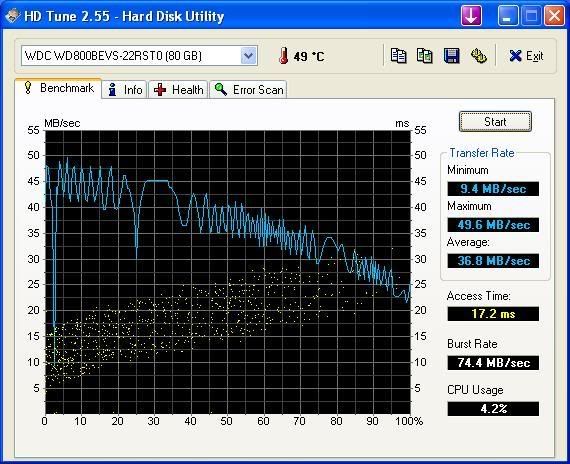
This is the benchmark for the 80GB 2.5" HDD on the MSI Wind.
If you still recall the earlier pictures on the SSD, you will notice some glaring differences:
Higher transfer rate: We actually have higher transfer rates for the conventional HDD as compared to the SSD. While SSDs are supposed to be much faster than HDDs, a plausible explanation for this is that the SSDs used in the Eee PC are not the best available. At only $800, you can't expect premium SSDs to be used. Following this reasoning, it would be possible to assume that SSDs in UMPCs will usually have a lower transfer rate as compared to conventional HDDs.
Slower access time: Due to the way HDDs read data, there is considerable time lost as the drive head searches across the platter for information. SSDs will always beat HDDs in this aspect.
Higher burst rate: The HD Tune website defines Burst Rate as "the highest speed (in megabytes per second) at which data can be transferred from the drive interface (IDE or SCSI for example) to the operating system." In this case, we can see that we have a higher burst rate on the MSI Wind. What does this mean? Going by the definition, it tells us that the MSI Wind is able to read cached data three times as fast as the Eee PC. Also, the MSI Wind's HDD does not have its transfer speeds bottlenecked by the burst rate, as compared to the Eee PC's SSDs. If one were to replace the 80GB HDD with a faster one, it would be possible to obtain better HDD performance with the MSI Wind.
This is the benchmark for the 80GB 2.5" HDD on the MSI Wind.
If you still recall the earlier pictures on the SSD, you will notice some glaring differences:
- Higher transfer rate
- Greater access time
- Higher burst rate
Higher transfer rate: We actually have higher transfer rates for the conventional HDD as compared to the SSD. While SSDs are supposed to be much faster than HDDs, a plausible explanation for this is that the SSDs used in the Eee PC are not the best available. At only $800, you can't expect premium SSDs to be used. Following this reasoning, it would be possible to assume that SSDs in UMPCs will usually have a lower transfer rate as compared to conventional HDDs.
Slower access time: Due to the way HDDs read data, there is considerable time lost as the drive head searches across the platter for information. SSDs will always beat HDDs in this aspect.
Higher burst rate: The HD Tune website defines Burst Rate as "the highest speed (in megabytes per second) at which data can be transferred from the drive interface (IDE or SCSI for example) to the operating system." In this case, we can see that we have a higher burst rate on the MSI Wind. What does this mean? Going by the definition, it tells us that the MSI Wind is able to read cached data three times as fast as the Eee PC. Also, the MSI Wind's HDD does not have its transfer speeds bottlenecked by the burst rate, as compared to the Eee PC's SSDs. If one were to replace the 80GB HDD with a faster one, it would be possible to obtain better HDD performance with the MSI Wind.
doody_
Supremacy Member
- Joined
- Nov 27, 2006
- Messages
- 7,508
- Reaction score
- 7
A quick summary of the differences:
HDD
SSD
Hence, I think the MSI Wind will take the lead when it comes to re-opening recently used applications and files that are still stored in cache, while the Eee PC should be able to have a good advantage over the MSI Wind in terms of boot-up timings.
A very interesting read for those who want to read more on SSD vs HDD: http://www.computerworld.com/action...rticleId=9080838&taxonomyId=19&intsrc=kc_feat
I suspect the article is slightly biased, but it shows that SSDs are not always faster than HDDs, unless you look at numbers only.
HDD
- Higher transfer rate
- Varying transfer rate
- Slower access time
- Higher burst rate
SSD
- Slower transfer rate
- Consistent transfer rate
- Faster access time
- Slower burst rate
Hence, I think the MSI Wind will take the lead when it comes to re-opening recently used applications and files that are still stored in cache, while the Eee PC should be able to have a good advantage over the MSI Wind in terms of boot-up timings.
A very interesting read for those who want to read more on SSD vs HDD: http://www.computerworld.com/action...rticleId=9080838&taxonomyId=19&intsrc=kc_feat
I suspect the article is slightly biased, but it shows that SSDs are not always faster than HDDs, unless you look at numbers only.
Important Forum Advisory Note
This forum is moderated by volunteer moderators who will react only to members' feedback on posts. Moderators are not employees or representatives of HWZ Forums. Forum members and moderators are responsible for their own posts.
Please refer to our Community Guidelines and Standards and Terms and Conditions for more information.

