
Need help! Laptop startup time 25s normal?

Intrinion

Senior Moderator
Senior Moderator
Joined
Dec 15, 2012
Messages
36,432
Reaction score
3,253
Regardless if you do a clean installation or not.

The disabling of telemetry does help with background resources and battery life.

So I would suggest doing it to firstly:

- Improve your privacy and what is sent to Microsoft.
- Background apps.


Disabling start up programs helps remove softwares in the future which have an impact on start up times.
 

Emphlr

Junior Member
Joined
Jun 8, 2017
Messages
9
Reaction score
0
Dear Techidiot & Intrinion,

Techidiot:

Just did as suggested, the clean Win10 installation (I clicked "install win10 and delete everything else / save nothing") actually brought me directly to step 3 as somehow the drivers are all installed and updated.

Then in the IRT step, realised that my SSD was already made as a cache driver.
*up to this point the startup was as slow as before

So what I did was under the IRT software, I clicked to accelerate my main HDD. And then I notice that everything is now faster than before.
Is this correct?

Intrinion:
After I did all of the above, I turned off the unnecessary apps and settings as suggested.

Both:
Thank you guys so much!! Will continue to observe the performance and update again.
 

86technie

High Supremacy Member
Joined
Jun 8, 2006
Messages
40,507
Reaction score
6,026
Dear Techidiot & Intrinion,

Techidiot:

Just did as suggested, the clean Win10 installation (I clicked "install win10 and delete everything else / save nothing") actually brought me directly to step 3 as somehow the drivers are all installed and updated.

Then in the IRT step, realised that my SSD was already made as a cache driver.
*up to this point the startup was as slow as before

So what I did was under the IRT software, I clicked to accelerate my main HDD. And then I notice that everything is now faster than before.
Is this correct?

Intrinion:
After I did all of the above, I turned off the unnecessary apps and settings as suggested.

Both:
Thank you guys so much!! Will continue to observe the performance and update again.

Yes, that is correct.
Just monitor, FYI the laptop is a dual core low voltage processor.
The performance will not be that as fast as regular Intel processor.
If still doesn't approved, your next step will be getting a SSD.
 

Chuaty89

Junior Member
Joined
Sep 3, 2017
Messages
12
Reaction score
0
Yes, that is correct.
Just monitor, FYI the laptop is a dual core low voltage processor.
The performance will not be that as fast as regular Intel processor.
If still doesn't approved, your next step will be getting a SSD.

Dear Techidiot,

Can you brief through me how to enter the Intel IRT to configure the SSD to cache? Sorry a tech newbie here.

Appreciate your assistance! Thanks !
 

Chuaty89

Junior Member
Joined
Sep 3, 2017
Messages
12
Reaction score
0
Dear Techidiot & Intrinion,

Techidiot:

Just did as suggested, the clean Win10 installation (I clicked "install win10 and delete everything else / save nothing") actually brought me directly to step 3 as somehow the drivers are all installed and updated.

Then in the IRT step, realised that my SSD was already made as a cache driver.
*up to this point the startup was as slow as before

So what I did was under the IRT software, I clicked to accelerate my main HDD. And then I notice that everything is now faster than before.
Is this correct?

Dear Emphlr,

I am having the exact same problem as you with the same computer! I have done the clean installation of Window. Can you please guide me what is the IRT step? Sorry I'm a tech newbie.

Thanks!
 

Emphlr

Junior Member
Joined
Jun 8, 2017
Messages
9
Reaction score
0
Dear Emphlr,

I am having the exact same problem as you with the same computer! I have done the clean installation of Window. Can you please guide me what is the IRT step? Sorry I'm a tech newbie.

Thanks!

Hi Chuaty89,

Really sorry to hear you have to experience the same pain. It's been awhile so I can only remember vaguely.

For step 3, iirc, go to https://www.intel.com/content/www/us/en/support/technologies/intel-rapid-storage-technology-intel-rst.html
And download the rapid start technology. I followed online guide for this but the goal is to make sure the SSD is used as a cache memory. I also remember accelerating the hard disk using this software.

May the gurus correct this information if i recalled wrongly, pls!
 

86technie

High Supremacy Member
Joined
Jun 8, 2006
Messages
40,507
Reaction score
6,026
Dear Techidiot,

Can you brief through me how to enter the Intel IRT to configure the SSD to cache? Sorry a tech newbie here.

Appreciate your assistance! Thanks !

I Thank you for your PM.
Basically is after you reinstall the OS.
Install the IRT software from Asus website under Others.

https://www.asus.com/Laptops/K401UQ/HelpDesk_Download/

After you install the IRT, as mentioned by Emphlr.
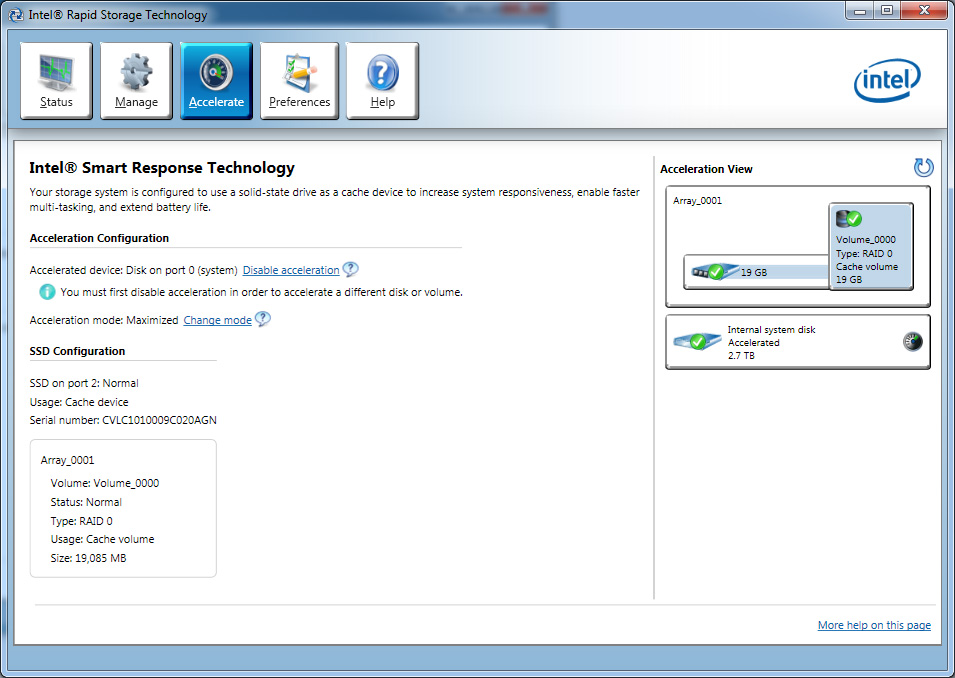
You should see a option under Accelerate to enable
Intel Smart Response Technology.

RST105-2.jpg


If you don't see it, please take note that K401UQ have two models.
K401UQ and the other K401UQK.
You might not have the option but to confirm go into BIOS
check whether Smart Repose tech is enabled or not.

Hope this helps.
 

Chuaty89

Junior Member
Joined
Sep 3, 2017
Messages
12
Reaction score
0
I Thank you for your PM.
Basically is after you reinstall the OS.
Install the IRT software from Asus website under Others.

https://www.asus.com/Laptops/K401UQ/HelpDesk_Download/

After you install the IRT, as mentioned by Emphlr.
You should see a option under Accelerate to enable
Intel Smart Response Technology.

RST105-2.jpg


If you don't see it, please take note that K401UQ have two models.
K401UQ and the other K401UQK.
You might not have the option but to confirm go into BIOS
check whether Smart Repose tech is enabled or not.

Hope this helps.

Hi techidiot,

Somehow in my performance tab of the IRT (version 14), it shows only Link Power Management, nothing about accelerating. In addition, according to other website, it gives me the following direction:

1. When starting the computer, press the F2 key to enter the BIOS setup menu.
2. Go to Configuration SATA Drives.
3. Select the setting for Chipset SATA Mode and change the value to RAID.
4. Press the F10 key to save settings and restart the system.

The point is, I have no option of "Configuration SATA Drives" after I enter BIOS.

Any advice?
 

86technie

High Supremacy Member
Joined
Jun 8, 2006
Messages
40,507
Reaction score
6,026
Hi techidiot,

Somehow in my performance tab of the IRT (version 14), it shows only Link Power Management, nothing about accelerating. In addition, according to other website, it gives me the following direction:

1. When starting the computer, press the F2 key to enter the BIOS setup menu.
2. Go to Configuration SATA Drives.
3. Select the setting for Chipset SATA Mode and change the value to RAID.
4. Press the F10 key to save settings and restart the system.

The point is, I have no option of "Configuration SATA Drives" after I enter BIOS.

Any advice?

My point of you going into BIOS is to check whether did you see Intel Smart response tech enabled or not.
You can't enable it through BIOS but only enable/disable it only.

Very difficult to advice, under disk management did you see two disk?
If only one than maybe your laptop doesn't have such feature.
 

Chuaty89

Junior Member
Joined
Sep 3, 2017
Messages
12
Reaction score
0
My point of you going into BIOS is to check whether did you see Intel Smart response tech enabled or not.
You can't enable it through BIOS but only enable/disable it only.

Very difficult to advice, under disk management did you see two disk?
If only one than maybe your laptop doesn't have such feature.

Hi techidiot,

Yes I do have two disk under storage controllers:

Intel Chipset SATA RAID controller
Microsoft Space Storage controller
 

86technie

High Supremacy Member
Joined
Jun 8, 2006
Messages
40,507
Reaction score
6,026
Hi techidiot,

Yes I do have two disk under storage controllers:

Intel Chipset SATA RAID controller
Microsoft Space Storage controller

The MS one is just another RAID driver.
Can screenshot your IRT windows here?
 

Chuaty89

Junior Member
Joined
Sep 3, 2017
Messages
12
Reaction score
0
The MS one is just another RAID driver.
Can screenshot your IRT windows here?

Hi Techidiot,

Unfortunately I do not have permission to upload any photo yet (need to have at least 50 posts to upload). Well basically, in my IRT I got no "acceleration" tab on it. Only "status" "manage" "preference" "help". I wonder why..
 

86technie

High Supremacy Member
Joined
Jun 8, 2006
Messages
40,507
Reaction score
6,026
Hi Techidiot,

Unfortunately I do not have permission to upload any photo yet (need to have at least 50 posts to upload). Well basically, in my IRT I got no "acceleration" tab on it. Only "status" "manage" "preference" "help". I wonder why..

I tell you what, I have PM you a way so I can help you.
 
Important Forum Advisory Note
This forum is moderated by volunteer moderators who will react only to members' feedback on posts. Moderators are not employees or representatives of HWZ Forums. Forum members and moderators are responsible for their own posts. Please refer to our Community Guidelines and Standards and Terms and Conditions for more information.
Top
