New Custom Rig Recommendations

yukita

Supremacy Member
Joined
Jan 1, 2000
Messages
8,505
Reaction score
220
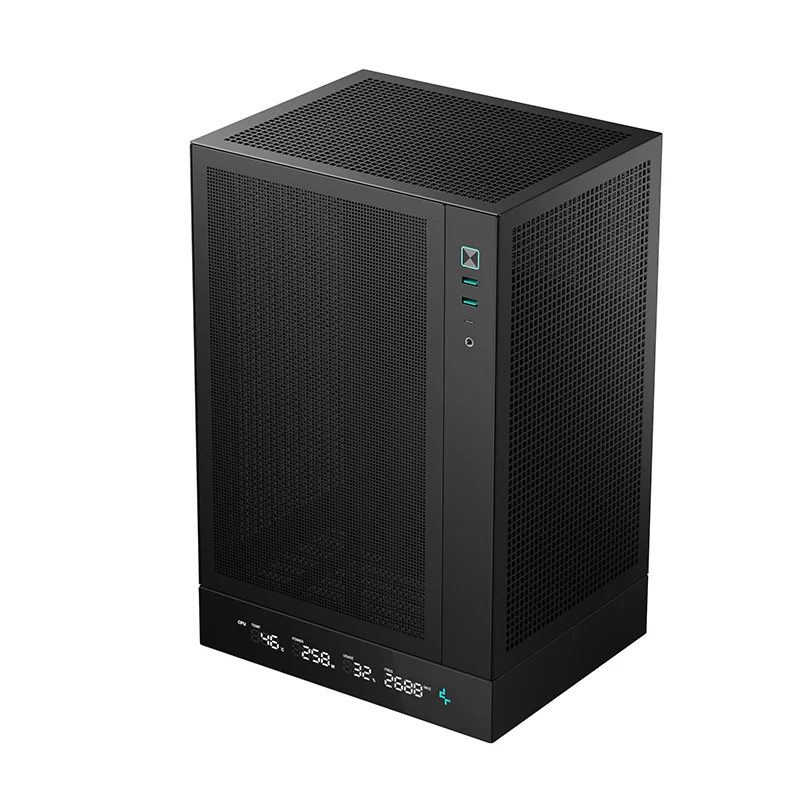
ooo ok ok.. but then if recommend Vision Compact and to change the top from glass to mesh.. might as well the O11D EVO RGB. By the way, the Vision compact material or quality is not as good as the O11D EVO RGB, inclusive of modularity. The O11D EVO RGB able to fit 420 liquid AIO (Brackets included), with more modularity features, thats why it's more expensive.

Maybe should ask you @Sensational, do you need 40G USB 4.0 port? and how many m.2 or SSD or HDD are you using? btw what's your current setup. maybe some of your PC component can reuse.

Just my suggestions
  1. In general I will spend less on case but it's a must to have good airflow and to cut off fanciful ARGB or LCD, which these 1) generate heat, 2) very expensive and 3) sometimes uncessary headaches for argb application to work properly.
  2. Best to use Mid Tier stuff. For processor and mobo, best to get from local, so RMA will be easier, as for rams or m.2, can get at amazon, RMA yes! Need to do own shipment but these are smaller items, cheaper to do tracking. Btw RAMs and M.2 seldom spoil, unless on rams, you do overclocking or to force tighter the timings with higher voltage. (Honestly it's silly to do this as your component will degrade faster, even if you have sufficient cooling.)
Hint : If getting from Amazon, make sure seller or shipped by Amazon.sg or Amazon.us, as you have 30 days before returning (if it's defective)

Processor 9800X3D
cheaper and runs cooler as compared to 9850X3D
(9850X3D is just a more overclocked processor to the 9800X3D)

DDR5 RAMS.
Though prices are ridiculous, I personally will grab 32G Kit CL30-36-36-96 @ 6000 1.4v, 6000MHz sweet spot and runs cooler. no point grab anything more or above 6000Mhz M/T.

Motherboard Get local set with warranty.
Budget ATX
A) MSI B850 Tomahawk
B) MSI B850 Edge Ti
C) Asus ROG Strix B850-F (by far the best board without lane sharing compromised. full on X16)

Why no Budget ATX B850
1) Asus - alot of their boards are with messy lane sharing except C). Though other asus mobo GPU that runs on 8x, are of not much impact, but I have tested so far, if populated with all m.2, sometimes system will just go black out or m.2 got disconnected for no reason.

2) ASRock - if you know how to control the VCore and VDDCR_SoC then it will be the ASRock B850 LiveMixer, it's much better compared to B850 Steel Legend, interms of VRM handling and Rams handling.

3) Gigabyte - Their High Tier boards are good but their mid tier is rather disappointing. 1st not true Wi-Fi 7 adaptor as most using MT7925 adaptor which is of 160MHz channel bandwidth instead of 320MHz

If budget is not a constraint and need 40G USB 4.0 with DP functions, inclusive of 5G to 10G port and having good thermal cooling heatsink (VRM , M.2 and Chipset)
A) MSI X870 Carbon
B) MSI X870 Edge Ti
C) Asus ROG Crosshair X870E Dark Hero (reverse version and this has 10G Lan port and no utter rubbish lane sharing all over the shot)
D) Gigabyte X870E Aero X3D Wood

Why no Premium ATX
1) ASRock, as mentioned only if know how to control VCore and VDDCR_SoC it will be the ASRock X870E Nova

2) Gigabyte, yes their top tier are good but as time goes by the GCC screw up and you will need it to control the ARGB. especially after windows update. Often leaving me to re-install GCC. except for D) which is expensive. By the way D) is impressive with cooling + 80A choke on VRM Smart phase, more than sufficient.

3) Not all Asus X870E board make sense as again, the lane sharing in a mess. but for C) yes it's expensive but the lane sharing are intact. no hiccup even there are lane sharing between m.2 and 40G USB 4.0.

Budget M-ATX
A) Asus ROG STRIX B850-G GAMING WIFI or ROG STRIX B850-G GAMING WIFI S 小吹雪 (Waifu version)
B) MSI B850M Mortar
C) MSI B850M Edge Ti

A) and C) rock solid super fast ram traing cycle, for some reason on AGESA 1.3.0.0.
Including super fast boot time on fresh windows OS installed (min 11.5s ~ 12.6s and max 11.8s ~ 12.8s)

Why no Budget M-ATX B850M
1) ASRock, as mentioned only if know how to control VCore and VDDCR_SoC but overall none of the ASRock M-ATX board impress me. Kind of weak as compared to MSI or ASUS.

2) Gigabyte, most of their M-ATX mobo, I don't like the port arrangement nor do I like the VRM handling, inclusive of their WiFi, majority are of WiFi 6E.

Additional Info
  • For MSI B850 boards, whatever ram kit you plug in (32G, 48G, 64G @ CL28~CL32 @ 6000MHz~6400MHz) it will just train and boot.
  • Unlike Asus or Gigabyte or ASRock. I have tested a few brands ram kits. some (32G, 48G, 64G @ CL28~CL32 @ 6000MHz~6400MHz) just not able to detect will stuck at C5 or AB if not Debug LED will stay Yellow. even if rams are of QVL Listed

M.2 NVMe SSD - best is 2TB and above
  1. For Gen 5, if you are into fast randering and compliation for work then this will benefit. Kindly get Gen 5 with dram and not dramless, and with controller SM2505 and Phision E28 (These run cooler at low power as compared to other controllers)
  2. If it's just for games, like work and leisure.. Gen 4 M.2 is good enough for Windows OS load and game play. my favourite Seagate Firecuda 530 / 520 (Highest TBW) or WD SN850X. both uses good NAND from Micron and Koxia.
  3. Gen 3 M.2 with high TBW is good enough for storage. you need the durabilty and most Gen 3 run cooler.
Air Cooler
Only 1, the Phantom Spirit 120 Digital EVO very practical Aircooler with segment stats, simple background application and very efficient in cooling AMD 7000 and 9000 mid tier series with PBO2 settings. In addition, it's damn quiet as compared to the rest of the AirCooler I have tested.

Liquid AIO
A) Asus Prime LC360 (super quiet)
B) Phantek PHANTEKS GLACIER ONE 360mm M25 G2 DRGB (quiet with smoothing gentle hum)
C) Lian Li Galahad II 360 (For performance is quiet but for ARGB version,it does give out a slightly high pitch)

Seriously cut the crap on getting LCD liquid AIO
  1. Liquid AIO will last up to 5 to 6 years. once dead, LCD if fixed on the pump, you can't reuse, except for some which are removable. If needed LCD, best to grab an internal LCD from Truzx Smart Screen, which has a build in Chip and it does not hog on CPU resources
  2. It generates uncessary heat on the pump block. not alot but will still affect if your case do not have good airflow.
  3. Hogging background process and worst part that the cache on LCD will accumlate till it will come to a point to have some mulfunction (screen shuttering, ghosting image, not picking up stats properly and etc)
PSU
I will not cheap out on PSU, will allocate $250. I can't say much about PSU as I don't test alot but impressive these PSU
  1. Montech II Century 1050W (OEM might be new but this is heavily stress on my open bench when I test Liquid AIO, GPU and Mobo when creating content and I love the flat modular cables, easy to cable manage)
  2. PCCooler YS1000 (OEM Seasonic, good sleeve modular cables but can be tricky if case space is limited)
  3. Seasonic Vertex GX 1000W (good sleeve modular cables but can be tricky if case space is limited)
Above Mid Tier PSU. So far I only have these two, prices are not cheap but performs well
  1. Montech Titan PLA 1000W (OEM Seasonic similar build to Seasonic Vertex PC1000W
  2. Seasonic Vertex PX 1200W
Please note, the above are my own opinion. it's what I've observed and experiment.
Again, kindly do your own due diligence on reasearch.
What is the simple no nonsense value for money air cooler?
I did not ask in the forum previously, but use Thermalright PS120 SE ARGB on my old pc and Scythe Mugen 6 Black Edition (because i want no RGB on my new pc). Both seem okay for normal usage.

Edit: So far my experience on Gigabyte B650M Aorus Elite AX and Gigabyte B850I Aorus Pro, support for my XMP 96gb 6400MT CL32 seems to be okay even though the ram not in QVL.
 

NightRaven49

Master Member
Joined
May 17, 2019
Messages
3,741
Reaction score
1,577
3. Aesthetics wise should also be nice with the RGB and lighting. This would be the statement piece for my workstation.

5. Would get a custom PC builder to do it and leave them to handle it. I did mine with catech from carousell previously, which worked well for 6 years and no issues. However their listing seems to be gone. Looked around and people are recommending mansa, dynacore / invader and define.pc? Happy to try any of them too.
if u are getting from prebuilt companies, u generally dont get as much flexibility (ie aesthetics) vs if u diy. u can probably send them a specific list of parts to build for u, though then it may be cheaper to diy.
4. Looking at mid to high end specs rig that would be sufficient for the next few years at least. I am looking at 2-2.5k budget wise, but happy to adjust so long it's reasonable and value. Think the budget should suffice.
2-2.5k is now midrange at best even if u scrimp and save.
GPU : Asus RXT 5070 ( white ) --$1059
PSU : Thermaltake TR750 3.1 80+ Gold ( white ) $110
funny how no one pointed out how thats an insane price for a 5070, u can get a 9070xt with rgb bling for less with 20-25% more performance and 33% more vram. also agree with @KleoZy, better to allocate more budget and stick to reputable brands for psu.
 

KleoZy

Supremacy Member
Joined
Jan 1, 2000
Messages
5,777
Reaction score
1,057
What is the simple no nonsense value for money air cooler?
I did not ask in the forum previously, but use Thermalright PS120 SE ARGB on my old pc and Scythe Mugen 6 Black Edition (because i want no RGB on my new pc). Both seem okay for normal usage.

Edit: So far my experience on Gigabyte B650M Aorus Elite AX and Gigabyte B850I Aorus Pro, support for my XMP 96gb 6400MT CL32 seems to be okay even though the ram not in QVL.
hmm.. your AirCooler is good enough ma.. why you itchy backside wanna buy new har🤭 .. then get the Thermalright frost spirit 140. quiet and more efficient.. 💪💪💪
 

kappak

Senior Member
Joined
Sep 2, 2019
Messages
1,150
Reaction score
445
Lian li sx1200p atx3.1 psu can get around 240-260-10 years warranty.
Lazada/shopee

Asus prime rx 9070 xt 16gb can get around 850.
Shopee

Klevv
32gbb 6000mhz cl28
Around 650
 
Last edited:

abstrax

Senior Member
Joined
Nov 29, 2001
Messages
1,537
Reaction score
166
Hi Guys,

Been a while since I was in the game of custom PC building. I am looking to build one new custom PC for my new place and workstation. Would greatly appreciate any recommended specs for my usage below!

1. My new rig would be used for my work, which involves alot of documents, tabs and Microsoft, and also used for general gaming. Used to fps alot but now the rig should be able to handle games well too.

2. Would most probably be pairing up with 2 x 27 inch monitors (1440p) due to work and dual monitors requirements. Don't think a curved monitor would be suitable for my working style.

3. Aesthetics wise should also be nice with the RGB and lighting. This would be the statement piece for my workstation.

4. Looking at mid to high end specs rig that would be sufficient for the next few years at least. I am looking at 2-2.5k budget wise, but happy to adjust so long it's reasonable and value. Think the budget should suffice.

5. Would get a custom PC builder to do it and leave them to handle it. I did mine with catech from carousell previously, which worked well for 6 years and no issues. However their listing seems to be gone. Looked around and people are recommending mansa, dynacore / invader and define.pc? Happy to try any of them too.

Greatly appreciate the help in recommending some specs for my new custom rig and will be looking to do the PC at start of march! Thanks guys!
Just go n check the price of prebuilt pc and u will noe the current price of the spec u r looking for 2.5k build.
 

86technie

High Supremacy Member
Joined
Jun 8, 2006
Messages
40,315
Reaction score
5,921
Sadly in this year building or upgrading PC isn't ideal due to skyrocket RAM prices.
Local DDR5 is now climbing from $600+ even the local Kingbank DDR5 isn't cheap.
If you ask me if your current rig can do maintainence or upgrade than just reuse it.

Until situation in US side changes than prices will fall.
RAM prices initially was due to tariff than AI boom made it worse.
If you want to build a new PC I rather you wait.
 

jinsatkilife

Senior Member
Joined
May 4, 2019
Messages
2,268
Reaction score
2,149
Sadly in this year building or upgrading PC isn't ideal due to skyrocket RAM prices.
Local DDR5 is now climbing from $600+ even the local Kingbank DDR5 isn't cheap.
If you ask me if your current rig can do maintainence or upgrade than just reuse it.

Until situation in US side changes than prices will fall.
RAM prices initially was due to tariff than AI boom made it worse.
If you want to build a new PC I rather you wait.
RAM prices may be high but they are not selling because everyone is putting off building pc

Even if they are building, they choose the cheapest and don't care about the spec such as cl
 

86technie

High Supremacy Member
Joined
Jun 8, 2006
Messages
40,315
Reaction score
5,921
RAM prices may be high but they are not selling because everyone is putting off building pc

Even if they are building, they choose the cheapest and don't care about the spec such as cl

True if you can find the cheapest kit just go with that.
Brand, specs like CL doesn't matter anymore.
 

yukita

Supremacy Member
Joined
Jan 1, 2000
Messages
8,505
Reaction score
220
hmm.. your AirCooler is good enough ma.. why you itchy backside wanna buy new har🤭 .. then get the Thermalright frost spirit 140. quiet and more efficient.. 💪💪💪
its 2 seperate system lol.
the mugen 6 currently in ITX System with CH170 Digital Case.

btw wanna ask, my nvme in Gigabyte 850I Aorus Pro temp is higher than my MATX. i suspect because the heatsink for NVME is together with heatsink for AMD PCH. hence it always follow PCH temp. Am I correct?
 

KleoZy

Supremacy Member
Joined
Jan 1, 2000
Messages
5,777
Reaction score
1,057
its 2 seperate system lol.
the mugen 6 currently in ITX System with CH170 Digital Case.

btw wanna ask, my nvme in Gigabyte 850I Aorus Pro temp is higher than my MATX. i suspect because the heatsink for NVME is together with heatsink for AMD PCH. hence it always follow PCH temp. Am I correct?
Yup. The chipset is sandwich below. No air to breathe or to dissipate heat. Only solution is to have an active fan blowing directly to the m.2 area. Anyway if your chipset is not above 75 degrees, it should be fine.
 
Last edited:

yukita

Supremacy Member
Joined
Jan 1, 2000
Messages
8,505
Reaction score
220
Yup. The chipset is sandwich below. No air to breathe or to dissipate heat. Only solution is to have an active fan blowing directly to the m.2 area. Anyway if your chipset is not above 75 degrees, it should be fine.
I see, it is now hovering around 60-70. A bit too high for my liking, but I think no choice for this. i think most of am5 itx board will have the same layout design.

The NVMe heatsink has a small, annoying, fast, and noisy fan, yet it does not help much with the temp as it was covered by a plastic shroud. Not sure why they design it like that.

I wonder if i change thermalright nvme ssd heatsink fan. will it really help? how cool can AMD PCH temp can be?
 

86technie

High Supremacy Member
Joined
Jun 8, 2006
Messages
40,315
Reaction score
5,921
I see, it is now hovering around 60-70. A bit too high for my liking, but I think no choice for this. i think most of am5 itx board will have the same layout design.

The NVMe heatsink has a small, annoying, fast, and noisy fan, yet it does not help much with the temp as it was covered by a plastic shroud. Not sure why they design it like that.

I wonder if i change thermalright nvme ssd heatsink fan. will it really help? how cool can AMD PCH temp can be?

Which SSD?
If Samsung 990 pro or 9100 pro these SSD are quite high.
Don't worry SSD can thermal throttle.

If you worry about thermal performance, to me I think that Deepcool ITX doesn't have enough fans for ventilation.

01.jpg


my-first-build-experience-with-the-nr200p-max-v0-1ulvrpgp0dec1.jpg


Compare with ITX cases like this.
Bottom have fans and top have fans thus hot air is pulled from the bottom to the top.
Vertical ITX cases I am not fan, cases like NZXT H1 have overheating issues.

Anyway you can experiment either change M.2 SSD or change to a better ITX case for overall better thermal.
 

yukita

Supremacy Member
Joined
Jan 1, 2000
Messages
8,505
Reaction score
220
Which SSD?
If Samsung 990 pro or 9100 pro these SSD are quite high.
Don't worry SSD can thermal throttle.

If you worry about thermal performance, to me I think that Deepcool ITX doesn't have enough fans for ventilation.

01.jpg


my-first-build-experience-with-the-nr200p-max-v0-1ulvrpgp0dec1.jpg


Compare with ITX cases like this.
Bottom have fans and top have fans thus hot air is pulled from the bottom to the top.
Vertical ITX cases I am not fan, cases like NZXT H1 have overheating issues.

Anyway you can experiment either change M.2 SSD or change to a better ITX case for overall better thermal.
I use CH170 Digital, negative airflow as my Mugen 6 has 2 fans, so no more space to put on the bottom. One exhaust fan on top, one exhaust fan behind. So the only intake will be mugen 6 fan and the GPU fan. but GPU fan rarely spins for work application.

It is 990Pro. I do not worry about the performance, but more of the longevity of the SSD. I do not think I can do anything other than change the default heatsink fan to a bigger heatsink fan such as Thermalright TR10. But even that, I doubt it can lower much. because the ssd is sandwiched between a heatsink that also functions to cool the AMD PCH (motherboard chipset). So the ssd temp is always follows the AMD PCH (motherboard chipset) temperature.

I test it when i just start booting up and run CrystalDiskMark, 1 cycle of 1GB, the highest temp recorded is 55+'C below 60. Once it booted long enough, even idle will reach 65+'C, as the AMD PCH is about 68'C.

other than Nvme SSD abit high, i do not notice anything else high in temp.
 

86technie

High Supremacy Member
Joined
Jun 8, 2006
Messages
40,315
Reaction score
5,921
I use CH170 Digital, negative airflow as my Mugen 6 has 2 fans, so no more space to put on the bottom. One exhaust fan on top, one exhaust fan behind. So the only intake will be mugen 6 fan and the GPU fan. but GPU fan rarely spins for work application.

It is 990Pro. I do not worry about the performance, but more of the longevity of the SSD. I do not think I can do anything other than change the default heatsink fan to a bigger heatsink fan such as Thermalright TR10. But even that, I doubt it can lower much. because the ssd is sandwiched between a heatsink that also functions to cool the AMD PCH (motherboard chipset). So the ssd temp is always follows the AMD PCH (motherboard chipset) temperature.

I test it when i just start booting up and run CrystalDiskMark, 1 cycle of 1GB, the highest temp recorded is 55+'C below 60. Once it booted long enough, even idle will reach 65+'C, as the AMD PCH is about 68'C.

other than Nvme SSD abit high, i do not notice anything else high in temp.

Exactly same thought as mine even if you change to a better NVME heatsink it won't help in overall temp.
The only thing you can experiment is change to a better case like Cooler Maser NR200P since it can put more fans.

I don't like ITX vertical cases like this, you should try NZXT H1 this one is the worst ITX case.
 

Sensational

Arch-Supremacy Member
Joined
Dec 16, 2004
Messages
23,887
Reaction score
132
Sadly in this year building or upgrading PC isn't ideal due to skyrocket RAM prices.
Local DDR5 is now climbing from $600+ even the local Kingbank DDR5 isn't cheap.
If you ask me if your current rig can do maintainence or upgrade than just reuse it.

Until situation in US side changes than prices will fall.
RAM prices initially was due to tariff than AI boom made it worse.
If you want to build a new PC I rather you wait.
ya man i am really quite surprised at the RAM prices now. i have my old pc that was built 5 years ago and still running well lah. just that i moving to my new place so wanted to do a clean new desktop for that.
 

Sensational

Arch-Supremacy Member
Joined
Dec 16, 2004
Messages
23,887
Reaction score
132
ooo ok ok.. but then if recommend Vision Compact and to change the top from glass to mesh.. might as well the O11D EVO RGB. By the way, the Vision compact material or quality is not as good as the O11D EVO RGB, inclusive of modularity. The O11D EVO RGB able to fit 420 liquid AIO (Brackets included), with more modularity features, thats why it's more expensive.

Maybe should ask you @Sensational, do you need 40G USB 4.0 port? and how many m.2 or SSD or HDD are you using? btw what's your current setup. maybe some of your PC component can reuse.

Just my suggestions
  1. In general I will spend less on case but it's a must to have good airflow and to cut off fanciful ARGB or LCD, which these 1) generate heat, 2) very expensive and 3) sometimes uncessary headaches for argb application to work properly.
  2. Best to use Mid Tier stuff. For processor and mobo, best to get from local, so RMA will be easier, as for rams or m.2, can get at amazon, RMA yes! Need to do own shipment but these are smaller items, cheaper to do tracking. Btw RAMs and M.2 seldom spoil, unless on rams, you do overclocking or to force tighter the timings with higher voltage. (Honestly it's silly to do this as your component will degrade faster, even if you have sufficient cooling.)
Hint : If getting from Amazon, make sure seller or shipped by Amazon.sg or Amazon.us, as you have 30 days before returning (if it's defective)

Processor 9800X3D
cheaper and runs cooler as compared to 9850X3D
(9850X3D is just a more overclocked processor to the 9800X3D)

DDR5 RAMS.
Though prices are ridiculous, I personally will grab 32G Kit CL30-36-36-96 @ 6000 1.4v, 6000MHz sweet spot and runs cooler. no point grab anything more or above 6000Mhz M/T.

Motherboard Get local set with warranty.
Budget ATX
A) MSI B850 Tomahawk
B) MSI B850 Edge Ti
C) Asus ROG Strix B850-F (by far the best board without lane sharing compromised. full on X16)

Why no Budget ATX B850
1) Asus - alot of their boards are with messy lane sharing except C). Though other asus mobo GPU that runs on 8x, are of not much impact, but I have tested so far, if populated with all m.2, sometimes system will just go black out or m.2 got disconnected for no reason.

2) ASRock - if you know how to control the VCore and VDDCR_SoC then it will be the ASRock B850 LiveMixer, it's much better compared to B850 Steel Legend, interms of VRM handling and Rams handling.

3) Gigabyte - Their High Tier boards are good but their mid tier is rather disappointing. 1st not true Wi-Fi 7 adaptor as most using MT7925 adaptor which is of 160MHz channel bandwidth instead of 320MHz

If budget is not a constraint and need 40G USB 4.0 with DP functions, inclusive of 5G to 10G port and having good thermal cooling heatsink (VRM , M.2 and Chipset)
A) MSI X870E Carbon
B) MSI X870E Edge Ti
C) Asus ROG Crosshair X870E Dark Hero (revise version and this has 10G Lan port and no utter rubbish lane sharing all over the shot)
D) Gigabyte X870E Aero X3D Wood

Why no Premium ATX
1) ASRock, as mentioned only if know how to control VCore and VDDCR_SoC it will be the ASRock X870E Nova

2) Gigabyte, yes their top tier are good but as time goes by the GCC screw up and you will need it to control the ARGB. especially after windows update. Often leaving me to re-install GCC. except for D) which is expensive. By the way D) is impressive with cooling + 80A choke on VRM Smart phase, more than sufficient.

3) Not all Asus X870E board make sense as again, the lane sharing in a mess. but for C) yes it's expensive but the lane sharing are intact. no hiccup even there are lane sharing between m.2 and 40G USB 4.0.

Budget M-ATX
A) Asus ROG STRIX B850-G GAMING WIFI or ROG STRIX B850-G GAMING WIFI S 小吹雪 (Waifu version)
B) MSI B850M Mortar
C) MSI B850M Edge Ti

A) and C) rock solid super fast ram training cycle, for some reason on AGESA 1.3.0.0.
Including super fast boot time on fresh windows OS installed (min 11.5s ~ 12.6s and max 11.8s ~ 12.8s)

Why no Budget M-ATX B850M
1) ASRock, as mentioned only if know how to control VCore and VDDCR_SoC but overall none of the ASRock M-ATX board impress me. Kind of weak as compared to MSI or ASUS.

2) Gigabyte, most of their M-ATX mobo, I don't like the port arrangement nor do I like the VRM handling, inclusive of their WiFi, majority are of WiFi 6E.

Additional Info
  • For MSI B850 boards, whatever ram kit you plug in (32G, 48G, 64G @ CL28~CL32 @ 6000MHz~6400MHz) it will just train and boot.
  • Unlike Asus or Gigabyte or ASRock. I have tested a few brands ram kits. some (32G, 48G, 64G @ CL28~CL32 @ 6000MHz~6400MHz) just not able to detect will stuck at C5 or AB if not Debug LED will stay Yellow. even if rams are of QVL Listed

M.2 NVMe SSD - best is 2TB and above
  1. For Gen 5, if you are into fast randering and compliation for work then this will benefit. Kindly get Gen 5 with dram and not dramless, and with controller SM2505 and Phision E28 (These run cooler at low power as compared to other controllers)
  2. If it's just for games, like work and leisure.. Gen 4 M.2 is good enough for Windows OS load and game play. my favourite Seagate Firecuda 530 / 520 (Highest TBW) or WD SN850X. both uses good NAND from Micron and Koxia.
  3. Gen 3 M.2 with high TBW is good enough for storage. you need the durabilty and most Gen 3 run cooler.
Air Cooler
Only 1, the Phantom Spirit 120 Digital EVO very practical Aircooler with segment stats, simple background application and very efficient in cooling AMD 7000 and 9000 mid tier series with PBO2 settings. In addition, it's damn quiet as compared to the rest of the AirCooler I have tested.

Liquid AIO
A) Asus Prime LC360 (super quiet)
B) Phantek PHANTEKS GLACIER ONE 360mm M25 G2 DRGB (quiet with smoothing gentle hum)
C) Lian Li Galahad II 360 (For performance is quiet but for ARGB version,it does give out a slightly high pitch)

Seriously cut the crap on getting LCD liquid AIO
  1. Liquid AIO will last up to 5 to 6 years. once dead, LCD if fixed on the pump, you can't reuse, except for some which are removable. If needed LCD, best to grab an internal LCD from Truzx Smart Screen, which has a build in Chip and it does not hog on CPU resources
  2. It generates uncessary heat on the pump block. not alot but will still affect if your case do not have good airflow.
  3. Hogging background process and worst part that the cache on LCD will accumlate till it will come to a point to have some mulfunction (screen shuttering, ghosting image, not picking up stats properly and etc)
PSU
I will not cheap out on PSU, will allocate $250. I can't say much about PSU as I don't test alot but impressive these PSU
  1. Montech II Century 1050W (OEM might be new but this is heavily stress on my open bench when I test Liquid AIO, GPU and Mobo when creating content and I love the flat modular cables, easy to cable manage)
  2. PCCooler YS1000 (OEM Seasonic, good sleeve modular cables but can be tricky if case space is limited)
  3. Seasonic Vertex GX 1000W (good sleeve modular cables but can be tricky if case space is limited)
Above Mid Tier PSU. So far I only have these two, prices are not cheap but performs well
  1. Montech Titan PLA 1000W (OEM Seasonic similar build to Seasonic Vertex PX1000W
  2. Seasonic Vertex PX 1200W
Please note, the above are my own opinion. it's what I've observed and experiment.
Again, kindly do your own due diligence on reasearch.
thanks for the detailed response and recommendations. yes will also look at these and do some research
 

yukita

Supremacy Member
Joined
Jan 1, 2000
Messages
8,505
Reaction score
220
Yup. The chipset is sandwich below. No air to breathe or to dissipate heat. Only solution is to have an active fan blowing directly to the m.2 area. Anyway if your chipset is not above 75 degrees, it should be fine.

Which SSD?
If Samsung 990 pro or 9100 pro these SSD are quite high.
Don't worry SSD can thermal throttle.

If you worry about thermal performance, to me I think that Deepcool ITX doesn't have enough fans for ventilation.

01.jpg


my-first-build-experience-with-the-nr200p-max-v0-1ulvrpgp0dec1.jpg


Compare with ITX cases like this.
Bottom have fans and top have fans thus hot air is pulled from the bottom to the top.
Vertical ITX cases I am not fan, cases like NZXT H1 have overheating issues.

Anyway you can experiment either change M.2 SSD or change to a better ITX case for overall better thermal.

Exactly same thought as mine even if you change to a better NVME heatsink it won't help in overall temp.
The only thing you can experiment is change to a better case like Cooler Maser NR200P since it can put more fans.

I don't like ITX vertical cases like this, you should try NZXT H1 this one is the worst ITX case.

Just to update, I bought Thermalright HR-10 Pro. the one with active fan. Change the ssd from 990Pro 2TB to 9100Pro 1TB.
The AMD PCH temperature drop 68-70 to 58-60.
The SSD temperature drop from about 68-70 (on 990Pro) to about 58-62 (on 9100Pro).

I think the nvme heatsink is quite good in cooling. worth the $28 :D
 

KleoZy

Supremacy Member
Joined
Jan 1, 2000
Messages
5,777
Reaction score
1,057
Just to update, I bought Thermalright HR-10 Pro. the one with active fan. Change the ssd from 990Pro 2TB to 9100Pro 1TB.
The AMD PCH temperature drop 68-70 to 58-60.
The SSD temperature drop from about 68-70 (on 990Pro) to about 58-62 (on 9100Pro).

I think the nvme heatsink is quite good in cooling. worth the $28 :D
ok ah.. it cools down, but personally. I did 1 time ITX build. I totally regret and dislike it. It's too weak for liking, be it for the price, functions, features and cooling.
 
Last edited:
Important Forum Advisory Note
This forum is moderated by volunteer moderators who will react only to members' feedback on posts. Moderators are not employees or representatives of HWZ Forums. Forum members and moderators are responsible for their own posts. Please refer to our Community Guidelines and Standards and Terms and Conditions for more information.
Top