New Gaming Rig

timpeh82

Senior Member
Joined
Sep 1, 2005
Messages
1,844
Reaction score
0
all 1070 are equal, its just marketing. Pay for what your pocket can afford.

Pay more = more fans = lower temps (e.g. Asus strix edition, Zotac AMP extreme edition and MSI Gaming X edition)

However normal 1070 can also do the job, just higher temps but does not necessarily mean lower performance.

If you ask me, its better to get tri-fan versions as the lower temp does help (check online for benchmarks and gpu core temps) provided your pocket can pay for it. Cheap 1070s can easily get for $500 but higher end ones go $700 upwards.
for cheaper 1070, just remove old lousy thermal paste, put artic mx4
will help to lower temp
 

ZrE0_Cha0s

Arch-Supremacy Member
Joined
Jun 21, 2011
Messages
16,703
Reaction score
26
To my knowledge, the RAM "kit" package is a marketing gimmick. It's just the brand guarantees and confirms that the 2 or more sticks or RAM packaged together have been tested to work together.

Basically it's an "idiot proof" way of buying multiple sticks of RAM.

well yes, but den again they have the cool heatsink fins and blink blink RGB :s13: (den again its all marketing gimmick xD)
 

NotLikeThis

Member
Joined
Dec 3, 2015
Messages
118
Reaction score
0
Update:
Bought my case (Corsair 400c) and
GPU (Zotac GTX 1070 Mini) already.

Btw if i do decide to go with a non wifi Mobo + a PCI wifi card, how do I choose a mobo that has space to put both the wifi card and my GPU?

Also, is there anything i should look out for if i want to add more storage to my com in the future? like which Mobo would be good? (SSD might be sata or m.2)

Boards I have in mind

W/o on board wifi

MSI B150 GAMING M3
MSI B150A GAMING PRO
ASUS B150 PRO GAMING AURA (the lights are kinda cool lol)

W on board wifi

ASUS B150I PRO GAMING/WIFI/AURA
GIGABYTE GA-H170N-WIFI
ASUS Z170A TOMAHAWK (the only standard size wifi mobo i can find)

Thanks!
 

Papermoon

Member
Joined
Oct 22, 2016
Messages
269
Reaction score
1
Update:
Bought my case (Corsair 400c) and
GPU (Zotac GTX 1070 Mini) already.

Btw if i do decide to go with a non wifi Mobo + a PCI wifi card, how do I choose a mobo that has space to put both the wifi card and my GPU?

Also, is there anything i should look out for if i want to add more storage to my com in the future? like which Mobo would be good? (SSD might be sata or m.2)

Boards I have in mind

W/o on board wifi

MSI B150 GAMING M3
MSI B150A GAMING PRO
ASUS B150 PRO GAMING AURA (the lights are kinda cool lol)

W on board wifi

ASUS B150I PRO GAMING/WIFI/AURA
GIGABYTE GA-H170N-WIFI
ASUS Z170A TOMAHAWK (the only standard size wifi mobo i can find)

Thanks!

I think MSI Gaming pro also got lights. But Aura if you wana get LED for case that is aura compatible? ( deepcool rgb? )
 

ZrE0_Cha0s

Arch-Supremacy Member
Joined
Jun 21, 2011
Messages
16,703
Reaction score
26
Update:
Bought my case (Corsair 400c) and
GPU (Zotac GTX 1070 Mini) already.

Btw if i do decide to go with a non wifi Mobo + a PCI wifi card, how do I choose a mobo that has space to put both the wifi card and my GPU?

Also, is there anything i should look out for if i want to add more storage to my com in the future? like which Mobo would be good? (SSD might be sata or m.2)

Boards I have in mind

W/o on board wifi

MSI B150 GAMING M3
MSI B150A GAMING PRO
ASUS B150 PRO GAMING AURA (the lights are kinda cool lol)

W on board wifi

ASUS B150I PRO GAMING/WIFI/AURA
GIGABYTE GA-H170N-WIFI
ASUS Z170A TOMAHAWK (the only standard size wifi mobo i can find)

Thanks!
den let me ask u some questions:

do u intend to SLI next time?
or
upgrades pc with more other parts? USB. PCIE SSD,etc?

storage meaning u intend to put how many? if just need m.2 most of the b150 does comes with it.

anyway those board u choose all depends on you. differences is minimal just weather u need those features.

beside that if u go for itx board will means too much space in your pc.

lastly what about your psu? bought or not yet?
 

NotLikeThis

Member
Joined
Dec 3, 2015
Messages
118
Reaction score
0
I think MSI Gaming pro also got lights. But Aura if you wana get LED for case that is aura compatible? ( deepcool rgb? )

By case that is aura compatible, does that mean that only some cases will work with it? or all cases work with it just that the 'compatible' ones look better?

den let me ask u some questions:

do u intend to SLI next time?
or
upgrades pc with more other parts? USB. PCIE SSD,etc?

storage meaning u intend to put how many? if just need m.2 most of the b150 does comes with it.

anyway those board u choose all depends on you. differences is minimal just weather u need those features.

beside that if u go for itx board will means too much space in your pc.

lastly what about your psu? bought or not yet?

Nope no intention to SLI next time

Might upgrade with more storage, like a M.2 SSD or maybe more normal SATA SSDs, but i doubt i'll get a PCIE SSD.

Currently I have 1 HDD and 1 SSD that I intend to put inside.

That's what I thought about ITX board, the large empty space will look weird /:

Nope no PSU bought, need a recommendation on that too.:s22:

Thanks :o:s12:

Edit: Boards not here also can just recommend :) I will go and see.

Also, those wifi card with those wired antennas are better right? but at the same time more ex?
 
Last edited:

MianBaoFren

Great Supremacy Member
Joined
Nov 22, 2012
Messages
53,159
Reaction score
4,035
By case that is aura compatible, does that mean that only some cases will work with it? or all cases work with it just that the 'compatible' ones look better?


Nope no intention to SLI next time

Might upgrade with more storage, like a M.2 SSD or maybe more normal SATA SSDs, but i doubt i'll get a PCIE SSD.

Currently I have 1 HDD and 1 SSD that I intend to put inside.

That's what I thought about ITX board, the large empty space will look weird /:

Nope no PSU bought, need a recommendation on that too.:s22:

Thanks :o:s12:

Edit: Boards not here also can just recommend :) I will go and see.

Also, those wifi card with those wired antennas are better right? but at the same time more ex?

pcie wifi cards are better becuz of the stability but yes, more ex. usb ones work but overtime will get funny.
 

ZrE0_Cha0s

Arch-Supremacy Member
Joined
Jun 21, 2011
Messages
16,703
Reaction score
26
By case that is aura compatible, does that mean that only some cases will work with it? or all cases work with it just that the 'compatible' ones look better?


Nope no intention to SLI next time

Might upgrade with more storage, like a M.2 SSD or maybe more normal SATA SSDs, but i doubt i'll get a PCIE SSD.

Currently I have 1 HDD and 1 SSD that I intend to put inside.

That's what I thought about ITX board, the large empty space will look weird /:

Nope no PSU bought, need a recommendation on that too.:s22:

Thanks :o:s12:

actually what he meant is that asus b150 aura have a fetures which allows u to connect to a RGB where u can change the LED base on the color or effects u want. not like some others where u required more manual control. (or like hard to configure.)

for me i rather u get a mobo + pcie or usb wifi adapter.

no point paying for something like

MSI Z170A TOMAHAWK

MSI B150 GAMING M3
MSI B150A GAMING PRO
ASUS B150 PRO GAMING AURA

as for those 3 boards i would say depends on what u want. their differences is quite minimal to really let us tell whats the difference. even u can go their website to compare./

psu get something like SF Ledex 650W Gold (got LED that u like)
 
Last edited:

Papermoon

Member
Joined
Oct 22, 2016
Messages
269
Reaction score
1
By case that is aura compatible, does that mean that only some cases will work with it? or all cases work with it just that the 'compatible' ones look better?


Nope no intention to SLI next time

Might upgrade with more storage, like a M.2 SSD or maybe more normal SATA SSDs, but i doubt i'll get a PCIE SSD.

Currently I have 1 HDD and 1 SSD that I intend to put inside.

That's what I thought about ITX board, the large empty space will look weird /:

Nope no PSU bought, need a recommendation on that too.:s22:

Thanks :o:s12:

Edit: Boards not here also can just recommend :) I will go and see.

Also, those wifi card with those wired antennas are better right? but at the same time more ex?

I meant LED that you are going to put inside your case. Some of those LED are compatible with the Asus Aura software which lets you configure ur LED. I think for cases also have. some cases power button got LED lor.. but if you are getting mobo based on whether have LED or not.. Idk.

When i build my rig i also wanted LED cause pretty but in the end i decided on a mobo without LED and just got LED lights in my computer chassis. Looks fine to me still.
EDIT: but if you really want Mobo with LED not just Asus.
MSI also have their gaming pro series
 
Last edited:

MianBaoFren

Great Supremacy Member
Joined
Nov 22, 2012
Messages
53,159
Reaction score
4,035
offtrack abit i realise that the wifi pcie cards are super expensive compared to the usb counterparts. currently, 1gbps should go for the ac series?
 

NotLikeThis

Member
Joined
Dec 3, 2015
Messages
118
Reaction score
0
pcie wifi cards are better becuz of the stability but yes, more ex. usb ones work but overtime will get funny.

Did you mean the on board ones or external USB?

offtrack abit i realise that the wifi pcie cards are super expensive compared to the usb counterparts. currently, 1gbps should go for the ac series?

if you meant external USB will get funny over time but cheaper, then looks like i'll get a PCIE one since I want to be lazy and not swap anything for a couple of years haha

actually what he meant is that asus b150 aura have a fetures which allows u to connect to a RGB where u can change the LED base on the color or effects u want. not like some others where u required more manual control. (or like hard to configure.)

for me i rather u get a mobo + pcie or usb wifi adapter.

no point paying for something like

MSI Z170A TOMAHAWK


as for those 3 boards i would say depends on what u want. their differences is quite minimal to really let us tell whats the difference. even u can go their website to compare./

psu get something like SF Ledex 650W Gold (got LED that u like)

Ahh ohk, after some searching I found out my cases doesn't have said LEDs haha I'll take a look at those MOBOS then.

For the PSU, is it anything above 650W is fine? I tried entering my set up under pcpartpicker and they gave me the max power at 396W, but generally higher is safer?

Lastly whats the diff between the 150 series and the 170 series mobos?

I read that they have more PCIE lanes?

I meant LED that you are going to put inside your case. Some of those LED are compatible with the Asus Aura software which lets you configure ur LED. I think for cases also have. some cases power button got LED lor.. but if you are getting mobo based on whether have LED or not.. Idk.

When i build my rig i also wanted LED cause pretty but in the end i decided on a mobo without LED and just got LED lights in my computer chassis. Looks fine to me still.
EDIT: but if you really want Mobo with LED not just Asus.
MSI also have their gaming pro series

I think just some subtle LED will do haha, IMO if too much will look like temple :s13:


Edit: How will I know if my PCIE wifi card and the GPU can fit onto the mobo im getting? /:
 
Last edited:

MianBaoFren

Great Supremacy Member
Joined
Nov 22, 2012
Messages
53,159
Reaction score
4,035
the pcie ones generally work very well. i used one last time and it was good. the usb ones on the other hand, u will be lucky to get 3 years out of it.
 

MoneyFace =p

High Supremacy Member
Joined
Dec 17, 2010
Messages
35,380
Reaction score
402
You need to plan where you want to plug in the graphics card and WiFi card. Graphics card should always be plugged into top first 16x slot for best bandwidth performance as this is the only electrically x16 slot on mainstream platform.

Your WiFi card should goes either to the x1 slot above or 2-3 slots below the graphics card slot since you won't want your WiFi card to block ventilation to the graphics card above. Mind you most gaming graphics cards occupy 2-3 slots. So need to take into consideration of the graphics card you getting.
 
Last edited:

ZrE0_Cha0s

Arch-Supremacy Member
Joined
Jun 21, 2011
Messages
16,703
Reaction score
26
Ahh ohk, after some searching I found out my cases doesn't have said LEDs haha I'll take a look at those MOBOS then.

For the PSU, is it anything above 650W is fine? I tried entering my set up under pcpartpicker and they gave me the max power at 396W, but generally higher is safer?

Lastly whats the diff between the 150 series and the 170 series mobos?

I read that they have more PCIE lanes?

lol no one mention that ur case have LED what ppmoon means LED control.

actually its more than 500W its fine. but given that u want to have whole case bling bling so i give u that psu.

which 170? there are 2 kinds btw. 1 is the H170 which is a non oc and a few less features than z170, which is the 2nd kind with the capability to OC your cpu and comes with more lanes and usb ports. not just that but many other features u wont find in other boards. but still depends on what u want. if u want just gaming with more storage. any b150, h170 or z170 also can.

I think just some subtle LED will do haha, IMO if too much will look like temple :s13:


Edit: How will I know if my PCIE wifi card and the GPU can fit onto the mobo im getting? /:

u can consider getting some board with pci-e x1 at the top or another pci-e x1 at least 1 slots below the GPU. (means that the wifi card will be place on the 4th slots. if gpu is on the 1st and 2nd slots.)
 

shadow84

High Supremacy Member
Joined
Apr 15, 2009
Messages
34,286
Reaction score
420
Can consider MSI H110i Pro. Comes with built in AC wifi adaptor. Although the ram slots, sata slots and pcie slot are limited.
 

NotLikeThis

Member
Joined
Dec 3, 2015
Messages
118
Reaction score
0
the pcie ones generally work very well. i used one last time and it was good. the usb ones on the other hand, u will be lucky to get 3 years out of it.

Was looking at this adaptor

DLINK AC 1200 DUAL BAND PCIE ADAPTER

Seems to be one of the cheaper ones.

You need to plan where you want to plug in the graphics card and WiFi card. Graphics card should always be plugged into top first 16x slot for best bandwidth performance as this is the only electrically x16 slot on mainstream platform.

Your WiFi card should goes either to the x1 slot above or 2-3 slots below the graphics card slot since you won't want your WiFi card to block ventilation to the graphics card above. Mind you most gaming graphics cards occupy 2-3 slots. So need to take into consideration of the graphics card you getting.

I see, but if i do plug my wifi card into the x1 slot above the GPU, won't the anttenas be blocking the mic/speaker in/out cause the x1 slot seems near that part of the mobo.

I'll be using a Zotac GTX 1070 mini, I've measured it and it's around 4cm thick, which i think the x1 slot has to be at least 2 slots lower than the GPU /:

lol no one mention that ur case have LED what ppmoon means LED control.

actually its more than 500W its fine. but given that u want to have whole case bling bling so i give u that psu.

which 170? there are 2 kinds btw. 1 is the H170 which is a non oc and a few less features than z170, which is the 2nd kind with the capability to OC your cpu and comes with more lanes and usb ports. not just that but many other features u wont find in other boards. but still depends on what u want. if u want just gaming with more storage. any b150, h170 or z170 also can.

u can consider getting some board with pci-e x1 at the top or another pci-e x1 at least 1 slots below the GPU. (means that the wifi card will be place on the 4th slots. if gpu is on the 1st and 2nd slots.)

I was just checking haha :p

Have been looking at a few full sized B150s and H170s and seems like only the

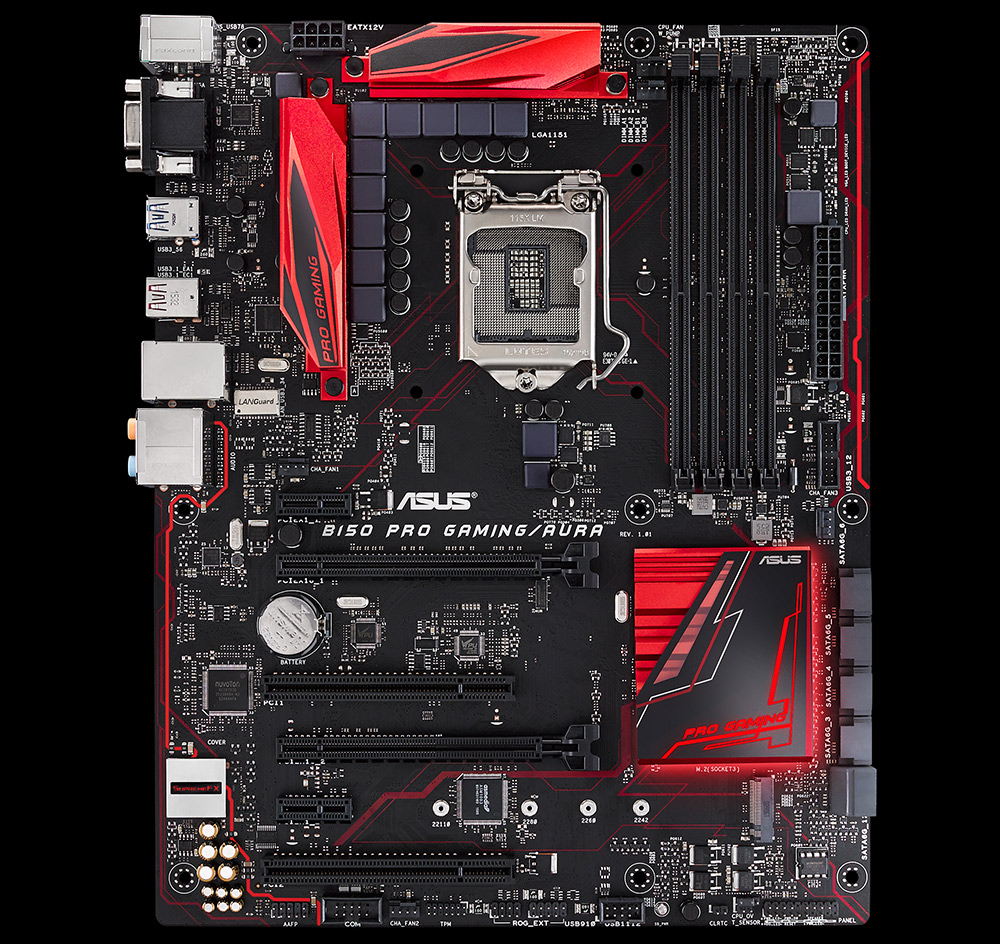
ASUS B150 PRO GAMING AURA
ASUS H170 PRO GAMING

have a x 1 slot that is 2 slots away from the GPU,

B150-Pro-Gaming-Aura.jpg


The rest, such as the MSI B150 GAMING M3 are only 1 slot away /:

1145956.jpg


Can consider MSI H110i Pro. Comes with built in AC wifi adaptor. Although the ram slots, sata slots and pcie slot are limited.

Thanks for the suggestion!
 

dennis7w7

High Supremacy Member
Joined
Aug 27, 2009
Messages
29,816
Reaction score
237
I just changed to asus h170 pro gaming myself last week. So far no issues. Great for gaming yet no intention to OC (I dont OC my parts at all).

As I am using my com inside my room, I also install PCIE wifi card. My suggestion is to put the wifi card above the first GPU slot, as you wont want your GPU fan to blow hot air onto your wifi card.
 

NotLikeThis

Member
Joined
Dec 3, 2015
Messages
118
Reaction score
0
I just changed to asus h170 pro gaming myself last week. So far no issues. Great for gaming yet no intention to OC (I dont OC my parts at all).

As I am using my com inside my room, I also install PCIE wifi card. My suggestion is to put the wifi card above the first GPU slot, as you wont want your GPU fan to blow hot air onto your wifi card.

Hi thanks for your tip :)

May I know which PCIE Wifi card are you using?

Also does it fit well in that slot? Internal fittings aside, do your antennas block the I/Os for your mic and speaker?

Thanks!

On another note,

while researching, I came across an article that said, as long as a pcie card can fit into a pcie slot (E.g. you can put a x 1 into a x 16)

I was thinking if putting my pcie wifi card into the spare empty x 16 slot would be possible? This would open up a lot more options from boards that I can choose from.

However, I also read that if I were to do that, both x 16 lanes will have the speed of x 8 lanes instead, is this true? If yes, will the performance of my GPU drop by alot since it's now using a x8 instead of x 16 lane?

Thanks for your patience guys, sorry I have so many questions. :o:s11:
 

ZrE0_Cha0s

Arch-Supremacy Member
Joined
Jun 21, 2011
Messages
16,703
Reaction score
26
den get this one : ASUS B150 PRO GAMING AURA (since u want bling bling as well =P)
 

ZrE0_Cha0s

Arch-Supremacy Member
Joined
Jun 21, 2011
Messages
16,703
Reaction score
26
Hi thanks for your tip :)

while researching, I came across an article that said, as long as a pcie card can fit into a pcie slot (E.g. you can put a x 1 into a x 16)

I was thinking if putting my pcie wifi card into the spare empty x 16 slot would be possible? This would open up a lot more options from boards that I can choose from.

However, I also read that if I were to do that, both x 16 lanes will have the speed of x 8 lanes instead, is this true? If yes, will the performance of my GPU drop by alot since it's now using a x8 instead of x 16 lane?

Thanks for your patience guys, sorry I have so many questions. :o:s11:

yes u can use that slots.

this depends on each boards. not all boards definitely gives u x8 x8 configurations as such is because of SLI requirement. but mostly is only x16 x4 configurations. beside that not all gpu really uses up to x16 capability.

=================================================================

damn all these lane theory im not that good at it but this is what i tell u.

1st pcie lane x16 will be a 3.0 type with the lanes taken by cpu (or u can say provided by the cpu)

then some things like another x16 lane or x1/x2/x4 lanes depends on the motherboard.

so here is an example for u. :

lets say u buy this mobo : ASUS B150 PRO GAMING AURA

their specs: Expansion Slots
1 x PCIe 3.0/2.0 x16 (x16 mode, )
1 x PCIe 3.0/2.0 x16 (max at x4 mode) *1
2 x PCIe 3.0/2.0 x1
2 x PCI

*1:When PCIE x16_2 is occupied by x4 or faster devices, PCIE x1_1 and PCIE x1_2 will be disabled. (PCIE x16_2 is actually the gpu slots)

this is because board like B150 max lane able to provide 18 so a few of the lanes is given to other ports and support so u cant use other lanes beside PCI.

more details on system lanes :

https://www.pugetsystems.com/labs/a...-B170-Q150-Q170---What-is-the-Difference-635/
 
Last edited:
Important Forum Advisory Note
This forum is moderated by volunteer moderators who will react only to members' feedback on posts. Moderators are not employees or representatives of HWZ Forums. Forum members and moderators are responsible for their own posts. Please refer to our Community Guidelines and Standards and Terms and Conditions for more information.
Top