New HDB BTO Flat - How do you connect your Home Fiber Network

xtwis7

Arch-Supremacy Member
Joined
Oct 13, 2006
Messages
21,852
Reaction score
597
An update here:
I've changed my ROG AX11000 5GHz-1 to only transmit to only AX mode. Am getting about 300-400mbps. Slightly better I guess. But still pretty disappointing for the price its valued at. Trying to call Asus now to see if they have any idea why this happening.
I’m on AX6000 and with my router in the study, tested from my sofa which has 3 walls between router and device, could hit 400-500mbps on a iPhone 12 Pro. The one that struggled a bit more is my ps5 which is understandable because it’s tucked away in the living room corner behind a solid wall.

Maybe out of box AX6000 is much more optimised than AX11000?
 

Zahhui

Junior Member
Joined
Jan 7, 2023
Messages
1
Reaction score
0


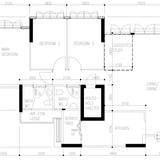
Hi gurus, I have just moved into my 5rm BTO and have went through my reno without considering for my network connection. So I am stuck with the setup as per the picture.

Looking to sign up for Starhub 1Gbps plan but I do not think their Smart Wifi option is suitable for me so I am looking to setup my own using Asus routers.

If I need to have wired connection for LAN 1 and 2 and a wireless connection in LAN 4, does this means I need to buy at least 4 routers?

1 in TP, 3 as APs at LAN 1/2 and 4.

And if so, any recommendation for the routers to use?

Thank you so much for your kind help!
 

cyberet

Senior Member
Joined
May 28, 2001
Messages
2,480
Reaction score
314


Hi gurus, I have just moved into my 5rm BTO and have went through my reno without considering for my network connection. So I am stuck with the setup as per the picture.

Looking to sign up for Starhub 1Gbps plan but I do not think their Smart Wifi option is suitable for me so I am looking to setup my own using Asus routers.

If I need to have wired connection for LAN 1 and 2 and a wireless connection in LAN 4, does this means I need to buy at least 4 routers?

1 in TP, 3 as APs at LAN 1/2 and 4.

And if so, any recommendation for the routers to use?

Thank you so much for your kind help!
you probably only need 2 routers or mesh packs like XD4,XD6,XT8,XT12
1 at TP
1 at LAN 4
the TP can connect to the LAN 1/2/3/4 via the patch panel in the TP box area.
If any of the LAN points need to connect more than 1 device, you can add a network switch there
 

coriander

Junior Member
Joined
Jan 9, 2023
Messages
6
Reaction score
0


Hello gurus, I am moving to a new place (5 rm HDB) soon, with above floor plan.

I am using M1 1Gbps plan, and recently just renewed the broadband plan hence now I have Asus AX55 + AX6000. I also have Asus zenwifi AC (CT8) from the previous broadband plan cycle.

The living room is only equipped with 1 port, hence I am planning to put one of my router inside the DB box and to utilize the Asus AIMesh.

With this, I am thinking either:
Option 1: using 1 node of Zenwifi CT8 as wired router (wireless disabled) in DB box.
- ONT > single node CT8 wireless disabled > patch panel
- patch panel > living room > AX6000 (ap/mesh node)
- patch panel > main bedroom > AX55 (ap/mesh node)

Option 2: using AX55 as main router in DB box.
- ONT > AX55 wireless enabled > patch panel
- patch panel > bedroom 3 > AX6000 (ap/mesh node)

Would like to get some inputs and suggestions if option 1 can work? And whether placement is already okay or can be further tuned (e.g. model XX better put in this room for better coverage, etc.)
And whether option 1 or option 2 would be better in term of coverage for the unit layout?

Many thanks for your kind help.
 

xonix

Arch-Supremacy Member
Joined
Mar 24, 2001
Messages
17,592
Reaction score
1,688


Hello gurus, I am moving to a new place (5 rm HDB) soon, with above floor plan.

I am using M1 1Gbps plan, and recently just renewed the broadband plan hence now I have Asus AX55 + AX6000. I also have Asus zenwifi AC (CT8) from the previous broadband plan cycle.

The living room is only equipped with 1 port, hence I am planning to put one of my router inside the DB box and to utilize the Asus AIMesh.

With this, I am thinking either:
Option 1: using 1 node of Zenwifi CT8 as wired router (wireless disabled) in DB box.
- ONT > single node CT8 wireless disabled > patch panel
- patch panel > living room > AX6000 (ap/mesh node)
- patch panel > main bedroom > AX55 (ap/mesh node)

Option 2: using AX55 as main router in DB box.
- ONT > AX55 wireless enabled > patch panel
- patch panel > bedroom 3 > AX6000 (ap/mesh node)

Would like to get some inputs and suggestions if option 1 can work? And whether placement is already okay or can be further tuned (e.g. model XX better put in this room for better coverage, etc.)
And whether option 1 or option 2 would be better in term of coverage for the unit layout?

Many thanks for your kind help.
By the looks of it, you have data points in all the rooms right ? If that's the case, you only have to decide which router to be placed in the DB. Outside is up to you liao.

If it was my place, I might put ct8 inside, patch to 3 rooms and decide on the location of the other 3 units based on individual rooms needs.
 
Last edited:

gregory_choo

Arch-Supremacy Member
Joined
Nov 7, 2007
Messages
10,478
Reaction score
1,973


Hello gurus, I am moving to a new place (5 rm HDB) soon, with above floor plan.

I am using M1 1Gbps plan, and recently just renewed the broadband plan hence now I have Asus AX55 + AX6000. I also have Asus zenwifi AC (CT8) from the previous broadband plan cycle.

The living room is only equipped with 1 port, hence I am planning to put one of my router inside the DB box and to utilize the Asus AIMesh.

With this, I am thinking either:
Option 1: using 1 node of Zenwifi CT8 as wired router (wireless disabled) in DB box.
- ONT > single node CT8 wireless disabled > patch panel
- patch panel > living room > AX6000 (ap/mesh node)
- patch panel > main bedroom > AX55 (ap/mesh node)

Option 2: using AX55 as main router in DB box.
- ONT > AX55 wireless enabled > patch panel
- patch panel > bedroom 3 > AX6000 (ap/mesh node)

Would like to get some inputs and suggestions if option 1 can work? And whether placement is already okay or can be further tuned (e.g. model XX better put in this room for better coverage, etc.)
And whether option 1 or option 2 would be better in term of coverage for the unit layout?

Many thanks for your kind help.


I suggest to go for option 1, however, since you are using aimesh, it is better to leave wireless on. when using aimesh, 3 wireless routers/AP is better than 2.

since you have data points in all rooms, if coverage is not good in certain areas, you can change the location of router easily. one option is to place the routers at DB, bedroom3 and main bedroom.

after you install the routers and set up aimesh, install speedtest (from ookla) on you handphone. go to varous point in the flat to measure the speed.
 

coriander

Junior Member
Joined
Jan 9, 2023
Messages
6
Reaction score
0
@xonix and Gregory
Many thanks for the inputs and suggestions, really appreciate that.

@gregory
I see... I never thought about mixing AC and AX in the same mesh as I was under impression there might be compatibility issue and/or can introduce bottleneck. But I guess it is worth to try. 😳

If wifi is enabled for CT8, would it's processor (qualcomm IPQ4019 / RAM 256) be enough though?
Reading this thread I am under assumption that main router would need good processing power, unless wireless is off - I think I could be wrong hence I would like to check here to get better clarity. 🙏
 

xiaofan

High Supremacy Member
Joined
Sep 16, 2018
Messages
31,656
Reaction score
9,011
If wifi is enabled for CT8, would it's processor (qualcomm IPQ4019 / RAM 256) be enough though?
Reading this thread I am under assumption that main router would need good processing power, unless wireless is off - I think I could be wrong hence I would like to check here to get better clarity. 🙏

I will suggest to sell the RT-AX55 and then get an RT-AX56U to put in the DB box. Asus RT-AX56U has the BCM6755 CPU and 512MB RAM and it should be good enough for majority of the users. It is also supported by the Merlin FW.
 
Last edited:

gregory_choo

Arch-Supremacy Member
Joined
Nov 7, 2007
Messages
10,478
Reaction score
1,973
@xonix and Gregory
Many thanks for the inputs and suggestions, really appreciate that.

@gregory
I see... I never thought about mixing AC and AX in the same mesh as I was under impression there might be compatibility issue and/or can introduce bottleneck. But I guess it is worth to try. 😳

If wifi is enabled for CT8, would it's processor (qualcomm IPQ4019 / RAM 256) be enough though?
Reading this thread I am under assumption that main router would need good processing power, unless wireless is off - I think I could be wrong hence I would like to check here to get better clarity. 🙏

if you planned to do many things in the main router, get one with good processing power and lots of memory. for most people, main router is just carrying out simple job. most gigabit routers, even those 10-15 year-old should have sufficient power to do the job.

BUT, since you have 3 routers, you can experiment all different configurations, like putting the AX in DB, AC in main bedroom. AFter doing it, do a site survey to find out the speed at all corner of the flat, and choose the best for you.
 

xtwis7

Arch-Supremacy Member
Joined
Oct 13, 2006
Messages
21,852
Reaction score
597
Do all of you run Merlin firmware on your Asus routers where possible?
 

xonix

Arch-Supremacy Member
Joined
Mar 24, 2001
Messages
17,592
Reaction score
1,688
Do all of you run Merlin firmware on your Asus routers where possible?
I don't because my usage is quite basic. Besides, it's technically non official firmware, best left to tech enthusiasts who want & know how to tinker.
 

xiaofan

High Supremacy Member
Joined
Sep 16, 2018
Messages
31,656
Reaction score
9,011
Do all of you run Merlin firmware on your Asus routers where possible?

I will run Asus stock FW first to see if it meets your needs.

For example, I am running Asus stock FW on my RT-AX86U now, with Entware installation to enhance the capabilities (to run more network utilities in the router).
https://github.com/Entware/Entware/wiki/Install-on-Asus-stock-firmware
Previously I was running Merlin fork for my RT-AX82U (as it is not supported by official Merlin). But that is only to install Entware easily. I do not really need Merlin myself.

BTW, I use Pi-hole with my Asus routers.

Another thing, Merlin or Asus FW can not be compared with OpenWRT or pfSense at all, if you want more functionalities.
 
Last edited:

xonix

Arch-Supremacy Member
Joined
Mar 24, 2001
Messages
17,592
Reaction score
1,688

xiaofan

High Supremacy Member
Joined
Sep 16, 2018
Messages
31,656
Reaction score
9,011

trenzterra

Arch-Supremacy Member
Joined
Sep 18, 2002
Messages
20,594
Reaction score
501
Hi everyone,

Am looking at how to set up an AiMesh in my four room BTO. Floor plan as follows:


As above I am looking to place an AX82U (or AX86S -- not decided yet) in the DB box. I am looking to get another ASUS router or mesh to extend Wifi coverage to the entire house. Was just wondering if a single XD6 would be sufficient for this purpose? Or should I get a pair of XD6 instead and connect the other to Bedroom 3?

Bedroom 3 is our study room (will place my desktop there as well) and Bedroom 2 is an empty room. Was at first thinking of placing the XD6 in the study room, but was afraid the master bed room will have bad reception.

Separately, was also wondering for you guys who have NAS, where do you all place the NAS? In the DB box? Was thinking if can place in the bomb shelter since it has a LAN point.
 

trenzterra

Arch-Supremacy Member
Joined
Sep 18, 2002
Messages
20,594
Reaction score
501
I realised that, with two TP-Link smart switches (e.g. SG108E 8-port paired with SG105E 5-port) with VLAN support, I potentially don't even need to have a router in DB box.

0hhUNYm.png


There might be a bottleneck on port 2 but in my limited testing, my speedtest still able to get ~900mbps both ways. I have not tried AiMesh through this method yet though -- might try tomorrow.
 
Last edited:

Mach3.2

Great Supremacy Member
Joined
Apr 8, 2011
Messages
72,405
Reaction score
2,465
I realised that, with two TP-Link smart switches (e.g. SG108E 8-port paired with SG105E 5-port) with VLAN support, I potentially don't even need to have a router in DB box.

Network-setup.png


There might be a bottleneck on port 2 but in my limited testing, my speedtest still able to get ~900mbps both ways. I have not tried AiMesh through this method yet though -- might try tomorrow.
Ethernet is full duplex, basically this means you have enough bandwidth to simultaneously download and upload 1Gb/s on a 1Gbps link.

What happens when you run a setup like this is the traffic have to flow from ONT > switch 1 port 2 > patch panel > switch 2 port 2 > router >switch 2 port 3 > patch panel > switch 1 port 2 > switch 1 port 8 > patch panel > AiMesh node.

This effectively halves your total theoritical bandwidth due to the bottleneck between switch 1 port 2 and switch 2 port 2; Best case scenario you can do ~900+Mb/s download or upload at any one time, or 500Mb/s download and upload simultaneously. If you're not a heavy user, you shouldn't notice anything.

I think you meant to label port 3 - 8 as VLAN 20 access ports? ;)
 

trenzterra

Arch-Supremacy Member
Joined
Sep 18, 2002
Messages
20,594
Reaction score
501
Ethernet is full duplex, basically this means you have enough bandwidth to simultaneously download and upload 1Gb/s on a 1Gbps link.

What happens when you run a setup like this is the traffic have to flow from ONT > switch 1 port 2 > patch panel > switch 2 port 2 > router >switch 2 port 3 > patch panel > switch 1 port 2 > switch 1 port 8 > patch panel > AiMesh node.

This effectively halves your total theoritical bandwidth due to the bottleneck between switch 1 port 2 and switch 2 port 2; Best case scenario you can do ~900+Mb/s download or upload at any one time, or 500Mb/s download and upload simultaneously. If you're not a heavy user, you shouldn't notice anything.

I think you meant to label port 3 - 8 as VLAN 20 access ports? ;)
Thanks. Yes I updated the image already haha.

Sigh. Wish HDB wire the two living room LAN ports together. Right now mine is at opposite walls of the room.

Looks like to get full speed need to spend $$ on another router to place at DB box.
 

gregory_choo

Arch-Supremacy Member
Joined
Nov 7, 2007
Messages
10,478
Reaction score
1,973
Thanks. Yes I updated the image already haha.

Sigh. Wish HDB wire the two living room LAN ports together. Right now mine is at opposite walls of the room.

Looks like to get full speed need to spend $$ on another router to place at DB box.
a few brothers had shared the same concept in this thread 1-2 years ago. it is a good technical solution to overcome single lan port in living room.

but it is not the cheapest solution. the cost of 2 smart switches is not low.

right now the cheapest solution is to put a 2nd hand router in db, and you can also utilize full 1gb speed.
 
Important Forum Advisory Note
This forum is moderated by volunteer moderators who will react only to members' feedback on posts. Moderators are not employees or representatives of HWZ. Forum members and moderators are responsible for their own posts.

Please refer to our Community Guidelines and Standards, Terms of Service and Member T&Cs for more information.
Top