New HDB BTO Flat - How do you connect your Home Fiber Network

gpgtmeowmeow

Member
Joined
Nov 4, 2022
Messages
135
Reaction score
80
I just noticed that IMDA COPIF 2018 mentions that there should be two LAN ports in the master bedroom and living room.

As per the reports in this forum, indeed the new HDB flats have two LAN ports in the living room, however the problem is that they are usually quite far apart in most cases.

I do not see reports of the two LAN ports in the master room. Are they close to each other or far apart?

Another thing, where is the typical location of the LAN port in the kitchen?

3Zc3qsh.png
I guess it should look something like that, 6 ports in total.

Hope someone actually dismantle and see if it has been crimped and punched down properly, hahaha.

sU2HIYt.jpeg


Found this from video at 4:44:
 

x3yang

Member
Joined
Apr 10, 2016
Messages
157
Reaction score
51
JmSpzB9.jpg


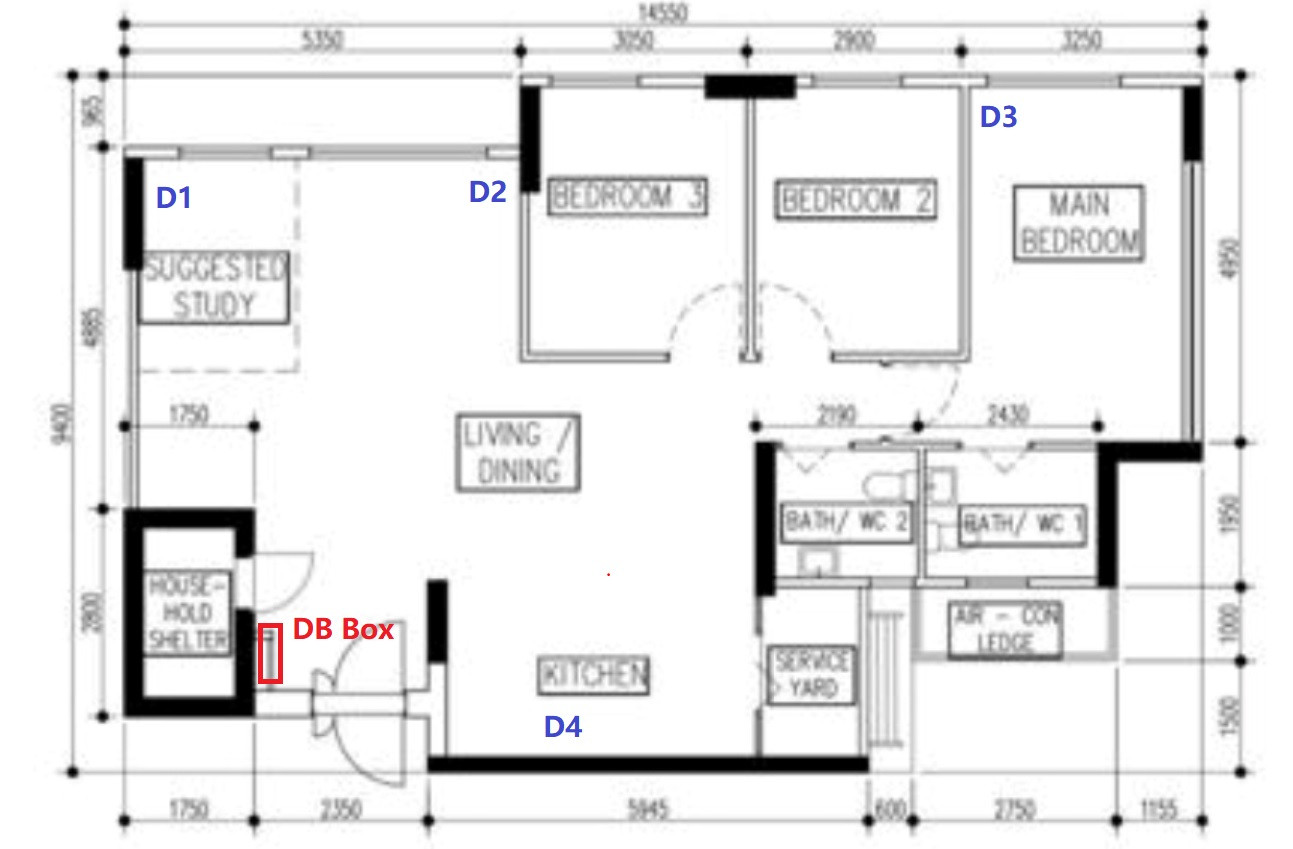
Hello guys, after reading through all the useful information I still have some questions in mind as I am totally new to this. I will not consider myself a power user but will prefer to have a stable network especially when watching TV.
Currently new BTO already have data points around the house. (I left out common bedrooms as planning to rent them out)

Please let me know if I am correct on the below setup:
DB Box:
1 x ONT
1 x Asus Ax3000 to use as wired router
1 x switch to connect router to various data points around the house

D1:
I wish to connect via LAN cable to both TV and Nintendo if possible. Otherwise will run LAN cable to TV and Nintendo via Wifi.

D2:
Need advice if ROG Rapture ax6000 placed at D2 will be sufficient to support entire house.

D3:
If ROG rapture at D2 is insufficient, will it be possible to add another AX3000 at D3 to further support the wireless network?

D4:
I am trying to avoid using the data point at D4 since its wierd to place a wireless router in the kitchen but open to suggestions.


I currently only own 1 ROG rapture ax6000 and able to purchase what I need to make this network possible. I have not sign up for Fibre as well but considering between M1/Starhub or if there are better options to consider. Will Cat6 Lan cables be sufficient or I should get cat7 instead?

Main list of devices that will need network:
1 x TV in living room
1 x Nintendo switch in living room
1 x Robot vacuum in living room
1 x doorbell/cctv at house entrance
4-5 x mobile phones who may connect to wifi network


Will appreciate any input and discussion to help me better understand what I need to purchase so I can purchase in advance.

 

cyberet

Senior Member
Joined
May 28, 2001
Messages
2,481
Reaction score
314
ASUS AX3000 should have some ports (usually 4), so you can move the switch to D1 if you want to connect your nintendo via cable

AX6000 alone at D2 is ok if you can accept weaker signals at master bedroom and the toilets.

my setup is AX6000 at DB Box, and AX88U at bedroom 2, but you can put the 2nd node at D3 instead of bedroom 2.
 

x3yang

Member
Joined
Apr 10, 2016
Messages
157
Reaction score
51
ASUS AX3000 should have some ports (usually 4), so you can move the switch to D1 if you want to connect your nintendo via cable

AX6000 alone at D2 is ok if you can accept weaker signals at master bedroom and the toilets.

my setup is AX6000 at DB Box, and AX88U at bedroom 2, but you can put the 2nd node at D3 instead of bedroom 2.

Oh, you mean I can connect the ONT to the AX3000 router and use the ports on router to connect router to all the different ports located at the DB box?

After I done the above step, I can buy a switch at D1 so I can have wired connection for both TV and Nintendo via D1. Please correct me if I am wrong as I totally new to this, the difference between a switch and a splitter is that switch will maintain the speed while splitter only have max 100 mpbs?

If I setup AX6000 at D2 and 1 * AX3000 at DB Box and 1 * AX3000 at D3, how do I make all of them into 1 wireless network?
 

cyberet

Senior Member
Joined
May 28, 2001
Messages
2,481
Reaction score
314
Oh, you mean I can connect the ONT to the AX3000 router and use the ports on router to connect router to all the different ports located at the DB box? - yes

After I done the above step, I can buy a switch at D1 so I can have wired connection for both TV and Nintendo via D1. Please correct me if I am wrong as I totally new to this, the difference between a switch and a splitter is that switch will maintain the speed while splitter only have max 100 mpbs? - yes, TV and Nintendo can share a 1gbps connection if you use switch (needs electricity), splitter will slow things down to 100mbps and usually not recommended nowadays

If I setup AX6000 at D2 and 1 * AX3000 at DB Box and 1 * AX3000 at D3, how do I make all of them into 1 wireless network? - you can setup AX3000 at DB Box as AiMesh Router mode, and AX6000 at D2 as AiMesh Node, and AX3000 at D3 as AiMesh Node
 

x3yang

Member
Joined
Apr 10, 2016
Messages
157
Reaction score
51
Oh, you mean I can connect the ONT to the AX3000 router and use the ports on router to connect router to all the different ports located at the DB box? - yes

After I done the above step, I can buy a switch at D1 so I can have wired connection for both TV and Nintendo via D1. Please correct me if I am wrong as I totally new to this, the difference between a switch and a splitter is that switch will maintain the speed while splitter only have max 100 mpbs? - yes, TV and Nintendo can share a 1gbps connection if you use switch (needs electricity), splitter will slow things down to 100mbps and usually not recommended nowadays

If I setup AX6000 at D2 and 1 * AX3000 at DB Box and 1 * AX3000 at D3, how do I make all of them into 1 wireless network? - you can setup AX3000 at DB Box as AiMesh Router mode, and AX6000 at D2 as AiMesh Node, and AX3000 at D3 as AiMesh Node
Thank you so much! Now I am clear on wad I need for my network to work.
 

hkchew03

Master Member
Joined
Aug 20, 2010
Messages
2,541
Reaction score
531
JmSpzB9.jpg


Hello guys, after reading through all the useful information I still have some questions in mind as I am totally new to this. I will not consider myself a power user but will prefer to have a stable network especially when watching TV.
Currently new BTO already have data points around the house. (I left out common bedrooms as planning to rent them out)

Please let me know if I am correct on the below setup:
DB Box:
1 x ONT
1 x Asus Ax3000 to use as wired router
1 x switch to connect router to various data points around the house

D1:
I wish to connect via LAN cable to both TV and Nintendo if possible. Otherwise will run LAN cable to TV and Nintendo via Wifi.

D2:
Need advice if ROG Rapture ax6000 placed at D2 will be sufficient to support entire house.

D3:
If ROG rapture at D2 is insufficient, will it be possible to add another AX3000 at D3 to further support the wireless network?

D4:
I am trying to avoid using the data point at D4 since its wierd to place a wireless router in the kitchen but open to suggestions.


I currently only own 1 ROG rapture ax6000 and able to purchase what I need to make this network possible. I have not sign up for Fibre as well but considering between M1/Starhub or if there are better options to consider. Will Cat6 Lan cables be sufficient or I should get cat7 instead?

Main list of devices that will need network:
1 x TV in living room
1 x Nintendo switch in living room
1 x Robot vacuum in living room
1 x doorbell/cctv at house entrance
4-5 x mobile phones who may connect to wifi network


Will appreciate any input and discussion to help me better understand what I need to purchase so I can purchase in advance.
Base on floor plan, if you want single Wifi router to cover the whole house, D4 should be the best place possible, even then might have issue at MBR toilet. Ideally D4 + D3 should cover the entire place with good signal.

Cat6 is way more than enough for home users.
 

xiaofan

High Supremacy Member
Joined
Sep 16, 2018
Messages
32,130
Reaction score
9,293
Base on floor plan, if you want single Wifi router to cover the whole house, D4 should be the best place possible, even then might have issue at MBR toilet. Ideally D4 + D3 should cover the entire place with good signal.

Cat6 is way more than enough for home users.

The issue is how to use the main good wireless router like GT-AX6000 in D4 yet get all the LAN ports like D1/D2/D3 to work.

I have a write-up here since this is the FAQ in the forum.
https://forums.hardwarezone.com.sg/...home-networking.6653421/page-3#post-149431568

Option 1 -- to use a wired router or wireless router in the DB box to act as the main router.
Option 2 -- to use a dumb switch in the DB box, the pre-requisite is to have two LAN ports close to each other in the D4 location. Now apparently that is not the case. The option is to pull another cable from DB box to the D4 location.

Both have its pros and cons but I tend to like Option 2 better in this case. It is a pity to put a lower grade Asus router in the DB box and use the GT-AX6000 as an AImesh node (wasting its CPU power). It is also a pity to put GT-AX6000 in the DB box and waste some of its strong wireless function.
 

x3yang

Member
Joined
Apr 10, 2016
Messages
157
Reaction score
51
Base on floor plan, if you want single Wifi router to cover the whole house, D4 should be the best place possible, even then might have issue at MBR toilet. Ideally D4 + D3 should cover the entire place with good signal.

Cat6 is way more than enough for home users.
Yup I also think d4 is best position. Only concern is that its the kitchen thus may fall back on D2 + D3 to support the wireless network.
 

x3yang

Member
Joined
Apr 10, 2016
Messages
157
Reaction score
51
The issue is how to use the main good wireless router like GT-AX6000 in D4 yet get all the LAN ports like D1/D2/D3 to work.

I have a write-up here since this is the FAQ in the forum.
https://forums.hardwarezone.com.sg/...home-networking.6653421/page-3#post-149431568

Option 1 -- to use a wired router or wireless router in the DB box to act as the main router.
Option 2 -- to use a dumb switch in the DB box, the pre-requisite is to have two LAN ports close to each other in the D4 location. Now apparently that is not the case. The option is to pull another cable from DB box to the D4 location.

Both have its pros and cons but I tend to like Option 2 better in this case. It is a pity to put a lower grade Asus router in the DB box and use the GT-AX6000 as an AImesh node (wasting its CPU power). It is also a pity to put GT-AX6000 in the DB box and waste some of its strong wireless function.
I guess its a lose some gain some situation here.

I am not planning to cable up the data point so likely the option left for me will be using the ax3000 as the main wired router at DB box.

Given that ax6000 might be an overkill, should I just use 3 x ax3000 for the entire network as in DB box, d2 and d3? I can keep my ax6000 in previous house tis way.
 

hkchew03

Master Member
Joined
Aug 20, 2010
Messages
2,541
Reaction score
531
Yup I also think d4 is best position. Only concern is that its the kitchen thus may fall back on D2 + D3 to support the wireless network.
D2+D3 should work ok, but BR2 might have weaker signal depending on your wall thickness between BR2 and MBR.
 

xiaofan

High Supremacy Member
Joined
Sep 16, 2018
Messages
32,130
Reaction score
9,293
I guess its a lose some gain some situation here.
I am not planning to cable up the data point so likely the option left for me will be using the ax3000 as the main wired router at DB box.
Given that ax6000 might be an overkill, should I just use 3 x ax3000 for the entire network as in DB box, d2 and d3? I can keep my ax6000 in previous house tis way.

That is okay but I have a question to you.

Which particular Asus AX3000 router are you looking at?

Cheap one: Asus RT-AX3000P at around S$80 BNIB from Carousell, good to be a mesh node but I do not recommend it to be the main router as it has only 256MB RAM and may have stability issues when acting as the main AImesh router. RT-AX57 is basically the same router as RT-AX3000P but more expensive.

More expensive one: Asus RT-AX58U V1 and V2, RT-AX3000 and TUF-AX3000. All of these models have 512MB RAM but they are a bit older models.

I will recommend to go with Asus TUF-AX4200 as the main AImesh router in the DB box. Then you can have two cheaper RT-AX3000P as AImesh nodes.
 

x3yang

Member
Joined
Apr 10, 2016
Messages
157
Reaction score
51
That is okay but I have a question to you.

Which particular Asus AX3000 router are you looking at?

Cheap one: Asus RT-AX3000P at around S$80 BNIB from Carousell, good to be a mesh node but I do not recommend it to be the main router as it has only 256MB RAM and may have stability issues when acting as the main AImesh router. RT-AX57 is basically the same router as RT-AX3000P but more expensive.

More expensive one: Asus RT-AX58U V1 and V2, RT-AX3000 and TUF-AX3000. All of these models have 512MB RAM but they are a bit older models.

I will recommend to go with Asus TUF-AX4200 as the main AImesh router in the DB box. Then you can have two cheaper RT-AX3000P as AImesh nodes.
Wow, never knew router RAM will play a part too. Thanks for sharing that!

If I signed up with M1, I get 1 free so prehaps I will just buy 1 TUF-ax4200 and 1 ax3000 along with some cat6 lan cables and 1 switch for the tv+nintendo. Alternatively, then I will use park ax6000 into DB box to work as main router and have 2 * ax3000 to work as mesh?
 

xiaofan

High Supremacy Member
Joined
Sep 16, 2018
Messages
32,130
Reaction score
9,293
Wow, never knew router RAM will play a part too. Thanks for sharing that!
If I signed up with M1, I get 1 free so prehaps I will just buy 1 TUF-ax4200 and 1 ax3000 along with some cat6 lan cables and 1 switch for the tv+nintendo. Alternatively, then I will use park ax6000 into DB box to work as main router and have 2 * ax3000 to work as mesh?

Yes.

For people with only a few devices and single router, 256MB RAM is probably fine.

But Asus AImesh main router need to manage the whole network, including the two AImesh nodes in your case. So the CPU and RAM play a part in the stability of the network.
 

gregory_choo

Arch-Supremacy Member
Joined
Nov 7, 2007
Messages
10,508
Reaction score
1,983
to add:

it is not necessary to add a switch at d1. you can use wifi for tv. most people dont need high speed connection for tv. for them, the most demanding is 4k netflix or 4k youtube, which need only 25Mbps or less
 

hkchew03

Master Member
Joined
Aug 20, 2010
Messages
2,541
Reaction score
531
to add:

it is not necessary to add a switch at d1. you can use wifi for tv. most people dont need high speed connection for tv. for them, the most demanding is 4k netflix or 4k youtube, which need only 25Mbps or less
Agree, beside using LAN for TV seems to break screencasting (at least on Xiaomi TV). And many TV are still on 100Mbps port, which is probably slower than Wifi especially those with 5Ghz.
 

cyberet

Senior Member
Joined
May 28, 2001
Messages
2,481
Reaction score
314
if your walls are the bto partition type, I can get more than 50 mbps in the MBR (can get higher, depending on the angle) just relying on AX6000 alone, which is sufficient for netflix/social media

So if you don't need reliable wifi in the MBR and MBR toilet (e.g. you don't do zoom meetings in MBR toilet or live stream in the MBR), my experience is that a single powerful one in the DB connected to your ONT will suffice.

I was having issues with a stable connection for my smart speaker in the MBR toilet, so I had to add a aimesh node
 

x3yang

Member
Joined
Apr 10, 2016
Messages
157
Reaction score
51
to add:

it is not necessary to add a switch at d1. you can use wifi for tv. most people dont need high speed connection for tv. for them, the most demanding is 4k netflix or 4k youtube, which need only 25Mbps or less
Hmm but if prefer wired connection for stability, I can consider a splitter instead to achieve wired connection for both TV and nintendo?
 

x3yang

Member
Joined
Apr 10, 2016
Messages
157
Reaction score
51
if your walls are the bto partition type, I can get more than 50 mbps in the MBR (can get higher, depending on the angle) just relying on AX6000 alone, which is sufficient for netflix/social media

So if you don't need reliable wifi in the MBR and MBR toilet (e.g. you don't do zoom meetings in MBR toilet or live stream in the MBR), my experience is that a single powerful one in the DB connected to your ONT will suffice.

I was having issues with a stable connection for my smart speaker in the MBR toilet, so I had to add a aimesh node
My walls are the bto partition type I suppose. They dun look strong enough to mount huge TVs kind.

Actually I dun need super reliable wifi in MBR as nowadays our mobile data are good enough. But if it does not cost too much to setup a good network, I dun mind trying. Allows me to learn the basics of networking as well. Haha.
 
Important Forum Advisory Note
This forum is moderated by volunteer moderators who will react only to members' feedback on posts. Moderators are not employees or representatives of HWZ. Forum members and moderators are responsible for their own posts.

Please refer to our Community Guidelines and Standards, Terms of Service and Member T&Cs for more information.
Top