[Official mITX Build Discussion Thread]

kelccm

Member
Joined
Mar 16, 2007
Messages
371
Reaction score
0
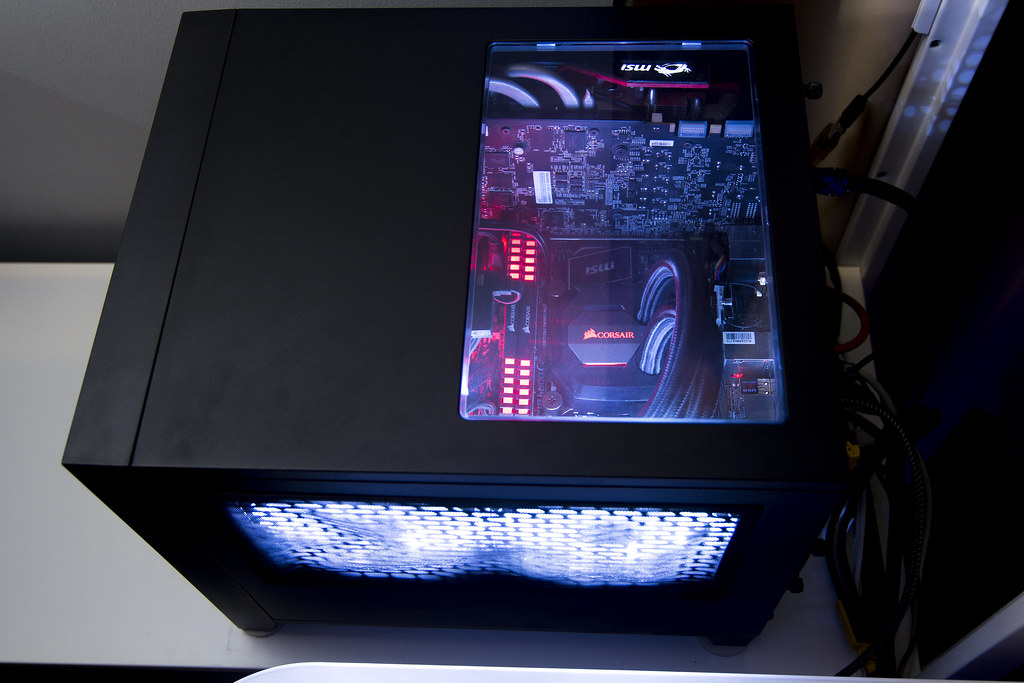
Nice thread and all the nice SSF build shared here. Sharing my humble build as well, done a couple months back with some parts reused from previous ATX build.

CPU: Intel i7 7700K
Mobo: MSI Z270i Gaming Pro Carbon AC
GPU: MSI GTX970 Gaming 4GB
CPU Cooler: Corsair H80i V2
RAM: Corsair Vengeance LED DDR4 2666MHz 8GB x 2
Case: Corsair Obsidian 250D
PSU: Corsair RM750
Fans: Corsair HD120 RGB x 4
Storage: Samsung 960 Evo M.2 NVMe 500GB + WD Black 1TB + Green 2TB
OOD: Asus Blu Ray Writer

All 4 fans oriented for intake only, and passive exhaust at the back. Intention to minimise dust build up internally. So far internal temps still looks ok.
 

kingcarlos

Senior Member
Joined
Aug 20, 2006
Messages
1,066
Reaction score
4
Hey guys, is it still possible to set up a mitx/matx with 4790k as cpu? Not willing to upgrade yet but cant really seem to find 1150 mobo in the price lists
 

joshuaho

Senior Member
Joined
Jan 3, 2015
Messages
830
Reaction score
0
4th Gen mobo hard to find already, not to mention itx or matx.. can try scout repair shops at SLS, might be able to find the rare gem over there. Otherwise go for second hand or carousell.

Check for the price of the motherboard. If it's around 200, recommend u just take ur 4790k and sell (think market price is around $250-$300 or more) then can top up to get current gen cpu and mobo (this round stock up on motherboard if u intend to stay on the same cpu for a Long Time or until it up lorry)

Hey guys, is it still possible to set up a mitx/matx with 4790k as cpu? Not willing to upgrade yet but cant really seem to find 1150 mobo in the price lists
 

mnemo_05

Member
Joined
Nov 24, 2009
Messages
499
Reaction score
0
Hey guys, is it still possible to set up a mitx/matx with 4790k as cpu? Not willing to upgrade yet but cant really seem to find 1150 mobo in the price lists

was caught on the same situation last april, ended up selling pretty much the entire rig to fund my mitx move. z97 itx are hard to find nowadays, even the 2nd hand market still ask a commanding price for them. I for one know someone selling an asrock z97e-itx/ac for 269.. 269 for a z97 mobo LMAO!
 

nannan82

Supremacy Member
Joined
Sep 29, 2005
Messages
5,510
Reaction score
0
Building a 'new' itx rig soon.. many p a rt reuse my my spare component... only buy sg13 casr and a h61 mobo from taobao. Haha planning to put it in my living room connected to my tv...
 

Op_Valkyrie

Arch-Supremacy Member
Joined
Nov 9, 2009
Messages
13,167
Reaction score
1,309
Nice thread and all the nice SSF build shared here. Sharing my humble build as well, done a couple months back with some parts reused from previous ATX build.

CPU: Intel i7 7700K
Mobo: MSI Z270i Gaming Pro Carbon AC
GPU: MSI GTX970 Gaming 4GB
CPU Cooler: Corsair H80i V2
RAM: Corsair Vengeance LED DDR4 2666MHz 8GB x 2
Case: Corsair Obsidian 250D
PSU: Corsair RM750
Fans: Corsair HD120 RGB x 4
Storage: Samsung 960 Evo M.2 NVMe 500GB + WD Black 1TB + Green 2TB
OOD: Asus Blu Ray Writer

All 4 fans oriented for intake only, and passive exhaust at the back. Intention to minimise dust build up internally. So far internal temps still looks ok.

Thanks for support and contribution!! :)

Got photos of ur rig?
 

kelccm

Member
Joined
Mar 16, 2007
Messages
371
Reaction score
0
Nice thread and all the nice SSF build shared here. Sharing my humble build as well, done a couple months back with some parts reused from previous ATX build.

CPU: Intel i7 7700K
Mobo: MSI Z270i Gaming Pro Carbon AC
GPU: MSI GTX970 Gaming 4GB
CPU Cooler: Corsair H80i V2
RAM: Corsair Vengeance LED DDR4 2666MHz 8GB x 2
Case: Corsair Obsidian 250D
PSU: Corsair RM750
Fans: Corsair HD120 RGB x 4
Storage: Samsung 960 Evo M.2 NVMe 500GB + WD Black 1TB + Green 2TB
OOD: Asus Blu Ray Writer

All 4 fans oriented for intake only, and passive exhaust at the back. Intention to minimise dust build up internally. So far internal temps still looks ok.

Thanks for support and contribution!! :)

Got photos of ur rig?


35651879935_cf3ee064ca_b.jpg


34842733083_56373f7696_b.jpg


34810792504_cf801e05dc_h.jpg
 

kelccm

Member
Joined
Mar 16, 2007
Messages
371
Reaction score
0
Ur casing looks spacious for an itx build... can even fit in a optical drive! :)

That was one of my criteria when selecting a casing, I still need an optical drive to rip CDs and act as my secondary blu ray player. As long as the casing can fit easily on my shelf is small enough for me.
 

lkong

Senior Member
Joined
Jul 10, 2000
Messages
1,564
Reaction score
249
i just built a itx using fractal design node 202 and i don't have gpu

a question if anyone can help, how do you secure the 2 x 12cm fan on the gpu location ? i don't see any thread hole etc. now i am just using those wire tie to secure it.
thanks
 

TrueBeliever_jh

Honorary Member
Joined
Jun 8, 2006
Messages
112,790
Reaction score
4,429
i just built a itx using fractal design node 202 and i don't have gpu

a question if anyone can help, how do you secure the 2 x 12cm fan on the gpu location ? i don't see any thread hole etc. now i am just using those wire tie to secure it.
thanks
you can open up the other side of the casing.

there is a certain angle for you to pull it out
6o3uiEn.png

you will be able to access the 2x magnetic meshes.

you should see holes for your case fan. you will also need to take out the angled thingy if you wanna fit a 12cm fan.


from my experience, do note that because the mesh is magnetic, so there might be slack for the mesh to sink in therefore might touch the fans.
 
Last edited:

lkong

Senior Member
Joined
Jul 10, 2000
Messages
1,564
Reaction score
249
you can open up the other side of the casing.

there is a certain angle for you to pull it out
6o3uiEn.png

you will be able to access the 2x magnetic meshes.

you should see holes for your case fan. you will also need to take out the angled thingy if you wanna fit a 12cm fan.


from my experience, do note that because the mesh is magnetic, so there might be slack for the mesh to sink in therefore might touch the fans.

but those holes are not threaded right ? i will open up again today to take a look.

thanks.
 
Important Forum Advisory Note
This forum is moderated by volunteer moderators who will react only to members' feedback on posts. Moderators are not employees or representatives of HWZ. Forum members and moderators are responsible for their own posts.

Please refer to our Community Guidelines and Standards, Terms of Service and Member T&Cs for more information.
Top