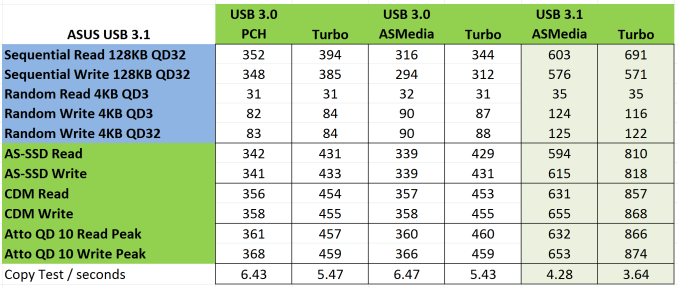
[Official USB 3.1 thread]

Kiwi8

Honorary Member
Deluxe Member
Joined
May 3, 2001
Messages
138,958
Reaction score
17,345
Dear Kiwi8,

I doubt spraying the I/O bracket might void warranty.

Best regard,
JK

U do mean "I THINK spraying the I/O bracket might void warranty" rite?

Cos in the original sentence it's a double negation, so it becomes the meaning that spraying the I/O bracket will not void warranty. :s13:
 

ASUS@SG

Suspended
Joined
Jul 26, 2011
Messages
7,580
Reaction score
8
U do mean "I THINK spraying the I/O bracket might void warranty" rite?

Cos in the original sentence it's a double negation, so it becomes the meaning that spraying the I/O bracket will not void warranty. :s13:

Dear Kiwi8,

We have confirmed spraying the I/O bracket will void warranty.

Best regard,
JK
 

Kiwi8

Honorary Member
Deluxe Member
Joined
May 3, 2001
Messages
138,958
Reaction score
17,345
Dear Kiwi8,

We have confirmed spraying the I/O bracket will void warranty.

Best regard,
JK

I see... thanks for the clarification.

I guess he can paste vinyl stickers on the bracket if he still wants it black lor. :o
 

ASUS@SG

Suspended
Joined
Jul 26, 2011
Messages
7,580
Reaction score
8
image003_w_600.png


USB 3.1 enables sequential reads in excess of 700MB/s, and we’re told that a couple of Samsung 840 Pros crest 800MB/s plugged in to the same developer board. Intel’s X99 chipset manages 423MB/s, while VIA’s PCI Express-connected controller can’t even muster 300MB/s.

Write performance isn’t far behind (though we’ll see real-world sequential writes fall off faster). ASMedia’s USB 3.1 controller continues to exceed 700MB/s. Intel’s PCH-based logic actually accelerates, hitting 426MB/ and the VIA VL805 tops out at 257MB/s.

image004_w_600.png


Random I/O isn’t nearly as impressive. But that’s what we’d expect from USB (or any other interface, for that matter). You’ll see reads approaching 7400 IOPS in 4KB reads at a queue depth of one from USB 3.1, while Intel’s controller yields over 5400 IOPS. This is one discipline where VIA comes out ahead of Intel; the VL805 posts nearly 6800 IOPS.

USB%203.1%20Results_575px.png
 

ASUS@SG

Suspended
Joined
Jul 26, 2011
Messages
7,580
Reaction score
8
USB-C vs. USB 3.1: What’s the difference?

USB31-640x353.jpg


USB-C (also called USB Type-C) and the accompanying USB 3.1 standard are both hitting market somewhat earlier than we initially expected. If you’re curious about the two standards and how they interact, we’ve dusted off and updated our guide to the upcoming technology. The situation is more nuanced than it’s been with previous USB standard updates — USB 3.1 and USB Type-C connectors may be arriving together on the new machines, but they aren’t joined at the hip the way you might think.

USB-3.1-Type-C-04.png


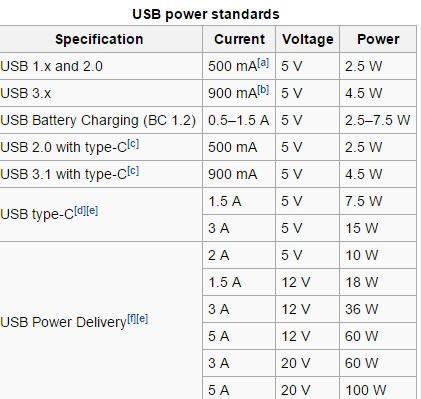
The ability to provide 100W of power, as opposed to 10W, however, means that nearly every manufacturers could ditch clunky power bricks. There would still be concern about ensuring that connect points were sufficiently reinforced, but provided such concerns can be accounted for, the vast majority of laptops could switch over to the new standard. Hard drives and other external peripherals could all be powered by single wires, as could USB hubs for multiple devices.

The higher bandwidth is nice, and a major selling point, but the flippable connector and the power provisioning will likely make more difference in the day-to-day reality of life. As for competition with Intel’s Thunderbolt, USB 3.1 will continue to lag Intel’s high-speed standard, but as bandwidth rises this gap becomes increasingly academic. At this point, it’s the features USB doesn’t allow, like RAID and TRIM, that matter more than the raw bandwidth does in most cases.
 

avsquare

Arch-Supremacy Member
Joined
Oct 27, 2011
Messages
11,314
Reaction score
42
USB 3.1 card already available in Singapore.

I believe next month you guys might see more USB 3.1 devices coming in Singapore.

Best regard,
JK

I wonder what device? :s13:

My Asus MB have 3.1 default tho. I wonder if the higher power delivery can charge my phone faster :s13:
 

micheloving

Supremacy Member
Joined
Feb 21, 2009
Messages
7,355
Reaction score
1
Well unless you have external ssd usb3.1 is pretty much useless .
(I can't even tap half of the potential of usb 3.0 after so many years cause most memory storage just ain't fast enough )

interesting to know Usb type C can power HDMI, VGA, DisplayPort and charge tablet & devices up to 3A .

That the main success of usb over dumb lightning which apple charge licensing fees for .

I guess usb will continue to reign supreme for a very long time .
 
Last edited:

ASUS@SG

Suspended
Joined
Jul 26, 2011
Messages
7,580
Reaction score
8
Hardwarezone Review: USB 3.1 Performance Preview: ASUS Z97-A/USB 3.1 motherboard

asus-z97-USB-3_1-front_0.jpg


Next-Generation USB

In early 2013, we heard murmurings of an update to USB 3.0 that would double data transfer rates while remaining fully backward compatible with existing USB connectors and cables. Later that same year, the USB 3.0 Promoter Group announced the completion of the new USB 3.1 specification with the following features:


  • 10Gbps USB data rate
  • Compatibility with existing cables and connectors
  • Improved data encoding for more efficient data transfer resulting in higher throughout and improved I/O power efficiency
  • Compatible with existing USB 3.0 software stacks and device class protocols
  • Compatible with both existing 5Gbps hubs and devices, as well as USB 2.0 products

PCMark 8 Results
The PCMark 8 Storage benchmark is used to test drive performance with popular games and various editing and productivity software. Unlike synthetic storage tests, it is used as a gauge of real-world performance.

There is little difference between USB 3.0 and 3.1 here. We figure the insignificant difference is because of the mSATA drives and their controllers being the bottleneck, even though they are operating in RAID mode.

Then again, you’re more likely to be running these programs off an OS or onboard drive as opposed to a USB-attached device, although we do see USB 3.1 (Turbo mode) marginally inching out the other two in the overall scores and individual tests.

PCMark-8-_overall_.jpg


PCMark-8-_individual__1.jpg


File Transfer Results
Lastly, we measured the time it took to transfer a 15GB batch of files from desktop to the ASUS USB 3.1 Enclosure. As expected, USB 3.1 (Turbo mode) was the best performer here, although it’s worth noting that it was only 3 seconds faster than when the Boost utility was set to Normal mode. On the other hand, USB 3.0 took 75 seconds to complete the transfer, which was a good 15 seconds slower than USB 3.1 with the Boost software disabled. Clearly, the improved data rate of the USB 3.1 standard is coming into play here.

We again ran the test with the power savings options in BIOS enabled to see the effect of this in real-world numbers as opposed to a synthetic test. We were glad to find that the difference is not that significant, with a timing of 63s for USB 3.1 (Normal mode) and 61s for Turbo mode. As most of the usage scenarios involving the USB interface center around bulk data transfers as in this test, everyday users probably don’t have to worry about going into BIOS to tweak the settings just to shave off that few seconds.
File-Transfer.jpg


http://www.hardwarezone.com.sg/prod...formance-preview-asus-z97-ausb-31-motherboard
 

BBen11

Member
Joined
Nov 29, 2011
Messages
318
Reaction score
0
USB 3.1 card already available in Singapore.

I believe next month you guys might see more USB 3.1 devices coming in Singapore.

Best regard,
JK

im using on Z77 vpremium board, is that possible? oem ones work fine with their basic driver, but just checking , or there will be a bios update for asus board? it seems like most do not need any bio update as long the pcie spec is supported.
 

ASUS@SG

Suspended
Joined
Jul 26, 2011
Messages
7,580
Reaction score
8
im using on Z77 vpremium board, is that possible? oem ones work fine with their basic driver, but just checking , or there will be a bios update for asus board? it seems like most do not need any bio update as long the pcie spec is supported.

Dear BBen11,

Yes, the card will work.

Just need PCI-E 2x and driver installed :)

Best regard,
JK
 

alesstan

Master Member
Joined
Jan 8, 2006
Messages
4,614
Reaction score
523
Hi ASUS@SG,

I am using Z87 sabretooth motherboard. May i know if i can use the PCI-E USB 3.1 for my motherboard? Thank you.
 
Important Forum Advisory Note
This forum is moderated by volunteer moderators who will react only to members' feedback on posts. Moderators are not employees or representatives of HWZ Forums. Forum members and moderators are responsible for their own posts. Please refer to our Community Guidelines and Standards and Terms and Conditions for more information.
Top