Official Xperia Z Thread

hush66

Supremacy Member
Joined
Aug 13, 2001
Messages
6,703
Reaction score
0
Tip: I don't quite like the notification that reminds you to unplug your charger from the wall socket to save electricity, when you unplug the cable from the phone.

To get rid of this notification, go to Settings -> Apps, and under "All", find the app named com.sonyericsson.unplugchargereminder and disable it.

Please note that once you've done this, you cannot easily enable it again.
 

casshern

Master Member
Joined
Nov 21, 2005
Messages
3,670
Reaction score
0
Yes. With the camera app for the small app, it is so much better and can do multi tasking. This small app is patented to Sony only and you cannot find similar apps from the playstore unlike other features in Samsung, you can find similar apps in playstore like the smart stay.


where to d/l this small app camera?
is it the same as the default one with intel mode etc etc?
 

hush66

Supremacy Member
Joined
Aug 13, 2001
Messages
6,703
Reaction score
0
nope, i tried that and it is re-setting up the pattern lock code. :s22:

Are you really sure that you didn't install something that requires certificates, like accessing your office email via the default Email app or some other 3rd party app? Those require some form of verification and therefore will not allow you to have no lockscreen or a swipe lockscreen.

where to d/l this small app camera?
is it the same as the default one with intel mode etc etc?

https://play.google.com/store/apps/details?id=com.applepie.android.smallcamera&hl=en
 

sunnycrowe

Senior Member
Joined
Apr 14, 2011
Messages
1,107
Reaction score
1
How to disable maps? I go to settings, apps, running apps, maps ... After i press stop, the map app stil appear on the running app page..
 

G4

Master Member
Joined
Jan 1, 2000
Messages
3,486
Reaction score
4
Just a reminder to those who buy the Xperia Z cheap at some of the mobile shops out there, I was told that Sony Mobile will be giving the warranty to those sets as they are throwing prices ridiculously which affect the image of Sony Mobile.

I agree with that also.

mmm... but sony is not like Apple. rem that the time when Apple resellers in SG are not allow to sell Appler PCs at SG's major PC fairs? only Apple can do that...

but as for Sony. if they really don't honour those who brought the set at lower than launch RRP, they may not be able to survive the mobile phone wars, btw, Sony don't really make good money recently... so i guess what they can do now is to sell as much phone as possible and pushes out new xperia ASAP to capture market.

so for those who got the XZ at high $988, learn to love the phone and don't look back, and pray that this XZ can last thru at least 6mth before you try another new phone.

just my view.
 

sunnycrowe

Senior Member
Joined
Apr 14, 2011
Messages
1,107
Reaction score
1
The wifi on z wil disconnect n reconnect many times.. My previous tx and sammy tab dun hav this problem...
 

sunnycrowe

Senior Member
Joined
Apr 14, 2011
Messages
1,107
Reaction score
1
Tip: I don't quite like the notification that reminds you to unplug your charger from the wall socket to save electricity, when you unplug the cable from the phone.

To get rid of this notification, go to Settings -> Apps, and under "All", find the app named com.sonyericsson.unplugchargereminder and disable it.

Please note that once you've done this, you cannot easily enable it again.

Superb tip... I dun think we ever wanna enable this again... Its super naggy
 

eeLsinneD

High Supremacy Member
Joined
Apr 10, 2010
Messages
36,942
Reaction score
60
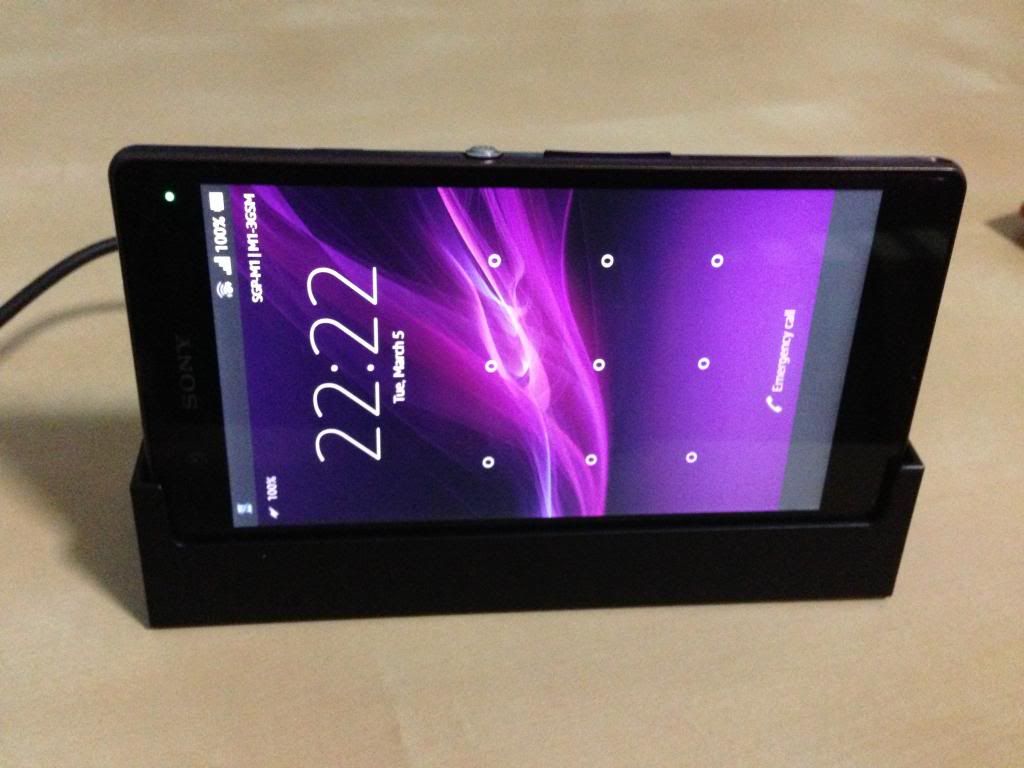
Official docks? Could you post some pics??

... you people hor... really no pic no talk hor... Luckily Yuga has built in camera. Cos I am not rich enough to buy a digital camera...

2013-03-05%2021.56.38.jpg


https://www.dropbox.com/s/x7ee8bmwimq6rcf/2013-03-05%2021.56.38.jpg
 

roflnova

Member
Joined
Dec 6, 2007
Messages
479
Reaction score
0
does anyone else have a slight yellow tint at the bottom of the screen when you don't look at the it from slightly below? i'm contemplating going to sony for a replacement.
 

cutiedoggy92

Master Member
Joined
May 14, 2006
Messages
2,982
Reaction score
6
where to d/l this small app camera?
is it the same as the default one with intel mode etc etc?

When u press the multi tasking button, there will be a + sign, click then it will direct u to play store to dl the small app then u can add it in
 

GreenHorn

Arch-Supremacy Member
Joined
Jan 1, 2000
Messages
18,500
Reaction score
0
Are you really sure that you didn't install something that requires certificates, like accessing your office email via the default Email app or some other 3rd party app? Those require some form of verification and therefore will not allow you to have no lockscreen or a swipe lockscreen.

Nope, not using the email client or my office email. Only Gmail app.
Oh i am running Apex launcher..will it hinder the lockscreen , which i doubt?
 

looooy

Member
Joined
Nov 7, 2008
Messages
177
Reaction score
0
went to jimmy to get my screen protector today. really good and friendly service. somemore the waiting area got aircon and tv. shiok. definitely recommend him.
 

hitme

Senior Member
Joined
Feb 10, 2003
Messages
848
Reaction score
0
my camera app takes about 1 to 2 sec to activate. (can feel the delay)
is this normal for your xperia z too?
 

carlover76

Supremacy Member
Joined
Oct 27, 2002
Messages
7,492
Reaction score
50
my camera app takes about 1 to 2 sec to activate. (can feel the delay)
is this normal for your xperia z too?

I feel that 1 to 2 sec delay to start up the camera is normal unless it take around 15 secs or more then it will be too long.
 

wolvie77

Senior Member
Joined
Apr 1, 2008
Messages
2,147
Reaction score
15
Anyone knows if there are any anti finger print screen protector for front & back? Where to buy?
 
Important Forum Advisory Note
This forum is moderated by volunteer moderators who will react only to members' feedback on posts. Moderators are not employees or representatives of HWZ Forums. Forum members and moderators are responsible for their own posts. Please refer to our Community Guidelines and Standards and Terms and Conditions for more information.
Top