

royfrosty
High Supremacy Member
- Joined
- Jul 23, 2009
- Messages
- 27,727
- Reaction score
- 1,553
I'm on the same firmware also.i dun have this problem leh... on 16.0.2.401 now
And my scroll and translate function also missing. Kns
I'm on the same firmware also.i dun have this problem leh... on 16.0.2.401 now

that, i test is not working on both Oppo and Oneplus, though not surprised considering they share OS codingI'm on the same firmware also.
And my scroll and translate function also missing. Kns

Are u using Android Auto or any 3rd party launchers on your current phone?I hope my S23U can last me till then.
Went Japan for 12 days late Nov. Can't recall how many times I got myself "Camera Failed" or "Failed to start the camera" message. Everytime that happens, I need to restart the phone to get the camera to work again. Sometimes it just straight restart itself when I turn on camera. Not quite sure if it's due to the cold weather (0 - 15C) or other factors - battery replaced in August possibly or purely software - updated to One UI 8 before the trip.
Then back in SG, it happened only once since 1/12 but taking a lot less photos and warmer temp.
Let me dream about it and see if I should just hoot OP15 or X9P and live with it
Anyone using OP15 with M1 Maxx 5G sim card? Can get 5g+ network on the phone?
Thanks!


Doesn't seems that worth...849 for 12+512GB
yeah. specs wise top up 200+ more get OP15. provided not fussy about screen PWM dimming etc, probably more worth? but on if got more coupons, or a bit lower, probably not too bad an option.Doesn't seems that worth...
Probably only worth considering few months later when price drop furtheryeah. specs wise top up 200+ more get OP15. provided not fussy about screen PWM dimming etc, probably more worth? but on if got more coupons, or a bit lower, probably not too bad an option.


For 2) I've cracked it, found out how to mitigate the delay. The delay is caused by the stock System Launcher and the fix is to kill it. The issue is launchers normally don't appear in the Recent Apps page, nor are they "killable" by force stopping it. I tried force stopping the System Launcher, clicking the button doesn't do anything.Are u using Android Auto or any 3rd party launchers on your current phone?
if yes, do note that are there some limitations for Oppo and OP.
1) Android Auto will not work well with Whatsapp Call on both Oppo and OP, it will cause your AA to exit to bluetooth screen.
2) 3rd party launchers will cause about 0.5s lag/delay when you use swipe up back to home using gesture.
if you are not concern about this both portion.. feel free to continue

Anyone using OP15 with M1 Maxx 5G sim card? Can get 5g+ network on the phone?
Thanks!
The 5G icon got indicate 5G+?Yes why not?
Got 5G. Won't show 5G+.The 5G icon got indicate 5G+?
when u use soft buttons, it won't have any lag, or the lag is very very negligible.For 2) I've cracked it, found out how to mitigate the delay. The delay is caused by the stock System Launcher and the fix is to kill it. The issue is launchers normally don't appear in the Recent Apps page, nor are they "killable" by force stopping it. I tried force stopping the System Launcher, clicking the button doesn't do anything.
So my workaround is to create a shortcut to the System Launcher, which allows me to launch it as an app. Then it appears in the Recent Apps page, I can swipe it away and the lag is gone!
Here's how to do it, I'm using Nova but I guess other launchers might also work.
1) In Nova, press and hold on any blank space to invoke the widgets/shortcuts menu
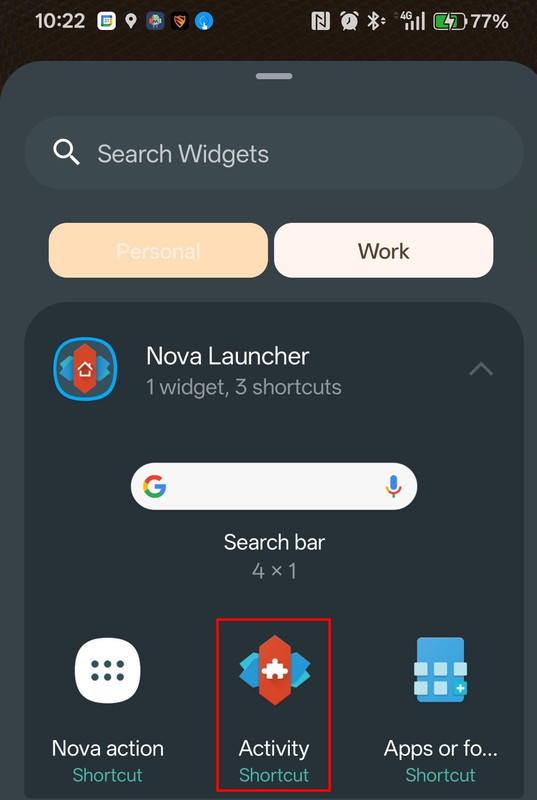
2) In the Widgets section, the first item on the list is Nova Launcher, click on that and then press and hold on the Activity shortcut and choose an empty spot on your home page to drop that Activity shortcut.
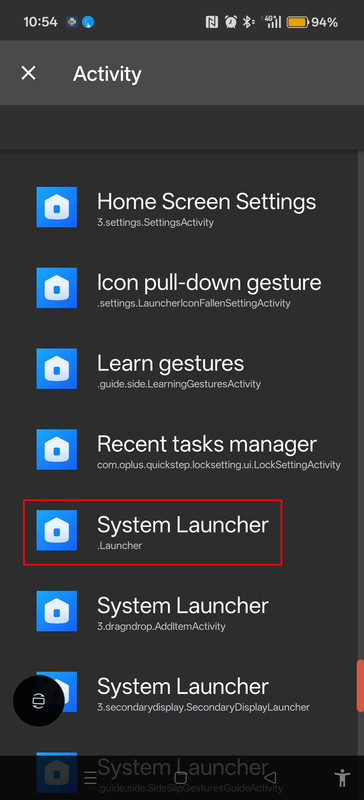
3) You'll be presented with the Activities page, it's a long list of apps. Scroll all the way down to the System Launcher section. Look for the .Launcher option, click on it and deposit the shortcut anywhere on your home page.
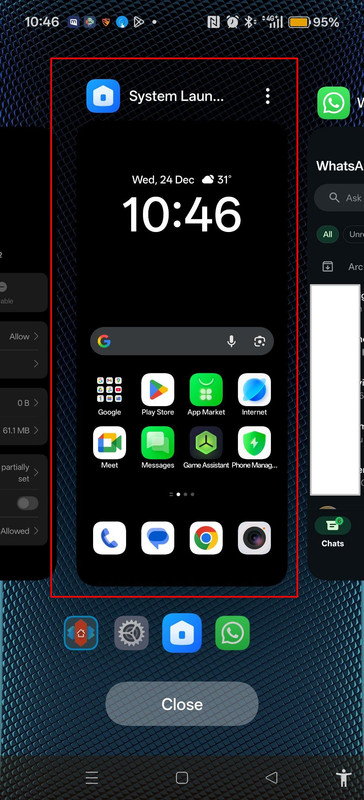
4) Once you have the System Launcher shortcut on your homepage, just click on it to launch the stock System Launcher, go the Recent Apps page, it should appear there, then just swipe it away and your lag should be gone.
A few things to note:
a) Your default home launcher should be kept as the 3rd party launcher throughout.
b) Second thing is this no-lag behavior only persists till the next reboot but having the shortcut to System Launcher makes it easy to kill in future.
c) As you can see from my screenshots, I'm not using gesture navigation so I can't say for sure this also works with gestures, but feel free to try and report back.
Hope it works for you guys too.
U mean if I don't kill System Launcher? Nope, I use buttons and I get the lag all the time, unless I kill the System launcher then no more lagwhen u use soft buttons, it won't have any lag, or the lag is very very negligible.
Pixel this part really no fight lahPixel cannot … 1 of the louiest phone I’ve used. No fight against the OP15. Can’t even see the tail light.
 OP15 win hands down

