OPNsense Discussions

XiaoFu99

Master Member
Joined
May 18, 2016
Messages
3,519
Reaction score
388
OPNSense + Adguard + Unbound setup

Setup #1

https://forum.opnsense.org/index.php?topic=22162.msg146626#msg146626

Code:
5 – Opnsense – Services - Unbound DNS – General

       Tick: Enable Unbound ( Listen Port: 5353 )

       Tick: Enable DNSSEC Support
      
       Network Interfaces: All

By changing the default listening port from 53 to 5353, my internet will gone case.


Setup #2

https://0x2142.com/how-to-set-up-adguard-on-opnsense/

I have success with setup #2, however, I will not be able to use DNS over TLS.

So which setup are you guys using? Or even a totally different setup?

Thanks
 

xiaofan

High Supremacy Member
Joined
Sep 16, 2018
Messages
34,765
Reaction score
11,532
OPNSense + Adguard + Unbound setup

Setup #1

https://forum.opnsense.org/index.php?topic=22162.msg146626#msg146626

Code:
5 – Opnsense – Services - Unbound DNS – General

       Tick: Enable Unbound ( Listen Port: 5353 )

       Tick: Enable DNSSEC Support
     
       Network Interfaces: All

By changing the default listening port from 53 to 5353, my internet will gone case.


Setup #2

https://0x2142.com/how-to-set-up-adguard-on-opnsense/

I have success with setup #2, however, I will not be able to use DNS over TLS.

So which setup are you guys using? Or even a totally different setup?

Thanks

I am not using Adguard Home with OPNsense, but rather Unbound + Blocklists for ads blocking. DNS Over TLS is working fine.

Please refer to the post #38.
https://forums.hardwarezone.com.sg/threads/opnsense-discussions.6943166/page-2#post-150009642
 

XiaoFu99

Master Member
Joined
May 18, 2016
Messages
3,519
Reaction score
388

xiaofan

High Supremacy Member
Joined
Sep 16, 2018
Messages
34,765
Reaction score
11,532

XiaoFu99

Master Member
Joined
May 18, 2016
Messages
3,519
Reaction score
388
I think it has nothing to do with OPNsense per se.
Have you ever got Adguard Home wotking with DoT? I believe that you need to get a valid domain name and TLS certiticate. I have not tried this myself.
https://adguard.com/en/blog/adguard-home-on-public-server.html#tlscertificate

it's either adguard or DoT but not both together.

ya. your link looks different from what i have read so far. search around, some faced the same problem as me while some are successful. so not so consistent.


Read HWZ Forum Rules!
 

XiaoFu99

Master Member
Joined
May 18, 2016
Messages
3,519
Reaction score
388
OPNSense + Adguard + Unbound setup

Setup #1

https://forum.opnsense.org/index.php?topic=22162.msg146626#msg146626

Code:
5 – Opnsense – Services - Unbound DNS – General

       Tick: Enable Unbound ( Listen Port: 5353 )

       Tick: Enable DNSSEC Support
     
       Network Interfaces: All

By changing the default listening port from 53 to 5353, my internet will gone case.


Setup #2

https://0x2142.com/how-to-set-up-adguard-on-opnsense/

I have success with setup #2, however, I will not be able to use DNS over TLS.

So which setup are you guys using? Or even a totally different setup?

Thanks

Finally able to resolve it with the below helpful thread!


The above is even more relevant for users who had installed Adguard and need to do further changes.

Hope it helps for whoever wanted to use OPNSense + Unbound + Adguard combo!
 

hwzlite

Master Member
Joined
Jan 27, 2007
Messages
3,064
Reaction score
3,204
Finally able to resolve it with the below helpful thread!


The above is even more relevant for users who had installed Adguard and need to do further changes.

Hope it helps for whoever wanted to use OPNSense + Unbound + Adguard combo!


Interestingly, usually the main purpose of setup unbound is if you don't trust the upstream public DNS servers ( DNS Resolver) and use the default root servers with no further configuration needed.

And yet your above links still put back 1.1.1.1 , 1.0.0.1..etc into the equation.... :unsure:

You can totally ditch unbound for unnecessary added layer of complexity if you truly trust upstream DNS servers and then can make fully use of Adguard:“fastest” / “best” Upstream DNS server(s) for adguard, why choose or benchmark? just parallel requests it all ;)

As for upstream DNS servers, I favor anything that is based on QUIC .
 
Last edited:

hwzlite

Master Member
Joined
Jan 27, 2007
Messages
3,064
Reaction score
3,204

XiaoFu99

Master Member
Joined
May 18, 2016
Messages
3,519
Reaction score
388
Finally able to resolve it with the below helpful thread!


The above is even more relevant for users who had installed Adguard and need to do further changes.

Hope it helps for whoever wanted to use OPNSense + Unbound + Adguard combo!


After installing AdGuard, for those who have issues with unable to update/check for updates and Crowdsec auto shutdown, can refer to the following thread for for help.

https://forum.opnsense.org/index.php?topic=32656.msg158068#msg158068
 

chromeIT

Member
Joined
Mar 17, 2019
Messages
101
Reaction score
26
My N100 from Cwwk Taobao should be coming in today, will report back my initial setup. Planning to offload adblock from my server to the N100 router running along side unbound dns. Still trying to figure out should i go for opnsense or pfsense...
Sorry for the late update, managed to get everything running after troubleshooting all day and changing 1 router. Thanks for all the inputs given! I settled with adguardhome listening at port 53 using unbound as the upstream dns server at port 5353. Additionally, i also throw a cheap pc fan on top of the chassis of cwwk N100 and got average temp of 37c.
 

woshiitcy

Member
Joined
Oct 19, 2011
Messages
224
Reaction score
13
Just ordered N100 machine with 16GB RAM from Carousell and 118GB Intel Optane. Also have a spare 860 EVO SSD Lying around.

Disk Configuration
- 860 Evo SSD for Proxmox OS in ZFS (Heard there it helps with data protection even if it is just one disk)
- Optane for my VMs and other LXCs (E.g. Moving my Primary PiHole instance here as well as well as some other Logging stuff like Influx, Elastic)

Plan is to install Proxmox on it and then install OPNSense or pfSense (Read a lot on reddit most switched to OPNSense, however also seems to realised pfSense is more talked about in hwz. anyone able to share their thoughts between this two)

For NIC Configuration

- Do IOMMU/SRIOV Pass Through 2 Ports x for WAN. (1 x for Current WAN, 1 x for Future WAN)
- The problem I have wrapping around my mind is the LAN Port. What is the best approach?
- Pass Through 1 more port for LAN then connect it to switch? But this way i will lose access to my Proxmox GUI correct? So I will need 1 more port just to access to proxmox LAN for it's GUI.
- Or alternatively I should just create a bridge in Proxmox and then pass through a Virtual NIC?

Logging
To be honest I know nothing about security... and this setup is more for educational purposes. I mean it will be a plus point if it is beneficial. Wanting to do a little bit on logging as well.

What logging tools (For the lack of a better term) like Grafana, are you using? Grafana? E.g. with graph/diagram/map showing what are the inbound/outbound IPs. This portion I feel might be too overkilled or too much for the N100. Keen to explore around and turn off/on if needed or I can move it to the 3 Proxmox Host.

VPN - Wireguard
Currently I have 2 x Wireguard LXC running in two different host. In case I need to remotely restart my host, I will still have 1 more Wireguard up. Thus also looking to shift one of the wireguard directly on the Firewall.

Have just tried installing OPNSense on my Proxmox and toyed around with it :
- 4 Cores [Host], 8GB Ram, 2 x Virtual NIC for WAN and LAN (WAN is doubled NAT-ed in my current network)
- Another VM with 1 x Virtual NIC is created and placed at the same LAN as the Firewall LAN for the test for iPerf3 Server/Client

I have installed os-wireguard (meaning it is Kernel based i believe), when I do a local wireguard iPerf, I am only able to get 650 to 700 Mbits/sec. and I give it 4 Cores, I realised the CPU hit 80%+ when i run iPerf. Nothing else is installed. Just purely wanted to see the VPN perfomance.

Whereas wireguard (PiVPN) running on the LXC can easily hit 2.5Gbps without seeing the CPU Spikes.

Any possible idea where what could have gone wrong here?

Security/Plugins
For plugin wise, do you think Crowdsec is enough or do I still need IDS/IPS Suricata/Snort as well? The only thing I am exposing port is my VPN Ports and Jellyfin Ports since I can't really do it via Cloudflare Tunnel due to ToS.

Also what are you guys generally using
Suricata on the WAN? Zenarmor on the LAN Side?

Or CrowdSec is enough on the WAN portion already?

 

xiaofan

High Supremacy Member
Joined
Sep 16, 2018
Messages
34,765
Reaction score
11,532
Security/Plugins
For plugin wise, do you think Crowdsec is enough or do I still need IDS/IPS Suricata/Snort as well? The only thing I am exposing port is my VPN Ports and Jellyfin Ports since I can't really do it via Cloudflare Tunnel due to ToS.

Also what are you guys generally using
Suricata on the WAN? Zenarmor on the LAN Side?

Or CrowdSec is enough on the WAN portion already?

Not a real OPNSense expert (only basic stuff used, not using CrowdSec or Suricata or Zenarmor) but I tend to think IPS/IDS is not necessary for home users.

Reference discussion here.
https://forums.hardwarezone.com.sg/...cting-your-family-and-business.7016514/page-5
 

gpgtmeowmeow

Member
Joined
Nov 4, 2022
Messages
135
Reaction score
80
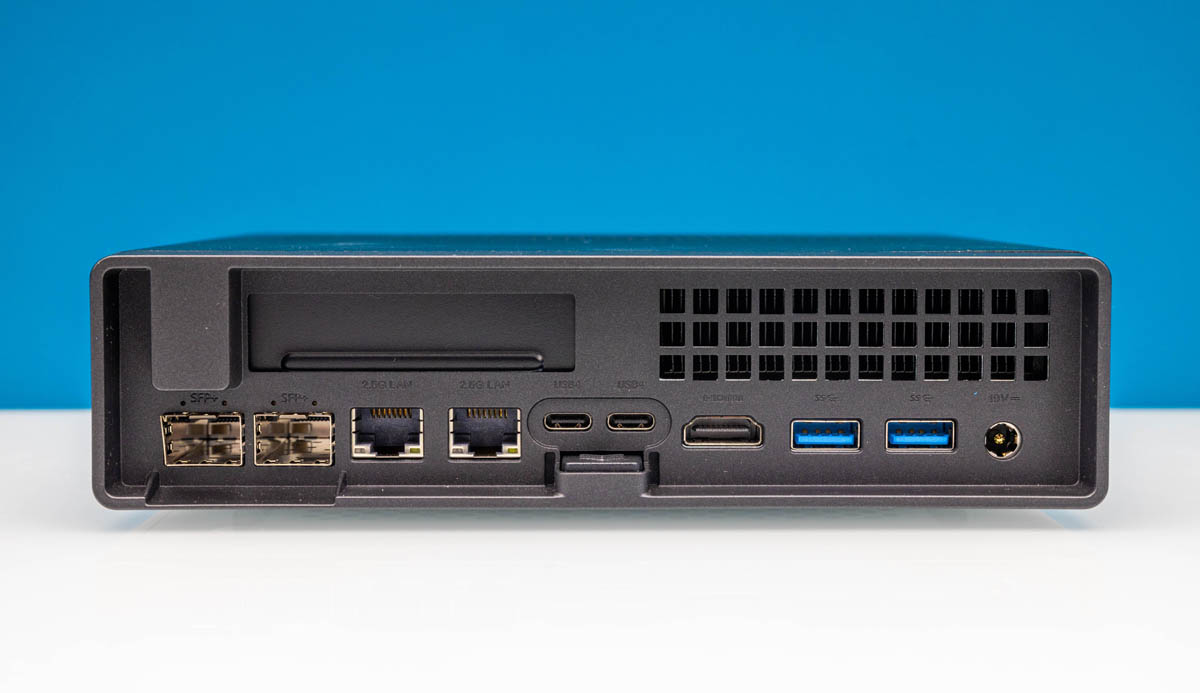
Recent hot device to play with is the Minisforum MS-01. Already feel like grabbing 2 after I saw the specs and flexibility.

Most will pick the i5-12600h version
A bit pricey though maybe can consider for 10Gbps

2x 10GbE ports - Intel X710
2x 2.5GbE ports - Intel i226-V & i226-LM
PCIE slot

Minisforum-MS-01-Back.jpg


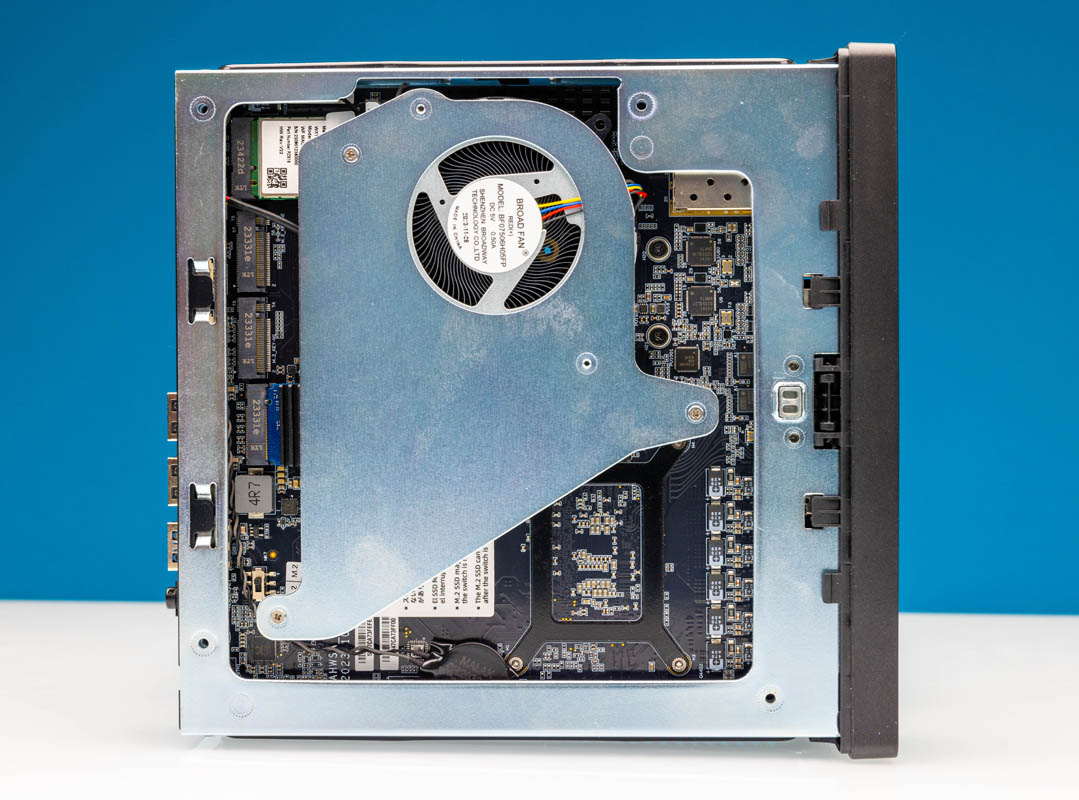
Wifi card can replace for a Google Coral M2.

Minisforum-MS-01-Internal-Overview-SSD-and-WiFi-Side-with-Cooler.jpg


Someone's setup


Interesting to see how it stacks against i3-n305 for 10Gbps
 
Last edited:

xiaofan

High Supremacy Member
Joined
Sep 16, 2018
Messages
34,765
Reaction score
11,532
OPNsense bandwidth limiter testing (900Mbps download, 700Mbps upload, fq_codel)
https://docs.opnsense.org/manual/how-tos/shaper_limit_per_user.html


NameOPNsensefirewall.localdomain
VersionsOPNsense 24.1.5_3-amd64
FreeBSD 13.2-RELEASE-p11
OpenSSL 3.0.13
UpdatesClick to view pending updates.
CPU typeQEMU Virtual CPU version 2.5+ (2 cores, 2 threads)


Without bandwidth limiter
Bash:
root@ubuntu2204ct21:~# ./speedtest -s 13623

   Speedtest by Ookla

      Server: Singtel - Singapore (id: 13623)
         ISP: Singtel Fibre
Idle Latency:     2.30 ms   (jitter: 0.23ms, low: 2.12ms, high: 2.51ms)
    Download:   869.16 Mbps (data used: 392.8 MB)                                                  
                  3.09 ms   (jitter: 0.66ms, low: 1.79ms, high: 8.67ms)
      Upload:   938.17 Mbps (data used: 1.1 GB)                                                  
                  6.04 ms   (jitter: 0.68ms, low: 4.37ms, high: 17.89ms)
 Packet Loss:     0.0%
  Result URL: https://www.speedtest.net/result/c/b71a15d5-bab3-45d5-81c2-d35f478b2ce4

With the bandwidth limiter -- download limit is not useful since I can not get to reach above the limit due to limitation of OPNsense with FreeBSD 13 kernel even without the limiter, as shown above. But upload limit seems to be working.

Bash:
root@ubuntu2204ct21:~# ./speedtest -s 13623

   Speedtest by Ookla

      Server: Singtel - Singapore (id: 13623)
         ISP: Singtel Fibre
Idle Latency:     2.48 ms   (jitter: 0.32ms, low: 2.15ms, high: 2.78ms)
    Download:   836.57 Mbps (data used: 729.8 MB)                                                  
                  3.09 ms   (jitter: 3.58ms, low: 1.56ms, high: 209.18ms)
      Upload:   648.01 Mbps (data used: 763.0 MB)                                                  
                  2.38 ms   (jitter: 2.73ms, low: 1.66ms, high: 208.79ms)
 Packet Loss:     0.0%
  Result URL: https://www.speedtest.net/result/c/146b65d8-14a7-403b-bf1d-adae0a4b9fb3
 

xiaofan

High Supremacy Member
Joined
Sep 16, 2018
Messages
34,765
Reaction score
11,532
With a fully upgraded OPNsense system, wired speed seems to be better now.

Bash:
root@ubuntu2204ct21:~# ./speedtest -s 13623

   Speedtest by Ookla

      Server: Singtel - Singapore (id: 13623)
         ISP: Singtel Fibre
Idle Latency:     1.00 ms   (jitter: 0.11ms, low: 0.91ms, high: 1.17ms)
    Download:   925.96 Mbps (data used: 416.5 MB)                                                  
                  2.86 ms   (jitter: 6.13ms, low: 0.94ms, high: 206.30ms)
      Upload:   937.79 Mbps (data used: 1.1 GB)                                                  
                  3.18 ms   (jitter: 2.68ms, low: 1.92ms, high: 208.47ms)
 Packet Loss:     0.0%
  Result URL: https://www.speedtest.net/result/c/f4b2952f-863a-489e-a772-f1ac0dde21a8

The shaper (900Mbps download, 700Mbps upload, fq_codel) is a bit shaky but seems to work as well.

Bash:
root@ubuntu2204ct21:~# ./speedtest

   Speedtest by Ookla

      Server: Singtel - Singapore (id: 13623)
         ISP: Singtel Fibre
Idle Latency:     1.05 ms   (jitter: 0.03ms, low: 1.01ms, high: 1.09ms)
    Download:   829.43 Mbps (data used: 518.4 MB)                                                   
                  2.53 ms   (jitter: 4.78ms, low: 0.99ms, high: 211.33ms)
      Upload:   653.21 Mbps (data used: 910.6 MB)                                                   
                  1.51 ms   (jitter: 4.22ms, low: 0.92ms, high: 213.55ms)
 Packet Loss:     0.0%
  Result URL: https://www.speedtest.net/result/c/c558bf4f-4fdd-4352-9bd3-90ca18c2b63a
 
Last edited:

siakpeng82

Senior Member
Joined
May 21, 2001
Messages
2,347
Reaction score
4
i am new to opnsense.
Yesterday installed a vanilla opnsense using homenetworkguy guide
Hardware
—————
Dell OptiPlex 7020, i5 4570, 8Gb ram, 120Gb SSD.
X550-AT2 NIC

It was working. Then I went to install ADGuard. Seems to be working. Then this morning all my internet dies.

I didn’t have the time to troubleshoot since my family need to use the internet. It is faster to fresh install.

All is working again.

Then I found this thread, and I either need to revisit the ADGuard setup or explore unbound blocking filter.

Also do I need ACME plugin if I am using for home? I need to pay for a domain before I can use let’s encrypt. Worth the money? Although it does not cost alot for a new domain.
 
Last edited:

xiaofan

High Supremacy Member
Joined
Sep 16, 2018
Messages
34,765
Reaction score
11,532
Also do I need ACME plugin if I am using for home? I need to pay for a domain before I can use let’s encrypt. Worth the money although not alot for a new domain.

By right you do not need a paid domain even though that may give you more flexibility.

You can use free DDNS service to get a free domain, if you want use that for things like setting up VPN servers (Wireguard, OpenVPN, etc).
 

siakpeng82

Senior Member
Joined
May 21, 2001
Messages
2,347
Reaction score
4
my OpnSense uses X550-T2, it supposed to support 1/2.5/5/10G.
When I connect to TP-Link 10g switch, the LAN is showing it connect at 10G.
When I force it to 2.5G, the LAN is showing 2.5G.
So I suppose the NIC is working as expected.

My computer is using Realtek Gaming 2.5GbE Family Controller. I had set EEE Max Support Speed to 2.5G.
Switch to Computer, the connection is 2.5G

I changed OpnSense to autodetect. Connect OpnSense to Computer, the connection is shown as 1G.
If I force OpnSense to use 2.5G, the connection is lost.

Where am I doing wrong?
 

cyberet

Senior Member
Joined
May 28, 2001
Messages
2,485
Reaction score
321
can disable EEE or green ethernet? sometimes some of the energy savings can cause issues negotiating a faster link
 
Important Forum Advisory Note
This forum is moderated by volunteer moderators who will react only to members' feedback on posts. Moderators are not employees or representatives of HWZ Forums. Forum members and moderators are responsible for their own posts. Please refer to our Community Guidelines and Standards and Terms and Conditions for more information.
Top