OPNsense Discussions

siakpeng82

Senior Member
Joined
May 21, 2001
Messages
2,347
Reaction score
4
tried, not working too
I suspect is the problem of X550-T2
it cannot negotiate the 2.5gb.
I going to return it (bought froom Amazon) , and get a X540-T2 instead
since ONT and switch are 10gbe, no need the NIC to have multigig

My switch is multi-gig, and it is auto negotiated well with my devices
 

d3adc3II

Senior Member
Joined
Nov 27, 2006
Messages
700
Reaction score
64
Recent hot device to play with is the Minisforum MS-01. Already feel like grabbing 2 after I saw the specs and flexibility.

Most will pick the i5-12600h version
A bit pricey though maybe can consider for 10Gbps

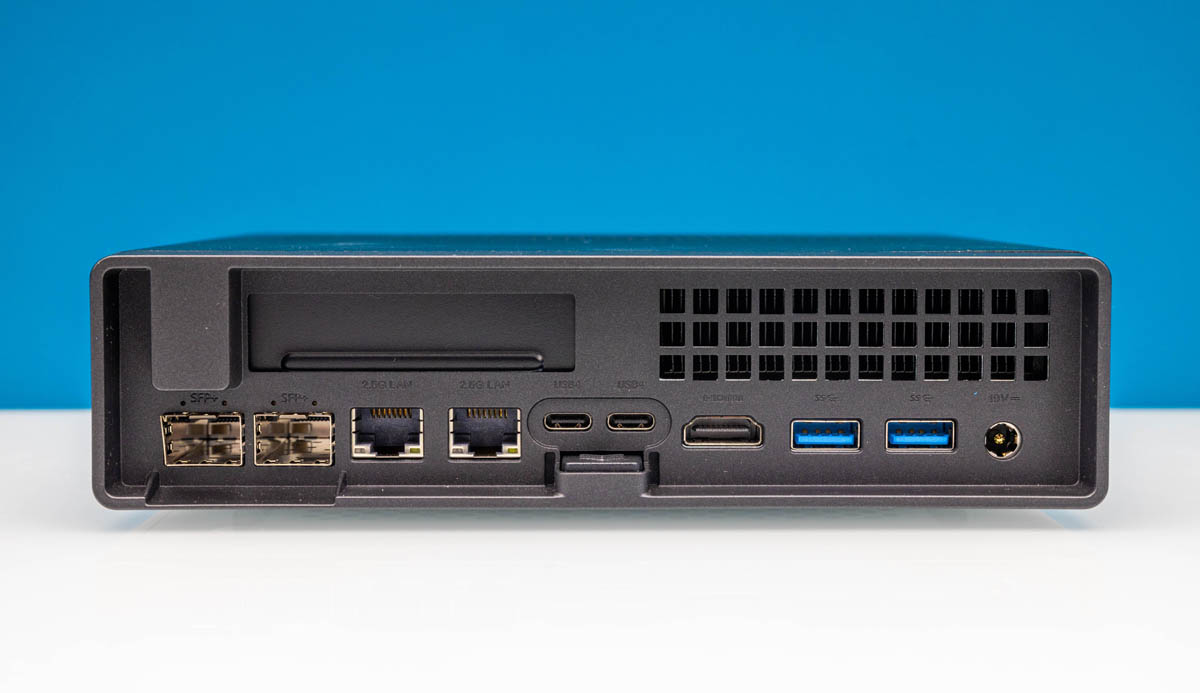
2x 10GbE ports - Intel X710
2x 2.5GbE ports - Intel i226-V & i226-LM
PCIE slot

Minisforum-MS-01-Back.jpg


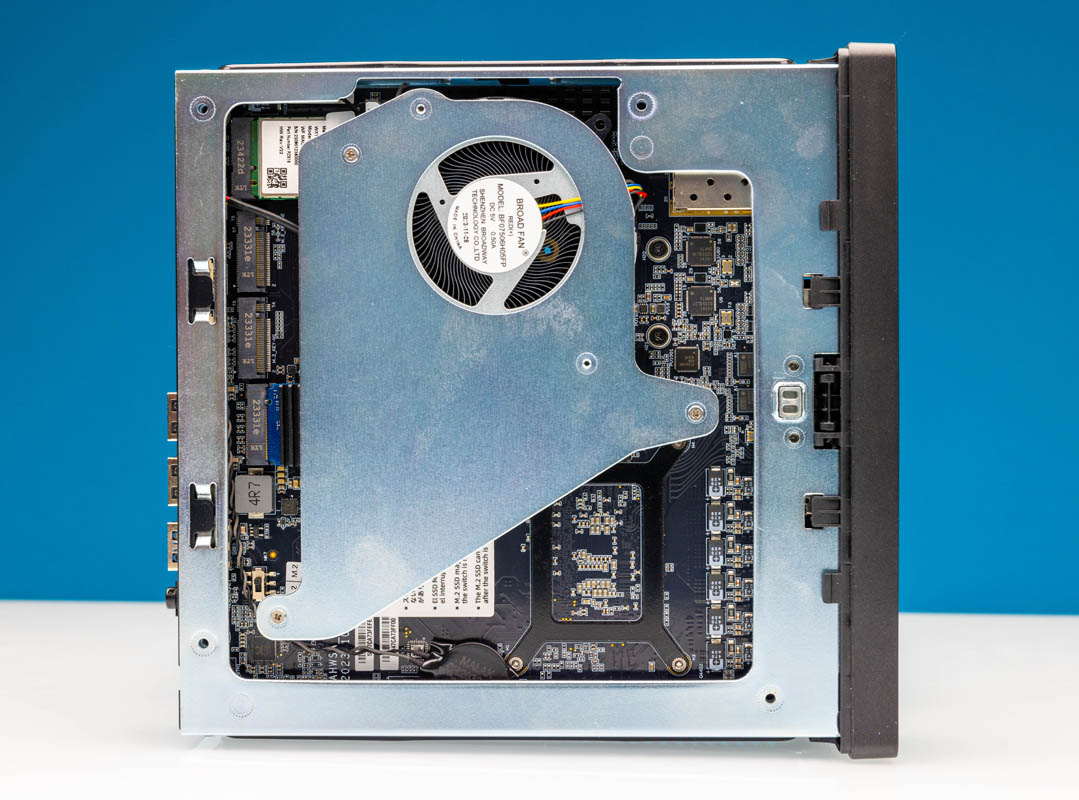
Wifi card can replace for a Google Coral M2.

Minisforum-MS-01-Internal-Overview-SSD-and-WiFi-Side-with-Cooler.jpg


Someone's setup


Interesting to see how it stacks against i3-n305 for 10Gbps


This is very good and cheap option, consider that dual x710 nic cost 200+ sgd if buy separately. 399 if buy during their anniversary sale. Grab 2 units myself, very happy with the product.

Combo with this and you can have poor man's "server rack"
https://shopee.sg/-SG-Stock-2-4-Tie...ns-Pots-Storage-Shelf-i.472495254.21886223049
 

xiaofan

High Supremacy Member
Joined
Sep 16, 2018
Messages
34,765
Reaction score
11,532
This is very good and cheap option, consider that dual x710 nic cost 200+ sgd if buy separately. 399 if buy during their anniversary sale. Grab 2 units myself, very happy with the product.

Combo with this and you can have poor man's "server rack"
https://shopee.sg/-SG-Stock-2-4-Tie...ns-Pots-Storage-Shelf-i.472495254.21886223049

Nice one.

I think the offer price is US$399 for the barebone system for the Core i5-12600H version, right? Usual price is US$419. This is actually slighly cheaper than buying from Taobao/Tmall Minisforum Flagship store.
https://store.minisforum.com/products/minisforum-ms-01?variant=44480511246581

How do you use these two systems? One with PVE + OPNsense? The other with Windows 11 or Linux?

Taobao/Tmall link just for reference. There may be cheaper times during sales.
RMB 2999 for the barebone i5-12600H version and overseas power supply.
RMB 3599 for the barebone i9-12900H version and overseas power supply.
RMB 4799 for the barebone i9-12900H version and overseas power supply.
【淘宝】https://m.tb.cn/h.ghDygHyVHYalnYn?tk=vuk33b0Ke99 CZ3460 「铭凡(MINISFORUM) MS-01 i9-12900H/13900H/i5-12600H酷睿迷你工作站电脑小主机高性能双万兆四网口台式机」
点击链接直接打开 或者 淘宝搜索直接打开
 
Last edited:

d3adc3II

Senior Member
Joined
Nov 27, 2006
Messages
700
Reaction score
64
Nice one.

I think the offer price is US$399 for the barebone system for the Core i5-12600H version, right? Usual price is US$419. This is actually slighly cheaper than buying from Taobao/Tmall Minisforum Flagship store.
https://store.minisforum.com/products/minisforum-ms-01?variant=44480511246581

How do you use these two systems? One with PVE + OPNsense? The other with Windows 11 or Linux?

Taobao/Tmall link just for reference. There may be cheaper times during sales.
RMB 2999 for the barebone i5-12600H version and overseas power supply.
RMB 3599 for the barebone i9-12900H version and overseas power supply.
RMB 4799 for the barebone i9-12900H version and overseas power supply.
【淘宝】https://m.tb.cn/h.ghDygHyVHYalnYn?tk=vuk33b0Ke99 CZ3460 「铭凡(MINISFORUM) MS-01 i9-12900H/13900H/i5-12600H酷睿迷你工作站电脑小主机高性能双万兆四网口台式机」
点击链接直接打开 或者 淘宝搜索直接打开

One thing, the price on official site is the price you gonna pay , shipping is free , and there is no import tax surprisingly.
Bought 2 (1 for a friend), both nvr kena tax, i wonder why.


Previously i run a small PVE cluster of 2 Dell Optiplex 3070 + 1 custom PC
I replaced 1 optiplex with ms-01.

ms-01 (pve1) :
- opsense vm ( passthrough 2.5G port to isp for WAN, 10G for LAN, another 2.5G i use for quorum)
- npg stack vm ( netdata, prometheus, grafana)
- reversed proxy using cosmos-server
optiplex ( pve2) with x710-bm2 (lolz got some spare so why not )
- some small lxc ( homepage, myspeed)
- proxmox backup to truenas to wasabi
- docker lxc for some apps and services
custom pc with x710-bm2
- truenas vm with 5 hdds on raidz2
- dns server using technitiumdns ( switched from unbound dns )
- influxdb for testing purpose
- another docker vm

Thats it, ms-01 bring in many possibilities, that I couldnt do with optiplex 3070 ( limited pcie lane/m2 slot).
Plan to get more ssd for Ceph , and k3s for learning purpose.
 

xiaofan

High Supremacy Member
Joined
Sep 16, 2018
Messages
34,765
Reaction score
11,532
1. Updated my virtual OPNsense installation to the latest version, on an Intel N100 based mini PC running Proxmox PVE 8.2.
Versions
OPNsense 24.7.4_1-amd64
FreeBSD 14.1-RELEASE-p4
OpenSSL 3.0.15

2. Learned the way to install OOKla Speedtest-CLI.

CPU does go to almost 100% when carrying out SpeedTest.

Bash:
root@OPNsensefirewall:~ # uname -a
FreeBSD OPNsensefirewall.localdomain 14.1-RELEASE-p4 FreeBSD 14.1-RELEASE-p4 stable/24.7-n267825-d0d18dbbaba SMP amd64


root@OPNsensefirewall:~ # cd utils/

root@OPNsensefirewall:~/utils # cat install_speedtest.sh
fetch https://install.speedtest.net/app/cli/ookla-speedtest-1.2.0-freebsd13-x86_64.pkg
set IGNORE_OSVERSION=yes
pkg add --force ookla-speedtest-1.2.0-freebsd13-x86_64.pkg
rehash
speedtest

root@OPNsensefirewall:~/utils # speedtest -s 13623

   Speedtest by Ookla

      Server: Singtel - Singapore (id: 13623)
         ISP: Singtel Fibre
Idle Latency:     1.48 ms   (jitter: 0.10ms, low: 1.34ms, high: 1.55ms)
    Download:  2052.94 Mbps (data used: 2.5 GB)
                  5.93 ms   (jitter: 6.19ms, low: 0.99ms, high: 216.67ms)
      Upload:  2353.23 Mbps (data used: 2.3 GB)
                  5.72 ms   (jitter: 1.93ms, low: 1.56ms, high: 15.07ms)
 Packet Loss:     0.0%
  Result URL: https://www.speedtest.net/result/c/ddef8996-5c36-4fe0-a7da-02cf7150a397
 

xiaofan

High Supremacy Member
Joined
Sep 16, 2018
Messages
34,765
Reaction score
11,532
so n100 cant even saturate the 2.5gbps ports?

No, it should have no issues for 2.5G or even higher (say 5Gbps) if you use bare metal. Take note I was using virtualized installation and using virtual CPU (2-core only).

Intel N100 is good even for basic 10Gbps routing, if you use OpenWRT/Linux. Still Intel N305 CPU should be better.

Not so sure about using Intel N100 with pfSense/OPNsense for 10Gbps. But again Intel N305 CPU should be fine.

BTW, I just tried a slower Intel J4125 CPU with FreeBSD 14.1 release and it has no issues with 2.5Gbps.
 

NightRaven49

Master Member
Joined
May 17, 2019
Messages
3,726
Reaction score
1,566
hi, want to ask for guru advice regarding choosing between setting up opnsense or pihole for network wide adblocking, main motivation is to block ads on devices without ublock (especially android tv youtube). read conflicting opinions about pihole not working well with youtube, though if it does work then it should be easier to set up with an old laptop lying around. ive also not really come across much conclusive evidence regarding opnsense + plugins efficacy with youtube, so want to see if anyone got success with either solution.
 

xiaofan

High Supremacy Member
Joined
Sep 16, 2018
Messages
34,765
Reaction score
11,532
hi, want to ask for guru advice regarding choosing between setting up opnsense or pihole for network wide adblocking, main motivation is to block ads on devices without ublock (especially android tv youtube). read conflicting opinions about pihole not working well with youtube, though if it does work then it should be easier to set up with an old laptop lying around. ive also not really come across much conclusive evidence regarding opnsense + plugins efficacy with youtube, so want to see if anyone got success with either solution.

I do not think there is a reliable solution to block YouTube ads on the router side, if you use YouTube app.
 

xiaofan

High Supremacy Member
Joined
Sep 16, 2018
Messages
34,765
Reaction score
11,532
A niche use case of using OPNsense as a transparent proxy (not to affect the existing network).

Guide
https://www.zenarmor.com/docs/netwo...gure-transparent-filtering-bridge-on-opnsense

Youtube Video Guide


This Youtube video seems to be very popular. I guess many people are stuck with the ISP's Gateway (eg: unbridged Singtel/WC ONR) and they want to add some transparent firewall without affecting the existing network infrastructure.

More detailed guide from Home Network Guy.
 

acpower2025

Junior Member
Joined
Feb 14, 2025
Messages
75
Reaction score
69
This Youtube video seems to be very popular. I guess many people are stuck with the ISP's Gateway (eg: unbridged Singtel/WC ONR) and they want to add some transparent firewall without affecting the existing network infrastructure.

More detailed guide from Home Network Guy.


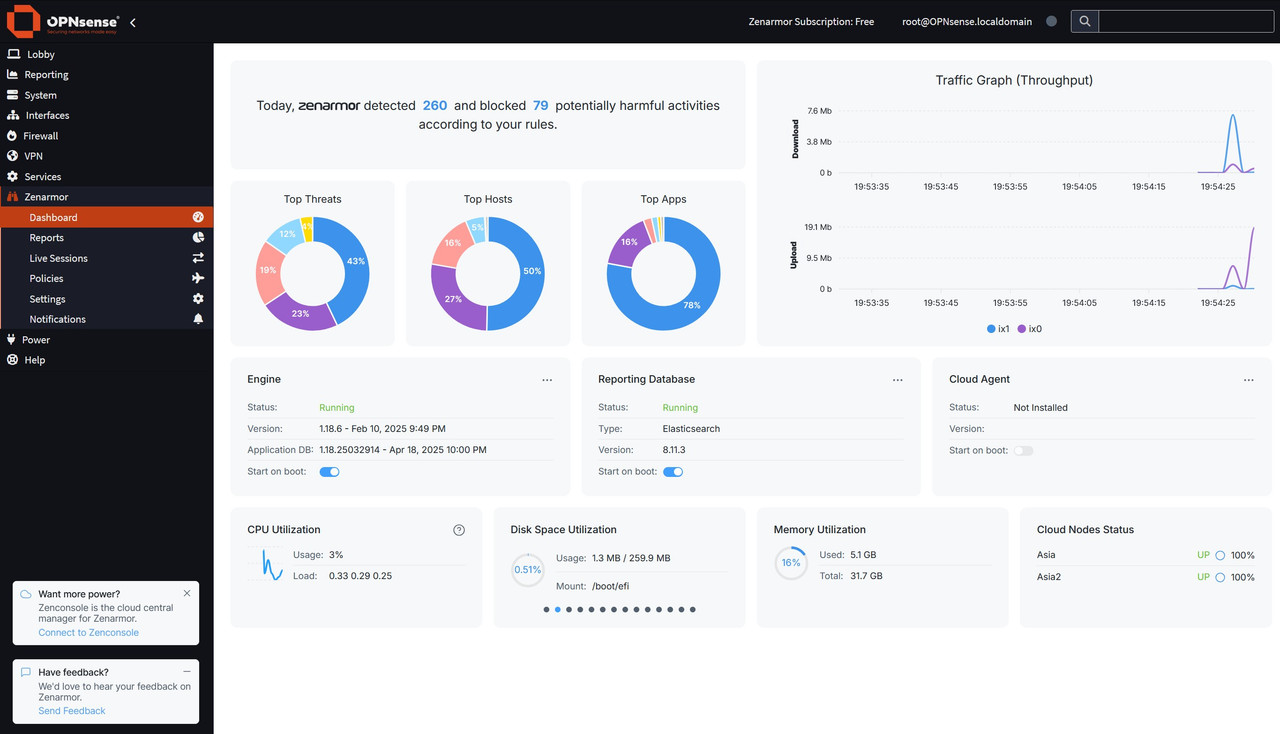
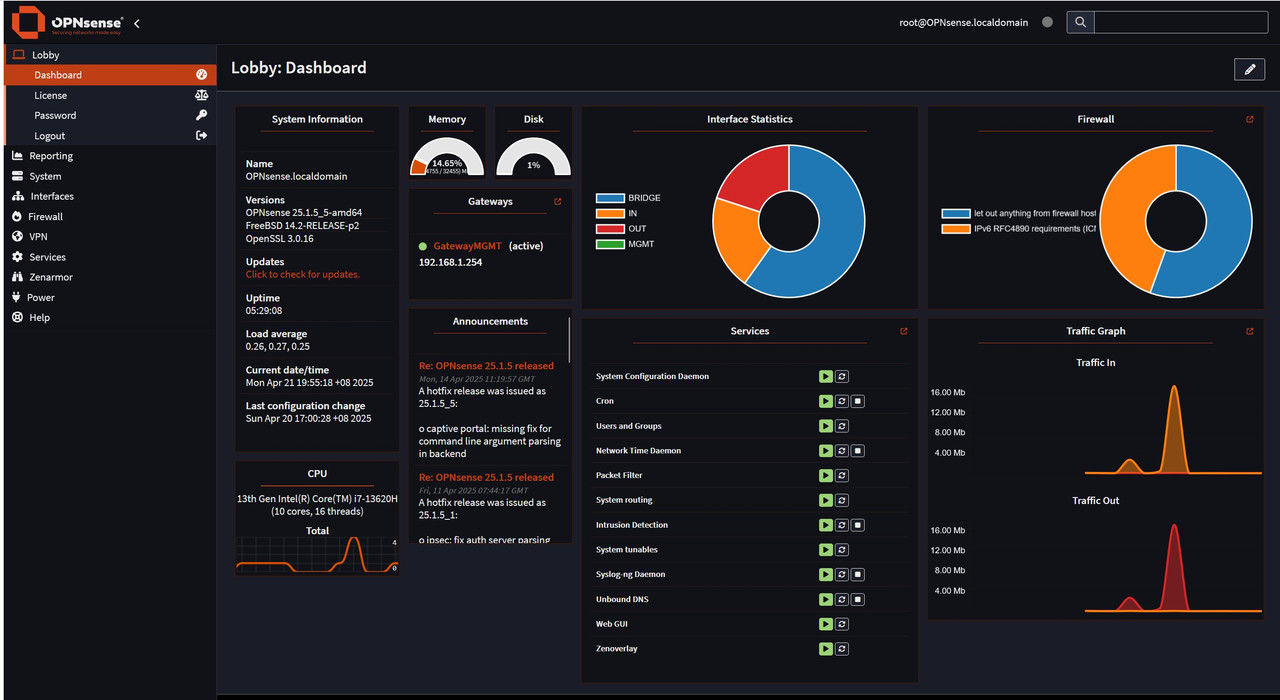
I bought a mini pc from Aliexpress with i7 processor (abit overkill) with 2 SfP 10g ports. Buy my own 32G RAM and use an old 512GB NVME PCIe together with 2 10g SFP adapters. Followed the You-tube video and managed to set up this Transparent Filtering Bridge. Thanks @xiaofan for the recommendation. Now I have a working firewall behind the Singtel ONR.

Total spending ~ SGD 590 (Mini PC) + 100 (32GB DDR5 Crucial SODIMM RAM) = SGD 690.
Delivery happen to be free and somehow, I was not charged for GST.

https://vi.aliexpress.com/item/1005...zHExGPCv&utparam-url=scene:search|query_from:


4.jpg

5.jpg


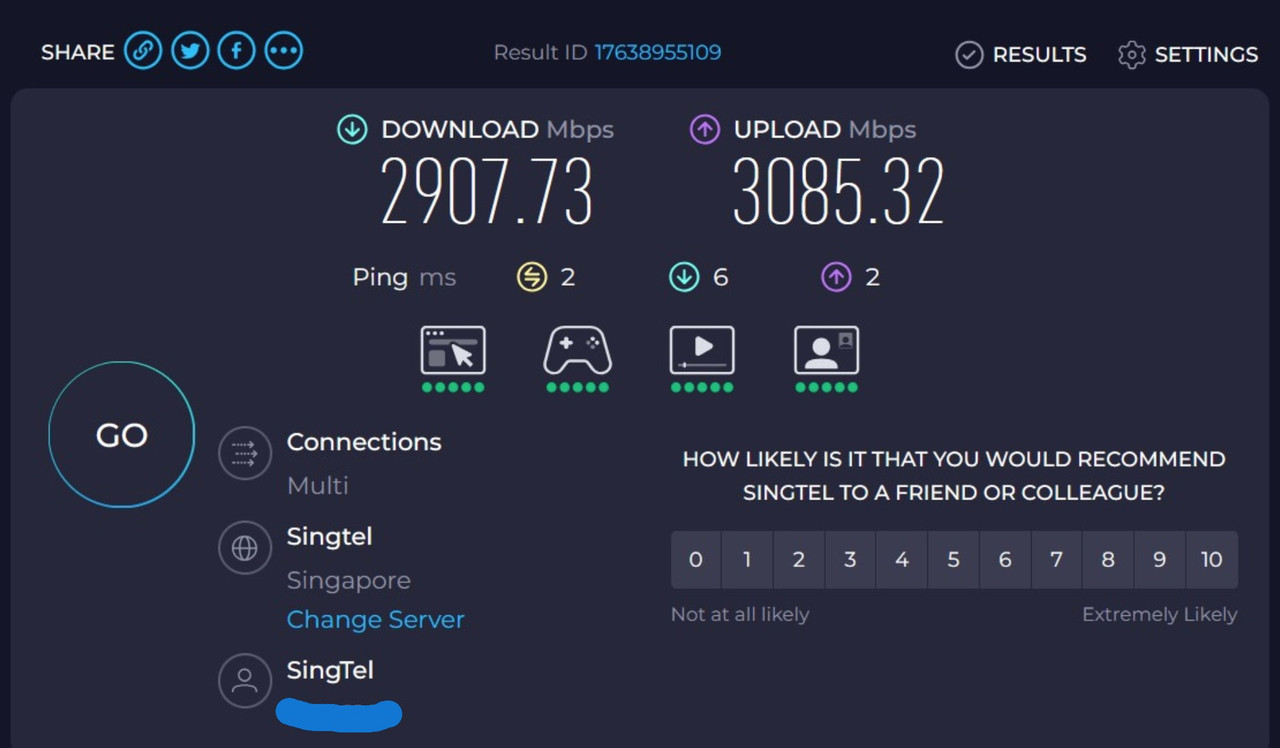
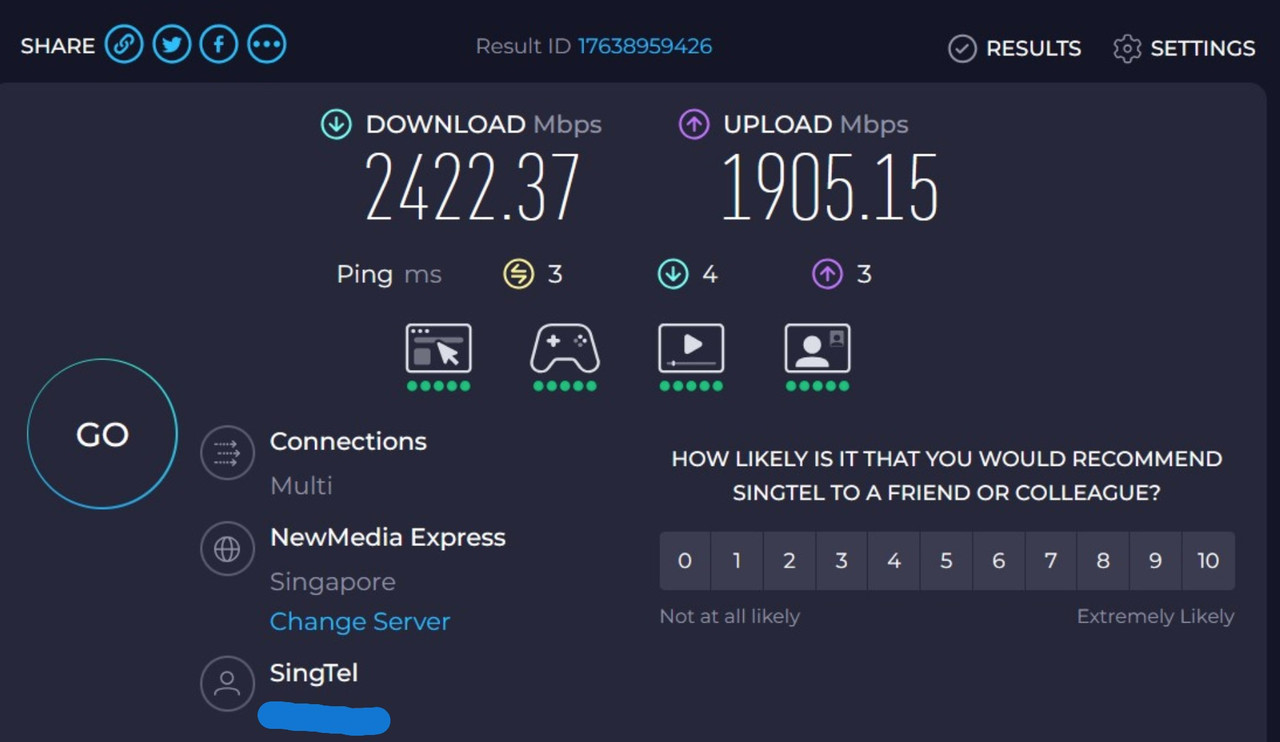
Below are some snapshots of the speedtest with the Firewall. Some speed degradation for my 5Gbps.
Screenshot-2025-04-22-110641.jpg

Screenshot-2025-04-22-110745.jpg
 

optiplex80

Junior Member
Joined
Jun 11, 2014
Messages
17
Reaction score
0

acpower2025

Junior Member
Joined
Feb 14, 2025
Messages
75
Reaction score
69
ONT (M1 6Gbps) -> Opnsense -> RT-BE88U

Hi all, i'm intending to get the barebone N305 as below from taobao and will place it between my ONT and Asus BE88U router. May i check from amazon which SPF+ module do i need to get ? 10G SFP+ RJ45 Copper Transceiver, 10GBase-T Module ?

https://item.taobao.com/item.htm?from=cart&id=804151060728&skuId=5470679468646&spm=a1z0d.6639537/202410.item.d804151060728.17bf7484wAIIfT


https://www.amazon.sg/Transceiver-1...9&hvtargid=pla-570612933593&gad_source=1&th=1

I bought mine from Shopee which I think is quite reasonable. Had been using on my Opnsense PC for a few months. Previously used it on my Asus AX89 router.
https://shopee.sg/10G-SFP-Module-10...r-Module-Silver-Metal-i.746008887.27600561714
 

xiaofan

High Supremacy Member
Joined
Sep 16, 2018
Messages
34,765
Reaction score
11,532
There were past reports of Starhub IPv6 problem with pfSense, which may well affect OPNsense as well. The following post in IPv6 thread may be a useful reference.

As of now, the best consumer ISP for IPv6 may actually be ViewQuest which gives free /56 Static IPv6 for VQ users upon request.

M1 and Starhub give only /64.

SingTel is rolling out native IPv6 as well and it is supposed to be /56. But somehow I could not really use more than /64 which may be related to the SingTel ONR.

Just sharing my experience, has dual-stacked my home previously except for Wireguard until now
Below are some of the backstories and what are the problems faces and the steps to overcome it. Solution might be janky, but it works for me now.

ISP: Starhub 5Gbps Plan
Router OS: OPNSense 25.1.8_1 (Running on Taobao N100 Mini PC bought 2 years back)

Write Up #1: Recently lost "IPv6" after dual-stacking my Wireguard, IPv6 was working fine when I whenever I check it until recently.
Block private networks: Checked
Block bogon networks: Unchecked
IPv6 Configuration Type: DHCPv6
Prefix delegation size: 64
Request prefix only: Unchecked
Send prefix hint: Unchecked

With this settings it is supposed to be working, but no matter what I am not able to get an IPv6.
Have restarted router and modem multiple times.
So did a packet inspection for WAN,
I did see Solicit, Advertise and Request... but no reply from Starhub issuing me IPv6.
So I thought Starhub was down, so I waited for another day, but nothing changes, still no IPv6

Afterwards I tried generating MAC Address and set it on my WAN Interface. Voila and it works, I am getting a IPv6 address. Problem solved.
Next, I tried removing the custom MAC address, I lost the IPv6 again. Then I generate another MAC address, this time it doesn't work anymore until I used back the first MAC address, I had generated previously
For now, I am leaving it this way. Leaving this here so that it might be able to help someone out as well as to see anyone has insight on this.


Write Up #2: Wireguard with IPv6
Backstory
Since setting up it as dual-stack last year, I have the following:
LAN Interface:
IPv6 Configuration Type: Track Interface
Parent Interface: WAN
Assign prefix ID: 0
Manual Configuration: [Checked] Allow manual adjustment of DHCPv6 and Router Advertisements

In Router Advertisements:
Router Advertisements: Stateless
Router Priority: Normal
Source Address: Automatic
DNS options:
Use the DNS configuration of the DHCPv6 server: Unchecked
Do not send any DNS configuration to clients: Unchecked

With this IPv6 is working perfectly as it should be able to browse public IPv6.
However, I do realised that if I set my DNS to the GUA IPv6 address of my Pihole, it will fail once I get a new prefix from starhub. So I looked into ULA, and given myself a ULA adding it in Interfaces/Virtual IPs:
Will explain why I didn't use the link local fe80 IP address later on.

Mode: IP Alias
Interface: LAN
Network / Address: [My generated LAN IPv6 ULA prefix]

Now with the this, all of my devices will get a 'Local' IPv6 address. ULA, my local IPv6 is fixed. Locally my IPv6 is working as it should.

Dual-Stacking Wireguard but... no public IPv6 access
1. Generate another ULA Network Address for my Wireguard
2. Everything work as it is, include DNS over IPv6, I realised I can't use the fe80 IP address to connect to my DNS server back home. Cause fe80 is link local, it doesn't support routing. Thus, the ULA address I have set up previously come into play.

Now the issue is without a Globally routed IPv6, I am not able to surf Public IPv6.
So, I am left with two choices. (Don't flame me for using NAT in IPv6, it's more like an experiment that I want to try, but also I am left with no other choice..

NAT-ing my Wireguard IPv6 Stateful vs Stateless
1. NAT66, so all my outgoing Wireguard to the public will use my WAN Interface IPv6. - This is tested to be working, but decided not to use it since it is stateful.
2. NPTv6 - This basically rewrites the prefix of my Wireguard ULA to my WAN IPv6 Prefix

NPTv6 rewriting the wrong address
Under firewall > NAT > NPTv6 Add a Rule
Interface: WAN
Internal IPv6 Prefix (source): [Internal Wireguard IPv6 Prefix]
External IPv6 Prefix: [Leave it Empty] (Since my public IPv6 prefix is dynamic, the idea to leave it empty is so that it will grab the prefix of my Global IPv6 prefix.
Track Interface: LAN

When I got to here... NPTv6 is working but no IPv6 public internet. Upon checking my logs...
NPTv6 is has replace my Wireguard IPV6 with the LAN IPv6 Prefix that I have created earlier.

But if i remove my Virtual IP temporarily, then add back my LAN ULA in Virtual IP. My Wireguard is able to surf IPv6 publicly.
However, feeling that this will not solve the problem, once reboot, I am afraid NPTv6 will pick my LAN prefix again.

Updating NPTv6 with Monit and Custom Script
Have to make use of Monit, OPNSense API and some custom script to update the NPTv6 settings.
Two scripts needed (At the bottom of this post)
1. check_ipv6_prefix.sh
2. update_nptv6.sh

In Services > Monit > Settings > Service Tests Settings (Add New):
Name: WAN_IPv6_Changes
Condition: status != 0
Action: Start

In Services > Monit > Settings > Service Settings (Add New):
Enable service checks: Ticked
Name: wan_ipv6_prefix_check
Type: Custom
Path: /path/to/check_ipv6_prefix.sh
Start: /path/to/update_nptv6.sh .
Test: WAN_IPv6_Changes (The Service Test Created Earlier)

If only Starhub gives us a prefix larger than /64
As of now this is the best I could think of to overcome this, it's janky, but it works for me for now. Do let me know if you have another solution. It would be good if Starhub don't just assign /64 IPv6 to us... then I could assign another IP range to another dummy interface and track that instead without conflicting with my Local ULA.

Scripts
Do review it before using it, not going to lie but made it up with the help of ChatGPT

check_ipv6_prefix.sh
https://pastebin.com/PJWg5aR9

update_nptv6.sh
https://pastebin.com/Scf88Ftp

 
Last edited:
Important Forum Advisory Note
This forum is moderated by volunteer moderators who will react only to members' feedback on posts. Moderators are not employees or representatives of HWZ Forums. Forum members and moderators are responsible for their own posts. Please refer to our Community Guidelines and Standards and Terms and Conditions for more information.
Top