
You are using an out of date browser. It may not display this or other websites correctly.
You should upgrade or use an alternative browser.
You should upgrade or use an alternative browser.
PC Power switch extension
- Thread starter Vanyel
- Start date
More options
Who Replied?
Shutterbox
Greater Supremacy Member
- Joined
- Nov 23, 2008
- Messages
- 82,858
- Reaction score
- 21,319
Which part of the casing can the cables route thru?
Last time still got a hole with rubber grommet at the back. Now it'll have?
Last time still got a hole with rubber grommet at the back. Now it'll have?
was thinking go thru the pcie casing slot cover *drill a holeWhich part of the casing can the cables route thru?
Last time still got a hole with rubber grommet at the back. Now it'll have?
Shutterbox
Greater Supremacy Member
- Joined
- Nov 23, 2008
- Messages
- 82,858
- Reaction score
- 21,319
was thinking go thru the pcie casing slot cover *drill a hole

Like the 2 holes with rubber.
Anyone use before?
Any possible issues with using this?

no issues aa I have been using it for years. very simple device. similar concept to Sipeed NanoKVM.
Read HWZ Forum Rules!

naked123
Supremacy Member
- Joined
- Feb 16, 2010
- Messages
- 7,655
- Reaction score
- 1,011
it's fine
im using one
but with splitter and reset button
i never connect LEDs cos they are super bright. also taped the connector up to prevent short.
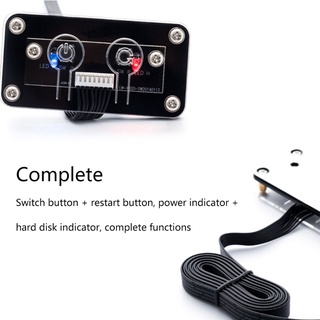
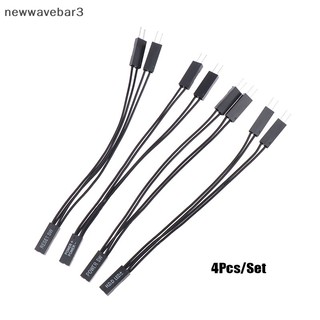
i swapped one of the pci covers to something below. still have to use pliers to make the vent bigger so cables can go thru
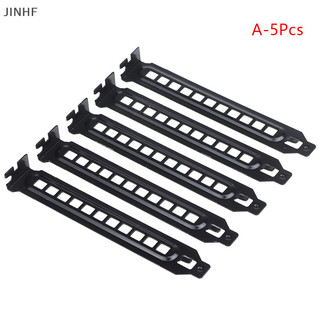
total around $10 on shopee
im using one
but with splitter and reset button
i never connect LEDs cos they are super bright. also taped the connector up to prevent short.
i swapped one of the pci covers to something below. still have to use pliers to make the vent bigger so cables can go thru
total around $10 on shopee

KleoZy
Supremacy Member
- Joined
- Jan 1, 2000
- Messages
- 5,825
- Reaction score
- 1,122
hmm.. are you on wired or wifi, if wired, can just use Wake Up On Lan and use your smartphone to turn on your PC.
or even use
1) PC remote started.. https://www.aliexpress.com/item/1005007391529628.html
2) Mobile App Wireless PC remote start .. https://www.aliexpress.com/item/1005004685040707.html
3) USB wireless PC remote start .. https://amzn.asia/d/eLos0hj
I find this neater (no wires extending out) plus you will be able to retain case button to start your pc.
or even use
1) PC remote started.. https://www.aliexpress.com/item/1005007391529628.html
2) Mobile App Wireless PC remote start .. https://www.aliexpress.com/item/1005004685040707.html
3) USB wireless PC remote start .. https://amzn.asia/d/eLos0hj
I find this neater (no wires extending out) plus you will be able to retain case button to start your pc.
Last edited:
naked123
Supremacy Member
- Joined
- Feb 16, 2010
- Messages
- 7,655
- Reaction score
- 1,011
should be getting from taobao, cheaper
now is just wondering which one is better


Shopee cheaper
The power/reset combo is around $4.5 on shopee
I kinda feel that 1 button placed on the tabletop to turn on and off is faster and more convenienthmm.. are you on wired or wifi, if wired, can just use Wake Up On Lan and use your smartphone to turn on your PC.
My 2 boys pc is on the floor and deep in under the table
Also the PC isnt turned off completely if use the wake on lan
Same exact model?Shopee cheaper
The power/reset combo is around $4.5 on shopee
Got link ma?
Generally made in china stuffs on shopee can all be found for cheaper over taobao because they are basically the same item

Rogue
Senior Member
- Joined
- Jan 1, 2000
- Messages
- 5,378
- Reaction score
- 122
Shoppee cheaper, both models shown.. Even more so due to $3 off voucher (not shown while browsing anon)
https://shopee.sg/search?keyword=pc power switch extension
https://shopee.sg/search?keyword=pc power switch extension
ya ur right~Shoppee cheaper, both models shown.. Even more so due to $3 off voucher (not shown while browsing anon)
https://shopee.sg/search?keyword=pc power switch extension
think for this case shopee cheaper due to shipping as value of items too low
taobao the switch is $4, the shipping is also $4
unless i have accumulated shipping then worthwhile for taobao

alamakazim
Supremacy Member
- Joined
- Feb 3, 2013
- Messages
- 8,134
- Reaction score
- 402
Don't even need to drill hole la... Sure can squeeze through some hole or sandwich it... Thin wires...
no space to add card for 1 of the PC, blocked by GPU~hmm.. are you on wired or wifi, if wired, can just use Wake Up On Lan and use your smartphone to turn on your PC.
or even use
1) PC remote started.. https://www.aliexpress.com/item/1005007391529628.html
2) Mobile App Wireless PC remote start .. https://www.aliexpress.com/item/1005004685040707.html
3) USB wireless PC remote start .. https://amzn.asia/d/eLos0hj
I find this neater (no wires extending out) plus you will be able to retain case button to start your pc.

Psycovirus
Senior Member
- Joined
- Jan 3, 2007
- Messages
- 1,789
- Reaction score
- 381
Got this Wireless Power button with the white box. About $15 last time. Link to product.
There are a few versions, some uses USB Power. This version I have does not. There's battery inside both the whitebox that is easily hidden behind the back panel and the power button. However, after using for 2 years, battery hasn't ran out yet. The white box also allows connection of PC case's power button so you can use either remote button or case button. Long press works too to force shutdown the PC.
If you're looking for small sleek version, this ain't it. this button is massive.

There are a few versions, some uses USB Power. This version I have does not. There's battery inside both the whitebox that is easily hidden behind the back panel and the power button. However, after using for 2 years, battery hasn't ran out yet. The white box also allows connection of PC case's power button so you can use either remote button or case button. Long press works too to force shutdown the PC.
If you're looking for small sleek version, this ain't it. this button is massive.
Last edited:

Koenig168
Arch-Supremacy Member
- Joined
- Nov 4, 2007
- Messages
- 10,090
- Reaction score
- 1,773
Got this Wireless Power button with the white box. About $15 last time. Link to product.
There are a few versions, some uses USB Power. This version I have does not. There's battery inside both the whitebox that is easily hidden behind the back panel and the power button. However, after using for 2 years, battery hasn't ran out yet. The white box also allows connection of PC case's power button so you can use either remote button or case button. Long press works too to force shutdown the PC.
If you're looking for small sleek version, this ain't it. this button is massive.
I thought of getting this some time back. Love the Evangelion theme.
Psycovirus
Senior Member
- Joined
- Jan 3, 2007
- Messages
- 1,789
- Reaction score
- 381

I haven't opened before actually. I got curious and checked. It's probably a circuit board from some remote... with wires soldered onto the button on the board and connected to the large nuclear button. the 12V 23A battery was just tapped onto it. such a ghetto way of doing things. Luckily, the 23A batteries are pretty cheap to replace.
This one machiam nuclear button
KleoZy
Supremacy Member
- Joined
- Jan 1, 2000
- Messages
- 5,825
- Reaction score
- 1,122
Got this Wireless Power button with the white box. About $15 last time. Link to product.
There are a few versions, some uses USB Power. This version I have does not. There's battery inside both the whitebox that is easily hidden behind the back panel and the power button. However, after using for 2 years, battery hasn't ran out yet. The white box also allows connection of PC case's power button so you can use either remote button or case button. Long press works too to force shutdown the PC.
If you're looking for small sleek version, this ain't it. this button is massive.
This is more practical, no wires.. just imagine you move your PC case and forget about the wires.. a simple tug, accident will happened. Else this is wireless.. GOOD. I like it. thanks for sharing @Psycovirus

Important Forum Advisory Note
This forum is moderated by volunteer moderators who will react only to members' feedback on posts. Moderators are not employees or representatives of HWZ Forums. Forum members and moderators are responsible for their own posts.
Please refer to our Community Guidelines and Standards and Terms and Conditions for more information.

