
Pi-Hole Discussion Thread

Jurong640

High Supremacy Member
Joined
Mar 22, 2011
Messages
43,808
Reaction score
17,811
Got another question.

I've set-up another secondary pi-hole with my Windows 11 mini PC. Installed using Windows Subsystem for Linux 2 (WSL2). I installed Pi-Hole inside Ubuntu Terminal and ran though the normal set-up process for pi-hole.

Then, I set up my pi-hole on webUI. However, I encountered an issue. On the top left hand corner, it states " DNS Server Failure".

Doing a diagnosis on ports in use, it says
[x] udp: 10.255.255.254:53 is in use by (https://doc.pi-hole.net/main/prerequisites/#ports)
Also noticed, there is no ipv6 IP
Anyone can help me on this? Thank you
 

xiaofan

High Supremacy Member
Joined
Sep 16, 2018
Messages
35,514
Reaction score
11,926
Got another question.

I've set-up another secondary pi-hole with my Windows 11 mini PC. Installed using Windows Subsystem for Linux 2 (WSL2). I installed Pi-Hole inside Ubuntu Terminal and ran though the normal set-up process for pi-hole.

Then, I set up my pi-hole on webUI. However, I encountered an issue. On the top left hand corner, it states " DNS Server Failure".

Doing a diagnosis on ports in use, it says

Also noticed, there is no ipv6 IP
Anyone can help me on this? Thank you
No idea with the issue but I will say no point to use Windows WSL for this use case.

Maybe I am just biased against WSL myself...
 

sgcarousell

Member
Joined
Feb 17, 2017
Messages
445
Reaction score
238
Got another question.

I've set-up another secondary pi-hole with my Windows 11 mini PC. Installed using Windows Subsystem for Linux 2 (WSL2). I installed Pi-Hole inside Ubuntu Terminal and ran though the normal set-up process for pi-hole.

Then, I set up my pi-hole on webUI. However, I encountered an issue. On the top left hand corner, it states " DNS Server Failure".

Doing a diagnosis on ports in use, it says

Also noticed, there is no ipv6 IP
Anyone can help me on this? Thank you
Does ur ubuntu has internet access if no u have to check wsl config? Try change the port to#5335 or anything but the default port. For ipv6, the ubuntu i think may not have ipv6 enable, check it using ubuntu cli n u install/enable it from there, u can google for instructions

Hope this can help u
 

Jurong640

High Supremacy Member
Joined
Mar 22, 2011
Messages
43,808
Reaction score
17,811
Does ur ubuntu has internet access if no u have to check wsl config? Try change the port to#5335 or anything but the default port. For ipv6, the ubuntu i think may not have ipv6 enable, check it using ubuntu cli n u install/enable it from there, u can google for instructions

Hope this can help u
Thanks. I tried all ways, looking online, and using Google gemini for help with config and troubleshooting, DNS, IP settings, editing IP, but still can't. Tried uninstalling and reinstalling again on Ubuntu wsl. Still does not work. Tried for half a day today, gave up.

Probably I will need to use another method other than wsl Ubuntu. Any recommendations? Docker?
 

xiaofan

High Supremacy Member
Joined
Sep 16, 2018
Messages
35,514
Reaction score
11,926
Thanks. I tried all ways, looking online, and using Google gemini for help with config and troubleshooting, DNS, IP settings, editing IP, but still can't. Tried uninstalling and reinstalling again on Ubuntu wsl. Still does not work. Tried for half a day today, gave up.

Probably I will need to use another method other than wsl Ubuntu. Any recommendations? Docker?

Just ditch Windows. No point using WSL or Docker under Windows to deploy Pi-hole (or Adguard Home).

I thought you had a working setup with the Orange Pi aleady. Why are you looking at Windows?

If this is a cheap Windows machine, you can always install Linux and then deploy Docker and Pi-hole. Or you can even deploy virtualization platform like Proxmox PVE and then use the LxC containers.

I use Intel N100 mini PCs to do that -- running OpenWRT virtual router and LxC containers and Linux/BSD VMs.
 

Jurong640

High Supremacy Member
Joined
Mar 22, 2011
Messages
43,808
Reaction score
17,811
Just ditch Windows. No point using WSL or Docker under Windows to deploy Pi-hole (or Adguard Home).

I thought you had a working setup with the Orange Pi aleady. Why are you looking at Windows?

If this is a cheap Windows machine, you can always install Linux and then deploy Docker and Pi-hole. Or you can even deploy virtualization platform like Proxmox PVE and then use the LxC containers.

I use Intel N100 mini PCs to do that -- running OpenWRT virtual router and LxC containers and Linux/BSD VMs.
I am looking for a secondary pihole, for redundancy in case my primary pihole goes down.

I was trying out using my Windows 11 N100 mini PC, it's a pain to deploy the pihole on that yesterday. Eventually, gave up. So I'll rely on my primary pi-hole for now and make sure it does not go down.

Probably, I'll get another cheap sbc like Orangepi Zero2W, to test it out. I have 2 currently at home for my other projects.
 

TanKianW

Supremacy Member
Joined
Apr 21, 2005
Messages
6,875
Reaction score
3,574
I am looking for a secondary pihole, for redundancy in case my primary pihole goes down.

I was trying out using my Windows 11 N100 mini PC, it's a pain to deploy the pihole on that yesterday. Eventually, gave up. So I'll rely on my primary pi-hole for now and make sure it does not go down.

Probably, I'll get another cheap sbc like Orangepi Zero2W, to test it out. I have 2 currently at home for my other projects.

Install proxmox or any hypervisor platform on your mini-pc and run pi-hole containers on it. IMO N100 too weak for Windows 11 anyway. WSL can get the job done, just not as str forward. You can check out Network Chuck YT channel if you wanna go into setting up WSL for your use case.

Just set a few external DNS in your router or devices if you want redundancy. Day to day use, I don't recommend running your own DNS server unless you running a HA setup or you running multiple servers at home. The inconvenience to troubleshoot when there is any downtimes or disconnection is not worth the hassle unless you want to experiment or know what you are doing.

Want to test, play around, experiment, just start with a slightly more powerful mini-pc (recommend multi-core AMD Zen 3 and above with multiple NICs) running hypervisor to build your homelab. So you won't start breaking things up and experiment with your heart's content eveb when anything screw up.​
 
Last edited:

xiaofan

High Supremacy Member
Joined
Sep 16, 2018
Messages
35,514
Reaction score
11,926
Install proxmox or any hypervisor platform on your mini-pc and run pi-hole containers on it. IMO N100 too weak for Windows 11 anyway.​

Or just dual boot if really want to keep Windows.

I have five Intel N100 mini PCs, three with dual or quad network adapters and I use them for my "Home Lab" setup running Proxmox PVE.

Then I have two Chuwi Intel N100 Mini PCs bought from Shopee at around S$150. I keep the Windows 11 installation (upgraded to Windows 11 24H2) and they are okay as a Windows testing machine (not a daily driver). I then add an 2.5 inch 256GB SATA SSD to both of them to install Linux (Ubuntu and Fedora respectively) as a Linux testing machine. Of course they run Linux much more smooth than Windows 11.
 

Jurong640

High Supremacy Member
Joined
Mar 22, 2011
Messages
43,808
Reaction score
17,811
Or just dual boot if really want to keep Windows.

I have five Intel N100 mini PCs, three with dual or quad network adapters and I use them for my "Home Lab" setup running Proxmox PVE.

Then I have two Chuwi Intel N100 Mini PCs bought from Shopee at around S$150. I keep the Windows 11 installation (upgraded to Windows 11 24H2) and they are okay as a Windows testing machine (not a daily driver). I then add an 2.5 inch 256GB SATA SSD to both of them to install Linux (Ubuntu and Fedora respectively) as a Linux testing machine. Of course they run Linux much more smooth than Windows 11.
Oh. yeah, i'm using that Chuwi Intel N100 minipc also bought from shopee. I'm running some programs that uses windows. Since I'm running it 24/7 and uses little power draw, was thinking to use it for second pi-hole. Currently, also on windows 11 24H2. It's a not bad machine.

I will read more about dual booting for the mini PC. Thank you. Otherwise, most probably, secondary DNS server I'll use Adguard (but it defeats the purpose of filtering DNS queries on cloud).
 

Jurong640

High Supremacy Member
Joined
Mar 22, 2011
Messages
43,808
Reaction score
17,811
Install proxmox or any hypervisor platform on your mini-pc and run pi-hole containers on it. IMO N100 too weak for Windows 11 anyway. WSL can get the job done, just not as str forward. You can check out Network Chuck YT channel if you wanna go into setting up WSL for your use case.

Just set a few external DNS in your router or devices if you want redundancy. Day to day use, I don't recommend running your own DNS server unless you running a HA setup or you running multiple servers at home. The inconvenience to troubleshoot when there is any downtimes or disconnection is not worth the hassle unless you want to experiment or know what you are doing.

Want to test, play around, experiment, just start with a slightly more powerful mini-pc (recommend multi-core AMD Zen 3 and above with multiple NICs) running hypervisor to build your homelab. So you won't start breaking things up and experiment with your heart's content eveb when anything screw up.​
thank you. i will check it out the YT channel. 👍🏼
 

Jurong640

High Supremacy Member
Joined
Mar 22, 2011
Messages
43,808
Reaction score
17,811
Another update again, Core v6.0.4FTL v6.0.2. After updating, cannot access webgui.
then I found out have to access using HTTP:// instead of HTTPS://
 

Jurong640

High Supremacy Member
Joined
Mar 22, 2011
Messages
43,808
Reaction score
17,811
Now I learn that setting up a secondary pi-hole is not really as redundancy aspect but not to a full extend. I have this understanding that the secondary Pi Hole is as a redundancy purposes and that the router secondary DNS is for a fail back in case the first DNS fails.

Last night before sleep, I tried to configure a secondary pi-hole on my other Orangepi Zero2W. I set my secondary DNS address on my router (TP-Link BE805) to my secondary Pi Hole IP address. This morning, I went to check the query result, and had some 40 queries blocked. Thereafter, I went to check my primary pi hole, don't see any downtime as it's running healthy without any load.

This got me thinking that, the router understanding of secondary DNS might differ from what we think. Some may say it's for fail over incase the first DNS fails. It might also be distribution of DNS queries. I checked with Google Gemini with advanced reasoning, they said, some routers understanding of secondary DNS might differ, which some act as fail over, while some distribute its load.

From Google Gemini reasoning: Why Routers Behave This Way (and why it's often not purely redundancy)
* Simplicity of Implementation: For router manufacturers, implementing a simple distribution or parallel querying method is often easier to code and less resource-intensive than a robust failover system with constant health checks of the primary DNS server.
* Perceived Speed (Though Debatable): The idea (often flawed in practice) is that distributing queries might, in some scenarios, potentially speed up DNS resolution.
* Marketing/Feature List Checkbox: Having a "Secondary DNS" option looks good on a feature list, even if its implementation is not purely for redundancy in the way a network administrator might expect in a larger enterprise environment.
Specifically in your Pi-hole Setup
* Router is likely distributing queries: The most probable explanation is that your router is simply distributing some portion of the DNS queries to the secondary DNS server (your Orange Pi Zero 2W Pi-hole), even when the primary Pi-hole is working perfectly.

Google Gemini reasoning on why queries might go to my secondary Pi hole:
Most home routers, when you configure both a primary and secondary DNS server, do not operate in a strict "primary fails, then use secondary" failover mode. Instead, they often employ one of these strategies:
* Distribution or Load Sharing (Simple Form): Routers might distribute DNS queries between the primary and secondary DNS servers, even when the primary is perfectly healthy. This is often done in a simple round-robin fashion or based on very basic algorithms. The idea (though not always practically significant in home networks) is to potentially spread the load.
* Parallel Querying (Less Common in Home Routers but possible): In some more advanced setups (less common in typical home routers), the router might send a DNS query to both the primary and secondary DNS servers simultaneously. It then uses the response that arrives first. Again, the intention (in theory) is to speed up DNS resolution, though in practice, it can sometimes add overhead.
* Fallback and Initial Use: The router will definitely use the secondary DNS if the primary becomes unreachable. However, it might also use the secondary DNS even when the primary is reachable, particularly when initially establishing connections or for certain types of queries. It's not always a purely sequential "try primary, if fail, try secondary" logic.

What do you guys think?
 

TanKianW

Supremacy Member
Joined
Apr 21, 2005
Messages
6,875
Reaction score
3,574
Now I learn that setting up a secondary pi-hole is not really as redundancy aspect but not to a full extend. I have this understanding that the secondary Pi Hole is as a redundancy purposes and that the router secondary DNS is for a fail back in case the first DNS fails.

Last night before sleep, I tried to configure a secondary pi-hole on my other Orangepi Zero2W. I set my secondary DNS address on my router (TP-Link BE805) to my secondary Pi Hole IP address. This morning, I went to check the query result, and had some 40 queries blocked. Thereafter, I went to check my primary pi hole, don't see any downtime as it's running healthy without any load.

This got me thinking that, the router understanding of secondary DNS might differ from what we think. Some may say it's for fail over incase the first DNS fails. It might also be distribution of DNS queries. I checked with Google Gemini with advanced reasoning, they said, some routers understanding of secondary DNS might differ, which some act as fail over, while some distribute its load.


What do you guys think?

Upgrade your consumer grade router.
 

Jurong640

High Supremacy Member
Joined
Mar 22, 2011
Messages
43,808
Reaction score
17,811
You need to VPN back home to securely connect to your pihole. Definitely don’t expose your pihole to the world by opening port 53. Recommend checking out https://tailscale.com/kb/1114/pi-hole

High level steps using Tailscale:

1. Expose pihole to Tailscale as its own device

2. Set the pihole addresses ipv4 and ipv6 as the tailnet’s DNS address

3. Enable the Override local DNS

4. Connect mobile device to tailnet


bonus: use MagicDNS and Tailscale cert to provision certificate for your pihole admin UI!
thanks bro. Managed to get it up and able to access pihole admin UI from my phone with mobile data network.

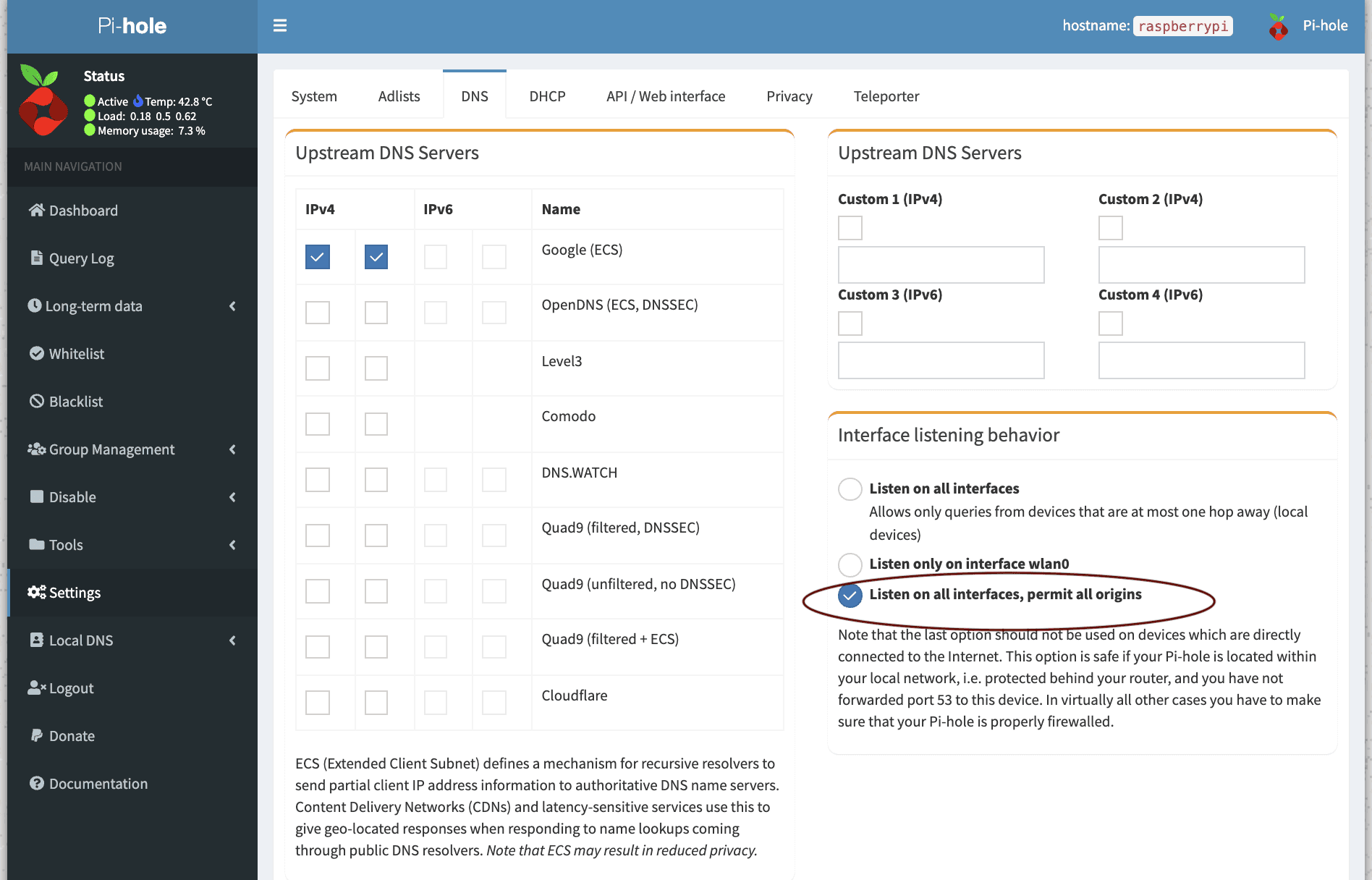
Noticed during the set-up, it mentioned to ensure pi-hole is properly firewalled after letting pi-hole "listen on all interfaces, permits all origins:
image

How do i ensure pi hole is firewalled? thank you
 

xiaofan

High Supremacy Member
Joined
Sep 16, 2018
Messages
35,514
Reaction score
11,926
thanks bro. Managed to get it up and able to access pihole admin UI from my phone with mobile data network.

Noticed during the set-up, it mentioned to ensure pi-hole is properly firewalled after letting pi-hole "listen on all interfaces, permits all origins:
image

How do i ensure pi hole is firewalled? thank you

You should be fine as Pi-hole is behind your main router (which has Firewall function).

BTW, what is your main router? After Pi-hole, you may want to take a look at pfSense, as hinted by brother TanKianW when he mentions the following.

Upgrade your consumer grade router.
 

Jurong640

High Supremacy Member
Joined
Mar 22, 2011
Messages
43,808
Reaction score
17,811
You should be fine as Pi-hole is behind your main router (which has Firewall function).

BTW, what is your main router? After Pi-hole, you may want to take a look at pfSense, as hinted by brother TanKianW when he mentions the following.
thank you. My pihole is behind my main router. My main router is the Tp-Link BE805. I only have one which can cover the whole house..

Wow. If I'm able to remote manage my pihole outside, means I'm also able to remote manage my tplink router?
 

xiaofan

High Supremacy Member
Joined
Sep 16, 2018
Messages
35,514
Reaction score
11,926
thank you. My pihole is behind my main router. My main router is the Tp-Link BE805. I only have one which can cover the whole house..

Wow. If I'm able to remote manage my pihole outside, means I'm also able to remote manage my tplink router?

Yes, that is the case.

For my main SingTel 5Gbps plan, I use OpenWRT as the main router running on an Intel N100 mini PC using Proxmox PVE 8. Then I install Wireguard VPN server and Tailscale on my OpenWRT main router for remote management. I can use either mobile phone or laptop when I am outside to access my home network.

Last time when I used Asus RT-AX86U as a main router, I use Asus Instant Guard for remote management of the Asus. Now it is just an AP after the OpenWRT router.

For my Starhub 5Gbps plan (the other site used by the tenants), I am lazy and just use TP-Link HB710 (S$192 from Starhub) as the main router and then use TP-Link Aginet app on my mobile phone to check the status of the HB710. It is less secure than using Wireguard VPN or Tailscale, but HB710 does not support Wireguard or TailScale.

Your Archer BE805 actually supports Wireguard VPN server. But you can also use Wireguard/Tailscale on your Orange Pi boards.
 
Last edited:

ShrmnK

Junior Member
Joined
Oct 9, 2011
Messages
81
Reaction score
83
thank you. My pihole is behind my main router. My main router is the Tp-Link BE805. I only have one which can cover the whole house..

Wow. If I'm able to remote manage my pihole outside, means I'm also able to remote manage my tplink router?
Depends on how you routed your tailscale network. If your pihole device is set to route the local subnet then you can probably access your other devices, including your tplink router, through the same entrypoint. Also the same case if you set your pihole device as the exit node.

Word of caution - pfsense, openwrt software and the other routers mentioned by xiaofan and others are a deep rabbit hole! Gauge how much you can disturb your home network and other users of your network before you start causing trouble ;)
 

uncle_josh

Master Member
Joined
Jun 16, 2018
Messages
3,095
Reaction score
757
Depends on how you routed your tailscale network. If your pihole device is set to route the local subnet then you can probably access your other devices, including your tplink router, through the same entrypoint. Also the same case if you set your pihole device as the exit node.

Word of caution - pfsense, openwrt software and the other routers mentioned by xiaofan and others are a deep rabbit hole! Gauge how much you can disturb your home network and other users of your network before you start causing trouble ;)
well, no venture no gain/no lost.
 
Important Forum Advisory Note
This forum is moderated by volunteer moderators who will react only to members' feedback on posts. Moderators are not employees or representatives of HWZ Forums. Forum members and moderators are responsible for their own posts. Please refer to our Community Guidelines and Standards and Terms and Conditions for more information.
Top