Pimp your desk 2023!

Solidus_GZ

Master Member
Joined
Nov 8, 2008
Messages
4,078
Reaction score
620
S2MkDZI.jpeg

Gxfc everyone
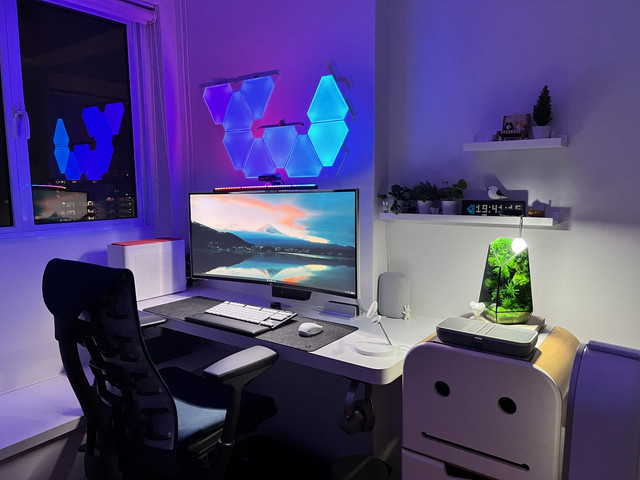
I will like to see what will be your work and play desk like. I start sharing mine. Mine is 2018 build so some items already out of date

Screen: S2721DGF & P2418HT
Screen Arm: ULTi Flex Pro Dual Monitor Arm with USB 3.0 & Type-C Ports -
Laptop arm: arm steath single
Docking station: Targus USB 3.0 SuperSpeed Dual Video Docking Station with Power, PC/Mac/MS Surface (except RT)/Windows 8-Tablet/Netbook Compatible (ACP71USZ)
Speaker: Katana 1 with Sub
Table: Omnidesk Lite
Keyboard: G 915
Mouse: Asus mouse gladius 2 wireless
Wired Headphones: Astro A10
Wireless HP: SteelSeries Arctis Nova 7P Wireless
Controller: X-Box controller
Desktop:
H310
i7-8700
Gigabyte Eagle 3070
2 X 16 GB 2666MHZ Ram
Please feel free to pimp your desk!
 
Last edited:

Psycovirus

Senior Member
Joined
Jan 3, 2007
Messages
1,789
Reaction score
381
That is a nice setup. +1 for Vertical Monitor. great for reading long websites.
Does your side peg board where you placed your xbox controller also goes up and down with your desk?
That is an interesting use. Don't say outdated la, still pretty modern! Happy New Year!
 

TanKianW

Supremacy Member
Joined
Apr 21, 2005
Messages
6,896
Reaction score
3,599
I will not call mine a pimped-up desk. Probably more fitting as a cluttered version of a "man-cave" or "home-lab" setup for work production and leisure. I will likely shift my 3D printer into the CD shelter/store room once I fully commission it. I will also be consolidating/migrating my hypervisor and storage servers onto a custom wall-mounted rack in the next 2-3 years. I run several POC for my work, coding/programming, tech consulting and training, server/cloud/website hosting, VMs, K8S + containers, testing, VR training development and gaming, network designs and architecture, ML/AI, etc.

Overview of my "cluttered" desk in 2023:
PJ8fm4S.jpg


Tj0q2M2.jpg

Top left: Hypervisor production system: XCP-ng+XOA system, 5950X, Asrock rack X570 m-itx, 128GB ECC Mem, GTX1660S transcoder (running multiple production and test operating system/servers/POCs)
Top right: TrueNAS Core storage system, Intel Xeon E3-1245v5, Asrock rack mobo, 4x 8TB + 4x 2TB, 32GB ECC Mem, 2x 10G SFP+ Intel NIC
Middle left: Macbook Pro 15 inch with stand + Work Laptop from Lenovo with Cooler Master laptop stand
Desktop: Filco Majestouch kb, Logitech G903 gaming mouse, BlueYeti Nano Mic, my good old KRK Rokit 5 studio monitor, Ipad Air 5, Epson L6179 AIO printer, VR headset Valve Index & controller, 8bitDo Ultimate controller for emulated games, ATEN 4-system USB3.0 switch hub, LG 27" IPS panel with USB-C connected to my work laptop and desktop only since my servers are all headless.
Headphones: HD650, Sennheiser Game ONE headset + Creative SB X4.

zqBVfaG.jpg

Original Prusa i3 MK3S+ handbuild from kit with original enclosure. Will fully commission after passing all the build quality tests. Mainly printing PAL and PETG.

DjMmjCK.jpg

Below desk left: Work and Leisure desktop: 5900X, Asus X570-F board, 2x 10G SPF+ NIC, RTX3080ti, 2x 16GB Mem.
Centre: APC UPS 1600VA
Right: TrueNAS Core storage system, 8700T, Asrock rack mobo, 8x 8TB, 32GB Mem, 2x 10G SFP+ NIC, SONOS Five for casual music and radio listening.
Top: MikroTik CRS 309 10G SFP+ switch + CRS 328 10G/1G switch

8PMwQiU.jpg

Upstream network setup:
Firewall/router: Bare-metal pfSense+ 22.05, Intel Xeon E3-1240L, 2x 8GB ECC Mem, Chelsio 2x 10G SFP+ NIC + onboard 2x 1GbE Intel NIC (double as reverse proxy server and VPN server)
Core switch: 12 port 10GbE MikroTik CRS 312
APs: 2x Ruckus R500 on Unleashed (crossing 9 years)
Mini server (not shown): Intel ZX-01 mini-pc running Home Assistant OS
ISP: M1 + MyRepublic + Mobile M1 4G multi-WAN setup, running cross fail-over and load-balancing.
UPS: All connected to 650VA APC UPS​
 
Last edited:

Solidus_GZ

Master Member
Joined
Nov 8, 2008
Messages
4,078
Reaction score
620
That is a nice setup. +1 for Vertical Monitor. great for reading long websites.
Does your side peg board where you placed your xbox controller also goes up and down with your desk?
That is an interesting use. Don't say outdated la, still pretty modern! Happy New Year!
Yes bro the peg board is attach to table top, I use it to hang cable as well and headphones.
The vertical screen is touch screen as well it help me to see the contract and vet documents. Or when I'm playing game, I can Google the walk Tru as well lol
 

Phen8210

High Supremacy Member
Joined
Jul 29, 2011
Messages
29,028
Reaction score
8,284
I will not call mine a pimped-up desk. Probably more fitting as a cluttered version of a "man-cave" or "home-lab" setup for work production and leisure. I will likely shift my 3D printer into the CD shelter/store room once I fully commission it. I will also be consolidating/migrating my hypervisor and storage servers onto a custom wall-mounted rack in the next 2-3 years. I run several POC for my work, coding/programming, tech consulting and training, server/cloud/website hosting, VMs, K8S + containers, testing, VR training development and gaming, network designs and architecture, ML/AI, etc.

Overview of my "cluttered" desk in 2023:
hyXJfdz.jpg


Tj0q2M2.jpg

Top left: Hypervisor production system: XCP-ng+XOA system, 5950X, Asrock rack X570 m-itx, 128GB ECC Mem, GTX1660S transcoder (running multiple production and test operating system/servers/POCs)
Top right: TrueNAS Core storage system, Intel Xeon E3-1245v5, Asrock rack mobo, 4x 8TB + 4x 2TB, 32GB ECC Mem, 2x 10G SFP+ Intel NIC
Middle left: Macbook Pro 15 inch with stand + Work Laptop from Lenovo with Cooler Master laptop stand
Desktop: Filco Majestouch kb, Logitech G903 gaming mouse, BlueYeti Nano Mic, my good old KRK Rokit 5 studio monitor, Ipad Air 5, Epson L6179 AIO printer, VR headset Valve Index & controller, 8bitDo Ultimate controller for emulated games, ATEN 4-system USB3.0 switch hub, LG 27" IPS panel with USB-C connected to my work laptop and desktop only since my servers are all headless.
Headphones: HD650, Sennheiser Game ONE headset + Creative SB X4.

zqBVfaG.jpg

Original Prusa i3 MK3S+ handbuild from kit with original enclosure. Will fully commission after passing all the build quality tests. Mainly printing PAL and PETG.

DjMmjCK.jpg

Below desk left: Work and Leisure desktop: 5900X, Asus X570-F board, 2x 10G SPF+ NIC, RTX3080ti, 2x 16GB Mem.
Centre: APC UPS 1600VA
Right: TrueNAS Core storage system, 8700T, Asrock rack mobo, 8x 8TB, 32GB Mem, 2x 10G SFP+ NIC, SONOS Five for casual music and radio listening.
Top: MikroTik CRS 309 10G SFP+ switch + CRS 328 10G/1G switch

8PMwQiU.jpg

Upstream network setup:
Firewall/router: Bare-metal pfSense+ 22.05, Intel Xeon E3-1240L, 2x 8GB ECC Mem, Chelsio 2x 10G SFP+ NIC + onboard 2x 1GbE Intel NIC (double as reverse proxy server and VPN server)
Core switch: 12 port 10GbE MikroTik CRS 312
APs: 2x Ruckus R500 on Unleashed (crossing 9 years)
Mini server (not shown): Intel ZX-01 mini-pc running Home Assistant OS
ISP: M1 + MyRepublic + Mobile M1 4G multi-WAN setup, running cross fail-over and load-balancing.
UPS: All connected to 650VA APC UPS​

For some reason, I feel triggered when I saw your monitor and speakers severely misaligned 🤭, and like everything is so close too.

The keyboard cover is pretty sweet though
 

royfrosty

High Supremacy Member
Joined
Jul 23, 2009
Messages
27,727
Reaction score
1,553
Nice thread start. I have been using my Omnidesk 2018 and my set up do change through the years.

However i find the Omnidesk 2018 is kinda wobble whenever i type or move the mouse. And it gets annoying when the monitor wobble together with it.

Any of you using any kind of desk that able to recommend? Be it sit and stand kind of desk or normal desk is fine, so long it solved the above issue.
 

Psycovirus

Senior Member
Joined
Jan 3, 2007
Messages
1,789
Reaction score
381
Yes bro the peg board is attach to table top, I use it to hang cable as well and headphones.
The vertical screen is touch screen as well it help me to see the contract and vet documents. Or when I'm playing game, I can Google the walk Tru as well lol
I have a similar 27" Vertical Monitor on my side which I use for Discord and Walkthroughs. It is not a touch screen though.
Nice thread start. I have been using my Omnidesk 2018 and my set up do change through the years.

However i find the Omnidesk 2018 is kinda wobble whenever i type or move the mouse. And it gets annoying when the monitor wobble together with it.

Any of you using any kind of desk that able to recommend? Be it sit and stand kind of desk or normal desk is fine, so long it solved the above issue.
My current desk is just some cheap $150 wooden old school desk from LCF.com.sg. Nothing fancy. It takes on all the weight and doesn't wobble. Been using it for 7 years and counting.

Past 3 years, I haven't travel for vacation thus have some extra funds to upgrade my Monitor, Speakers, Amp, Subwoofer, Headphones and also get a PS5.

My desk don't have bling LEDs or decorations, just cluttered with equipment.
5rdU6wW.jpg

ScreensLG C2 42"Vertical Dell 27"
PCR7 5800x3DRX 6900 XT
ConsolePS5Switch
SpeakersELAC Uni-Fi 2.0 UB52Starksound SW-10 Subwoofer (below table)
Dac AmpsSVS Prime Wireless Soundbase ProTopping D50s / A50s (Headphone)
Headphones/MiscSennheiser HD800sCat

Love the musicality of these ELAC UB52s! It's rather big for desktop use... Taking up too much space but eh, nothing else I've listened impressed me as much as these ELACs.
 

Solidus_GZ

Master Member
Joined
Nov 8, 2008
Messages
4,078
Reaction score
620
Nice thread start. I have been using my Omnidesk 2018 and my set up do change through the years.

However i find the Omnidesk 2018 is kinda wobble whenever i type or move the mouse. And it gets annoying when the monitor wobble together with it.

Any of you using any kind of desk that able to recommend? Be it sit and stand kind of desk or normal desk is fine, so long it solved the above issue.
Actually Omni desk warranty not bad, last 2 year my motor spoil, they come and replace the whole leg, then I realized their guy over drill the screw it penerate tru my desktop
Then they come down to replace the table top
In the end I got a brand new table lol.
The leg are still working well but I will want to replace with a solid table top in future
 

trenzterra

Arch-Supremacy Member
Joined
Sep 18, 2002
Messages
20,628
Reaction score
516
q57Yp23.jpg


Let me lower the standards for everyone lol.

Under table

Case: Fractal Design Define 7XL. Got it because I still have 3 HDDs and it's hard to find cases which fit multiple HDDs these days. Also too lazy to do proper cable management so a big case is easier to wire things up. (Please ignore the RT-AX86U box -- saving this router which I got from Carousell recently for my new home).

Rig specs are: 5800X, X570S Aorus Master, Arctic Liquid Freezer II AIO, 32GB RAM, 256GB Crucial m500 SATA, 512GB Samsung 850 EVO SATA, 1TB ADATA SX8200 Pro PCI-E 3.0 NVMe, 3TB Toshiba, 8TB Toshiba X300, 10TB Toshiba X300

Others: Random floor mat; leg riser which I got from Ikea; Baseus 100W charger, Anker 100W charger

Table

ffcRnip.jpeg


IKEA Galant 160x80, going strong since December 2003 (20 years!). Some parts of the table are bloating up though, so I use an Ikea desk pad to cover it up. Part of the underneath is also peeling off. Moving to a new place later this year so just living with it for now.


Left side of table

  • IKEA pegboard. I hang my ATH-M50 there (hidden behind my monitor). Other things I place there is my camera battery charger and card reader
  • Dell Latitude 5430 which is my office laptop. It's wired to my WD19TB Thunderbolt 3 dock
  • Acer VG271UP 27" QHD 144Hz monitor, which was previously my primary monitor
  • HyperX Cloud Stinger S which I use mainly for work calls
  • Google Pixel 6a
  • Xiaomi Mi 9T
  • Phone stand
Back of table
  • Some random cable management box, which conceals my Prolink 100W charger
  • Ikea desk lamp which I don't really use
  • Creative Sound Blaster X Katana
  • Ugreen USB switch so I can toggle my keyboard, mouse and headphones between my office laptop and my home desktop
  • Monitor switch as my stupid LG monitor is not smart enough to auto-toggle display between my laptop and desktop
  • Dock for Dyson vacuum
  • One monitor arm I bought from Carousell (can't remember the brand), another from Prism which I like cos it's hot-swappable

Mid/right of table
  • Razer Gigantus V2 mousepad -- turns white very easily even after cleaning it right before CNY
  • Razer Basilisk V3
  • LG 32" UN650 4K
  • Keychron Q1 with U4Tx switches and some aviator cable (forgot the brand)
  • Glorious wrist rest
  • Skyloong numpad
  • Xiaomi monitor light
  • Logitech C615 webcam
  • Galaxy Watch4 classic 40mm
 
Last edited:

chenghui

Member
Joined
Nov 5, 2007
Messages
168
Reaction score
3
My desk don't have bling LEDs or decorations, just cluttered with equipment.
5rdU6wW.jpg

ScreensLG C2 42"Vertical Dell 27"
PCR7 5800x3DRX 6900 XT
ConsolePS5Switch
SpeakersELAC Uni-Fi 2.0 UB52Starksound SW-10 Subwoofer (below table)
Dac AmpsSVS Prime Wireless Soundbase ProTopping D50s / A50s (Headphone)
Headphones/MiscSennheiser HD800sCat

Love the musicality of these ELAC UB52s! It's rather big for desktop use... Taking up too much space but eh, nothing else I've listened impressed me as much as these ELACs.

How is the viewing distance for your 42" C2? Is 42" just nice or too big?
 

Psycovirus

Senior Member
Joined
Jan 3, 2007
Messages
1,789
Reaction score
381
How is the viewing distance for your 42" C2? Is 42" just nice or too big?
Viewing Distance is 70cm, a little over 2 ft. Its perfect for me. Not too big nor small. Just at the edge of not needing to turn my head to see the whole screen.
 

elmariachi

Supremacy Member
Joined
May 30, 2005
Messages
6,339
Reaction score
1,489
So sleek and sharp. :love:
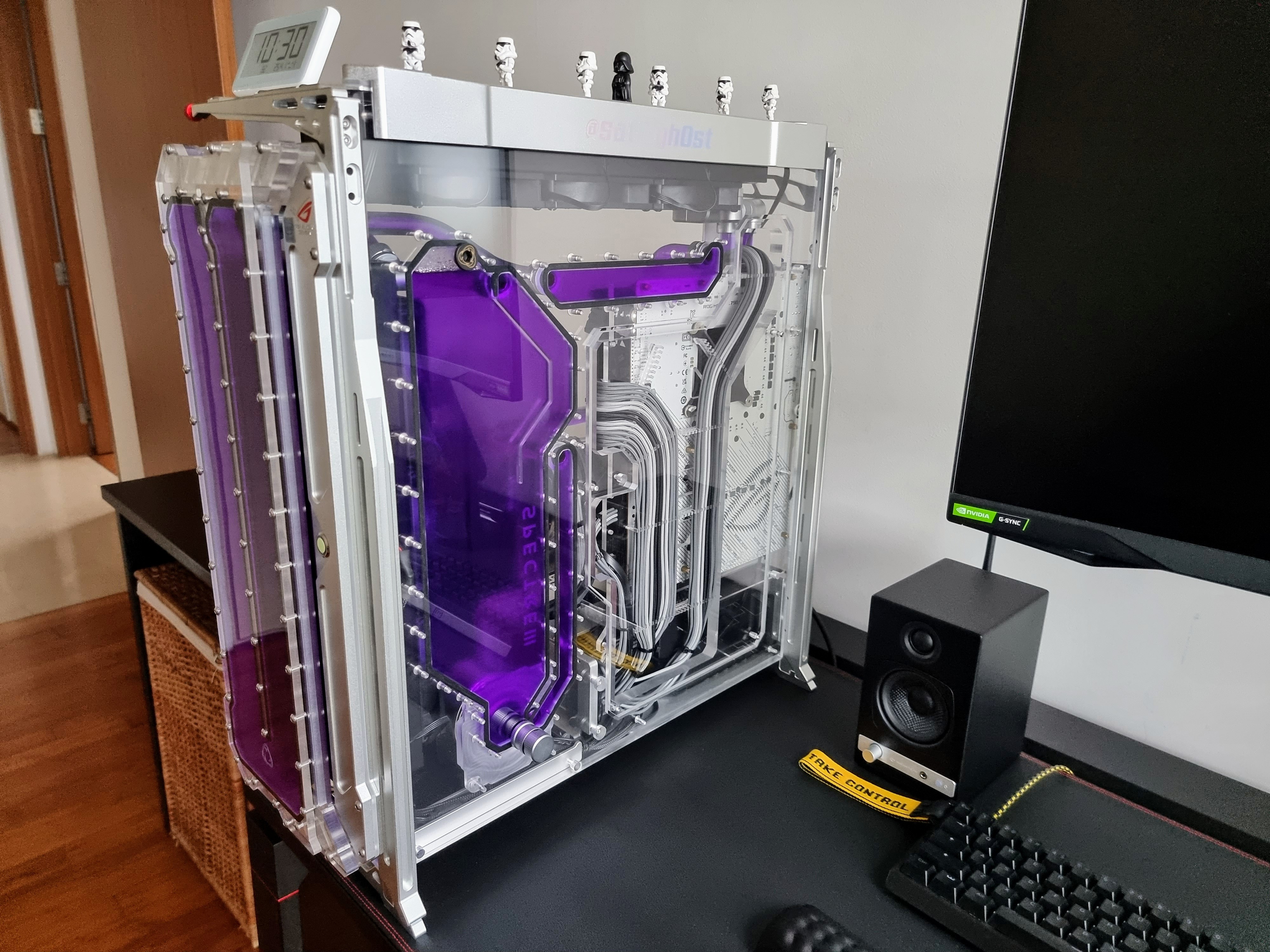
Sick looking rig you got there. Side tracking a litte, mind sharing the specs and costing of yours?

Thanks Dude.

Intel 13900k
Asus Z790 Apex
Firecuda 530 NVME 2TB
Asus Strix 3080 Ti OC
G.skill 7800 DDR5
Singularity Spectre 3.0 Case with Additional Front Distro
EK 1x 360mm XE Front Rad and EK 1x360mm PE Top Mounted Rad
GoChiller Flexgraph Violet Coolant

Cost is around 10k casing and GPU was the biggest cost.
 

froztheart

Supremacy Member
Joined
Aug 8, 2012
Messages
9,167
Reaction score
3,994
Thanks Dude.

Intel 13900k
Asus Z790 Apex
Firecuda 530 NVME 2TB
Asus Strix 3080 Ti OC
G.skill 7800 DDR5
Singularity Spectre 3.0 Case with Additional Front Distro
EK 1x 360mm XE Front Rad and EK 1x360mm PE Top Mounted Rad
GoChiller Flexgraph Violet Coolant

Cost is around 10k casing and GPU was the biggest cost.
10k?! What's the cost of this case that can chalk up such a huge chunk of the budget?
GPU probably 2/3k max I suppose. You got these at the peak pricing or?
 

elmariachi

Supremacy Member
Joined
May 30, 2005
Messages
6,339
Reaction score
1,489
10k?! What's the cost of this case that can chalk up such a huge chunk of the budget?
GPU probably 2/3k max I suppose. You got these at the peak pricing or?

Case was around 2k and GPU was 2.7k when I got my 3080 Ti during peak pricing.
 
Important Forum Advisory Note
This forum is moderated by volunteer moderators who will react only to members' feedback on posts. Moderators are not employees or representatives of HWZ Forums. Forum members and moderators are responsible for their own posts. Please refer to our Community Guidelines and Standards and Terms and Conditions for more information.
Top