Q regarding R9 280x and screen problem

XxGaiaxX

Senior Member
Joined
Apr 1, 2006
Messages
669
Reaction score
20
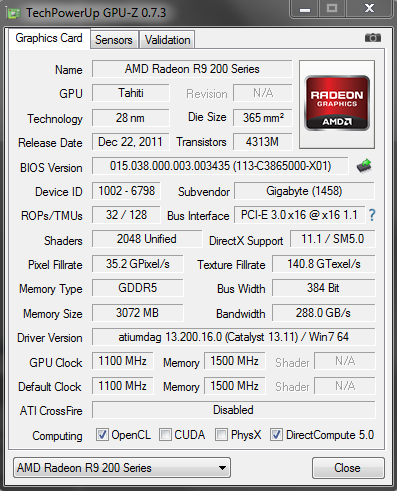
Hi guys, I recently just got a new cpu. But the weird thing is, my AMD R9 280x appear as AMD HD 7900 series in my device manager / dxdiag. Any idea why is that so? The salesperson told me its cause the chip used or driver used is based off that. But when I check it using techpowerup, although it still display as AMD HD 7900 series, the info stated in there is the same as another user who owned a AMD R9 280x (Which displayed correctly)

Oh and another weird thing is, earlier I played FF14 for like 1 hour or so, the screen turned distorted (with weird lines over the entire screen, then turn black screen), I had to hard reboot my com to make it work again.
 

XxGaiaxX

Senior Member
Joined
Apr 1, 2006
Messages
669
Reaction score
20
Here's the screenshot.

Capture_zpsfd2b3176.png
 

shadow84

High Supremacy Member
Joined
Apr 15, 2009
Messages
34,286
Reaction score
420
r9 280x is a rebranded 7970 gpu.... they are using the same tahiti core. The only new architecture would be r9 290/290x.
 

XxGaiaxX

Senior Member
Joined
Apr 1, 2006
Messages
669
Reaction score
20
r9 280x is a rebranded 7970 gpu.... they are using the same tahiti core. The only new architecture would be r9 290/290x.

So the name displayed doesnt really matter I guess? Just find it weird that it appears wrongly for the name.
 

MacClipper

High Supremacy Member
Joined
Jan 1, 2000
Messages
33,617
Reaction score
4
GV-R928XOC-3GD BIOS issues

PCB blue or black? Saw some forum posts saying new actual R9 cards are black while recycled HD 7 series cards are still the old blue PCB. Your screenshot with 2011 BIOS seems to prove it, perhaps they even forgot to flash your 'old' card properly altogether while recycling their unsold stock.

New R9 cards should come with new PCB and new BIOS dated 2013 ie. this year instead, looks like this.


HTH
 

XxGaiaxX

Senior Member
Joined
Apr 1, 2006
Messages
669
Reaction score
20
Mine's blue. And it's suppose to be Gigabyte. Not sure why it displayed as undefined too.

After doing some windows update and rebooting of com, it appears correctly again. Not sure why is that so. Its kind of an on off issue.

Capture_zps86393871.png
 
Last edited:

shadow84

High Supremacy Member
Joined
Apr 15, 2009
Messages
34,286
Reaction score
420
Mine's blue. And it's suppose to be Gigabyte. Not sure why it displayed as undefined too.

Try changing for a new set at shop, if it is within 7 days.... make sure its black PCB.

Says may have possible differences like Boost, OpenGL 4.2 vs 4.3, DX11.1 vs 11.2, max res etc...
Compare

If so, quite a few ppl i saw in OCN affected....
 

XxGaiaxX

Senior Member
Joined
Apr 1, 2006
Messages
669
Reaction score
20
Try changing for a new set at shop, if it is within 7 days.... make sure its black PCB.


If so, quite a few ppl i saw in OCN affected....

I tried searching online, and it seems like all Gigabyte ones are in blue?
 

royfrosty

High Supremacy Member
Joined
Jul 23, 2009
Messages
27,727
Reaction score
1,553
I got a feeling is a lemon set. Go back to the shop and do a 1-1 exchange and get it sought out.
 

royfrosty

High Supremacy Member
Joined
Jul 23, 2009
Messages
27,727
Reaction score
1,553
Mine's blue. And it's suppose to be Gigabyte. Not sure why it displayed as undefined too.

After doing some windows update and rebooting of com, it appears correctly again. Not sure why is that so. Its kind of an on off issue.

Capture_zps86393871.png

Probably the windows is not updated and possible showing an old card.
 

XxGaiaxX

Senior Member
Joined
Apr 1, 2006
Messages
669
Reaction score
20
I got a feeling is a lemon set. Go back to the shop and do a 1-1 exchange and get it sought out.

Just called the shop. Was told by them that the stock taken are all from the same distributor. High chance is that the problem is on Gigabyte side. Since from what I see, the board are all blue for Gigabyte.

They asked to send an email for comparison and will do just that to clarify stuff.
 

royfrosty

High Supremacy Member
Joined
Jul 23, 2009
Messages
27,727
Reaction score
1,553
Just called the shop. Was told by them that the stock taken are all from the same distributor. High chance is that the problem is on Gigabyte side. Since from what I see, the board are all blue for Gigabyte.

They asked to send an email for comparison and will do just that to clarify stuff.

Correct. But the display issues you faced when playing ff14 is not a good sign already. Best is to swap out with shop first. Try to isolate the issue for that first.
 

XxGaiaxX

Senior Member
Joined
Apr 1, 2006
Messages
669
Reaction score
20
Correct. But the display issues you faced when playing ff14 is not a good sign already. Best is to swap out with shop first. Try to isolate the issue for that first.

Thanks for the advise. That problem just happened once, and I'm not sure what caused it too. Will try a few times again to see if that problem comes back. Just updated my video card driver, and so far so good. Hopefully its the driver fault.
 

spyboy48

Senior Member
Joined
Feb 20, 2006
Messages
1,342
Reaction score
0
Hi guys, I recently just got a new cpu. But the weird thing is, my AMD R9 280x appear as AMD HD 7900 series in my device manager / dxdiag. Any idea why is that so? The salesperson told me its cause the chip used or driver used is based off that. But when I check it using techpowerup, although it still display as AMD HD 7900 series, the info stated in there is the same as another user who owned a AMD R9 280x (Which displayed correctly)

Oh and another weird thing is, earlier I played FF14 for like 1 hour or so, the screen turned distorted (with weird lines over the entire screen, then turn black screen), I had to hard reboot my com to make it work again.

As I have don't game, only did benches. No issues encounter so far.
If u r playing certain gaming most likely is the driver! I have check newegg...just for the reference, even Sapphire has this issues!
Newegg.com - SAPPHIRE 100363L Radeon R9 280X 3GB 384-bit GDDR5 PCI Express 3.0 x16 HDCP Ready CrossFireX Support Video Card
I just received it today, installed it as it replaced 2 HD 6970's in Xfire. It started displaying major artifacts after a mere 10-15 minutes of game play. I was playing Battlefield: Bad Company 2...needless to say I'm disappointed in the quality of this particular product.
Just a note on my Gigabyte R9 280X, otherwise I don't get good scored!!!

Bios released date also 2011!

Good to have a 3yrs warranty card!

3DMK11 scores 11K above at max temp 68degC!
Grab while you can before stock runs out...3 yrs warranty at the lowest price in the whole of SLS.
$449 Hoot Ah :D
 
Last edited:

hlots123

Supremacy Member
Joined
Apr 5, 2006
Messages
5,207
Reaction score
11

spyboy48

Senior Member
Joined
Feb 20, 2006
Messages
1,342
Reaction score
0
On a side note about fan noise, look what it was said over here.
Which R9 280X ? Sapphire Or GIGABYTE - Graphics Cards - Graphics & Displays
All the reviews I have seen on these 2 cards indicate that the Sapphire card is actually quite loud and is significantly louder than the Gigabyte. The ASUS CUII Top is the quietest R9 280X by far. Also, dB math is important to understand for noise level. A simple (or as some say small 3dB) difference is actually twice the noise level. Every 3dB increase doubles the noise.
 
Important Forum Advisory Note
This forum is moderated by volunteer moderators who will react only to members' feedback on posts. Moderators are not employees or representatives of HWZ Forums. Forum members and moderators are responsible for their own posts. Please refer to our Community Guidelines and Standards and Terms and Conditions for more information.
Top