
Recommendations for my PC upgrade

N.QX Tech

Junior Member
Joined
Oct 4, 2021
Messages
14
Reaction score
1
Want to upgrade my PC, but is considering to upgrade/change RAM first. Reason to upgrade RAM cos I game with chrome and other apps open and the upon checking task manager, the memory is taking 60%-65% most of the time and my PC freezes sometimes.

Few questions to ask:
  1. Should I add on to my current RAM or change entire to other RAM? E.g. Buy 2x8GB same brand and same speed.
  2. If I were to buy other RAM, will G.Skill Trident Z Neo 3600Mhz CL14 cause any error for my intel build as it is optimised for AMD build? The QVL of the RAM has my MB but my MB QVL doesn't have the RAM. That's why I'm unsure. https://www.gskill.com/qvl/165/326/1604306130/F4-3600C14D-32GTZN-Qvl
  3. Any other RAMs to recommend? Budget around $400. (Was told that CL14 is better than CL16 & CL18 so would prefer to have CL14/CL16 running at 1.4V max. Please also recommend where to get it, thanks)
Thanks all in advance for guiding me. :giggle:

Current system build:
MOBO - ASUS ROG STRIX Z490-F Gaming
CPU - Intel® Core i7-10700K
GPU - ZOTAC RTX 2060 SUPER 8GB OC
RAM - 16GB Klevv BOLT X 3200 Mhz CL16 (2x8GB)
SSD - 512GB M.2 NVME SSD
HDD - 1TB TOSHIBA
PSU - 600W FSP/EVGA 80+ Certified PSU
 
Last edited:

86technie

High Supremacy Member
Joined
Jun 8, 2006
Messages
40,356
Reaction score
5,943
If you are using Intel can just get G.Skill Trident Z RGB, the difference is for Intel is the overclock profile
it uses XMP.
G.Skill Trident Z Neo for AMD Ryzen uses D.O.C.P.

System freezes can be other factor, if you have any error message do take a photo of it.
 

Yongkit

Supremacy Member
Joined
Oct 9, 2015
Messages
5,904
Reaction score
2,493
Looking at the spec it is quite decent, wondering if TS OC your cpu and RAM?

Have you check for latest motherboard bios?

Have you try to reseat your RAM or are they place in the correct slot?
 

ragnarok95

Senior Moderator
Senior Moderator
Joined
Mar 9, 2004
Messages
125,168
Reaction score
6,407
What SW is eating so much memory first? You need to check this. Looks like a software issue.
 

ghillie

Master Member
Joined
Dec 10, 2005
Messages
4,509
Reaction score
17
chrome is known to eat memory excessively...based on your specs i dun think its a ram issue.
 

N.QX Tech

Junior Member
Joined
Oct 4, 2021
Messages
14
Reaction score
1
If you are using Intel can just get G.Skill Trident Z RGB, the difference is for Intel is the overclock profile
it uses XMP.
G.Skill Trident Z Neo for AMD Ryzen uses D.O.C.P.

System freezes can be other factor, if you have any error message do take a photo of it.

What SW is eating so much memory first? You need to check this. Looks like a software issue.

chrome is known to eat memory excessively...based on your specs i dun think its a ram issue.

Based on my task manager, it is taking about 60%+ of memory cos I game with my chrome open (for music) and I have an app for my game which adds up to so much of memory usage.

Sometimes my system freezes when I start up the pc and most of the time is due to windows explorer not responding. No error message pops out, the entire screen just freezes and I had to force shut down by manual button.
 

N.QX Tech

Junior Member
Joined
Oct 4, 2021
Messages
14
Reaction score
1
Looking at the spec it is quite decent, wondering if TS OC your cpu and RAM?

Have you check for latest motherboard bios?

Have you try to reseat your RAM or are they place in the correct slot?

Maybe my screen freezes cos I tried to OC my CPU to around 4.3 Ghz. 🙊

Not sure how to check if MB BIOS is latest, but I got the PC from Aftershock on Jul 2020 and haven't done any updates to BIOS since then.

The RAM should be fitted in the correct slots since I've already used it for so long and it's from Aftershock.
 

Yongkit

Supremacy Member
Joined
Oct 9, 2015
Messages
5,904
Reaction score
2,493
Maybe my screen freezes cos I tried to OC my CPU to around 4.3 Ghz. 🙊

Not sure how to check if MB BIOS is latest, but I got the PC from Aftershock on Jul 2020 and haven't done any updates to BIOS since then.

The RAM should be fitted in the correct slots since I've already used it for so long and it's from Aftershock.
:) for your cpu to OCC 4.3 GHz should have no issue perhaps the method might not be correct, not sure if you are using BIOS auto OC or you are using the AI suite to do OC?

if you OC through AI suite for the 4.3GHz it is normally not stable as I experience before therefore normally will perform any OC directly from BIOS.

Not too sure how comfortable are you with OC setting, but I recommend any OC should be tweak directly from BIOS and not any other software base.

ROG STRIX Z490-F GAMING - BIOS & FIRMWARE

upon checking your motherboard latest BIOS should be Version 2301 (link to your mobo support page above), you can see your mobo bios version in the bios main page or you can see this in the CPU-Z motherboard tab BIOS section (green shaded) as screenshot red circle below:

CPU-Z.jpg

Just as additional information the following for your own reference as how RAM should be place in your mobo, and you may want to double check if RAM XMP profile for 3200MHz actually activated.

ROG Z490F RAM.jpg
 

N.QX Tech

Junior Member
Joined
Oct 4, 2021
Messages
14
Reaction score
1
- Run Crystaldiskmark see whether the SSD freezes or crash.

I do have experience with Aftershock PC that the SSD can be faulty after sometime of usage.
The SSD they included is not a very good one, if I am not wrong should be a Lexar SSD.

- Run Memtest

System freeze can be RAM or SSD.

Will try to do the tests this weekend as I do not have access to my PC on weekdays. Will post updates again. Thank you.
 

N.QX Tech

Junior Member
Joined
Oct 4, 2021
Messages
14
Reaction score
1
:) for your cpu to OCC 4.3 GHz should have no issue perhaps the method might not be correct, not sure if you are using BIOS auto OC or you are using the AI suite to do OC?

if you OC through AI suite for the 4.3GHz it is normally not stable as I experience before therefore normally will perform any OC directly from BIOS.

Not too sure how comfortable are you with OC setting, but I recommend any OC should be tweak directly from BIOS and not any other software base.

upon checking your motherboard latest BIOS should be Version 2301 (link to your mobo support page above), you can see your mobo bios version in the bios main page or you can see this in the CPU-Z motherboard tab BIOS section (green shaded) as screenshot red circle below:

View attachment 29609

Just as additional information the following for your own reference as how RAM should be place in your mobo, and you may want to double check if RAM XMP profile for 3200MHz actually activated.

View attachment 29610

Will check the BIOS version and all this weekend. I contacted Aftershock PC before regarding BIOS update but they do not recommend me to do it myself as it might cause the PC to be unable to use if anything happens and the warranty will not be covered. 🥲 Will figure my way to check the RAM XMP profile for the exact run speed. Thank you.
 

86technie

High Supremacy Member
Joined
Jun 8, 2006
Messages
40,356
Reaction score
5,943
Will check the BIOS version and all this weekend. I contacted Aftershock PC before regarding BIOS update but they do not recommend me to do it myself as it might cause the PC to be unable to use if anything happens and the warranty will not be covered. 🥲 Will figure my way to check the RAM XMP profile for the exact run speed. Thank you.

Err... I don't BIOS will cause any major harm or void warranty cuz for branded PC.
Example Dell if you do BIOS update it won't void the warranty so this point quite skeptical.
Anyway BIOS update you can go ahead, just remember not to turn off the PC during the
process else it will brick the PC.

During BIOS update you may notice PC on than off it is normal, once it reach desktop or
a screen saying BIOS setting reset than that means BIOS update is successful.
 

N.QX Tech

Junior Member
Joined
Oct 4, 2021
Messages
14
Reaction score
1
:) for your cpu to OCC 4.3 GHz should have no issue perhaps the method might not be correct, not sure if you are using BIOS auto OC or you are using the AI suite to do OC?

if you OC through AI suite for the 4.3GHz it is normally not stable as I experience before therefore normally will perform any OC directly from BIOS.

Not too sure how comfortable are you with OC setting, but I recommend any OC should be tweak directly from BIOS and not any other software base.

ROG STRIX Z490-F GAMING - BIOS & FIRMWARE

upon checking your motherboard latest BIOS should be Version 2301 (link to your mobo support page above), you can see your mobo bios version in the bios main page or you can see this in the CPU-Z motherboard tab BIOS section (green shaded) as screenshot red circle below:


Just as additional information the following for your own reference as how RAM should be place in your mobo, and you may want to double check if RAM XMP profile for 3200MHz actually activated.

Hi, my current CPU is running at 100 * 45.0 and my BIOS version is at 0607. Not confident with updating the BIOS as I have no knowledge on how to do it. The latest BIOS is ver 2301. Maybe you guys can help guide me along on the BIOS update. (I can't post links or images idk why)
 

86technie

High Supremacy Member
Joined
Jun 8, 2006
Messages
40,356
Reaction score
5,943
Hi, my current CPU is running at 100 * 45.0 and my BIOS version is at 0607. Not confident with updating the BIOS as I have no knowledge on how to do it. The latest BIOS is ver 2301. Maybe you guys can help guide me along on the BIOS update. (I can't post links or images idk why)

Note: Before you update BIOS, best to load default as overclock setting will be reset.

1) Download latest BIOS from Asus website onto a USB.
https://rog.asus.com/sg/motherboards/rog-strix/rog-strix-z490-f-gaming-model/helpdesk_bios2) Under BIOS load default system
3) After system restarts, look for Asus EZflash under BIOS settings.
4) Select the BIOS file and let it update.
5) You may see "Please enter SETUP to recover BIOS setting" message is normal.
Go to BIOS load default than let it restart.
6) Take note I know Aftershock usually set CSM compatibility mode on for boot.

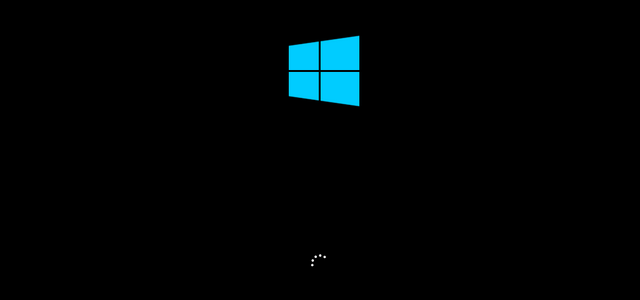
change-windows-10-boot-screen-1.png


If by default the boot shows a Windows logo you have to enable CSM compatibility mode else the OS won't boot. Most motherboard by default, UEFI boot is enabled but PC builders like aftershock enable CSM/Legacy boot if not the factory image won't work.

The PC Windows is factory image meaning it is clone from a master PC, unless you know to do a clean install of Windows would be better for better performance.
 

Yongkit

Supremacy Member
Joined
Oct 9, 2015
Messages
5,904
Reaction score
2,493
Hi, my current CPU is running at 100 * 45.0 and my BIOS version is at 0607. Not confident with updating the BIOS as I have no knowledge on how to do it. The latest BIOS is ver 2301. Maybe you guys can help guide me along on the BIOS update. (I can't post links or images idk why)

The overall sequence is similar to the above Supremacy Member mention.

this video will help to gain your confidence how to update BIOS :) no worry there is always first time and i have gone through it too.


if you choose to update via internet i suggest using network cable instead of wifi to minimize any internet hiccups issue.

you can play the video few times until you are more confident, and you can always try to navigate the bios update menu before click on "OK" :)
 

ItsmeagainhK

Supremacy Member
Joined
Feb 23, 2008
Messages
5,544
Reaction score
52
Get 2x16gb, CL16 3600mhz ballistic rams. 16gb min nowadays but 32gb is becoming the norm very very soon.

Then can think think of upgrading your psu if you intend to upgrade gpu next. Get a good one and dont scrimp on it. A higher wattage and good quality one can potentially outlast your next 2-3 upgrades. But tbh, your rig is fine.
 

ItsmeagainhK

Supremacy Member
Joined
Feb 23, 2008
Messages
5,544
Reaction score
52
Err... I don't BIOS will cause any major harm or void warranty cuz for branded PC.
Example Dell if you do BIOS update it won't void the warranty so this point quite skeptical.
Anyway BIOS update you can go ahead, just remember not to turn off the PC during the
process else it will brick the PC.

During BIOS update you may notice PC on than off it is normal, once it reach desktop or
a screen saying BIOS setting reset than that means BIOS update is successful.
The key to doing bios flashes is that to ensure you have the correct revision and model of the mobo.

The next key thing is to ensure that you update in accordance to what is required first and not just jumping to the latest bios. Read the patch notes. More often then not, they will say you will need to update to bios version XXX before YYY. If you just jump to YYY, i hope nothing bad happens.
 

N.QX Tech

Junior Member
Joined
Oct 4, 2021
Messages
14
Reaction score
1
The key to doing bios flashes is that to ensure you have the correct revision and model of the mobo.

The next key thing is to ensure that you update in accordance to what is required first and not just jumping to the latest bios. Read the patch notes. More often then not, they will say you will need to update to bios version XXX before YYY. If you just jump to YYY, i hope nothing bad happens.

alright, thanks for your advice. will read about the updates
 

N.QX Tech

Junior Member
Joined
Oct 4, 2021
Messages
14
Reaction score
1
Note: Before you update BIOS, best to load default as overclock setting will be reset.

1) Download latest BIOS from Asus website onto a USB.
https://rog.asus.com/sg/motherboards/rog-strix/rog-strix-z490-f-gaming-model/helpdesk_bios2) Under BIOS load default system
3) After system restarts, look for Asus EZflash under BIOS settings.
4) Select the BIOS file and let it update.
5) You may see "Please enter SETUP to recover BIOS setting" message is normal.
Go to BIOS load default than let it restart.
6) Take note I know Aftershock usually set CSM compatibility mode on for boot.

change-windows-10-boot-screen-1.png


If by default the boot shows a Windows logo you have to enable CSM compatibility mode else the OS won't boot. Most motherboard by default, UEFI boot is enabled but PC builders like aftershock enable CSM/Legacy boot if not the factory image won't work.

The PC Windows is factory image meaning it is clone from a master PC, unless you know to do a clean install of Windows would be better for better performance.

i don't quite get on how to enable the CSM compatibility (idk what's that too :x) please advice.
 

86technie

High Supremacy Member
Joined
Jun 8, 2006
Messages
40,356
Reaction score
5,943
i don't quite get on how to enable the CSM compatibility (idk what's that too :x) please advice.
As mention unless your PC boots with this logo than you need to enabled CSM.

change-windows-10-boot-screen-1.png


If not can skip this step.
 
Important Forum Advisory Note
This forum is moderated by volunteer moderators who will react only to members' feedback on posts. Moderators are not employees or representatives of HWZ Forums. Forum members and moderators are responsible for their own posts. Please refer to our Community Guidelines and Standards and Terms and Conditions for more information.
Top