
[SIC] Really good Ryzen mini PC

Euqorab

Arch-Supremacy Member
Joined
Jul 8, 2001
Messages
24,436
Reaction score
4,394
First Solid State Drive
None
Included
256 GB SSD M.2 2280 PCIe Gen4 TLC Opal
+SG$80.00
512 GB SSD M.2 2280 PCIe Gen4 TLC Opal
+SG$110.00
512 GB SSD M.2 2280 PCIe Gen4 Performance TLC Opal
+SG$150.00
1 TB SSD M.2 2280 PCIe Gen4 TLC Opal
+SG$190.00


Second Solid State Drive
256 GB SSD M.2 2280 PCIe Gen4 TLC Opal
Included
512 GB SSD M.2 2280 PCIe Gen4 TLC Opal
+SG$30.00
512 GB SSD M.2 2280 PCIe Gen4 Performance TLC Opal
+SG$70.00
1 TB SSD M.2 2280 PCIe Gen4 TLC Opal
+SG$110.00


Wireless
No Wireless LAN
Included
Realtek Wi-Fi 6 RTL8852BE 2x2 AX & Bluetooth® 5.1 or above
+SG$20.00
MediaTek Wireless MT7921 Wi-Fi 6 2x2 AX & Bluetooth® 5.1 or above
+SG$20.00
Wi-Fi 6E RZ616 2x2 AX & Bluetooth® 5.1 or above
+SG$20.00


Why the first solid state drive is optional while the second solid state drive is included in the pre option? Can I add another solid state drive if I don’t get the first but only the second included one?

Why need to add wifi separately? Which wireless chip is better because all same price $20?
 

Euqorab

Arch-Supremacy Member
Joined
Jul 8, 2001
Messages
24,436
Reaction score
4,394
Optional USB Port
No Optional USB Port
Included
2×Ports USB 3.1 Card
+SG$20.00


USB-C Port
No USB-C Port
Included
USB-C Port
+SG$10.00

DP Port
No DP Port
Included
Optional Display Port
+SG$10.00
Optional Dual DP Ports
+SG$40.00

VGA Port
No VGA Port
Included
Optional VGA Port
+SG$10.00

HDMI Port
No HDMI Port
Included
Optional HDMI Port
+SG$10.00


Rear Com Port
No Rear Com Port
Included
Serial Port Cable
+SG$10.00


External Adapter Cage
No External Adapter Cage
Included

External Adapter Cage
+SG$10.00


VESA Mount
No VESA Mount
Included
VESA Mount
+SG$10.00

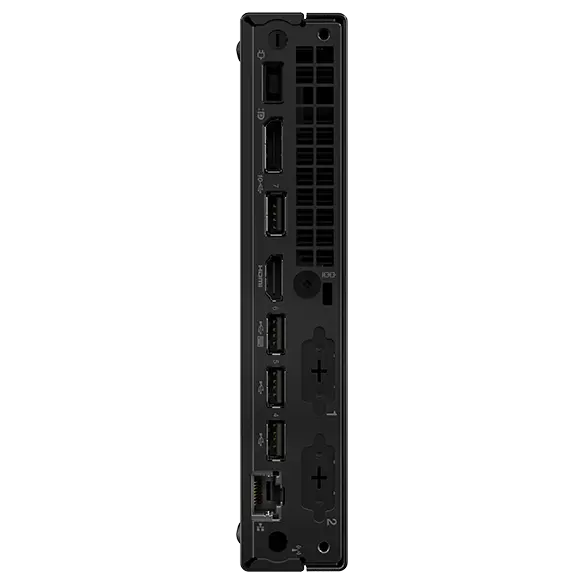
This the photo of the back
If I don’t add these ports I won’t get anything behind? I reckon I need mor usb c ports. Don’t need serial port anymore

c27r2nx4655ly9qezpts1fbx63ze4a442645.png
 

Euqorab

Arch-Supremacy Member
Joined
Jul 8, 2001
Messages
24,436
Reaction score
4,394
Optional USB Port
No Optional USB Port
Included
2×Ports USB 3.1 Card
+SG$20.00


USB-C Port
No USB-C Port
Included
USB-C Port
+SG$10.00

DP Port
No DP Port
Included
Optional Display Port
+SG$10.00
Optional Dual DP Ports
+SG$40.00

VGA Port
No VGA Port
Included
Optional VGA Port
+SG$10.00

HDMI Port
No HDMI Port
Included
Optional HDMI Port
+SG$10.00


Rear Com Port
No Rear Com Port
Included
Serial Port Cable
+SG$10.00


External Adapter Cage
No External Adapter Cage
Included

External Adapter Cage
+SG$10.00


VESA Mount
No VESA Mount
Included
VESA Mount
+SG$10.00

This the photo of the back
If I don’t add these ports I won’t get anything behind? I reckon I need mor usb c ports. Don’t need serial port anymore

c27r2nx4655ly9qezpts1fbx63ze4a442645.png
What is external adapter cafe?

Thanks in advance gurus!

Buyed mba but eventually still used to windows pc
 

NightRaven49

Master Member
Joined
May 17, 2019
Messages
3,728
Reaction score
1,569
Processor and ram? Worth to go up to Ryzen 7?
whats ur use case?
I intend to get 1x 16GB. Is there difference 2x 8GB?
2x 8gb enables dual channel operation, which allows for higher memory bandwidth and improves performance in general.
Why the first solid state drive is optional while the second solid state drive is included in the pre option?
either way u still get at least 1 drive. they probably just mixed up the names, so first drive is secondary while second drive is primary.
Can I add another solid state drive if I don’t get the first but only the second included one?
yes.
Why need to add wifi separately?
some buyers can live with wired ethernet and thus have no need for wifi.
Which wireless chip is better because all same price $20?
technically the rz616 supports wifi 6e which is more recent than the wifi 6 non e cards.
If I don’t add these ports I won’t get anything behind?

c27r2nx4655ly9qezpts1fbx63ze4a442645.png
the picture is probably the default u get without any add ons.
I reckon I need mor usb c ports.
theres the option to add usb c for $10.
 

Euqorab

Arch-Supremacy Member
Joined
Jul 8, 2001
Messages
24,436
Reaction score
4,394
whats ur use case?

2x 8gb enables dual channel operation, which allows for higher memory bandwidth and improves performance in general.

either way u still get at least 1 drive. they probably just mixed up the names, so first drive is secondary while second drive is primary.

yes.

some buyers can live with wired ethernet and thus have no need for wifi.

technically the rz616 supports wifi 6e which is more recent than the wifi 6 non e cards.

the picture is probably the default u get without any add ons.

theres the option to add usb c for $10.
Thanks guru

I just want to experiment with small pc after having owned only laptops for the past decade… read newspaper, surf forums, do some graphics and videos occasionally

If I get 1x 16GB I can add another 1x 16GB myself right? Last time I mixed brands on desktop when young

Is there a need to add another display port be it display port itself, hdmi, or vga?
 

Euqorab

Arch-Supremacy Member
Joined
Jul 8, 2001
Messages
24,436
Reaction score
4,394
Thanks guru

I just want to experiment with small pc after having owned only laptops for the past decade… read newspaper, surf forums, do some graphics and videos occasionally

If I get 1x 16GB I can add another 1x 16GB myself right? Last time I mixed brands on desktop when young

Is there a need to add another display port be it display port itself, hdmi, or vga?
Interestingly if I add usb c port, I cannot add any further display output ports
 

NightRaven49

Master Member
Joined
May 17, 2019
Messages
3,728
Reaction score
1,569
read newspaper, surf forums, do some graphics and videos occasionally
then the base 8500ge is fine, probably overkill even. u should be able to upgrade the cpu in the future if the need arises, when they will be cheaper or a faster newer gen is available.
If I get 1x 16GB I can add another 1x 16GB myself right? Last time I mixed brands on desktop when young
can is can, but best to not mix.
Is there a need to add another display port be it display port itself, hdmi, or vga?
if u are using more than 2 monitors now or intend to in the future, then sure adding more display outs makes sense.
Interestingly if I add usb c port, I cannot add any further display output ports
better to go with the usbc add on, u can just plug in ur own usbc dongle with more display outs.
 

Euqorab

Arch-Supremacy Member
Joined
Jul 8, 2001
Messages
24,436
Reaction score
4,394
then the base 8500ge is fine, probably overkill even. u should be able to upgrade the cpu in the future if the need arises, when they will be cheaper or a faster newer gen is available.

can is can, but best to not mix.

if u are using more than 2 monitors now or intend to in the future, then sure adding more display outs makes sense.

better to go with the usbc add on, u can just plug in ur own usbc dongle with more display outs.
Thanks guru!

is the base 8500ge very good? Thinking if I should add pro +$20 because I read pro can do NPU functions which sounds cool to me as enthusiast though I don’t know how to use…

I should go for usb c add on decided! Because their existing dp and hdmi so I already can have two monitors even though I use one only currently 27”

Oh yah! Their add on promotion $50.01 for ThinkVision E24-30 23.8" Monitor making it very attractive
 

Euqorab

Arch-Supremacy Member
Joined
Jul 8, 2001
Messages
24,436
Reaction score
4,394
Having said that the gen 2 is only $729 with the monitor

But I guess not worth to get it since is 3 generations older with Ryzen 3 5300 as base cpu
 

watzup_ken

High Supremacy Member
Joined
Nov 21, 2003
Messages
25,671
Reaction score
2,122
I do want to call out that the new M75q strangely gimps the DDR5 to just 5200 MT instead of 5600. I am not sure if the limitation is because Lenovo chooses to use DDR5 5200 dimm, or they actually impose a limit in the BIOS.
 

firesong

Supremacy Member
Deluxe Member
Joined
Jan 17, 2001
Messages
8,815
Reaction score
4,834
I do want to call out that the new M75q strangely gimps the DDR5 to just 5200 MT instead of 5600. I am not sure if the limitation is because Lenovo chooses to use DDR5 5200 dimm, or they actually impose a limit in the BIOS.
Lenovo actually clarifies this in the PSREF. They blame the processor. Not sure why.
1729152614080.png
 

NightRaven49

Master Member
Joined
May 17, 2019
Messages
3,728
Reaction score
1,569
Important Forum Advisory Note
This forum is moderated by volunteer moderators who will react only to members' feedback on posts. Moderators are not employees or representatives of HWZ Forums. Forum members and moderators are responsible for their own posts. Please refer to our Community Guidelines and Standards and Terms and Conditions for more information.
Top
