Singtel ONR AP Issues

lonetree

Junior Member
Joined
Apr 13, 2007
Messages
15
Reaction score
0
I can't remember the logic behind my QOS priority settings. But you might want to try different permutations.

Since Router -> Port 7 of SG2008, maybe on SG2008, you can set priority for Port 7 to highest?

Basically play around with the QOS priorities on Port 7 & 8 on SG2008, and Port 4 and5 on SG105E
Thanks. I was playing wth all these ports all these while.

One question, priority set to highest is only to the access port (i.e port 4 of SG105E and port 7 of SG2008) or both port 4&5 and 7&8? -- hope you can remember.

I did a strip down test earlier, direct connection from STB to Asus, works. Then STB to SG105E to Asus, works. All these tests were done after total shutdown for 15 mins to ensure that the sessions are reset.

This might narrow down my investigation on what went wrong.
 

xiaofan

High Supremacy Member
Joined
Sep 16, 2018
Messages
32,670
Reaction score
10,207
This is probably a VLAN adventure but there is another simpler work-around.

Just change your RT-AC1200G+ to Singtel Mesh Router and use another Singtel Mesh Router in the living room. You can buy Singtel Mesh router at around S$20 to S$30 from Carousell. So total investment is about S$40 to S$60.

1) Singtel ONT -- Singtel Mesh Router 1 as main router -- Ethernet Cable -- Singtel Mesh Router 2 in AP mode
2) Singtel Mesh Router 2 in AP mode --> Singtel TV box + other devices
 

lilycll

Senior Member
Joined
May 7, 2018
Messages
2,012
Reaction score
498
Hi Creator88,

thanks for your reply.

Below appended is my set up.

What I wanted to achieve is to have 1 single structured cable transport LAN, internet and Singtel TV traffic (as seen on the right portion of the diagram).

As I have a NAS, Smart TV and Singtel TV residing at the TV console, and have only 1 LAN point at that location. Running extra structured cabling is too tedious. I read from your other post that you have similar scenario as mine but you are using ONR instead of ONT and both smart switches are TL-SG105E, I use TL-SG2008 for 1 end.

In my situation, I have a ASUS RT-AC1200G+ and port 4 is the only port can be used for Singtel TV.

For this configuration, I am able to get internet connectivity, LAN works, but not Singtel TV.

Any advice?

Home-network-V1.png

It's interesting to note that you mentioned only Port 4 of Asus RT-AC1200G+ can be used for SingTel TV which I doubt. You can try to check the VLAN Configuration to verify that indeed only Port 4 VLAN was configured with VLAN 20 tagging (Priority 4 for SingTel TV).

It should be possible to tag ALL 4 Ports with VLAN 20 too or multiple VLAN IDs so that the STB can be connected to any port instead of limit it to Port 4. All Ports should have VLAN 10 (Priority 0) by default so that all your Desktop or Wireless devices or NAS can be interconnected or to access the internet.

A quick question: Are your TP+ONT+Asus RT-AC1200G++TL-SG2008 in a separate location eg Utility box different from the TL-SG105E+NAS+STB (maybe TV console)?

Since the Asus RT-AC1200G+ supports VLAN, you probably do not need another secondary smart switch eg, TL-SG2008 in same location unless you need additional LAN ports.

If the above question answer is in 2 different locations, we can look at following connections:
1. You only need one LAN backbone cabling between the Utility box and TV console. This will be between your main Asus RT-AC1200G+ (once VLAN settings verified can use any port) and TL-SG108E (or TL-SG2008 move to TV area).

2. Another cable will go between Asus RT-AC1200G+ to the other location where all your Desktop or Wireless devices are.

3. Check that the STB SingTel TV connected to the TL-SG108E is still working.
 

lonetree

Junior Member
Joined
Apr 13, 2007
Messages
15
Reaction score
0
It's interesting to note that you mentioned only Port 4 of Asus RT-AC1200G+ can be used for SingTel TV which I doubt. You can try to check the VLAN Configuration to verify that indeed only Port 4 VLAN was configured with VLAN 20 tagging (Priority 4 for SingTel TV).

It should be possible to tag ALL 4 Ports with VLAN 20 too or multiple VLAN IDs so that the STB can be connected to any port instead of limit it to Port 4. All Ports should have VLAN 10 (Priority 0) by default so that all your Desktop or Wireless devices or NAS can be interconnected or to access the internet.

A quick question: Are your TP+ONT+Asus RT-AC1200G++TL-SG2008 in a separate location eg Utility box different from the TL-SG105E+NAS+STB (maybe TV console)?

Since the Asus RT-AC1200G+ supports VLAN, you probably do not need another secondary smart switch eg, TL-SG2008 in same location unless you need additional LAN ports.

If the above question answer is in 2 different locations, we can look at following connections:
1. You only need one LAN backbone cabling between the Utility box and TV console. This will be between your main Asus RT-AC1200G+ (once VLAN settings verified can use any port) and TL-SG108E (or TL-SG2008 move to TV area).

2. Another cable will go between Asus RT-AC1200G+ to the other location where all your Desktop or Wireless devices are.

3. Check that the STB SingTel TV connected to the TL-SG108E is still working.
Lilycll,

no doubt only port 4 is used for Singtel TV (in fact, for most others if not all), there are preset IPTV profile in the list. There is no VLAN configuration option for AC1200+ unless it's hidden somewhere that you might want to share.

-- answer to your question --
A quick question: Are your TP+ONT+Asus RT-AC1200G++TL-SG2008 in a separate location eg Utility box different from the TL-SG105E+NAS+STB (maybe TV console)?

You are right. As shown in my network diagram, TP+ONT+Asus RT-AC1200G++TL-SG2008 are in the utility box, where I converted all the phone point to LAN point. TL-SG105E+NAS+STB are located at the TV console where there is only 1 LAN point available. I did not mention other network equipment at this location as I do not want to complicate thing, basically, the most important thing is I need both STB and the NAS to work, at the present moment, I am only able to get NAS to work and not IPTV, unless it is directly connected to the router.

As mentioned in my previous reply to @creator88

I did a strip down test earlier, direct connection from STB to Asus, works. Then STB to SG105E to Asus, works. All these tests were done after total shutdown for 15 mins to ensure that the sessions are reset.

Once I revert to the proposed set up, then SingtelTV will not work anymore, while NAS and internet for other rooms work.

Once again, thank for the effort to reply and share your view.
 

lonetree

Junior Member
Joined
Apr 13, 2007
Messages
15
Reaction score
0
This is probably a VLAN adventure but there is another simpler work-around.

Just change your RT-AC1200G+ to Singtel Mesh Router and use another Singtel Mesh Router in the living room. You can buy Singtel Mesh router at around S$20 to S$30 from Carousell. So total investment is about S$40 to S$60.

1) Singtel ONT -- Singtel Mesh Router 1 as main router -- Ethernet Cable -- Singtel Mesh Router 2 in AP mode
2) Singtel Mesh Router 2 in AP mode --> Singtel TV box + other devices
Thanks @xiaofan .

I do have Mesh but that option is not a desired. If I'm not wrong, Singtel Mesh router do not have the luxury to set the DNS, only can use Singnet DNS.
 

creator88

Senior Member
Joined
Nov 16, 2007
Messages
569
Reaction score
35
Thanks. I was playing wth all these ports all these while.

One question, priority set to highest is only to the access port (i.e port 4 of SG105E and port 7 of SG2008) or both port 4&5 and 7&8? -- hope you can remember.

I did a strip down test earlier, direct connection from STB to Asus, works. Then STB to SG105E to Asus, works. All these tests were done after total shutdown for 15 mins to ensure that the sessions are reset.

This might narrow down my investigation on what went wrong.
I think it should be port 4 of SG105E and port 7 of SG2008, but can't be 100% sure. Hence, I suggested to try various permutations (single port and dual port variations)

I don't understand what you meant by strip down test. Are you saying that you tested the following configurations and Singtel TV was working?

ONT -> Asus (Port 4) -> STB
ONT -> Asus (Port 4) -> SG105E (Port 4) -> STB

(a) For ONT -> Asus (Port 4) -> SG105E (Port 4) -> STB, are you able to get internet on the remaining 3 ports of the SG105E?

(b) Have you tested this:

ONT -> Asus (Port 4) -> SG2008 (Port 8) -> STB

Could also possibly be a SG2008 issue.
 

lilycll

Senior Member
Joined
May 7, 2018
Messages
2,012
Reaction score
498
Lilycll,

no doubt only port 4 is used for Singtel TV (in fact, for most others if not all), there are preset IPTV profile in the list. There is no VLAN configuration option for AC1200+ unless it's hidden somewhere that you might want to share.

-- answer to your question --
A quick question: Are your TP+ONT+Asus RT-AC1200G++TL-SG2008 in a separate location eg Utility box different from the TL-SG105E+NAS+STB (maybe TV console)?

You are right. As shown in my network diagram, TP+ONT+Asus RT-AC1200G++TL-SG2008 are in the utility box, where I converted all the phone point to LAN point. TL-SG105E+NAS+STB are located at the TV console where there is only 1 LAN point available. I did not mention other network equipment at this location as I do not want to complicate thing, basically, the most important thing is I need both STB and the NAS to work, at the present moment, I am only able to get NAS to work and not IPTV, unless it is directly connected to the router.

As mentioned in my previous reply to @creator88

I did a strip down test earlier, direct connection from STB to Asus, works. Then STB to SG105E to Asus, works. All these tests were done after total shutdown for 15 mins to ensure that the sessions are reset.

Once I revert to the proposed set up, then SingtelTV will not work anymore, while NAS and internet for other rooms work.

Once again, thank for the effort to reply and share your view.

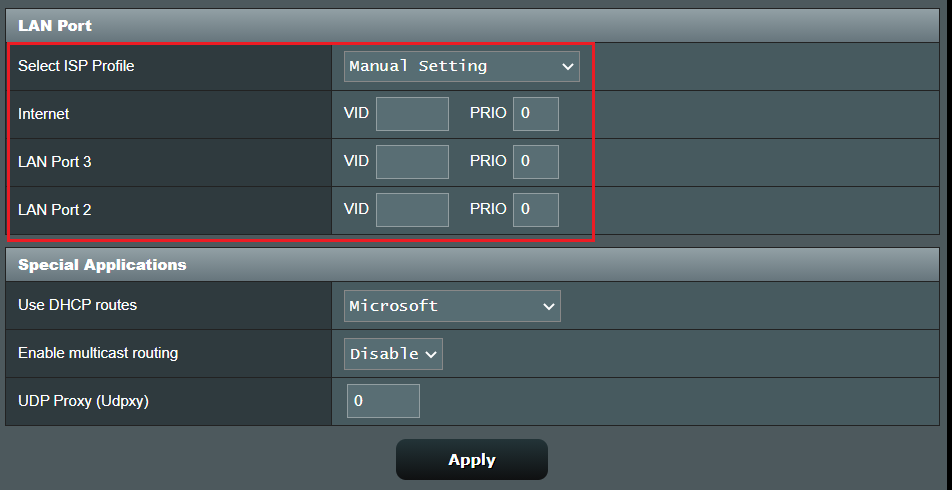
I found a statement from Asus website 'ASUS router only supports VLAN for WAN and IPTV, not VLAN for LAN'. This could be the reason why only one single Port 4 can be used for IPTV.

However I found a screenshot below that you can manually configure the VID of LAN Ports when using Manual Settings for Select ISP Profile. It does not show which LAN Port is for the Internet.

b509cd86-126d-4ea7-bffe-aab3c8c5c364.png


Try these:
1. Set VID 10 and Priority 0 for Internet.
2. Set VID 20 and Priority 4 for at least LAN Port 3 (guess this is Port 4 where Port 1 is LAN Port 0 counting from 0 to 3).
Note: LAN Port 2 can be omitted or tested later.
3. Connect a Laptop/Desktop PC using a LAN cable to Port 4 (GT1200G+) directly just to test if Internet is working. Disconnect LAN cable.
4. Connect STB directly to same Port 4 (GT1200G+) and check if SingTel TV works too.

If above 3 and 4 working well, continue with below:

5. Connect the LAN point/cable between Asus RT-GT1200G+ to the SG105E (bypassing the other smart switches SG2008 in Utility Box).
6. Double check that the SG105E VLAN settings are setup with both VLAN IDs. Example Port 5 with both VLAN 10 & 20, Port 4 IPTV and All other Ports Default VLAN 10.
7. Connect STB to Port 4 (SG105E) and check if SingTel TV works now.
8. Connect a Laptop/Desktop PC using LAN cable to Port 1 (SG105E) and check if Internet works too.
 
Last edited:

xiaofan

High Supremacy Member
Joined
Sep 16, 2018
Messages
32,670
Reaction score
10,207
I do have Mesh but that option is not a desired. If I'm not wrong, Singtel Mesh router do not have the luxury to set the DNS, only can use Singnet DNS.

That is correct but I am just mentioning one simple solution.

It is a bit tricky to get Singtel TV box working with VLAN due to the VLAN priority and IGMP Snooping thingy. I think your basic setup is correct and now it is for you to experiment with different settings.

Maybe your TL-SG2008 is a bit different (and has more features) from the typical TL-SG105E/TL-SG108E mentioned in this thread. You may want to get a TL-SG108E to replace it and see if that helps.

The 3rd party VLAN profile implementation for Singtel TV is not as versatile as Singtel issued router like Singtel Mesh Router (or the notorious Singtel AC Plus). Therefore you have to utilize VLAN capable switches in your use case.

For example, the following will work.
Singtel ONT -- Singtel Mesh Router -- LAN -- Singtel Mesh Router -- Singtel TV Box
Singtel ONR -- Singtel Mesh Router -- LAN -- Singtel Mesh Router -- Singtel TV Box

The following will not work.
Singtel ONT -- Asus Router -- LAN -- Asus Router in AP mode -- Singtel TV Box
Singtel ONR -- Asus Router in AP mode -- Singtel TV Box (there is a workaround)
Singtel ONR -- Asus Router in AP mode -- Asus Router in AP mode -- Singtel TV Box
 

lonetree

Junior Member
Joined
Apr 13, 2007
Messages
15
Reaction score
0
That is correct but I am just mentioning one simple solution.

It is a bit tricky to get Singtel TV box working with VLAN due to the VLAN priority and IGMP Snooping thingy. I think your basic setup is correct and now it is for you to experiment with different settings.

Maybe your TL-SG2008 is a bit different (and has more features) from the typical TL-SG105E/TL-SG108E mentioned in this thread. You may want to get a TL-SG108E to replace it and see if that helps.

The 3rd party VLAN profile implementation for Singtel TV is not as versatile as Singtel issued router like Singtel Mesh Router (or the notorious Singtel AC Plus). Therefore you have to utilize VLAN capable switches in your use case.

For example, the following will work.
Singtel ONT -- Singtel Mesh Router -- LAN -- Singtel Mesh Router -- Singtel TV Box
Singtel ONR -- Singtel Mesh Router -- LAN -- Singtel Mesh Router -- Singtel TV Box

The following will not work.
Singtel ONT -- Asus Router -- LAN -- Asus Router in AP mode -- Singtel TV Box
Singtel ONR -- Asus Router in AP mode -- Singtel TV Box (there is a workaround)
Singtel ONR -- Asus Router in AP mode -- Asus Router in AP mode -- Singtel TV Box
Thanks @xiaofan
 

lonetree

Junior Member
Joined
Apr 13, 2007
Messages
15
Reaction score
0
I think it should be port 4 of SG105E and port 7 of SG2008, but can't be 100% sure. Hence, I suggested to try various permutations (single port and dual port variations)

I don't understand what you meant by strip down test. Are you saying that you tested the following configurations and Singtel TV was working?

ONT -> Asus (Port 4) -> STB
ONT -> Asus (Port 4) -> SG105E (Port 4) -> STB

(a) For ONT -> Asus (Port 4) -> SG105E (Port 4) -> STB, are you able to get internet on the remaining 3 ports of the SG105E?

(b) Have you tested this:

ONT -> Asus (Port 4) -> SG2008 (Port 8) -> STB

Could also possibly be a SG2008 issue.
Hi @creator88 ,

actually I did all the test you suggested.

Below are the result.

1. IPTV -- > asus router, works
2. IPTV --> 5 port vlan switch --> asus router, works
3. Asus router --> 8 port switch --> IPTV, works
4. Asus router --> 8 port switch <-- trunk--> 5 port switch --> IPTV, not working.
 

creator88

Senior Member
Joined
Nov 16, 2007
Messages
569
Reaction score
35
Hi @creator88 ,

actually I did all the test you suggested.

Below are the result.

1. IPTV -- > asus router, works
2. IPTV --> 5 port vlan switch --> asus router, works
3. Asus router --> 8 port switch --> IPTV, works
4. Asus router --> 8 port switch <-- trunk--> 5 port switch --> IPTV, not working.
Have you tested:

Asus router --> 5 port switch --> IPTV ?


I'm not clear as to the first two tests you mentioned. How did you test the reverse order from IPTV back to switch then back to router?

1. IPTV -- > asus router, works
2. IPTV --> 5 port vlan switch --> asus router, works
 

lonetree

Junior Member
Joined
Apr 13, 2007
Messages
15
Reaction score
0
Have you tested:

Asus router --> 5 port switch --> IPTV ?


I'm not clear as to the first two tests you mentioned. How did you test the reverse order from IPTV back to switch then back to router?

1. IPTV -- > asus router, works
2. IPTV --> 5 port vlan switch --> asus router, works
Hi @creator88

Yes. I did. It work.

Once both switches are connected it will not work.

I'm wondering why too.
 

xiaofan

High Supremacy Member
Joined
Sep 16, 2018
Messages
32,670
Reaction score
10,207
Hi @creator88

Yes. I did. It work.

Once both switches are connected it will not work.

I'm wondering why too.

Basically it will work if there is only dumb switch between Asus LAN Port 4 (VLAN 20) and the Singtel TV Box. The dumb switch may need to support IGMP Snooping.

But once you mix that with other things, you need to use VLAN switch and you may some VLAN configurations. So far I have not heard any successful report with your approach (VLAN switch after the Asus).

I will suggest to put the VLAN switch after the ONT port and before the Asus.

1) ONT -- VLAN capable switch TL-SG105E --- single Ethernet cable -- 2nd VLAN capable switch TL-SG2008 in the living room TV console area

2) ONT --> TL-SG105E Port 1 (trunk)
TL-SG105E Port 2 (VLAN 10)
TL-SG105E Port 3 (VLAN 20)
TL-SG105E Port 4 (trunk)
TL-SG105E Port 5 (not used, or for web access of the TL-SG105E)

3) TL-SG105E Port 4 --TL-SG2008 Port 1 (trunk)
TL-SG2008 Port 2 (VLAN 10) -- Asus RT-AC1200G+ (no VLAN required, internet only)
TL-SG2008 Port 3 (VLAN 20) -- Singtel TV box
TL-SG2008 Port 4 (trunk) -- existing Singtel router -- Singtel TV box (if Port 3 does not work)
4) Asus RT-AC1200G+ LAN ports --dumb switch + NAS
5) dumb switch -- desktop PC + wireless AP

Reference:
https://forums.hardwarezone.com.sg/...properly-singtel-asus-rt-ax86u.6564040/page-2
 

creator88

Senior Member
Joined
Nov 16, 2007
Messages
569
Reaction score
35
Hi @creator88

Yes. I did. It work.

Once both switches are connected it will not work.

I'm wondering why too.
I'm out of ideas as well. Could be some special/unique settings on the TL-SG2008.


You could try what Xiaofan suggested above. Or if you can borrow another TL-SG105E, try using two TL-SG105E (instead of one TL-SG2008 and one TL-SG105E)
 

hardhet

Junior Member
Joined
May 21, 2017
Messages
10
Reaction score
4
Good Afternoon All,

I need your advise. Thank you.

Currently using TP Link TL-SG105E. But now running out of network point.

I just need a plug and play device because I am not an expert.

May I know whether TL-SG108E or TL-SG1008P is better?

Thank again.
 

firesong

Supremacy Member
Deluxe Member
Joined
Jan 17, 2001
Messages
8,650
Reaction score
4,658
Good Afternoon All,

I need your advise. Thank you.

Currently using TP Link TL-SG105E. But now running out of network point.

I just need a plug and play device because I am not an expert.

May I know whether TL-SG108E or TL-SG1008P is better?

Thank again.
Hmm.. Do you need simple management features (like VLANs)? If so, only the SG108E will work.

If you need PoE, then the SG1008P. Both are different devices offering different things. Although, if you need management and PoE, get the SG108E and use injectors to provide PoE power for devices.
 

hardhet

Junior Member
Joined
May 21, 2017
Messages
10
Reaction score
4
Hmm.. Do you need simple management features (like VLANs)? If so, only the SG108E will work.

If you need PoE, then the SG1008P. Both are different devices offering different things. Although, if you need management and PoE, get the SG108E and use injectors to provide PoE power for devices.
Thank you
 

xiaofan

High Supremacy Member
Joined
Sep 16, 2018
Messages
32,670
Reaction score
10,207
Just a summary post for reference.

For Singtel ONR users who have Singtel TV box and yet want to use 3rd party router, you have a few choices.

1) Connect Singtel TV box to the Singtel ONR, you may need to have two LAN ports in the TV console area
Singtel ONR -- Singtel TV box
Singtel ONR -- 3rd party router in AP mode (to avoid Double NAT)

2) Use Singtel supported router in AP mode, you only need to have one LAN port in the TV console area
Singtel ONR -- Linksys E9450 in AP mode -- Singtel TV box
Singtel ONR -- Netgear Orbi in AP mode -- Singtel TV box

3) Use Singtel Mesh Router (or Singtel AC Plus or Singtel AC Elite) as the intermediate. You only need one LAN port in the TV console area
Singtel ONR -- Singtel Mesh Router (automatically run in AP mode, you may want to disable its Wifi) -- Singtel TV box
Singtel Mesh Router -- 3rd party router in AP mode

4) Use customized AP mode
Singtel ONR -- 3rd party router in custom AP mode (needs to support IGMP snooping) -- Singtel TV box

Reference from the expert hairymonster.
https://forums.hardwarezone.com.sg/...tel-tv-onr-ac86u-ax23-singtel-tv-box.6681949/
 

i_dun_understand

Senior Member
Joined
Feb 15, 2014
Messages
1,396
Reaction score
308
MyRepublic Internet and Singtel IPTV Co-existing

I finally had my Singtel IPTV installed at home. After much tinkering with switch settings, I have managed to combine MyRepublic Internet data with Singtel IPTV down a single LAN cable, and split them up again at the other end with the use of two smart switches.

In theory, this method should work with broadband plans from other ISP's as well (be it ViewQuest, WhizzComm, Starhub, M1 etc) when combined with Singtel IPTV.

Attached the network diagram and switch settings for those who might face similar issues (single LAN line to room etc) in future. Hopefully it will be useful.

VOyJ5q0.jpg
Digging this old thread. I'm curious why need another switch for the MR connection ? All the 3 connections unable to connect directly to the Wireless router ?
 

xiaofan

High Supremacy Member
Joined
Sep 16, 2018
Messages
32,670
Reaction score
10,207
Digging this old thread. I'm curious why need another switch for the MR connection ? All the 3 connections unable to connect directly to the Wireless router ?

You have to use two VLAN enabled switches (two TL-SG105E shown in the picture) to carry both MR Internet and Singtel TV using one Ethernet Cable connection (shown as trunk in the picture).

Take note he has standalone Singtel TV subscription without Singtel Fibre Internet. He is using MR for Fibre Internet.
 
Important Forum Advisory Note
This forum is moderated by volunteer moderators who will react only to members' feedback on posts. Moderators are not employees or representatives of HWZ Forums. Forum members and moderators are responsible for their own posts. Please refer to our Community Guidelines and Standards and Terms and Conditions for more information.
Top