

You are using an out of date browser. It may not display this or other websites correctly.
You should upgrade or use an alternative browser.
You should upgrade or use an alternative browser.
(Storage) SSD Discussion Thread
- Thread starter adrianlee
- Start date
More options
Who Replied?

BoyNike
Arch-Supremacy Member
- Joined
- Dec 19, 2001
- Messages
- 17,519
- Reaction score
- 0
i got too excited and went to post office, only to be told collect next day. LOL. wasted trip!
haha i think i can only collect on sat.. post office operating hours are just too short.

seeyourhead_jiejie
Arch-Supremacy Member
- Joined
- Nov 3, 2007
- Messages
- 13,104
- Reaction score
- 0
how come must self collect ?haha i think i can only collect on sat.. post office operating hours are just too short.
registered post but no 1 at home ?
BoyNike
Arch-Supremacy Member
- Joined
- Dec 19, 2001
- Messages
- 17,519
- Reaction score
- 0
how come must self collect ?
registered post but no 1 at home ?
Yap no one is at home when the postman came. So self collect @ post office


danxiaogui86
Arch-Supremacy Member
- Joined
- Jan 12, 2003
- Messages
- 11,285
- Reaction score
- 23
check with u guys. clone ssd to ssd will impact performance? will clean install be better?
danxiaogui86
Arch-Supremacy Member
- Joined
- Jan 12, 2003
- Messages
- 11,285
- Reaction score
- 23
haha i think i can only collect on sat.. post office operating hours are just too short.
930am to 930pm leh!
BoyNike
Arch-Supremacy Member
- Joined
- Dec 19, 2001
- Messages
- 17,519
- Reaction score
- 0
930am to 930pm leh!
Nearest post office @ tanjong pagar only 9 to 5 pm.

Tucksoon
Supremacy Member
- Joined
- Jan 1, 2000
- Messages
- 8,962
- Reaction score
- 34
check with u guys. clone ssd to ssd will impact performance? will clean install be better?
I'm no expert but I assume clean install is always better


CaboWabo
Senior Member
- Joined
- Mar 6, 2011
- Messages
- 1,810
- Reaction score
- 0
Yes i recieve it too.
you guys receive your letter so soon? oh man my eta is like 7 june wth
danxiaogui86
Arch-Supremacy Member
- Joined
- Jan 12, 2003
- Messages
- 11,285
- Reaction score
- 23
you guys receive your letter so soon? oh man my eta is like 7 june wth
mine also 7 june but i received already.
CaboWabo
Senior Member
- Joined
- Mar 6, 2011
- Messages
- 1,810
- Reaction score
- 0
mine also 7 june but i received already.
sucks to me, so you missed the singpost guy thn they left a letter at your door ?
danxiaogui86
Arch-Supremacy Member
- Joined
- Jan 12, 2003
- Messages
- 11,285
- Reaction score
- 23
sucks to me, so you missed the singpost guy thn they left a letter at your door ?
yup ^^ ran off with my package. i saw the note so happy bath and went post office without reading.. queue there end up told me only can collect next working day as stated on the paper.
BoyNike
Arch-Supremacy Member
- Joined
- Dec 19, 2001
- Messages
- 17,519
- Reaction score
- 0
WOW, so much trouble in formatting a SSD ? I thought it works like any SATA harddisk.

adrianlee
Arch-Supremacy Member
- Joined
- Apr 28, 2001
- Messages
- 20,067
- Reaction score
- 1
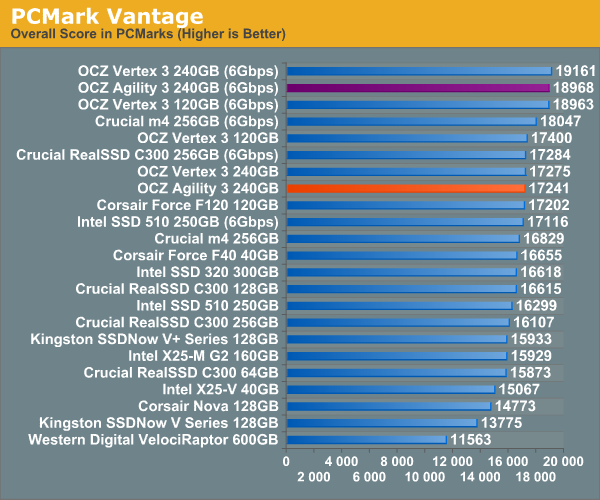
OCZ Agility 3 240GB Review @Storagereview
http://www.storagereview.com/ocz_agility_3_review_240gbThe OCZ Agility 3 fills the mid-range gap of OCZ's SSD lineup; but don't let "mid-range" or "mainstream" fool you. The Agility 3 uses a SATA 6Gb/s interface and the SandForce SF-2281 processor to drive 525MB/s read speeds, 500MB/s writes and 45,000 4KB random write IOPS - those are just a hair under the Vertex 3 specs. OCZ offers the Agility 3 in three capacity points, 60GB, 120GB and 240GB - all leveraging Intel/Micron 25nm NAND.

xtreme84
Senior Member
- Joined
- Feb 10, 2009
- Messages
- 1,782
- Reaction score
- 4
WOW, so much trouble in formatting a SSD ? I thought it works like any SATA harddisk.
Actually not all the steps are necessary. An SSD is actually more hardy than we think. For me, I just did a secure erase prior to installing Windows 7 on it. My motherboard doesn't support AHCI, if yours does, be sure to change the settings in BIOS to AHCI before installing Windows. Then after installation, disable Superfetch and Disk Defragmenter and you're good to go.
I turned off Hibernation and System Protection because I don't use them.
Just confused. Hope you can enlighten, thanks !! When I change the settings in BIOS to AHCI before installing Windows. Then after installation, disable Superfetch and Disk Defragmenter and you're good to go., will these affect the other SATA harddisks in used? Thanks !!Actually not all the steps are necessary. An SSD is actually more hardy than we think. For me, I just did a secure erase prior to installing Windows 7 on it. My motherboard doesn't support AHCI, if yours does, be sure to change the settings in BIOS to AHCI before installing Windows. Then after installation, disable Superfetch and Disk Defragmenter and you're good to go.
I turned off Hibernation and System Protection because I don't use them.
xtreme84
Senior Member
- Joined
- Feb 10, 2009
- Messages
- 1,782
- Reaction score
- 4
Just confused. Hope you can enlighten, thanks !! When I change the settings in BIOS to AHCI before installing Windows. Then after installation, disable Superfetch and Disk Defragmenter and you're good to go., will these affect the other SATA harddisks in used? Thanks !!
For the AHCI, I believe it doesn't make any difference to non-OS drives, but maybe someone else can share if it does.
SuperFetch is a Microsoft computer technology that pre-loads software into memory to reduce their load times
Hence, if your programs are all installed on the SSD, you can just disable this and it will not affect your non-OS drive since there are no programs on your non-OS drive.
As for Disk Defragmenter, you can select which drives to disable it on. In this case, just disable on the SSD will do.
One should note that many SSDs are not playing nicely with Intel Series 6 motherboards, P67 included.
So far read that C300, M4, Vertex 3 all have issues.
There is a manual fix but we should be watching for a manufacturer's permanent patch.
It appears quite obvious that Intel is dragging their feet on this even though they have a part in who's to blame. FYI, Intel has their own SSDs and this is actually beneficial for them in the short run.
So far read that C300, M4, Vertex 3 all have issues.
There is a manual fix but we should be watching for a manufacturer's permanent patch.
It appears quite obvious that Intel is dragging their feet on this even though they have a part in who's to blame. FYI, Intel has their own SSDs and this is actually beneficial for them in the short run.
Important Forum Advisory Note
This forum is moderated by volunteer moderators who will react only to members' feedback on posts. Moderators are not employees or representatives of HWZ Forums. Forum members and moderators are responsible for their own posts.
Please refer to our Community Guidelines and Standards and Terms and Conditions for more information.
