
The Nexus 5 users Thread

gwzc_mk2

Arch-Supremacy Member
Joined
Aug 29, 2004
Messages
22,241
Reaction score
88
Only unlocking will wipe. After that it won't unless you flash custom roms.
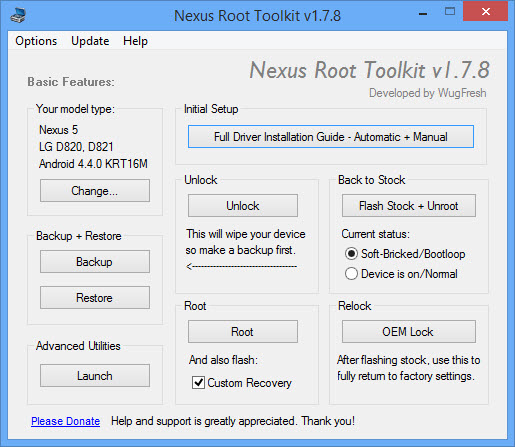
so basically i just click on the root button with custom recovery box checked?
178_main.jpg


sorry for the noob question
 

IncTEh

Master Member
Joined
May 29, 2012
Messages
2,723
Reaction score
0
so basically i just click on the root button with custom recovery box checked?
178_main.jpg


sorry for the noob question

Yup, just check the custom recovery then press root. I dun know about this cause I use manual adb one.
 

HMAN

Supremacy Member
Joined
Jan 6, 2002
Messages
5,267
Reaction score
687
so basically i just click on the root button with custom recovery box checked?
178_main.jpg


sorry for the noob question

If you are not into hardcore day to day flashing custom ROM..avoid flashing custom recovery..kepp trouble free

With the introduction of 4.3 with multiple users and up. It has given many problem on OTA update with custom recovery. The OTA script is very fussy on any changes made to system files and change of permission right

My suggestion is not to permanently flash custom recovery. Instead do this, keep original recovery. Every time you want to update OTA...still run the Custom Recovery program like CWM ,just conduct one time flash...reboot to recovery and use the custom Recovery to do the OTA update. after OTA installation complete. do one more time of SuperSU update to keep root.

When prompted to permanently install custom recovery..Choose NO..

Above approach always serve me well. On my nexus 7, I am clicking too fast to accept permanent custom recovery..Nightmare starts to come on every OTA which I have to execute many manual Linux commands (some may not know how to do it) in order to allow OTA to get through.
 

HMAN

Supremacy Member
Joined
Jan 6, 2002
Messages
5,267
Reaction score
687
Nexus 4 vs Nexus 5

After using Nexus 5 for 4 days.. Some observation comparing to Nexus 4. This is complete Stock . Stop rooting for quite a while..so far only keep one Nexus 7 rooted for the USB storage mounting purpose

1) Battery charging is super fast comparing to Nexus 4, charging with the same charger. Will time it properly..I am getting opinion of charging time of just slightly more than an hour.
By the way I am still using Nexus One 1.5A charger , I have yet checked on the ship with charger ..dont know what current rating is it.


2) Photo taking, the Auto White Balance seems not doing proper job..the color tone come out to be very pale as compare to Nexus 4. After forcing the White balance to CCFL , picture improved..

-occasionally , photo taking orientation get mixed up..Landscape taking with portrait ..this is like bugs after Google Camera app is allowed to use the volume to take picture..as usually ..i dont hold the volume button side up..

3) Screen is brighter and of course it is more details than Nexus 4 but this is Full HD panel..
 

gwzc_mk2

Arch-Supremacy Member
Joined
Aug 29, 2004
Messages
22,241
Reaction score
88
If you are not into hardcore day to day flashing custom ROM..avoid flashing custom recovery..kepp trouble free

With the introduction of 4.3 with multiple users and up. It has given many problem on OTA update with custom recovery. The OTA script is very fussy on any changes made to system files and change of permission right

My suggestion is not to permanently flash custom recovery. Instead do this, keep original recovery. Every time you want to update OTA...still run the Custom Recovery program like CWM ,just conduct one time flash...reboot to recovery and use the custom Recovery to do the OTA update. after OTA installation complete. do one more time of SuperSU update to keep root.

When prompted to permanently install custom recovery..Choose NO..

Above approach always serve me well. On my nexus 7, I am clicking too fast to accept permanent custom recovery..Nightmare starts to come on every OTA which I have to execute many manual Linux commands (some may not know how to do it) in order to allow OTA to get through.
not into hardcore modding
just wanna do the speaker mod.....
but come to think of it
i shall just leave the phone just rooted with stock recovery
am thinking of just unroot and lock back the phone as well

am not too sure what i'm doing and still tramatized by the time i root my SGS3 to play around but end up frying my motherboard.
 

kEvinErd

Supremacy Member
Joined
Dec 28, 2008
Messages
5,686
Reaction score
395
not into hardcore modding
just wanna do the speaker mod.....
but come to think of it
i shall just leave the phone just rooted with stock recovery
am thinking of just unroot and lock back the phone as well

am not too sure what i'm doing and still tramatized by the time i root my SGS3 to play around but end up frying my motherboard.
I think there were some issues with s3 motherboard dying. Don't think it's due to you rooting.. hard to fry the motherboard from just rooting. Just coincidence I guess.
 

koreanlover

Arch-Supremacy Member
Joined
Aug 6, 2004
Messages
17,146
Reaction score
4,087
Mine is a bin 2 also, lousy overclock, wonderful underclocker

I'm running -100mv no issues.

Wow -100mv ! I am only at -50mv,maybe I try UV some more.

Do you know if every phone's stock voltages are different?

I compared mine with someone from xda, and they are different.
 

yellowyard

Senior Member
Joined
Jan 3, 2008
Messages
544
Reaction score
0
Kinda noob question. But I was wondering how do I swipe forward and backward between pages on chrome? Or is this not possible ?
 

yellowyard

Senior Member
Joined
Jan 3, 2008
Messages
544
Reaction score
0
swipe @ address bar

thanks for the info. but that only allow me to swipe between tabs and not forward or backward between existing pages that i browse in the same tab.

the motion i am looking at will be something similar to safari in ios7 in iPhone.
 

shichuanhua

Master Member
Joined
Mar 2, 2012
Messages
4,901
Reaction score
49
thanks for the info. but that only allow me to swipe between tabs and not forward or backward between existing pages that i browse in the same tab.

the motion i am looking at will be something similar to safari in ios7 in iPhone.


Ohhh I don't think chrome gt this, anw there is arrow key into menu
 

billytannn

Junior Member
Joined
Jan 5, 2011
Messages
59
Reaction score
0
Any good app or ROM for slide to wake or double tap to wake?

I'm actually using this app called Auto Screen On. Double tap on proximity sensor io wake screen. So far so good. Option to use g-sensor also, meaning if you lift up your phone from horizontal position will auto on screen.
Battery wise so far also so good.
Additionally, I'm using Power Toggles to off the screen, minimize power button usage. Hope it helps.
 
Important Forum Advisory Note
This forum is moderated by volunteer moderators who will react only to members' feedback on posts. Moderators are not employees or representatives of HWZ Forums. Forum members and moderators are responsible for their own posts. Please refer to our Community Guidelines and Standards and Terms and Conditions for more information.
Top