

You are using an out of date browser. It may not display this or other websites correctly.
You should upgrade or use an alternative browser.
You should upgrade or use an alternative browser.
White budget CPU Cooler recommendations?
- Thread starter wtfh4x
- Start date
More options
Who Replied?
wwenze
Greater Supremacy Member
- Joined
- Dec 2, 2002
- Messages
- 87,148
- Reaction score
- 30,728
Then turn off Turbo or Performance Enhancement or whatever it is called in the BIOS. Rule of thumb is power = square of frequency i.e. in order to turbo @ 110% of base clock the CPU will draw 120% the power at least.It's cheaper on Shopee even, about $33. After I use all my coins and vouchers, about $20+ only.
I run a lot of long video renders, so the dust builds up very fast when the CPU is at 100% usage and the fans are spinning up for hours on end. Within two months the fan blades all covered in dust already.
To properly clean the fans I need to remove the heatsink, so there goes the thermal paste.
Unless you do time-critical 10-hour renders that would be problematic if it takes 11 hours to finish.
*Don't turn off PBO because it actually provides benefits when undervolting/underpoweriing.
With enough tweaking you can cut power to almost half while losing maybe 20% speed. My 5600G CPU-Z score is around 4100-4200, or 10% less than normal 5600G, but it is done with 3.9GHz all clock at <40W package power. x264 rendering is also 3.9GHz all clock while package power limited to 40W.

Yongkit
Supremacy Member
- Joined
- Oct 9, 2015
- Messages
- 5,921
- Reaction score
- 2,501
Air purifier no point cos I don't use aircon very often. The room is quite dusty and the PC is on the floor. Dust filter is just the basic one built into the Corsair Spec 01 case, nothing special.
When it renders it easily runs at 100% CPU fan speed for 12+ hours at one go, so you can imagine the airflow and the dust sucked from the floor after one or two months of that.
The cases I'm looking to upgrade to also nothing special in terms of dust filters and I definitely need a mesh front to keep the system cool during long renders.
Now using stock cooler so it's quite hard to remove the fan from the cooler to clean between, might as well upgrade to save the issue with the backplate.
noted on your environment condition, but if the room is vacuumed on timely basis I believe it could help a lot as i also placed my pc on floor and dusty room.
before you get the new cooler, i believe for sure you will also check for the cpu clearance of your future pc case and air flow planning too.
your work seems to be highly dependent of the cpu performance, if the budget air cooler unable to control the heat from cpu on substantial high load definitely the workload will prolong, but I guess you are aware of this instances based on the history of your posting in other threads.
I am just curious why not considered a better cpu air cooler for your cpu workload?
as below video, your choice of budget cooler seems good and highly recommended but it is less ideal for powerful cpu.

Phen8210
High Supremacy Member
- Joined
- Jul 29, 2011
- Messages
- 29,059
- Reaction score
- 8,305
Then turn off Turbo or Performance Enhancement or whatever it is called in the BIOS. Rule of thumb is power = square of frequency i.e. in order to turbo @ 110% of base clock the CPU will draw 120% the power at least.
Unless you do time-critical 10-hour renders that would be problematic if it takes 11 hours to finish.
*Don't turn off PBO because it actually provides benefits when undervolting/underpoweriing.
With enough tweaking you can cut power to almost half while losing maybe 20% speed. My 5600G CPU-Z score is around 4100-4200, or 10% less than normal 5600G, but it is done with 3.9GHz all clock at <40W package power. x264 rendering is also 3.9GHz all clock while package power limited to 40W.
yeah, actually ryzen can be very power efficient one.. its just at the high end range watt per performance really bad.
Thanks, a bit expensive for my taste though. I'm mainly buying it just to not deal with the backplate falling off right now, I won't need the best coolers out there. Anyway I've taken a leap of faith and ordered the SE224 in white, if the plastic yellows over time I'll just unscrew the plastic white bit on top of the heatpipes and it'll look like the 'basic' model with the bare metal.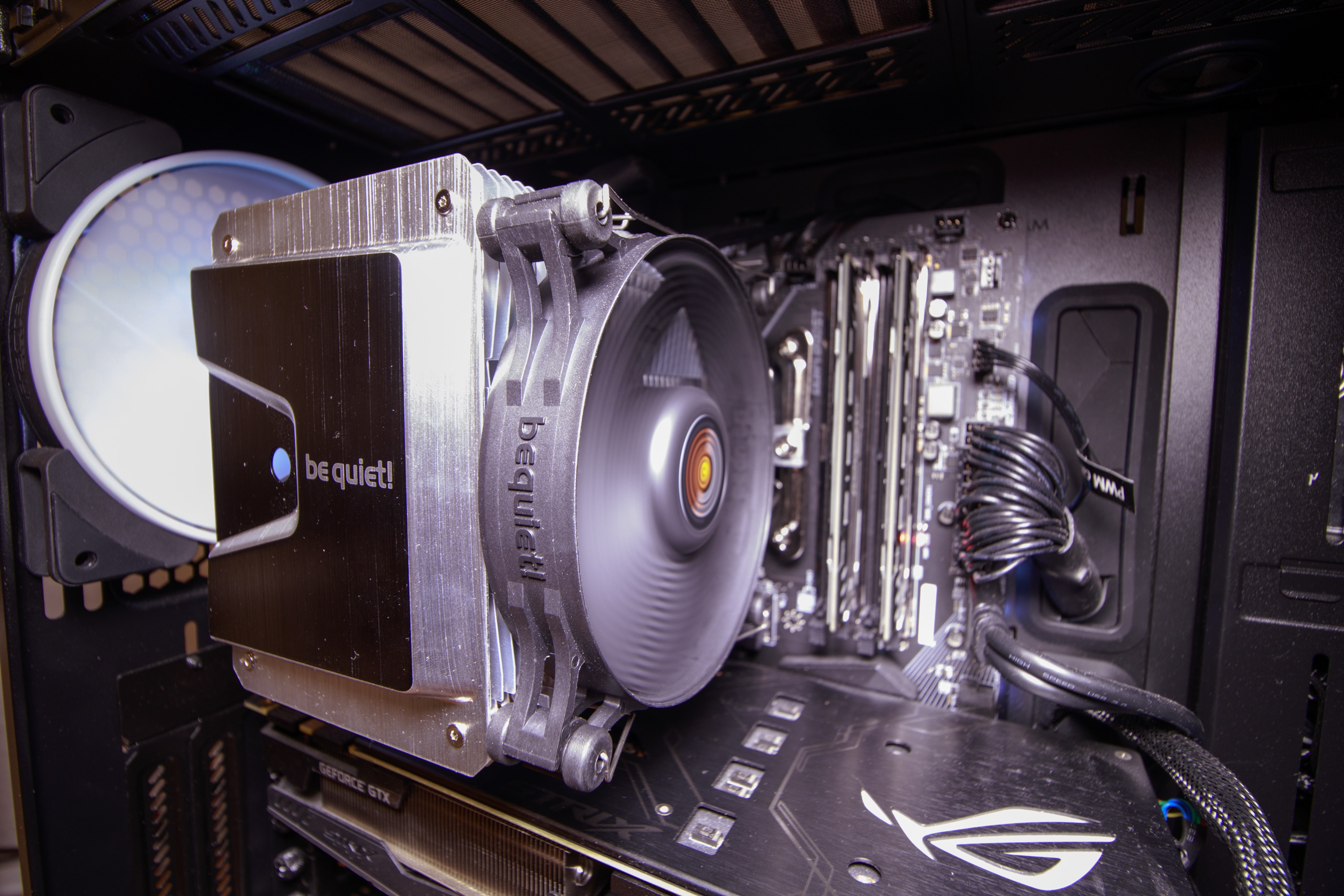
Another CPU cooler you can consider is Bequiet shadow rock 3, is not entirely white but chrome.
The good thing about this cooler is much easier to install than other CPU cooler in the market.
Yeah so far I haven't moved to AM4 yet, I updated the BIOS on the new board then gave up halfway because of this backplate debacle. Since I'm getting a new case I'd rather install the mobo straight into the new case rather than put in and then take out and reinstall into the new case one week later, but I appreciate the tip which I'll definitely try once I upgrade!Then turn off Turbo or Performance Enhancement or whatever it is called in the BIOS. Rule of thumb is power = square of frequency i.e. in order to turbo @ 110% of base clock the CPU will draw 120% the power at least.
Unless you do time-critical 10-hour renders that would be problematic if it takes 11 hours to finish.
*Don't turn off PBO because it actually provides benefits when undervolting/underpoweriing.
With enough tweaking you can cut power to almost half while losing maybe 20% speed. My 5600G CPU-Z score is around 4100-4200, or 10% less than normal 5600G, but it is done with 3.9GHz all clock at <40W package power. x264 rendering is also 3.9GHz all clock while package power limited to 40W.
noted on your environment condition, but if the room is vacuumed on timely basis I believe it could help a lot as i also placed my pc on floor and dusty room.
before you get the new cooler, i believe for sure you will also check for the cpu clearance of your future pc case and air flow planning too.
your work seems to be highly dependent of the cpu performance, if the budget air cooler unable to control the heat from cpu on substantial high load definitely the workload will prolong, but I guess you are aware of this instances based on the history of your posting in other threads.
I am just curious why not considered a better cpu air cooler for your cpu workload?
as below video, your choice of budget cooler seems good and highly recommended but it is less ideal for powerful cpu.
Yeah so far because it's just a Skylake system, I don't think the CPU cooler is a big bottleneck. Even at 100% for 10 hours the CPU barely breaks 70 deg C on the stock cooler and noise is very tolerable. Once I upgrade to AM4 it might be more of an issue with a more powerful CPU. Anyway I ordered the SE 224, will update when I receive it!
wwenze
Greater Supremacy Member
- Joined
- Dec 2, 2002
- Messages
- 87,148
- Reaction score
- 30,728
Skylake i5 draws just 50W when gaming. That's even less than a 5600G.Yeah so far because it's just a Skylake system, I don't think the CPU cooler is a big bottleneck. Even at 100% for 10 hours the CPU barely breaks 70 deg C on the stock cooler and noise is very tolerable. Once I upgrade to AM4 it might be more of an issue with a more powerful CPU. Anyway I ordered the SE 224, will update when I receive it!
https://cdn.mos.cms.futurecdn.net/u3nK3KNMiWBMWpgqJF943Z-970-80.png

- Joined
- May 3, 2001
- Messages
- 139,259
- Reaction score
- 17,477
Actually, with the backplate issue, if u are not buying a new cooler, u can tape the backplate to the motherboard.
Even if u buy a new cooler, most 3rd party coolers have backplates too, unless u use those clip on ones that are a lot more like the default coolers, which dun really work as well as those with backplates.
Even if u buy a new cooler, most 3rd party coolers have backplates too, unless u use those clip on ones that are a lot more like the default coolers, which dun really work as well as those with backplates.
Skylake i5 draws just 50W when gaming. That's even less than a 5600G.
https://cdn.mos.cms.futurecdn.net/u3nK3KNMiWBMWpgqJF943Z-970-80.png
Yup, heat in the Skylake system wasn't a problem and there wasn't a backplate problem like this one because of the stock cooler so it's all good.
Yeah I didn't have such wide strong tape available and buying it would have cost me $12, almost half the price of the cooler. I've got no use for such tape in other scenarios anyway.Actually, with the backplate issue, if u are not buying a new cooler, u can tape the backplate to the motherboard.
Even if u buy a new cooler, most 3rd party coolers have backplates too, unless u use those clip on ones that are a lot more like the default coolers, which dun really work as well as those with backplates.
This one seems okay though, theres a front mount screwed to the backplate and then the cooler screws onto that front mount. The backplate can't fall off when the CPU is removed because of the front mount.
Update: So I've got the SE224XT. It's fine really, solved the problem I wanted it to.
There's a front bracket to screw onto the existing AMD backplate which you need to set up first. The cooler then screws into the front bracket with two screws.
When the CPU cooler is removed, the front bracket holds the backplate on, preventing it from falling off.
Build quality is fine, nothing to complain about. Included accessories are of fairly decent quality, a full-sized tube of thermal paste is thrown in, it's fairly easy to install even for beginners, there's little proprietary hardware like custom sized fans or plastic brackets which may break over time, the metal mounting brackets feel solid, white LED fan is bright to add a bit of muted bling through the side panel.
I can't comment on performance because it's a new system and I haven't bothered with the stock cooler, but check out professional reviews if that's your thing.
For sub $30, it seems like a perfectly good cooler and it'll save a lot of hassle on AM4 re backplates falling off over the life of the system.
There's a front bracket to screw onto the existing AMD backplate which you need to set up first. The cooler then screws into the front bracket with two screws.
When the CPU cooler is removed, the front bracket holds the backplate on, preventing it from falling off.
Build quality is fine, nothing to complain about. Included accessories are of fairly decent quality, a full-sized tube of thermal paste is thrown in, it's fairly easy to install even for beginners, there's little proprietary hardware like custom sized fans or plastic brackets which may break over time, the metal mounting brackets feel solid, white LED fan is bright to add a bit of muted bling through the side panel.
I can't comment on performance because it's a new system and I haven't bothered with the stock cooler, but check out professional reviews if that's your thing.
For sub $30, it seems like a perfectly good cooler and it'll save a lot of hassle on AM4 re backplates falling off over the life of the system.

summer_dell
Supremacy Member
- Joined
- Dec 6, 2007
- Messages
- 5,850
- Reaction score
- 78
Congrats! I also gotten it as well. Performance wise i think its quite decent. I OC to 4.2ghz and at 100% stress test, it hovers about 70s in degree, and at half an hour mark at 80 - 84. have not reached 90 even once in the 30 mins test.Update: So I've got the SE224XT. It's fine really, solved the problem I wanted it to......
One thing i dont really like is when the included fan runs at higher RPM. can hear it quite clearly.
For me i set it at 20% of the speed as long as my processor is below 50 degree. still decent. idle around 40s degree.

bundy
Master Member
- Joined
- Jan 1, 2000
- Messages
- 2,518
- Reaction score
- 16
Here. $33.80, use coupons and you can get it below $30 pretty easily.
Important Forum Advisory Note
This forum is moderated by volunteer moderators who will react only to members' feedback on posts. Moderators are not employees or representatives of HWZ Forums. Forum members and moderators are responsible for their own posts.
Please refer to our Community Guidelines and Standards and Terms and Conditions for more information.
