WhizComms, new Fibre Broadband provider

xiaofan

High Supremacy Member
Joined
Sep 16, 2018
Messages
32,100
Reaction score
9,280
Yes, new subscriber. suppose the schedule for installation is on friday, but somehow the technician call say they are around my area and check if they come in to do the installation. Talk to the technician that i need to access my home from external and he told me to write in to get permission.

Thanks for the updates.

So you already installed WC 2.5Gbps Fibre Internet as a new subscriber, and you got Nokia G240 ONR instead of the ZTE ZXHN F620 ONR.

Interestingly they say that you need to get permission to access home network from outside. Not so sure what kind of permission do they mean.

What kind of remote access to home you need? What is your own router model (to be used after the ONR)? You may try to use DMZ (put your own router in the DMZ zone of the WC issued Nokia G240 ONR) first to see if the helps.

Unfortunately nobody has shared the superadmin login information of the Nokia G240 ONR publicly in this forum yet.
 

Matt_Max

Junior Member
Joined
Sep 21, 2016
Messages
31
Reaction score
25
I got my own linux server at home where i usually ssh back from company. I also setup reverse proxy at asus router to connect all the service from my home server. so now double NAT, all seem out of control.
 

Matt_Max

Junior Member
Joined
Sep 21, 2016
Messages
31
Reaction score
25
Thanks for the updates.

So you already installed WC 2.5Gbps Fibre Internet as a new subscriber, and you got Nokia G240 ONR instead of the ZTE ZXHN F620 ONR.

Interestingly they say that you need to get permission to access home network from outside. Not so sure what kind of permission do they mean.

What kind of remote access to home you need? What is your own router model (to be used after the ONR)? You may try to use DMZ (put your own router in the DMZ zone of the WC issued Nokia G240 ONR) first to see if the helps.

Unfortunately nobody has shared the superadmin login information of the Nokia G240 ONR publicly in this forum yet.
let me try the DMZ tonight.
 

alex22

Arch-Supremacy Member
Joined
Apr 29, 2001
Messages
21,838
Reaction score
5,614
Yes, new subscriber. suppose the schedule for installation is on friday, but somehow the technician call say they are around my area and check if they come in to do the installation. Talk to the technician that i need to access my home from external and he told me to write in to get permission.
Wah, not public housing huh
 

Matt_Max

Junior Member
Joined
Sep 21, 2016
Messages
31
Reaction score
25
Recheck the speed ... o_O
16511078149.png
Think i found the cultprit ... my NIC was detect as 100T instead of 1000T. Redo the test show better result.
16520326114.png
 

Matt_Max

Junior Member
Joined
Sep 21, 2016
Messages
31
Reaction score
25
Thanks for the updates.

So you already installed WC 2.5Gbps Fibre Internet as a new subscriber, and you got Nokia G240 ONR instead of the ZTE ZXHN F620 ONR.

Interestingly they say that you need to get permission to access home network from outside. Not so sure what kind of permission do they mean.

What kind of remote access to home you need? What is your own router model (to be used after the ONR)? You may try to use DMZ (put your own router in the DMZ zone of the WC issued Nokia G240 ONR) first to see if the helps.

Unfortunately nobody has shared the superadmin login information of the Nokia G240 ONR publicly in this forum yet.
explorer around the Nokia ONR found:
1. Can set DMZ
2. Can set port forwarding.
3. Can do DDNS
Basically can do what i need already. but then stuck in 1gbps ... even i put dual wan load balancing(understand asus dual WAN need public ip). speed does not boost up.

Wonder does anyone success change the ONR to 2.5gb ONU(from taobao)? i search here saw some info but think still missing some crucial info like LOID ...
Can anyone share more on this?
 

xiaofan

High Supremacy Member
Joined
Sep 16, 2018
Messages
32,100
Reaction score
9,280
explorer around the Nokia ONR found:
1. Can set DMZ
2. Can set port forwarding.
3. Can do DDNS
Basically can do what i need already. but then stuck in 1gbps ... even i put dual wan load balancing(understand asus dual WAN need public ip). speed does not boost up.

Wonder does anyone success change the ONR to 2.5gb ONU(from taobao)? i search here saw some info but think still missing some crucial info like LOID ...
Can anyone share more on this?

Read this post for Singtel/WC GPON ONR replacement to see if you want to proceed or not. GPON Stick or GPON ONU is pretty cheap from Taobao so no harm trying.
https://forums.hardwarezone.com.sg/...nd-onr-bridging.6938685/page-3#post-152058800
 

tanyj82

Member
Joined
Jul 30, 2007
Messages
150
Reaction score
7
i cant really find reasonable cheap ONU with either 10gbps or 2.5gbps on lan port.. mostly on 1gbps ... any good deal to suggest ?
 

xiaofan

High Supremacy Member
Joined
Sep 16, 2018
Messages
32,100
Reaction score
9,280
Not sure this will work? Taobao

This will for sure not work by itself. You need a GPON stick or GPON ONU for 1G/2G/2.5Gbps services. A few people have done the replacement of ISP ONT/ONR with this option in this forum.

Then you need an XGS-PON stick or XGS-PON ONU (expensive) for 5G/10Gbps service. Nobody has done the replacement of ISP XGS-PON ONT/ONR with this option in this forum.

VQ has come out with a cheap XSG-PON Stick at S$99 one time charge for their new XGS-PON based 3G/5G/10G services for power users. This indeed attracts quite some power users including @Mach3.2 who has signed up VQ 3Gbps plan along with his M1 1Gbps plan. In this case, you do not need the VQ issued bridged ONR. You need to have a router with SFP+ ports to use this option.
https://viewqwest.com/sg/residential/broadband/
https://forums.hardwarezone.com.sg/threads/10g-capable-router-with-sfp-wan-or-wan-lan-port.7047645/

SFP-380x500-3.jpg

FPCdu4t.jpg
 
Last edited:

xiaofan

High Supremacy Member
Joined
Sep 16, 2018
Messages
32,100
Reaction score
9,280
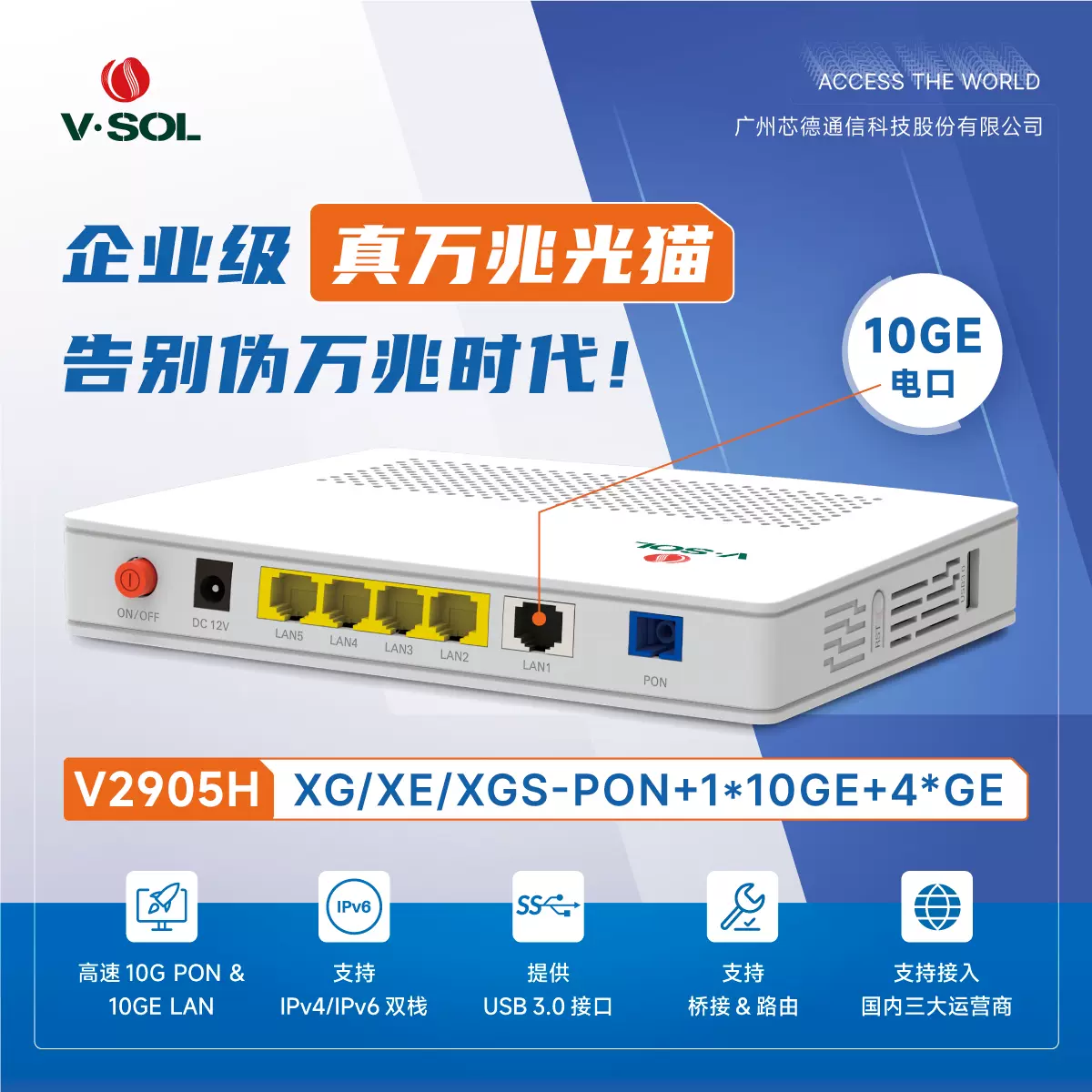
1. Example GPON ONU from VSOL with 2.5G LAN port Taobao, RMB 185. This will work usually for 1G/2G/2.5Gbps plans if you configure it properly (with potential exception for Singtel TV box).

https://item.taobao.com/item.htm?spm=a21xtw.29178619.product_shelf.1.17a62472jCAJSz&id=749364212240
O1CN01SVGlWf1hQAYXe3xwu_!!2200643534271.png_.webp


2. Example XGS-PON ONU with 10G LAN port from VSOL Taobao, RMB590. Not guarantee to work.

https://item.taobao.com/item.htm?spm=a21n57.1.item.2.317951bfOOj9FE
O1CN01el4mKb1hQAZPCMs9V_!!2200643534271.jpg_Q75.jpg_.webp


3. Setting reference for GPON Stick/ONU for Singtel ONR replacement, it should be working for WC as well. Still standard disclam applies: no guarantee, YMMV, proceed at your own risk.

https://forums.hardwarezone.com.sg/...nd-onr-bridging.6938685/page-3#post-152058800
1. GPON--互操作兼容设置--基本认证设置
GPON SN: 12 letters S/N on back of your Singtel ONR
LOID: Fiber Broadband ID on your Singtel contract/bill
LOID CheckCode & Ploam Password: leave blank

2. GPON--互操作兼容设置--VLAN相关设置
互操作兼容模式:tick
默认PVID(for internet):10
下行组播VLAN(for IPTV):1281
下行组播VLAN转换(for IPTV):20
VLAN转换/绑定:leave blank

click 保存&应用

3. 系统--重启 (reboot) and you should now see 注册状态 5 under GPON状态

His speedtest result with Singtel 1Gbps plan (looks like Singtel does not throttle the speed for 1Gbps user now).
https://forums.hardwarezone.com.sg/threads/singtel-1-gbps-fibre.5930834/page-238#post-152950414

Ei2WXd3.png
 
Last edited:

xiaofan

High Supremacy Member
Joined
Sep 16, 2018
Messages
32,100
Reaction score
9,280
explorer around the Nokia ONR found:
1. Can set DMZ
2. Can set port forwarding.
3. Can do DDNS
Basically can do what i need already. but then stuck in 1gbps ... even i put dual wan load balancing(understand asus dual WAN need public ip). speed does not boost up.

By right Asus Dual WAN Load balancing should work based on the reports in this WC thread. So you should be able to get > 1Gbps when using OOkla SpeedTest. There are other reports of success as well using Xiaomi routers.

The only time Asus Dual WAN Load Balancing does not work seems to be related to MR 2Gbps plan (dual 1Gbps plan with CGNAT).
 

Matt_Max

Junior Member
Joined
Sep 21, 2016
Messages
31
Reaction score
25
By right Asus Dual WAN Load balancing should work based on the reports in this WC thread. So you should be able to get > 1Gbps when using OOkla SpeedTest. There are other reports of success as well using Xiaomi routers.

The only time Asus Dual WAN Load Balancing does not work seems to be related to MR 2Gbps plan (dual 1Gbps plan with CGNAT).
let me fixed my laptop 2.5G port first ... can't test anything beyond 1G
 
Important Forum Advisory Note
This forum is moderated by volunteer moderators who will react only to members' feedback on posts. Moderators are not employees or representatives of HWZ. Forum members and moderators are responsible for their own posts.

Please refer to our Community Guidelines and Standards, Terms of Service and Member T&Cs for more information.
Top