
Oh no, his contact number also not in useI deleted liao. He's a bit strange since the last incident when I contracted him
You are using an out of date browser. It may not display this or other websites correctly.
You should upgrade or use an alternative browser.
You should upgrade or use an alternative browser.
Wireless IP Camera thread
- Thread starter Dr_ARCHer
- Start date
More options
Who Replied?
harky
Great Supremacy Member
- Joined
- Jan 20, 2002
- Messages
- 61,741
- Reaction score
- 3,579
Your router need to set that IP to post forward.Hi can check how to do the port forwarding? Just change the router but realised the person in charge no longer contactable .
Can advice where to find the IP for my IP cam?Your router need to set that IP to post forward.
harky
Great Supremacy Member
- Joined
- Jan 20, 2002
- Messages
- 61,741
- Reaction score
- 3,579
do u had the CD?Can advice where to find the IP for my IP cam?
inside got one prog to find once u hoot up ur cam
I have a small cd but no cd player to play . My laptop don’t have a cd romdo u had the CD?
inside got one prog to find once u hoot up ur cam
harky
Great Supremacy Member
- Joined
- Jan 20, 2002
- Messages
- 61,741
- Reaction score
- 3,579
i been a while i install so i actually forget..I have a small cd but no cd player to play . My laptop don’t have a cd rom
hmm i think u need to connect the cam (Wire) to ur router first to find the ip and access the cam to setup something inside.
something like this
nt sure if u can find using wifi a not..
try to download search tool IP (nt sure work a nt)
http://www.easyn.com/IP-search-tools.html
roughly remember i do ddns (FREE https://www.noip.com/) and do some setting on the router
usually router ip is hidden tht why u cant access outside network, so u need to port forward and setup a ddns..
some router had ddns inside.... (i think ASUS one has) so it easy just reg and setup and it done if nt wrong.
sineoji is using old technology, got gd and bad.. the only i like is i can view cam from browser which save dataplan haha, new one cannot.. must use mobile

now i use xiaomi 2k cam liao ahha
Last edited:
i been a while i install so i actually forget..
hmm i think u need to connect the cam (Wire) to ur router first to find the ip and access the cam to setup something inside.
something like this
nt sure if u can find using wifi a not..
try to download search tool IP (nt sure work a nt)
roughly remember i do ddns and do some setting on the router
usually router ip is hidden tht why u cant access outside network, so u need to port forward and setup a ddns..
some router had ddns inside.... (i think ASUS one has) so it easy just reg and setup and it done if nt wrong.
sineoji is using old technology, got gd and bad.. the only i like is i can view cam from browser which save dataplan haha, new one cannot.. must use mobile
now i use xiaomi 2k cam liao ahha
Hi thanks , the big headache is that I change my router and now the IP Sineoji cam is still under the old router settings. Once I connect ethernet cable from the camera to the new router and do reset, where shall I go to reconfigure the IP cam to the new router settings?
harky
Great Supremacy Member
- Joined
- Jan 20, 2002
- Messages
- 61,741
- Reaction score
- 3,579
lolHi thanks , the big headache is that I change my router and now the IP Sineoji cam is still under the old router settings. Once I connect ethernet cable from the camera to the new router and do reset, where shall I go to reconfigure the IP cam to the new router settings?
once hoot up ur cam and ur router... u got the ip thn access from tht ip from browser and go in..
actually u can hoot up and see if ur router can detect the cam IP a not..
i think down because Sineoji ddns gone.. so u cant access it..
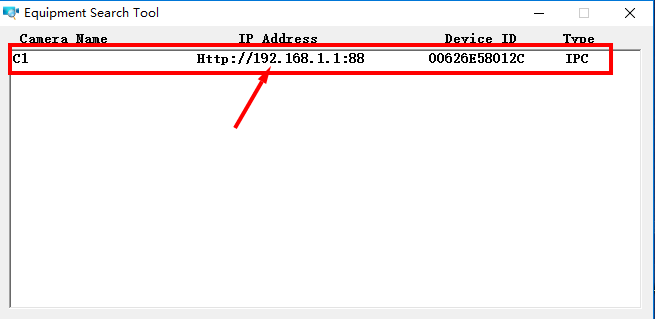
Last edited:
Hi that’s the other brand camera search tool. Now that Sineoji brand has gone into history, where shall I search?lol
once hoot up ur cam and ur router... u got the ip thn access from tht ip from browser and go in..
actually u can hoot up and see if ur router can detect the cam IP a not..
i think down because Sineoji ddns gone.. so u cant access it..
harky
Great Supremacy Member
- Joined
- Jan 20, 2002
- Messages
- 61,741
- Reaction score
- 3,579
should be able to search.... i think is universal oneHi that’s the other brand camera search tool. Now that Sineoji brand has gone into history, where shall I search?
if not u try to rest and hook up see ur router can detect a nt
Last edited:
Hi I connect the lan cable and I see connected device. But connected does not mean configured. Also the camera in the Sineoji app is still offline. I need to configure settings but how to do that? Go to which website?should be able to search.... i think is universal one
if not u try to rest and hook up see ur router can detect a nt
harky
Great Supremacy Member
- Joined
- Jan 20, 2002
- Messages
- 61,741
- Reaction score
- 3,579
No website. The website is the IP address.Hi I connect the lan cable and I see connected device. But connected does not mean configured. Also the camera in the Sineoji app is still offline. I need to configure settings but how to do that? Go to which website?
Just like you go in to your router.
HTTP://192....
But how to do port forwarding?
harky
Great Supremacy Member
- Joined
- Jan 20, 2002
- Messages
- 61,741
- Reaction score
- 3,579
Different router had own settIng.But how to do port forwarding?
You need to go into your router and check and google.
It all in configure..
Need to explore yourself de..
What do you mean last incident. You have any other sources for Sineoji? Thank youI deleted liao. He's a bit strange since the last incident when I contracted him
Hi can check you still using PT528v? So got any issues? I am using PT528v and now Dean has disappeared.Sineoji PT528V
I'm having issues connecting to my webcam from outside, my setup is using PT528v on wireless connection to Linksys Velop Tri-Band. Anyone could kindly help?
harky
Great Supremacy Member
- Joined
- Jan 20, 2002
- Messages
- 61,741
- Reaction score
- 3,579
it very hard to teach u de.. is not somthing tht can do teach u step by step..Hi can check you still using PT528v? So got any issues? I am using PT528v and now Dean has disappeared.
all u need to do, is go in ur cam & router and explore the setting inside.
via the ip address.
if u cant access the IP cam... i think u need to do hard reset..
think u use IE, dont use chrome.
ur cam look like wanscam one, can follow this...
https://tutoriels.domotique-store.fr/images/WANSCAM/manuels/WANSCAM-JW-IPCAM-MANUAL-EN.pdf
the rest is on ur own.. no one can teach u because diff router config diff way.
need someone who has IT background to do it.
Last edited:
Guess I have to change IP cam. No point wasting time for something I dont know. Any recommendations for similar type as Sineoji IP cam which I can mount on to the wall? Thanksit very hard to teach u de.. is not somthing tht can do teach u step by step..
all u need to do, is go in ur cam & router and explore the setting inside.
via the ip address.
if u cant access the IP cam... i think u need to do hard reset..
think u use IE, dont use chrome.
ur cam look like wanscam one, can follow this...
https://tutoriels.domotique-store.fr/images/WANSCAM/manuels/WANSCAM-JW-IPCAM-MANUAL-EN.pdf
the rest is on ur own.. no one can teach u because diff router config diff way.
need someone who has IT background to do it.
harky
Great Supremacy Member
- Joined
- Jan 20, 2002
- Messages
- 61,741
- Reaction score
- 3,579
most can... xiaomi 2k quite gd..Guess I have to change IP cam. No point wasting time for something I dont know. Any recommendations for similar type as Sineoji IP cam which I can mount on to the wall? Thanks
scan QR code to link ur mobile app to watch
The model and brand name is Xiaomi 2k?most can... xiaomi 2k quite gd..
scan QR code to link ur mobile app to watch
Important Forum Advisory Note
This forum is moderated by volunteer moderators who will react only to members' feedback on posts. Moderators are not employees or representatives of HWZ Forums. Forum members and moderators are responsible for their own posts.
Please refer to our Community Guidelines and Standards and Terms and Conditions for more information.
