

You are using an out of date browser. It may not display this or other websites correctly.
You should upgrade or use an alternative browser.
You should upgrade or use an alternative browser.
xbmc live tv
- Thread starter neanea
- Start date
More options
Who Replied?
rECKleSSfElla
Supremacy Member
- Joined
- Jul 26, 2005
- Messages
- 9,763
- Reaction score
- 1,103
i remember there is a channelnewsasia addon for xbmc but i dont remember there is any for chan 5 n 8.

Blindaim
Supremacy Member
- Joined
- Aug 27, 2007
- Messages
- 5,202
- Reaction score
- 1,336
Where find this add on?
You mean toggle? It is not xbmc btw
Channel 8 Primetime
App from apple or google store.

Jeffsrightnow
Member
- Joined
- Sep 7, 2011
- Messages
- 494
- Reaction score
- 0
Xbmc can stream channel 5 & 8 but no live.You can search on more icon & select Mediacorp Tv Spore to install.
What you guys use xbmc for?
How to get live tv from it?
Anyone ??????
Jeffsrightnow
Member
- Joined
- Sep 7, 2011
- Messages
- 494
- Reaction score
- 0
What you guys use xbmc for?
How to get live tv from it?
Xbmc if good for HD streaming content such as movies,music video,tv drama,sport replay.For live tv spore channel is best to use normal tv as
an option.
Jeffsrightnow
Member
- Joined
- Sep 7, 2011
- Messages
- 494
- Reaction score
- 0
What about viewing live tv of the rest of the world?
What software to use?
You can visit SuperRepo.org » Worlds largest XBMC addons repository

batuchka
Honorary Member
- Joined
- Jun 4, 2007
- Messages
- 106,383
- Reaction score
- 10,330
What you guys use xbmc for?
How to get live tv from it?
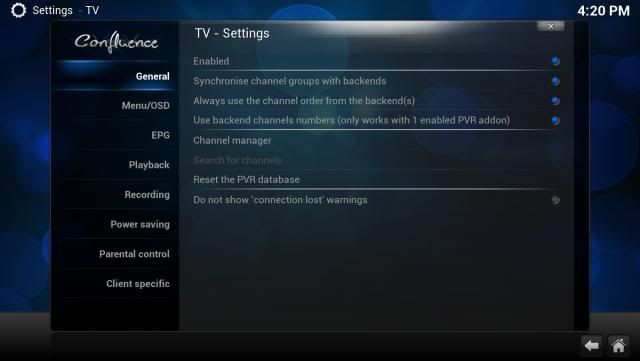
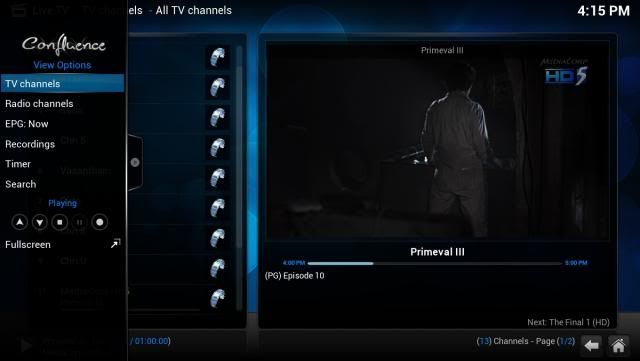
Hi i've been using NPVR as a backend for my installed dual TV Cards on my HTPC - now there is the NPVR addon which allows one to watch live tv (with an installed TV Card) in XBMC


batuchka
Honorary Member
- Joined
- Jun 4, 2007
- Messages
- 106,383
- Reaction score
- 10,330
Previous pics were from last year as HTPC was on duty recording : updated using a working USB DVB-T2 tuner and NPVR PVR client in XBMC
[URL=http://s137.photobucket.com/user/batuchka/media/DIY%20PCs/screenshot000_zpsa79ac6ab.png.html]
 [/URL]


Also : subtitles works fine in live tv/xbmc with the new DVB-T2 channels ^^


[URL=http://s137.photobucket.com/user/batuchka/media/DIY%20PCs/screenshot000_zpsa79ac6ab.png.html]


Also : subtitles works fine in live tv/xbmc with the new DVB-T2 channels ^^


Last edited:
Jeffsrightnow
Member
- Joined
- Sep 7, 2011
- Messages
- 494
- Reaction score
- 0
Hope some information of set-up guide help.
1. Download NextPVR Downloads | NextPVR
2. Install NextPVR and setup your tuner. Use the wiki here if you need any help setting up the NextPVR software. NextPVR Documentation Wiki | Main / NextPVR Wiki
3. Test NextPVR. Make sure that you can view channels in nextpvr.
4. Download XBMC Frodo. Download | XBMC
5. Install XBMC Frodo, make sure that you install the PVR plugin for NextPVR in the install options.
5. Stop the NextPVR services using the shortcut in your start menu under nextpvr. Make sure the dialog box Stopped appears and click ok.
6. Download the updated dll file http://forums.gbpvr.com/attachment.php?attachmentid=36068&d=1364084249
7. Extract the nshared.dll file into the NextPVR folder in your Program Files.
8. Download the updated XBMC plugin from here. http://forums.gbpvr.com/attachment.php?attachmentid=36068&d=1364084249
9. Extract the dll file to the Program Files\XBMC\Addons\pvr.nextpvr
10. Start NextPVR services.
11. Go into XBMC, go into system\settings\live tv & enable, choose the nextpvr and click enable. Job done.
1. Download NextPVR Downloads | NextPVR
2. Install NextPVR and setup your tuner. Use the wiki here if you need any help setting up the NextPVR software. NextPVR Documentation Wiki | Main / NextPVR Wiki
3. Test NextPVR. Make sure that you can view channels in nextpvr.
4. Download XBMC Frodo. Download | XBMC
5. Install XBMC Frodo, make sure that you install the PVR plugin for NextPVR in the install options.
5. Stop the NextPVR services using the shortcut in your start menu under nextpvr. Make sure the dialog box Stopped appears and click ok.
6. Download the updated dll file http://forums.gbpvr.com/attachment.php?attachmentid=36068&d=1364084249
7. Extract the nshared.dll file into the NextPVR folder in your Program Files.
8. Download the updated XBMC plugin from here. http://forums.gbpvr.com/attachment.php?attachmentid=36068&d=1364084249
9. Extract the dll file to the Program Files\XBMC\Addons\pvr.nextpvr
10. Start NextPVR services.
11. Go into XBMC, go into system\settings\live tv & enable, choose the nextpvr and click enable. Job done.
Last edited:
Previous pics were from last year as HTPC was on duty recording : updated using a working USB DVB-T2 tuner and NPVR PVR client in XBMC
Which USB DVB-T2 tuner are you using? A month ago, there is no T2 tuner that is compatible with SG implemented T2 version.
batuchka
Honorary Member
- Joined
- Jun 4, 2007
- Messages
- 106,383
- Reaction score
- 10,330
Which USB DVB-T2 tuner are you using? A month ago, there is no T2 tuner that is compatible with SG implemented T2 version.
Am currently in the rigorous testing phase and finalising review but product yet to be approved my MDA and released to retail channel hence am under NDA
Can I buy a USB TV toggle for this setup?
Which USB TV toggle to buy?
Which USB TV toggle to buy?
Hi i've been using NPVR as a backend for my installed dual TV Cards on my HTPC - now there is the NPVR addon which allows one to watch live tv (with an installed TV Card) in XBMC

batuchka
Honorary Member
- Joined
- Jun 4, 2007
- Messages
- 106,383
- Reaction score
- 10,330
Can I buy a USB TV toggle for this setup?
Which USB TV toggle to buy?
Have to be very careful that DVB-T2 tuner is v 1.3.1 compliant and more info here
http://forums.hardwarezone.com.sg/h...t2-usb-pci-e-pci-tv-tuner-thread-3290548.html
Jeffsrightnow
Member
- Joined
- Sep 7, 2011
- Messages
- 494
- Reaction score
- 0
On the topic of XBMC, any repos for Hong Kong movies? Been googling around .. can't find an answer.
Big fan of Channel 1 & Ice Films.
You can try this.
http://mirrors.superrepo.org/addons/frodo/plugin.video.azdrama/plugin.video.azdrama-1.0.14.zip
Important Forum Advisory Note
This forum is moderated by volunteer moderators who will react only to members' feedback on posts. Moderators are not employees or representatives of HWZ Forums. Forum members and moderators are responsible for their own posts.
Please refer to our Community Guidelines and Standards and Terms and Conditions for more information.
