Xiaomi 13 series

Milo-Dino

Great Supremacy Member
Joined
May 15, 2009
Messages
72,113
Reaction score
30,966
Hi guys. need some urgent help here. Got the Xiaomi 13 ultra today,
1) battery life is terrible. Drop 10% in half an hour.
2) Phone is very warm, I was only just setting up my phone.
3) Google location history cannot be turned on at all. I can't checked the box for my device. 'There was a problem getting this setting. Please try again later.' Pretty sure this is a global set, as I got it from reputable shop locally. This is very frustrating. I can still see the timeline history but I just can't turn on the location history for this device at all, I already turn on all the access for Google map.

you 100% sure it's global set? points 1 & 3 sounds like a china set with google loaded....

my ultra easily lasts from morning to i go to bed with around 2 hours of netflix and maybe 1-2 hours of gaming (mlbb) during the day
 

twinklingstars

Supremacy Member
Joined
Aug 2, 2006
Messages
6,443
Reaction score
839
you 100% sure it's global set? points 1 & 3 sounds like a china set with google loaded....

my ultra easily lasts from morning to i go to bed with around 2 hours of netflix and maybe 1-2 hours of gaming (mlbb) during the day
I checked the MIUI version, it says global. What is the correct way to check if it's a global set. I verify the IMEI number on the product authentication website, it confirms my phone is the official international version. Got it from Red White.

Your location history can be enabled ?
 
Last edited:

Milo-Dino

Great Supremacy Member
Joined
May 15, 2009
Messages
72,113
Reaction score
30,966
I checked the MIUI version, it says global. What is the correct way to check if it's a global set. I verify the IMEI number on the product authentication website, it confirms my phone is the official international version. Got it from Red White.

Your location history can be enabled ?
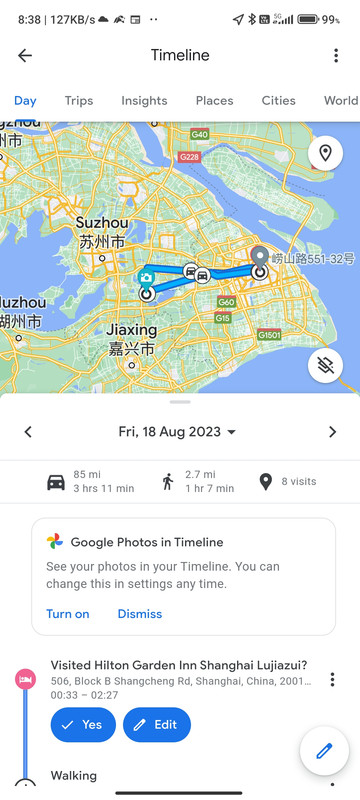
Screenshot-2023-08-22-08-38-20-987-com-google-android-apps-maps.jpg


Works fine even when I was in China last week
 

vibranze

Senior Member
Joined
Apr 30, 2006
Messages
1,582
Reaction score
274
I checked the MIUI version, it says global. What is the correct way to check if it's a global set. I verify the IMEI number on the product authentication website, it confirms my phone is the official international version. Got it from Red White.

Your location history can be enabled ?
Mine is China set and location history is working fine too.
 

dreamcast18

Master Member
Joined
Jan 8, 2016
Messages
4,059
Reaction score
3,936
Hi guys. need some urgent help here. Got the Xiaomi 13 ultra today,
1) battery life is terrible. Drop 10% in half an hour.
2) Phone is very warm, I was only just setting up my phone.
3) Google location history cannot be turned on at all. I can't checked the box for my device. 'There was a problem getting this setting. Please try again later.' Pretty sure this is a global set, as I got it from reputable shop locally. This is very frustrating. I can still see the timeline history but I just can't turn on the location history for this device at all, I already turn on all the access for Google map.
Battery life is awesome on mine. And I edit alot of Insta360 videos on it.

Sounds like something is running in the background that is draining ur battery and causing it to run warm.
 

tckrto

Arch-Supremacy Member
Joined
Oct 21, 2001
Messages
23,985
Reaction score
1,315
Hi guys. need some urgent help here. Got the Xiaomi 13 ultra today,
1) battery life is terrible. Drop 10% in half an hour.
2) Phone is very warm, I was only just setting up my phone.
3) Google location history cannot be turned on at all. I can't checked the box for my device. 'There was a problem getting this setting. Please try again later.' Pretty sure this is a global set, as I got it from reputable shop locally. This is very frustrating. I can still see the timeline history but I just can't turn on the location history for this device at all, I already turn on all the access for Google map.
Battery life drop 10% still need to know what u were doing with the phone. If idling and drop then something running at the background.

Phone warm is normal since running application and maybe sync while running stuff around

This gotta be user problem. Just go check the privacy setting and google setting maybe something miss-out that's why not working.

I using a bootloader unlock mi 12s ultra with custom miui rom also don't have google location history issue.
 

bellevue18

Senior Member
Joined
Jan 1, 2012
Messages
1,248
Reaction score
219
I read that the Snapdragon 8 Gen 2 chip has inbuilt iSim onboard. Any expert know if Xiaomi has enabled the iSim in its ROM? Thanks
 

divinepotato

Senior Member
Joined
Sep 25, 2005
Messages
665
Reaction score
125
Received the 13 Ultra today with a free Watch S1 (shipping took 10 days from Hong Kong). Charging is quite slow with the Boost Charging turned off (it's turned off by default); which is a lot slower than my Realme. The charger is a 2 pin plug (round type). Also got the 50w wireless charger from the official Taobao store at a very reasonable SGD 37.
 

dreamcast18

Master Member
Joined
Jan 8, 2016
Messages
4,059
Reaction score
3,936
Received the 13 Ultra today with a free Watch S1 (shipping took 10 days from Hong Kong). Charging is quite slow with the Boost Charging turned off (it's turned off by default); which is a lot slower than my Realme. The charger is a 2 pin plug (round type). Also got the 50w wireless charger from the official Taobao store at a very reasonable SGD 37.
with the factory charger, must select the turbo charging when they ask. I don't use it often. usually quick charge, not even rapid charge to maintain battery health...unless need to rush out and need a quick boost. I find it similar to my Real GT2Pro.

That said..batt life is soooo much better than GT2Pro.
 
Important Forum Advisory Note
This forum is moderated by volunteer moderators who will react only to members' feedback on posts. Moderators are not employees or representatives of HWZ Forums. Forum members and moderators are responsible for their own posts. Please refer to our Community Guidelines and Standards and Terms and Conditions for more information.
Top