
You are using an out of date browser. It may not display this or other websites correctly.
You should upgrade or use an alternative browser.
You should upgrade or use an alternative browser.
Xiaomi MiTV2 help
- Thread starter zyijia
- Start date
- Status
- Not open for further replies.
More options
Who Replied?
i1magic
Arch-Supremacy Member
- Joined
- Dec 11, 2002
- Messages
- 22,366
- Reaction score
- 117
Mi TV 2 got 1 x 3.5mm audio jack and 1 S / PDIF jack. Same for the soundbar too. But the audio cable supplied, 1 end is 3.5mm audio jack and the other end is S / PDIF jack.
So what would be the best way to connect the TV to the soundbar?
Currently, I connect 3.5mm jack from TV to the S / PDIF input on the soundbar.
I don't see the 1 S / PDIF jack from the tv. Only 3.5mm
You are right. I just checked again and cannot see S/ PDIF jack.
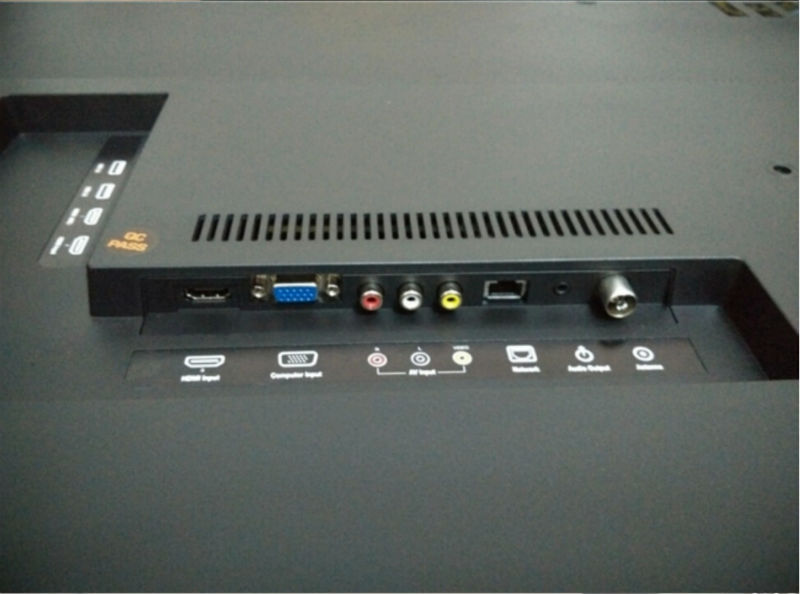
Specs say have but I cannot find also.
Another thing, I thought the remote controller suppose to be BlueTooth type but the one I got is IR type. How about the rest of you?

Devilsire
Arch-Supremacy Member
- Joined
- Jan 9, 2007
- Messages
- 11,713
- Reaction score
- 4,450
bluetooth controller for 49" mitv 2, others are IR default.
You are right. I just checked again and cannot see S/ PDIF jack.
Specs say have but I cannot find also.
Another thing, I thought the remote controller suppose to be BlueTooth type but the one I got is IR type. How about the rest of you?
I am surprised...3.5mm is meant for analogue signal whereas S/PDIF is for digital signal carried optically (by light, same as optical fibre).Mi TV 2 got 1 x 3.5mm audio jack and 1 S / PDIF jack. Same for the soundbar too. But the audio cable supplied, 1 end is 3.5mm audio jack and the other end is S / PDIF jack.
So what would be the best way to connect the TV to the soundbar?
Currently, I connect 3.5mm jack from TV to the S / PDIF input on the soundbar.
Anyway, I found this that claims to be the original Xiaomi cable (http://www.aliexpress.com/item/Orig...o-RCA-1-2m-Length-Oxygen-free/1753817002.html)

Is your cable similarly to this? If so, can you examine the tips of both plugs to see if there are lenses there? If there are then the signal is carried optically.
I don't see the 1 S / PDIF jack from the tv. Only 3.5mm
I suppose this is "Specifications are subject to change without notice"You are right. I just checked again and cannot see S/ PDIF jack.
Specs say have but I cannot find also.
Another thing, I thought the remote controller suppose to be BlueTooth type but the one I got is IR type. How about the rest of you?

49" Bluetooth type RC
48"/55" IR type RC
All model come with Bluetooth connectivity
http://www.mi.com/mitv55/techspeces/
48"/55" IR type RC
All model come with Bluetooth connectivity
http://www.mi.com/mitv55/techspeces/
Last edited:
Hi Guys! First post, before I wasjust a silent reader
I'm in China and got the 49" MiTV2 a few weeks ago. All in all an awesome TV, just the software is naaaah.... So I'm glad I found this english speaking forum, as my Chinese is far from good enough to read in the Chinese Mi-Forum!
So here is what I want to know:
I bought a Bluetooth Keyboard/Mouse Combination.
It happens that the mouse on the screen is very slow from time to time. It lags behind a little. Someone has a bluetooth mouse and has similar issues? I also realized, that I can't use the keyboard for input in every situation. It works fine in Games, but when the Mi-Keyboard appears, its useless...
Second: How can I enter the settings for the sound bar? I remember in the bgeinning, when I set up the TV, I could adjust the volume of the subwoofer. But now I can't find these settings anymore...
Third: Anyone updated to 1.1.88 yet? TV keeps asking
P.s.: Anyone found a hack to disable the ads? Worst thing about it is, that I almost have any of the products they are advertising already at home
I'm in China and got the 49" MiTV2 a few weeks ago. All in all an awesome TV, just the software is naaaah.... So I'm glad I found this english speaking forum, as my Chinese is far from good enough to read in the Chinese Mi-Forum!
So here is what I want to know:
I bought a Bluetooth Keyboard/Mouse Combination.
It happens that the mouse on the screen is very slow from time to time. It lags behind a little. Someone has a bluetooth mouse and has similar issues? I also realized, that I can't use the keyboard for input in every situation. It works fine in Games, but when the Mi-Keyboard appears, its useless...
Second: How can I enter the settings for the sound bar? I remember in the bgeinning, when I set up the TV, I could adjust the volume of the subwoofer. But now I can't find these settings anymore...
Third: Anyone updated to 1.1.88 yet? TV keeps asking
P.s.: Anyone found a hack to disable the ads? Worst thing about it is, that I almost have any of the products they are advertising already at home
Your link has the info as the one I gave earlier:49" Bluetooth type RC
48"/55" IR type RC
All model come with Bluetooth connectivity
http://www.mi.com/mitv55/techspeces/
Maybe my eyesight not so good. Can you point to me where the info is stated as indicated in bold? Thanks.
1. I connect a common 4 ports usb hub --- wired mouse or wifi keyboard &mouse or MeLe F10 air mouse, sd card , portable harddisk.. .. working fine
2 Sound - settings > Sound and display param
3 Hold your horse on 1.1.8.8 ... better disable update..
Some cannot turn On the tv after this update..
2 Sound - settings > Sound and display param
3 Hold your horse on 1.1.8.8 ... better disable update..
Some cannot turn On the tv after this update..
Last edited:
S/PDIF Port
Just to share this article which should help us to understand the workings of the S/PDIF
http://www.hardwaresecrets.com/everything-you-need-to-know-about-the-spdif-connection/
Quote from the article
On laptops, the presence of an SPDIF output is more difficult to detect, because it is usually combined with the headphone jack, supporting the 3.5 mm optical connector...
I checked the 小米specs again. The tv has one audio out which suports for both line out (analogue) and S/PDIF.
Just to share this article which should help us to understand the workings of the S/PDIF
http://www.hardwaresecrets.com/everything-you-need-to-know-about-the-spdif-connection/
Quote from the article
On laptops, the presence of an SPDIF output is more difficult to detect, because it is usually combined with the headphone jack, supporting the 3.5 mm optical connector...
I checked the 小米specs again. The tv has one audio out which suports for both line out (analogue) and S/PDIF.
Devilsire
Arch-Supremacy Member
- Joined
- Jan 9, 2007
- Messages
- 11,713
- Reaction score
- 4,450
Your link has the info as the one I gave earlier:
Maybe my eyesight not so good. Can you point to me where the info is stated as indicated in bold? Thanks.
right at the bottom
遥控器
- 红外遥控器 x 1 个 40"
- 红外遥控器 x 1 个 55"
- 蓝牙遥控器 x 1 个 49"
- 红外遥控器 x 1 个 48"
Oh thanks...blame my eyesight.right at the bottom
遥控器
- 红外遥控器 x 1 个 40"
- 红外遥控器 x 1 个 55"
- 蓝牙遥控器 x 1 个 49"
- 红外遥控器 x 1 个 48"
Thx for the reply!1. I connect a common 4 ports usb hub --- wired mouse or wifi keyboard &mouse or MeLe F10 air mouse, sd card , portable harddisk.. .. working fine
2 Sound - settings > Sound and display param
3 Hold your horse on 1.1.8.8 ... better disable update..
Some cannot turn On the tv after this update..
I actually only need the bluetooth mouse/keyboard because in some Apps a "touch" is definetl needed. Here comes the mouse into play. So it's actually enough for my purpose.
For the update:
I disabled auto-update. Nevertheless the notification poped up from time to time. Guess what? Happened while I was playing some games. Guess again? I pushed it... No chance to avoid it... Luckily my TV still works
So I'm on 1.1.88 now. By the way it included an update for the soundbar.Question for soundbar users: How to turn the bar and subwoofer off? After switching off the TV, the subwoofer and bar stay on (logo on woofer is white).
i1magic
Arch-Supremacy Member
- Joined
- Dec 11, 2002
- Messages
- 22,366
- Reaction score
- 117
bluetooth controller for 49" mitv 2, others are IR default.
No wonder lah .... why don't they just give BT controller for all? *sigh*
i1magic
Arch-Supremacy Member
- Joined
- Dec 11, 2002
- Messages
- 22,366
- Reaction score
- 117
I am surprised...3.5mm is meant for analogue signal whereas S/PDIF is for digital signal carried optically (by light, same as optical fibre).
Anyway, I found this that claims to be the original Xiaomi cable (http://www.aliexpress.com/item/Orig...o-RCA-1-2m-Length-Oxygen-free/1753817002.html)
Is your cable similarly to this? If so, can you examine the tips of both plugs to see if there are lenses there? If there are then the signal is carried optically.
I suppose this is "Specifications are subject to change without notice"
How to see the lens on the cable? I don't think I see any lens on the cable.
Yes. The cable looks exactly like the one in the picture above.
i1magic
Arch-Supremacy Member
- Joined
- Dec 11, 2002
- Messages
- 22,366
- Reaction score
- 117
Anyway, I found this that claims to be the original Xiaomi cable (http://www.aliexpress.com/item/Orig...o-RCA-1-2m-Length-Oxygen-free/1753817002.html)
Is your cable similarly to this? If so, can you examine the tips of both plugs to see if there are lenses there? If there are then the signal is carried optically.
Just to share this article which should help us to understand the workings of the S/PDIF
http://www.hardwaresecrets.com/everything-you-need-to-know-about-the-spdif-connection/
Quote from the article
On laptops, the presence of an SPDIF output is more difficult to detect, because it is usually combined with the headphone jack, supporting the 3.5 mm optical connector...
I checked the 小米specs again. The tv has one audio out which suports for both line out (analogue) and S/PDIF.
So I guess the 3.5mm audio out jack is also a SPDIF out also.
i1magic
Arch-Supremacy Member
- Joined
- Dec 11, 2002
- Messages
- 22,366
- Reaction score
- 117
I have ordered this for my Mi TV 2.
Item : Measy GP800 Wireless mini air mouse keyboard touchpad for Android smart TV PC
Price : About SGD$15.40

Source :
http://www.ebay.com.sg/itm/Measy-GP8...item20fe36de36
Just got this few days ago. Just plug the doogle in and it is up and running.
This is my review :
- Build quality is not bad
- Connection is good
- Buttons is well spaced out
- Buttons feel rubbery, so quite nice to press
- Mouse pad is good too ... can use 2 finger to scroll up and down
Few problems which I found, or maybe I don't know how.
- NO power button to power up the TV
With Firmware 1.1.70 (Stable), I can press "Shift + Space" to switch language input. But after upgrading to 1.1.82 (Stable) firmware, cannot liao. *sian*
I got the controller about to try. The trackpad is pretty good for the usage. Can type easily.
But got :
1. NO Power button
2. NO source input change
3. NO "Go back" button
4. NO Home button
Overall not very fantastic. But if you just want something that you can type and got mouse that you can use .... can consider this one.
The tips of the 2 plugs, as shown in red. So long as it is not metal and looks like plastic.How to see the lens on the cable? I don't think I see any lens on the cable.
Yes. The cable looks exactly like the one in the picture above.

Devilsire
Arch-Supremacy Member
- Joined
- Jan 9, 2007
- Messages
- 11,713
- Reaction score
- 4,450
xiaomi's original cable is SPDIF compatible 2in1 ( http://item.mi.com/1142900024.html?cfrom=list ) Anyway whats the difference btw SPDIF & 3.5mm ah? am using bluetooth Harman Kardon speaker
- Status
- Not open for further replies.
Important Forum Advisory Note
This forum is moderated by volunteer moderators who will react only to members' feedback on posts. Moderators are not employees or representatives of HWZ Forums. Forum members and moderators are responsible for their own posts.
Please refer to our Community Guidelines and Standards and Terms and Conditions for more information.
