
You are using an out of date browser. It may not display this or other websites correctly.
You should upgrade or use an alternative browser.
You should upgrade or use an alternative browser.
Xiaomi Mi Max 2 - The new BIG gets even better!
- Thread starter amazingone
- Start date
More options
Who Replied?pokipoki08
Master Member
- Joined
- Aug 29, 2008
- Messages
- 3,742
- Reaction score
- 1,606
5.7" Nia leh.... can't qualify as a phablet these days if less than 6" lol.
Not interested in phablet anymore, 18:9 6-inch & 6.4-inch not much difference. Need better features ie TruSignal & Aqstic. TruSignal saves battery coz implement better radio functions. MM2 SD625 don't support it.
Many new models will be launched this month. RN5 killers should give good competition. Big battery, sweet spot screen size 6".
Side tracked a bit
Which music player is good? Xiaomi one cmi
Sent from Xiaomi MI MAX 2 using GAGT
Neutron player audio quality the best, UI is a bit complicated (options within options).
XDA audio mods
Best audio mod: Sauron MKII
Best DSP: JamesDSP with custom bass, EQ, convolver
Last edited:
pokipoki08
Master Member
- Joined
- Aug 29, 2008
- Messages
- 3,742
- Reaction score
- 1,606
Not sure if this drop is permanent but if it is then it might indicate Max 3 is coming.
MM3 may not have headphone port. Deal breaker for some ppl.

heng_ah
Arch-Supremacy Member
- Joined
- Sep 10, 2015
- Messages
- 10,670
- Reaction score
- 1,378
Side tracked a bit
Which music player is good? Xiaomi one cmi
Sent from Xiaomi MI MAX 2 using GAGT
I use these randomly :
PowerAmp
Neutron Music Player
JetAudio Plus


windwaver
High Supremacy Member
- Joined
- Apr 28, 2000
- Messages
- 33,824
- Reaction score
- 2,565
Recommendation would be to use
Xposed: Amplify Pro to limit alarms & wakelocks
MyAndroidTools Pro to disable services & broadcasts
Here are some guides:
Amplify Pro: what to limit (extra careful with this, wrong setting makes phone go crazy/unusable)
https://forum.xda-developers.com/android/general/guide-0-0-hour-idle-battery-drain-stock-t2973588
https://forum.xda-developers.com/android/general/guide-extreme-battery-life-t3095884
MyAndroidToolsPro: Services & Broadcasts: what to disable
(get the Pro version, makes disabling Services & Broadcasts much easier)
https://forum.xda-developers.com/showpost.php?p=73693320&postcount=32709
https://forum.xda-developers.com/android/general/guide-android-toolspro-one-fav-apps-t3262150
https://forum.xda-developers.com/ga...hare-myandroidtools-guide-to-disable-t2869119
Best way to measure battery drainage
- Better Battery Stats Official thread (signup as beta tester & get the latest beta, it will work on Oreo)
https://forum.xda-developers.com/showthread.php?t=1179809
Another less efficient method to measure battery drainage
- Settings > Battery (look for trashbin icon at top right corner), reset the battery stats after fully charged or the results will overlap
Only the recent Jan/Feb 2018 roms have this feature to reset battery stats. You will also need the latest Device Health Services from Play Store or Jan/Feb 2018 gapps.
MIUI probably have loads of these. Worse if they have it low-level on the base firmware, where all data go to China servers.
Hey bro, what do you do to limit wakelocks from LINE?
windwaver
High Supremacy Member
- Joined
- Apr 28, 2000
- Messages
- 33,824
- Reaction score
- 2,565
Side tracked a bit
Which music player is good? Xiaomi one cmi
Sent from Xiaomi MI MAX 2 using GAGT
VLC.
10 chars.
Use VLC, enable OpenSL ES and hear the difference. It's only useful if you have a Qualcomm Snapdragon.

1982-1994
Great Supremacy Member
- Joined
- Oct 10, 2016
- Messages
- 60,415
- Reaction score
- 30,122
Someone here recommended me Pulsar.
Its decent enough for me as it plays all the formats I have so far.
Sent from Nokia 8800 without using GAGT
yes pulsar...can repeat the track by hitting the back button upon dropping down the notification bar. 100mb ram usage.

Yuripa
Arch-Supremacy Member
- Joined
- Aug 11, 2005
- Messages
- 17,464
- Reaction score
- 2,933
lol zhun bo?yes pulsar...can repeat the track by hitting the back button upon dropping down the notification bar. 100mb ram usage.
How come use so much ram?
Sent from Nokia 8800 without using GAGT
pokipoki08
Master Member
- Joined
- Aug 29, 2008
- Messages
- 3,742
- Reaction score
- 1,606
Hey bro, what do you do to limit wakelocks from LINE?
MyAndroidTools Pro: sections Service, Broadcast Receiver, Content Provider
Disable anything with the word
- Analytic
- AppMeasurement
- Firebase
- GeoFence (if u use GPS or location services, keep this enabled)
- InstallReferrer or Install_Referrer
If Line fail to start, undo one by one till you find it.
Amplify Pro: Alarms, Wakelocks
Nothing from Line
You may refer to this post, or the subsequent posts.
windwaver
High Supremacy Member
- Joined
- Apr 28, 2000
- Messages
- 33,824
- Reaction score
- 2,565
MyAndroidTools Pro: sections Service, Broadcast Receiver, Content Provider
Disable anything with the word
- Analytic
- AppMeasurement
- Firebase
- GeoFence (if u use GPS or location services, keep this enabled)
- InstallReferrer or Install_Referrer
If Line fail to start, undo one by one till you find it.
Amplify Pro: Alarms, Wakelocks
Nothing from Line
You may refer to this post, or the subsequent posts.
How about crashlytics?
pokipoki08
Master Member
- Joined
- Aug 29, 2008
- Messages
- 3,742
- Reaction score
- 1,606
How about crashlytics?
Yes, that one too.
Note some services names will be changed from time to time.
Refer to XDA BetterBatterStats thread.
BTW, if using Oreo, can backup all device settings, apps data to Google Drive. Must enable backup to Google Drive.
sourceadb shell
bmgr run
bmgr backupnow --all
To check the backup: use PC, login to Google Drive page, look under Backup. Use Phone, System > Backup
To restore: after flashing rom & gapps, 1st run Setup Wizard, Restore from Cloud
For local backup to sdcard, I use oandbackup. Can backup and restore both data and apk.
Last edited:
windwaver
High Supremacy Member
- Joined
- Apr 28, 2000
- Messages
- 33,824
- Reaction score
- 2,565
Yes, that one too.
Note some services names will be changed from time to time.
Refer to XDA BetterBatterStats thread.
BTW, if using Oreo, can backup all device settings, apps data to Google Drive. Must enable backup to Google Drive.
source
To check the backup: use PC, login to Google Drive page, look under Backup. Use Phone, System > Backup
To restore: after flashing rom & gapps, 1st run Setup Wizard, Restore from Cloud
For local backup to sdcard, I use oandbackup. Can backup and restore both data and apk.
Anyway to backup google account settings? e.g google accounts for my wife and mum on my phone so that I don't have to set them up every time on a new ROM.
I'm using Titanium Backup and TWRP nandroid but both can't do that or am I doing it wrong?
BTW, I've increased deep sleep time to 92% from 60%+.

ZrE0_Cha0s
Arch-Supremacy Member
- Joined
- Jun 21, 2011
- Messages
- 16,704
- Reaction score
- 26
Guys, anyway to use 2 sim cards at the same time, number 1 (primary sim) number 2 (secondary sim)
But i would like to disable phone calls coming in from the secondary sim
In other words u want to use 2nd sim as data? Yes u can do by setting the 2nd sim as
Ddata and call for 1st sim.

lionelfoo
Arch-Supremacy Member
- Joined
- Oct 27, 2006
- Messages
- 14,430
- Reaction score
- 6
In other words u want to use 2nd sim as data? Yes u can do by setting the 2nd sim as
Ddata and call for 1st sim.
but calls will still come in via 2nd sim.
pokipoki08
Master Member
- Joined
- Aug 29, 2008
- Messages
- 3,742
- Reaction score
- 1,606
Anyway to backup google account settings? e.g google accounts for my wife and mum on my phone so that I don't have to set them up every time on a new ROM.
I'm using Titanium Backup and TWRP nandroid but both can't do that or am I doing it wrong?
BTW, I've increased deep sleep time to 92% from 60%+.
Google Account & selected apps: Backup & Restore
METHOD 1
TO BACKUP
For android oreo 8.0 or above
Run this from any windows or linux command prompt/shell
adb shell
bmgr run
bmgr backupnow --all
After backup, can see the backup & date time stamp from Google Drive > Backup
IMPORTANT: If during Google Account setup wizard, you choose not to backup to Google Drive, all backups will be *DELETED* and cannot be recovered.
TO RESTORE

After flashing new rom, during setup wizard, select restore from online or something like that, do not choose setup as new.
METHOD 2
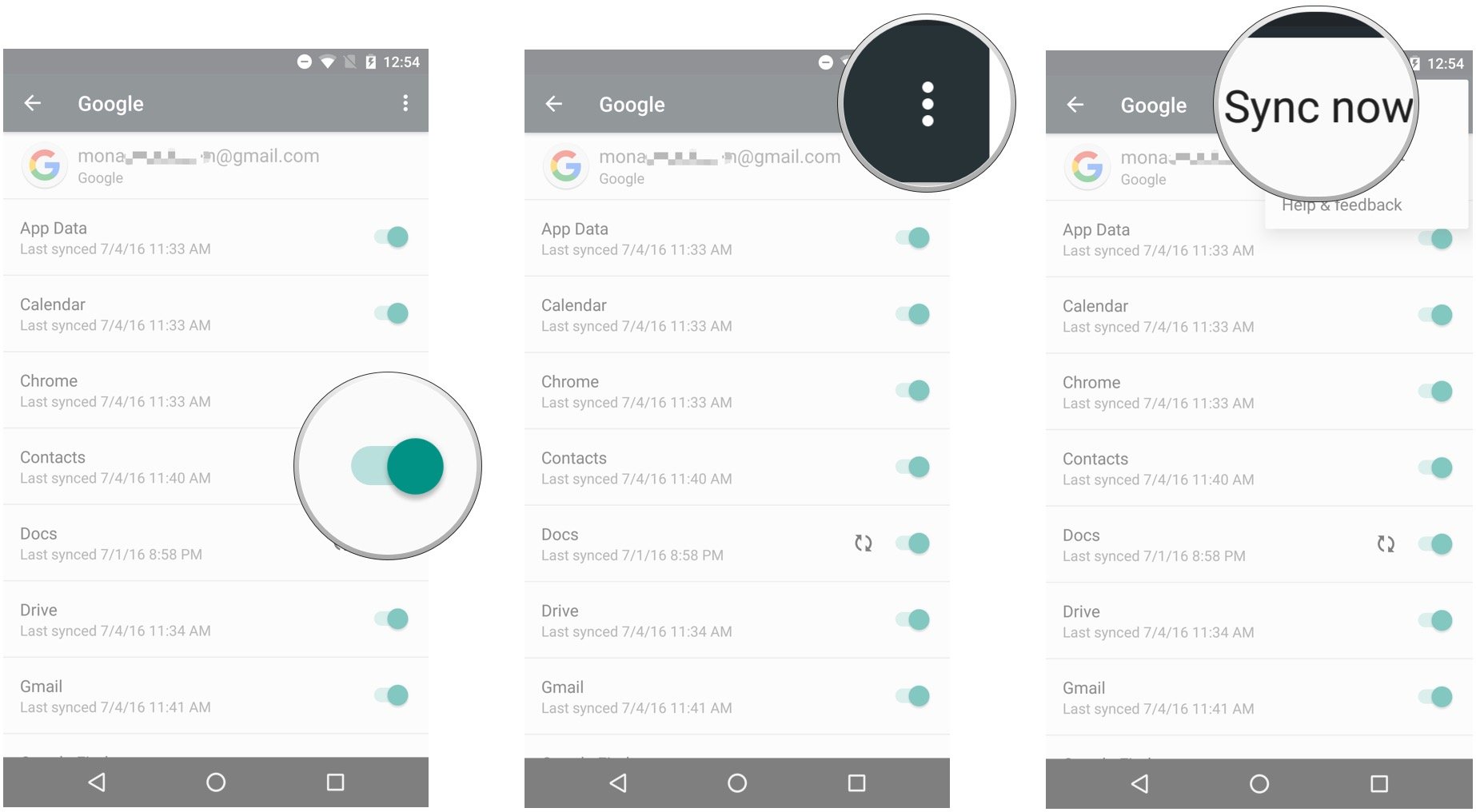
Selected Apps like Google Contacts, Calendar, Drive, Keep, Gmail, Chrome also sync online, so if you sync previously (backup), after new rom flashing, simply re-install the app and it will sync again (restore).
METHOD 3
To backup & restore data from local apps, ie those apps don't sync online at all, either use TitaniumBackup Pro or oandbackup.
For sms, I use Super Backup & Restore. uninstall after use, coz got many firebase, appmeasurement services.
For apps apk, use Apk Extractor, uninstall after use.
Note: TitaniumBackup Pro have this option to backup everything ie google accounts, apps & their data etc etc and convert into a system.img file, to be restored using twrp, but I never used it, too troublesome. The UI is ancient, since JellyBean.
The 3 methods listed above will cover 95% of all backup & restore. Apps who sync online should be restored using online sync. Local backup for these apps only act as failsafe ie messed-up data.
MyAndroidTools Pro data cannot be backup, Amplify Pro can.
Last edited:
windwaver
High Supremacy Member
- Joined
- Apr 28, 2000
- Messages
- 33,824
- Reaction score
- 2,565
It's a good post mate but I'm already on methods 2 and 3 but it doesn't restore all the google accounts I setup on the phone, I have to manually add 1 by 1.
Does step 1 achieve that? I'm not on Oreo but it doesn't seem to work for Nougat.
Does step 1 achieve that? I'm not on Oreo but it doesn't seem to work for Nougat.
Important Forum Advisory Note
This forum is moderated by volunteer moderators who will react only to members' feedback on posts. Moderators are not employees or representatives of HWZ Forums. Forum members and moderators are responsible for their own posts.
Please refer to our Community Guidelines and Standards and Terms and Conditions for more information.
