
Singtel 1 Gbps Fibre

xiaofan

High Supremacy Member
Joined
Sep 16, 2018
Messages
33,128
Reaction score
10,464
I never used singtel router since 2018 when it spoiled haha...
i brought the d-link ac1750(dir-868l) the old router tat starhub use to giv their customer so far it been serving me well tat y i dun see need to change
U expert in router?
Is this mesh router any better den my d-link? Or same same?

Same same.

The good thing about SingTel mesh router is that you can connect it to your existing router and it will automatically run in AP mode, in case you need an extra AP.
 

Scp173

Master Member
Joined
Feb 15, 2022
Messages
2,813
Reaction score
1,282
Same same.

The good thing about SingTel mesh router is that you can connect it to your existing router and it will automatically run in AP mode, in case you need an extra AP.

Need to link cable to both ar?
Setup alrdy can the ap operate wirelessly?

I dun hav so long cable to keep them connected haha
 

xiaofan

High Supremacy Member
Joined
Sep 16, 2018
Messages
33,128
Reaction score
10,464
Need to link cable to both ar?
Setup alrdy can the ap operate wirelessly?

I dun hav so long cable to keep them connected haha

Yes you need cable connection for it to work. AP means wireless access point, so yes it provide wireless access.

If you can not use cable connection, then just put it aside as a spare. You can also try it to see if the wireless coverage is better or worse than your DIR-868L.
 

auroraskyzzz

Junior Member
Joined
Nov 30, 2008
Messages
85
Reaction score
16
Hi guys, I need some advice here. Hope someone can help. My parents' house is currently on 500mbps plan but the signal is very bad in the bedrooms. Only living room has full signal. The router was given free by singtel many yrs ago when they forced us to upgrade to fibre plan. I am wondering if the poor signal is due to the router and am planning to change the router.

My question is, I have a spare router from m1, can I use it for singtel? Do I need to change the singtel ONR device too?

Thank u!
 

xiaofan

High Supremacy Member
Joined
Sep 16, 2018
Messages
33,128
Reaction score
10,464
Hi guys, I need some advice here. Hope someone can help. My parents' house is currently on 500mbps plan but the signal is very bad in the bedrooms. Only living room has full signal. The router was given free by singtel many yrs ago when they forced us to upgrade to fibre plan. I am wondering if the poor signal is due to the router and am planning to change the router.

My question is, I have a spare router from m1, can I use it for singtel? Do I need to change the singtel ONR device too?

Thank u!

What is your M1 router? Mostly it will work with Singtel -- you need to set up Singtel VLAN profile as your side most likely use Singtel ONT. There is no need to change to ONR.

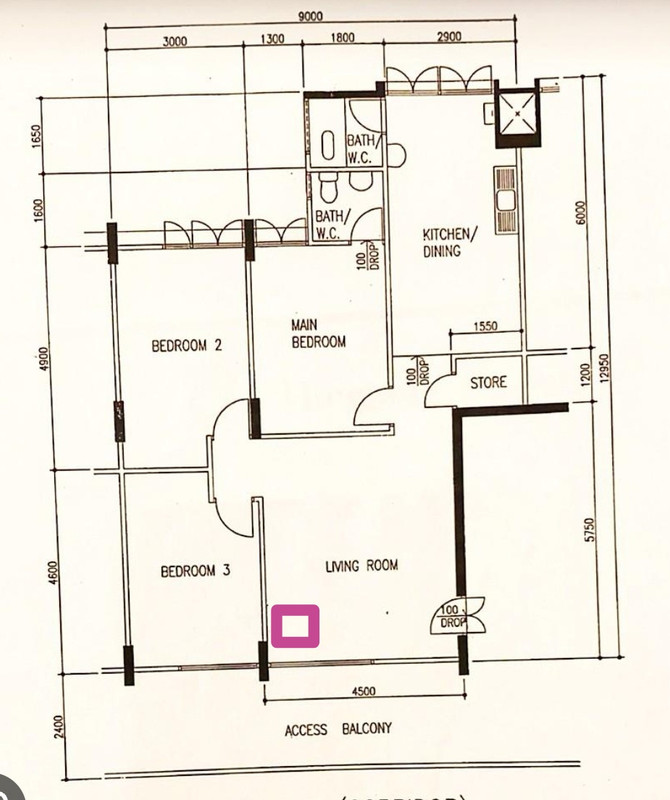
You may want to post the floor plan as well and the location of the Singtel ONT and router. Router placement is very important. I assue there is no LAN ports in the rooms, right?
 

auroraskyzzz

Junior Member
Joined
Nov 30, 2008
Messages
85
Reaction score
16
What is your M1 router? Mostly it will work with Singtel -- you need to set up Singtel VLAN profile as your side most likely use Singtel ONT. There is no need to change to ONR.

You may want to post the floor plan as well and the location of the Singtel ONT and router. Router placement is very important. I assue there is no LAN ports in the rooms, right?
Screenshot-20230323-224710-com-android-chrome-edit-1151432017238365.jpg


The pink box is the location of the router and ONT. No, the rooms dont have any lan ports. The thing is, the signal had been fine for the past few yrs, but in recent months its starting to get very weak. Room 3,being the nearest to the router, should have good signal? I can get only 2 or 3 bars on my hp/ipad nowadays. Room 2 and living room is the worst. I can only get 1 bar or sometimes none at all.

Another factor which i can think of which contributes to the weak signal could be the number of devices we are using? I realised when the smart tv is switched on, the signals gets real bad.

Sorry, I'm really a noob when it comes to IT.
 

Scp173

Master Member
Joined
Feb 15, 2022
Messages
2,813
Reaction score
1,282
Yes you need cable connection for it to work. AP means wireless access point, so yes it provide wireless access.

If you can not use cable connection, then just put it aside as a spare. You can also try it to see if the wireless coverage is better or worse than your DIR-868L.

Oic thank
Lik tat too mafan if hav to keep the cable connected to the AP to work, hav to buy a very looooong cable

I stay in 3rm flat , not a big issue with just using router, only at kitchen toilet sometime the signal will goes on and off haha

Guess i just tak the router and keep as spare since it free
 

xiaofan

High Supremacy Member
Joined
Sep 16, 2018
Messages
33,128
Reaction score
10,464
Screenshot-20230323-224710-com-android-chrome-edit-1151432017238365.jpg


The pink box is the location of the router and ONT. No, the rooms dont have any lan ports. The thing is, the signal had been fine for the past few yrs, but in recent months its starting to get very weak. Room 3,being the nearest to the router, should have good signal? I can get only 2 or 3 bars on my hp/ipad nowadays. Room 2 and living room is the worst. I can only get 1 bar or sometimes none at all.

Another factor which i can think of which contributes to the weak signal could be the number of devices we are using? I realised when the smart tv is switched on, the signals gets real bad.

Sorry, I'm really a noob when it comes to IT.

What is the current Singtel router being used? Maybe the performance degraded due to aging or hardware issue. So you'd better change the router.

As for number of devices, it should not matter too much if the total number is still low. Again looks like your existing router is kind of spoiled.

It is quite cheap to get Singtel Mesh Router (AC1900) from Carousell at about S$20 which should be plug and play (just need to change the wireless SSID/password).

The position of the ONT/Router is not bad, at least the bedrooms and living room should get good signals. Kitchen and bathroom may be the challenging part.

What is your M1 router?
 

auroraskyzzz

Junior Member
Joined
Nov 30, 2008
Messages
85
Reaction score
16
What is the current Singtel router being used? Maybe the performance degraded due to aging or hardware issue. So you'd better change the router.

As for number of devices, it should not matter too much if the total number is still low. Again looks like your existing router is kind of spoiled.

It is quite cheap to get Singtel Mesh Router (AC1900) from Carousell at about S$20 which should be plug and play (just need to change the wireless SSID/password).

The position of the ONT/Router is not bad, at least the bedrooms and living room should get good signals. Kitchen and bathroom may be the challenging part.

What is your M1 router?

My m1 router is Asus RT AC2600, which has been used for 2yrs.

The singtel router is Singtel WiFi Gigabit Router AC Plus.
ONR is Huawei Echolife HG8244H.

Ac1900 at $20 is for used unit ? Plug and play, meaning, replacing my current wifi gigabit ac plus with ac1900?

Thank u so much, xiaofan, :)
 

berger

Banned
Joined
Jan 22, 2018
Messages
7,108
Reaction score
3,092
Yours is an ONT and Airties 4960R is the right one for ONT. Actually 4960R is compatible with both SingTel ONT (as the main router) and ONR (as an AP).

The other one, Singtel Wifi 6 Mesh Extender (Askey) is just a mesh node (AP) and cannot be directly connected to the ONT. It is usually issued to Singtel ONR users.
thank you so much for helping us with all our qns 🙏
 

xiaofan

High Supremacy Member
Joined
Sep 16, 2018
Messages
33,128
Reaction score
10,464
My m1 router is Asus RT AC2600, which has been used for 2yrs.

The singtel router is Singtel WiFi Gigabit Router AC Plus.
ONR is Huawei Echolife HG8244H.

Ac1900 at $20 is for used unit ? Plug and play, meaning, replacing my current wifi gigabit ac plus with ac1900?

Thank u so much, xiaofan, :)

Since you have the RT-AC2600, it should be good enough. Since you are using Singtel ONR, you do not need to set up Singtel VLAN profile (which is only for Singtel ONT users). Rather you need to set it up as an AP. It will be much better than Singtel AC Plus, which is quite bad.

You do not need to buy the Singtel Mesh Router in this case. But yes it is a plug and play replacement and better than the Singtel AC Plus (AC1200) or Singtel AC Elite (AC1900).
 

jxlee1

Junior Member
Joined
Jun 5, 2007
Messages
4
Reaction score
0
Hi guys,
I need some advise.
I am on singtel 1gbps fibre
Using Huawei HG8244H as ONR
Wireless Asus AX86U router

I would experience lag spikes.. whereby it would be very laggy on moment..then it will be ok, awhile later it will be back, whenever my children watches Netflix, play their computer games which is connected by lan connection and also me playing mobile legend on my handphone.

Is there anyway I can improve the connection? Isit due to the ISP . I really don't know how to rectify this problem
 

Windowlover

Master Member
Joined
Sep 13, 2009
Messages
2,625
Reaction score
117
Actually 1gbps is more than sufficient. Increasing so not increasing actual speed so fast. Save your money for other gadgets is better
 

xiaofan

High Supremacy Member
Joined
Sep 16, 2018
Messages
33,128
Reaction score
10,464
Hi guys,
I need some advise.
I am on singtel 1gbps fibre
Using Huawei HG8244H as ONR
Wireless Asus AX86U router

I would experience lag spikes.. whereby it would be very laggy on moment..then it will be ok, awhile later it will be back, whenever my children watches Netflix, play their computer games which is connected by lan connection and also me playing mobile legend on my handphone.

Is there anyway I can improve the connection? Isit due to the ISP . I really don't know how to rectify this problem

This lag may be due to the remote web server. I am not into gaming so that I can not help you much here. It may be true other ISPs may have better routing to the game servers. You can ask in other ISP thread if you intend to move away from Singtel.

The basic Singtel ONR can be a limitation but I do not think what you do will really stress the ONR.

BTW, do you configure your RT-AX86U in AP mode or router mode (Double NAT)?

It is also said that Singtel customers may have some problems now with overseas connection due to submarine cable fault. I myself do not feel the slow down but again I do not play games. So you may want to wait a while until next week to see if the issues go away.
https://www.straitstimes.com/singap...network-speeds-after-submarine-cables-damaged
 
Last edited:

jxlee1

Junior Member
Joined
Jun 5, 2007
Messages
4
Reaction score
0
My router is set on router mode.. damm think I better set it to AP mode then.. interesting I never read about the cable stuff.

Did you retain the onr? Or switch it with something else @xiaofan
 

xiaofan

High Supremacy Member
Joined
Sep 16, 2018
Messages
33,128
Reaction score
10,464
My router is set on router mode.. damm think I better set it to AP mode then.. interesting I never read about the cable stuff.

Did you retain the onr? Or switch it with something else @xiaofan

I am using ONT (since Feb 2012). I replaced my older Ecrisson ONT to a ZTE ONT back in 2018.

I do not recommend new users to go with Singtel as Singtel only offers ONR to new users and no longer entertains bridging request. That being said, if your requirement is basic, then SIngtel ONR may still be okay.

Reference: read my first here:
https://forums.hardwarezone.com.sg/threads/singapore-isp-comparisons.6665380/

1) For existing users of any ISPs: no switching of ISP unless if you got issues or you got very good offers from the other ISPs.

2) Recommendation for new sign-up: M1 or Starhub 500Mbps or 1Gbps plan; avoid Singtel 1Gbps/2Gbps plan becuase of ONR. Singtel no longer entertains bridging request for 1Gbps plan since March 2022. Singtel 2Gbps plan will not allow ONR bridging at all.

Number 1 plan to avoid is Singtel 2Gbps plan which is no better than Singtel 1Gbps plan for 99% of the use cases.
 

xiaofan

High Supremacy Member
Joined
Sep 16, 2018
Messages
33,128
Reaction score
10,464
From the other thread: BE VERY CAREFUL OF SUCH DOOR TO DOOR SALESPERSON.

Typical problem -- change the ONT to ONR, promote useless 2Gbps upgrade, etc.

https://forums.hardwarezone.com.sg/threads/simba-2-5gb-20-fibre.6883465/page-3#post-146841091https://forums.hardwarezone.com.sg/threads/simba-2-5gb-20-fibre.6883465/page-3#post-146846522
Beware. They will swap out ONT to ONR. Had a friend who already had the Asus AX86U, and they recontracted him with the promise of being faster, and all they did was swap out the ONT to ONR and brought yet another AX86U.

Sad thing is my friend couldn't do anything since it was his dad that recontracted. But putting this out here in case other people fall for the same door to door salespeople.
 
Important Forum Advisory Note
This forum is moderated by volunteer moderators who will react only to members' feedback on posts. Moderators are not employees or representatives of HWZ Forums. Forum members and moderators are responsible for their own posts. Please refer to our Community Guidelines and Standards and Terms and Conditions for more information.
Top