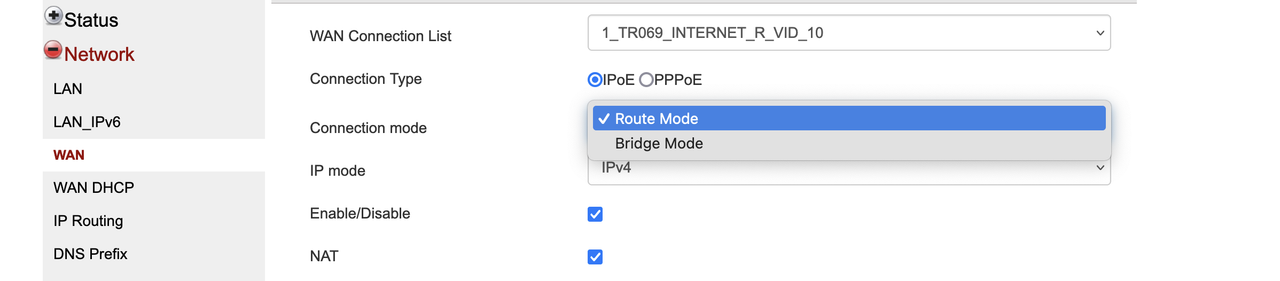
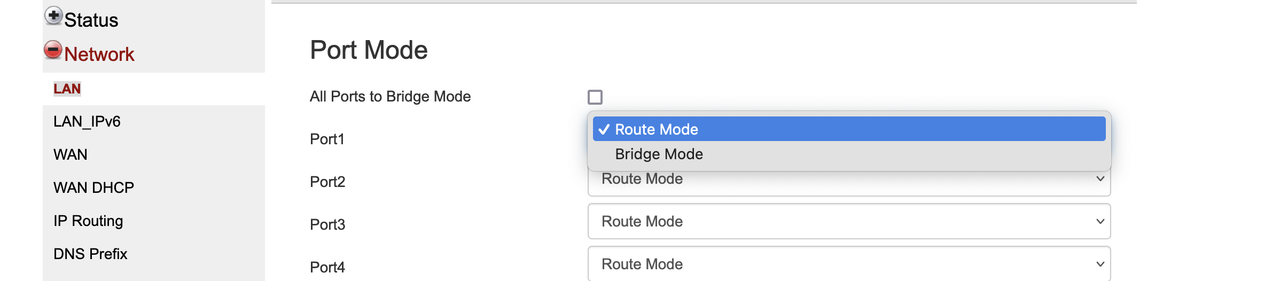
Singtel 10Gbps ZTE F8648P superadmin password.

neptunesea

Junior Member
Joined
Sep 5, 2023
Messages
27
Reaction score
15
Got my ONR swapped for free! After chatting with the tech realised apparently there is a high defect rate with the ZTE ONRs causing intermittent disconnections that worsen over time. Looks like you can use this excuse to get a free swap.

Managed to bridge under the bridge port option successfully.
WRxJo10.png
 

Lexng88

Member
Joined
Dec 16, 2014
Messages
100
Reaction score
49
Got my ONR swapped for free! After chatting with the tech realised apparently there is a high defect rate with the ZTE ONRs causing intermittent disconnections that worsen over time. Looks like you can use this excuse to get a free swap.

Managed to bridge under the bridge port option successfully.
WRxJo10.png
Bro how your Sintel 10Gbps Speedtest result?
 

kryon22

Junior Member
Joined
Jan 14, 2011
Messages
5
Reaction score
8
Got my ONR swapped for free! After chatting with the tech realised apparently there is a high defect rate with the ZTE ONRs causing intermittent disconnections that worsen over time. Looks like you can use this excuse to get a free swap.

Managed to bridge under the bridge port option successfully.
WRxJo10.png
So, I bricked my first ONR by selecting the ONT mode (similarly to previous poster, i lost the ability to access the admin menu and the unit refused to work. Got a replacement ONR (tech came to my place), and yesterday finally got round to trying to see if i could try manual bridging. I noticed the firmware version was N15. i was able to manually bridge Lan 5 (the 10G port). Tested it on my home network, and so far no issues and conflicts i’ve observed. But one thing about Singtel’s service, the latency is terrrrrrrrible!!! Also the bandwidth throttling is more severe than MyRepublic’s. since i have until Sep 25 to finish this contract, gonna have to suck thumb a bit. Thankfully with the manual bridging, i managed to salvage my ability to torrent and access DC++. Just FYI for everyone.
 

SNAG

Master Member
Joined
Jan 1, 2000
Messages
4,874
Reaction score
103
Got my ONR swapped for free! After chatting with the tech realised apparently there is a high defect rate with the ZTE ONRs causing intermittent disconnections that worsen over time. Looks like you can use this excuse to get a free swap.

Managed to bridge under the bridge port option successfully.
WRxJo10.png
So to confirm, all bridging requests are still unofficial and have to be done through the superuser password?
 

xiaofan

High Supremacy Member
Joined
Sep 16, 2018
Messages
32,452
Reaction score
9,452
So to confirm, all bridging requests are still unofficial and have to be done through the superuser password?

Yes that is the case based on the reports in this forum.

Singtel mentions the following in their terms and conditions for 5Gbps/10Gbps plan using XGS-PON ONR. Take note they use the word "temporailly". This seems to give some hope that they may entertain bridging request in the future, but no idea when the situation may change. And they may change the terms and conditions later.
https://www.singtel.com/content/dam/singtel/eshop/Fibre/agreements/singtel-fibre-broadband-tncs.pdf
"Bridge Mode” is temporarily not supported on this plan and there can be no reversion to previous plans that offered “Bridge Mode”
 

SNAG

Master Member
Joined
Jan 1, 2000
Messages
4,874
Reaction score
103
Yes that is the case based on the reports in this forum.

Singtel mentions the following in their terms and conditions for 5Gbps/10Gbps plan using XGS-PON ONR. Take note they use the word "temporailly". This seems to give some hope that they may entertain bridging request in the future, but no idea when the situation may change. And they may change the terms and conditions later.
https://www.singtel.com/content/dam/singtel/eshop/Fibre/agreements/singtel-fibre-broadband-tncs.pdf
"Bridge Mode” is temporarily not supported on this plan and there can be no reversion to previous plans that offered “Bridge Mode”
Thanks, at least they had put this down in writing. Really wonder what is holding them back from offering bridge mode as it's a big limitation for power users.
 

Sarahlina

Member
Joined
Jan 14, 2012
Messages
169
Reaction score
32
Saw this notification on my phone:


mHJ5z01.jpeg


Need to tick the check box only to proceed

Bk34GBE.jpeg


And I quit the whole process not wanting them to snoop on my bridge ONR :mad:
 

xiaofan

High Supremacy Member
Joined
Sep 16, 2018
Messages
32,452
Reaction score
9,452
Saw this notification on my phone:


mHJ5z01.jpeg


Need to tick the check box only to proceed

Bk34GBE.jpeg


And I quit the whole process not wanting them to snoop on my bridge ONR :mad:

1. That is the one of the main reason people like @firesong thinks Singtel ONR is a privacy/security risks.

ONT vs ONR
https://forums.hardwarezone.com.sg/...cs-of-home-networking.6653421/#post-138363236

Some people have some concerns about security and privacy of using an ONR where the ISP can access the router configuration through features like TR-069. Example posts from firesong.
https://forums.hardwarezone.com.sg/...-the-difference.5768534/page-3#post-128639402
https://forums.hardwarezone.com.sg/...-the-difference.5768534/page-6#post-130548173

2. Even if you bridge the ONR, your HB810 in router mode will still be under the control of Singtel.

If you worry about this, you have to ditch HB810 as well.

3. Technically it is the same for the Nokia XGS-PON all in one ONR used by Starhub 5Gbps users (but you can request to use ONT) as well as the TP-Link EB810v routers used by Starhub 5Gbps/10Gbps users (even if using XGS-PON ONT).

4. Reference:
1) EB810v: https://www.tp-link.com/sg/service-provider/wifi-router/eb810v/
Remote Management: TR-069 and TR-369 protocols and TAUC (TP-Link Aginet Unified Cloud) are supported.

2) HB810: https://www.tp-link.com/sg/service-provider/wifi-router/hb810/
Remote Management: TR-069 and TR-369 protocols and TAUC (TP-Link Aginet Unified Cloud) are supported.
 
Last edited:

firesong

Supremacy Member
Deluxe Member
Joined
Jan 17, 2001
Messages
8,633
Reaction score
4,638
The edge device in your house should never be under the full control of the ISP. Especially when that device also consists of your DHCP assignments (all devices at home). Your ISP also can build a patten of when you are home and out by mapping when your devices are connected.

More importantly, if your ISP can access and control it, it follows that anyone on the internet can control it with the right access information. That's a direct breach to your home network with total control. It's a sobering thought.
 

blurnard

Senior Member
Joined
Sep 3, 2001
Messages
1,095
Reaction score
57
1. That is the one of the main reason people like @firesong thinks Singtel ONR is a privacy/security risks.

ONT vs ONR
https://forums.hardwarezone.com.sg/...cs-of-home-networking.6653421/#post-138363236

Some people have some concerns about security and privacy of using an ONR where the ISP can access the router configuration through features like TR-069. Example posts from firesong.
https://forums.hardwarezone.com.sg/...-the-difference.5768534/page-3#post-128639402
https://forums.hardwarezone.com.sg/...-the-difference.5768534/page-6#post-130548173

2. Even if you bridge the ONR, your HB810 in router mode will still be under the control of Singtel.

If you worry about this, you have to ditch HB810 as well.

3. Technically it is the same for the Nokia XGS-PON all in one ONR used by Starhub 5Gbps users (but you can request to use ONT) as well as the TP-Link EB810v routers used by Starhub 5Gbps/10Gbps users (even if using XGS-PON ONT).

4. Reference:
1) EB810v: https://www.tp-link.com/sg/service-provider/wifi-router/eb810v/
Remote Management: TR-069 and TR-369 protocols and TAUC (TP-Link Aginet Unified Cloud) are supported.

2) HB810: https://www.tp-link.com/sg/service-provider/wifi-router/hb810/
Remote Management: TR-069 and TR-369 protocols and TAUC (TP-Link Aginet Unified Cloud) are supported.
My regular nokia ONR also have the support log in...

Safe to put lan port 1 to Bridge mode?haha
 

xiaofan

High Supremacy Member
Joined
Sep 16, 2018
Messages
32,452
Reaction score
9,452
My regular nokia ONR also have the support log in...
Safe to put lan port 1 to Bridge mode?haha

Are you using SingTel issued Nokia G240 ONR?

If yes, please post the screenshot of the ONR webpage which allows you to bridge the LAN ports, thanks. Please also share the special login user name and password if you can.

If you are using the Starhub issued Nokia XGS-PON ONR and got the superadmin password during the installation, then there are detailed instructions to bridge the ONR in this forum.
 

blurnard

Senior Member
Joined
Sep 3, 2001
Messages
1,095
Reaction score
57
Are you using SingTel issued Nokia G240 ONR?

If yes, please post the screenshot of the ONR webpage which allows you to bridge the LAN ports, thanks. Please also share the special login user name and password if you can.

If you are using the Starhub issued Nokia XGS-PON ONR and got the superadmin password during the installation, then there are detailed instructions to bridge the ONR in this forum.
Hi XiaoFan,

I am using Nokia G240 ONR.

please see my screenshot


Screenshot-2024-06-17-at-7-54-45-PM.png


Should I change it it bridge mode?

Screenshot-2024-06-17-at-7-56-48-PM.png
 

xiaofan

High Supremacy Member
Joined
Sep 16, 2018
Messages
32,452
Reaction score
9,452
Hi XiaoFan,

I am using Nokia G240 ONR.

please see my screenshot


Screenshot-2024-06-17-at-7-54-45-PM.png


Should I change it it bridge mode?

Screenshot-2024-06-17-at-7-56-48-PM.png

I do not think this is the super-admin log-in. By right it should be in the LAN page where you can bridge one LAN port and keep the other ports un-bridged.

Are you just using the normal admin password (in the back of the ONR)?

Reference: my collection of bridging methods for Singtel/WC ONRs.
https://forums.hardwarezone.com.sg/...ed-double-nat-and-onr-bridging.6938685/page-3
  • Huawei HG8244H ONR -- can be bridged, methods posted in this forum
  • Huawei HG8240T5 ONR -- can be bridged, methods posted in this forum
  • Nokia G240 ONR -- can be bridged?? To be confirmed. Methods not posted in this forum.
  • ZTE F8648P ONR -- Singtel XGS-PON ONR for 5Gbps/10Gbps plan, can be bridged with later FW, methods posted in this forum
  • ZTE ZXHN F620 ONR -- can be bridged, methods posted in this forum
  • Huawei OptiXstar V183 ONR, Singtel FTTR, no point to bridge even if you can bridge it since then your 10Gbps FTTR plan will become 1Gbps plan (the ONR has only 1G LAN ports)
 
Last edited:

blurnard

Senior Member
Joined
Sep 3, 2001
Messages
1,095
Reaction score
57
I do not think this is the super-admin log-in. By right it should be in the LAN page where you can bridge one LAN port and keep the other ports un-bridged.

Are you just using the normal admin password (in the back of the ONR)?

Reference: my collection of bridging methods for Singtel/WC ONRs.
https://forums.hardwarezone.com.sg/...ed-double-nat-and-onr-bridging.6938685/page-3
  • Huawei HG8244H ONR -- can be bridged, methods posted in this forum
  • Huawei HG8240T5 ONR -- can be bridged, methods posted in this forum
  • Nokia G240 ONR -- can be bridged?? To be confirmed. Methods not posted in this forum.
  • ZTE F8648P ONR -- Singtel XGS-PON ONR for 5Gbps/10Gbps plan, can be bridged with later FW, methods posted in this forum
  • ZTE ZXHN F620 ONR -- can be bridged, methods posted in this forum
  • Huawei OptiXstar V183 ONR, Singtel FTTR, no point to bridge even if you can bridge it since then your 10Gbps FTTR plan will become 1Gbps plan (the ONR has only 1G LAN ports)
Hi Xiao Fan,

my second screenshot is the LAN page where i can choose which port to bridge leaving the rest as unbridge.

I log in via the support as shared by another member / if i logged in via the usual admin mode, i am not able to select any ports to bridge mode.
 

xiaofan

High Supremacy Member
Joined
Sep 16, 2018
Messages
32,452
Reaction score
9,452
Hi Xiao Fan,

my second screenshot is the LAN page where i can choose which port to bridge leaving the rest as unbridge.

I log in via the support as shared by another member / if i logged in via the usual admin mode, i am not able to select any ports to bridge mode.

Ah, sorry I missed that. I tend to think now you can just bridge Port 4 to see how it goes. That is what Singtel 1+1 Gamer Bundle plan is doing (Port 4 bridged, Port 1/2/3 not bridged). If successful, you can connect your own router to Port 4 and then it should get a public IPv4 address (and not 192.168.1.x private IPv4 address).

Again standard disclaim: proceed at your own risk. YMMV. Some users may brick their ONR when bridging.
 

blurnard

Senior Member
Joined
Sep 3, 2001
Messages
1,095
Reaction score
57
Ah, sorry I missed that. I tend to think now you can just bridge Port 4 to see how it goes. That is what Singtel 1+1 Gamer Bundle plan is doing (Port 4 bridged, Port 1/2/3 not bridged). If successful, you can connect your own router to Port 4 and then it should get a public IPv4 address (and not 192.168.1.x private IPv4 address).

Again standard disclaim: proceed at your own risk. YMMV. Some users may brick their ONR when bridging.
oh haha....
 

xiaofan

High Supremacy Member
Joined
Sep 16, 2018
Messages
32,452
Reaction score
9,452
oh haha....

There are indeed risks associated with self bridging the ONR.

You can check out two posts in this thread.

Post #40.
Yes correct! I only got a new one because I bricked my previous one trying to convert it to ONR mode. Seems like quite a pain if anyone wanted to follow suit as they would have to "accidentally" brick their ONR to get provided a new one unless Singtel is able to provide the update file

Post #59
*do at your own risk

I bricked it once and got it swapped for free, change from ONR to ONT mode while in the support account. You will no longer be able to connect to the device web menu @192.168.1.254 neither will the device connect to the internet. Call 1688, go full dumb and act like you woke up to a broken internet connection. Con is you won't have internet until they come and swap your ONR.

The better way is to first do a USB backup onto your FAT32 thumbdrive (Management & Diagnosis > System Management > USB backup) then switch the ONR to hybrid mode. Internet will be down in hybrid mode but you can still access the device web menu. Call 1688 and complain as above. After booking the tech appt use the USB Restore option in the web menu to revert it back to the old working config. Internet will work perfectly fine.

BTW, my ONR is stuck on firmware V2.1.10P5N10(without the new bridge port option) , tried rebooting via the web menu and disconnecting-waiting-reconnecting in the hope it can catch the new *N15 firmware to no avail. Anyone knows how else to get the ONR updated without having the tech swap the ONR?

 
Last edited:

lightstal

Junior Member
Joined
Jun 21, 2016
Messages
37
Reaction score
25
Ah, sorry I missed that. I tend to think now you can just bridge Port 4 to see how it goes. That is what Singtel 1+1 Gamer Bundle plan is doing (Port 4 bridged, Port 1/2/3 not bridged). If successful, you can connect your own router to Port 4 and then it should get a public IPv4 address (and not 192.168.1.x private IPv4 address).

Again standard disclaim: proceed at your own risk. YMMV. Some users may brick their ONR when bridging.
Unfortunately I realised my entire home network was down today as no additional IPv4 addresses were allocated. Can confirm now for me at least only 1 IPv4 address is allocated and the loophole is closed :')
 

xiaofan

High Supremacy Member
Joined
Sep 16, 2018
Messages
32,452
Reaction score
9,452
Unfortunately I realised my entire home network was down today as no additional IPv4 addresses were allocated. Can confirm now for me at least only 1 IPv4 address is allocated and the loophole is closed :')

It could be SingTel pushed the default ONR profile to your ONR (sometimes it happens). You may want to repeat the bridging process to see if you get it working again.
 

SNAG

Master Member
Joined
Jan 1, 2000
Messages
4,874
Reaction score
103
Unfortunately I realised my entire home network was down today as no additional IPv4 addresses were allocated. Can confirm now for me at least only 1 IPv4 address is allocated and the loophole is closed :')
Do keep us posted. Very tempted to upgrade my 1gb bridged ONR to the 5gbps plan.
 
Important Forum Advisory Note
This forum is moderated by volunteer moderators who will react only to members' feedback on posts. Moderators are not employees or representatives of HWZ. Forum members and moderators are responsible for their own posts.

Please refer to our Community Guidelines and Standards, Terms of Service and Member T&Cs for more information.
Top