Singtel 1 Gbps Fibre

klarklar

Supremacy Member
Joined
Jan 8, 2012
Messages
9,280
Reaction score
645
If contract for Singtel 1G fibre is expiring soon and customer did not renew to wait and see, will Singtel cut off broadband connection?

Currently, don't have good renewal plans at good price. Anyone knows of good renewal plans?
 

xiaofan

High Supremacy Member
Joined
Sep 16, 2018
Messages
33,532
Reaction score
10,649
If contract for Singtel 1G fibre is expiring soon and customer did not renew to wait and see, will Singtel cut off broadband connection? Currently, don't have good renewal plans at good price.

They will not, just your price will go up after contract expires. You need to check your contract.

I think SingTel 5Gbps recontract at S$29.90 per month is pretty good. You should click the link to see if your order will be accepted or not. So far only one user reported that he got rejected.

The link is in the sticky thread on top of this forum section.

Thread '⚡️💻 [Official] README First! 2025 SG ISP Comparison & Latest Promo Deals! ✨' https://forums.hardwarezone.com.sg/...sg-isp-comparison-latest-promo-deals.6665380/
 

kw2023

Junior Member
Joined
Feb 18, 2023
Messages
32
Reaction score
15
Hi xiaofan and all, need some advice:
As mentioned previously, i recently got the Singtel 5Gpbs @$29.99/mth contract with wifi 6 mesh ARC (single Pack). NLT and Singtel installation is sometime next week.

My question: Can i replace the SINGTEL ARC wifi 6 mesh extender with a TP Link Deco BE25 (wifi 7)? If yes, will the DECO BE25 provide faster wifi speeds?

Thanks!
 

xiaofan

High Supremacy Member
Joined
Sep 16, 2018
Messages
33,532
Reaction score
10,649
Hi xiaofan and all, need some advice:
As mentioned previously, i recently got the Singtel 5Gpbs @$29.99/mth contract with wifi 6 mesh ARC (single Pack). NLT and Singtel installation is sometime next week.

My question: Can i replace the SINGTEL ARC wifi 6 mesh extender with a TP Link Deco BE25 (wifi 7)? If yes, will the DECO BE25 provide faster wifi speeds?

Thanks!

Yes you can.

1. You may need to set your Deco main node to AP mode for Ethernet backhaul to work.

Singtel ONR 10G LAN port -->main Deco BE25 2.5G WAN port in AP mode.
Singtel ONR 1G LAN port --> second Deco BE25 2.5G WAN port (limited to 1Gbps).

Deco mesh in AP mode
https://www.tp-link.com/sg/support/faq/1842/

2. If you use wireless backhaul, then it does not matter much.

Singtel ONR 10G LAN port -->main Deco BE25 in router mode (Double NAT) or AP mode--> wireless backhaul --> second Deco BE25

3. More about Double NAT:
https://kb.netgear.com/30186/What-is-double-NAT-and-why-is-it-bad
 

kw2023

Junior Member
Joined
Feb 18, 2023
Messages
32
Reaction score
15
Yes you can.

1. You may need to set your Deco main node to AP mode for Ethernet backhaul to work.

Singtel ONR 10G LAN port -->main Deco BE25 2.5G WAN port in AP mode.
Singtel ONR 1G LAN port --> second Deco BE25 2.5G WAN port (limited to 1Gbps).

Deco mesh in AP mode
https://www.tp-link.com/sg/support/faq/1842/

2. If you use wireless backhaul, then it does not matter much.

Singtel ONR 10G LAN port -->main Deco BE25 in router mode (Double NAT) or AP mode--> wireless backhaul --> second Deco BE25

3. More about Double NAT:
https://kb.netgear.com/30186/What-is-double-NAT-and-why-is-it-bad

Thanks xioafan! I plan to set up 2 x Deco BE25 via existing lan cables.
As you suggested:
1. Singtel ONR 10G LAN port -->main Deco BE25 2.5G WAN port in AP mode in Living Room (where the FTP is).
2. Singtel ONR 1G LAN port --> second Deco BE25 2.5G WAN port (limited to 1Gbps) in Master BR (which is quite a distance down a corridor - about 10m from the ONR in the LR)

Am I correct to say that I would not have double NAT issue with my setup since the only wifi routers I have will be the main Deco BE25 in the living room and the other BE25 in the MBR?
My understanding is that I will face double NAT issues only if I have 2 wifi routers near each other?

Again, thanks for your help!
 

xiaofan

High Supremacy Member
Joined
Sep 16, 2018
Messages
33,532
Reaction score
10,649
Thanks xioafan! I plan to set up 2 x Deco BE25 via existing lan cables.
As you suggested:
1. Singtel ONR 10G LAN port -->main Deco BE25 2.5G WAN port in AP mode in Living Room (where the FTP is).
2. Singtel ONR 1G LAN port --> second Deco BE25 2.5G WAN port (limited to 1Gbps) in Master BR (which is quite a distance down a corridor - about 10m from the ONR in the LR)

Am I correct to say that I would not have double NAT issue with my setup since the only wifi routers I have will be the main Deco BE25 in the living room and the other BE25 in the MBR?
My understanding is that I will face double NAT issues only if I have 2 wifi routers near each other?

Again, thanks for your help!

Yes you get the connection scheme right. Once you use Ethernet Backhaul, no problem with the distance of the second Deco BE25 node to the main Deco BE25 node.

You must set up the main Deco BE25 in AP mode so that you will have no Double NAT situation, basically Singtel ONR is the main router in the home network and you should not have another device in router mode if you do not want Double NAT. It is not about the distance.

A router handles NAT, an AP does not handle NAT.

Please read about Double NAT again here.
https://kb.netgear.com/30186/What-is-double-NAT-and-why-is-it-bad

Or more about Double NAT here.
https://support.google.com/googlenest/answer/6277579?hl=en-SG

If you set up the main Deco in router mode, your mesh will not work with Ethernet Backhaul at all with the above connection scheme.
 

xiaofan

High Supremacy Member
Joined
Sep 16, 2018
Messages
33,532
Reaction score
10,649
From the Google Article.
https://kb.netgear.com/30186/What-is-double-NAT-and-why-is-it-bad

What other disadvantages are there in a double NAT configuration?
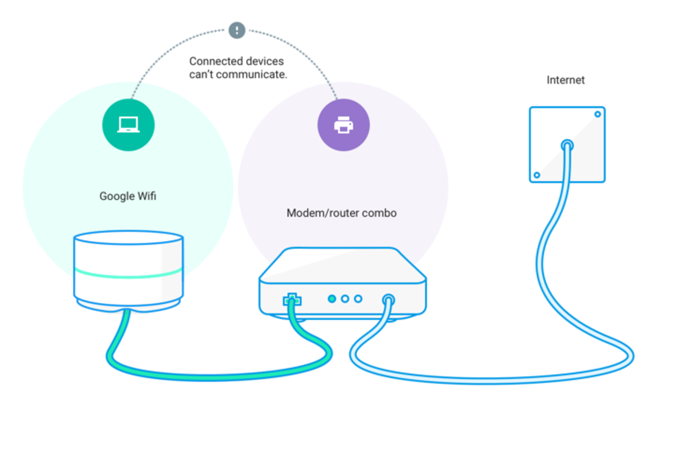
You can connect two or more independent (non-meshed) router systems to extend the Wi-Fi coverage in your home. But when you have two routers, each with their own private Wi-Fi network, your personal devices can have a hard time communicating with each other because of the different sets of IP addresses and firewalls between the two independent router systems.

For example, let's say you want to wirelessly print a picture from your computer. If you have two independent networks, it's possible your computer is on one network while your printer is on the other. And if both networks are private, your computer won't be able to tell your printer to print the picture.

Double NAT

VmlL2eZUrrZAf8S_n-SJb-eQ7TdI_BI20vJiJYb3L-lHFX3trJpyqyz93ztO_0oSdyY=w895

A double NAT can also result in performance issues if you play online games or use port forwarding rules and UPnP.

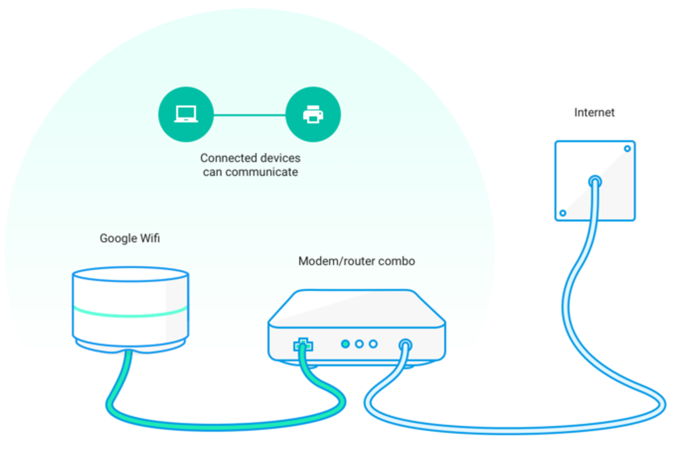
To fix this, Bridge mode lets multiple routers share one single Wi-Fi network. Here's what that could look like:

Bridge mode

sevWJGZapi5V3jRYjByeqRuVE-o-R0k66e2gj81kOQob6A7NqhP5vYcnw29j8ndNBgw=w895
 

kw2023

Junior Member
Joined
Feb 18, 2023
Messages
32
Reaction score
15
Yes you get the connection scheme right. Once you use Ethernet Backhaul, no problem with the distance of the second Deco BE25 node to the main Deco BE25 node.

You must set up the main Deco BE25 in AP mode so that you will have no Double NAT situation, basically Singtel ONR is the main router in the home network and you should not have another device in router mode if you do not want Double NAT. It is not about the distance.

A router handles NAT, an AP does not handle NAT.

Please read about Double NAT again here.
https://kb.netgear.com/30186/What-is-double-NAT-and-why-is-it-bad

Or more about Double NAT here.
https://support.google.com/googlenest/answer/6277579?hl=en-SG

If you set up the main Deco in router mode, your mesh will not work with Ethernet Backhaul at all with the above connection scheme.
I see!! I read the link again of using the DECO app to set the BE25 in router mode. The APP allows one to choose "Wifi Router" mode or "Access Point" mode.
So I assume the 2nd Deco BE25 in my MBR should also be set up in AP mode?

BTW, my earlier question on getting a BE25: Will the DECO BE25(wifi7) provide faster wifi speed than the SIngtel supplied wifi 6 Arc router? It sounds logical that it will but i dont know! I read somewhere that wifi 6 can support speeds up to 9.6Gbps so is it worth getting the Deco BE25 (its about $160 per pc).
Thanks!
 
Last edited:

xiaofan

High Supremacy Member
Joined
Sep 16, 2018
Messages
33,532
Reaction score
10,649
I see!! Read the link again of using the DECO app to set the BE25 in router mode. The APP allows one to choose "Wifi Router" mode or "Access Point" mode.
So I assume the 2nd Deco BE25 in my MBR should also be set up in AP mode?

BTW, my earlier question on getting a BE25: Will the DECO BE25(wifi7) provide faster wifi speed than the SIngtel supplied wifi 6 Arc router? It sounds logical that it will but i dont know! I read somewhere that wifi 6 can support speeds up to 9.6Gbps so is it worth getting the Deco BE25 (its about $160 per pc).
Thanks!

You do not need to set up the second Deco into AP mode, when it is functioning as a mesh node for the main Deoc mode, it will automatically run in AP mode. If you have done some manual changes to the second Deco, you need to carry out factory reset and then add it to the main Deco.

The given Singtel free AX5400 mesh node is pretty lousy. But you can always try it first to see how good or how bad it is for your use case before buying Deco BE25. It will not be able to hit above 1Gbps (no matter wired or wireless) due to the limitation imposed by 1Gbps capably only WAN port.

That being said, I do not think Deco BE25 is a very good one either (but at least way better than Singtel AX5400 mesh device). However, it all depends on your budget.
 

kw2023

Junior Member
Joined
Feb 18, 2023
Messages
32
Reaction score
15
You do not need to set up the second Deco into AP mode, when it is functioning as a mesh node for the main Deoc mode, it will automatically run in AP mode. If you have done some manual changes to the second Deco, you need to carry out factory reset and then add it to the main Deco.

The given Singtel free AX5400 mesh node is pretty lousy. But you can always try it first to see how good or how bad it is for your use case before buying Deco BE25. It will not be able to hit above 1Gbps (no matter wired or wireless) due to the limitation imposed by 1Gbps capably only WAN port.

That being said, I do not think Deco BE25 is a very good one either (but at least way better than Singtel AX5400 mesh device). However, it all depends on your budget.
Yes, i plan to see how it goes first with the Singtel supplied wifi 6 AX5400 mesh node before deciding whether to get the Deco BE25.
Thanks again for your advice!
 

kw2023

Junior Member
Joined
Feb 18, 2023
Messages
32
Reaction score
15
Hi Xiaofan, need your advice again!
My current lan cable from FTP area to my study is Cat 5e. When SINGTEL installs the new ONR (XGS-PON) - will i need to change my cable to a Cat 6 in order to get up to 5Gbs speed? I read one of the post that someone could still get about 4+Gbps on his old Cat5e cable.
Thanks!
(To refresh - i got a 5Gps Enhanced @$29.90 wifi 6 mesh plan).
 

xiaofan

High Supremacy Member
Joined
Sep 16, 2018
Messages
33,532
Reaction score
10,649
Hi Xiaofan, need your advice again!
My current lan cable from FTP area to my study is Cat 5e. When SINGTEL installs the new ONR (XGS-PON) - will i need to change my cable to a Cat 6 in order to get up to 5Gbs speed? I read one of the post that someone could still get about 4+Gbps on his old Cat5e cable.
Thanks!
(To refresh - i got a 5Gps Enhanced @$29.90 wifi 6 mesh plan).

Just try it, it may well work. CAT5E officially supported 2.5Gbe. It may even work for 10Gbe if you are lucky.

Since you are using Singtel 5Gbps plan at S$29.90 per month, actually you will only get one lousy Singtel AX5400 WiFi 6 mesh node which is only capble of 1Gbps only. The wired ONR is capable of 10Gbps though as it has one 10G LAN ports and a few 1G LAN ports (3 for Nokia XS-240X-A ONR, 4 for ZTE F8648P ONR).

Please post your floor plan and indicate the FTP, intended ONR location, and LAN ports location in the rooms.

1) If your plan is like the following, no issues at all.

FTP --> Singtel ONR
Singtel ONR 1G LAN port --> CAT 5E cable --> Study Room LAN port --> Singtel AX5400 node (capable of 1Gbps only)
Singtel ONR 10G LAN port --> CAT6 cable --> wired device (up to 5 Gbps if you have 10G network adapter, or 2.5Gbps if you have 2.5G adapter)

2) If your plan is like the following, then your wired device may get 2.5Gbps or 5Gbps or something in between depending on your luck.

FTP --> Singtel ONR
Singtel ONR 10G LAN port --> patch panel --> CAT 5E cable --> Study Room LAN port --> CAT6 cable --> Wired device like a desktop (up to 5 Gbps if you have 10G network adapter if you are lucky, or 2.5Gbps if you have 2.5G adapter)
Singtel ONR 1G LAN port -->patch panel --> CAT5E cable --> Living Room LAN port --> Singtel AX5400 node (capable of 1Gbps only)

 
Last edited:

kw2023

Junior Member
Joined
Feb 18, 2023
Messages
32
Reaction score
15
Just try it, it may well work. CAT5E officially supported 2.5Gbe. It may even work for 10Gbe if you are lucky.

Since you are using Singtel 5Gbps plan, actually you will only get one lousy Singtel AX5400 WiFI 6 mesh node which is only capble of 1Gbps only.

Please post your floor plan and indicate the FTP, intended ONR location, and LAN ports location in the rooms.

1) If your plan is like the following, no issues at all.

FTP --> Singtel ONR
Singtel ONR 1G LAN port --> CAT 5E cable --> Study Room LAN port --> Singtel AX5400 node (capable of 1Gbps only)
Singtel ONR 10G LAN port --> CAT6 cable --> wired device (up to 5 Gbps if you have 10G network adapter, or 2.5Gbps if you have 2.5G adapter)

2) If your plan is like the following, then your wired device may get 2.5Gbps or 5Gbps depending on your luck.

FTP --> Singtel ONR
Singtel ONR 10G LAN port --> patch panel --> CAT 5E cable --> Study Room LAN port --> CAT6 cable --> Wired device like a desktop (up to 5 Gbps if you have 10G network adapter if you are lucky, or 2.5Gbps if you have 2.5G adapter)
Singtel ONR 1G LAN port -->patch panel --> CAT5E cable --> Living Room LAN port --> Singtel AX5400 node (capable of 1Gbps only)
Thanks xiaofan for your detailed options! (y)

Right now: under 1 Gbps enhanced plan.
- FROM FTP in Living room: To old ONT to Airties AX5400 to TPlink TL-SG105 5port switch to:
a. Cat 5e ethernet cable to STUDY - this goes into my Macbook (via a Belkin USB-C to Gigabit network adapter - so max 1Gbps). This is a makeshift set up! I just lay a cable from the LR to the study! at that time I only had a Cat 5e cable that was long enough. This is the cable I am thinking of changing to a Cat 6 or Cat 7.
b. Cat 6 cable to MBR : Will plug a cable from LAN port to macbook when needed. used only for WFH zoom meetings
c. Cat 6 cable to LAN port outside MBR (above ceiling board) - to a wifi 6 mesh router - AP5690W-bought from Carousell). This provides wifi signal for the end bedrooms (end of corridor).

Note:
- Singtel new ONR install is 27 Feb. Will see how speed goes. (NLT came today to activate the 2nd port on my FTP. Technician literally took only 5 mins!
- I dont have a USB-C to a 2.5Gbe/5Gbe/10Gbe network adapter for now. Thinking of getting one after testing new speed after SINGTEL install..

(unfortunately i still can't post pictures. I think i have not chalk up enough messages!☹️)
 

Yakumo

Member
Joined
Jun 23, 2012
Messages
320
Reaction score
19
Hello! Can I check something with you gurus please? I had been running a double NAT setup for a few years now. SingTel router mainly just for MioTV and wifi for guest (when applicable). Connected an Asus RT-AC86U router via Ethernet cable into my room where my PC and other devices are connected. Also Ai Mesh it to another RT-AC86U unit in a separate room as well. The Asus network is intended for family usage only. Don't need the devices in this 2 network (SingTel/Asus) to cross communicate and no printers either. Has been running well for years.

So the SingTel router drop dead overnight recently and just got replaced with a new, smaller router. About as tall as a typical smartphone. Model name is only listed as Wi-Fi 6 Router. So I login to the gateway to change admin and wifi password, turn off 5GHz wifi. Then follow by setting static IP for my Asus router as per the previous setup.

On reboot, internet is down and MioTV not working. Also, I can't reach the SingTel gateway via 192.168.1.254. Lucky a factory restart managed to get things back. This time round I changed only the admin and wifi password, turn off the 5GHz wifi, no reboot and things work fine so far (touch wood). It seems like setting static IP for the Asus router is likely the cause for the network issue? Any guru know why this happen when the same setup was working fine previously? Thank you in advanced!
 

ShrmnK

Junior Member
Joined
Oct 9, 2011
Messages
79
Reaction score
82
Hello! Can I check something with you gurus please? I had been running a double NAT setup for a few years now. SingTel router mainly just for MioTV and wifi for guest (when applicable). Connected an Asus RT-AC86U router via Ethernet cable into my room where my PC and other devices are connected. Also Ai Mesh it to another RT-AC86U unit in a separate room as well. The Asus network is intended for family usage only. Don't need the devices in this 2 network (SingTel/Asus) to cross communicate and no printers either. Has been running well for years.

So the SingTel router drop dead overnight recently and just got replaced with a new, smaller router. About as tall as a typical smartphone. Model name is only listed as Wi-Fi 6 Router. So I login to the gateway to change admin and wifi password, turn off 5GHz wifi. Then follow by setting static IP for my Asus router as per the previous setup.

On reboot, internet is down and MioTV not working. Also, I can't reach the SingTel gateway via 192.168.1.254. Lucky a factory restart managed to get things back. This time round I changed only the admin and wifi password, turn off the 5GHz wifi, no reboot and things work fine so far (touch wood). It seems like setting static IP for the Asus router is likely the cause for the network issue? Any guru know why this happen when the same setup was working fine previously? Thank you in advanced!
Is static IP in the 192.168.1.x space? What's the IP address range on your asus router? Is your asus router connected to the singtel router on its (asus') WAN or LAN port?
 

Yakumo

Member
Joined
Jun 23, 2012
Messages
320
Reaction score
19
Is static IP in the 192.168.1.x space? What's the IP address range on your asus router? Is your asus router connected to the singtel router on its (asus') WAN or LAN port?
For SingTel router, I left it as default (can't remember the previous setting):
IP pool: 192.168.1.1-192.168.1.253
LAN IP: 192.168.1.254

I then set the Asus router static IP to 192.168.1.199 on SingTel router as per previous setup

Asus IP pool: 192.168.2.2-192.168.2.254
Asus LAN IP: 192.168.2.1

Now that I type them down.. do the Asus LAN IP needs to match the static IP listed on SingTel router (192.168.1.199)?

SingTel LAN to Asus WAN
 

xiaofan

High Supremacy Member
Joined
Sep 16, 2018
Messages
33,532
Reaction score
10,649
For SingTel router, I left it as default (can't remember the previous setting):
IP pool: 192.168.1.1-192.168.1.253
LAN IP: 192.168.1.254

I then set the Asus router static IP to 192.168.1.199 on SingTel router as per previous setup

Asus IP pool: 192.168.2.2-192.168.2.254
Asus LAN IP: 192.168.2.1

Now that I type them down.. do the Asus LAN IP needs to match the static IP listed on SingTel router (192.168.1.199)?

SingTel LAN to Asus WAN

Your Asus router LAN IP address cannot be the same as the WAN address (192.168.1.199). So your Asus side is okay.

Are you using Singtel ONT? What is the new Singtel router given? You can check the label to see the model.

https://www.singtel.com/personal/support/broadband/routers-ont
Can you change the Singtel router's DHCP range so that your router static IPv4 address is out of the range and see if that helps?

SingTel wireless router example settings: 192.168.1.199 is out of the DHCP range.
IP pool: 192.168.1.1-192.168.1.180
LAN IP: 192.168.1.254
 

Yakumo

Member
Joined
Jun 23, 2012
Messages
320
Reaction score
19
Your Asus router LAN IP address cannot be the same as the WAN address (192.168.1.199). So your Asus side is okay.

Are you using Singtel ONT? What is the new Singtel router given? You can check the label to see the model.

https://www.singtel.com/personal/support/broadband/routers-ont
Can you change the Singtel router's DHCP range so that your router static IPv4 address is out of the range and see if that helps?

SingTel wireless router example settings: 192.168.1.199 is out of the DHCP range.
IP pool: 192.168.1.1-192.168.1.180
LAN IP: 192.168.1.254

Currently using Wi-Fi 6 Router (WG660242-ST). Will try the suggestion to shrink IP pool range to .180 tomorrow. Gonna get hang if I screw up and ruin soccer night later haha. Thanks in advanced!

Oh one more thing, I used to port forward a port of the Asus router (192.168.1.199) from the SingTel router in the past, do you foresee any issue if I do the same here? (assuming I can get by setting static IP for Asus router first)
 
Important Forum Advisory Note
This forum is moderated by volunteer moderators who will react only to members' feedback on posts. Moderators are not employees or representatives of HWZ Forums. Forum members and moderators are responsible for their own posts. Please refer to our Community Guidelines and Standards and Terms and Conditions for more information.
Top