M1 FIBRE BROADBAND DISCUSSION - Part 2

everex

Senior Member
Joined
Jan 6, 2008
Messages
922
Reaction score
196
Check your PC ethernet link status ? Maybe auto negotiate to 100mbps, have to go into network card driver and change from auto to the max speed available
Thanks bro for the feedback. Already changed to 2.5Gbps Full Duplex and 1Gbps Full Duplex. Still showing max 90+Mbps only in both cases. Perhaps my NIC cards are due for replacement.
 

ceecookie

Arch-Supremacy Member
Joined
Dec 26, 2006
Messages
22,505
Reaction score
806
Had to temporarily withdraw my asus BE92 from duty today... today crashed so many time until i fed up and swapped back to my older Wifi6 setup. Before that, I notice the uptime was no more than a few days before it would crash.

Now i've factory reset the BE92 and upgraded firmware to 3.0.0.6.102_37548 (previously was 37200 or 37300 something). Will monitor it running isolated to see if its stable enough.
 

ykeen

Moderator
Moderator
Joined
Jul 31, 2000
Messages
4,614
Reaction score
88
Thanks bro for the feedback. Already changed to 2.5Gbps Full Duplex and 1Gbps Full Duplex. Still showing max 90+Mbps only in both cases. Perhaps my NIC cards are due for replacement

Try changing the cable first
 

xonix

Arch-Supremacy Member
Joined
Mar 24, 2001
Messages
17,592
Reaction score
1,688
Had to temporarily withdraw my asus BE92 from duty today... today crashed so many time until i fed up and swapped back to my older Wifi6 setup. Before that, I notice the uptime was no more than a few days before it would crash.

Now i've factory reset the BE92 and upgraded firmware to 3.0.0.6.102_37548 (previously was 37200 or 37300 something). Will monitor it running isolated to see if its stable enough.
I upgraded to 3.0.0.6.102_37548 same day when it was available, so far so good for me.
 

Griggs

Senior Member
Joined
Mar 2, 2008
Messages
1,925
Reaction score
1,889
My ONT finally gonna be installed tmr. Have already setup my ssid on the asus routers, hopefully everything goes smoothly tmr!

After that can finally set up all the smart devices around my new house, quite excited hahaha
 

xonix

Arch-Supremacy Member
Joined
Mar 24, 2001
Messages
17,592
Reaction score
1,688

Slowdown

Master Member
Joined
Apr 18, 2003
Messages
3,486
Reaction score
804
FYI new firmware just released for be92u. My own unit is doing fine but I'm on the M1 3gbps plan, not sure if any difference from the other higher speed plans. And I always set custom DNS regardless of the router that I'm using. Also make use of the IOT wifi profile for your smart home gadgets as those are not compatible with wifi 6 & 7 signal. One of my family member still using a 5yr old Xiaomi phone, had to connect it to IOT wifi signal otherwise it won't connect to the default wifi signal at all.

https://www.asus.com/networking-iot...-be92u/helpdesk_bios?model2Name=ASUS-RT-BE92U
Update:
I spoke too soon. Once I started using chrome and HWZ Forum, it took down the router. Got disconnected. I don't know if the router is overheating or what. It was not just many devices connected to the router, just one desktop and one mobile phone. Issue should be with Wifi 7. The main SSID is no longer detectable while the 2nd SSD (iot) is still showing up.

Original Post:
Only managed to have time this morning. Fired up the be92u and remove 2.4ghz from the main SSID. I kept the original wifi router running so that it does not disrupt the family. Now I have two machine connected to the asus router. It has been an hour and it did not disconnect.

I also updated the firmware to the latest. Finger crossed. If it maintain a connection for the rest of the week, I will then migrate the rest of the family over. Everybody can suffer from disconnection. I don't care. Except my Mom. I hate Starhub for using wifi instead of cable. The poor lady just simply want to watch her TV in peace.
 
Last edited:

xonix

Arch-Supremacy Member
Joined
Mar 24, 2001
Messages
17,592
Reaction score
1,688
Update:
I spoke too soon. Once I started using chrome and HWZ Forum, it took down the router. Got disconnected. I don't know if the router is overheating or what. It was not just many devices connected to the router, just one desktop and one mobile phone. Issue should be with Wifi 7. The main SSID is no longer detectable while the 2nd SSD (iot) is still showing up.

Original Post:
Only managed to have time this morning. Fired up the be92u and remove 2.4ghz from the main SSID. I kept the original wifi router running so that it does not disrupt the family. Now I have two machine connected to the asus router. It has been an hour and it did not disconnect.

I also updated the firmware to the latest. Finger crossed. If it maintain a connection for the rest of the week, I will then migrate the rest of the family over. Everybody can suffer from disconnection. I don't care. Except my Mom. I hate Starhub for using wifi instead of cable. The poor lady just simply want to watch her TV in peace.
Yes...some devices don't work well with Wifi 7 or DFS, that's why it's prompted during the setup wizard to create the IoT signal for such devices. Eh...i recall the starhub tv box has ethernet port right ? Or are you referring to the app on smart tv ?
 

Slowdown

Master Member
Joined
Apr 18, 2003
Messages
3,486
Reaction score
804
Yes...some devices don't work well with Wifi 7 or DFS, that's why it's prompted during the setup wizard to create the IoT signal for such devices. Eh...i recall the starhub tv box has ethernet port right ? Or are you referring to the app on smart tv ?
I am too far away to use Lan cable. Hence, it has always been wifi since SH changed from cable box to media box.

If I can't connect my desktop and mobile phone to wifi7, then this router is a waste of money.
 

prince_fan

Member
Joined
Mar 21, 2007
Messages
131
Reaction score
16
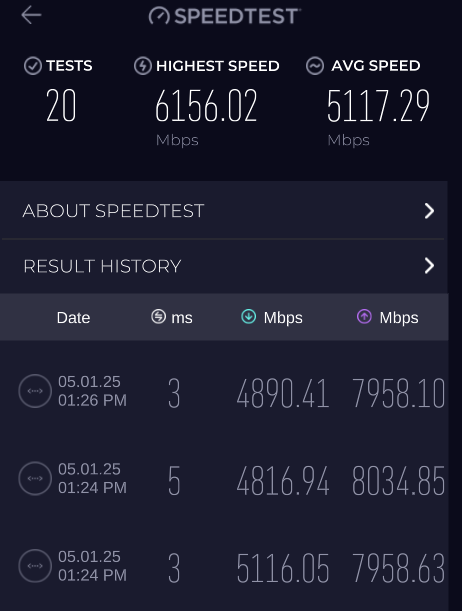
what is the typical speed and highest speed you have seen on M1 10Gbps network? Just had mine installed and activated, download speed is around 5000+Mbps and upload is 8000Mbps. seems like for now up to 6Gbps plan can achieve its potential speed.
Screenshot-2025-05-01-133016.png
 

xonix

Arch-Supremacy Member
Joined
Mar 24, 2001
Messages
17,592
Reaction score
1,688
what is the typical speed and highest speed you have seen on M1 10Gbps network? Just had mine installed and activated, download speed is around 5000+Mbps and upload is 8000Mbps. seems like for now up to 6Gbps plan can achieve its potential speed.
Screenshot-2025-05-01-133016.png
And this is why I only sub 3gbps plan. Other speed test, very rarely are you able to reach or utilise the max speed. Waste of money going for the super high speed plans. In fact I only sub 3gbps because it was cheaper then existing 1gbps plan 😂 Save $$$ more impt
 

xiaofan

High Supremacy Member
Joined
Sep 16, 2018
Messages
31,605
Reaction score
8,977
what is the typical speed and highest speed you have seen on M1 10Gbps network? Just had mine installed and activated, download speed is around 5000+Mbps and upload is 8000Mbps. seems like for now up to 6Gbps plan can achieve its potential speed.
Screenshot-2025-05-01-133016.png

What is the PC spec and 10G network adapter you are using? Apparently your speed achieved is limted by the network adapter. M1 10Gbps plan should be able to do better.

https://forums.hardwarezone.com.sg/threads/5gbe-and-beyond-ethernet-adapters.7068236/
PCI-E adapters using Marvell AQC107/AQC113C chipset may have issues under Windows.

TP-Link TX401and Asus XG-C100C are the most notorious 10G network adapters in this forum under Windows, even though they are both very popular. Both are using Marvell AQC107/AQC113C chipset. Some users have to reinstall Windows to get the right speed. On the other hand, quite some users have no issues. YMMV.

They are usually fine under Linux. So I will say it is partially Windows problem, partially Marvell problem.

Note: Asus XG-C100C newer versions are based on AQC113C and may be better as per some reports.
Note: Windows may play a big part if you encounter slower speed -- you may have to disable 3rd party antivirus program or some network monitoring applications if you encounter issues.

Potential solution:
You made my day! I tweaked the settings as suggested in the link and followed up with a stress test by running multiple torrent downloads and uploads - ZERO "Timed Out" errors for the last 30 minutes! Problem solved! Thank you so much for the link. Wishing you a great day too!

Energy Efficient Ethernet: Off
Flow Control: Off
Interrupt Moderation: Disabled
Interrupt Moderation Rate: Disabled
Jumbo Packets: 9014 (Must be configured on all switches/routers on your network + internal servers must have matching MTU. If you don't have a NAS or some type of high network capacity server on your network, don't touch this setting.)
Receive Side Scaling: Disabled

Better to avoid Marvell chipset based 10G NIC.
Marvell, Broadcom (some) and Realtek made NICs are what I will always avoid if I could. Unless it was built-in onto the motherboard. Especially from a "production-ready" and long-term stability standpoint.

I've built countless servers/appliances/systems using NICs (non-2.5G) from Chelsio, Intel, and Mellanox, which have given me zero issues over the years. Operating systems span across different distributions of Linux, BSD (Unix), and Windows (Server).​
 

Griggs

Senior Member
Joined
Mar 2, 2008
Messages
1,925
Reaction score
1,889
Anyone experiencing slow wifi speed? Currently on latest firmware. Today M1 technician came down to install my ONT, he showed me from his laptop plug in directly to ONT he got 5000mbps download and upload.


Afterwards I plug in my Asus BT10 router and configured it myself, main network using 2.4ghz+5ghz+6ghz. When I connect my Pixel 9 Pro it shows connected via 6ghz, but when I put my phone directly beside the router the highest speed I get is 300+ mbps.


Tested on my laptop and my wife's Samsung Galaxy S24U, both also getting 300+ mbps. Weird thing is the speed maintains this range throughout the house, even the furthest corner of the house getting 300+ mbps.


Anyone know what could be causing the speed to be limited to such? My parents house using Singtel 5gbps, using old Xiaomi ax3600 router I also getting 6-700+ mbps when directly beside the router.
 

prince_fan

Member
Joined
Mar 21, 2007
Messages
131
Reaction score
16

froztheart

Supremacy Member
Joined
Aug 8, 2012
Messages
8,024
Reaction score
3,360
Anyone experiencing slow wifi speed? Currently on latest firmware. Today M1 technician came down to install my ONT, he showed me from his laptop plug in directly to ONT he got 5000mbps download and upload.


Afterwards I plug in my Asus BT10 router and configured it myself, main network using 2.4ghz+5ghz+6ghz. When I connect my Pixel 9 Pro it shows connected via 6ghz, but when I put my phone directly beside the router the highest speed I get is 300+ mbps.


Tested on my laptop and my wife's Samsung Galaxy S24U, both also getting 300+ mbps. Weird thing is the speed maintains this range throughout the house, even the furthest corner of the house getting 300+ mbps.


Anyone know what could be causing the speed to be limited to such? My parents house using Singtel 5gbps, using old Xiaomi ax3600 router I also getting 6-700+ mbps when directly beside the router.
Pixel from experience not able to get good speed, IIRC it was the chip issue.
Your Samsung all updated to latest firmware?
 

Griggs

Senior Member
Joined
Mar 2, 2008
Messages
1,925
Reaction score
1,889
Pixel from experience not able to get good speed, IIRC it was the chip issue.
Your Samsung all updated to latest firmware?
NDlEKs9.png


Even my PC only getting 400mbps max. For some reason now both my S22 and my wife's S24 getting only 90mbps. Even though both my Pixel and PC still getting 300-400mbps. I don't know what's going on anymore man
 

froztheart

Supremacy Member
Joined
Aug 8, 2012
Messages
8,024
Reaction score
3,360
NDlEKs9.png


Even my PC only getting 400mbps max. For some reason now both my S22 and my wife's S24 getting only 90mbps. Even though both my Pixel and PC still getting 300-400mbps. I don't know what's going on anymore man
Basic troubleshooting like rebooting your router, done yet?
 
Important Forum Advisory Note
This forum is moderated by volunteer moderators who will react only to members' feedback on posts. Moderators are not employees or representatives of HWZ. Forum members and moderators are responsible for their own posts.

Please refer to our Community Guidelines and Standards, Terms of Service and Member T&Cs for more information.
Top