
You are using an out of date browser. It may not display this or other websites correctly.
You should upgrade or use an alternative browser.
You should upgrade or use an alternative browser.
M1 FIBRE BROADBAND DISCUSSION - Part 2
- Thread starter Henry Ng
- Start date
More options
Who Replied?
- Joined
- Aug 9, 2011
- Messages
- 17,103
- Reaction score
- 983
Wifi connection switched to 2.4 Ghz wave la.Basic troubleshooting like rebooting your router, done yet?
- Joined
- Aug 8, 2012
- Messages
- 8,495
- Reaction score
- 3,701
hahahah, possible too.Wifi connection switched to 2.4 Ghz wave la.
You checked which network connected to?I tried updating the firmware, after that reboot the router to take effect. I also tried disabling 2.4ghz on the main ssid. Nothing changed so far
Doesn't make sense nothing changed but you are getting such issue.

Problematic123
Member
- Joined
- Oct 18, 2016
- Messages
- 248
- Reaction score
- 19
hi shifus,
currently thinking of recontracting my 1gbps plan, and i read through the previous posts and understand that the $35.9 6gbps plan is still avail but need go physically down to m1 store. I am interested in getting that.
However, i am unsure if i should spend more to upgrade to ASUS BT10. Currently im using 2 ASUS router configured as a mesh setup, ASUS RT-AX88U + 1 ASUS XD6 Node. I understand that the free wifi is the TP Link BE805, but if i were to get that, i will either have to sell that or get another BE805 so that i can use it in a mesh setup.
However, if i were to use existing setup, it will be locked to 1gbps only. (though for now, most if not all of my devices dont support wifi7 at all + no PC at my home).
Hence i was wondering if it is worth it to top up for the BT10, or get another BE805, or retain existing setup (or recontract 1gbps?).
Thank you.
currently thinking of recontracting my 1gbps plan, and i read through the previous posts and understand that the $35.9 6gbps plan is still avail but need go physically down to m1 store. I am interested in getting that.
However, i am unsure if i should spend more to upgrade to ASUS BT10. Currently im using 2 ASUS router configured as a mesh setup, ASUS RT-AX88U + 1 ASUS XD6 Node. I understand that the free wifi is the TP Link BE805, but if i were to get that, i will either have to sell that or get another BE805 so that i can use it in a mesh setup.
However, if i were to use existing setup, it will be locked to 1gbps only. (though for now, most if not all of my devices dont support wifi7 at all + no PC at my home).
Hence i was wondering if it is worth it to top up for the BT10, or get another BE805, or retain existing setup (or recontract 1gbps?).
Thank you.

purpleberry
Supremacy Member
- Joined
- Nov 23, 2008
- Messages
- 5,878
- Reaction score
- 169
Tried to find the recommended settings for TP Link BE805 here but can't find any. Anyone can share? Thanks.
I made one small change and the wifi seemed to be more stable. I turned on ECO Mode for wifi. Did not lose connection for the rest of the day. Will continue to monitor.Update:
I spoke too soon. Once I started using chrome and HWZ Forum, it took down the router. Got disconnected. I don't know if the router is overheating or what. It was not just many devices connected to the router, just one desktop and one mobile phone. Issue should be with Wifi 7. The main SSID is no longer detectable while the 2nd SSD (iot) is still showing up.
Original Post:
Only managed to have time this morning. Fired up the be92u and remove 2.4ghz from the main SSID. I kept the original wifi router running so that it does not disrupt the family. Now I have two machine connected to the asus router. It has been an hour and it did not disconnect.
I also updated the firmware to the latest. Finger crossed. If it maintain a connection for the rest of the week, I will then migrate the rest of the family over. Everybody can suffer from disconnection. I don't care. Except my Mom. I hate Starhub for using wifi instead of cable. The poor lady just simply want to watch her TV in peace.
- Joined
- Sep 16, 2018
- Messages
- 32,938
- Reaction score
- 10,372
Tried to find the recommended settings for TP Link BE805 here but can't find any. Anyone can share? Thanks.
1. Just try the default to see how it goes: 2.4GHz/5GHz one SSID, 6GHz another SSID.
If you got issues with devices stuck with 2.4GHz SSID, disable Smart Connect.
MLO --> you can try to enable it to see if it works for your WiFi 7 devices or not. For my Intel BE200 based Intel Killer BE1750 WiFi 7 adapter, it is completely broken. If you have issues you may want to disable MLO.
2. Issues encountered by me:
1) MLO is broken for Intel BE200 and I have only two WiFi 7 devices using Intel BE200.
2) Sometimes 6GHz band may disappear, reboot the router will sort out the issue.
3) Sometimes 5GHz band may become very slow, reboot the router will sort out the issue.
4) I tend to believe all issues will be gone if I disable MLO, but not really checked.
3. If you want to check out my settings, it is in the below thread.
https://forums.hardwarezone.com.sg/...-deco-wifi-6e-7-mesh-solution.6953682/page-14
1) 5GHz band: I like to DFS channel CH60 which works well for me. But it may or may not work for you. You may want to start with auto. If 160MHz channel bandwidth does not work well for you, change to 80MHz.
2) 2.4GHz band --> good to use 20MHz channel bandwidth.
3) 6GHz band --> try 320MHz if you have WiFi 7 devices with 320MHz channel bandwidth support. If not, change it to 160MHz. Disable 6GHz band if you do not have any devices with 6GHz support.
4. I have also done many wireless speedtests in the above thread. Overall, I still think TP-Link Archer BE805 is a pretty decent wireless router and suitable for 5Gbps/6Gbps/10Gbps plans.
My wireless settings for Archer BE805 for reference -- nothing special now. I like to use CH60 for 5GHz (DFS channel) but it may not be suitable for you if you live near to the airport. It is also a good practice to set 20MHz channel bandwidth for 2.4GHz.
Edit to add --> today I decided to disable MLO to see if it will sort out the issue below in the next post.

Last edited:
- Joined
- Sep 16, 2018
- Messages
- 32,938
- Reaction score
- 10,372
I am not into IoT devices and I have very few legacy devices.
If you are into IoT, you may want to check out IoT network and Guest Network.
https://forums.hardwarezone.com.sg/...-deco-wifi-6e-7-mesh-solution.6953682/page-19
If you are into IoT, you may want to check out IoT network and Guest Network.
https://forums.hardwarezone.com.sg/...-deco-wifi-6e-7-mesh-solution.6953682/page-19
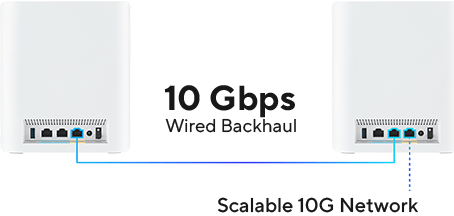
ONT is connected to the middle (10G LAN/WAN) port, then 2nd node is connected to the last (10G LAN) port.u have try to connect 10G WAN/LAN 2nd LAN port
Yes it's connected to my main network, I only have 1 main and 1 IoT network, both using different password so unlikely connect wrong. If you're asking about the band, my pixel shows connected to 6ghz band.hahahah, possible too.
You checked which network connected to?
Doesn't make sense nothing changed but you are getting such issue.

I have since turned off my 2nd mesh node and focus troubleshooting on the primary node.
I have plugged in my pc directly to the main node 10G Lan port and still getting the same speed:

I know my PC is limited by its 1G NIC but even then I believe it should be getting higher than 400mbps.
I have rebooted the router a few times since the last time I posted, today I also tried rebooting the ONT but result still the same unfortunately.
Anyway sorry if my replies are slow, I haven't fully moved in to this new house yet so will only be here every few days.

xonix
Arch-Supremacy Member
- Joined
- Mar 24, 2001
- Messages
- 17,592
- Reaction score
- 1,694

Yeah someone suggested on the BT10 thread to change 5Ghz to 160mhz and 6Ghz to 320mhz, I tested and still the same result. I don't have 5Ghz-2 on my router though.

Asus80
Master Member
- Joined
- Sep 20, 2003
- Messages
- 2,583
- Reaction score
- 248
try to change the Lan cable & install the Asus app in moblie phone & screen shot the Lan statusYeah someone suggested on the BT10 thread to change 5Ghz to 160mhz and 6Ghz to 320mhz, I tested and still the same result. I don't have 5Ghz-2 on my router though.
- Joined
- Sep 16, 2018
- Messages
- 32,938
- Reaction score
- 10,372
One thing recommended to change --> 20MHz for 2.4GHz band due to the congestion in Singapore.
5GHz band --> try 160 MHz first, if not working very well then change to 80MHz, for Singapore, if you have two 5Ghz band, then 5GHz-2 can only work with 80MHz channel bandwidth.
6GHz band --> try 320 MHz channel bandwidth first if you have supported WiFi 7 clients. If not, then 160MHz channel bandwidth will do (WiFi 6E clients). If you do not have any devices supporting 6GHz, then you can disable 6GHz band.
Maybe you can try to unplug and plug or change the fiber (yellow) cable.
Initially i am having asymmetry dl/ul (800/<10mbps) when i connect the laptop to the ont on 6gbps plan. But this problem was somehow fixed after i unplugged the fiber cable and plug in securely then no longer have that asymmetry dl/ul. Give this a try and hope it fixs you issue here.

Initially i am having asymmetry dl/ul (800/<10mbps) when i connect the laptop to the ont on 6gbps plan. But this problem was somehow fixed after i unplugged the fiber cable and plug in securely then no longer have that asymmetry dl/ul. Give this a try and hope it fixs you issue here.
I have already disabled 2.4ghz on the main SSID so I'm not taking into it account.One thing recommended to change --> 20MHz for 2.4GHz band due to the congestion in Singapore.
5GHz band --> try 160 MHz first, if not working very well then change to 80MHz, for Singapore, if you have two 5Ghz band, then 5GHz-2 can only work with 80MHz channel bandwidth.
6GHz band --> try 320 MHz channel bandwidth first if you have supported WiFi 7 clients. If not, then 160MHz channel bandwidth will do (WiFi 6E clients). If you do not have any devices supporting 6GHz, then you can disable 6GHz band.
Have tried setting both 5Ghz to 160mhz and 6Ghz to 320mhz
try to change the Lan cable & install the Asus app in moblie phone & screen shot the Lan status

Using Cat6A cable to connect both ports. LAN3 is connected directly to my PC and WAN/LAN2 is connected to ONT.
Wah that's damn weird, will try it laterMaybe you can try to unplug and plug or change the fiber (yellow) cable.
Initially i am having asymmetry dl/ul (800/<10mbps) when i connect the laptop to the ont on 6gbps plan. But this problem was somehow fixed after i unplugged the fiber cable and plug in securely then no longer have that asymmetry dl/ul. Give this a try and hope it fixs you issue here.
Wah that's damn weird, will try it later
I believe it is my fault as i unplugged the fibre cable to tidy the DB box after the technician left. But i didn't realise i didn't plug the fibre cable fully till it lock into the ont.
Give it a try and hopefully it is the same issue i encountered.
I didn't touch the fiber cable ever since the technician that setup the ONT left. Nonetheless I have tried to reseat the cable, didn't make a difference unfortunately.I believe it is my fault as i unplugged the fibre cable to tidy the DB box after the technician left. But i didn't realise i didn't plug the fibre cable fully till it lock into the ont.
Give it a try and hopefully it is the same issue i encountered.
Yah, learnt that the hard way too… spent lots of time troubleshooting BT10 issues that don’t make sense. Gave up and reset to factory defaults, issues resolved.
For new BT10 users, u may want to immediately do a factory reset right after the first firmware update - it might prevent all these weird issues.
For new BT10 users, u may want to immediately do a factory reset right after the first firmware update - it might prevent all these weird issues.

- Joined
- Oct 8, 2010
- Messages
- 1,319
- Reaction score
- 386
as expected coming from ASUS
they don't share much, but best practice after upgrading the FW is to hard-reset the unit...
remember to backup any config, so that you can save time
how to hard-reset:
https://www.asus.com/sg/support/faq/1039078
they don't share much, but best practice after upgrading the FW is to hard-reset the unit...
remember to backup any config, so that you can save time
how to hard-reset:
https://www.asus.com/sg/support/faq/1039078
Important Forum Advisory Note
This forum is moderated by volunteer moderators who will react only to members' feedback on posts. Moderators are not employees or representatives of HWZ Forums. Forum members and moderators are responsible for their own posts.
Please refer to our Community Guidelines and Standards and Terms and Conditions for more information.
