5GbE and beyond ethernet adapters

jinsatkilife

Senior Member
Joined
May 4, 2019
Messages
1,902
Reaction score
1,886
wah need cooling for ethernet adaptor??

will there be a time where its not needed and can be as small as what have now in our laptop or desktop
 

xiaofan

High Supremacy Member
Joined
Sep 16, 2018
Messages
31,689
Reaction score
9,035
Updated post 2 too.

Good call, won't want people to be surprised by the heat output of SFP+ to RJ45 modules, and of course the SFP+ ONU from ViewQwest.

Indeed. I did not know too much about the heat issues and bought four SFP+ to RJ45 modules from Ganwen. They work well with both Ganwen and Hasivo switches. However, they are hot. So I do not really use them now other than short time testing.

I bought Hasivo S600WP-4GT-1SX-1XGT-SE 2.5G switch specificaly to avoid the constant use of SFP+ RJ45 modules. It has one SFP+ port and one 10G RJ45 port.

Original configuration:
Singtel F8648P ONR --> Hasivo 2.5G switch SFP+ port and Ganwen SFP+ to RJ45 module
Hasivo switch SFP+ port --> DAC cable --> Mini PC with dual SFP+ ports

Better configuration:
Singtel F8648P ONR --> Hasivo S600WP-4GT-1SX-1XGT-SE switch 10G RJ45 port
Hasivo S600WP-4GT-1SX-1XGT-SE switch SFP+ port --> DAC cable --> Mini PC with dual SFP+ ports

But if you need both SFP+ port and 10G RJ45 port in a single switch, the choices seem to be limited.

Among the cheaper ones, I only find Hasivo makes 2.5G switch has one SFP+ port and one 10G RJ45 ports.
Hasivo S600W-4GT-1SX-1XGT and S600WP-4GT-1SX-1XGT-SE

xikestore has a pure 10G switch (more expensive) with 4 SFP+ ports and 4 RJ45 10G ports, which can be a good use case here.
https://xikestor.com/sks7300-4x4t.htm
 

kindredSG

Member
Joined
Jun 3, 2024
Messages
193
Reaction score
192
wah need cooling for ethernet adaptor??

will there be a time where its not needed and can be as small as what have now in our laptop or desktop
For home PCs if you have a gaming rig which is properly cooled with good air-flow, you likely won't need any extra cooling - it's just something to be aware of and that it can add to the heat produced inside a case. Singapore hot enough as it is :D

TB/USB to RJ45 adapters usually have a cooling fan inside the unit because the hardware produces a LOT of heat.

I'm sure given enough time things will get smaller and need less power, and just like a lot of motherboard manufacturers started using 2.5gbit ports by default, more are starting to add 10gbit NICs - but it's not a lot and they're top-end versions and so expensive (URL is for USD prices, not SGD). Due to the heat I'd expect laptops to be even further behind and more top-end insane spec builds.
 

xiaofan

High Supremacy Member
Joined
Sep 16, 2018
Messages
31,689
Reaction score
9,035
Manufacturer coding
SFP/SFP+/SFP28 modues can be coded with a manufacturer code by specification, and they often are. Often this is used to lock out 3rd party transceivers in the enterprise space. Some manufactuers like Mikrotik don't do this. :)

Usually equipment manufacturers only guarantee their own SFP modues to work with their equipment. If you're mixing and matching, things are not guaranteed to work. Once again, you have been warned.

Good 3rd party SFP+ module vendors like 10GTek will allow you to choose the switch brand you want to use to have better compatibility.

MikroTik is indeed a good switch vendor and I was originally looking at it, along with TP-Link China models. My first 2.5G switch is TP-Link TL-SH1008 and I am still using it.

But then reading some articles from STH led me to the lessor known Chinese brands like Hasivo and Xikestor. These less known brands do not care about coding. But then again the SFP+ module vendors may not test the compatibilities as well. So you are kind of taking the risks and you may have to buy the SFP+ modules from the switch vendor to be safe. This was what I did. I bought Ganwen SFP+ to RJ45 modules to use with Ganwen switch ; and Hasivo single mode SFP+ optic modules to use with Hasivo switch.

So far I have no problems using different types of SFP+ modules with my Hasivo switches:
Hasivo single mode optic module (RMB 150 x 2)
Ganwen SFP+ to RJ45 modules (RMB 189 x 4)
10GTek multi-mode optic module (RMB 49 x 2), coded to TP-Link.
ONTi multi-mode optic module (RMB 45 x 4)
Huawei multi-mode optic module (second hand, bundle with Huawei 10G NIC)

Still I have problems with DAC cables (10GTek and ONTi) once I need to stack two switches (no problem with just one switch).

STH guide for 2.5G and 10G switches.
https://www.servethehome.com/the-ul...gear-hasivo-mokerlink-trendnet-zyxel-tp-link/
https://forums.servethehome.com/ind...timate-cheap-10gbe-switch-buyers-guide.44848/
 
Last edited:

xiaofan

High Supremacy Member
Joined
Sep 16, 2018
Messages
31,689
Reaction score
9,035
However for 10/25GbE, cost for single mode transceivers have came down and the difference in cost between multi-mode and single mode transceivers are no longer significant.

I'd argue greenfield 10/25GbE deployments should be biased towards single mode fibre optics since single mode fibre optic cable is infinitely scalable vs multi-mode fibre optic cables, where there are different types for different speed.

That is what I did initially, only single mode Fibre cable and single mode SFP+ modules.

But then later I got cheap second hand Huawei 10G NICs with dual SFP+ ports (Intel X520-DA2) chipset and they bundled two Huawei multi-mode SFP+ modules (all for RMB120).

Then I found 10GTek single mode modules and multi-mode modules still have quite a bit of cost differences.

The following is from 10GTek official Taobao Flagship shop (not counting shipment and GST)
Single mode model SFP-10G-LR: RMB 89 (you can choose the switch brand to use with)
Multi-mode model SFP-0G-SR: RMB 49 (you can choose the switch brand to use with)
SFP+ to 10G RJ45 module: RMB 198 (claimed to be compatible with different brands of switch)

Now I have mixed single mode and multi-mode modules and Fibre cables. :ROFLMAO:
 

TanKianW

Supremacy Member
Joined
Apr 21, 2005
Messages
6,673
Reaction score
3,322
So you just signed up for a 10Gbps fibre internet service, but realised your computer is stuck only on 1GbE/2.5GbE... What do?!?

I'm not really interested in 10GbE network adapters for laptops so I suppose I'd leave that to @xiaofan in the following posts. But for now let's get started with desktop PCIe network adapters for 1GbE and beyond.

Do note adapters from Intel/Nivida/Mellanox/Chelsio are server adapters, and will require airflow over the heatsink to properly operate within designed specifications. You can operate those without heatsinks at your own risk, but conventional wisdom is you should always operate electronics within their designed specifications.

A 40mm PWM fan is commonly zip tied to the heatsink to provide airflow over the heatsinks.

I've seen reports of NICs getting burned out or errors being induced when operated for prolonged duration without adequare airflow over the heatsinks.

You have been warned if you chose to proceed without proper cooling for these network adapters.

Having said that, let's get to the meat. 😁


mGig RJ45 copper

Marvell
AQC114 (PCIe gen 3 x2): 5GbE/2.5GbE/1GbE/100Mb/10Mb
AQC115C (PCIe gen 2 x1): 2.5GbE/1GbE/100Mb/10Mb


10GbE RJ45 copper

Intel
Intel X540-T1/T2 (PCIe gen 2 x8) [EOL]: 10GbE/1GbE/100Mb
Intel X550-T1/T2 (PCIe gen 3 x4): 10GbE/5GbE/2.5GbE/1GbE/100Mb
Intel X710-T4 (PCIe gen 3 x8): 10GbE/1GbE/100Mb
Intel X710-T2L/T4L (PCIe gen 3 x8): 10GbE/5GbE/2.5GbE/1GbE/100Mb

Marvell
Aquantia/Marvell AQC113 (PCIe gen 4 x4): 10GbE/5GbE/2.5GbE/1GbE/100Mb/10Mb


10GbE SFP+

Intel
Intel X520-DA1/DA2 (PCIe gen 2 x8): 10GbE/1GbE
Intel X710-DA2 (PCIe gen 3 x8): 10GbE/1GbE
Intel X710-DA4 (PCIe gen 3 x8): 10GbE/1GbE

Nvidia/Mellanox
ConnectX-3 EN (EOL)
  • MCX311A-XCBT (PCIe gen 3 x8) [Single port]: 10GbE/1GbE
  • MCX312A-XCBT (PCIe gen 3 x8) [Dual port]: 10GbE/1GbE
ConnectX-4 Lx
  • MCX4111A-XCAT (PCIe gen 3 x8) [Single port]: 10GbE/1GbE
  • MCX4121A-XCAT (PCIe gen 3 x8) [Dual port]: 10GbE/1GbE
Chelsio
T540-LP-CR (PCIe gen 3 x8) [Quad port]: 10GbE/1GbE
T520-BT (PCIe gen 3 x8) [Dual port]: 10GbE/1GbE


25GbE SFP28

Intel
XXV710-DA1 (PCIe gen 3 x8): 25/10/1GbE
XXV710-DA2 (PCIe gen 3 x8): 25/10/1GbE
XXV710-DA2T (PCIe gen 3 x8): 25/10/1GbE
E810-XXVDA2/XXVDA4/XXVDA4T (PCIe gen 4 x8) [Dual port]: 25GbE/10GbE/1GbE
E810-XXVDA4/XXVDA4T (PCIe gen 3 x16) [Quad port]: 25GbE/10GbE/1GbE

Nvidia/Mellanox
ConnectX-4 Lx
  • MCX4111A-ACAT (PCIe gen 3 x8) [Single port]: 25GbE/10GbE/1GbE
  • MCX4121A-ACAT (PCIe gen 3 x8) [Dual port]: 25GbE/10GbE/1GbE
ConnectX-5 EN
  • MCX511A-ACAT (PCIe gen 3 x8) [Single port]: 25GbE/10GbE/1GbE
  • MCX512A-ACAT (PCIe gen 3 x8) [Dual port]: 25GbE/10GbE/1GbE
  • MCX512A-ADAT (PCIe gen 4 x8) [Dual port]: 25GbE/10GbE/1GbE
Chelsio
T6225-CR (PCIe gen 3 x8) [Dual port]: 25GbE/10GbE/1GbE
T6225-SO-CR (PCIe gen 3 x8) [Dual port]: 25GbE/10GbE/1GbE


I figured no need to talk about anything beyond 25GbE, since if you're interested in those data rates, you probably already know what you're doing, and what you're looking for.

Some cheap and commonly recommended 10GbE adapters are the Intel 500 series adapters, and Nvidia/Mellanox ConnectX-3 and ConnectX-4 Lx cards. These can be purchased for around $100, or even way under $100 on ebay/taobao.


Initially also thought of doing a thread like this (a simple one). Coz seemed like a lot of forumers do not understand the SFP+/SFP/SFP28/QSFP thingy. This demand for >1G networking knowledge kind of exploded when the 10G internet finally arrived late last year.

Good to see the veterans here step up and continue to proactively share more of their knowledge to cover the gaps. (y)

This year got too much work and family commitment liao. Have more time then update my "Starting" threads or share other new tech. No time to join the "insider" program too. My apology to admin. :LOL:
 
Last edited:

overratedplot

Junior Member
Joined
May 3, 2024
Messages
35
Reaction score
38
Can confirm the server cards will burn you if you don't put a fan on them.

If you go with fibre cabling you should know it's not (realistically) possible to shorten them like you can with CAT cables. The length you buy is final.
 

xiaofan

High Supremacy Member
Joined
Sep 16, 2018
Messages
31,689
Reaction score
9,035
Can confirm the server cards will burn you if you don't put a fan on them.

If you go with fibre cabling you should know it's not (realistically) possible to shorten them like you can with CAT cables. The length you buy is final.

Its not too bad coiling up the fibre as long as you observe the bend radius. Price wise its even cheaper than pre terminated cat6.

You guys are very good to be able to lay Fibre cables.

I have bought the tools and cables (CAT 6 Ethernet cable, single mode and multi-mode Fibre cables, transparent Fibre cables) and different types of SFP+ modules (SFP+ to RJ45 modules, single mode SFP+ optic modules, multi-mode SFP+ optic modules and even bi-direction SFP+ modules).

But then I only carry out experiments within a small corner of the living room and dare not to start the DIY exercises to lay Fibre Cables or Ethernet Cables to even the nearest bedroom...

Waiting for my wife to volunteer to lay transparent fibre cable to the bedroom. But she will only be free in December.
 

herzog21

Senior Member
Joined
Sep 16, 2006
Messages
1,264
Reaction score
6
Hi....happen to see your post while researching for a good 10Gbpe NIC.
VQ asked me to upgrade to 10Gbps plan and i am considering it and building a new rig at the same time

ASUS TUF GAMING B650M-E WIFI + AMD Ryzen 7700 - $510
TEAM T-FORCE DELTA RGB DDR5 6000MHz CL30 32GB - $175
Powercolour 7800xt - $650
Thermalright Phantom spirit 120 se - $65
6x Thermalright PWM TL-C12C-S ARGB - $32
Samsung 980 Pro 7000MB/s Gen4 Nvme M.2 500GB(5yrs) - $105
Adata XPG Core Reactor - $125
Montech Air 903 Max Case - $100
Windows 11 Pro 64 - $13
Office Pro Plus - $15

I have a couple questions which I need advice from experts here as very long never build a rig and i am out of touch with the PC scene.

1) I dont see any tb/aliexpress links for 10Gbpe PCI adaptor. Could anyone recommend me a good adaptor pls? Also should i be considering SFP+ since i see this term being used.
2) Will the fans above provide sufficient airflow?

Thanks
 

xiaofan

High Supremacy Member
Joined
Sep 16, 2018
Messages
31,689
Reaction score
9,035
Hi....happen to see your post while researching for a good 10Gbpe NIC.
VQ asked me to upgrade to 10Gbps plan and i am considering it and building a new rig at the same time

ASUS TUF GAMING B650M-E WIFI + AMD Ryzen 7700 - $510
TEAM T-FORCE DELTA RGB DDR5 6000MHz CL30 32GB - $175
Powercolour 7800xt - $650
Thermalright Phantom spirit 120 se - $65
6x Thermalright PWM TL-C12C-S ARGB - $32
Samsung 980 Pro 7000MB/s Gen4 Nvme M.2 500GB(5yrs) - $105
Adata XPG Core Reactor - $125
Montech Air 903 Max Case - $100
Windows 11 Pro 64 - $13
Office Pro Plus - $15

I have a couple questions which I need advice from experts here as very long never build a rig and i am out of touch with the PC scene.

1) I dont see any tb/aliexpress links for 10Gbpe PCI adaptor. Could anyone recommend me a good adaptor pls? Also should i be considering SFP+ since i see this term being used.
2) Will the fans above provide sufficient airflow?

Thanks

Not an expert in this area.

I bought two used 10G NICs from the following not-well-known Taobao shop.

I have only tested the dual SFP+ version from Huawei subsidiary and it seems to work fine. It is very cheap at RMB110 with two used Huawei SFP+ modules.

I have not tested the dual RJ45 10G ports version from Dell yet. It is also very cheap at RMB125. It has a fan to cool it down.

There are many shops selling such 2nd hand server gears. No ideas which is good.


【淘宝】限时满599减5 http://e.tb.cn/h.gvsK32IMe2KX0Rk?tk=KL1L3lm57Io CZ3460 「原装超聚变 SP310双光口万兆网卡X520-DA2 82599ES」
点击链接直接打开 或者 淘宝搜索直接打开

【淘宝】限时满599减5 http://e.tb.cn/h.gv7nUHaOIj6dKdO?tk=m4V83lm4MIX CZ0002 「原装DELL intel X540-T2 10G万兆电口网卡0K7H46 03DFV8 RJ45群晖」
点击链接直接打开 或者 淘宝搜索直接打开
 
Last edited:

matique

Senior Member
Joined
Sep 25, 2017
Messages
797
Reaction score
786
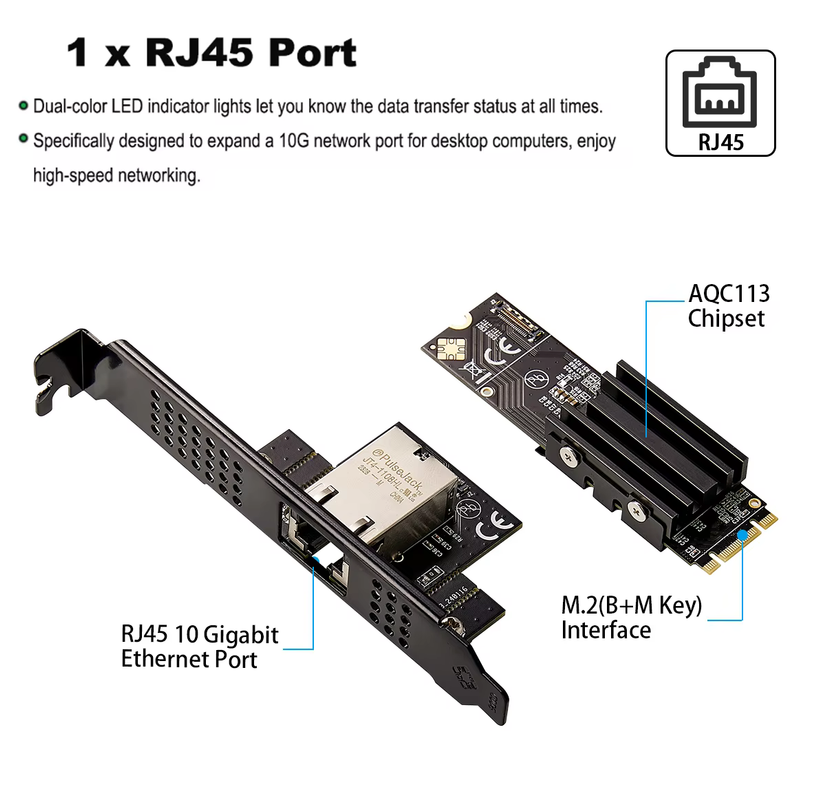
m-2-10-GBe.png


http://www.iocrest.com/index.php?id=2348
https://www.aliexpress.com/item/1005005065403928.html

Driver:
http://www.mmui.com.cn/data/upload/image/AQC113.zip

I bought this for my NAS as well as my desktop, as both are mitx boards without an additional PCIE slot. NAS has 2 m.2 slots and I've one spare. Desktop mitx board is a z790i edge with 3 m.2 slots, so i sacrificed the rear slot. Front still running 2x 4tb SSD so still have enough storage.

It works very well, temps aren't too hot either but i do have plenty of airflow in my case as well. This is also a viable alternative for those with mini PCs that uses thinitx and have no additional pcie slot for 10gbe NIC.
 

phayze

Supremacy Member
Joined
Aug 14, 2000
Messages
5,284
Reaction score
231
I have been looking into any reason on deploying fibre at home.

How can i convince myself with a good reason to deploy fibre over existing ethernet network if both is 10Gbps in speed?


You guys are very good to be able to lay Fibre cables.

I have bought the tools and cables (CAT 6 Ethernet cable, single mode and multi-mode Fibre cables, transparent Fibre cables) and different types of SFP+ modules (SFP+ to RJ45 modules, single mode SFP+ optic modules, multi-mode SFP+ optic modules and even bi-direction SFP+ modules).

But then I only carry out experiments within a small corner of the living room and dare not to start the DIY exercises to lay Fibre Cables or Ethernet Cables to even the nearest bedroom...

Waiting for my wife to volunteer to lay transparent fibre cable to the bedroom. But she will only be free in December.
 

xiaofan

High Supremacy Member
Joined
Sep 16, 2018
Messages
31,689
Reaction score
9,035
I have been looking into any reason on deploying fibre at home.

How can i convince myself with a good reason to deploy fibre over existing ethernet network if both is 10Gbps in speed?

No need or at least not in a hurry, wait until 2030 when 25Gbps/50Gbps plan will become cost effective. FTTR plans may well become the main stream at that time.

I do not have LAN ports in my rooms. That is why I am thinking of skipping Ethernet cables and go to Fibre directly.
 

morimorimori

Member
Joined
Jan 8, 2004
Messages
322
Reaction score
203
Fibre itself is already cheaper than copper with more bandwidth.

But like xiaofan says by 2030 with 25/50g the cables and electronics will also probably be dirt cheap. The one thing that won't change (or even increase) is the labor cost to rewire the house.
 

sglandscape

Supremacy Member
Joined
Jan 30, 2023
Messages
5,464
Reaction score
2,663
No need or at least not in a hurry, wait until 2030 when 25Gbps/50Gbps plan will become cost effective. FTTR plans may well become the main stream at that time.

I do not have LAN ports in my rooms. That is why I am thinking of skipping Ethernet cables and go to Fibre directly.
I did OM4 fibre run when renovated the house, and it was pretty cheap alongside cat6 cabling. This makes it cheap to run 10G with SFP+ transceiver VS using 10Gbase-T that runs hotter and costs more.

Should future proof for 25G transition in the future too, just need get new transceiver and new switches. Kept the ethernet so can have POE if required.
 
Last edited:
Important Forum Advisory Note
This forum is moderated by volunteer moderators who will react only to members' feedback on posts. Moderators are not employees or representatives of HWZ. Forum members and moderators are responsible for their own posts.

Please refer to our Community Guidelines and Standards, Terms of Service and Member T&Cs for more information.
Top