
5GbE and beyond ethernet adapters

Kei_Li

Senior Member
Joined
Apr 25, 2003
Messages
763
Reaction score
4
Taobao?

There are many shops selling cheaper second hand ones. No idea which one is good. The following are new ones from more well-known vendors.

10Gtek Taobao official shop, dual port X550-T2 NIC at RMB935
【淘宝】假一赔四 https://e.tb.cn/h.SgQuUfy1nsjCMgx?tk=Zbob4zAvX5o HU591 「万兆网卡 电口网卡 万兆服务器网卡 intel芯片 Pcie 3.0 10G网卡 单/双口 电口RJ45 X550-T1/T2」
点击链接直接打开 或者 淘宝搜索直接打开

GRIS single port X550-T1, RMB 680
【淘宝】假一赔四 https://e.tb.cn/h.SgdJXUif7qm0L2P?tk=sM254Aab58z tG-#22>lD 「GRIS PCI-E万兆网卡X550T1台式机X4服务器RJ45网线10G以太网英特尔2口电脑INTEL软路由PXE群晖汇聚海蜘蛛ESXI」
点击链接直接打开 或者 淘宝搜索直接打开

GRIS dual port X550-T2, RMB 780
【淘宝】假一赔四 https://e.tb.cn/h.SgM94vRTjHxKm4p?tk=S0MB4AaW9e4 HU071 「GRIS PCI-E转POE万兆网卡X550T2视觉采集卡双口10G台式机服务器RJ45以太网英特尔电脑INTEL软路由PXE群晖ESXI」
点击链接直接打开 或者 淘宝搜索直接打开

XikeStor X550-T2 dual port, RMB 966
【淘宝】假一赔四 https://e.tb.cn/h.SgdDZEgUR0bO194?tk=yDZ64Aafrgu MF287 「兮克2.5G/5G/10G/40G万兆电口光口PCIE内置网卡英特尔X520/X540芯片I226台式机服务器nas可用」
点击链接直接打开 或者 淘宝搜索直接打开

Diewu X550-T2 dual port, RMB 621
【淘宝】假一赔四 https://e.tb.cn/h.SgMGry0aEtMzGN6?tk=OBUK4AaPOTC HU108 「DIEWU 82575双口英特尔千兆网卡台式机万兆I350 Intel软路由ROS汇聚服务器PCIE POE网卡有线pcie服务器网卡」
点击链接直接打开 或者 淘宝搜索直接打开

Many thanks, appreciate the effort.
I noted some people mentioned the RT8127 from Taobao as well, do you know if that is that a good alternative?
 

xiaofan

High Supremacy Member
Joined
Sep 16, 2018
Messages
36,611
Reaction score
12,403
Many thanks, appreciate the effort.
I noted some people mentioned the RT8127 from Taobao as well, do you know if that is that a good alternative?

Not a good alternative for Intel X550, it is only meant for those who have single PCIe 4.0 x 1 slot left. The reports show that 10Gbe NICs based on Realtek RTL8127 can only hit at about 7Gbps.

They are pretty cheap though and seems to be more stable than the popular AQC113C. If you do not care about performance, then I think it is okay.

Just to share i using the Realtek 8127 PCIe 10GB RJ45 Ethernet controller i got from PDD China on M1 10Gbs on my Asus mainboard. Can get speed of about 6500Mbs upload and 6900Mbs upload speed.

Yeah ive tested RTL8127 on my end as well, it is way better than the usual Marvel AQC113C card you can find everywhere

I ran a file transfer test (100GB file) with the RTL8127 vs AQC113C (both from taobao)

At about 60GB to 70GB, the AQC113C will drop down to about 2G or 3G transfer speed ( suspect due to thermal throttling), the RTL8127 maintains 10G transfer speed all the way
 

xiaofan

High Supremacy Member
Joined
Sep 16, 2018
Messages
36,611
Reaction score
12,403
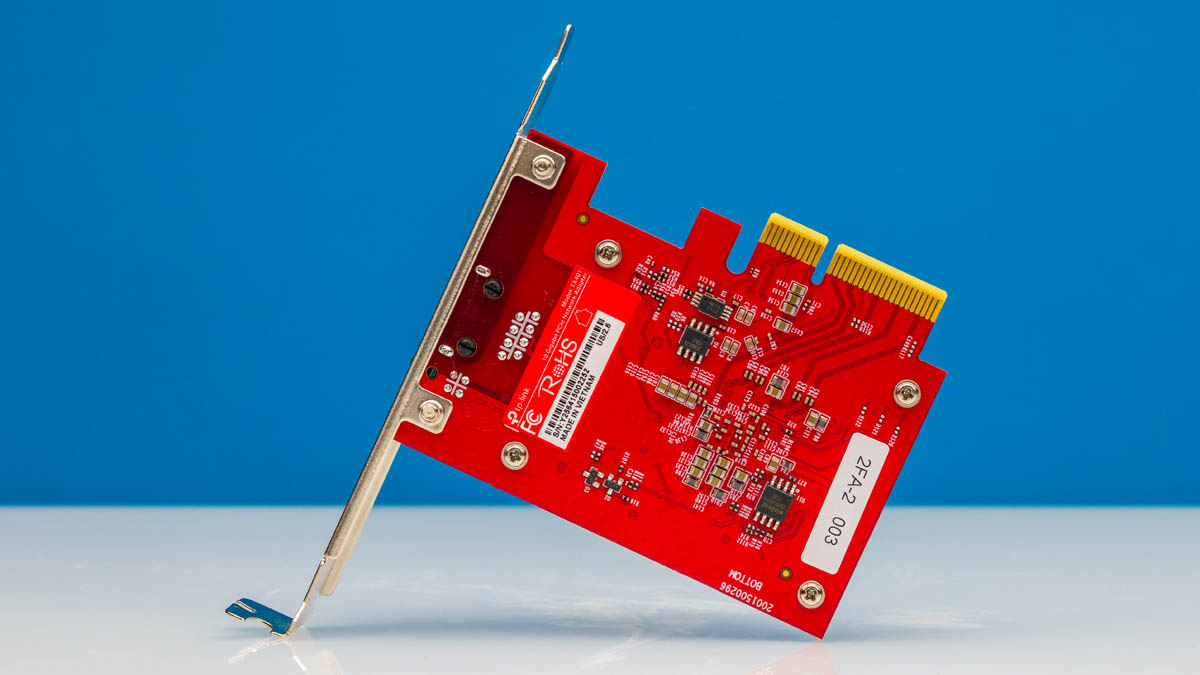
1. For those who want to buy TP-Link TX401, make sure you buy version 2 which is based on Marvel AQC113C.
https://www.tp-link.com/sg/support/download/tx401/v2/

Mini review from STH. His test results are good.
https://www.servethehome.com/tp-link-10gigabit-pcie-network-adapter-mini-review-marvell-aqc113/

The version is shown on the label on the card.
TP-Link-10Gigabit-PCIe-Network-Adapter-Bottom-2.jpg


2. Take note some uses have no issues with Marvell AQC107/AQC113C based 10Gbe NIC, but some users have big issues under Windows. AQC107 based one will have higher heat dissipation.

3. If you buy USB4/TB4 based 10Gbe NIC, mostly they will use AQC107 or AQC113C. Personally I have three USB4/TB4 based 10Gbe NICs and all of them are okay under Windows/macOS/Linux, even though they are based on AQC107/AQC113C chipset.

4. Asus XG-C100C version 2 and version 3 10Gbe NIC are said to be based on AQC113C chipset.
https://www.asus.com/sg/networking-iot-servers/wired-networking/all-series/xg-c100c/
 
Last edited:

Kei_Li

Senior Member
Joined
Apr 25, 2003
Messages
763
Reaction score
4
Not a good alternative for Intel X550, it is only meant for those who have single PCIe 4.0 x 1 slot left. The reports show that 10Gbe NICs based on Realtek RTL8127 can only hit at about 7Gbps.

They are pretty cheap though and seems to be more stable than the popular AQC113C. If you do not care about performance, then I think it is okay.

thanks, my M1 plan is only 6gbps so should technically be sufficient. I will look around a little more for the x550 if not will have to to go RT or even TP link. I don’t know why x550 kind of hard to find and with a consistent price point.
Have a great day.
 

Wataru

Master Member
Joined
Apr 26, 2004
Messages
2,650
Reaction score
111
Not a good alternative for Intel X550, it is only meant for those who have single PCIe 4.0 x 1 slot left. The reports show that 10Gbe NICs based on Realtek RTL8127 can only hit at about 7Gbps.

They are pretty cheap though and seems to be more stable than the popular AQC113C. If you do not care about performance, then I think it is okay.

where are these reports that show Realtek RTL8127 limited to 7Gbps?
Geniuinely curious, because in all my bandwidth and file transfer tests it managed to maintain 10Gbps performance

I will probably test with files bigger than 100GB soon, what i tested it with was with a 100GB VMDK

If you compare to Intel solutions like X550 or X710, of course its not going to be as fantastic. But you pay more for those brand-new.

But i think the Realtek RTL8127 being on PCIE 4.0 x1 is a great development. AQC113C and Intel X710/X550 are all old from PCIE 3.0 era, so any PCIE version of them would be packaged into a PCIE x4 card. Which as you can imagine is either not present (especially on MATX where its hard to put a 2nd PCIE x16 slot) or is in some dumb location and takes lanes from something else

For example, my brother's ASUS b650 tuf gaming plus wifi has the 2nd PCIE x16 slot in a way that prevents him from putting a GPU more than 3 slots thick if he uses that slot, plus he loses 1 of his 3 M.2 slot as well

Going to RTL8127 means he can put it in the bottommost PCIE 4.0 x1 slot. Which means he has no more restriction on GPU size and he can use all 3 of his M.2 slots

https://www.asus.com/sg/motherboards-components/motherboards/tuf-gaming/tuf-gaming-b650-plus-wifi/

I'm curious to see these new NICs that Intel has in place to replace the X710 and E810 (25G and 100G)
https://www.servethehome.com/intel-...-and-e610-for-10gbe-and-2-5gbe-nics-launched/
 

xiaofan

High Supremacy Member
Joined
Sep 16, 2018
Messages
36,611
Reaction score
12,403
where are these reports that show Realtek RTL8127 limited to 7Gbps?
Geniuinely curious, because in all my bandwidth and file transfer tests it managed to maintain 10Gbps performance

From various reports over the Internet, also the report here.
Just to share i using the Realtek 8127 PCIe 10GB RJ45 Ethernet controller i got from PDD China on M1 10Gbs on my Asus mainboard. Can get speed of about 6500Mbs upload and 6900Mbs upload speed.

The test methods may vary though -- some users use OOkla SpeedTest (Internet speed), some users use iperf3 (usually internal network), some users use librespeed/OpenSpeedTest (usually internal network), some users use file transfer.
 

cloud77

Arch-Supremacy Member
Joined
Jul 10, 2000
Messages
16,588
Reaction score
155
where are these reports that show Realtek RTL8127 limited to 7Gbps?
Geniuinely curious, because in all my bandwidth and file transfer tests it managed to maintain 10Gbps performance

I will probably test with files bigger than 100GB soon, what i tested it with was with a 100GB VMDK

If you compare to Intel solutions like X550 or X710, of course its not going to be as fantastic. But you pay more for those brand-new.

But i think the Realtek RTL8127 being on PCIE 4.0 x1 is a great development. AQC113C and Intel X710/X550 are all old from PCIE 3.0 era, so any PCIE version of them would be packaged into a PCIE x4 card. Which as you can imagine is either not present (especially on MATX where its hard to put a 2nd PCIE x16 slot) or is in some dumb location and takes lanes from something else

For example, my brother's ASUS b650 tuf gaming plus wifi has the 2nd PCIE x16 slot in a way that prevents him from putting a GPU more than 3 slots thick if he uses that slot, plus he loses 1 of his 3 M.2 slot as well

Going to RTL8127 means he can put it in the bottommost PCIE 4.0 x1 slot. Which means he has no more restriction on GPU size and he can use all 3 of his M.2 slots

https://www.asus.com/sg/motherboards-components/motherboards/tuf-gaming/tuf-gaming-b650-plus-wifi/

I'm curious to see these new NICs that Intel has in place to replace the X710 and E810 (25G and 100G)
https://www.servethehome.com/intel-...-and-e610-for-10gbe-and-2-5gbe-nics-launched/
i use Ookla speedtest to M1 server. Using Asus Z790A mainboard and Ethernet card also plug in the the most bottom PCIe slot. I am able to get speedtest of about 8000Mbs both up and down on my Asus router (speed test) config page but only manage to get max 6500Mbs on my PC
 

1 Ghz

Arch-Supremacy Member
Joined
Jan 1, 2000
Messages
10,157
Reaction score
274
Some things to point out:

- AQC113 chip supports PCIE Gen4. However, the card manufacturer might limit it to Gen3 x2 to save costs and/or broaden the compatibility with older systems.

- AQC107 supports 8 RSS queues, but AQC113 supports 4. I have both NICs; former is discrete, latter is integrated and setting 8 on the AQC113 causes it to lose connectivity.
 

xiaofan

High Supremacy Member
Joined
Sep 16, 2018
Messages
36,611
Reaction score
12,403
RTL8127 Linux driver is back ported to OpenWRT 24.10.3 release as per the following OpenWRT forum thread.

Interestingly it mentions that there are two versions of RTL8127 based 10Gbe NIC, PCIe 4.0 × 1 and PCIe 3.0 x 2.

As of now, I only see PCIe 4.0 × 1 version now. If you have PCIe 3.0 × 1 slot, then the speed will drop to about 7Gbps using iperf3 as per the report in the thread.

https://forum.openwrt.org/t/the-new...s-working-without-problem-on-openwrt/241442/3
 

xiaofan

High Supremacy Member
Joined
Sep 16, 2018
Messages
36,611
Reaction score
12,403
i use Ookla speedtest to M1 server. Using Asus Z790A mainboard and Ethernet card also plug in the the most bottom PCIe slot. I am able to get speedtest of about 8000Mbs both up and down on my Asus router (speed test) config page but only manage to get max 6500Mbs on my PC

Okay, now I see why. Your Asus Z790A motherboard's PCIe x 1 slot is rated at PCIe 3.0, that is why you get less than 7Gbps speed.

https://rog.asus.com/sg/motherboards/rog-strix/rog-strix-z790-a-gaming-wifi-model/

  1. Intel® Socket LGA 1700 for Intel® Core™ 14th&13th Gen Processors, Intel® Core™ 12th Gen, Pentium® Gold, and Celeron® Processors
  2. Expansion Slots
    • 1 x PCIe 5.0 x16 Safeslot (x16) [CPU]
    • 2 x PCIe 4.0 x16 Slots (x4) [Chipset]
    • 1 x PCIe 3.0 x1 Slot [Chipset]
 

kappak

Senior Member
Joined
Sep 2, 2019
Messages
1,154
Reaction score
447
Last edited:

cloud77

Arch-Supremacy Member
Joined
Jul 10, 2000
Messages
16,588
Reaction score
155
Okay, now I see why. Your Asus Z790A motherboard's PCIe x 1 slot is rated at PCIe 3.0, that is why you get less than 7Gbps speed.

https://rog.asus.com/sg/motherboards/rog-strix/rog-strix-z790-a-gaming-wifi-model/

  1. Intel® Socket LGA 1700 for Intel® Core™ 14th&13th Gen Processors, Intel® Core™ 12th Gen, Pentium® Gold, and Celeron® Processors
  2. Expansion Slots
    • 1 x PCIe 5.0 x16 Safeslot (x16) [CPU]
    • 2 x PCIe 4.0 x16 Slots (x4) [Chipset]
    • 1 x PCIe 3.0 x1 Slot [Chipset]

Can i ask, when say i am using the most bottom PCIe slot, i mean i am using the most bottom full length PCIe slot (although only connect on part of it), its labelled as PCIeX16G4_2 on the mainboard manual. I am not using the short micro PCI. Does it still explain why cannot hit 10GB ? thks for advice
 

xiaofan

High Supremacy Member
Joined
Sep 16, 2018
Messages
36,611
Reaction score
12,403
Can i ask, when say i am using the most bottom PCIe slot, i mean i am using the most bottom full length PCIe slot (although only connect on part of it), its labelled as PCIeX16G4_2 on the mainboard manual. I am not using the short micro PCI. Does it still explain why cannot hit 10GB ? thks for advice

I see. Then it is a different story. Your PCIe 4.0 x 16 slot is not the issue.

Maybe we will need to wait for more testing results to see if the issue is with the chipset or with Windows (device driver or other factors).
 

cloud77

Arch-Supremacy Member
Joined
Jul 10, 2000
Messages
16,588
Reaction score
155
I see. Then it is a different story. Your PCIe 4.0 x 16 slot is not the issue.

Maybe we will need to wait for more testing results to see if the issue is with the chipset or with Windows (device driver or other factors).
i download the driver from realtek.com website. Hope one day i reach full speed.
 

Kei_Li

Senior Member
Joined
Apr 25, 2003
Messages
763
Reaction score
4
Just got my TX401 v2 and tested it out.

Motherboard: MSI B450 Gaming Pro Carbon AC, installed in a PCIE 2.0 x16 slot.

Driver: Marvell_AQtion_Win_v3.1.10

Cables are at least Cat6

M1 6gbps plan, Archer BE805 router.

Result: 1932mbps down, 661mbps up. (Speedtest.net)

Theoretically the hardware should be able to support the 6gbps plan, I wonder where the problem is.
 
Important Forum Advisory Note
This forum is moderated by volunteer moderators who will react only to members' feedback on posts. Moderators are not employees or representatives of HWZ Forums. Forum members and moderators are responsible for their own posts. Please refer to our Community Guidelines and Standards and Terms and Conditions for more information.
Top
