Anybody using Singtel Mesh?

amazingone

Great Supremacy Member
Joined
Jan 14, 2015
Messages
66,197
Reaction score
5,767
Anyone knows how to remove the Askey mesh that's being tied to my Askey WiFi Mesh Account?

Am planning to give it to my friend, am not sure if the Askey mesh will work if it's tied to my Askey WiFi Mesh Account..
 

benlau1

Senior Member
Joined
Oct 15, 2012
Messages
1,204
Reaction score
3
Jojo, what’s the wifi speed you get on the Samsung? I am getting 20-40mb ... it sucks. Any idea how to overcome it?

My router wifi ssid is disabled but if I connect to it... I get 300-400mb... but if I use the Samsung ssid (even its it’s next to the router) I am getting 20-40mb


Been reading this thread- I am also using samsung mesh.. the wifi like not v fast and also not v stable le? So this mesh is lousy huh
 

xpkerx

Senior Member
Joined
Jun 14, 2009
Messages
1,348
Reaction score
13
Anyone else experiencing problems with their iPhone connecting to the mesh? Like the WiFi keeps dropping and can’t stay connected? Bloody frustrating and the Singtel tech guy can’t even resolve it
 

sadboy

Master Member
Joined
Nov 24, 2000
Messages
2,909
Reaction score
174
Hav
Anyone else experiencing problems with their iPhone connecting to the mesh? Like the WiFi keeps dropping and can’t stay connected? Bloody frustrating and the Singtel tech guy can’t even resolve it
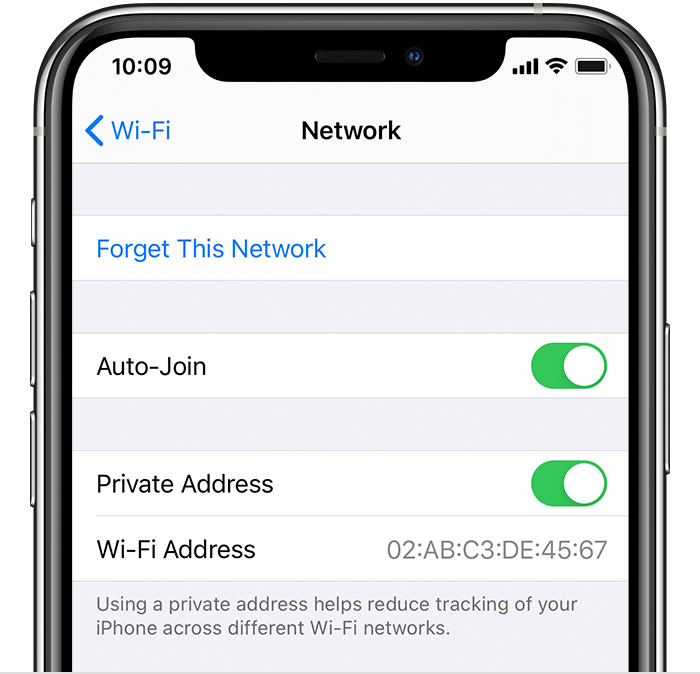
have you try to disable Private Address in your IOS wifi?

iPhone, iPad, or iPod touch​

  1. Open the Settings app, then tap Wi-Fi.
  2. Tap the information button
    ios13-info-icon.png
    next to a network.
  3. Tap to turn Private Address on or off. If your device joined the network without using a private address, a privacy warning explains why.
    ios14-2-iphone-11pro-settings-wifi-network-use-private-address-on.jpg

Some WIFI network does have issue with Private address
 

xiaomibsd2

Junior Member
Joined
May 26, 2021
Messages
4
Reaction score
0
Hi all,
Please advise for my case
Current as-is :
ONR1: wired to singtel TV box
Onr2: wired to router singtel gigabit ac plus. use Ssid name e.g singtel 123
Onr position in living room. MBR has WiFi repeater TPlink RE500 to strengthen signal ssid singtel 123

To-be (alternative 1)
Current setting still use, include mbr using tplink re500.
Additional only : add onr3 wired to askey unit1 and introduce new ssid e.g: askey456 and put askey unit2 in child room with pairing from askey unit1

Question related to be alternative 1:
1.1 will it interfere or reduce speed when 2 ssid (singtel123 and askey456) status both active in 1 house?


To-be (alternative 2)
Remove onr2 by not using singtel router ac plus anymore and only rely on new onr3 with askey unit1 and pairing with askey2 using new ssid : askey456

Question related to be alternative 2:
1. How stability of using askey unit 1 as broadcaster to askey unit2 to the whole existing devices used at home?
2. Can my TPlink Re500 repeat ssid name : askey456 to my master bed room? Any compatibility issue??? (just in case if askey unit 2 cannot reach master bed room).

Thank you in advance

 

xiaofan

High Supremacy Member
Joined
Sep 16, 2018
Messages
32,517
Reaction score
9,919
If you have not got the Askey, do not get it as it is not a good solution and it is specific to SingTel.

It is a dual band solution and it seems to me you do not have LAN ports in the rooms so the performance of the mesh node may not be good since you have to use wireless backhaul.

Recommended mesh solution is to get triband mesh if you have to use wireless backhaul.
 

xiaomibsd2

Junior Member
Joined
May 26, 2021
Messages
4
Reaction score
0
Hi Xiaofan,
Unfortunately I just recontract and want to collect askey to orchard Central.

I still confuse which one give me more benefit whether:
Alternative 1: Turn on existing singtel router gigabit AC (causing 2 ssid in my home and potential interference/congestion/collateral among these 2 ssid or among devices to be connected)

Alternative 2: turn off existing singtel router gigabit AC. Only rely askey unit 1 become main broadcaster and pairing with askey unit 2 as slave mesh wifi.
 

xiaomibsd2

Junior Member
Joined
May 26, 2021
Messages
4
Reaction score
0
If choosing alternative 1: but I rename ssid askey456 become ssid singtel123. (To unify). Is there any potential conflict signal?
 

xiaofan

High Supremacy Member
Joined
Sep 16, 2018
Messages
32,517
Reaction score
9,919
Hi Xiaofan,
Unfortunately I just recontract and want to collect askey to orchard Central.
I still confuse which one give me more benefit whether:
Alternative 1: Turn on existing singtel router gigabit AC (causing 2 ssid in my home and potential interference/congestion/collateral among these 2 ssid or among devices to be connected)
Alternative 2: turn off existing singtel router gigabit AC. Only rely askey unit 1 become main broadcaster and pairing with askey unit 2 as slave mesh wifi.

It is okay to have two SSID, just keep the main Askey a bit away from the AC Plus.

But I will suggest you try the second option first to see if it is good enough.
 

dolphina

Member
Joined
Sep 21, 2006
Messages
145
Reaction score
4
i am using the Askey mesh. but recently since the outage, connection is strong but says not connected. anyone also with this issue and got solution?
 

ThrownAz

Junior Member
Joined
Jul 6, 2020
Messages
1
Reaction score
0
Can the Askey AP5100W be used as extender? My Linksys EA8100 (got together with starhub) still perform better and also has better networking configs. I wanna know if I can set up the mesh as extender from the linksys router so can cover the whole house. Or do I have to set a new wifi coverage with a network switch that is in my room?
 

valeron90

Member
Joined
Jul 10, 2010
Messages
120
Reaction score
0
Hello,
Wanted to check for my singtel askey - would it work if I do the following:
- connect a new router to the ONT
- connect LAN cable to askey in one of the rooms
Main reason is cos the vacuum robot does not work with mesh.
Thanks much.
 
Joined
Apr 3, 2019
Messages
679
Reaction score
108
How to set up the Askey wifi app? The app doesn't recognise i have connected to the network. Stuck at "join the network"
 
Important Forum Advisory Note
This forum is moderated by volunteer moderators who will react only to members' feedback on posts. Moderators are not employees or representatives of HWZ. Forum members and moderators are responsible for their own posts.

Please refer to our Community Guidelines and Standards, Terms of Service and Member T&Cs for more information.
Top