AX router recommendations?

alex22

High Supremacy Member
Joined
Apr 29, 2001
Messages
26,162
Reaction score
7,496
it is similar to this except there is no wash area i.e. the kitchen is without any partitions. The router is installed beside the main door in the living room
090005_Floor_Plan.PNG
Lol where is the tp situated
(Removed my own error)
44 to 45 year old flat?

My layout very similar to this.
My router and tp is directly left hand side of the word Living, that wall.
Coverage can whole flat cos small 3 room.

I go opposite block same floor corridor can still surf web on 2.4ghz but slow only, kym.

If can put router at the top lhs in pic of the living room then is best most central
 
Last edited:

tek888

Member
Joined
Mar 23, 2012
Messages
191
Reaction score
7
Suggest to check if router is CLS certified. Think currently only ASUS is certified for CLS level 4.
thanks for the advice. I used several brands of routers over the years. Personally, I also prefer Asus.
 

tek888

Member
Joined
Mar 23, 2012
Messages
191
Reaction score
7
Due to the distance from the main router and probably the things in between it is probably difficult to get good wifi coverage in the utility room with a single router.

If you go with M1 you can get the RT-AX55 top up, check if the wifi signal is better in the utility room.

If not good enough, then buy an extra RT-AX58U as the main router. Put the RT-AX55 in the kitchen area as the mesh node to provide coverage to the utility room.
yes, I am also in favour of Asus AX55 until I read this artical https://www.mbreviews.com/asus-rt-ax55-review/

It seems to suggest that the WIFI signal strength isn't very good. So I was looking at the other TPlink router offered by M1.

If all else fails, will really need to put another router in the kitchen.

Thanks for your advice.
 

tek888

Member
Joined
Mar 23, 2012
Messages
191
Reaction score
7
Lol where is the tp situated
(Removed my own error)
44 to 45 year old flat?

My layout very similar to this.
My router and tp is directly left hand side of the word Living, that wall.
Coverage can whole flat cos small 3 room.

I go opposite block same floor corridor can still surf web on 2.4ghz but slow only, kym.

If can put router at the top lhs in pic of the living room then is best most central
The TP is on the far corner of the living room, near the corridor end. There is a TV console on that shorter living room wall and the router is placed there too.

The flat is 50 years already. Waiting for en bloc but still waiting.

mind sharing what router you are using? thanks
 

alex22

High Supremacy Member
Joined
Apr 29, 2001
Messages
26,162
Reaction score
7,496
The TP is on the far corner of the living room, near the corridor end. There is a TV console on that shorter living room wall and the router is placed there too.

The flat is 50 years already. Waiting for en bloc but still waiting.

mind sharing what router you are using? thanks
Was tplink ac3200, now is

https://forums.hardwarezone.com.sg/threads/tl-xtr7880.6722433/
But don't think anyone will recommend you to do this here lol.

Neither will anyone recommend to buy China Tplink AC or AX triband mesh that is so damn cheap in taobao.

K30, K66, wdr8670, a pair of k50
Ax3000 mesh imo is overkill even for the intended user i feel.


Oic the tp is there.
Then maybe you think mesh ba so that can "bring" the primary signal from that corner to another part of the unit then spread 1 or 2 nodes from there, to far bedroom, should do it alr with total 2 units cos main unit covers living n front room alr

No point to get a big power router in that corner cos more than half ur signal radiation is outside of the intended usage area.

M1 500m no router de.
 
Last edited:

ptstone

Junior Member
Joined
Jun 11, 2022
Messages
1
Reaction score
0
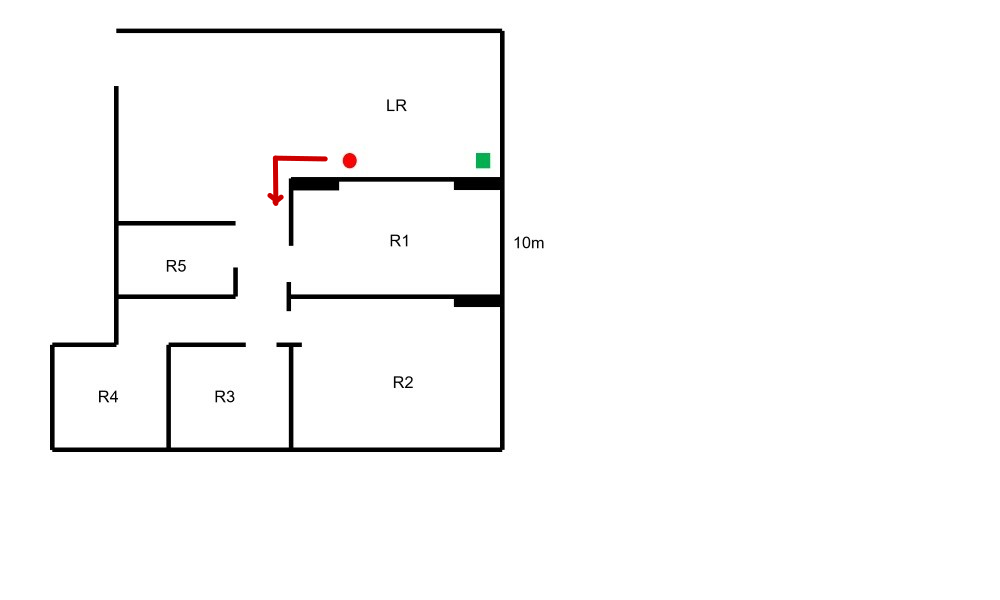
seeking advice to improve wifi

currently using a aztech 7 something (at red spot), wifi speed about 10-300mbps at r1 and 5, no to poor reception at other rooms. wondering if replacing the aztech router with a tplink ax20/50/55/72 would help bring reception throughout the house, or a mesh system would be more suitable

rough floorplan, about 100sm2 space, no ethernet cables around the house,
ftp at green spot:

nKErBUn.jpg
 

uncle_josh

Master Member
Joined
Jun 16, 2018
Messages
3,040
Reaction score
740
seeking advice to improve wifi

currently using a aztech 7 something (at red spot), wifi speed about 10-300mbps at r1 and 5, no to poor reception at other rooms. wondering if replacing the aztech router with a tplink ax20/50/55/72 would help bring reception throughout the house, or a mesh system would be more suitable

rough floorplan, about 100sm2 space, no ethernet cables around the house,
ftp at green spot:

nKErBUn.jpg
Consider moving your router to this location. Sure improve your wifi
ptstone-100sqm.png
 

Tokieda

Supremacy Member
Joined
Jun 21, 2000
Messages
7,717
Reaction score
23
I am now using TP-Link Archer C9 router which gives me decent speed.

The router is inside a wooden cupboard which is shut all the time, and the termination point is also inside this cupboard.
This means the router/mesh location is fixed permanently.

Is there any route or mesh solution that can amplify my wifi signals?

Whats-App-Image-2021-08-21-at-19-08-49.jpg[img]
 
Last edited:

blurnard

Senior Member
Joined
Sep 3, 2001
Messages
1,102
Reaction score
64
I am now using TP-Link Archer C9 router which gives me decent speed.

The router is inside a wooden cupboard which is shut all the time, and the termination point is also inside this cupboard.
This means the router/mesh location is fixed permanently.

Is there any route or mesh solution that can amplify my wifi signals?

Whats-App-Image-2021-08-21-at-19-08-49.jpg[img]
In your instance, most would recommend you using a network switch to split the internet connection.

This way you can shift your router out to either bedroom 2 or 3...

Coz it seems that you have Ethernet port in every room
 

loganrunning

Master Member
Joined
May 12, 2017
Messages
3,755
Reaction score
2,305
I am now using TP-Link Archer C9 router which gives me decent speed.

The router is inside a wooden cupboard which is shut all the time, and the termination point is also inside this cupboard.
This means the router/mesh location is fixed permanently.

Is there any route or mesh solution that can amplify my wifi signals?

Whats-App-Image-2021-08-21-at-19-08-49.jpg[img]

Archer C9 does not seem to support Tp-Link's OneMesh, so if you intend to keep your existing router, you can eitther relocate it (use existing cabling or lay new cabling), or leave it as it is and add Access Points in the other rooms as needed, using the existing cabled outlets. or you could use repeaters/powerline units, but there will be some loss of speed (which may or may not affect useage).

if you change your router, then other options open up.
 

loganrunning

Master Member
Joined
May 12, 2017
Messages
3,755
Reaction score
2,305
Archer C9 does not seem to support Tp-Link's OneMesh, so if you intend to keep your existing router, you can eitther relocate it (use existing cabling or lay new cabling), or leave it as it is and add Access Points in the other rooms as needed, using the existing cabled outlets. or you could use repeaters/powerline units, but there will be some loss of speed (which may or may not affect useage).

if you change your router, then other options open up.


current list of OneMesh devices (nice to know C7/A7 ver5 are supported): https://www.tp-link.com/us/onemesh/product-list/#wi-fi-routers

Will archer c9 get onemesh feature?
 

keenklee

Arch-Supremacy Member
Joined
Sep 9, 2000
Messages
18,717
Reaction score
6,553
i am actually using a https://www.dell.com/en-us/work/sho...x-10-100-1000-desktop/apd/a8697337/networking for my living room ethernet port, to connect to my tv box and android tv. i only have ethernet connections to my living room and desktop PC areas.

i won't be able to switch my router position. so would a new router like tp-link ax20 improve wifi reception/speed for my mobile devices?
IMHO.
Maybe you can put down what is the speed you're getting at the different locations.
I think the cupboard wooden door panel should not affect the speed drastically.

If you upgrade to AX, usually you can benefit if your devices can connect to AX.
 

Tokieda

Supremacy Member
Joined
Jun 21, 2000
Messages
7,717
Reaction score
23
I don't think much of my existing devices support ax yet. or should I look at deco m9 plus?

i am on singtel 1gbps plan, using alu ont.

1xIQ6Mj.png
 

keenklee

Arch-Supremacy Member
Joined
Sep 9, 2000
Messages
18,717
Reaction score
6,553
I don't think much of my existing devices support ax yet. or should I look at deco m9 plus?

i am on singtel 1gbps plan, using alu ont.

1xIQ6Mj.png
IMHO.
You results seems slow. Are you on 5Ghz ?
Maybe can try to open the cupboard door and test the speed next to the router.
 

loganrunning

Master Member
Joined
May 12, 2017
Messages
3,755
Reaction score
2,305
with my phone on 5ghz network.

AkSXskM.jpg

for general use, the speeds seem ok.

for the living room, if you have extra ports on the switch, just pick up a cheap router on carousell < $50 max, and set it up as an access point (that is, if the current speed is insufficient)

for mbr, speed is lower because of the additional wall. try the measurement where you usually are. if the current speed is ok for current use, then the speed is a "nice to know" measure.
 

Tokieda

Supremacy Member
Joined
Jun 21, 2000
Messages
7,717
Reaction score
23
for general use, the speeds seem ok.

for the living room, if you have extra ports on the switch, just pick up a cheap router on carousell < $50 max, and set it up as an access point (that is, if the current speed is insufficient)

for mbr, speed is lower because of the additional wall. try the measurement where you usually are. if the current speed is ok for current use, then the speed is a "nice to know" measure.

thanks. I have this https://www.tp-link.com/us/support/download/tl-wa801nd/ in my storeroom.
 

loganrunning

Master Member
Joined
May 12, 2017
Messages
3,755
Reaction score
2,305

it will work, but depending on your use case, you may find it slow.

it's restricted to 2.4GHz N band, and the ethernet port is the old 100Mbps "fast ethernet".

but if it's just for general browsing and youtube, it will work.
the key criteria is, under your current network and useage, do you find unacceptable slow speeds?

personally, if you were to extend the range with access points (APs), it makes more sense to go with more recent technology - at least AC and 5GHz for wifi, and 1Gbps for wired ports. these are available for less than $20 (i have picked up a few for as low as $5) on carousell. cheers
 
Important Forum Advisory Note
This forum is moderated by volunteer moderators who will react only to members' feedback on posts. Moderators are not employees or representatives of HWZ Forums. Forum members and moderators are responsible for their own posts. Please refer to our Community Guidelines and Standards and Terms and Conditions for more information.
Top