DIY PC Rig Recommendations For 2026

cal316

Junior Member
Joined
Jun 25, 2011
Messages
83
Reaction score
30
Yes that price too good. The cheapest 3070 msi ventus 2x already $550 at mansa. I guess price should be similar at invader. 3070 price even lower than my tuf gaming 3060ti. But tuf gaming model is a higher end model with better cooler. Should have ask if upgrade to 3070 how much. If the same I might get 3070.

7.7 see got any good deals or not ..
Good luck on your hunt. Must say prices now are good. 2 years ago when I was looking the prices were so unappealing I rather game on xbox.
 

haagen

Junior Member
Joined
Nov 28, 2005
Messages
10
Reaction score
0
Hi everyone,

I was looking at the aftershock PCs but keep seeing people say go DIY or Sim Lim. I was thinking of getting a new gaming PC with the Nvidia RTX 4080 or even the 4090 but i have no idea where to start. Anyone can advise me? Generally, I run 2 screens, 1 gaming (2k resolution) and 1 watching videos etc. Recently, i have been seeing stuttering when playing D4 hence i am thinking of getting a new PC. My budget is around $4K (not sure if enough since the GPU is so expensive). If i am posting in the wrong place, please let me know where can i ask my questions.

Edit: added in my budget.
 

deepblue_82

Arch-Supremacy Member
Joined
Oct 23, 2007
Messages
20,302
Reaction score
2,594
Hi everyone,

I was looking at the aftershock PCs but keep seeing people say go DIY or Sim Lim. I was thinking of getting a new gaming PC with the Nvidia RTX 4080 or even the 4090 but i have no idea where to start. Anyone can advise me? Generally, I run 2 screens, 1 gaming (2k resolution) and 1 watching videos etc. Recently, i have been seeing stuttering when playing D4 hence i am thinking of getting a new PC. My budget is around $4K (not sure if enough since the GPU is so expensive). If i am posting in the wrong place, please let me know where can i ask my questions.

Edit: added in my budget.
u can start here
high end gaming rig, total: $2084
ryzen 5 7600 + asus tuf gaming b650m-plus wifi564dynacore
thermalright peerless assassin 120 *157mm height57tradepac
gskill flare x5 2x 16gb 6000c32 ddr5 expo *highly recommended to tune timings190dynacore
wd black sn850x 1tb130tradepac
zotac rtx 4070 twin edge863tradepac
nzxt c650 gold130tradepac

but whats ur current rig? please list the specs
 

hyperfuse

Master Member
Joined
Sep 23, 2019
Messages
4,385
Reaction score
1,854
Hi everyone,

I was looking at the aftershock PCs but keep seeing people say go DIY or Sim Lim. I was thinking of getting a new gaming PC with the Nvidia RTX 4080 or even the 4090 but i have no idea where to start. Anyone can advise me? Generally, I run 2 screens, 1 gaming (2k resolution) and 1 watching videos etc. Recently, i have been seeing stuttering when playing D4 hence i am thinking of getting a new PC. My budget is around $4K (not sure if enough since the GPU is so expensive). If i am posting in the wrong place, please let me know where can i ask my questions.

Edit: added in my budget.
because generally going DIY means u can choose better parts, aesthetics, etc

going with aftershock , dreamcore, invaderpc etc...at least you will be rest assured that everything will go smoothly and any issue, just contact them and they will take care of it.

going the DIY route means...if anything spoils, u gotta figure out what part is faulty, and then send that part for warranty. ( alot of time wastage at times)

So see whether u wanna save some money and go the DIY ( simlim route. or even cheaper, buying from international stores but considered it no warranty) or spend more to get after service if things go wrong and customisation level will drop since u will have to stick to what aftershock provides.
 

NightRaven49

Master Member
Joined
May 17, 2019
Messages
3,746
Reaction score
1,583
Capture.jpg


1) is this a good ram timing to pair with the 7800x3d on a B650 mobo? pricing wise also ok?
if u are able to get it be stable on am5, these are good timings for ryzen in general. id say its ok ish, given that it is possible to get non rgb adata lancer kits with similar timings from bizgram for 170, while rgb kits are above 200. whether forgoing local lifetime warranty for $30 saving is up to u to decide though.
2) i googled the spec sheet of the mobo. the gigabyte B650 aorus pro ax board. it says it support up to 6666mhz timing ram. So if i get a 6400mhz with CL32 timings. will that perform better than this 6000mhz CL 30 ram?
it should slightly outperform if u can get it to be stable on ur cpu, since the infinity fabric clock will be higher even though actual latency is similar. however, ryzen imc is still first gen and 6400mhz is only possible on the best bins, most will cap out around 6000-6200mhz.
Durability:
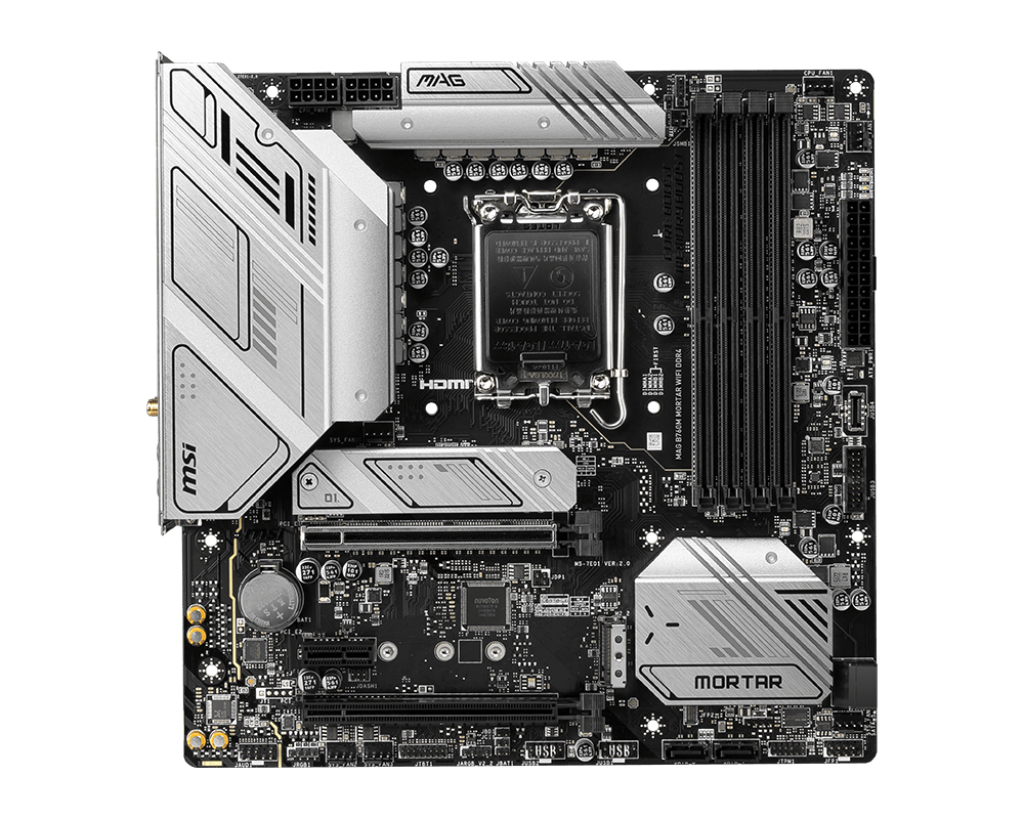
Will this MSI mobo likely last >15% longer than this ASUS mobo? Or no difference?

Set-up:
i5-13400F (stock power settings) + RX 6950 XT


MSI B760M Mortar
1024.png


ASUS Prime B760M
43e9c0fd-f9b4-4e45-9bdf-f14495af40b7
like what deepblue said, there is no exact science to this. ideally u want to keep ur parts as cool as possible to increase the chances of it lasting longer, but it is still possible that a more premium part that runs cooler can fail before a cheaper part that runs hotter. really is see heng suay one la, no such thing as u spend 15% more means it will confirm last 15% longer, but u see it running cooler is more for peace of mind.
Can you explain why "Yes"?

Coz my understanding is that the 65W i5 is low power, so practically won't stress either mobo i.e. both should last as long as each other. Is it coz the hot GPU will stress the mobos more than the CPU? Is it coz the MSI has a better PCB than the ASUS? Or maybe not, coz both are 6 layers? Is it coz the MSI has higher quality VRMs, which are supposed to last longer?

I don't know how to determine mobo longevity & how to get the best bang-for-buck for a low-power i5 at Intel stock power settings. Don't wanna spend extra $$$ when it makes no difference.
tdp values have not made sense for a very long time, the 13400 actually does 75w in sustained workloads. a worse example would be the 13500, which also lists a 65w tdp but can consume over 100w, comparable to that of 7600x/7700x. to make life easier, best to choose mobo based on features and price, then vrm performance if those are tied. vrm performance can be a bigger deciding factor should u look to upgrade to more powerful processor in the future though. theres a warranty for a reason anyway, chances are if it survives the warranty period it should continue to do so for a long time. imo if u dont plan to upgrade on the same mobo in the future, the asus prime board, while not great, is sufficient for the 13400. u will be looking at a pretty big bottleneck with the 6950xt if ur not playing at 4k though, especially with ddr4.
Looking to game at 1440p for games like D4, and past AA games like Cyberpunk, Horizon Zero Dawn, Red Dead Redemption 2, etc. My budget is ~$2k and I don't need a monitor.

Saw the below going for $1,465. Is it ok for the price?
- AMD RYZEN 5 5600X 3.7GHz 6CORE/12THREAD
- ASUS PRIME B550M-A WIFI II AX ARGB
- COOLER MASTER HYPER 212 HALO
- KINGSTON FURY BEAST RGB 3600MHz 16GB(8GBx2) CL17
- ASUS DUAL RTX4070 12GB GDDR6X
- CRUCIAL P3 PLUS 1TB PCIe GEN4 NVMe M.2
- SILVERSTONE ET750 750W 80+ GOLD
- COOLER MASTER CMP 320 CASING (3 ARGB FANS)
i would say pretty good, though id upgrade the psu to something like the msi mpg a750gf or asus rog strix 750w to be sure. personally, id use up all the budget and get a current gen system (ie core 13th gen/ryzen 7000) with ddr5 as it is possible; invader lists a 7600 + 4070 system for 1720, which is also very reasonable.
Some questions I have:
1. Will also look to add in CRUCIAL P3 PLUS 2TB 5000MB/S NVME GEN4 M.2 for $184 for storage. Is this reasonable?
2. Is 5600X good enough or should I upgrade to 5700x
3. Better to get 4070 or 4060TI?
4. PSU of 750W high enough?
dynacore lists the 2tb p3 plus at 164, so maybe just buy separately and add urself later. 5600x vs 5700x minimal performance gain in games, so just stick to the 5600x though like i mentioned above, best to go for the 7600 for not that much more money. i would advise against getting the 4060ti. 750w is enough, in fact u can go as low as 550w even for 4070 system.
actually is it worth considering used/2nd hand pc? recently saw a few good pricing rig on carousell, with many of them being 'regret buys' from aftershock being lightly new or 1 year or less old.

is x570 gaming X a good motherboard?
yes now is a buyers market for pc, many good deals around. in fact i havent built a pc this year because very hard to make a profit with good full build prices :s22:
x570 gaming x is an entry level x570 mobo, but it should work fine.
thanks very much for your feedback

total damage $2,297, thinking where i can lower the cost

mainly used to surf net / watch movies on projector / play Diablo 4 smoothly

Zotac gaming rtx 4070 (considering whether to switch to 4070 TI)$ 883.00
AMD Ryzen 7 7700
Asus Tuf gaming B650M-plus wifi motherboard (bundle with Ryzen 7 7700)$ 748.00
Gskill Flare X5 (AMD Expo) 32 GB (2x16 GB) DDR5 6000$ 188.00
Thermalright Peerless Assassin 120 SE Argb Cpu Cooler$ 56.00
WD Black SN850X 1TB$ 138.00
Superflower legion GX pro semi modular 750W (please advise which 650W psu with 10y warranty)$ 125.00
Jonsbo D41 Mesh black (ATX, Type C, no fans)$ 79.00
i would stick to the 4070, the 4070ti costs too much to be worth it and still features only 12gb of vram which is quite outrageous over $1k. u can get the zotac twin edge model for 863 from tradepac if theyre still running that promo. i would also stick to the 7600, since it is significantly cheaper than the 7700 but performance is still fairly comparable in general use and games; u can get the 7600 bundle for just 564 from dynacore. as for psu, u can get the nzxt c650 gold from bizgram at $130 as suggested in my high end gaming pc reco. in fact, id suggest u just follow that reco entirely.
I was looking at the aftershock PCs but keep seeing people say go DIY or Sim Lim. I was thinking of getting a new gaming PC with the Nvidia RTX 4080 or even the 4090 but i have no idea where to start. Anyone can advise me? Generally, I run 2 screens, 1 gaming (2k resolution) and 1 watching videos etc. Recently, i have been seeing stuttering when playing D4 hence i am thinking of getting a new PC. My budget is around $4K (not sure if enough since the GPU is so expensive). If i am posting in the wrong place, please let me know where can i ask my questions.

Edit: added in my budget.
u don't need to spend so much for d4 and general use, half ur budget is enough for a good experience. u can follow either the midrange or high end gaming rig recommendations, no need 4080 or 4090 (both of which are grossly overpriced imo). even if u don't want to diy, u can go for system integrators like aftershock, dreamcore, invaderpc etc, can look for builds with roughly the same parts, should also be around the same price.

 

given

Supremacy Member
Joined
Dec 10, 2002
Messages
6,665
Reaction score
384
if u are able to get it be stable on am5, these are good timings for ryzen in general. id say its ok ish, given that it is possible to get non rgb adata lancer kits with similar timings from bizgram for 170, while rgb kits are above 200. whether forgoing local lifetime warranty for $30 saving is up to u to decide though.

it should slightly outperform if u can get it to be stable on ur cpu, since the infinity fabric clock will be higher even though actual latency is similar. however, ryzen imc is still first gen and 6400mhz is only possible on the best bins, most will cap out around 6000-6200mhz.

like what deepblue said, there is no exact science to this. ideally u want to keep ur parts as cool as possible to increase the chances of it lasting longer, but it is still possible that a more premium part that runs cooler can fail before a cheaper part that runs hotter. really is see heng suay one la, no such thing as u spend 15% more means it will confirm last 15% longer, but u see it running cooler is more for peace of mind.

tdp values have not made sense for a very long time, the 13400 actually does 75w in sustained workloads. a worse example would be the 13500, which also lists a 65w tdp but can consume over 100w, comparable to that of 7600x/7700x. to make life easier, best to choose mobo based on features and price, then vrm performance if those are tied. vrm performance can be a bigger deciding factor should u look to upgrade to more powerful processor in the future though. theres a warranty for a reason anyway, chances are if it survives the warranty period it should continue to do so for a long time. imo if u dont plan to upgrade on the same mobo in the future, the asus prime board, while not great, is sufficient for the 13400. u will be looking at a pretty big bottleneck with the 6950xt if ur not playing at 4k though, especially with ddr4.

i would say pretty good, though id upgrade the psu to something like the msi mpg a750gf or asus rog strix 750w to be sure. personally, id use up all the budget and get a current gen system (ie core 13th gen/ryzen 7000) with ddr5 as it is possible; invader lists a 7600 + 4070 system for 1720, which is also very reasonable.

dynacore lists the 2tb p3 plus at 164, so maybe just buy separately and add urself later. 5600x vs 5700x minimal performance gain in games, so just stick to the 5600x though like i mentioned above, best to go for the 7600 for not that much more money. i would advise against getting the 4060ti. 750w is enough, in fact u can go as low as 550w even for 4070 system.

yes now is a buyers market for pc, many good deals around. in fact i havent built a pc this year because very hard to make a profit with good full build prices :s22:
x570 gaming x is an entry level x570 mobo, but it should work fine.

i would stick to the 4070, the 4070ti costs too much to be worth it and still features only 12gb of vram which is quite outrageous over $1k. u can get the zotac twin edge model for 863 from tradepac if theyre still running that promo. i would also stick to the 7600, since it is significantly cheaper than the 7700 but performance is still fairly comparable in general use and games; u can get the 7600 bundle for just 564 from dynacore. as for psu, u can get the nzxt c650 gold from bizgram at $130 as suggested in my high end gaming pc reco. in fact, id suggest u just follow that reco entirely.

u don't need to spend so much for d4 and general use, half ur budget is enough for a good experience. u can follow either the midrange or high end gaming rig recommendations, no need 4080 or 4090 (both of which are grossly overpriced imo). even if u don't want to diy, u can go for system integrators like aftershock, dreamcore, invaderpc etc, can look for builds with roughly the same parts, should also be around the same price.
Thank you for the info! I was eyeing a r5 5600g x570 gaming x with 4060 , 16gb ram, 1tb name, nzxt aio cpu cooler, lian lo case for 1k. Do you think it’s a gd price? Heard a lot of negative abt 4060 however coming from a laptop user I’m feeling rather neutral since never had experience with any desktop gpu .. and I heard the new gen gpu consume lesser power?
 

deepblue_82

Arch-Supremacy Member
Joined
Oct 23, 2007
Messages
20,302
Reaction score
2,594
Thank you for the info! I was eyeing a r5 5600g x570 gaming x with 4060 , 16gb ram, 1tb name, nzxt aio cpu cooler, lian lo case for 1k. Do you think it’s a gd price? Heard a lot of negative abt 4060 however coming from a laptop user I’m feeling rather neutral since never had experience with any desktop gpu .. and I heard the new gen gpu consume lesser power?
i really would not go for a 5600G and a 4060 for the price to performance ratio gpu
its 5600 or a 5600x
 

haagen

Junior Member
Joined
Nov 28, 2005
Messages
10
Reaction score
0
u can start here
high end gaming rig, total: $2084
ryzen 5 7600 + asus tuf gaming b650m-plus wifi564dynacore
thermalright peerless assassin 120 *157mm height57tradepac
gskill flare x5 2x 16gb 6000c32 ddr5 expo *highly recommended to tune timings190dynacore
wd black sn850x 1tb130tradepac
zotac rtx 4070 twin edge863tradepac
nzxt c650 gold130tradepac

but whats ur current rig? please list the specs
I wish i knew enough but i bought it off a friend 3 years ago. All i know it is using a 1080 GPU hahaha

I will try to come back with more information once I find out more. :) Thanks for taking time to answer my questions.
 

deepblue_82

Arch-Supremacy Member
Joined
Oct 23, 2007
Messages
20,302
Reaction score
2,594
I wish i knew enough but i bought it off a friend 3 years ago. All i know it is using a 1080 GPU hahaha

I will try to come back with more information once I find out more. :) Thanks for taking time to answer my questions.
because if u are using a am4 platform u could be able to spend less to get a bump in performance like a 3600 => 5700x or even 5800x3d based on the time frame of 3 years.
 

cal316

Junior Member
Joined
Jun 25, 2011
Messages
83
Reaction score
30
Hi everyone,

I was looking at the aftershock PCs but keep seeing people say go DIY or Sim Lim. I was thinking of getting a new gaming PC with the Nvidia RTX 4080 or even the 4090 but i have no idea where to start. Anyone can advise me? Generally, I run 2 screens, 1 gaming (2k resolution) and 1 watching videos etc. Recently, i have been seeing stuttering when playing D4 hence i am thinking of getting a new PC. My budget is around $4K (not sure if enough since the GPU is so expensive). If i am posting in the wrong place, please let me know where can i ask my questions.

Edit: added in my budget.
Actually now these prebuilts companies prices are very good compared to sourcing and diy yourself. Maybe if you are very savy and could get cheap parts overseas and do not care about warranty then you might be able to get a good deal. For me I got a really good deal customising the parts at invader and got like the part for 300 less total. Maybe you can choose the parts and whatapp them to qoute. Thats is like diy liao but you get the peace of mind of 1yr onsite warranty . For aftershock they do have a customising option on the website which is very ex compared to ready to ship.
 

given

Supremacy Member
Joined
Dec 10, 2002
Messages
6,665
Reaction score
384
Actually now these prebuilts companies prices are very good compared to sourcing and diy yourself. Maybe if you are very savy and could get cheap parts overseas and do not care about warranty then you might be able to get a good deal. For me I got a really good deal customising the parts at invader and got like the part for 300 less total. Maybe you can choose the parts and whatapp them to qoute. Thats is like diy liao but you get the peace of mind of 1yr onsite warranty . For aftershock they do have a customising option on the website which is very ex compared to ready to ship.
Issit you choose 1 of the prebuilt and WhatsApp them the parts you want to change and they quote you? I see many 4060 prebuilt cheaper than 3060ti. I might want to enquire their price on that too.
 

cal316

Junior Member
Joined
Jun 25, 2011
Messages
83
Reaction score
30
Issit you choose 1 of the prebuilt and WhatsApp them the parts you want to change and they quote you? I see many 4060 prebuilt cheaper than 3060ti. I might want to enquire their price on that too.
Yes I chose a build on the website and ask them to change certain parts how much. I use the pricelist of dynacore as a guide since those are the parts I know they have. So total they qoute me a price which I am kinda shocked with the amount of upgrades and things I added. Its like 300 cheaper than if you add the price of the parts on their dynacore price list.

Their website do not have the ability to custom like aftershock so I just try my luck and lucky really can. For aftershock if you use the website to custom will be much more ex compared to the ready to ship. Also aftershock uses gigabyte which quality is kinda iffy with the psu explode and gpu pcb breaking news all over youtube.

also 4060 is suppose to be cheaper than 3060ti. if you are going to get 4060 or 4060ti, I rather you get 3060 12gb. 3060ti or 3070.
 

given

Supremacy Member
Joined
Dec 10, 2002
Messages
6,665
Reaction score
384
Yes I chose a build on the website and ask them to change certain parts how much. I use the pricelist of dynacore as a guide since those are the parts I know they have. So total they qoute me a price which I am kinda shocked with the amount of upgrades and things I added. Its like 300 cheaper than if you add the price of the parts on their dynacore price list.

Their website do not have the ability to custom like aftershock so I just try my luck and lucky really can. For aftershock if you use the website to custom will be much more ex compared to the ready to ship. Also aftershock uses gigabyte which quality is kinda iffy with the psu explode and gpu pcb breaking news all over youtube.

also 4060 is suppose to be cheaper than 3060ti. if you are going to get 4060 or 4060ti, I rather you get 3060 12gb. 3060ti or 3070.

yea i do hear about aftershock customization costing a bomb .. 3070 much more exp liao right .. nvm maybe i go enquire first
 

cutthroat

Senior Member
Joined
Dec 27, 2012
Messages
1,722
Reaction score
43
Looks like Aftershock changing their MO from after you buy you get a shock to before you buy also you get a shock. Before&Aftershock.
 

R6exR6

Master Member
Joined
Sep 29, 2010
Messages
3,279
Reaction score
2,717
like what deepblue said, there is no exact science to this. ideally u want to keep ur parts as cool as possible to increase the chances of it lasting longer, but it is still possible that a more premium part that runs cooler can fail before a cheaper part that runs hotter. really is see heng suay one la, no such thing as u spend 15% more means it will confirm last 15% longer, but u see it running cooler is more for peace of mind.

tdp values have not made sense for a very long time, the 13400 actually does 75w in sustained workloads. a worse example would be the 13500, which also lists a 65w tdp but can consume over 100w, comparable to that of 7600x/7700x. to make life easier, best to choose mobo based on features and price, then vrm performance if those are tied. vrm performance can be a bigger deciding factor should u look to upgrade to more powerful processor in the future though. theres a warranty for a reason anyway, chances are if it survives the warranty period it should continue to do so for a long time. imo if u dont plan to upgrade on the same mobo in the future, the asus prime board, while not great, is sufficient for the 13400. u will be looking at a pretty big bottleneck with the 6950xt if ur not playing at 4k though, especially with ddr4.
Thanks for the detailed explanation. Am upgrading my old 3570K PC. I like the Prime board. While I like the Mortar board more, I feel it's overkill, since I've decided to go for the i5-12400F. At stock settings, this thing only consumes 38W on average when gaming (Techpowerup). No point spending extra $122 (~30% more) at Dynacore for just another 2% more fps with the hotter & costlier i5-13400F + Mortar mobo. Not like it's guaranteed to have a 30% longer lifespan. Since you said the Prime is fine for the 13400, it'll be even better for the 12400. I'm just aiming for 4K60 game sessions anyway. No sustained multi-threaded workload, and no plan to upgrade CPU. You guys are right. My cheap Gigabyte GA-G41M-Combo & G1.Sniper M3 mobos and my expensive Asus P8Z77 WS mobo all lasted around the same 4 years each. Price doesn't seems to be a definitive indicator of mobo longevity.
 
Last edited:

Dufasleong

Junior Member
Joined
Aug 2, 2018
Messages
23
Reaction score
0
if u are able to get it be stable on am5, these are good timings for ryzen in general. id say its ok ish, given that it is possible to get non rgb adata lancer kits with similar timings from bizgram for 170, while rgb kits are above 200. whether forgoing local lifetime warranty for $30 saving is up to u to decide though.

it should slightly outperform if u can get it to be stable on ur cpu, since the infinity fabric clock will be higher even though actual latency is similar. however, ryzen imc is still first gen and 6400mhz is only possible on the best bins, most will cap out around 6000-6200mhz.

like what deepblue said, there is no exact science to this. ideally u want to keep ur parts as cool as possible to increase the chances of it lasting longer, but it is still possible that a more premium part that runs cooler can fail before a cheaper part that runs hotter. really is see heng suay one la, no such thing as u spend 15% more means it will confirm last 15% longer, but u see it running cooler is more for peace of mind.

tdp values have not made sense for a very long time, the 13400 actually does 75w in sustained workloads. a worse example would be the 13500, which also lists a 65w tdp but can consume over 100w, comparable to that of 7600x/7700x. to make life easier, best to choose mobo based on features and price, then vrm performance if those are tied. vrm performance can be a bigger deciding factor should u look to upgrade to more powerful processor in the future though. theres a warranty for a reason anyway, chances are if it survives the warranty period it should continue to do so for a long time. imo if u dont plan to upgrade on the same mobo in the future, the asus prime board, while not great, is sufficient for the 13400. u will be looking at a pretty big bottleneck with the 6950xt if ur not playing at 4k though, especially with ddr4.

i would say pretty good, though id upgrade the psu to something like the msi mpg a750gf or asus rog strix 750w to be sure. personally, id use up all the budget and get a current gen system (ie core 13th gen/ryzen 7000) with ddr5 as it is possible; invader lists a 7600 + 4070 system for 1720, which is also very reasonable.

dynacore lists the 2tb p3 plus at 164, so maybe just buy separately and add urself later. 5600x vs 5700x minimal performance gain in games, so just stick to the 5600x though like i mentioned above, best to go for the 7600 for not that much more money. i would advise against getting the 4060ti. 750w is enough, in fact u can go as low as 550w even for 4070 system.

yes now is a buyers market for pc, many good deals around. in fact i havent built a pc this year because very hard to make a profit with good full build prices :s22:
x570 gaming x is an entry level x570 mobo, but it should work fine.

i would stick to the 4070, the 4070ti costs too much to be worth it and still features only 12gb of vram which is quite outrageous over $1k. u can get the zotac twin edge model for 863 from tradepac if theyre still running that promo. i would also stick to the 7600, since it is significantly cheaper than the 7700 but performance is still fairly comparable in general use and games; u can get the 7600 bundle for just 564 from dynacore. as for psu, u can get the nzxt c650 gold from bizgram at $130 as suggested in my high end gaming pc reco. in fact, id suggest u just follow that reco entirely.

u don't need to spend so much for d4 and general use, half ur budget is enough for a good experience. u can follow either the midrange or high end gaming rig recommendations, no need 4080 or 4090 (both of which are grossly overpriced imo). even if u don't want to diy, u can go for system integrators like aftershock, dreamcore, invaderpc etc, can look for builds with roughly the same parts, should also be around the same price.
Saw you mention that the Invaderpc 4070 + 7600 deal is decent? What other changes would you make? Looking for value for a mid-high end gaming PC.
 

tang_tang

Senior Member
Joined
Jun 13, 2005
Messages
673
Reaction score
18
Thanks for the detailed explanation. Am upgrading my old 3570K PC. I like the Prime board. While I like the Mortar board more, I feel it's overkill, since I've decided to go for the i5-12400F. At stock settings, this thing only consumes 38W on average when gaming (Techpowerup). No point spending extra $122 (~30% more) at Dynacore for just another 2% more fps with the hotter & costlier i5-13400F + Mortar mobo. Not like it's guaranteed to have a 30% longer lifespan. Since you said the Prime is fine for the 13400, it'll be even better for the 12400. I'm just aiming for 4K60 game sessions anyway. No sustained multi-threaded workload, and no plan to upgrade CPU. You guys are right. My cheap Gigabyte GA-G41M-Combo & G1.Sniper M3 mobos and my expensive Asus P8Z77 WS mobo all lasted around the same 4 years each. Price doesn't seems to be a definitive indicator of mobo longevity.
Sorry. I am getting a prebuilt too. The package now is Asus prime b660m-a wifi d4 ax argb + i5-12400F and ASUS TUF GAMING RTX3060Ti O8G GAMING OC. Is it worth to upgrade the CPU and motherboard to i5-13400F + Msi B760M Mortar Wifi D4 with a $209 top up?
 
Important Forum Advisory Note
This forum is moderated by volunteer moderators who will react only to members' feedback on posts. Moderators are not employees or representatives of HWZ Forums. Forum members and moderators are responsible for their own posts. Please refer to our Community Guidelines and Standards and Terms and Conditions for more information.
Top