

Lucky177
Master Member
- Joined
- Jul 1, 2002
- Messages
- 4,380
- Reaction score
- 140
Same. Mine also still 100%. Have been using both cable and wireless charging.
Mine still on 100% on the 1st day.
Mine still on 100% on the 1st day.


Just use it normally
Mine still 100% , bought on 1st day of launch.
At home using wireless and fast charging.
Office fast charging
On the move wireless charging .
So I concur that what is use for charging is not a factor at all.
Third Party applications that tell you things about battery should be generally avoided. Apple has removed all API that reports battery status and states so this app is making wild guesses.

Just use the one in apple settings ba

Have? I’m still on 11.2 which I do not see any that will inform me on the wear and tear percentage.
11.4 have?
Have? I’m still on 11.2 which I do not see any that will inform me on the wear and tear percentage.
11.4 have?
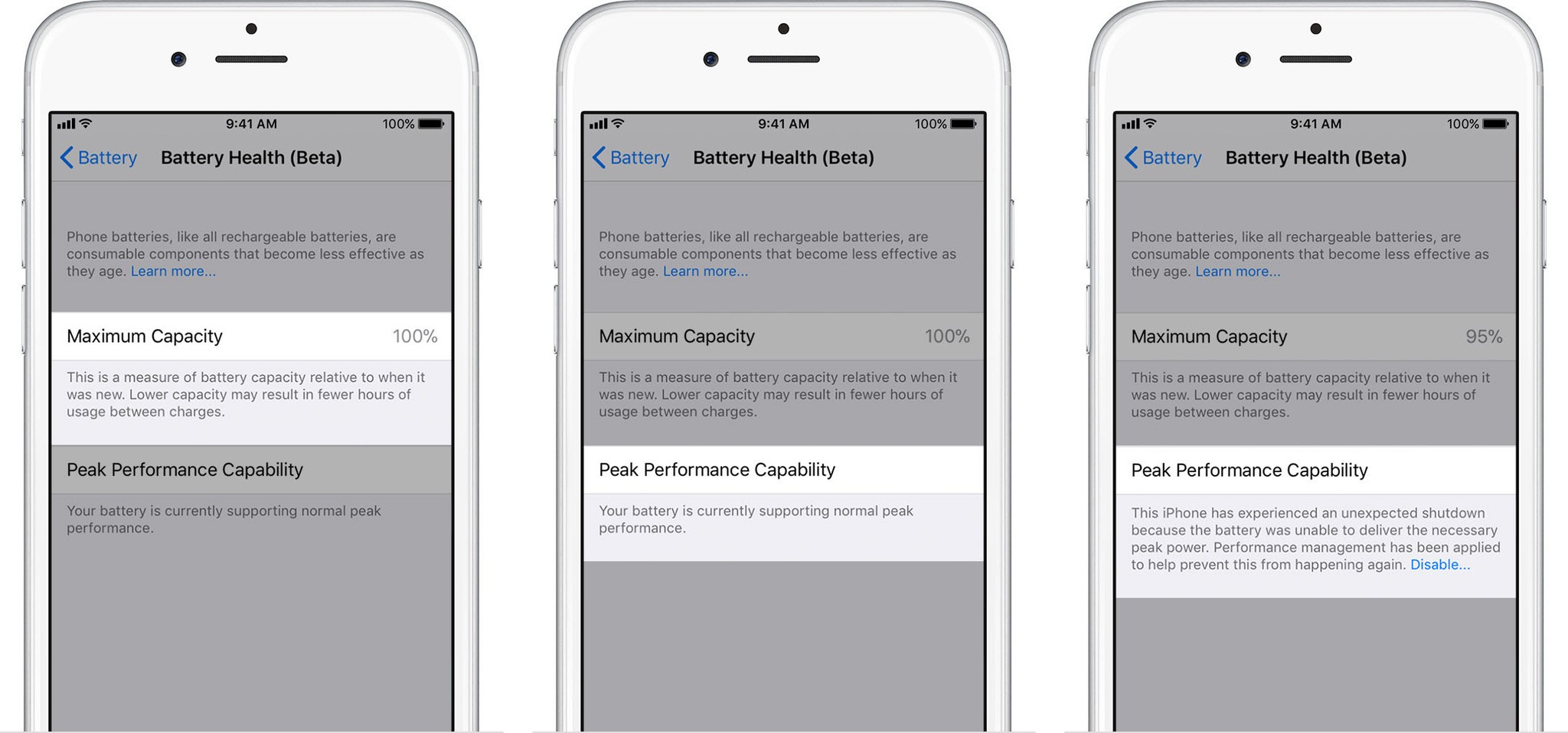


Mine is 94% but description is the same as 100% 0.0You need to be on 11.3. It should also bring some performance boost provided your battery can handle it.
iOS 11.3 improves this performance management feature by periodically assessing the level of performance management necessary to avoid unexpected shutdowns. If the battery health is able to support the observed peak power requirements, the amount of performance management will be lowered. If an unexpected shutdown occurs again, then performance management will increase. This assessment is ongoing, allowing more adaptive performance management.
Peak performance capability is the ability of your iPhone's battery to supply adequate charge even in the face of highly demanding tasks, up to and including those that cause power spikes.
Apple shows the following messages in Battery Health, depending on your iPhone's capability to handle apps at peak performance:
100%: Your battery is currently supporting normal peak performance.
95%: This iPhone has experienced an unexpected shutdown because the battery was unable to deliver the necessary peak power. Performance management has been applied to help prevent this from happening again. Disable…
79% or less: Your battery's health is significantly degraded. An Apple Authorized Service Provider can replace the battery to restore full performance and capacity. More about service options…
Unknown: This iPhone is unable to determine battery health. An Apple Authorized Service Provider can service the battery. More about service options…
If you disable performance management, you'll see the following message:
"This iPhone has experienced an unexpected shutdown because the battery was unable to deliver the necessary peak power. You have manually disabled performance management protections."

Mine is 94% but description is the same as 100% 0.0
Mine is 94% but description is the same as 100% 0.0
The iPhone 8 and X should be able to deliver better and more peak power than the older devices. So until the unexpected shut down happens you can still reach peak performanceApple shows the following messages in Battery Health, depending on your iPhone's capability to handle apps at peak performance:

Just use it normally
Mine still 100% , bought on 1st day of launch.
At home using wireless and fast charging.
Office fast charging
On the move wireless charging .
So I concur that what is use for charging is not a factor at all.
What is the % according to Apple settings? That would be a better gauge.


Updated to 11.4 and the percentage is 97% base on Apple setting. Which is still considering good ba.

Apple has officially included Wi-Fi calling for M1 and Starhub under their carriers list.


