Fastest ISP?

ieatcable

Junior Member
Joined
Sep 15, 2024
Messages
93
Reaction score
104
M1 results are terrible right now towards USA. Recorded at 11.20PM which is a peak period.

https://www.meter.net/tools/world-ping-test/#0-564635-a5ae8f
4tycb44.png


I have a suspicion which transit provider is causing this but I need to do more tests :D
 

ieatcable

Junior Member
Joined
Sep 15, 2024
Messages
93
Reaction score
104
M1 results are terrible right now towards USA. Recorded at 11.20PM which is a peak period.

https://www.meter.net/tools/world-ping-test/#0-564635-a5ae8f
4tycb44.png


I have a suspicion which transit provider is causing this but I need to do more tests :D

Some traceroutes below.

M1 and M247 NYC.
Code:
:# mtr --report --report-wide -c 30 151.236.22.118
HOST:                                        Loss%   Snt   Last   Avg  Best  Wrst StDev
  2.|-- 138.75.x.1                            0.0%    30    3.6   4.2   2.7  12.2   1.9
  3.|-- 182.246.65.202.unknown.m1.com.sg      0.0%    30    3.5   4.3   2.8  25.9   4.1
  4.|-- 181.246.65.202.unknown.m1.com.sg      0.0%    30    3.4   4.8   2.8  22.2   3.9
  5.|-- 38.246.65.202.unknown.m1.com.sg       0.0%    30    4.6   4.4   3.2   6.5   0.6
  6.|-- 159.245.65.202.unknown.m1.com.sg      0.0%    30    4.6   4.8   3.7  12.2   1.9
  7.|-- ae-52.a00.sngpsi08.sg.bb.gin.ntt.net  0.0%    30    4.8   5.7   3.7  23.1   4.1
  8.|-- ae-12.r25.sngpsi07.sg.bb.gin.ntt.net 10.0%    30  182.1 183.2 182.1 185.6   0.8
  9.|-- ae-1.m.nwrknj03.us.bb.gin.ntt.net    26.7%    30  788.8 786.6 731.5 821.7  20.9
 10.|-- ???                                  100.0    30    0.0   0.0   0.0   0.0   0.0
 11.|-- ???                                  100.0    30    0.0   0.0   0.0   0.0   0.0
 12.|-- 118.22.236.151.in-addr.arpa           3.3%    30  390.9 372.9 296.3 441.9  28.8
Code:
traceroute to 138.75.192.1 (138.75.192.1), 20 hops max, 60 byte packets
 1  _gateway (45.15.21.1)  69.286 ms  69.239 ms
 2  irb-2205.core2.nyc1.us.m247.ro (176.10.83.106)  0.779 ms  0.798 ms
 3  146.70.0.241 (146.70.0.241)  0.661 ms  0.802 ms
 4  ae-19.a00.nwrknj03.us.bb.gin.ntt.net (157.238.228.8)  0.881 ms  0.889 ms
 5  ae-3.r22.nwrknj03.us.bb.gin.ntt.net (129.250.3.176)  111.482 ms  111.531 ms
 6  ae-4.r26.sttlwa01.us.bb.gin.ntt.net (129.250.6.177)  66.033 ms  66.089 ms
 7  * *
 8  * *
 9  * *
10  ae-18.a03.sngpsi07.sg.bb.gin.ntt.net (129.250.6.73)  796.386 ms *
11  ntt-as2914-gw1a.sgp.internet.mycloud.services (116.51.26.94)  766.557 ms  767.279 ms
12  138.245.65.202.unknown.m1.com.sg (202.65.245.138)  774.021 ms  774.013 ms
13  202.246.65.202.unknown.m1.com.sg (202.65.246.202)  770.810 ms  770.798 ms
14  * *
15  138.75.192.1 (138.75.192.1)  745.457 ms  756.393 ms

OVH (AU) trace to M1.
Code:
Start: 2026-01-19T15:42:33+0000
HOST: syd1.lg.ovh.net                                                       Loss%   Snt   Last   Avg  Best  Wrst StDev
  1. AS16276  139.99.216.1                                                   0.0%     3    0.2   0.2   0.2   0.2   0.0
  2. AS???    192.168.143.254                                                0.0%     3    0.2   0.2   0.2   0.3   0.1
  3. AS???    10.29.252.62                                                   0.0%     3    0.3   0.3   0.3   0.3   0.0
  4. AS???    10.29.231.218                                                  0.0%     3    0.3   0.4   0.3   0.4   0.1
  5. AS???    10.133.18.32                                                   0.0%     3    0.7   0.7   0.7   0.7   0.0
  6. AS???    10.75.8.8                                                      0.0%     3    0.4   0.3   0.3   0.4   0.0
  7. AS???    172.20.136.0                                                   0.0%     3    2.0   2.9   2.0   3.7   0.9
  8. AS???    10.200.6.2                                                     0.0%     3    2.1   2.5   2.1   2.8   0.4
  9. AS???    10.200.6.1                                                     0.0%     3    0.7   0.8   0.7   0.9   0.1
 10. AS???    ???                                                           100.0     3    0.0   0.0   0.0   0.0   0.0
 11. AS2914   ae-1.r23.sydnau05.au.bb.gin.ntt.net (129.250.2.56)             0.0%     3    1.0   0.9   0.6   1.1   0.3
 12. AS???    ???                                                           100.0     3    0.0   0.0   0.0   0.0   0.0
 13. AS???    ???                                                           100.0     3    0.0   0.0   0.0   0.0   0.0
 14. AS2914   ae-4.r25.sngpsi07.sg.bb.gin.ntt.net (129.250.2.242)           66.7%     3  817.4 817.4 817.4 817.4   0.0
 15. AS2914   ae-18.a03.sngpsi07.sg.bb.gin.ntt.net (129.250.6.73)           33.3%     3  689.5 696.7 689.5 703.8  10.1
 16. AS2914   ntt-as2914-gw1a.sgp.internet.mycloud.services (116.51.26.94)  33.3%     3  668.7 680.9 668.7 693.1  17.2
 17. AS4773   138.245.65.202.unknown.m1.com.sg (202.65.245.138)             66.7%     3  681.4 681.4 681.4 681.4   0.0
 18. AS4773   202.246.65.202.unknown.m1.com.sg (202.65.246.202)             33.3%     3  692.3 677.5 662.7 692.3  20.9
 19. AS4773   1.192.75.138.unknown.m1.com.sg (138.75.192.1)                 33.3%     3  670.7 668.7 666.7 670.7   2.8

OVH (AU) trace to Starhub. SH also seems affected by high latency. :s13: So far the common factor is NTT when passing transiting through Japan.

Code:
Start: 2026-01-19T15:42:18+0000
HOST: syd1.lg.ovh.net                                                  Loss%   Snt   Last   Avg  Best  Wrst StDev
  1. AS16276  139.99.216.1                                              0.0%     3    0.1   0.2   0.1   0.2   0.0
  2. AS???    192.168.143.254                                           0.0%     3    0.2   0.2   0.2   0.2   0.0
  3. AS???    10.29.252.62                                              0.0%     3    0.2   0.3   0.2   0.4   0.1
  4. AS???    10.29.231.218                                             0.0%     3    0.3   0.3   0.3   0.4   0.1
  5. AS???    10.133.18.34                                              0.0%     3    0.7   0.7   0.7   0.7   0.0
  6. AS???    10.75.8.12                                                0.0%     3    0.3   0.4   0.3   0.7   0.2
  7. AS???    172.20.136.0                                              0.0%     3    2.7   2.2   1.8   2.7   0.5
  8. AS???    10.200.6.2                                                0.0%     3    3.6   3.4   3.2   3.6   0.2
  9. AS???    10.200.6.5                                                0.0%     3    0.9   0.9   0.8   0.9   0.1
 10. AS???    ???                                                      100.0     3    0.0   0.0   0.0   0.0   0.0
 11. AS2914   ae-1.r23.sydnau05.au.bb.gin.ntt.net (129.250.2.56)        0.0%     3    1.0   0.8   0.7   1.0   0.2
 12. AS???    ???                                                      100.0     3    0.0   0.0   0.0   0.0   0.0
 13. AS2914   ae-1.r33.tokyjp05.jp.bb.gin.ntt.net (129.250.5.54)       66.7%     3  136.4 136.4 136.4 136.4   0.0
 14. AS2914   ae-4.r25.sngpsi07.sg.bb.gin.ntt.net (129.250.2.242)      33.3%     3  776.0 773.4 770.7 776.0   3.7
 15. AS2914   ae-18.a03.sngpsi07.sg.bb.gin.ntt.net (129.250.6.73)       0.0%     3  664.5 662.3 648.7 673.5  12.6
 16. AS2914   ce-4-1-3.a03.sngpsi07.sg.ce.gin.ntt.net (128.241.6.249)   0.0%     3  650.4 651.1 643.8 659.1   7.7
 17. AS4657   203.118.60.82                                            33.3%     3  667.2 669.0 667.2 670.9   2.6
 18. AS55430  116.86.192.1                                              0.0%     3  644.9 646.2 631.7 662.1  15.2
 

probablye

Junior Member
Joined
Jul 26, 2022
Messages
78
Reaction score
130
Singtel is sending traffic for a local Anycast IP to Japan. But aside from how crappy Singtel is, look at how bad the latency is passing through NTT to Japan.

NTT seems to be performing really badly for the past few months. I'm on MR, and when I see a return path coming through NTT, I need to route it via Cloudflare WARP, so that the data flows via Arelion instead.

Target Name: dns.controld.com
IP: 76.76.2.22

Hop Sent PL% Min Max Avg Host Name / [IP]
1 20 0 0.80 173.49 69.82 xxx [192.168.1.1]
2 21 0 2.02 174.47 78.57 bb116-14-127-252.singnet.com.sg [116.14.127.252]
3 21 24 3.44 184.31 73.05 165.21.193.22 [165.21.193.22]
4 21 0 2.23 174.46 79.69 165.21.193.21 [165.21.193.21]
5 21 0 2.49 180.33 78.30 165.21.138.245 [165.21.138.245]
6 21 0 2.45 175.27 74.59 SN-SINQT1-BO403-ae1.singnet.com.sg [165.21.138.85]
7 21 62 2.66 174.97 78.06 ix-hge-0-0-0-14.ecore3.svq-singapore.as6453.net [180.87.98.85]
8 21 38 2.84 201.95 91.55 if-be-22-2.ecore1.svq-singapore.as6453.net [180.87.105.48]
9 21 95 3.91 3.91 3.91 if-bundle-20-2.qcore1.esin4-singapore.as6453.net [63.243.180.72]
10 21 5 49.00 226.87 123.87 ae-72.a02.sngpsi07.sg.bb.gin.ntt.net [129.250.66.9]
11 21 14 348.39 521.61 415.70 ae-2.r24.sngpsi07.sg.bb.gin.ntt.net [129.250.6.62]
12 21 100 0 0 0 [-]
13 21 52 751.53 948.70 832.31 103.84.154.16 [103.84.154.16]
14 21 24 794.68 1173.36 966.08 dns.controld.com [76.76.2.22]
 

xiaofan

High Supremacy Member
Joined
Sep 16, 2018
Messages
34,810
Reaction score
11,553
Indeed IPv4 connection from Singtel to ControlD DNS is very bad. IPv6 is much better.

Bash:
root@openwrt18:~# ping -4 -c 4 dns.controld.com
PING dns.controld.com (76.76.2.22): 56 data bytes
64 bytes from 76.76.2.22: seq=0 ttl=46 time=890.354 ms
64 bytes from 76.76.2.22: seq=1 ttl=46 time=927.376 ms
64 bytes from 76.76.2.22: seq=2 ttl=46 time=927.463 ms

--- dns.controld.com ping statistics ---
4 packets transmitted, 3 packets received, 25% packet loss
round-trip min/avg/max = 890.354/915.064/927.463 ms

root@openwrt18:~# ping -6 -c 4 dns.controld.com
PING dns.controld.com (2606:1a40::22): 56 data bytes
64 bytes from 2606:1a40::22: seq=0 ttl=48 time=42.763 ms
64 bytes from 2606:1a40::22: seq=1 ttl=48 time=50.135 ms
64 bytes from 2606:1a40::22: seq=2 ttl=48 time=42.432 ms
64 bytes from 2606:1a40::22: seq=3 ttl=48 time=42.546 ms

--- dns.controld.com ping statistics ---
4 packets transmitted, 4 packets received, 0% packet loss
round-trip min/avg/max = 42.432/44.469/50.135 ms
 

xiaofan

High Supremacy Member
Joined
Sep 16, 2018
Messages
34,810
Reaction score
11,553
mtr for IPv4 (going through NTT in Japan) versus IPv6

IPv6
Bash:
root@openwrt18:~# mtr -6 dns.controld.com
                                                 My traceroute  [v0.95]
openwrt18 (2400:d802:d18:xxxx::xx) -> dns.controld.com (2606:1a40::22)                         2026-01-20T22:04:25+0800
Keys:  Help   Display mode   Restart statistics   Order of fields   quit
                                                                               Packets               Pings
 Host                                                                        Loss%   Snt   Last   Avg  Best  Wrst StDev
 1. 2400:d801:4001:611::                                                      0.0%   130    1.4   1.6   1.0   4.7   0.5
 2. 2001:c20:3c00::6                                                          0.0%   130    3.6   4.2   2.9  14.7   2.4
 3. 2001:c20:3c00::7                                                          0.0%   129    1.9   2.9   1.6  40.5   3.9
 4. 2001:c20:0:3::35                                                          0.0%   129    2.2   3.7   2.0  66.7   7.3
 5. 2001:c20:0:3::a                                                           0.0%   129    2.0   2.2   1.8   2.6   0.2
 6. 2400:8800:1f02:74::1                                                      5.4%   129   46.1  47.4  41.7  61.8   4.2
 7. 2400:8800:1f02:95::2                                                      3.1%   129   41.8  42.9  41.3  61.7   3.0
 8. (waiting for reply)
 9. dns.controld.com                                                          0.0%   129   42.3  44.2  42.0  57.6   3.0

IPv4
Bash:
root@openwrt18:~# mtr -4 dns.controld.com
                                                 My traceroute  [v0.95]
openwrt18 (119.74.xxx.xx) -> dns.controld.com (76.76.2.22)                                     2026-01-20T22:07:55+0800
Keys:  Help   Display mode   Restart statistics   Order of fields   quit
                                                                               Packets               Pings
 Host                                                                        Loss%   Snt   Last   Avg  Best  Wrst StDev
 1. bb119-74-xxx-254.singnet.com.sg                                           0.0%   145    1.4   1.5   1.0   4.8   0.5
 2. 165.21.193.22                                                             0.7%   145    3.7   4.7   2.5  19.4   3.5
 3. 165.21.193.21                                                             0.0%   145    1.8   6.6   1.8  33.4   7.1
 4. 165.21.138.245                                                            0.0%   145    1.9   4.0   1.8  59.0   7.6
 5. SN-SINQT1-BO403-ae1.singnet.com.sg                                        0.0%   145    1.9   2.2   1.8   2.7   0.2
 6. ix-hge-0-0-0-14.ecore3.svq-singapore.as6453.net                          77.2%   145    2.6   3.0   2.3  13.4   1.9
 7. if-be-22-2.ecore1.svq-singapore.as6453.net                               43.4%   145    2.8   2.8   2.3   6.2   0.5
 8. if-bundle-20-2.qcore1.esin4-singapore.as6453.net                         90.9%   144    2.6   2.6   2.2   3.0   0.2
 9. ae-72.a02.sngpsi07.sg.bb.gin.ntt.net                                      4.9%   144   52.6  51.9  42.0  56.0   2.1
10. ae-2.r24.sngpsi07.sg.bb.gin.ntt.net                                       6.9%   144  360.9 356.5 354.5 361.6   2.7
11. (waiting for reply)
12. 103.84.154.16                                                            22.9%   144  201.5 219.0 157.0 371.0  37.7
13. dns.controld.com                                                         38.5%   144  915.6 911.5 880.3 945.1  10.9
 

xiaofan

High Supremacy Member
Joined
Sep 16, 2018
Messages
34,810
Reaction score
11,553
Indeed IPv4 connection from Singtel to ControlD DNS is very bad. IPv6 is much better.

Bash:
root@openwrt18:~# ping -4 -c 4 dns.controld.com
PING dns.controld.com (76.76.2.22): 56 data bytes
64 bytes from 76.76.2.22: seq=0 ttl=46 time=890.354 ms
64 bytes from 76.76.2.22: seq=1 ttl=46 time=927.376 ms
64 bytes from 76.76.2.22: seq=2 ttl=46 time=927.463 ms

--- dns.controld.com ping statistics ---
4 packets transmitted, 3 packets received, 25% packet loss
round-trip min/avg/max = 890.354/915.064/927.463 ms

root@openwrt18:~# ping -6 -c 4 dns.controld.com
PING dns.controld.com (2606:1a40::22): 56 data bytes
64 bytes from 2606:1a40::22: seq=0 ttl=48 time=42.763 ms
64 bytes from 2606:1a40::22: seq=1 ttl=48 time=50.135 ms
64 bytes from 2606:1a40::22: seq=2 ttl=48 time=42.432 ms
64 bytes from 2606:1a40::22: seq=3 ttl=48 time=42.546 ms

--- dns.controld.com ping statistics ---
4 packets transmitted, 4 packets received, 0% packet loss
round-trip min/avg/max = 42.432/44.469/50.135 ms

Now it seems to be normal.

Bash:
root@openwrt18:~# ping -4 -c 4 dns.controld.com
PING dns.controld.com (76.76.2.22): 56 data bytes
64 bytes from 76.76.2.22: seq=0 ttl=49 time=36.431 ms
64 bytes from 76.76.2.22: seq=1 ttl=49 time=36.691 ms
64 bytes from 76.76.2.22: seq=2 ttl=49 time=36.556 ms
64 bytes from 76.76.2.22: seq=3 ttl=49 time=36.692 ms

--- dns.controld.com ping statistics ---
4 packets transmitted, 4 packets received, 0% packet loss
round-trip min/avg/max = 36.431/36.592/36.692 ms

root@openwrt18:~# ping -6 -c 4 dns.controld.com
PING dns.controld.com (2606:1a40::22): 56 data bytes
64 bytes from 2606:1a40::22: seq=0 ttl=48 time=42.104 ms
64 bytes from 2606:1a40::22: seq=1 ttl=48 time=42.431 ms
64 bytes from 2606:1a40::22: seq=2 ttl=48 time=42.074 ms
64 bytes from 2606:1a40::22: seq=3 ttl=48 time=42.303 ms

--- dns.controld.com ping statistics ---
4 packets transmitted, 4 packets received, 0% packet loss
round-trip min/avg/max = 42.074/42.228/42.431 ms
 

xiaofan

High Supremacy Member
Joined
Sep 16, 2018
Messages
34,810
Reaction score
11,553
mtr IPv4

Bash:
root@openwrt18:~# mtr -4 dns.controld.com
                                                              My traceroute  [v0.95]
openwrt18 (119.74.xxx.xx) -> dns.controld.com (76.76.2.22)                                                                 2026-01-23T17:24:22+0800
Keys:  Help   Display mode   Restart statistics   Order of fields   quit
                                                                                                           Packets               Pings
 Host                                                                                                    Loss%   Snt   Last   Avg  Best  Wrst StDev
 1. bb119-74-xxx-254.singnet.com.sg                                                                       0.0%   181    1.5   1.3   0.9   7.4   0.6
 2. 165.21.193.22                                                                                         9.9%   181    2.9   4.0   2.4  19.3   2.4
 3. 165.21.193.21                                                                                        18.8%   181    2.3   4.7   1.7  50.4   7.3
 4. 165.21.138.245                                                                                        0.0%   181    2.2   6.5   1.9  61.9   8.1
 5. SN-SINQT1-BO403-ae1.singnet.com.sg                                                                    0.0%   181    2.0   2.1   1.7   2.5   0.2
 6. ix-hge-0-0-0-14.ecore3.svq-singapore.as6453.net                                                      91.1%   181    2.8   2.6   2.2   2.9   0.2
 7. if-be-22-2.ecore1.svq-singapore.as6453.net                                                           65.7%   181    3.0   3.4   2.4  31.3   4.0
 8. if-bundle-20-2.qcore1.esin4-singapore.as6453.net                                                     86.7%   181    3.2   2.5   1.9   3.3   0.4
 9. ae-72.a02.sngpsi07.sg.bb.gin.ntt.net                                                                  2.8%   181   50.8  48.4  22.7  53.8   4.7
10. ae-2.r24.sngpsi07.sg.bb.gin.ntt.net                                                                  13.9%   181  353.7 353.8 353.3 354.6   0.2
11. (waiting for reply)
12. (waiting for reply)
13. (waiting for reply)
14. dns.controld.com                                                                                      0.0%   181   36.2  37.3  36.2  50.8   2.0
 

xiaofan

High Supremacy Member
Joined
Sep 16, 2018
Messages
34,810
Reaction score
11,553
Singtel Fibre 5Gbps plan, IPv4 connection to Quad9 is okay but not IPv6.

Bash:
root@openwrt38:~# ping -4 -c 4 dns.quad9.net
PING dns.quad9.net (9.9.9.9): 56 data bytes
64 bytes from 9.9.9.9: seq=0 ttl=51 time=2.578 ms
64 bytes from 9.9.9.9: seq=1 ttl=51 time=2.472 ms
64 bytes from 9.9.9.9: seq=2 ttl=51 time=2.691 ms
64 bytes from 9.9.9.9: seq=3 ttl=51 time=2.258 ms

--- dns.quad9.net ping statistics ---
4 packets transmitted, 4 packets received, 0% packet loss
round-trip min/avg/max = 2.258/2.499/2.691 ms

root@openwrt38:~# ping -6 -c 4 dns.quad9.net
PING dns.quad9.net (2620:fe::9): 56 data bytes
64 bytes from 2620:fe::9: seq=0 ttl=50 time=202.450 ms
64 bytes from 2620:fe::9: seq=1 ttl=50 time=188.880 ms
64 bytes from 2620:fe::9: seq=2 ttl=50 time=187.812 ms
64 bytes from 2620:fe::9: seq=3 ttl=50 time=188.738 ms

--- dns.quad9.net ping statistics ---
4 packets transmitted, 4 packets received, 0% packet loss
 

xiaofan

High Supremacy Member
Joined
Sep 16, 2018
Messages
34,810
Reaction score
11,553
No issues to Cloudflare DNS (I am using the family DNS 1.0.0.3/1.1.1.3).

Bash:
root@openwrt38:~# ping -4 -c 4 family.cloudflare-dns.com
PING family.cloudflare-dns.com (1.0.0.3): 56 data bytes
64 bytes from 1.0.0.3: seq=0 ttl=54 time=2.575 ms
64 bytes from 1.0.0.3: seq=1 ttl=54 time=3.352 ms
64 bytes from 1.0.0.3: seq=2 ttl=54 time=3.088 ms
64 bytes from 1.0.0.3: seq=3 ttl=54 time=3.247 ms

--- family.cloudflare-dns.com ping statistics ---
4 packets transmitted, 4 packets received, 0% packet loss
round-trip min/avg/max = 2.575/3.065/3.352 ms

root@openwrt38:~# ping -6 -c 4 family.cloudflare-dns.com
PING family.cloudflare-dns.com (2606:4700:4700::1113): 56 data bytes
64 bytes from 2606:4700:4700::1113: seq=0 ttl=54 time=2.059 ms
64 bytes from 2606:4700:4700::1113: seq=1 ttl=54 time=2.736 ms
64 bytes from 2606:4700:4700::1113: seq=2 ttl=54 time=2.517 ms
64 bytes from 2606:4700:4700::1113: seq=3 ttl=54 time=3.108 ms

--- family.cloudflare-dns.com ping statistics ---
4 packets transmitted, 4 packets received, 0% packet loss
 

xiaofan

High Supremacy Member
Joined
Sep 16, 2018
Messages
34,810
Reaction score
11,553
Singtel IPv6 connection to M1 SpeedTest server improves a bit but still much worse than IPv4.

Bash:
root@openwrt18:~/ookla# ./speedtest -s 7311

   Speedtest by Ookla

      Server: M1 Limited - Singapore (id: 7311)
         ISP: Singtel, Singtel Broadband
Idle Latency:    37.87 ms   (jitter: 0.18ms, low: 37.76ms, high: 38.20ms)
    Download:  3610.44 Mbps (data used: 4.3 GB)
                 38.13 ms   (jitter: 1.80ms, low: 35.64ms, high: 51.85ms)
      Upload:  2120.85 Mbps (data used: 2.4 GB)
                 47.97 ms   (jitter: 3.40ms, low: 42.77ms, high: 111.78ms)
 Packet Loss: Not available.
  Result URL: https://www.speedtest.net/result/c/358a49e3-bf76-40e8-b2dd-a20e35e26b82

root@openwrt18:~/ookla# ping -4 -c 4 m1speedtest1.m1net.com.sg
PING m1speedtest1.m1net.com.sg (103.1.138.214): 56 data bytes
64 bytes from 103.1.138.214: seq=0 ttl=53 time=2.675 ms
64 bytes from 103.1.138.214: seq=1 ttl=53 time=3.122 ms
64 bytes from 103.1.138.214: seq=2 ttl=53 time=2.967 ms
64 bytes from 103.1.138.214: seq=3 ttl=53 time=2.723 ms

--- m1speedtest1.m1net.com.sg ping statistics ---
4 packets transmitted, 4 packets received, 0% packet loss
round-trip min/avg/max = 2.675/2.871/3.122 ms

root@openwrt18:~/ookla# ping -6 -c 4 m1speedtest1.m1net.com.sg
PING m1speedtest1.m1net.com.sg (2401:7400:8888:13::2): 56 data bytes
64 bytes from 2401:7400:8888:13::2: seq=0 ttl=48 time=37.350 ms
64 bytes from 2401:7400:8888:13::2: seq=1 ttl=48 time=37.193 ms
64 bytes from 2401:7400:8888:13::2: seq=2 ttl=48 time=37.960 ms
64 bytes from 2401:7400:8888:13::2: seq=3 ttl=48 time=38.053 ms

--- m1speedtest1.m1net.com.sg ping statistics ---
4 packets transmitted, 4 packets received, 0% packet loss
round-trip min/avg/max = 37.193/37.639/38.053 ms

root@openwrt18:~/ookla# mtr -4  m1speedtest1.m1net.com.sg
                                                               My traceroute  [v0.95]
openwrt18 (119.74.xxx.xx) -> m1speedtest1.m1net.com.sg (103.1.138.214)                                                     2026-01-23T17:46:52+0800
Keys:  Help   Display mode   Restart statistics   Order of fields   quit
                                                                                                           Packets               Pings
 Host                                                                                                    Loss%   Snt   Last   Avg  Best  Wrst StDev
 1. bb119-74-xxx-254.singnet.com.sg                                                                       0.0%   111    2.6   1.5   0.9   5.2   0.6
 2. 165.21.193.22                                                                                        43.6%   111    2.8   4.3   2.4  17.6   3.5
 3. 165.21.193.21                                                                                        88.2%   111    3.7   2.6   1.8   8.0   1.7
 4. 165.21.138.245                                                                                        0.0%   111    3.0   4.3   1.5  66.9   8.9
 5. SN-SINQT1-BO403-ae1.singnet.com.sg                                                                    0.0%   111    1.8   1.9   1.5   2.7   0.2
 6. ip-202-147-32-136.asianetcom.net                                                                      0.0%   111    2.9  33.7   2.6 102.9  35.8
 7. i-93.sgpl-core03.telstraglobal.net                                                                   85.5%   111    3.6   3.7   2.9   4.9   0.7
 8. i-92.sgpl01.telstraglobal.net                                                                         0.0%   111    5.5  43.7   3.4 179.5  45.0
 9. unknown.telstraglobal.net                                                                             0.0%   111    2.2   2.8   1.9  39.9   3.7
10. 203.118.6.202                                                                                         0.0%   111    2.3   8.1   2.3  40.4   8.6
11. 203.116.245-218.unknown.starhub.net.sg                                                                0.0%   110    4.6   4.8   3.1  34.0   4.0
12. 161.246.65.202.unknown.m1.com.sg                                                                      0.0%   110    3.5   5.2   3.3  34.8   4.8
13. 37.246.65.202.unknown.m1.com.sg                                                                       0.0%   110    2.9   4.2   2.6  24.7   3.2
14. 214.138.1.103.unknown.m1.com.sg                                                                       0.9%   110    2.8   2.8   2.4   3.5   0.2

root@openwrt18:~/ookla# mtr -6  m1speedtest1.m1net.com.sg

                                                               My traceroute  [v0.95]
openwrt18 (2400:d802:d18:xxxx::xx) -> m1speedtest1.m1net.com.sg (2401:7400:8888:13::2)                                     2026-01-23T17:43:42+0800
Keys:  Help   Display mode   Restart statistics   Order of fields   quit
                                                                                                           Packets               Pings
 Host                                                                                                    Loss%   Snt   Last   Avg  Best  Wrst StDev
 1. 2400:d801:4001:611::                                                                                  0.0%   107    1.6   1.5   1.1   2.7   0.2
 2. 2001:c20:3c00::6                                                                                      0.0%   107    2.7   4.1   2.4  12.8   2.6
 3. 2001:c20:3c00::7                                                                                      0.0%   107    1.9   2.8   1.4  38.6   4.6
 4. 2001:c20:0:3::35                                                                                      0.0%   107    2.0   5.8   1.5  60.7  10.0
 5. 2001:c20:0:3::a                                                                                       0.0%   107    1.9   1.9   1.6   2.3   0.2
 6. 2001:c10:80:2::a21                                                                                    8.5%   106    1.9   2.9   1.3  41.7   5.1
 7. 2001:c10:80:2::915                                                                                    5.7%   106    2.3   5.4   2.1  82.4  11.1
 8. 2001:c10:80:1::a75                                                                                    1.9%   106    2.4   4.9   2.0  83.4  10.0
 9. sng-b7-link.ip.twelve99.net                                                                           1.9%   106  173.4 176.5 172.8 188.9   4.5
10. sng-b5-v6.ip.twelve99.net                                                                            65.7%   106  176.0 187.1 175.6 453.5  45.9
11. starhub-ic-359575.ip.twelve99-cust.net                                                                0.0%   106   41.2  36.9  35.6  53.8   3.2
12. 2406:3000::203:118:5:42                                                                               0.0%   106   51.5  41.4  40.6  65.9   2.6
13. 2406:3000:2:50::2                                                                                     0.0%   106   45.7  42.3  40.4  63.1   3.3
14. 2401:7400:0:1::c                                                                                      0.0%   106   37.8  38.3  36.8  57.1   3.1
15. 0.0.4.7.1.0.4.2.ip6.arpa                                                                              0.0%   106   39.6  37.9  37.1  53.0   1.9
 

xiaofan

High Supremacy Member
Joined
Sep 16, 2018
Messages
34,810
Reaction score
11,553
FYI: Singtel SpeedTest server has got some problems for a while. It is still not working now.

Another thing, Starhub OOkla SpeedTest server (4235) seems to be down.

Bash:
root@openwrt18:~/ookla# ./speedtest -s 13623

   Speedtest by Ookla

      Server: Singtel - Singapore (id: 13623)
         ISP: Singtel, Singtel Broadband
Idle Latency:     1.73 ms   (jitter: 0.23ms, low: 1.46ms, high: 1.85ms)
    Download:   633.80 Mbps (data used: 389.7 MB)
                  1.41 ms   (jitter: 0.30ms, low: 1.00ms, high: 3.36ms)
      Upload:  3669.70 Mbps (data used: 6.3 GB)
                  3.98 ms   (jitter: 1.81ms, low: 1.18ms, high: 10.10ms)
 Packet Loss:     0.0%
  Result URL: https://www.speedtest.net/result/c/84f90ee2-e0d4-42f5-80ad-c6f10b00d11d

root@openwrt18:~/ookla# ./speedtest -s 62020

   Speedtest by Ookla

      Server: Axclusive Pte Ltd - Singapore (id: 62020)
         ISP: Singtel, Singtel Broadband
Idle Latency:     1.95 ms   (jitter: 0.14ms, low: 1.83ms, high: 2.12ms)
    Download:  5376.26 Mbps (data used: 2.4 GB)
                  1.83 ms   (jitter: 0.28ms, low: 1.47ms, high: 4.57ms)
      Upload:  4938.27 Mbps (data used: 2.3 GB)
                  8.42 ms   (jitter: 0.67ms, low: 1.49ms, high: 9.79ms)
 Packet Loss:     0.0%
  Result URL: https://www.speedtest.net/result/c/1543950a-0bdf-444b-bf97-2320662f6526

root@openwrt18:~/ookla# ./speedtest -s 5935

   Speedtest by Ookla

      Server: MyRepublic Singapore - Singapore (id: 5935)
         ISP: Singtel, Singtel Broadband
Idle Latency:     2.37 ms   (jitter: 0.20ms, low: 2.20ms, high: 2.56ms)
    Download:  5467.05 Mbps (data used: 4.4 GB)
                  2.30 ms   (jitter: 0.30ms, low: 2.00ms, high: 6.76ms)
      Upload:  4936.91 Mbps (data used: 2.3 GB)
                  8.08 ms   (jitter: 0.77ms, low: 1.64ms, high: 9.36ms)
 Packet Loss:     0.0%
  Result URL: https://www.speedtest.net/result/c/efdb16fe-86b1-44b8-8c46-ae8df023a3cd

root@openwrt18:~/ookla# ./speedtest -s 2054

   Speedtest by Ookla

      Server: ViewQwest - Singapore (id: 2054)
         ISP: Singtel, Singtel Broadband
Idle Latency:     3.49 ms   (jitter: 0.15ms, low: 3.36ms, high: 3.56ms)
    Download:  5404.37 Mbps (data used: 4.8 GB)
                  3.58 ms   (jitter: 0.26ms, low: 3.21ms, high: 4.78ms)
      Upload:  4934.36 Mbps (data used: 2.5 GB)
                  9.94 ms   (jitter: 1.02ms, low: 4.66ms, high: 11.59ms)
 Packet Loss:     0.0%
  Result URL: https://www.speedtest.net/result/c/b3d84fc4-fc52-4e04-b1d0-be83b5acb526

root@openwrt18:~/ookla# ./speedtest -s 7311

   Speedtest by Ookla

      Server: M1 Limited - Singapore (id: 7311)
         ISP: Singtel, Singtel Broadband
Idle Latency:    42.96 ms   (jitter: 0.15ms, low: 42.81ms, high: 43.08ms)
    Download:  3200.84 Mbps (data used: 5.6 GB)
                 35.37 ms   (jitter: 0.46ms, low: 35.03ms, high: 44.61ms)
      Upload:  2016.61 Mbps (data used: 3.6 GB)
                 36.89 ms   (jitter: 1.24ms, low: 36.27ms, high: 44.99ms)
 Packet Loss: Not available.
  Result URL: https://www.speedtest.net/result/c/28990f6d-dd9a-4499-b508-f456f5f9ac04

root@openwrt18:~/ookla# ./speedtest -s 4235
[error] Configuration - No servers defined (NoServersException)

root@openwrt18:~/ookla# ./speedtest -s 12687

   Speedtest by Ookla

      Server: SIMBA Telecom - Singapore (id: 12687)
         ISP: Singtel, Singtel Broadband
Idle Latency:     4.45 ms   (jitter: 0.41ms, low: 4.09ms, high: 4.85ms)
    Download:  5442.77 Mbps (data used: 5.7 GB)
                  3.70 ms   (jitter: 0.28ms, low: 3.19ms, high: 4.82ms)
      Upload:  4936.15 Mbps (data used: 2.4 GB)
                  9.20 ms   (jitter: 1.18ms, low: 2.73ms, high: 10.46ms)
 Packet Loss:     0.0%
  Result URL: https://www.speedtest.net/result/c/01d0b97b-9482-4aad-905c-ca07928f4ee1

root@openwrt18:~/ookla# ./speedtest -s 31293

   Speedtest by Ookla

      Server: Pacific Internet (S) - Singapore (id: 31293)
         ISP: Singtel, Singtel Broadband
Idle Latency:    42.85 ms   (jitter: 0.30ms, low: 42.47ms, high: 43.42ms)
    Download:  1975.28 Mbps (data used: 2.6 GB)
                 45.77 ms   (jitter: 4.65ms, low: 36.51ms, high: 64.67ms)
      Upload:  2091.57 Mbps (data used: 2.3 GB)
                 38.24 ms   (jitter: 2.36ms, low: 36.54ms, high: 55.62ms)
 Packet Loss: Not available.
  Result URL: https://www.speedtest.net/result/c/565a393b-d7a9-40b4-bfe7-1a530bdeee69

 

xiaofan

High Supremacy Member
Joined
Sep 16, 2018
Messages
34,810
Reaction score
11,553
Same wireless setup as the above test.

Singtel IPv4 address is 119.74.xxx.xxx (different Singtel IPv4 segment may have different performances)

Today's results (19-Jan-2026), 7:30pm on a Monday evening.
https://www.meter.net/tools/world-ping-test/#0-564438-e0cef3
b1CyBqc.png

Using wireless, Singtel 5Gbps plan.

Singtel IPv4 address is 42.60.xxx.xxx (different Singtel IPv4 segment may have different performances)

Today's results (17-Feb-2026), 9:10 am, Chinese New Year
https://www.meter.net/tools/world-ping-test/#0-604016-e542f8

9Oax2FU.png
 

ieatcable

Junior Member
Joined
Sep 15, 2024
Messages
93
Reaction score
104
Using wireless, Singtel 5Gbps plan.

Singtel IPv4 address is 42.60.xxx.xxx (different Singtel IPv4 segment may have different performances)

Today's results (17-Feb-2026), 9:10 am, Chinese New Year
https://www.meter.net/tools/world-ping-test/#0-604016-e542f8

9Oax2FU.png

Good improvement coming from Singtel. Not sure for how long. :s13:

IMHO.
Eight Home.
In my other testing, Eight has good connectivity to USA vs Singtel.

2026-02-17-0925-World-Ping-Test.jpg

Quite impressive actually. Usually only get this few reds on premium VPN.

M1 results. There are some minor routing differences between different blocks for now (some have Telstra inbound and some do not). Used to have no difference last time.

180.129.x.x
https://www.meter.net/tools/world-ping-test/#0-604040-7ee00c

g0Ae4f5.png


138.75.x.x
https://www.meter.net/tools/world-ping-test/#0-604042-74a69f

4nym4ZH.png
 

nothinghere

Member
Joined
Aug 9, 2022
Messages
334
Reaction score
216
Using wireless, Singtel 5Gbps plan.

Singtel IPv4 address is 42.60.xxx.xxx (different Singtel IPv4 segment may have different performances)

Today's results (17-Feb-2026), 9:10 am, Chinese New Year
https://www.meter.net/tools/world-ping-test/#0-604016-e542f8

Singtel/SingNet, 220.255.x.x, 500Mbps plan wired ethernet, 18/2/2026, ~7:40pm

https://www.meter.net/tools/world-ping-test/#0-605766-041b92

rcIAFK9.png


At this point I'm inclined to believe that customers on old plans are getting shafted through poor routing.
 

lobukong

Member
Joined
Jun 16, 2011
Messages
365
Reaction score
200
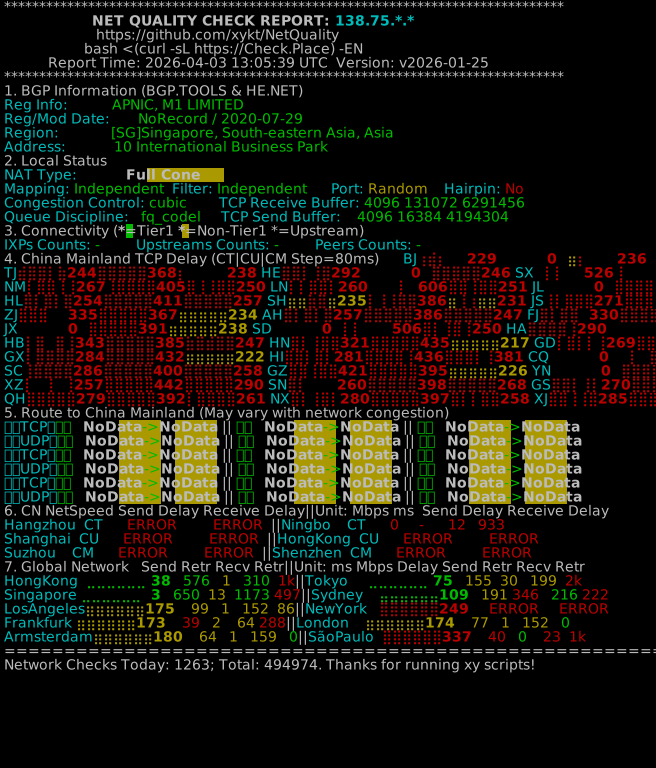
Hi all,


I’m currently on M1 and exploring whether other ISPs like StarHub or Eight might offer better routing/latency, especially to China and global nodes.


Before deciding, I’d like to gather some real-world comparisons across different providers.


If you’re using StarHub, Eight, (or even M1 for reference), could you help run this quick diagnostic and share your results?


How to run:
https://github.com/xykt/NetQuality/blob/main/README_EN.md


My result (M1):
https://report.check.place/net/3AS1HUHF1.svg

3AS1HUHF1.svg


Thanks in advance—would be great to see how different networks compare!
 
Important Forum Advisory Note
This forum is moderated by volunteer moderators who will react only to members' feedback on posts. Moderators are not employees or representatives of HWZ Forums. Forum members and moderators are responsible for their own posts. Please refer to our Community Guidelines and Standards and Terms and Conditions for more information.
Top