Fastest ISP?

chocointed

Junior Member
Joined
Apr 14, 2023
Messages
28
Reaction score
9
Cross posting from Singtel thread

“Been trying to connect to a VPS (SpeedyPage VPS in Equinix SG3) via Singtel for a Minecraft server, but failed to even connect

Traceroute from LAN to the IP address has Singtel routing as below
ST > ST > ST Core > STIX > STIX > TATA/ST Transit (Over ocean) > TATA (Palo Alto, USA) > TATA (Palo Alto, USA) > TATA (UK) > VPS

Traceroute from Starhub LG to the IP address as below
SH > SH > SH > TATA (Within SG) > VPS

Traceroute from a Malaysia residential IP
MX > Internal > MX > NTT (Within SG) > NTT (Within SG) > NTT/M1 (Within SG) > VPS

Singtel Fibre gives around 280MS - 300MS
StarHub LG gives around 5MS
MX (Maxis) gives around 15-20MS
Singtel Mobile (GOMO) gives around 55-60MS

Tried to restart the router (UX7) to get a new IP address from Singtel but it's stuck at 42.61.X.X, same IP at all, even rebooting the ONU gives the same result”
 

xiaofan

High Supremacy Member
Joined
Sep 16, 2018
Messages
34,765
Reaction score
11,532
Cross posting from Singtel thread

“Been trying to connect to a VPS (SpeedyPage VPS in Equinix SG3) via Singtel for a Minecraft server, but failed to even connect

Traceroute from LAN to the IP address has Singtel routing as below
ST > ST > ST Core > STIX > STIX > TATA/ST Transit (Over ocean) > TATA (Palo Alto, USA) > TATA (Palo Alto, USA) > TATA (UK) > VPS

Traceroute from Starhub LG to the IP address as below
SH > SH > SH > TATA (Within SG) > VPS

Traceroute from a Malaysia residential IP
MX > Internal > MX > NTT (Within SG) > NTT (Within SG) > NTT/M1 (Within SG) > VPS

Singtel Fibre gives around 280MS - 300MS
StarHub LG gives around 5MS
MX (Maxis) gives around 15-20MS
Singtel Mobile (GOMO) gives around 55-60MS

Tried to restart the router (UX7) to get a new IP address from Singtel but it's stuck at 42.61.X.X, same IP at all, even rebooting the ONU gives the same result”

Using Singtel ONR as the main router and with Double NAT?

You may want to post the detailed traceroute result.
 

xiaofan

High Supremacy Member
Joined
Sep 16, 2018
Messages
34,765
Reaction score
11,532
Hi all,

I’m currently on M1 and exploring whether other ISPs like StarHub or Eight might offer better routing/latency, especially to China and global nodes.

Before deciding, I’d like to gather some real-world comparisons across different providers.

If you’re using StarHub, Eight, (or even M1 for reference), could you help run this quick diagnostic and share your results?

How to run:
https://github.com/xykt/NetQuality/blob/main/README_EN.md

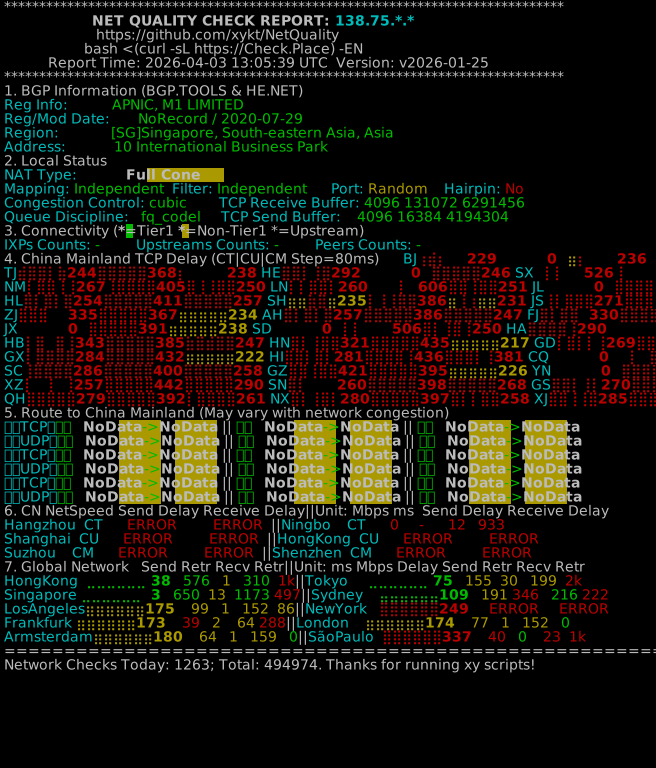
My result (M1):
https://report.check.place/net/3AS1HUHF1.svg

3AS1HUHF1.svg


Thanks in advance—would be great to see how different networks compare!

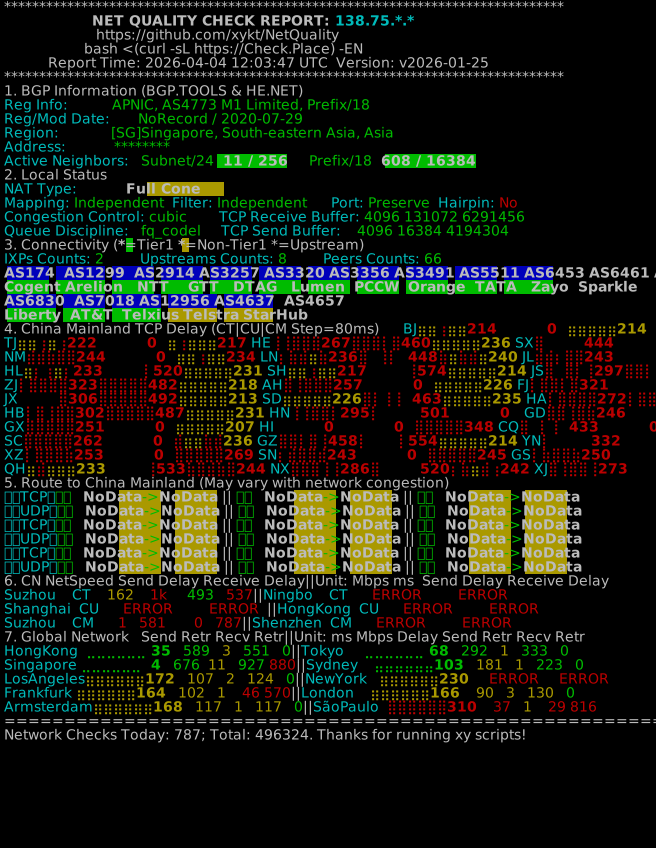
Not using eight/M1 here and not able to test with Starhub right now.

So testing using Singtel as a reference, from an Ubuntu 22.04 Linux LxC container.

Kvrzc36.png

ESCctkn.png
 

xiaofan

High Supremacy Member
Joined
Sep 16, 2018
Messages
34,765
Reaction score
11,532
Singtel IPv6 results are similar to IPv4, from the same Ubuntu 22.04 Linux LxC container (Intel N100 mini PC, Proxmox VE, wired connnection with 2.5Gbe link to the main OpenWRT router)

Singtel 5Gbps plan, bridged Singtel ZTE F8648P ONR

1pGPRyX.png

UZW4mDY.png
 

chocointed

Junior Member
Joined
Apr 14, 2023
Messages
28
Reaction score
9
Using Singtel ONR as the main router and with Double NAT?

You may want to post the detailed traceroute result.
No, bridged to UX7 so there's no double NAT

Let me get the traceroute result from Singtel and Maxis both as comparison with PingPlotter
 

xiaofan

High Supremacy Member
Joined
Sep 16, 2018
Messages
34,765
Reaction score
11,532
No, bridged to UX7 so there's no double NAT

Let me get the traceroute result from Singtel and Maxis both as comparison with PingPlotter

I see. If you bridge the ONR, reboot the UX7 will usually get the new IPv4 address.

Or you can change the WAN MAC address to force an update.
 

xiaofan

High Supremacy Member
Joined
Sep 16, 2018
Messages
34,765
Reaction score
11,532
No, bridged to UX7 so there's no double NAT

Let me get the traceroute result from Singtel and Maxis both as comparison with PingPlotter

You can also provide the IP address of the VPS server so that other Singtel users can carry out the test.

Singtel may indeed have the routing issues to some servers, as per many reports in this forum.
 

xiaofan

High Supremacy Member
Joined
Sep 16, 2018
Messages
34,765
Reaction score
11,532
UX7 with Singtel
1lfjA0A.png


UDM SE with Maxis
n8Dkowh.png


Starhub LG
6iVZIEx.png


I'm not certain how accurate the Starhub LG tool is GlobalPing-SH but I'm taking it as just a normal reference

Different Singtel IPv4 segment may have quite different routing performance.

Singtel Fibre 5Gbps plan
Singtel results, IPv4 segment 119.234.xxx.xxx
From my main OpenWRT router.

Bash:
root@openwrt18:~# mtr  mchostsea.com
                                                 My traceroute  [v0.95]
openwrt18 (119.234.xxx.xxx) -> mchostsea.com (45.139.226.253)                                   2026-04-04T22:39:35+0800
Keys:  Help   Display mode   Restart statistics   Order of fields   quit
                                                                               Packets               Pings
 Host                                                                        Loss%   Snt   Last   Avg  Best  Wrst StDev
 1. dnssec1.singnet.com.sg                                                    0.0%   110    1.1   1.4   1.0   4.4   0.4
 2. 165.21.193.22                                                             0.0%   110    3.1   4.1   2.4  20.3   3.0
 3. 165.21.193.21                                                             0.9%   110    2.0   4.4   1.5  75.4  10.2
 4. SN-SINTP1-BO118-xe-0-1-1.singnet.com.sg                                   0.0%   110    1.9   2.1   1.7   2.5   0.2
 5. SN-SINTP1-BO402-ae1.singnet.com.sg                                        0.0%   110    2.5   6.3   1.7  78.4  13.6
 6. 203.208.190.133                                                           0.0%   110    3.2   4.5   1.6  69.6   9.9
 7. 203.208.158.9                                                             6.4%   109    2.1   4.5   1.8  61.6   8.9
    203.208.171.190
    203.208.158.162
 8. 203.208.158.206                                                           0.9%   109    2.7   5.6   2.5  70.5  10.3
    63-218-211-253.static.as3491.net
    203.208.151.37
 9. 203.208.151.122                                                           0.0%   109   42.6  42.5  35.9  50.7   2.8
    BE47.br07.sin02.as3491.net
    203.208.171.142
10. 203.208.151.93                                                            0.0%   109   43.4  39.8  34.4  48.2   2.4
    63-216-147-42.static.as3491.net
11. 63-218-211-253.static.as3491.net                                          1.8%   109   39.6  39.4  38.9  44.3   0.7
12. BE47.br07.sin02.as3491.net                                               67.0%   109   40.0  40.8  39.4  63.8   4.5
13. 63-216-147-42.static.as3491.net                                           0.9%   109   39.5  39.3  38.9  39.7   0.2
14. (waiting for reply)
15. 253.226.139.45.speedyvps.uk                                               0.0%   109   39.3  39.3  38.8  44.0   0.5
 

chocointed

Junior Member
Joined
Apr 14, 2023
Messages
28
Reaction score
9
Different Singtel IPv4 segment may have quite different routing performance.

Singtel Fibre 5Gbps plan
Singtel results, IPv4 segment 119.234.xxx.xxx
From my main OpenWRT router.

Bash:
root@openwrt18:~# mtr  mchostsea.com
                                                 My traceroute  [v0.95]
openwrt18 (119.234.xxx.xxx) -> mchostsea.com (45.139.226.253)                                   2026-04-04T22:39:35+0800
Keys:  Help   Display mode   Restart statistics   Order of fields   quit
                                                                               Packets               Pings
 Host                                                                        Loss%   Snt   Last   Avg  Best  Wrst StDev
 1. dnssec1.singnet.com.sg                                                    0.0%   110    1.1   1.4   1.0   4.4   0.4
 2. 165.21.193.22                                                             0.0%   110    3.1   4.1   2.4  20.3   3.0
 3. 165.21.193.21                                                             0.9%   110    2.0   4.4   1.5  75.4  10.2
 4. SN-SINTP1-BO118-xe-0-1-1.singnet.com.sg                                   0.0%   110    1.9   2.1   1.7   2.5   0.2
 5. SN-SINTP1-BO402-ae1.singnet.com.sg                                        0.0%   110    2.5   6.3   1.7  78.4  13.6
 6. 203.208.190.133                                                           0.0%   110    3.2   4.5   1.6  69.6   9.9
 7. 203.208.158.9                                                             6.4%   109    2.1   4.5   1.8  61.6   8.9
    203.208.171.190
    203.208.158.162
 8. 203.208.158.206                                                           0.9%   109    2.7   5.6   2.5  70.5  10.3
    63-218-211-253.static.as3491.net
    203.208.151.37
 9. 203.208.151.122                                                           0.0%   109   42.6  42.5  35.9  50.7   2.8
    BE47.br07.sin02.as3491.net
    203.208.171.142
10. 203.208.151.93                                                            0.0%   109   43.4  39.8  34.4  48.2   2.4
    63-216-147-42.static.as3491.net
11. 63-218-211-253.static.as3491.net                                          1.8%   109   39.6  39.4  38.9  44.3   0.7
12. BE47.br07.sin02.as3491.net                                               67.0%   109   40.0  40.8  39.4  63.8   4.5
13. 63-216-147-42.static.as3491.net                                           0.9%   109   39.5  39.3  38.9  39.7   0.2
14. (waiting for reply)
15. 253.226.139.45.speedyvps.uk                                               0.0%   109   39.3  39.3  38.8  44.0   0.5
Very interesting, I'll restart the connection again and give it a try again prehaps

However, that connection I did the traceroute on is a legacy 1Gbps plan, is it possible that the connection is being deprioritized to reach the destination compared to newer plans?
 

xiaofan

High Supremacy Member
Joined
Sep 16, 2018
Messages
34,765
Reaction score
11,532
Very interesting, I'll restart the connection again and give it a try again prehaps

However, that connection I did the traceroute on is a legacy 1Gbps plan, is it possible that the connection is being deprioritized to reach the destination compared to newer plans?

Just tried another Singtel IPv4 segment 42.60.xxx.xx and it has similar results. It has 1Gbps uplink (but still with my Singtel 5Gbps plan).

Not so sure if you have something strange on your UX7 or not. You may want to try with another router to see if you get the same results or not before suspecting that legacy 1Gbps plan gets deprioritized.

Bash:
root@openwrt38:~# mtr  mchostsea.com
                                                 My traceroute  [v0.95]
openwrt38 (42.60.xxx.xxx) -> mchostsea.com (45.139.226.253)                                     2026-04-04T22:45:10+0800
Keys:  Help   Display mode   Restart statistics   Order of fields   quit
                                                                               Packets               Pings
 Host                                                                        Loss%   Snt   Last   Avg  Best  Wrst StDev
 1. bb42-60-xxx-254.singnet.com.sg                                            0.0%   171    1.5   1.4   1.0   4.5   0.4
 2. 165.21.193.22                                                             1.2%   171    4.7   4.4   2.1  20.0   3.3
 3. 165.21.193.21                                                             0.0%   171    1.9   4.8   1.5  70.6  10.5
 4. SN-SINTP1-BO118-xe-0-1-1.singnet.com.sg                                   0.0%   170    1.9   2.0   1.7   2.4   0.2
 5. SN-SINTP1-BO402-ae1.singnet.com.sg                                        0.0%   170    2.2   5.3   1.7  65.5   9.7
 6. 203.208.190.133                                                           0.0%   170    1.6   4.4   1.6  79.5  10.8
 7. 203.208.171.229                                                           0.0%   170   37.5  11.8   2.1  75.9  16.0
    203.208.158.9
    203.208.158.162
    203.208.172.106
    203.208.153.66
 8. 203.208.178.18                                                            0.0%   170   36.3  13.5   2.3  80.1  16.8
    203.208.158.206
    63-218-211-253.static.as3491.net
    203.208.154.78
    203.208.151.37
 9. 63-218-211-253.static.as3491.net                                          7.6%   170   37.9  42.8  35.6  76.7   4.8
    203.208.151.122
    BE47.br07.sin02.as3491.net
    203.208.173.29
    203.208.158.94
10. BE47.br07.sin02.as3491.net                                                1.2%   170   36.1  37.3  35.4  38.8   1.0
    203.208.151.93
    63-216-147-42.static.as3491.net
11. 63-216-147-42.static.as3491.net                                           0.7%   141   35.6  36.7  34.8  37.2   0.4
 

chocointed

Junior Member
Joined
Apr 14, 2023
Messages
28
Reaction score
9
Just tried another Singtel IPv4 segment 42.60.xxx.xx and it has similar results. It has 1Gbps uplink (but still with my Singtel 5Gbps plan).

Not so sure if you have something strange on your UX7 or not. You may want to try with another router to see if you get the same results or not before suspecting that legacy 1Gbps plan gets deprioritized.

Bash:
root@openwrt38:~# mtr  mchostsea.com
                                                 My traceroute  [v0.95]
openwrt38 (42.60.xxx.xxx) -> mchostsea.com (45.139.226.253)                                     2026-04-04T22:45:10+0800
Keys:  Help   Display mode   Restart statistics   Order of fields   quit
                                                                               Packets               Pings
 Host                                                                        Loss%   Snt   Last   Avg  Best  Wrst StDev
 1. bb42-60-xxx-254.singnet.com.sg                                            0.0%   171    1.5   1.4   1.0   4.5   0.4
 2. 165.21.193.22                                                             1.2%   171    4.7   4.4   2.1  20.0   3.3
 3. 165.21.193.21                                                             0.0%   171    1.9   4.8   1.5  70.6  10.5
 4. SN-SINTP1-BO118-xe-0-1-1.singnet.com.sg                                   0.0%   170    1.9   2.0   1.7   2.4   0.2
 5. SN-SINTP1-BO402-ae1.singnet.com.sg                                        0.0%   170    2.2   5.3   1.7  65.5   9.7
 6. 203.208.190.133                                                           0.0%   170    1.6   4.4   1.6  79.5  10.8
 7. 203.208.171.229                                                           0.0%   170   37.5  11.8   2.1  75.9  16.0
    203.208.158.9
    203.208.158.162
    203.208.172.106
    203.208.153.66
 8. 203.208.178.18                                                            0.0%   170   36.3  13.5   2.3  80.1  16.8
    203.208.158.206
    63-218-211-253.static.as3491.net
    203.208.154.78
    203.208.151.37
 9. 63-218-211-253.static.as3491.net                                          7.6%   170   37.9  42.8  35.6  76.7   4.8
    203.208.151.122
    BE47.br07.sin02.as3491.net
    203.208.173.29
    203.208.158.94
10. BE47.br07.sin02.as3491.net                                                1.2%   170   36.1  37.3  35.4  38.8   1.0
    203.208.151.93
    63-216-147-42.static.as3491.net
11. 63-216-147-42.static.as3491.net                                           0.7%   141   35.6  36.7  34.8  37.2   0.4
Unfortunately don't have another easy way to test another router but, I did try Nord on the client PC itself, all SG VPN just gives around 250-300 ping, connected to Malaysia and it dropped down to 60-70 ping, which is super weird as well
 

xiaofan

High Supremacy Member
Joined
Sep 16, 2018
Messages
34,765
Reaction score
11,532
Unfortunately don't have another easy way to test another router but, I did try Nord on the client PC itself, all SG VPN just gives around 250-300 ping, connected to Malaysia and it dropped down to 60-70 ping, which is super weird as well

I see. Maybe you have to monitor the situation.

I will suggest you to reboot the UX7 to try to get a new IPv4 block to see if the situation changes.
 

keenklee

Arch-Supremacy Member
Joined
Sep 9, 2000
Messages
18,618
Reaction score
6,518
@chocointed

IMHO.
I am a newbie. These are AI assisted. Not sure if it is helpful.
Apparently it seems that the routing by SIngtel is not optimal - went out and come back in again causing the high pings.
You can try paid Windscribe Pro VPN which has local SG servers at 17ms.
Alternatively, for risk free, probably ProtoVPN which seems to have SG servers and 30-days money back. Cheers !


1. The "False" Block (Routing Failure)​

When you use Singtel, your connection is trying to reach the server by going to Palo Alto, California and then back to Singapore. This creates two major problems that look like a "block":

  • Timed Out Packets: Minecraft servers have a "timeout" threshold. If your connection takes 280+ ms to respond (as seen in your second trace), the server or your game client may simply give up and drop the connection, giving you a "Timed Out" or "Connection Refused" error.
  • The "Black Hole" at Hop 15: In your Singtel trace, hops 15, 16, and 18 show * * * Request timed out. This means somewhere in the US-to-Singapore return path, a router is dropping your Minecraft data packets entirely.
Starhub works because it keeps the data in Singapore (2ms latency), so it never hits these international "black holes."

2. Potential "Broadband Protect" or DNS Filtering​

Singtel often includes a feature called Broadband Protect (or similar security suites) by default.

  • The Issue: These filters sometimes flag gaming traffic or specific IP ranges (like the one your server uses: 45.139.226.x) as "untrusted" or "malicious" because they originate from smaller VPS hosting providers.
  • Why Starhub is different: Starhub’s default filtering is typically less aggressive, or your plan there might not have the "security" add-on active

How to Fix It (On Singtel)​

If you have to stay on Singtel, try these steps in order:

Step 1: Change your DNS​

Singtel's default DNS can sometimes point you toward these bad "international" routes.

  1. Go to your Windows Network Settings.
  2. Change your IPv4 DNS servers to Cloudflare (1.1.1.1) or Google (8.8.8.8).
  3. Open Command Prompt and type ipconfig /flushdns.

Step 2: Disable Singtel Security Features​

Log in to your Singtel account portal (or the Singtel App). Look for "Broadband Protect" or "Security Suite." If it is on, try disabling it temporarily to see if the server unblocks. Many users have reported that this "protection" incorrectly blocks game servers.

Step 3: Use a VPN (Temporary Fix)​

If you use a VPN and set your location to Singapore, it will force your data to stay within the country (tunneling through Singtel's bad routing). This usually drops the latency back down to ~10-20ms and bypasses the "block."

Step 4: Contact the Server Host​

Since the server is hosted on speedyvps.uk (but located in SG), you can send them your Singtel traceroute. They can contact their "upstream" provider (Tata Communications/AS6453) to ask why Singtel traffic is being routed through Palo Alto instead of staying local.

Summary: You aren't actually being "banned" or "blocked" by the server itself; your Singtel connection is just taking a "scenic route" to America that is so long and broken that the game can't stay connected.

 

ieatcable

Junior Member
Joined
Sep 15, 2024
Messages
93
Reaction score
104
@chocointed

IMHO.
I am a newbie. These are AI assisted. Not sure if it is helpful.
Apparently it seems that the routing by SIngtel is not optimal - went out and come back in again causing the high pings.
You can try paid Windscribe Pro VPN which has local SG servers at 17ms.
Alternatively, for risk free, probably ProtoVPN which seems to have SG servers and 30-days money back. Cheers !
Is Windscribe confirmed 17ms to ST? you tried?

Btw I understand the urge to help and use AI, but not everyone appreciates the hallucinations and sometimes irrelevant info it generates (wall of slop). Especially when it comes to network, AI does terribly as there are not many sources online for it to reference. Better to let those more well versed in network stuff like TS and others to advise. I myself am not a network engineer as a day job, but I do research into these a bit more thoroughly.
 

ieatcable

Junior Member
Joined
Sep 15, 2024
Messages
93
Reaction score
104
Unfortunately don't have another easy way to test another router but, I did try Nord on the client PC itself, all SG VPN just gives around 250-300 ping, connected to Malaysia and it dropped down to 60-70 ping, which is super weird as well
As you have already experienced yourself, ST routing is a mess. This moment might be alright, but next month the routing changes again. This has been Singtel's pattern since ages. No need to bother contacting their CS, there are not a lot of success stories and even if their technical team fixed it, the route can change again.

As an example, I commonly recommend to others subscribed ST broadband to self-host Wireguard on a VPS that uses GSL as an upstream. Since that has been tested stable at <3ms for a long time. But even now, GSL is getting 40ms after ST disconnected from Lumen.

Can try other providers for those who are more technically inclined and want to self-host VPN to bypass ST horrible routing. These have direct connectivity to ST, but again, not guaranteed. Looking glass: <1> <2>

Code:
HOST: xxx                                      Loss%   Last
  1. AS137552 160.30.4.225                      0.0%    0.3
  2. AS21859  162.128.20.128                    0.0%    0.4
  3. AS21859  162.128.20.69                     0.0%    1.1
  4. AS4229   98.98.230.236                     0.0%    0.9
  5. AS???    162.128.6.6                       0.0%    0.9
  6. AS???    ???                               100%      0
  7. AS7473   203.208.146.169                   0.0%    1.5
  8. AS7473   203.208.143.130                   0.0%    1.7
  9. AS3758   165.21.139.129                    0.0%    1.5
 10. AS3758   165.21.139.121                    0.0%    2.0
 11. AS9506   bb42-60-192-1.singnet.com.sg.     0.0%    2.1

Code:
 Host                                                                     Loss%   Snt   Last   Avg  Best  Wrst StDev
 1. AS152900 104.250.118.102                                               0.0%    10    0.3   0.3   0.2   0.3   0.0
 2. AS??? 10.0.0.1                                                         0.0%    10    0.3   0.3   0.2   0.4   0.1
 3. AS24482 103.14.246.200                                                 0.0%    10    0.4   0.4   0.3   0.4   0.0
 4. AS6453 180.87.106.10                                                   0.0%    10    0.4   1.1   0.4   6.4   1.9
 5. AS6453 ix-hge-0-0-0-20.ecore1.svw-singapore.as6453.net (180.87.106.9) 40.0%    10    0.6   0.7   0.6   0.9   0.1
 6. AS6453 180.87.106.7                                                    0.0%    10   33.9  36.3  33.9  47.2   4.2
 7. AS7473 203.208.153.69                                                 20.0%    10  285.4 283.6 271.9 292.8   6.1
 8. AS7473 203.208.143.130                                                 0.0%    10    1.4   3.3   1.4  19.3   5.6
 9. AS3758 165.21.139.133                                                  0.0%    10    1.4   2.0   1.3   6.8   1.7
10. AS3758 165.21.139.117                                                  0.0%     9    2.4   4.6   1.0  30.6   9.8
11. AS9506 bb42-60-192-1.singnet.com.sg (42.60.192.1)                      0.0%     9    1.4   1.5   1.4   1.8   0.1
 

keenklee

Arch-Supremacy Member
Joined
Sep 9, 2000
Messages
18,618
Reaction score
6,518
Is Windscribe confirmed 17ms to ST? you tried?

Btw I understand the urge to help and use AI, but not everyone appreciates the hallucinations and sometimes irrelevant info it generates (wall of slop). Especially when it comes to network, AI does terribly as there are not many sources online for it to reference. Better to let those more well versed in network stuff like TS and others to advise. I myself am not a network engineer as a day job, but I do research into these a bit more thoroughly.
IMHO.
I use Windscribe Pro on my mobile phone.
In the Windscribe app, for "Singapore SMRT" server, ST is 37ms and Eight 17ms.

On AI, how "good" is the outcome depends on how it is prompted.
I fed the AI with enough information to let it do the work.
Is there any specific parts that are hallucinations in your opinion ?
I just put the information here IMHO.
 

keenklee

Arch-Supremacy Member
Joined
Sep 9, 2000
Messages
18,618
Reaction score
6,518
IMHO.
Just for information.

Notebook, Singtel , Wifi, Windscribe VPN (Wireguard) - Singapore MRT Server

Tracing route to mchostsea.com [45.139.226.253]
over a maximum of 30 hops:

1 4 ms 4 ms 4 ms 100.64.2.178
2 5 ms * 8 ms vl4.sg-eqxsg3-evpn-gw20.globalsecurelayer.com [206.148.27.208]
3 5 ms 3 ms 5 ms po7.sg-eqxsg3-bb5.globalsecurelayer.com [206.148.27.38]
4 5 ms 6 ms 6 ms 103.231.152.95
5 4 ms 7 ms 5 ms cust-datacamp.cdn77.com [156.146.32.25]
6 9 ms 19 ms 5 ms 253.226.139.45.speedyvps.uk [45.139.226.253]

Trace complete.
 
Last edited:
Important Forum Advisory Note
This forum is moderated by volunteer moderators who will react only to members' feedback on posts. Moderators are not employees or representatives of HWZ Forums. Forum members and moderators are responsible for their own posts. Please refer to our Community Guidelines and Standards and Terms and Conditions for more information.
Top