Google / Android Apps New Features, Tips & Tricks

limmk

High Supremacy Member
Joined
Jul 5, 2001
Messages
39,374
Reaction score
7,975


As the go-to digital keyboard for Android, Gboard often sees a big change. The latest such update is more expressive hand gesture emoji on Gboard.

Google’s approach to emojis has been more fun than the bubbly, almost plastic look that Apple has adopted on iOS. This is most prominent with the little circular faces with cutesy facial expressions, but while they remain pretty much unchanged, some tweaks are made to other commonly used hand emoji as part of the wider Noto updates prepared for Android 16.

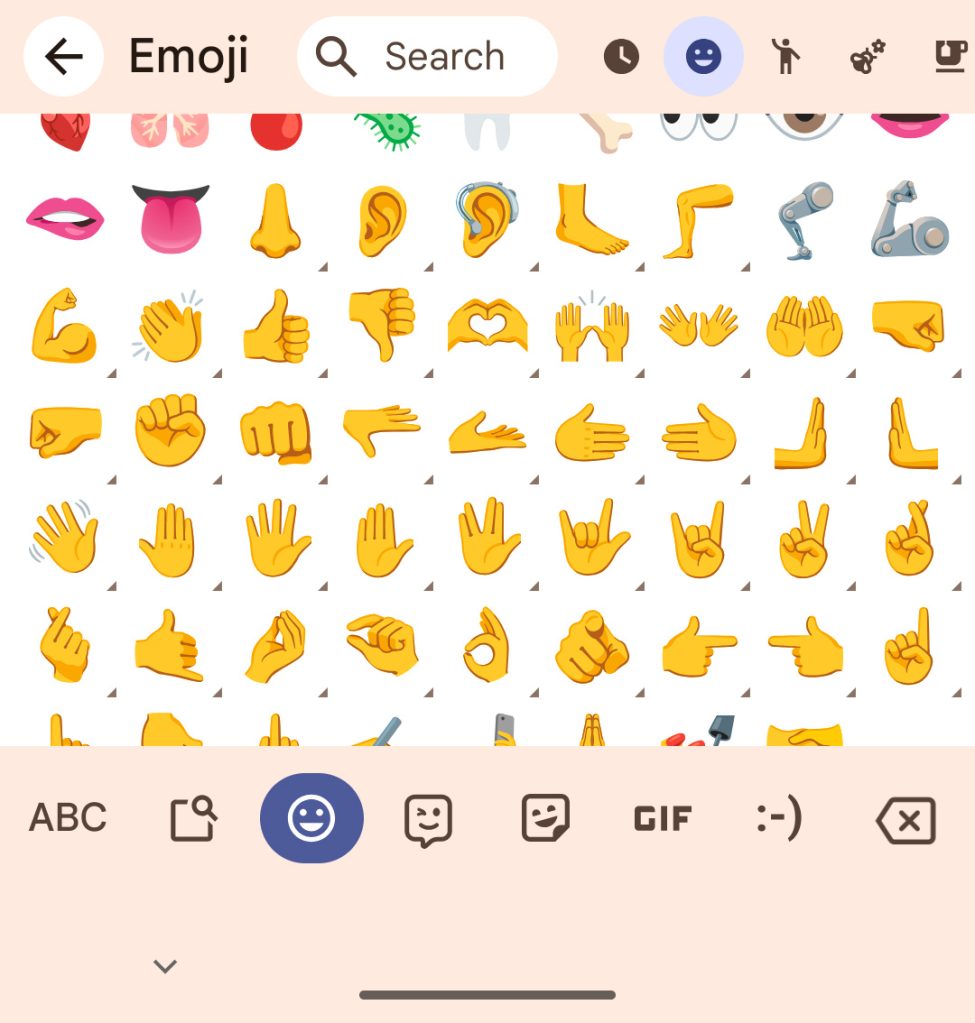
If you have updated to the recent Android 15 QPR2 Beta 3 release, you might spot this right away. As expected, Google altered the designs to make hand gesture emojis more expressive and clearer to read. What’s more, while this was expected to arrive with the next OS upgrade, the changes appear to be rolling out to those not running the preview software. This change also appears to be present on devices already running the Android 16 Developer Preview and was spotted by eagle-eyed reader Richard.
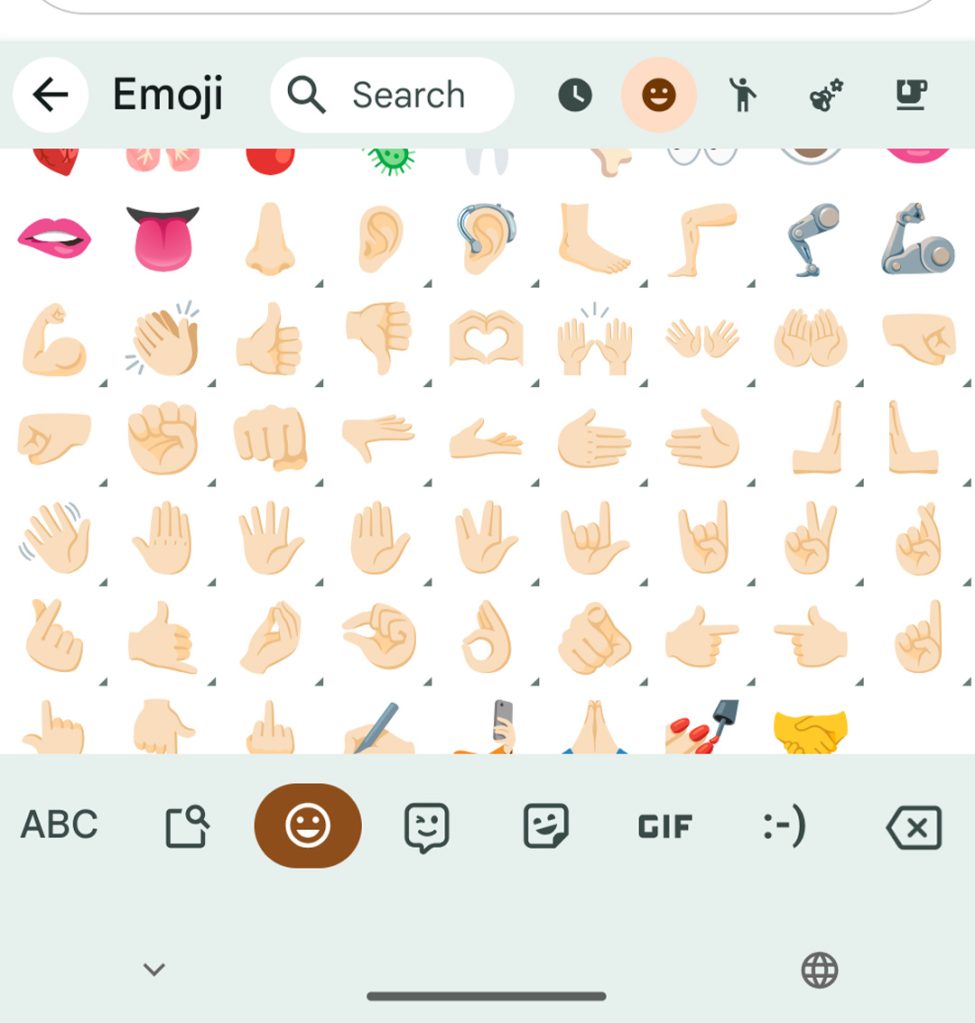
old-hand-gesture-emoji-gboard.jpg
old emoji

new-hand-gesture-emoji-gboard.jpg
new emoji

The outlines and shadows of each hand gesture now have greater prominence, while some fingers have been redesigned to make it easier to distinguish each specific emoji, it does mean that Gboard has ditched some of the cartoon-like qualities that we have come to know and love.

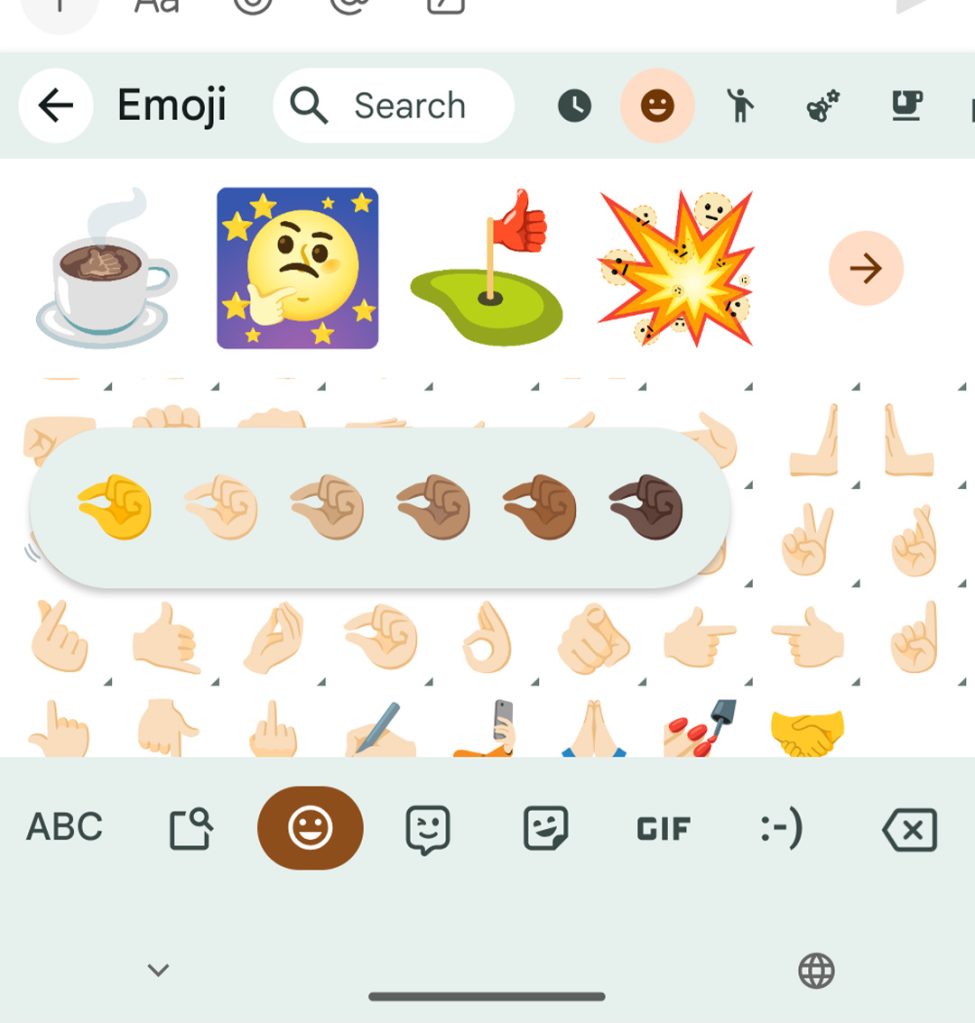
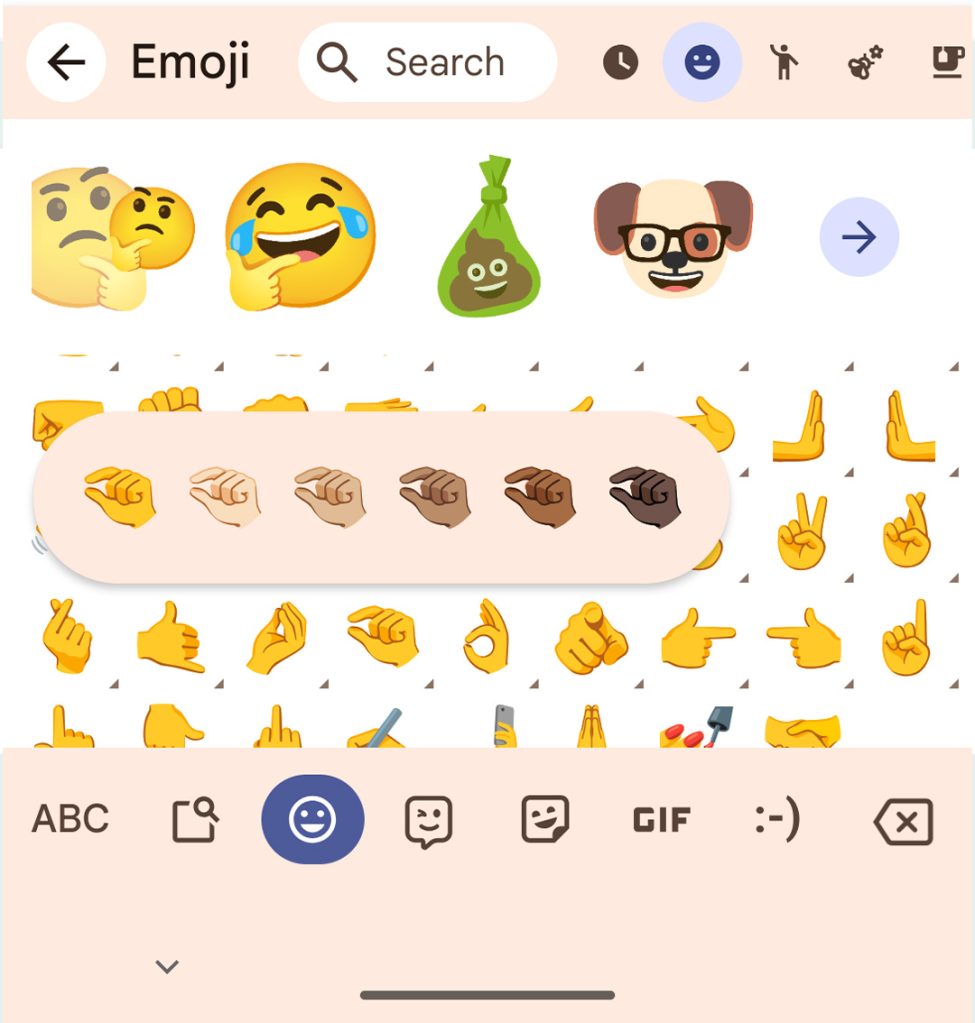
For instance, the “pinch” gesture has more anatomically correct knuckles with a more clasped hand. The end result is that it’s easier to work out what you’re using and what these icons mean, and therefore, they better convey the message you’ve sent – or received.
gboard hand emoji
old pinch emoji

gboard hand emoji
new pinch emoji

At the moment, the updated hand emoji don’t appear to have altered any creations you may have tinkered with on Gboard’s excellent emoji kitchen, but that could change as the upgraded images roll out more widely.
 

limmk

High Supremacy Member
Joined
Jul 5, 2001
Messages
39,374
Reaction score
7,975
TL;DR
  • An upcoming version of the Google Sounds app will let you change the vibration pattern for your selected ringtone or notification alert.
  • Previously, the vibration pattern that was associated with a ringtone or notification alert was predetermined.
  • This feature is found in version 3.2 of the Google Sound app, which hasn’t been released yet.


The best Android phones generally have haptic feedback motors that allow them to vibrate in incredibly precise ways. You’ll notice this especially when typing but also when you get a phone call, as many stock ringtones vibrate the phone in fun ways. This is no different on Pixel phones, which come with the Google Sounds app and its suite of ringtone and notification alerts preinstalled. With an upcoming Android release for Pixel phones, you’ll be able to enjoy your Pixel phone’s haptic motor even better as the Google Sounds app will let you mix and match your favorite ringtone or notification alert with your favorite vibration pattern.

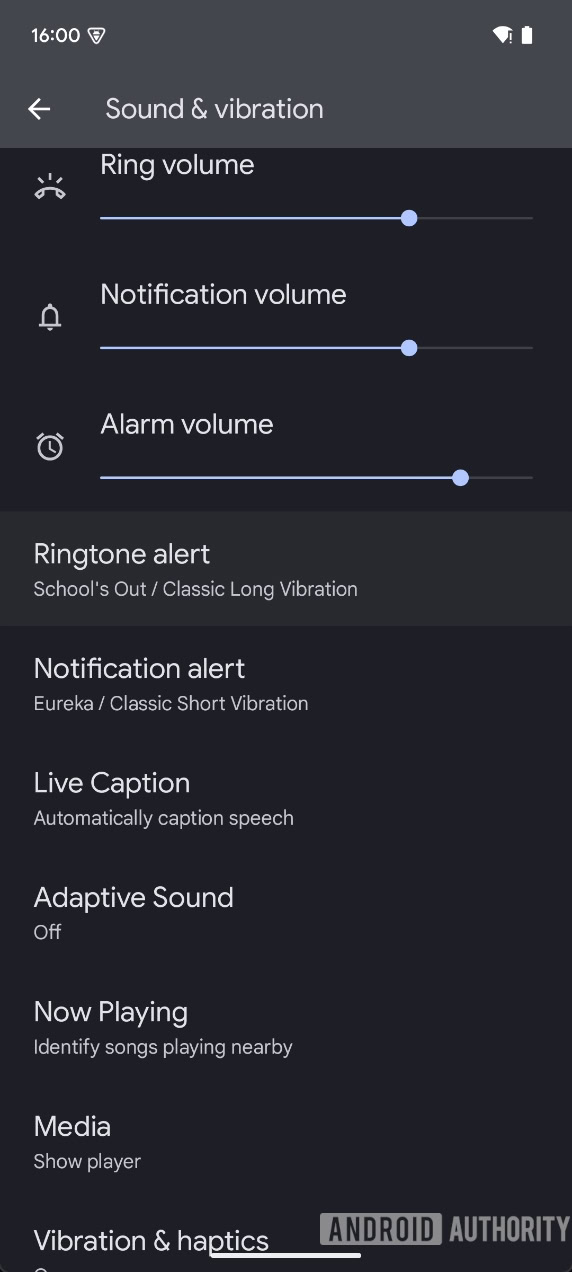
Tipster Nail Sadykov managed to get his hands on an unreleased version of the Google Sounds app, version 3.2. He shared the APK with me, so I was able to install it on my own Pixel device. When I launched the app by going to Settings > Sound & vibration > Ringtone alert or Notification alert, I noticed that there were now two tabs: One for “Sounds” and another for “Vibrations.”

Android sound and vibration settings with new vibration pattern
1a Pixel Sounds with new vibration tab for ringtones


The “Sounds” tab contains the familiar list of ringtones and notification alerts, while the “Vibrations” tag contains something new: a selector for a vibration pattern.

For ringtones, there are a total of 12 vibration patterns available, including:
  • Synchronized
  • Classic Long Vibration
  • Bumps
  • Buzz
  • Rhythm
  • Swirl
  • Drumbeat
  • Swoop
  • Snare
  • Gentle wave
  • Heartbeat
  • Gears
2a Pixel Sounds vibration pattern options for ringtones
3a Pixel Sounds more vibration patten options for ringtones
4a Pixel Sounds vibration pattern selected for ringtone


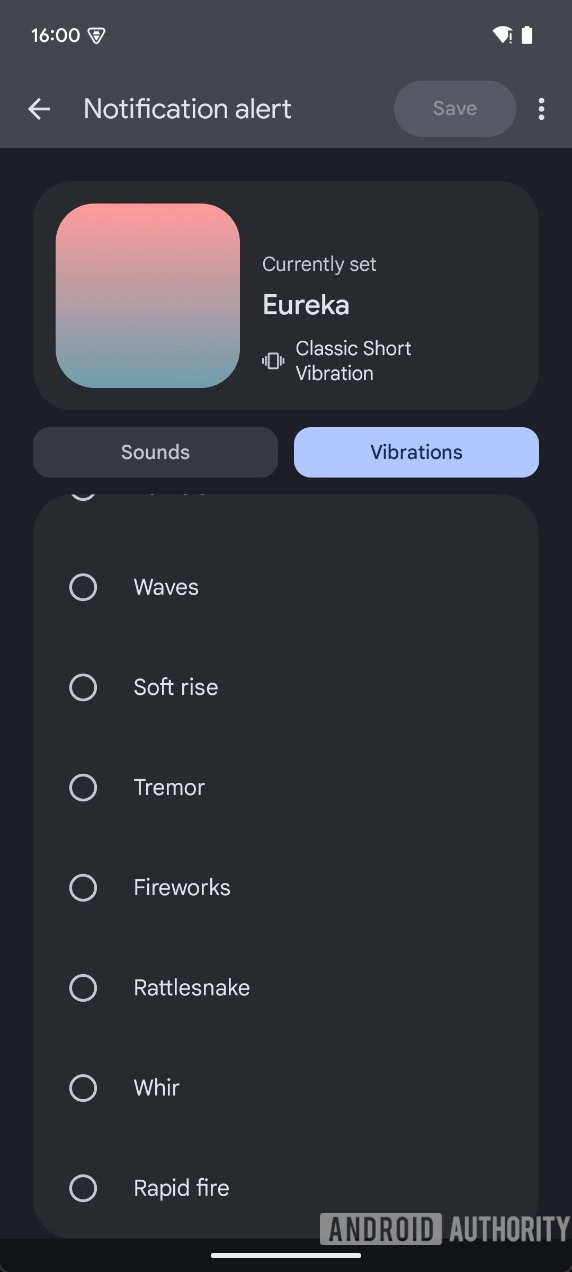
For notification alerts, though, there are only a total of 11 vibration patterns available to choose from:
  • Classic Short Vibration
  • Taps
  • Blip
  • Rumble
  • Waves
  • Soft rise
  • Tremor
  • Fireworks
  • Rattlesnake
  • Whir
  • Rapid fire
1b Pixel Sounds with new vibration tab for notification alerts
2b Pixel Sounds vibration pattern options for notification alerts
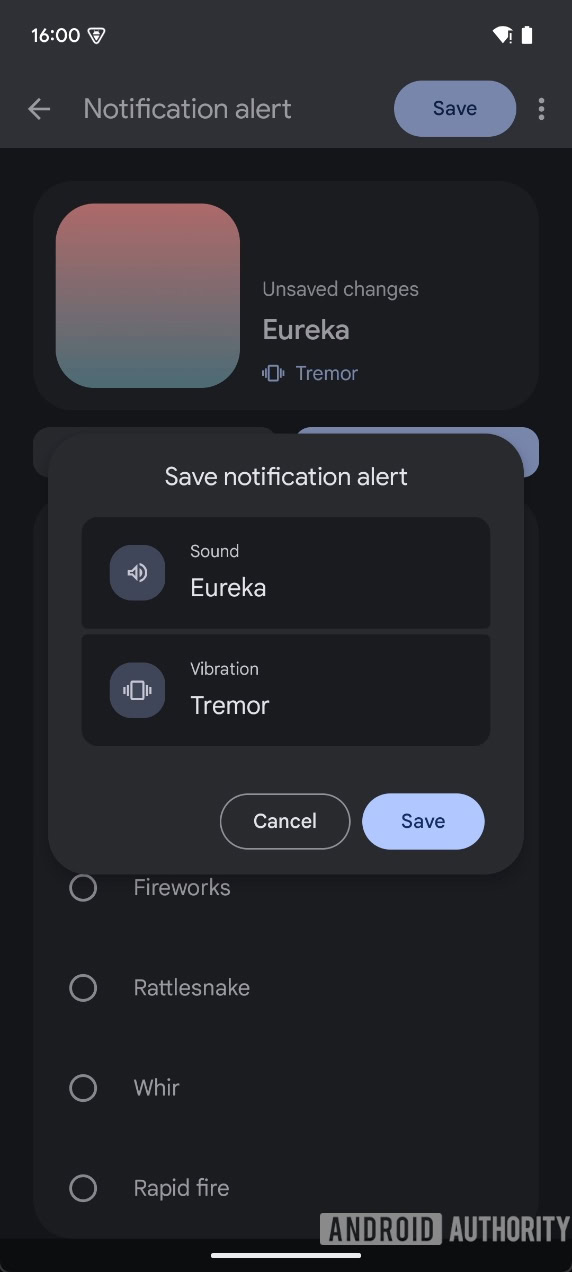
3b Pixel Sounds save notification alert dialog


Each of these patterns vibrate the phone in different ways. Some are more intense than others, and some last long than others.

Here’s a short video that demonstrates some of these custom vibration patterns:


Keep in mind that this video doesn’t fully capture the vibration patterns in effect since you can only hear, and not feel them, by watching.

We don’t know when Google plans to roll out this new version of the Google Sounds app. It could come through an update on the Play Store at any time or be bundled with an upcoming beta of Android 16. When Google rolls it out, we’ll let you know.
 

limmk

High Supremacy Member
Joined
Jul 5, 2001
Messages
39,374
Reaction score
7,975


Add Me is one of the Pixel 9’s tentpole camera features, and Google has a blog post today explaining how it was developed. Personally, I’ve noticed that people didn’t really use Add Me until the holiday season.

The Pixel 9 feature was first pitched internally by a member of the “Creative Camera” team in August of 2022.

According to a separate job listing, that team’s mission is to: “imagine and build the future of photography and videography. Our team is reinventing digital imagery: from new algorithms for creating the highest-quality images and videos possible on mobile devices, to creating entirely new ways of capturing and reliving our experiences.”

They’ve worked on Night Sight, Best Take, Magic Eraser, and Magic Editor, with the two latter capabilities eventually dropping Pixel exclusivity and coming to Google Photos. The rest of the job description makes for an interesting read:


Google has ambitious plans to continue to be an innovator in this field–and ensure Pixel camera continues to be seen as the biggest selling point for Pixel–while also expanding the reach of our work to other products to Google Photos and the Android Ecosystem.

Google will continue to improve mobile and server-side photography image quality, reinventing the way we capture, process, and relive moments. Our research has the potential to help define the future of photography and promote photography’s continued democratization–helping all users capture the important moments in their lives.


When Add Me was first brought up, which would have been a few months before the Pixel 7 event, Google said “development was already underway for the Pixel 8 series,” which launched in October 2023 and reflects the long development cycle for devices.

Besides Creative Camera, Add Me was a collaboration with the main Pixel Camera team and Google XR division. Today’s post describes the latter as such:

(The Google XR team works on Android XR and ARCore, platforms for building augmented and virtual reality experiences.)
Google “explored a few methods” to align/frame the first and second images before landing on augmented reality.

…developing an interface where the AR feature was self-explanatory — so even those unfamiliar with the technology could use it — wasn’t easy, and took ample experimentation.
Meanwhile, a TPU (Tensor Processing Unit) — in general — is credited as making possible the on-device machine learning models that show the AR preview and ultimately combine the two shots. Running on a GPU or CPU wouldn’t have been fast enough for Add Me.
 

limmk

High Supremacy Member
Joined
Jul 5, 2001
Messages
39,374
Reaction score
7,975


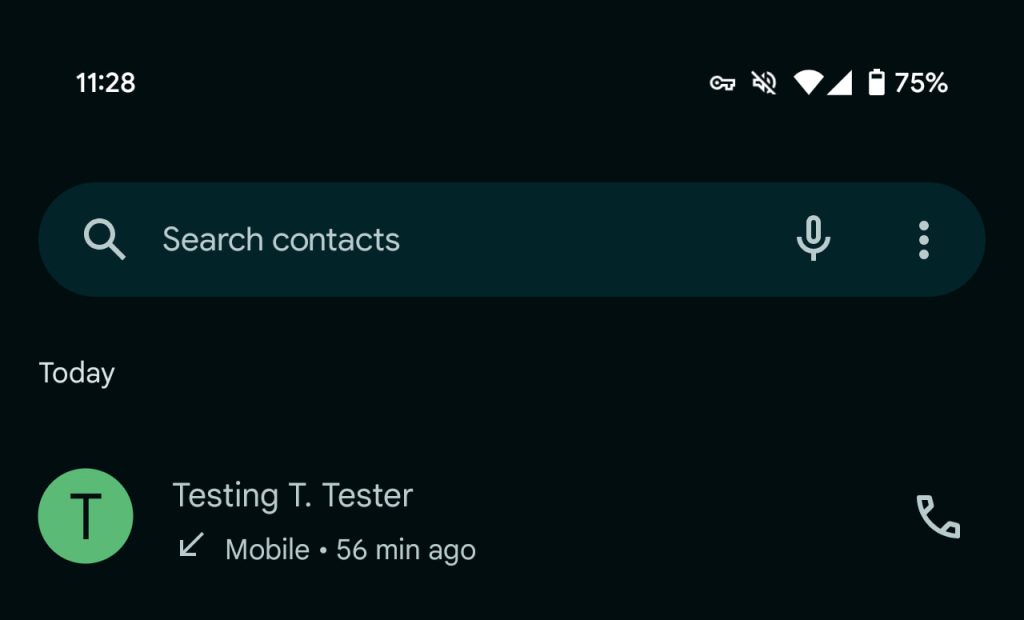
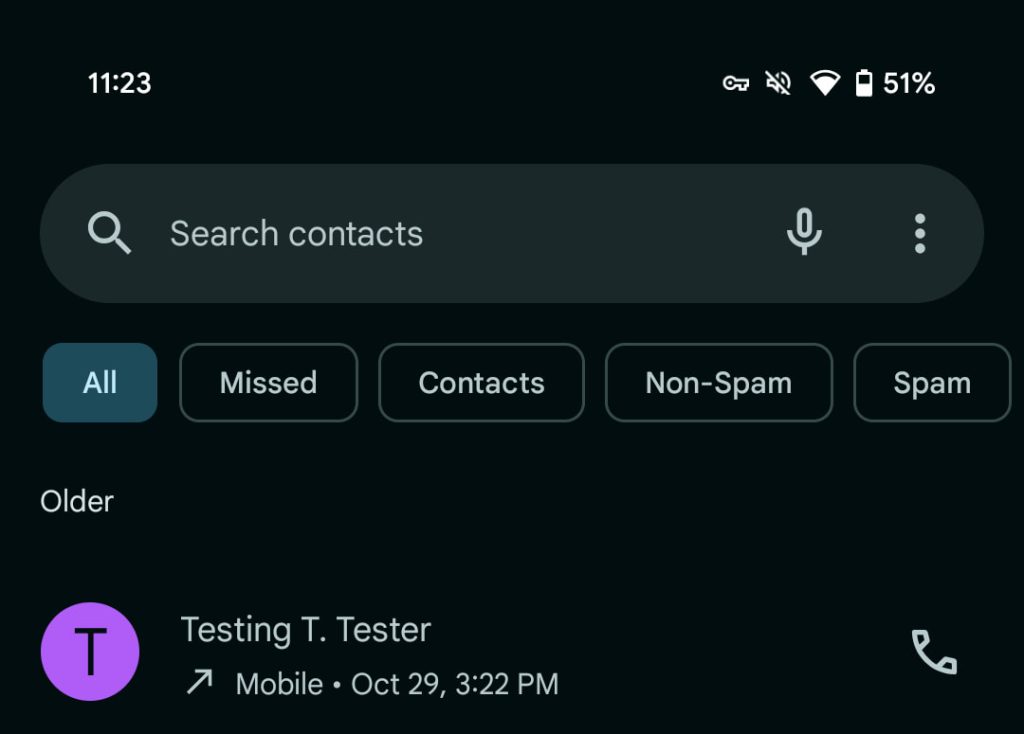
The Phone by Google app is adding filters to the “Recents” tabs that lets you sort and quickly triage your call history list.

To start with, yes, Google made the top search bar that spans across all four tabs bigger. It’s taller and more aligned with the Material 3 design language in other first-party apps, like Gmail.

Underneath, you’ll find a carousel of filters: All, Missed, Contacts, Non-Spam, and Spam. The options are pretty straightforward with “Contacts” a good idea, while “Non-Spam” is a clunky name but gets the points across.

Old vs. new

Google-Phone-history-filters-old.jpg

Google Phone history filters


Visually, the option to hide them behind a filter icon (see: Google Contacts) would be nice, and a bit cleaner.

While Phone by Google will remember what filter you were last on when the app remains in Recents/multitasking, it will otherwise default to the “All” view.

We’re seeing this (via Android Police) rolled out today on just one device running the Phone by Google beta (version 159).

Google Phone history filters
 

limmk

High Supremacy Member
Joined
Jul 5, 2001
Messages
39,374
Reaction score
7,975


After introducing a “Government” badge last year, the Google Play Store is adding one called “Verified” for consumer-facing VPN apps.

Google Play already highlights VPNs that have an “Independent security review” in the Data safety section, while there’s also a banner in search results.

This new “Verified” badge with a shield and checkmark appears next to the app rating above the Install button. The badge will also appear in search results underneath a “VPN security badging” banner, as well as inline.

It is “designed to highlight apps that prioritize user privacy and safety, help users make more informed choices about the VPN apps they use, and build confidence in the apps they ultimately download.”

The VPN badge helps your app stand out in a crowded marketplace.

  • Google Play Verified VPN
  • Google Play Verified VPN

To be “considered” for this badge, Google Play wants VPN Android apps to:

Google says this “list is not exhaustive and doesn’t fully represent all the criteria used to display the badge” and that “other factors contribute to the evaluation,” though “fulfilling these requirements significantly increases your chances.”

Initial VPN apps that have the Verified badge include Nord, hide.me, and Aloha Browser.
 

limmk

High Supremacy Member
Joined
Jul 5, 2001
Messages
39,374
Reaction score
7,975


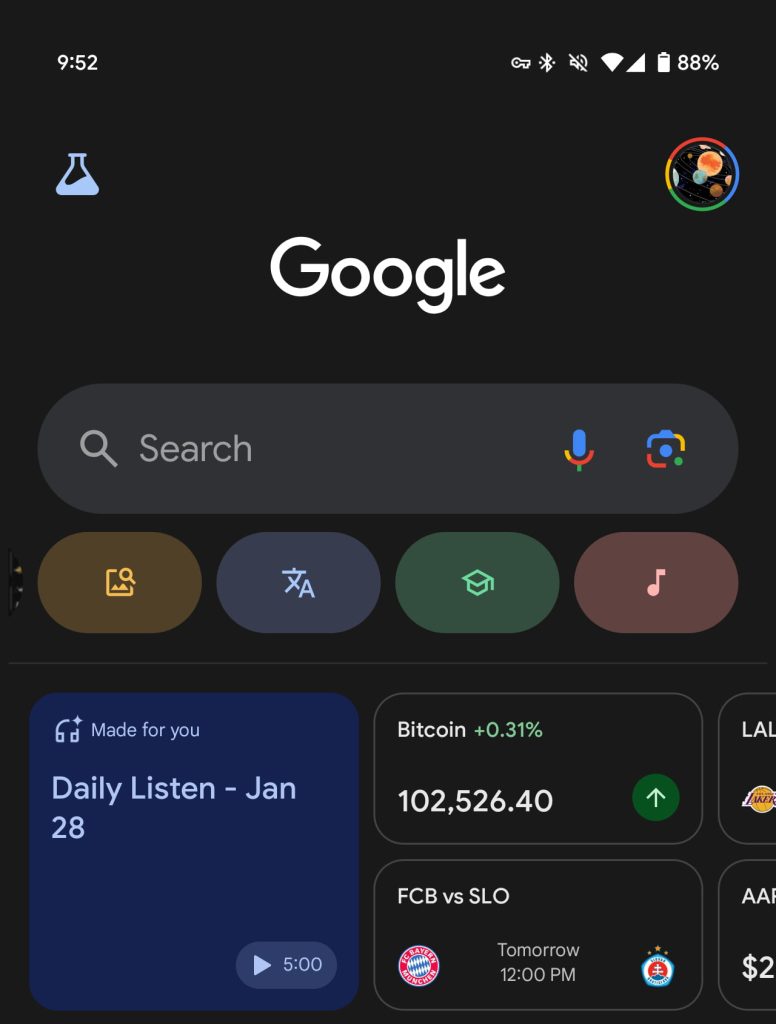
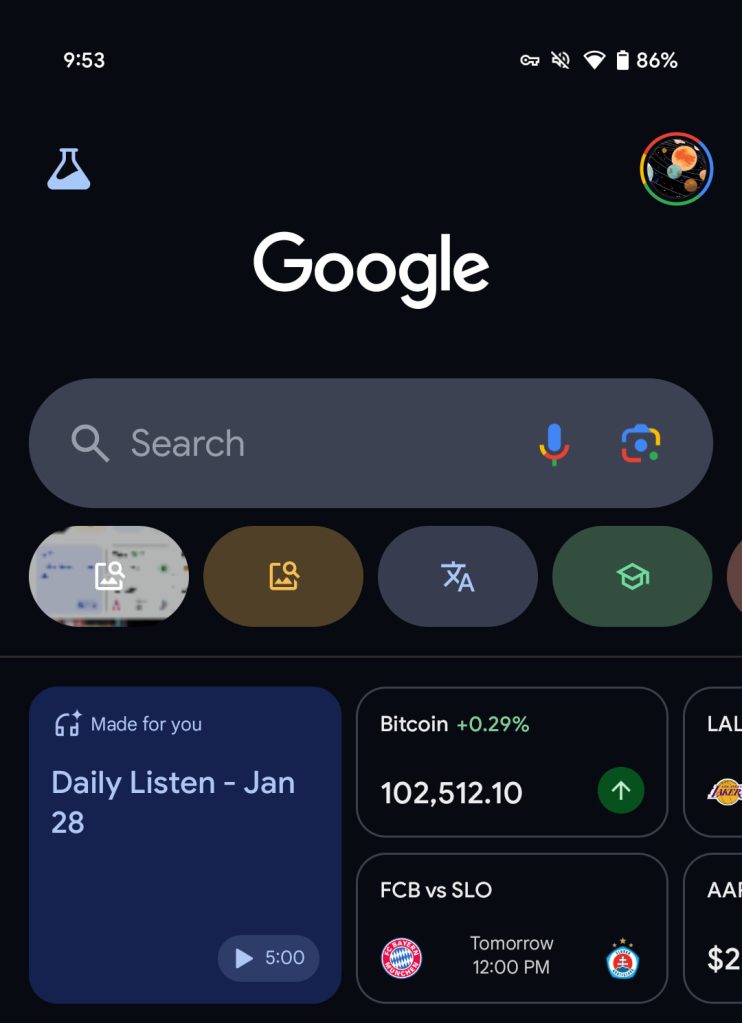
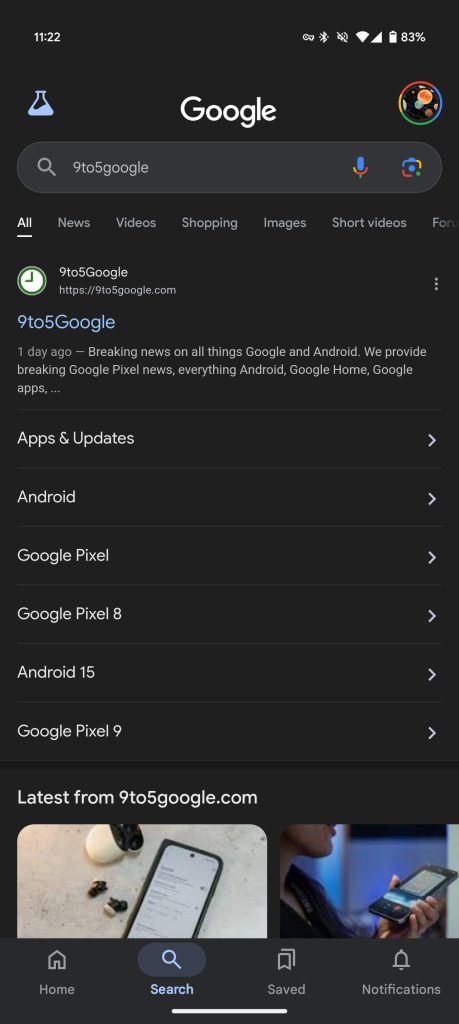
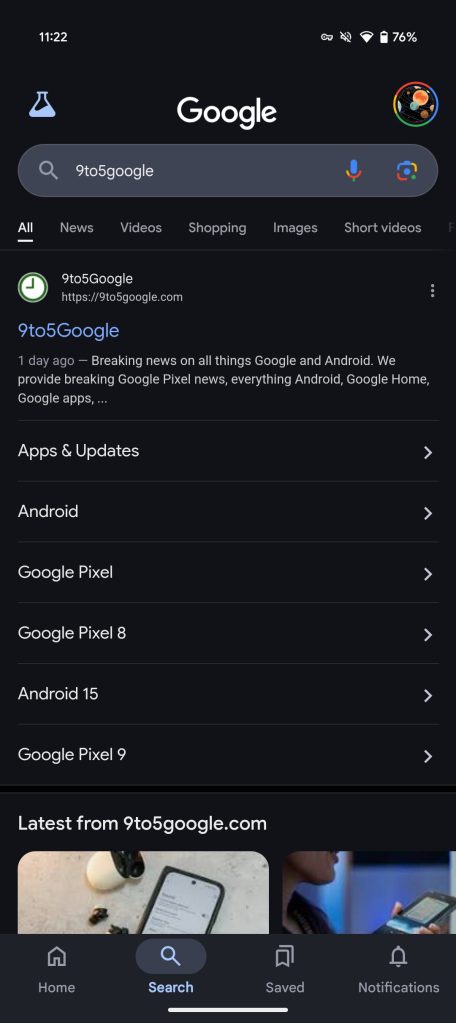
In recent weeks (if not longer), Google Search has been testing a new dark theme that is blue and a bit darker.

The current dark theme is a dark gray that’s on the lighter side. Google Search has been testing a blue that is noticeably darker than what we have today. (In 2022, Google tested a fully black background.)

Old vs. new

Google-Search-old-dark-theme.jpg

Google-Search-blue-dark-theme.jpg


You might encounter it when signed out of your Google Account in Incognito. It’s clearly still in testing, and does not appear on the main Google.com homepage. There are no changes to the light theme.

Meanwhile, we’re now seeing this dark blue background in the Google app on Android. It’s only appearing on one device running the latest beta (version 16.3.32).

Google-app-dark-theme-old-1.jpg
Google blue dark theme


This background is applied to the Home and Search tabs, including when browsing results. Saved and Notifications are still gray, while the Search field and bottom bar have also been refreshed. Both are lighter than the rest of the screen.

This small change makes the Google app feel a bit more modern and vibrant. It’s unclear whether Google will proceed with this design.

Google-app-dark-theme-old-2.jpg
Google blue dark theme
 

limmk

High Supremacy Member
Joined
Jul 5, 2001
Messages
39,374
Reaction score
7,975


UPDATE: 2025/01/28 16:40 EST BY KARANDEEP SINGH OBEROI​

Google confirmed that it knows about the Pixel Weather app bug and is currently rolling out a fix with no action required on the user-end.

Original article below...

Summary​

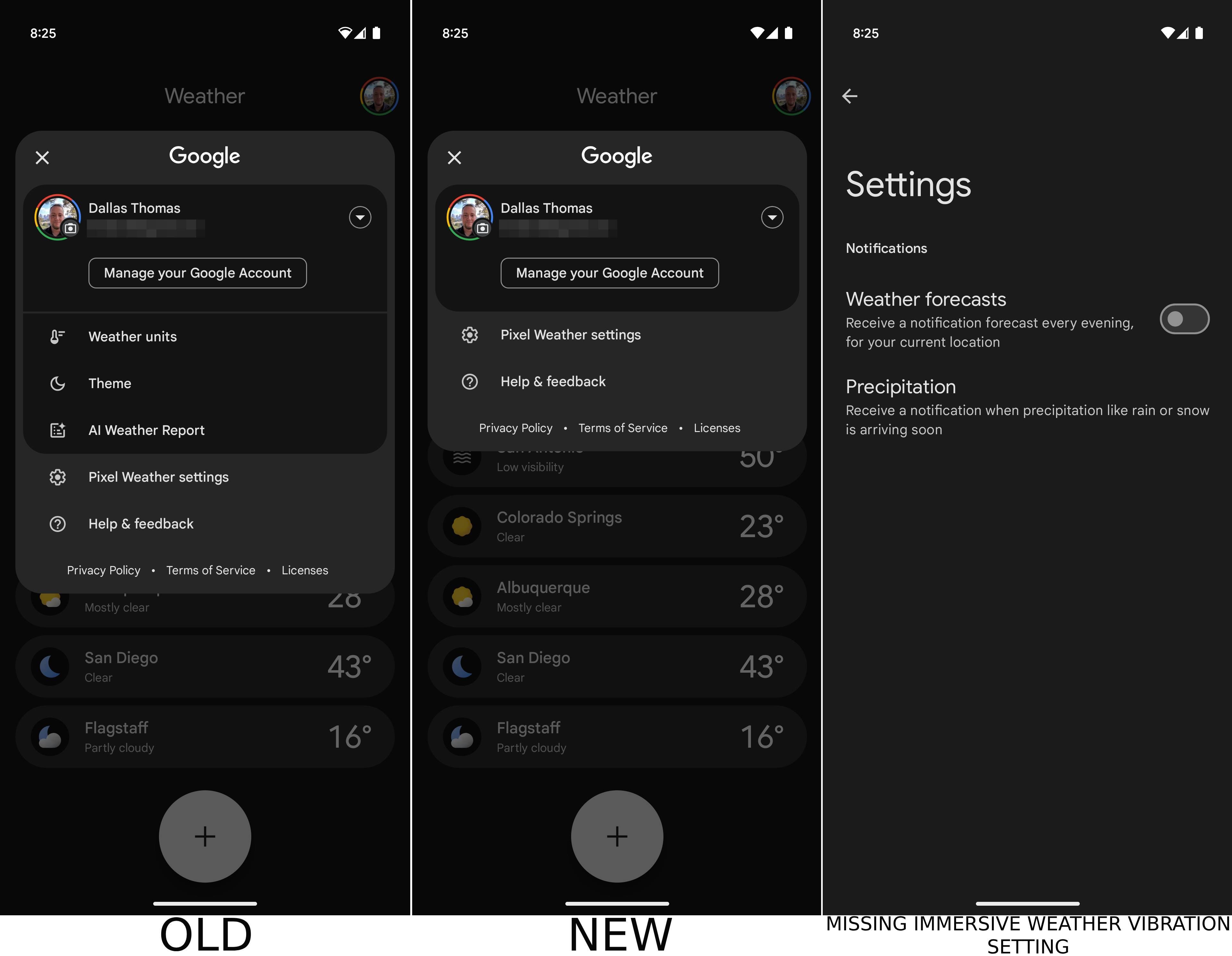
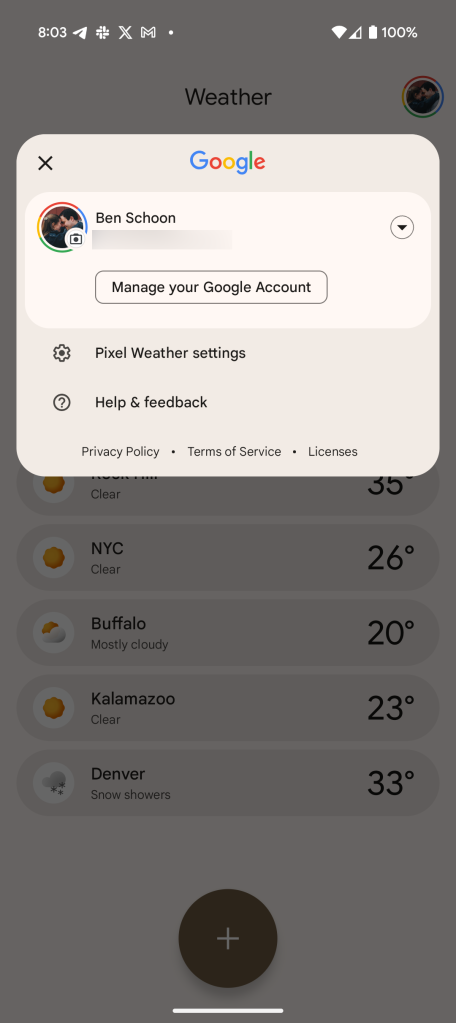
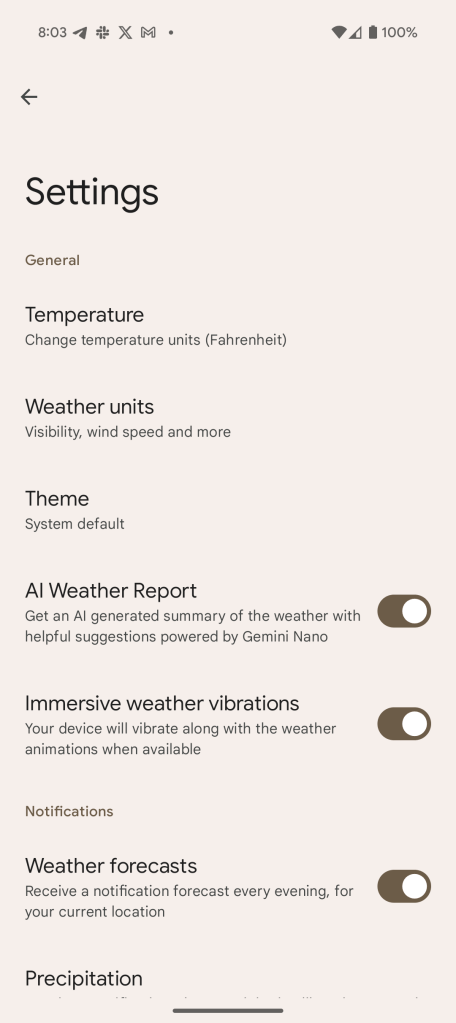
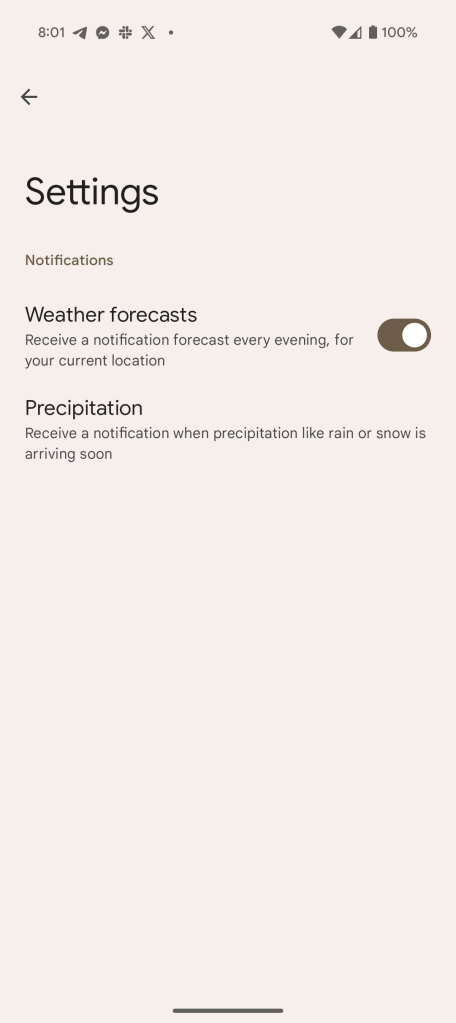
  • Key settings, including toggles for immersive vibrations, AI-powered weather reports, weather units, and app theme, have vanished from the Pixel Weather app's settings menu.
  • Despite the missing toggles, features like AI weather reports appear to be permanently enabled, regardless of user preference.
  • It's unknown whether Google intentionally removed these settings or if it's a bug. The issue appears to be server-side. We've reached out to Google for comment.
The new Pixel Weather app launched to much fanfare alongside the Pixel 9 series back in August last year, even though it took away the weather frog mascot we've come to love over the years.
The app offers dedicated weather maps, a customizable layout, pollen count, AI-powered weather reports, immersive weather vibrations, and more. The latter, which was first showcased with the October 2024 Pixel Feature Drop, essentially attempts to replicate the density of rain in the form of haptic feedback when you're on the screen that shows AI-generated city backgrounds. On the other hand, AI-powered weather reports, as the feature's name suggests, provide a bite-sized summary of upcoming weather — "Light snow from 5:02 PM to 0:00 PM," for example.

Mysteriously though, in-app settings for both the detailed features have gone missing, and it has been that way since Wednesday, January 22, at least. We're seeing this across the board on devices running Pixel Weather 1.0.20241108.700112341.release. There have been no new releases since then, prompting us to believe that the missing settings are likely tied to a server-side blunder (via PiunikaWeb).

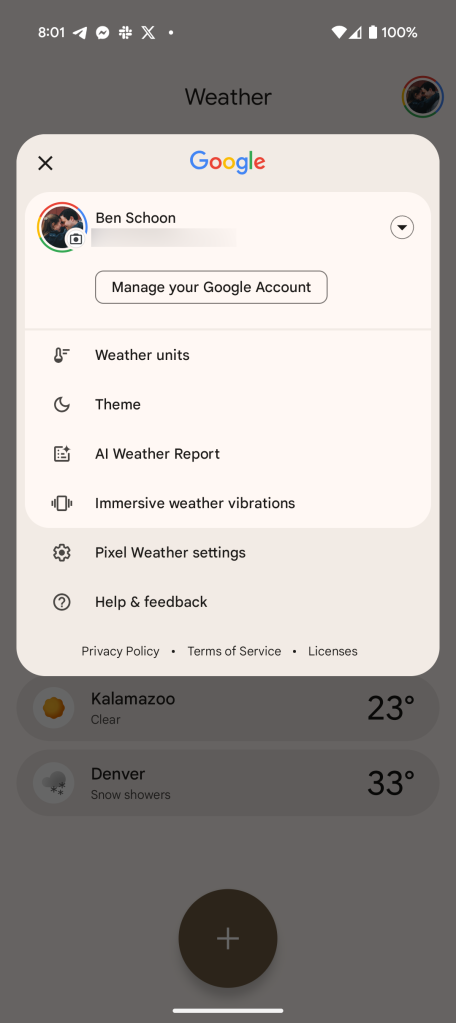
Eagle-eyed users would also have spotted that the settings for weather units and app theme have also disappeared from the profile section, leaving the menu significantly minimized, as seen in the screenshots below.

Weather the storm for now​

Screenshots of the Pixel Weather app's old and new setting screen.


For what it's worth, we dug around and found out that you can temporarily bring back the AI Weather Report setting by clearing the Pixel Weather app's data. However, this temporary fix only brings back the setting for a minute or two at max. Once you use the app for a bit, the AI Weather Report setting disappears again. Regardless, considering that the feature is enabled by default, no matter which way it is/was set, with the setting gone, you'll see the AI-generated reports anyway.

Android Police's News Editor, Dallas Thomas, corroborated the claim. Despite having turned the AI-generated reports off previously, the reports reappeared for him on Wednesday, January 22, with no way to disable them since the corresponding setting had disappeared. This is also the case with the weather vibrations.

It is currently unclear if Google has intentionally removed said settings to enforce permanent use of the features, or if the case of missing toggles is just a blip that will be resolved in a future update/server-side fix. We've reached out to Google and will update this article if we hear back.


limmk

High Supremacy Member
Joined
Jul 5, 2001
Messages
39,374
Reaction score
7,975


Summary​

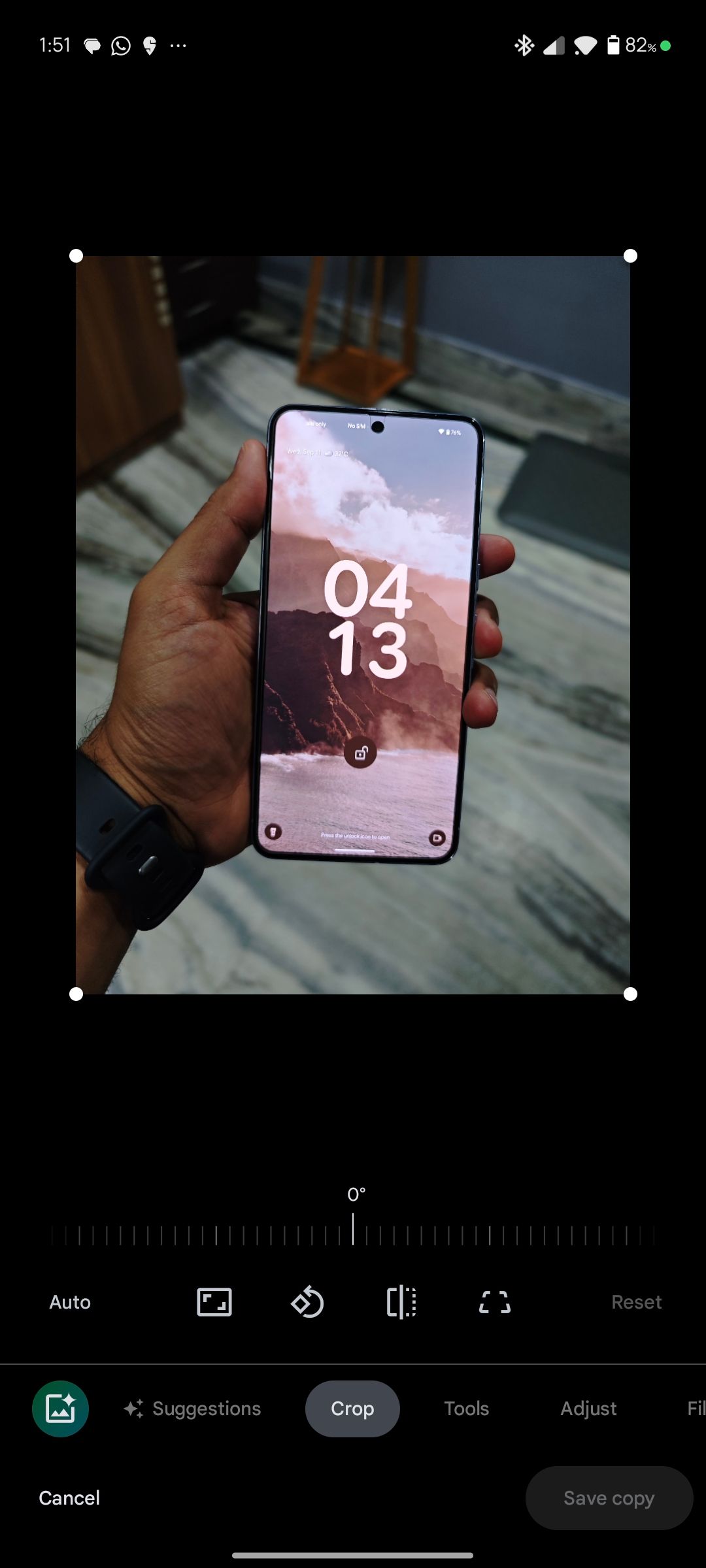
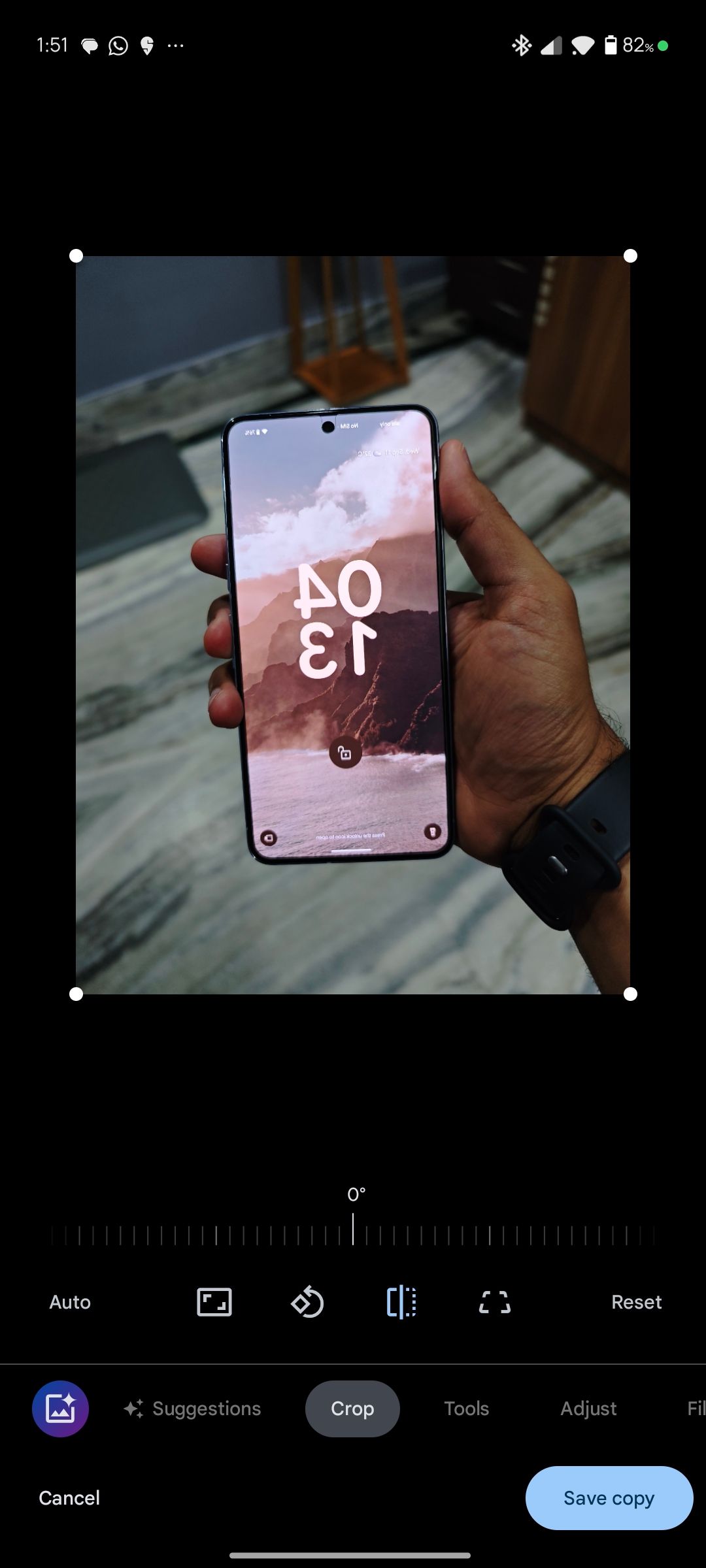
  • Google Photos now offers a flip option in the editing tools, located in the Crop section.
  • The mirror feature is currently only available on Android.
  • It is also not available on the web.

Google Photos offers an extensive suite of editing tools, including several AI-powered features like Magic Editor, HDR effect, and more. Despite packing such advanced editing tools, Google's photo backup service lacked a simple option to mirror images. This changed briefly in September 2024, when a flip option appeared for some Photos users, only for Google to pull it quickly. Now, over four months later, Google has officially announced its rollout.
A Google community manager announced the availability of the flip option in a post on Google's support forums. You will find this option in the Crop section of the Google Photos editor. Strangely, the mirror option is exclusive to the Google Photos Android app, with no word from Google on if or when it will arrive on iPhones. The option is also not available on the web.

Flip option in Google Photos
Flipping an image in Google Photos


Once you mirror a picture, you can save it as a copy, ensuring the original remains untouched. Do note that the flip option is limited to images and is not available for videos. The flip option in Google Photos is likely rolling out as a server-side update. If it does not show up, update to the app's latest build from the Play Store and check again.

It is surprising that Google took this long to add such a basic editing option to Google Photos. Even then, it is only available on Android and not on other platforms.

While many of you may not have even noticed the absence of a flip option in Google Photos, you can now rest easy knowing that, should the need arise, the feature is finally here to help.

Google Photos is only going to get better​

The words 'Google Photos' with the Google Photos logo beneath


Despite lacking a basic mirror option, Google Photos is among the best cross-platform photo backup services offering powerful editing tools. It stands out for its ease of use and extensive use of AI for features like Photo Unblur and Portrait Light.

Even better, Google has only scratched the surface of AI integration in Photos. For example, Ask Photos, an AI-powered search experience, is only available to Labs users in the US. Our favorite photo backup service is bound to keep improving as Google enhances its AI integration.
 

limmk

High Supremacy Member
Joined
Jul 5, 2001
Messages
39,374
Reaction score
7,975


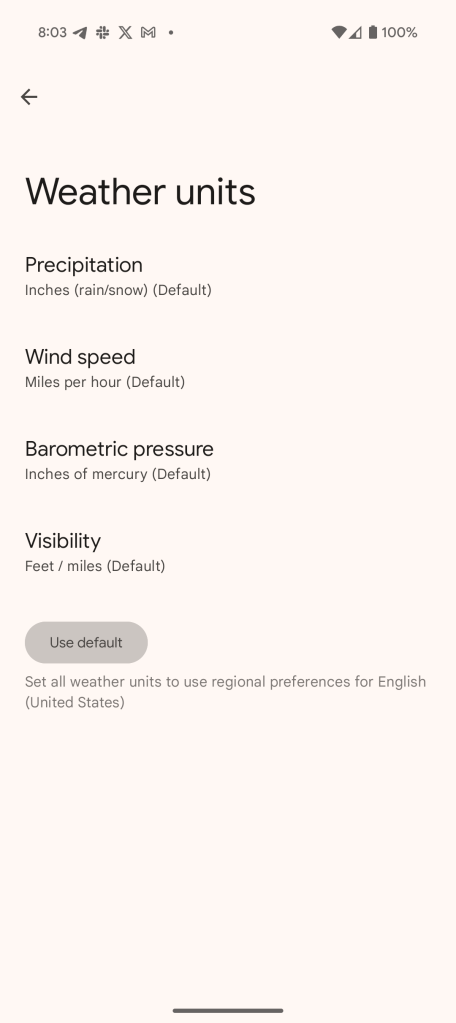
Google is rolling out a new update to the Pixel Weather app which makes it considerably easier to change the units of measurement throughout the app. Here’s what’s new.

Having debuted on the Pixel 9 series and since expanded to older models, there haven’t been any major updates to Google’s new Pixel Weather app to date. The last notable update rolled out in November with pollen counts and support for “immersive vibrations.”

Now, version 1.0.20250106 is rolling out with a helpful change.

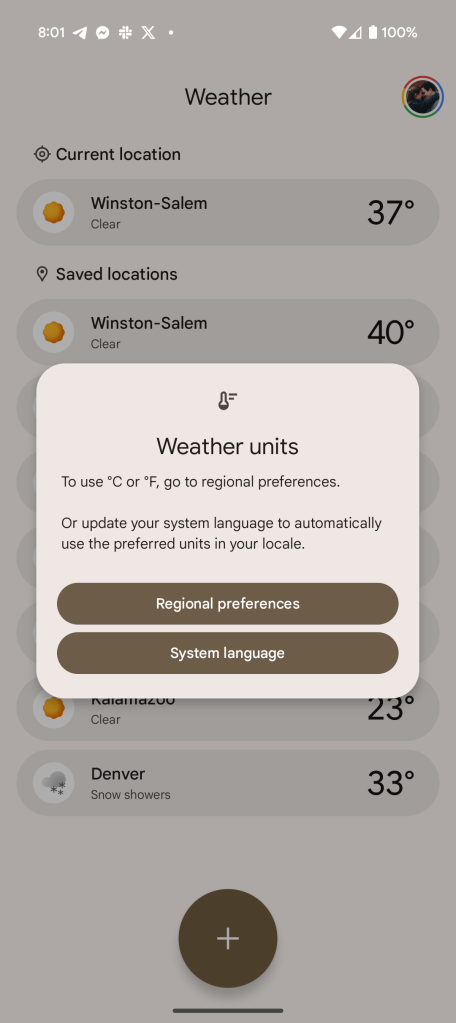
The ability to adjust measurements is useful for any weather app, but the Pixel Weather app didn’t make it particularly easy. A “Weather units” pop-up required used to either update their system language or adjust their “Regional preferences.” Both settings would have impacts beyond just the Pixel Weather app.
In this latest update, Google has adjusted this to allow for more granularity. Newly added “Temperature” and “Weather units” sections in Pixel Weather’s settings menu allow for changes for each unit of measurement. These include:

  • Precipitation: Inches, Centimeters, Millimeters
  • Wind Speed: Meters per second, Kilometers per second, Miles per hour, Knots
  • Barometric Pressure: Hectopascals, Millibars, Millimeters of mercury, Inches of mercury
  • Visibility: Meters/kilometers, Feet/miles
Changing these will have no impact on other apps. Adjusting the measurement of temperature between Fahrenheit and Celsius, though, will still require changing your “regional preferences.”

Screenshot_20250130-080342.png
Screenshot_20250130-080345.png
Screenshot_20250130-080349.png

version 1.0.20250106.720365328.release

Screenshot_20250130-080146.png
Screenshot_20250130-080152.png
Screenshot_20250130-080149.png

version 1.0.20241108.700112341.release

This change is now rolling out via the Play Store to compatible Pixel devices.
 

limmk

High Supremacy Member
Joined
Jul 5, 2001
Messages
39,374
Reaction score
7,975


YouTube already has a 2x speed multiplier for videos that seem to go on a little too long. The company is furthering that with an experimental 4x speed multiplier, available only to YouTube Premium subscribers for the time being.

In the YouTube app for Android, users have the option to scrub through videos with a simple tap and hold on the screen. The touch will speed the video up by 2 times, allowing users to watch the video in half the amount of time it would normally take. This is accompanied by the option to play the video faster without holding your finger to the screen.

YouTube’s experimental feature cabinet now includes the expected 4x speed multiplier (via The Verge). This extra speed means the video will speed up to twice the speed of the fastest currently available option. This doesn’t look like it can be achieved by long-pressing the screen; rather, it needs to be adjusted in the video settings under “Playback speed.” In that menu, the new 4x speed is accompanied by the standard range of speeds, going as low as 0.25x.

YouTube-4x-playback-speed.jpg


Notably, YouTube’s 4x speed is a lot faster than the previous highest speed, and speech is almost impossible to decipher. The speed option is good for tutorials or turning a long-form video into a short, sped-up clip.

This experimental feature is available on Android and iOS for YouTube Premium members. It can be turned on by heading to the You page > premium benefits > experimental features. This is accompanied by a new HD audio bump for music on YouTube. The 4x speed feature will be available through the experimental tab until February 26.
 

limmk

High Supremacy Member
Joined
Jul 5, 2001
Messages
39,374
Reaction score
7,975


Google Prompt is a pretty good 2-factor authentication (2FA) option for the vast majority of users, with Google now adding fingerprint or PIN authentication to the process.

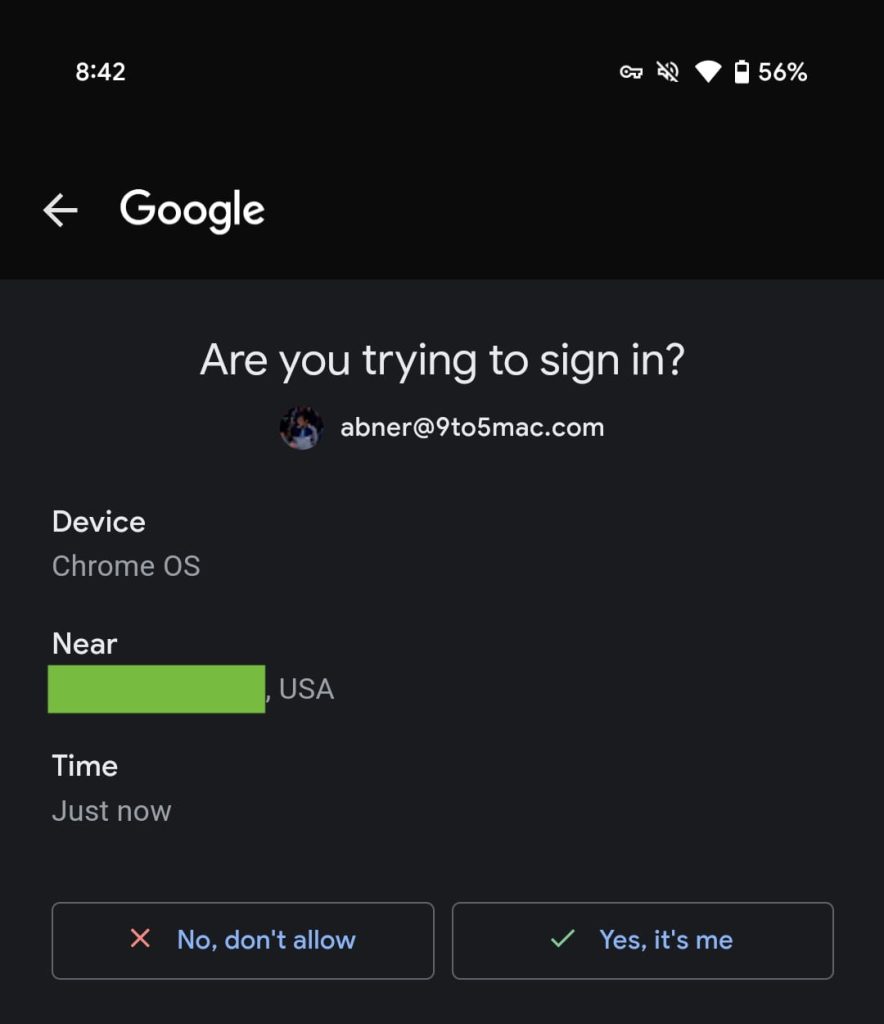
Over the past few days, we’ve started noticing an extra step after tapping “Yes, it’s me” on the fullscreen “Are you trying to sign in” Google Prompt.

Google-Promot-2025-1.jpg


Google Play services throws up a standard (similar to what’s depicted below) “Use your screen lock” bottom sheet: google.com needs to verify it’s you. You continue to see Device, Near, and Time details in the background, while you can use fingerprint, face unlock, or PIN to proceed.

In the past, tapping ‘yes’ signs you in on your other device or asks to confirm a number that’s shown.

This extra security doesn’t hurt and it’s pretty fast, but arguably most people just unlocked their phone to access the Google Prompt. (It’s a bit like the Google Wallet unlock verification introduced last year.) You of course have other 2FA (or 2-Step Verification in Google parlance) options like passkeys, security keys, or authenticator apps.

We’re seeing this 2FA Prompt fingerprint requirement with version 25.02.34 of Google Play services on Android. Play services powers all this on Android, while the Google app or Gmail on iOS is responsible for the Prompt.

Pixel-9-Pro-Fingerprint-Unlock-1.jpg
 

limmk

High Supremacy Member
Joined
Jul 5, 2001
Messages
39,374
Reaction score
7,975


Generative AI mass adoption brought many possibilities and facilities for content creation. However, it also entailed additional efforts on the part of AI companies. They must ensure that their technologies are being used responsibly. Google’s SynthID “AI watermark” was born as a response to this, and now the firm is bringing it to its Photos app.

SynthID is a system that integrates specific metadata into fully AI-generated images. This allows such images to be identified as “AI-generated” by compatible services to prevent misuse. For example, Google Search’s results tell you if an image is AI-generated in the “About this image” tab.

Google Photos’ Reimagine feature gets support by SynthID AI watermark​

Google Photos has received a plethora of AI-powered features for some time now. “Reimagine,” available as part of the “Magic Editor” suite, is one of the most powerful Gen AI features in Photos, as it allows you to completely transform existing images. Well, now Google is integrating SynthID with Reimagine in Magic Editor. This means that images deeply edited by Reimagine will have metadata that identifies them as such.

The change will be implemented starting this week on the server side. It’s noteworthy that SynthID was already present in another Gen AI-based product from Google: the text-to-image model “Imagen.” The latter is the model that generates pictures through the Gemini assistant, for example.

Google notes that when you make very small edits, SynthID may not flag the image. For instance, this could occur when you alter the color of a small element in the picture, such as a flower. The system is designed to identify AI-powered heavy edits as such. The tool can be a great help in avoiding potential scams in multiple areas. After all, AI-generated images can be incredibly realistic today.

You won’t have to do anything to label the images as “AI-generated,” as the process will happen automatically. You can’t disable the option either, though.
 

limmk

High Supremacy Member
Joined
Jul 5, 2001
Messages
39,374
Reaction score
7,975

Google brings Gboard's voice typing to the forefront with a dedicated toolbar​


TL;DR
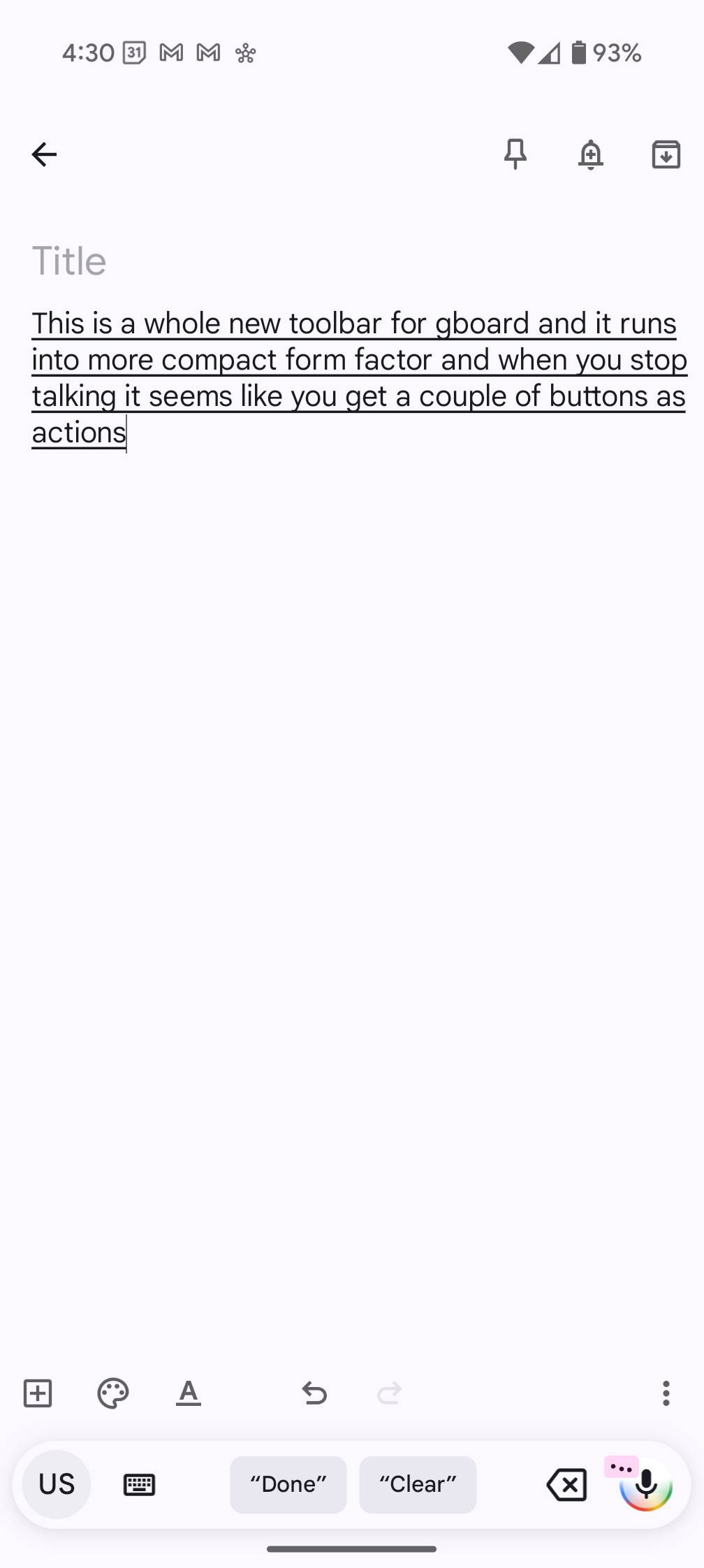
  • Google is rolling out an updated Assistant Voice Typing layout with the latest Gboard beta.
  • It appears as a new toolbar with a microphone button, a backspace key, and buttons to open the keyboard and change language.
  • The toolbar also suggests voice commands for actions you might want to perform when you stop speaking.
Google has started testing a new Assistant Voice Typing experience for the Gboard app with its latest beta release. The new voice typing UI appears as a toolbar above the keyboard that makes it easier for users to start and stop voice typing, minimize the keyboard, and view supported voice commands.

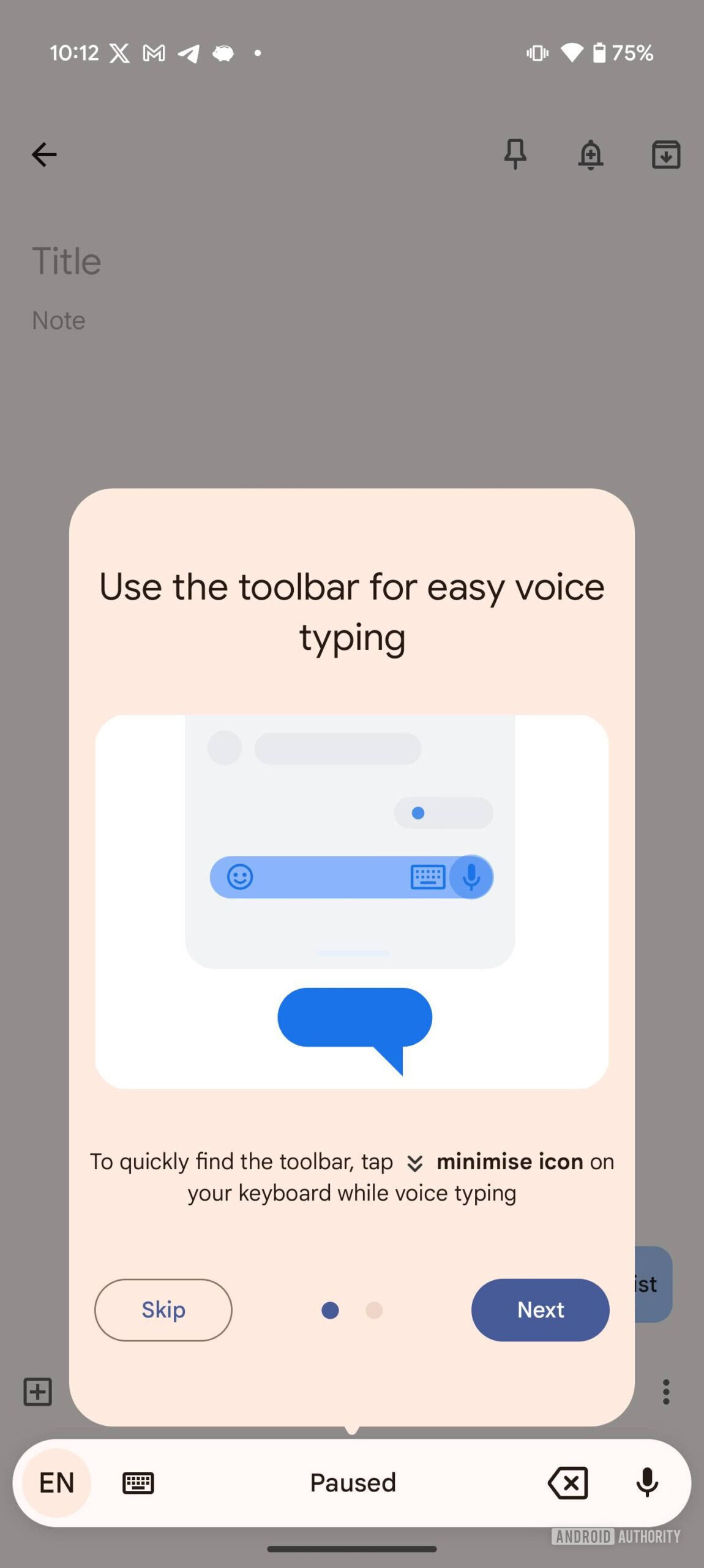
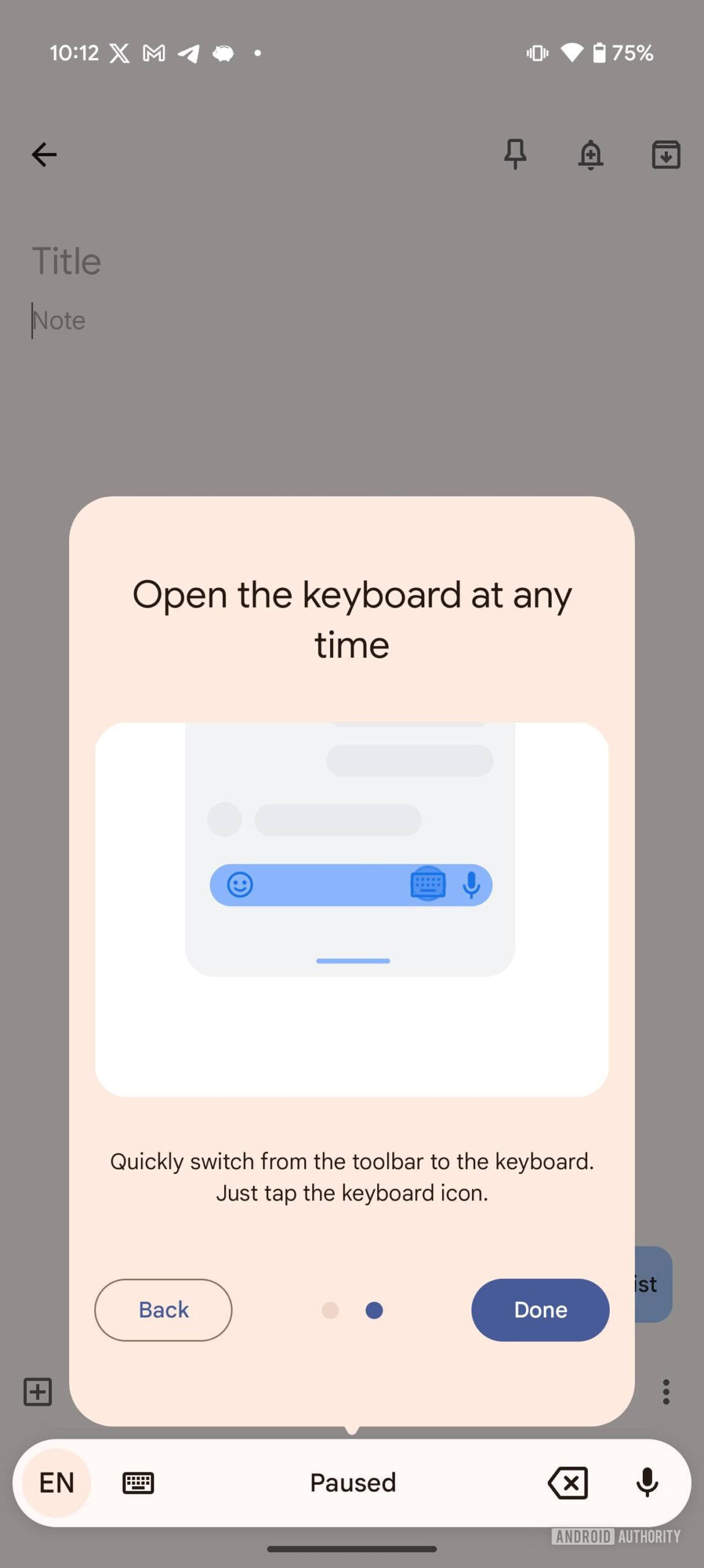
The new Assistant Voice Typing UI appears to be rolling out to some beta testers with version 15.0.03.717871796 of the Gboard app. It’s available on several of our devices and, as you can see in the attached screenshots, Gboard shows a two-page tutorial highlighting how it works.

Gboard new Assistant Voice Typing UI 2
Gboard new Assistant Voice Typing UI 3


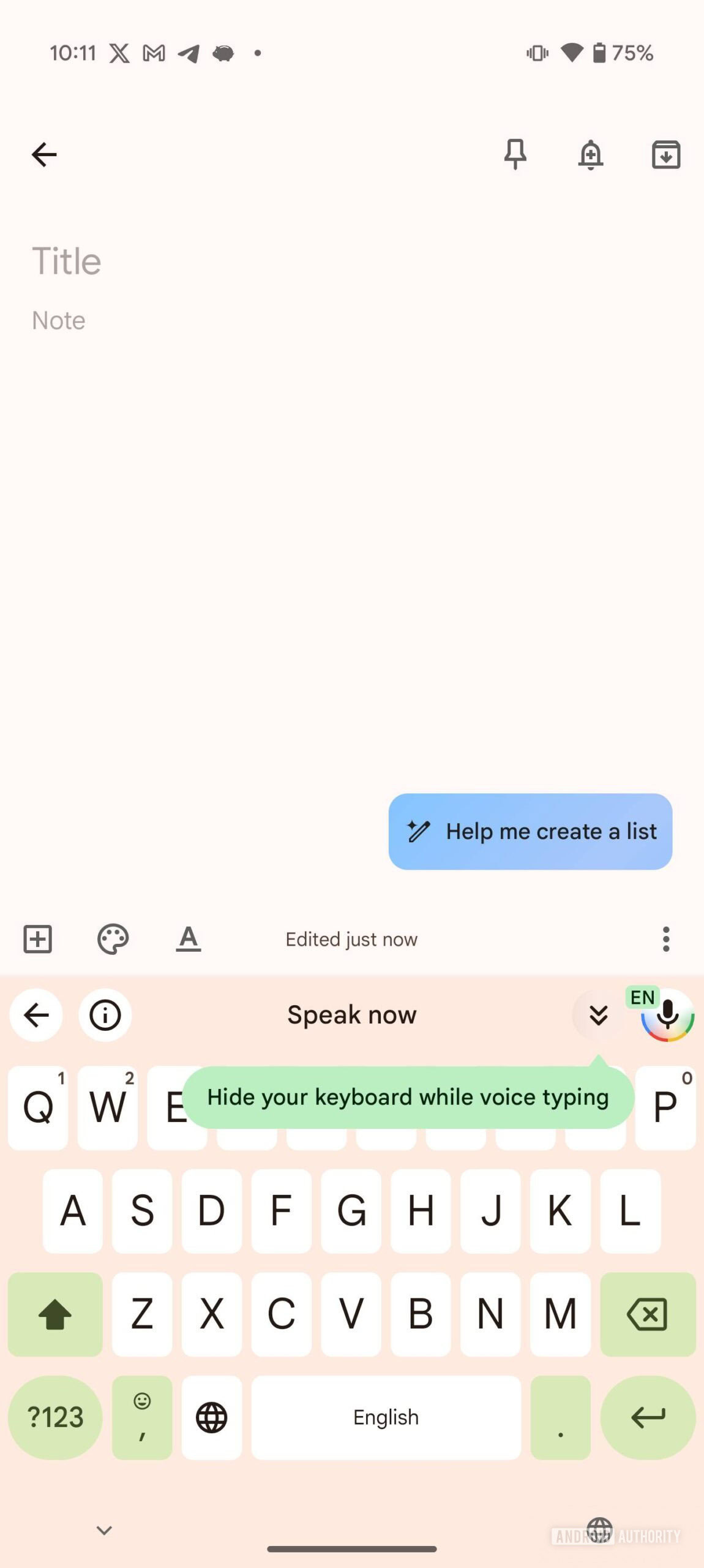
In the new layout, the Assistant Voice Typing UI appears as a bar at the top of the keyboard. It has a microphone button featuring Google’s colors to the right that you can use to start and stop voice typing. It also has buttons to minimize the keyboard, return to the previous toolbar page, and view supported voice commands.

Gboard new Assistant Voice Typing UI 1
Gboard new Assistant Voice Typing UI 4


The space between the four buttons shows a “Speak now” prompt when Assistant Voice Typing is ready and listening for your commands or a “Paused” prompt when you hit the microphone button and stop voice typing. Additionally, the toolbar offers voice command suggestions in this space when voice typing is active and you stop speaking.

Gboard new Assistant Voice Typing UI 5


When you minimize the keyboard, the toolbar replaces the minimize button with a backspace key and the ‘i’ button with a shortcut to reopen the full keyboard layout. As mentioned earlier, the new Assistant Voice Typing layout is currently available to a few beta testers. It could roll out to more users with a future update.

Along with the new UI, Google is improving Gboard’s Assistant Voice Typing experience with support for writing tools. We got our first look at the feature in a teardown of the Gboard app earlier today, which revealed six new voice commands that will help you rewrite texts with your voice.

// androidauthority
 

limmk

High Supremacy Member
Joined
Jul 5, 2001
Messages
39,374
Reaction score
7,975
TL;DR
  • Google is changing the way Video Boost works on Pixel phones.
  • The feature now remains on automatically, without the need for manual activation each time a recording is initiated.
  • While the new behavior enhances usability, an always-on Video Boost could impact phone and backup storage.


Update: February 12, 2025 (4;59 AM ET): We can now confirm that Video Boost indeed stays on once selected through the settings in the camera app. While the new behavior is not yet displaying on our Pixel 8 Pro, it’s available on the Pixel 9 Pro unit we have.


Original article: February 12, 2025 (12:56 AM ET): Google’s Video Boost feature — exclusive to the Pixel 8 Pro, 9 Pro, and 9 Pro XL — uses AI to enhance video quality, particularly in low-light conditions and when additional stabilization is needed. Now, it appears the feature is getting a usability upgrade, as spotted by some Reddit users (and brought to our attention by our contributor Assemble Debug).

Previously, Video Boost had to be manually enabled in the Pixel Camera app before recording a clip. However, several Pro Pixel users are reporting that the feature now stays enabled automatically.

“Ever since video boost came out, I’d have to manually go into the settings and enable it before every video, which is super inconvenient, and almost ruins the feature. But sometime within the past few weeks, every video that I take has been automatically processing with video boost, which is such a major improvement,” a user wrote on Reddit.

Other users have confirmed that once enabled, Video Boost now stays on, even after closing the Camera app from the multitasking screen and reopening it.

While users are hailing this as a welcome change, always-on Video Boost could impact storage space on Pixel devices as well as backup servers. The feature records in 4K by default, and while users can switch to Full HD to reduce processing time and storage usage, remembering to do so for every video might be a challenge. Boosted videos anyway take up more space than standard 4K or 1080p recordings, meaning storage could fill up faster if the setting remains on.

That said, this new Video Boost behavior isn’t available to everyone just yet. Our Pixel 8 Pro, running the latest version of the Pixel Camera app, still requires manual Video Boost activation before each recording. It’s likely Google is rolling out the change in phases, as it does with new Pixel software features.
 

limmk

High Supremacy Member
Joined
Jul 5, 2001
Messages
39,374
Reaction score
7,975


Google today announced a suite of new features for parents and kids, including a Family Link redesign.

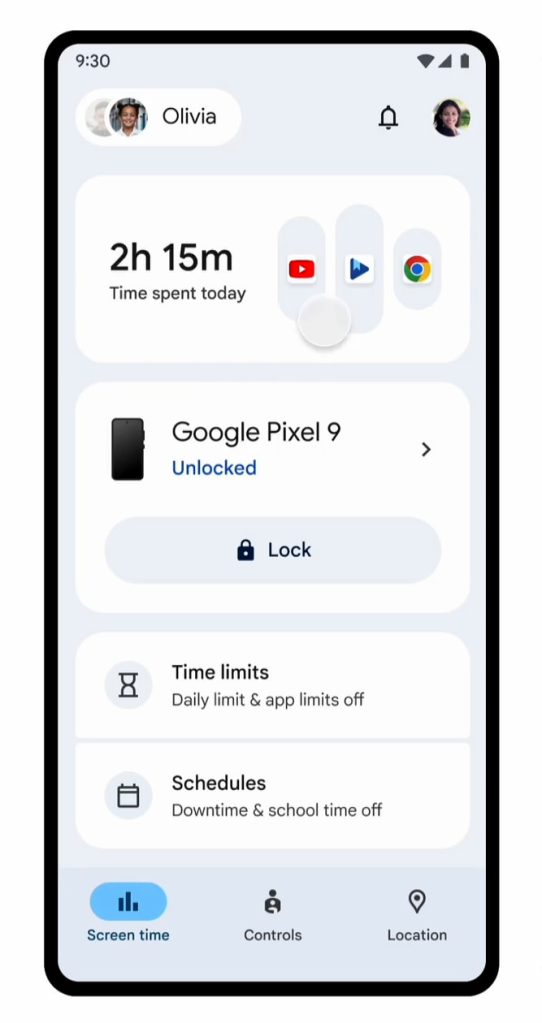
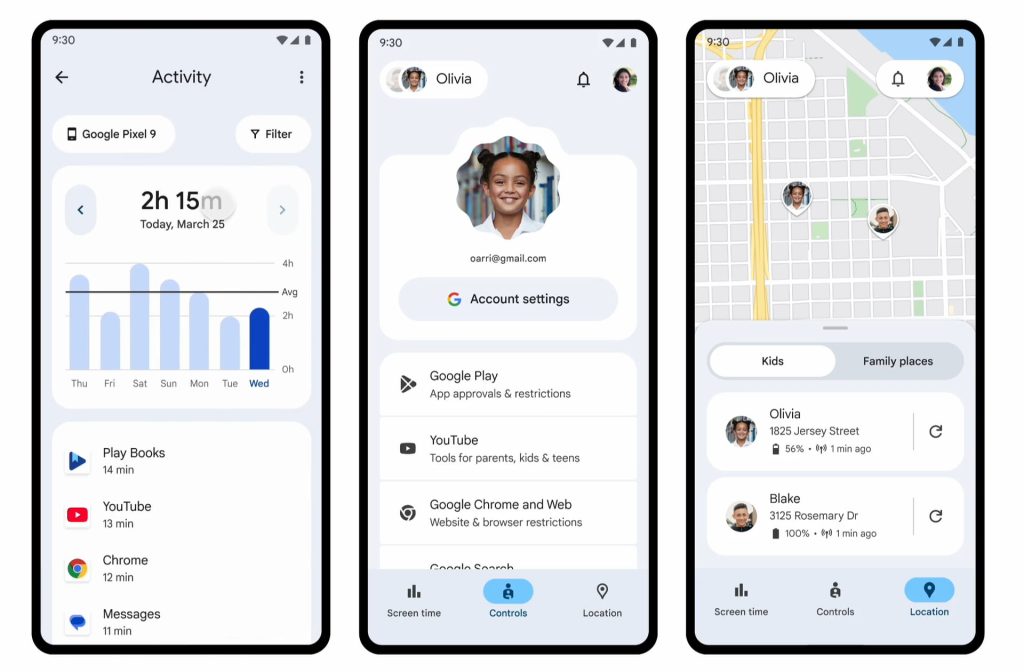
Google is redesigning the Family Link (Android + iOS) experience for parents that “brings the most important tools and resources for managing screen time to the forefront.” This update is meant to make supervising multiple kids and devices easier.

Family Link redesign

Family Link redesign


The “Highlights” tab is becoming “Screen time” with large cards showing key stats and controls, like Lock, setting Time limits, and Schedules. The middle “Controls” tab is getting streamlined and will prominently highlight Google Play, YouTube, Chrome, and Search access. Finally, “Location” benefits from some visual (Material You) tweaks.

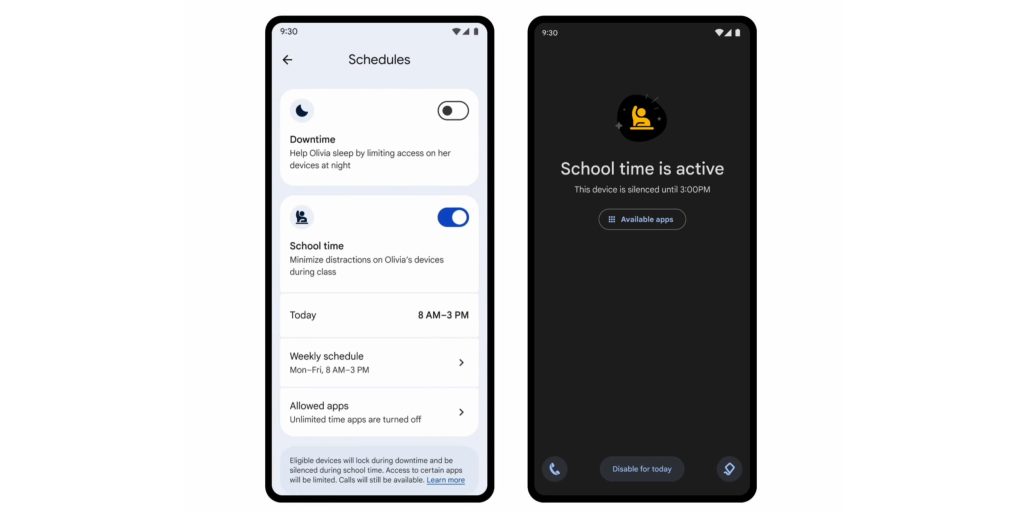
Meanwhile, Google in the next week will roll out School Time to Android phones and tablets so that parents can “automatically limit or adjust phone functionality and restrict app access during school hours.” Access it from the Screen time tab > Schedules card > School time. This first debuted on the Fitbit Ace LTE and Samsung Galaxy Watch for Kids.

Family-Link-School-Time.jpg


Google is also rolling out sensitive content warnings in Google Messages. For users under 18 with parental controls for supervised accounts, this is opt-out. (It’s opt-in for all other users.)

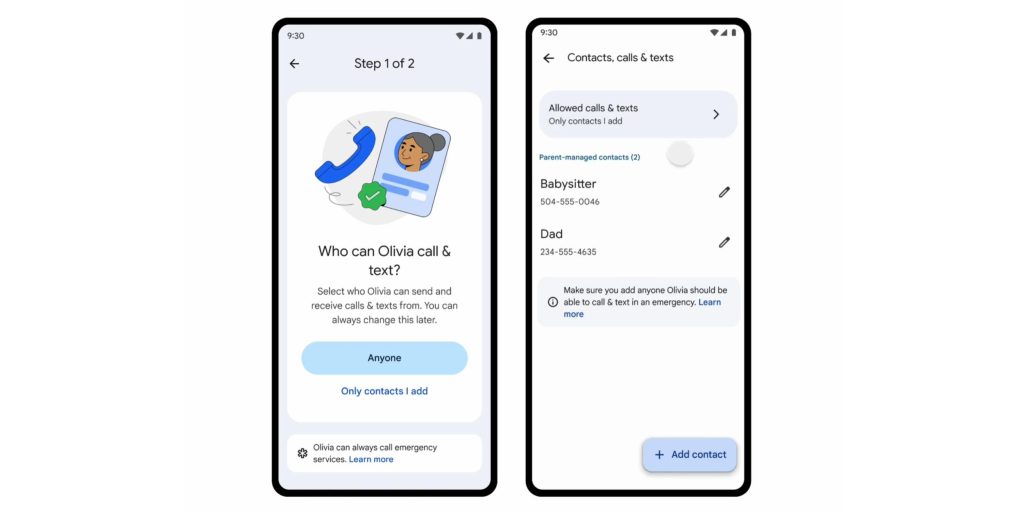
Starting in March, “parents will be able to add contacts directly to their child’s device and choose to limit phone calls and text conversations to only these contacts.” This first debuted on the Galaxy Watch for Kids and this rollout will bring it to Android phones.

Android-Parent-managed-contacts.jpg


This spring, the previously announced Google Wallet for kids experience is launching. Parents can add a payment card to their child’s phone for in-store NFC tap-to-pay, as well as see transaction history and remove cards. The app will also support gift cards and event tickets.

Over the coming months, teen accounts will get access to NotebookLM and the Learn About gen AI lab. This follows Gemini, AI Overviews, and Circle to Search.

Finally, Google is testing a machine learning-powered age estimation model in the US and will bring it to more countries over time.
 

limmk

High Supremacy Member
Joined
Jul 5, 2001
Messages
39,374
Reaction score
7,975


A small redesign for Gmail on Android improves the readability of each overflow menu by adding icons and more thematic organization. It makes for nice quality-of-life improvements.

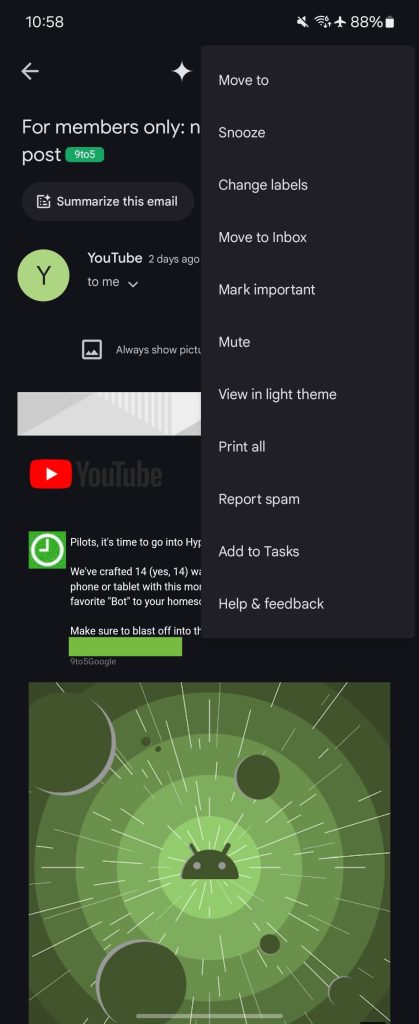
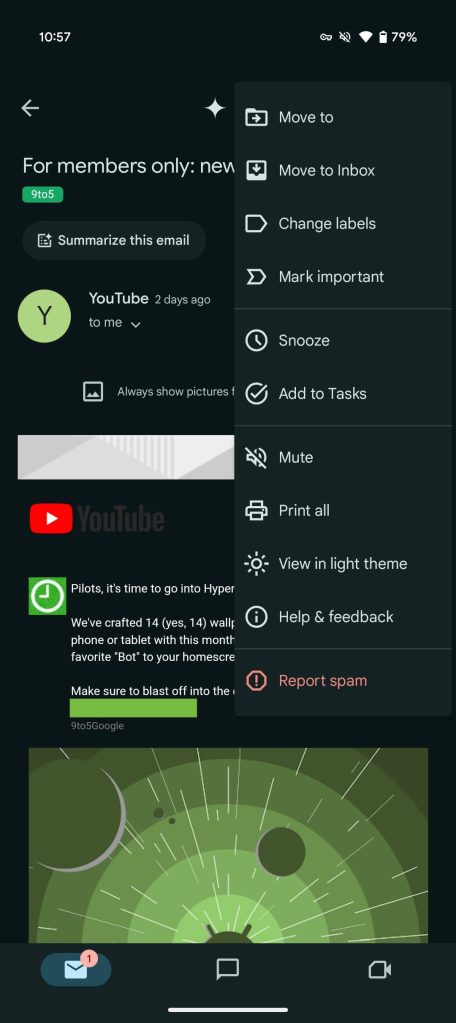
Google has added icons for each item in every overflow menu, while also inserting line separators to create new sections. This results in the long menus feeling less like a wall of text, while making it easier to find what you’re looking for. The Gmail website was similarly updated with icons in October of 2023.

In emails, there are a pair of three-dot menus, starting with the one for the entire conversation in the top-right corner. Gmail has grouped together Move to, Move to Inbox, Change labels, and Mark important. Snooze goes from being the second item to the fifth alongside Add to Tasks, which gets elevated from the bottom.

Then there’s Mute, Print all, View in light theme, and Help & feedback, with Report spam getting red text in the final section.

Gmail-Android-menu-old-a.jpg
Gmail Android menu redesign


The other menu for each message maintains the same order, while adding Report spam.

In your inbox, the overflow menu available after selecting an email groups together Move to, Add star, Change labels, and Mark (not) important, while Snooze and Mute are paired. Spam reporting also appears at the end.

We’re seeing this menu redesign with version 2025.01.25.721794537 of Gmail for Android, which widely rolled out via the Play Store today. Force stop the app after updating if you’re not seeing the changes.
 
Important Forum Advisory Note
This forum is moderated by volunteer moderators who will react only to members' feedback on posts. Moderators are not employees or representatives of HWZ Forums. Forum members and moderators are responsible for their own posts. Please refer to our Community Guidelines and Standards and Terms and Conditions for more information.
Top