Google Pixel Update - Android 12 July 2022

limmk

High Supremacy Member
Joined
Jul 5, 2001
Messages
38,222
Reaction score
7,830
Google Play system update February 1, 2021
TwtX99q.png

aSx8VtU.png


Interested users can sideload here, or wait for the update to roll out.

Get Google Play system updates
  1. Open your device’s Settings app ⚙️
  2. Tap Security 🔒
  3. Check for an update:
    ◾ To check if a Google Play system update is available, tap Google Play system update 📱
  4. Follow any steps on the screen
 
Last edited:

limmk

High Supremacy Member
Joined
Jul 5, 2001
Messages
38,222
Reaction score
7,830
Today is Pixel update day.

March 2021 security patch rolling out to Google Pixel, factory images & OTAs live

m3ZxJRf.jpg


Notable fixes:
thread-100309551-683451440046437412.png


Alongside new features, the March update includes several fixes and improvements across many areas including performance, stability, battery, and more.

Interested users can sideload the OTA, flash the factory image, or wait for the update to roll out.

The OTA update will roll out in phases depending on carrier and device. Users will receive a notification once it becomes available.

Details of security fixes are found in this link :
https://source.android.com/security/bulletin

Get security updates & Google Play system updates
  1. Open your device’s Settings app ⚙️
  2. Tap Security 🔒
  3. Check for an update:
    ◾ To check if a Security update is available, tap Security update 📱
    ◾ To check if a Google Play system update is available, tap Google Play system update 📱
  4. Follow any steps on the screen

jUJxBRf.png


Factory Images for Nexus and Pixel Devices
Full OTA Images for Nexus and Pixel Devices

Android Security Bulletin—March 2021
Pixel Update Bulletin—March 2021
 

chuppachop

Senior Member
Joined
Jun 2, 2006
Messages
760
Reaction score
16
Hi, after updating to this latest March update, i realized no popup notifications appearing for WhatApp immediately after the update.

Under WhatsApp /Settings / Notifications / Popup notification (now grey out and shows Not available)

Anyone has the same issu or know how to resolve it?

Clear Cache, memory and re-install app but still shows grey out .... thx
 

limmk

High Supremacy Member
Joined
Jul 5, 2001
Messages
38,222
Reaction score
7,830
Hi, after updating to this latest March update, i realized no popup notifications appearing for WhatApp immediately after the update.

Under WhatsApp /Settings / Notifications / Popup notification (now grey out and shows Not available)

Anyone has the same issu or know how to resolve it?

Clear Cache, memory and re-install app but still shows grey out .... thx

Mine still getting notifications, beta version 2.21.5.8
 

chuppachop

Senior Member
Joined
Jun 2, 2006
Messages
760
Reaction score
16
Thx for the reply .... i re-install several times to no avail ..... after I change the OS Language to Chinese and re-installed, it works but the WhatsApp settings still shows:

Popup notification (still and shows Not available)

Cukoo app .... thx again :)
 

temytemy

Senior Member
Joined
Jul 13, 2010
Messages
1,379
Reaction score
106
Hi all

I would ask this here since it's pertaining to March 21 updates.

For the new Google Fit, did any of you tried the heart rate monitor yet? I find it very hard to get it to read to 100%. Either the message says it's too dark or it says I moved my finger slightly. But I gonna say it's very accurate like my Fitbit.
 

ThinkMe

High Supremacy Member
Joined
Jun 4, 2011
Messages
41,773
Reaction score
7,892
Hi all

I would ask this here since it's pertaining to March 21 updates.

For the new Google Fit, did any of you tried the heart rate monitor yet? I find it very hard to get it to read to 100%. Either the message says it's too dark or it says I moved my finger slightly. But I gonna say it's very accurate like my Fitbit.

Just tried this morning and quite easy.
 

limmk

High Supremacy Member
Joined
Jul 5, 2001
Messages
38,222
Reaction score
7,830
April 2021 security patch rolling out to Google Pixel, factory images & OTAs live

m3ZxJRf.jpg


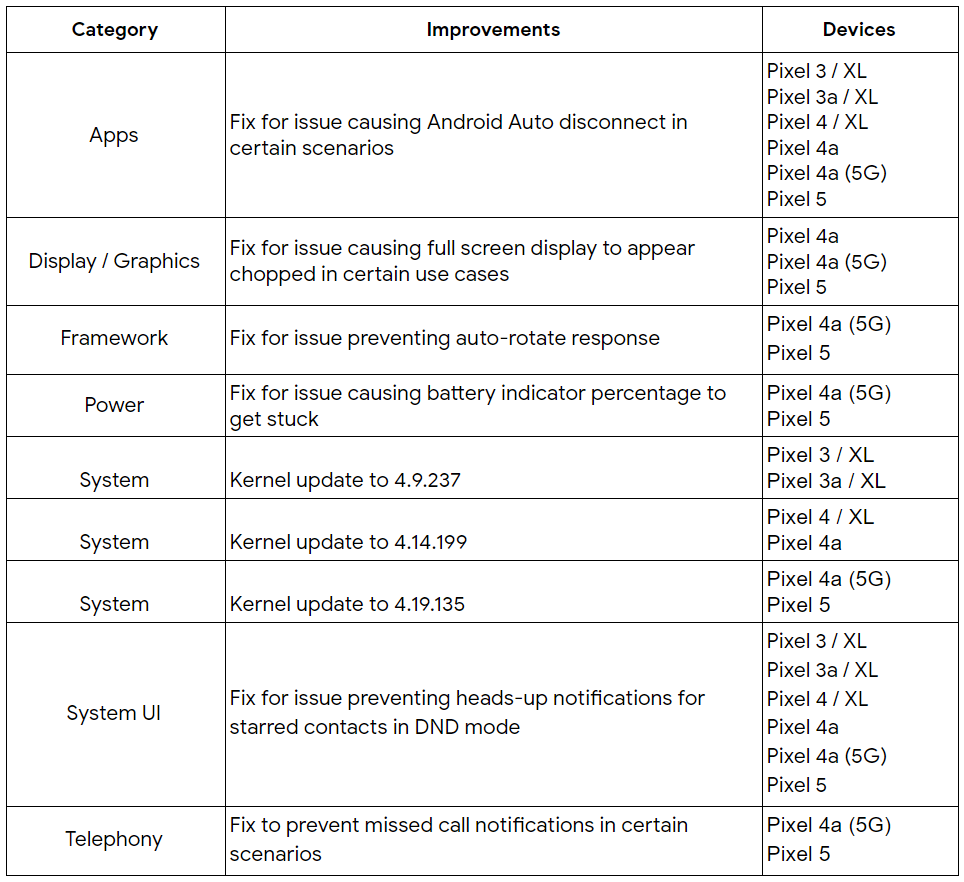
Notable fixes:

KnB4T1XuXH9o_gCgsMuwnxwnOM9ae7l8l4sOTKJ6wSHlvDw7jOGy2g6dxjPwjAahEgpTehDUWHg2XJinC926I9CKFC072kXG0yaQDMMUx7aK4RPKplp0weCImiNAZqA


Interested users can sideload the OTA, flash the factory image, or wait for the update to roll out.

The OTA update will roll out in phases depending on carrier and device. Users will receive a notification once it becomes available.

Details of security fixes are found in this link :
https://source.android.com/security/bulletin

Get security updates & Google Play system updates
  1. Open your device’s Settings app ⚙️
  2. Tap Security 🔒
  3. Check for an update:
    ◾ To check if a Security update is available, tap Security update 📱
    ◾ To check if a Google Play system update is available, tap Google Play system update 📱
  4. Follow any steps on the screen

6cjeMcB.png


Factory Images for Nexus and Pixel Devices
Full OTA Images for Nexus and Pixel Devices
Android Security Bulletin—Apri 2021
Pixel Update Bulletin—Apri 2021
 

limmk

High Supremacy Member
Joined
Jul 5, 2001
Messages
38,222
Reaction score
7,830
Google Play system update to April 1, 2021

WixNYd4.png


Interested users can sideload the OTA, or wait for the update to roll out.

Get Google Play system updates
  1. Open your device’s Settings app ⚙️
  2. Tap Security 🔒
  3. Check for an update:
    ◾ To check if a Google Play system update is available, tap Google Play system update 📱
  4. Follow any steps on the screen
 
Last edited:

limmk

High Supremacy Member
Joined
Jul 5, 2001
Messages
38,222
Reaction score
7,830
Google Play system update to April 1, 2021 OTA update lai liao

y5TuHib.png


Get Google Play system updates
  1. Open your device’s Settings app ⚙️
  2. Tap Security 🔒
  3. Check for an update:
    ◾ To check if a Google Play system update is available, tap Google Play system update 📱
  4. Follow any steps on the screen
 
Important Forum Advisory Note
This forum is moderated by volunteer moderators who will react only to members' feedback on posts. Moderators are not employees or representatives of HWZ. Forum members and moderators are responsible for their own posts.

Please refer to our Community Guidelines and Standards, Terms of Service and Member T&Cs for more information.
Top