HDB dream internet setup

wahjohreno

Master Member
Joined
May 15, 2017
Messages
3,382
Reaction score
216
Thanks Eric.

I'll definitely check out the Singtel packages, although I prefer not to put hardware costs on the internet plan. I'm also aware of the relocation fee. I think it's $80+ if I remember correctly.

If I go for the Velop system, won't it be the router already?

Fibre point > Singtel modem > Velop > 16-port switch > rest of the house?

As mine is an old resale flat, I think the BTO wall issues don't apply. I'm just concerned the corners of the house will not get wifi, like in the toilets. So having a 3-node mesh system with a wired backhaul (I just learned this term haha) should ensure I have more than enough coverage.
 

eric3743

Supremacy Member
Joined
Jun 26, 2016
Messages
6,092
Reaction score
1
Velop is a optional device for wifi extender.
Router is still required for necessary flow on data packets, and IP.
Whereas beyond router that is for devices as in Velop, handsets, etc, do have each own IP connect to the main Router IP then outside network.
SingTel provide free Router in 1Gbps plan.
Hence using Linksys router best use the Velop or AirTies as part of full package.
Should there be any issue they can resolve it as using all their devices, no 3rd party.

Toilet bathroom should not be an issue for old flats.
Previously in my old flat, i never need any additional wifi repeater, as my Router in living room able to receive every corner of the flat.
That is why testing before buying new devices is crucial to determine the suitation.

Regards.

Sent from Samsung SM-G920I using GAGT
 

dragous

Member
Joined
Aug 12, 2011
Messages
109
Reaction score
0
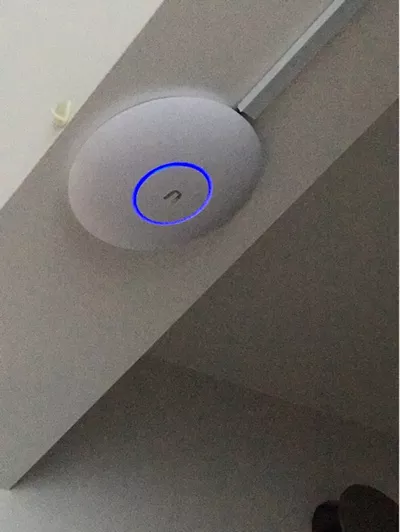
i using full ubnt for my hse. good product and easy to use actually. powerful enough for residence but may be overkill for simple application. now my whole hse is covered with wifi and can roam anywhere

I think your layout not too bad... You can either setup a AP at either Point X1 or X2.

Should give you a good coverage. within your house.

M73erVn.jpg


Can consider Ubiquiti UAP-AC-PRO. (The AP do not have Web interface, you need to install a controller on your MAC/Windows/Smartphone to configure).

pretty easy to configure and had a strong wifi coverage. Since you are renovating can run a cable and mount the AP up.


a1791d27-ffc7-4a92-b39a-c75cafa97f60.s_400-w-fs_s.jpg.webp

https://www.ubnt.com/unifi/unifi-ap-ac-pro/


*I am not sell the AP or the link this is only for an idea the cost of the AP.

http://www.lazada.sg/ubiquiti-uap-a....brand-24628.0.0.eR1T2A&ff=1&sc=MTRg&rb=24628


http://list.qoo10.sg/item/UBIQUITI-UBIQUITI-UNIFI-AP-AC-PRO-UAP-AC-PRO/486578586


https://shop.winpro.com.sg/products/unifi-ap-ac-pro
 

Mng85

Senior Member
Joined
Jul 24, 2003
Messages
1,953
Reaction score
0
i using full ubnt for my hse. good product and easy to use actually. powerful enough for residence but may be overkill for simple application. now my whole hse is covered with wifi and can roam anywhere

how different is using this vs a gd wireless router if i intend to hide it in false ceiling?
 

Mng85

Senior Member
Joined
Jul 24, 2003
Messages
1,953
Reaction score
0
so any advice? a gd wireless router will do or the ap is a better choice?
 

terry1

Senior Member
Joined
Nov 22, 2005
Messages
565
Reaction score
1
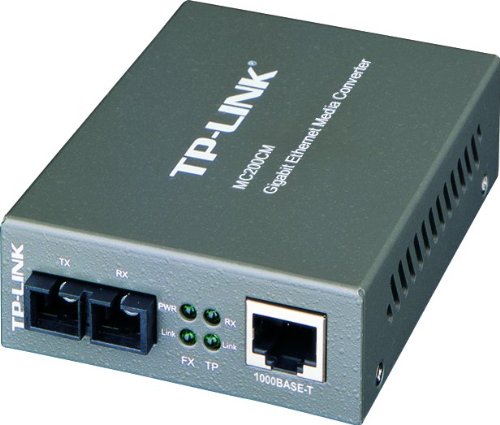
you would want to lay a fibre point to every room if you want your setup to last for a long time. currently those fibre to gigabit ethernet converters are very cheap in china, typically costing only about s$20 each. in fact the fibre cable that connects you up may cost more than the converters themselves :D

and you change to the higher speed converters when they become cheaper :D

51aFD-pyuhL.jpg
 

moron+genius

Senior Member
Joined
May 16, 2011
Messages
1,340
Reaction score
18
so any advice? a gd wireless router will do or the ap is a better choice?
I'll be using ceiling mounted AP for my new house and the AP n POE switch just arrived yest and setup in current house. A bit better signal strength but I expected more improvement in new house due to central positioning.
 

eric3743

Supremacy Member
Joined
Jun 26, 2016
Messages
6,092
Reaction score
1
you would want to lay a fibre point to every room if you want your setup to last for a long time. currently those fibre to gigabit ethernet converters are very cheap in china, typically costing only about s$20 each. in fact the fibre cable that connects you up may cost more than the converters themselves :D

and you change to the higher speed converters when they become cheaper :D

51aFD-pyuhL.jpg


Basically i don't think these devices could be of any help.
The main focus should be the Main Router connect to the ONT and the ISP do provide a better signal to your house.

As in my case, all my cables are lay underneath the floor inside a metal piping (similar to water pipe) to protect the cables inside.
The end point will be inside each room with an Data Point.
In my room a simple power hub $45 with 8-ports auto detect.
When doing the speedtest direct connect to one of the LAN port of the Main Router and via room Hub, both speed result remain the same.
As i am getting above 600+Mbps for download i thought it was cause by either hub or cabling, but it is not the case.

Using the Main Router and another same model Router via WAN port from the Hub, both wireless speed for the same phone is the same at 400Mbps.
So this conclude my testing on the devices and connections via cabling and Hub.
Even testing using Cat-5E and Cat-6 make no difference.

Regards.
 

wahjohreno

Master Member
Joined
May 15, 2017
Messages
3,382
Reaction score
216
I just setup a 3-node Velop mesh system, and as expected, my wifi is freaking fantastic now. I get full coverage on both floors of my maisonette now (vs crappy coverage prior just using Singtel's AC Plus router).

In the process, I had to call Singtel's helpline because I thought I could bypass Singtel's router and use one of the Velops as the router. Didn't work. The singtel helpline guy told me Singtel's ONT will only work with Singtel routers. Once I switched back to the AC Plus, everything was fast.
 

renfred89

Arch-Supremacy Member
Joined
Nov 11, 2007
Messages
17,520
Reaction score
19
I just setup a 3-node Velop mesh system, and as expected, my wifi is freaking fantastic now. I get full coverage on both floors of my maisonette now (vs crappy coverage prior just using Singtel's AC Plus router).

In the process, I had to call Singtel's helpline because I thought I could bypass Singtel's router and use one of the Velops as the router. Didn't work. The singtel helpline guy told me Singtel's ONT will only work with Singtel routers. Once I switched back to the AC Plus, everything was fast.

Well, velocity does not support lan, thus it wont work out of the box with SingTel ONT. you can turn off the wifi from the SingTel router and let velop handles the wifi, this will be better than having the wifi signal from SingTel router which will compete with the velop in wireless environment, leading to more congested channels..
 

wahjohreno

Master Member
Joined
May 15, 2017
Messages
3,382
Reaction score
216
Well, velocity does not support lan, thus it wont work out of the box with SingTel ONT. you can turn off the wifi from the SingTel router and let velop handles the wifi, this will be better than having the wifi signal from SingTel router which will compete with the velop in wireless environment, leading to more congested channels..
Yes, that's exactly what I did.
 

hawthorne

Arch-Supremacy Member
Joined
May 9, 2006
Messages
11,706
Reaction score
210
In the process, I had to call Singtel's helpline because I thought I could bypass Singtel's router and use one of the Velops as the router. Didn't work. The singtel helpline guy told me Singtel's ONT will only work with Singtel routers. Once I switched back to the AC Plus, everything was fast.

Singtel requires vlan tagging, hence, u need to use Singtel's own router. This is very leh chey becos it adds an intermediate component and hence, one more point of failure. In the past SH also requires this, and SH's own router is very buggy and problematic.

Ways to get around it, includes getting a managed switch and add in the vlan tagging for the individual ports. (see https://kb.netgear.com/25724/VLAN-tagging-setup-for-Nighthawk-router). A managed switch will cost upwards of $300 though.

A cheaper option is to abandon Singtel and sign up with another ISP. IIRC, all other ISPs do not need to do vlan tagging already. SH need in the past, but for new sign-ups, they already removed this requirement.
 
Last edited:

hawthorne

Arch-Supremacy Member
Joined
May 9, 2006
Messages
11,706
Reaction score
210
Basically i don't think these devices could be of any help.
The main focus should be the Main Router connect to the ONT and the ISP do provide a better signal to your house.

As in my case, all my cables are lay underneath the floor inside a metal piping (similar to water pipe) to protect the cables inside.
The end point will be inside each room with an Data Point.
In my room a simple power hub $45 with 8-ports auto detect.
When doing the speedtest direct connect to one of the LAN port of the Main Router and via room Hub, both speed result remain the same.
As i am getting above 600+Mbps for download i thought it was cause by either hub or cabling, but it is not the case.

Using the Main Router and another same model Router via WAN port from the Hub, both wireless speed for the same phone is the same at 400Mbps.
So this conclude my testing on the devices and connections via cabling and Hub.
Even testing using Cat-5E and Cat-6 make no difference.

Regards.

How did you do your speedtest? Did you try using iPerf?
 

thatone1

Junior Member
Joined
Sep 16, 2007
Messages
94
Reaction score
1
yep I use ubnt too ... but for different purpose.
I use ubnt edgerouter with 2 x WAN 1Gbps Fibre links with load balancer.
Very stable and fast too..
 
Important Forum Advisory Note
This forum is moderated by volunteer moderators who will react only to members' feedback on posts. Moderators are not employees or representatives of HWZ Forums. Forum members and moderators are responsible for their own posts. Please refer to our Community Guidelines and Standards and Terms and Conditions for more information.
Top