Hisense TV

Which Model(s) are you interested in?

  • U6H (4K, 60hz)

    Votes: 13 8.7%
  • U7H (4K, 120hz, Full Array Local Dimming, HDMI 2.1, VRR)

    Votes: 50 33.3%
  • U8H (4K, 120hz, Mini LED, HDMI 2.1, VRR)

    Votes: 86 57.3%
  • U9H (4K, 120hz, Mini LED, HDMI 2.1, VRR)

    Votes: 36 24.0%

  • Total voters
    150

creator88

Senior Member
Joined
Nov 16, 2007
Messages
569
Reaction score
35

may i check with you regards to blue tint? no idea whether it belongs to the earlier batch

i bought my set at 11.11.22
I purchased my set in early September 2022. Not sure whether your set is the same batch with problems.

If you find the colours off, especially the skin tones have a bluish hue, then you might have a defective panel. No harm checking in with hisense and quoting your purchase date, serial number etc.
 

|XterA|

Master Member
Joined
Jul 29, 2012
Messages
2,927
Reaction score
30
I purchased my set in early September 2022. Not sure whether your set is the same batch with problems.

If you find the colours off, especially the skin tones have a bluish hue, then you might have a defective panel. No harm checking in with hisense and quoting your purchase date, serial number etc.
thanks for your info, will check with hisense.
much appreciated!
 

eciloP

Senior Member
Joined
Oct 23, 2000
Messages
1,333
Reaction score
10
do let us know how their aft sales service nowadays is
wish you get back your tv soon
Hi, received my TV over the weekends. So far.. Dun want to say, abit 'bantang'.. haha. Tried to ask the guys who sent back the TV if this issue is common, however they do not know.. Anyway, their after sales service so far ok. Quite prompt.
 

sgmem88

Senior Member
Joined
Jan 6, 2007
Messages
2,099
Reaction score
679
Hi, received my TV over the weekends. So far.. Dun want to say, abit 'bantang'.. haha. Tried to ask the guys who sent back the TV if this issue is common, however they do not know.. Anyway, their after sales service so far ok. Quite prompt.
Glad to hear that.
They provided prompt and great support before & after I placed order with Courts online last year. I can only shake head with Courts support.

Enjoy your tv!
 

Firefox

Arch-Supremacy Member
Joined
Jan 1, 2000
Messages
10,133
Reaction score
6
Edit:
Finally managed to find the actual settings bottom - the remote control has 2 settings button (hint: not the gear button in the center). You'll need to click on the hamburger menu button at the numpad below '7'.
Note that accessing the device menu via the gear button/ Google TV device settings DOES NOT have the HDMI mode sub-menu required to turn on Enhanced Mode.
Also, the backlight bleed on the edges is still horrigible - I could not recommend this TV for the price and given how bad their technical support actually is (my email to their technical support has gone unanswered for 7 days now; don't even get an automated response). I had to go through their Lazada sales support chat who apparently goes to their China backend to request and they don't obviously test on the same firmware as our sets.

See below for backlight bleed at the edges (that's not glare at the sides and edges):


Just informational for anyone considering buying the 43" E7H.
I just bought a pair of the 43" E7H (delivered this Tuesday) and it will not do 4K 60Hz with HDR on its HDMI inputs.
In fact, it won't even do 4:4:4 Chroma sub sampling at 4K resolution (obviously without HDR as it isn't working) - the only mode at 4K60 when connected to my computers is 4:2:0.

Even my yesteryear Prism would do RGB or 4:4:4 with HDR and Dolby Vision certification in Windows (I'm quite surprised at this really considering Skyworth is a pretty low hanging fruit manufacturer).

Hisense email support has not answer my inquiry and the Lazada sales support (I bought from Lazada) has been singularly useless - their technical side keeps repeating the request for information even when I've given it all including pictures and video evidence.

Before anyone asks, yes, I've ran through all the different troubleshooting (even before contacting them):
1) Change HDMI cables - tried certififed HDMI 2.1 cables & non-certified HDMI 2.1 cables, HDMI 2.0 cables etc.
2) Tried different HDMI inputs on both the TV units.
3) Tried different computers and graphics cards - GTX 1650/ RTX 3060/ Intel Iris Plus 655 (iGPU on NUC).
4) Verified that these computers and cables will actually run 4K60 HDR - some are my HTPC units and they can do 4K60 w/ HDR on my other TV units (Prism Q55 & Xiaomi P1) so I know it's not the source side or cabling issue.
5) Factory reset of the TV units.
6) Ran the updates (both TV and computer drivers/ windows patches).

At this point I've just issued an ultimatum for them to either rectify the issue or I'll force a platform refund (yay for online shopping; buying offline would have been a convoluted case of going to CASE and/or SCT).

So there you have it. Don't buy the current E7H 43" since they seemed to have some issues on the hardware side (probably swapped to lower end components like SSD manufacturers).

 
Last edited:

R6exR6

Master Member
Joined
Sep 29, 2010
Messages
3,286
Reaction score
2,727
While 4K60 HDR is to be expected, 4:4:4 choma isn't specified on Hisense's site, so we can't expect this TV to feature it.
Anyway, glad Lazada has the Return/Refund policy for crap products like these!
 

Firefox

Arch-Supremacy Member
Joined
Jan 1, 2000
Messages
10,133
Reaction score
6
While 4K60 HDR is to be expected, 4:4:4 choma isn't specified on Hisense's site, so we can't expect this TV to feature it.
Anyway, glad Lazada has the Return/Refund policy for crap products like these!
I don't really need 4:4:4 but when something as low hanging as a Prism or Xiaomi can handle RGB (effectively similar range to 4:4:4), it does seem rather disingenuous that the Hisense would only handle 4:2:0.
This isn't part of my reason to refund the TV, mainly it's the lack of ability to handle 4K60 HDR .
 

R6exR6

Master Member
Joined
Sep 29, 2010
Messages
3,286
Reaction score
2,727
I don't really need 4:4:4 but when something as low hanging as a Prism or Xiaomi can handle RGB (effectively similar range to 4:4:4), it does seem rather disingenuous that the Hisense would only handle 4:2:0.
This isn't part of my reason to refund the TV, mainly it's the lack of ability to handle 4K60 HDR .
Agree. Either Hisense SG really cheapout on our local E7H variant or you've got a faulty unit. That said, even the more expensive local Sony X750H also can't display proper chroma 4:4:4. Then again, that's Sony's lowest-end 4K TV. Well, as long as we're dealing with low-end models, there's always a chance they won't have chroma 4:4:4 support. Either way, I wish you a smooth return/refund process. 🙏
 

Firefox

Arch-Supremacy Member
Joined
Jan 1, 2000
Messages
10,133
Reaction score
6
Agree. Either Hisense SG really cheapout on our local E7H variant or you've got a faulty unit. That said, even the more expensive local Sony X750H also can't display proper chroma 4:4:4. Then again, that's Sony's lowest-end 4K TV. Well, as long as we're dealing with low-end models, there's always a chance they won't have chroma 4:4:4 support. Either way, I wish you a smooth return/refund process. 🙏
I bought 2 units and both are not able to do 4K60 with HDR so it's not a defect on one unit. Lowering to 30Hz allows HDR to be turned on so I suspect they cheaped out on the inputs or something.
Their engineering response is 'We didn't get HDR10 certification so we can't do HDR' - problem is my Xiaomi P1 isn't certified either but does 4K60 RGB & HDR just fine. Pretty much at this time it seems like they're just finding any lame excuse to try and wiggle out of the problem.
 

R6exR6

Master Member
Joined
Sep 29, 2010
Messages
3,286
Reaction score
2,727
I bought 2 units and both are not able to do 4K60 with HDR so it's not a defect on one unit. Lowering to 30Hz allows HDR to be turned on so I suspect they cheaped out on the inputs or something.
Their engineering response is 'We didn't get HDR10 certification so we can't do HDR' - problem is my Xiaomi P1 isn't certified either but does 4K60 RGB & HDR just fine. Pretty much at this time it seems like they're just finding any lame excuse to try and wiggle out of the problem.
I see. If both units can't do 4K60 with HDR, then it's false advertising. Must get Lazada to refund!
After all, E7H is specced as HDR10 capable with 4K and 60Hz on their webpage.
Likely they used some cheap SoC with throttled bandwidth.
 

R6exR6

Master Member
Joined
Sep 29, 2010
Messages
3,286
Reaction score
2,727
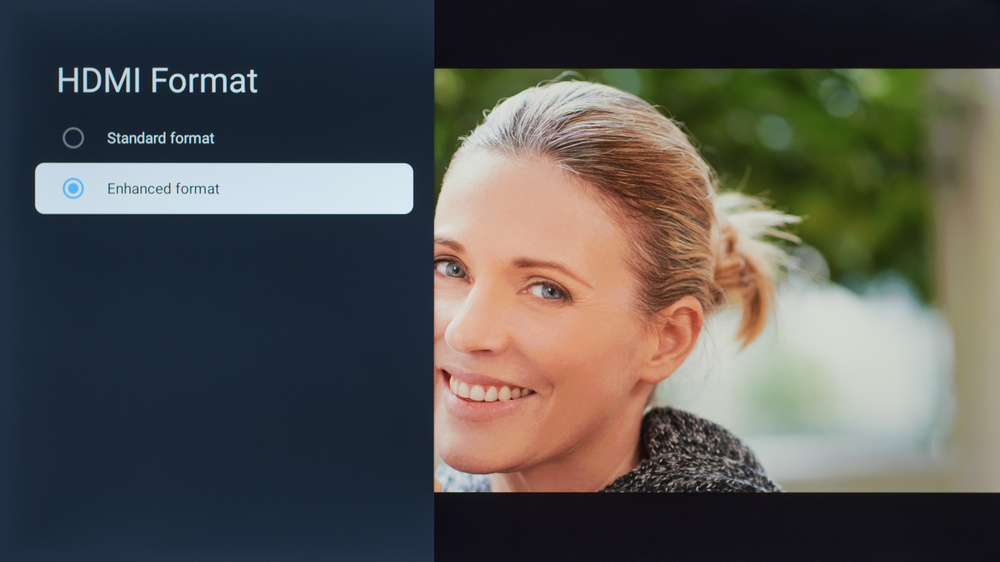
Did you set HDMI Format to 'Enhanced format' in order for HDR to work?

config-56-medium.jpg
 

Firefox

Arch-Supremacy Member
Joined
Jan 1, 2000
Messages
10,133
Reaction score
6
Ok... Finally resolved the issue - probably my bad as well..

Turns out there are two (2) menu buttons on the remote - they do different things.

There's a gear icon next to the navigation button - this opens up the Google TV menu which does not have the HDMI mode menu item (all the rest of the menu items are the same).

There's also a hamburger (3 lines) button at the numpad section - this opens a different menu with the HDMI mode sub-menu hidden in it.

I was finally able to find/ enable the HDMI enhanced mode which now allows me to get RGB 4K60 + HDR.
On a side note, this also allows VRR to work - Nvidia card detects as G-sync compatible.

The edge bleed is still crap though.
 

winningeleven

Arch-Supremacy Member
Joined
Mar 11, 2017
Messages
10,378
Reaction score
3,497
Went to the cee suntec to view the 98 inch tv set on Sunday. Retail at $8999 and I believe u can get it cheaper a few hundreds dollar.

Also viewing the L9H 120 inch laser tv.

My personal opinion for looking for big screen TV . Either u choose the 120 L9H or 98 inch U7H. Since 98 inch tv can be used in any room condition whereas 100 inch laser tv still need a dim room.
 

ryouma

Member
Joined
Oct 22, 2007
Messages
147
Reaction score
4
hey guys looking to get a tv for my hdb mbr
will be watching with dimmed lights
would you recommend E7H 43" or U6H 55"?

Main concerns are whether 55" are too big for mbr, and my main tv in the living room is LG G2, so also concerned on picture quality and deep blacks
 

R6exR6

Master Member
Joined
Sep 29, 2010
Messages
3,286
Reaction score
2,727
hey guys looking to get a tv for my hdb mbr
will be watching with dimmed lights
would you recommend E7H 43" or U6H 55"?

Main concerns are whether 55" are too big for mbr, and my main tv in the living room is LG G2, so also concerned on picture quality and deep blacks
From G2 to E7H will be a jarring downgrade in visuals.

50" TCL C635 is a possible option, if you're concerned about size. Being a VA panel, it has deep blacks with decent PQ, but does not have FALD. Performance should be similar to the U6H. U6H is likely to be an IPS panel, which does not have deep blacks, but has basic FALD to increase the contrast. You do not need the high brightness of the U6H, since you're watching in dim conditions, meaning the low brightness of the C635 should be enough. In dim conditions, I'd take the C635 over the U6H.

For a bit more $$$, I'd take the 50" Sony X80J over the above 3. Why? See the video.


stev85x

Member
Joined
Dec 2, 2005
Messages
351
Reaction score
36
Today took the plunge to grab U8H 75 inch at $2,599 from Courts with $100 Courts Voucher.

Hisense Promotion. Better than Lazada vouchers 6% or Shopee.

Coming from C7 Oled last me 6 years.

Only drawback is VIDAA. If can flash Google TV into it. Will be best.
 
Important Forum Advisory Note
This forum is moderated by volunteer moderators who will react only to members' feedback on posts. Moderators are not employees or representatives of HWZ. Forum members and moderators are responsible for their own posts.

Please refer to our Community Guidelines and Standards, Terms of Service and Member T&Cs for more information.
Top