Huawei Mate XT

1982-1994

Great Supremacy Member
Joined
Oct 10, 2016
Messages
60,041
Reaction score
29,693
Latest voucher pushed the price down to less than 3k ..
The only consolation for me spending $3200 on an export 512gb set; free from Google mobile services and so,less heating and better battery life
Though the catch is cannot use Huawei Pay
 

chari-men

Master Member
Joined
Jul 14, 2025
Messages
2,884
Reaction score
1,226
O
The only consolation for me spending $3200 on an export 512gb set; free from Google mobile services and so,less heating and better battery life
Though the catch is cannot use Huawei Pay
I think this one can don't install gms also rite hahaha..saw from advert also use Huawei app gallery ..one year standard warranty only.. nvm tahan a bit.. wait few months later come back when it's 2.3k come back hoot one just for the luxury of owning one..
 

1982-1994

Great Supremacy Member
Joined
Oct 10, 2016
Messages
60,041
Reaction score
29,693
https://www.hardwarezone.com.sg/mob...tri-fold-phone-singapore-specs-price-official

Oh local set is under EMUI 14.2

Before you decide in getting it

From deepseek
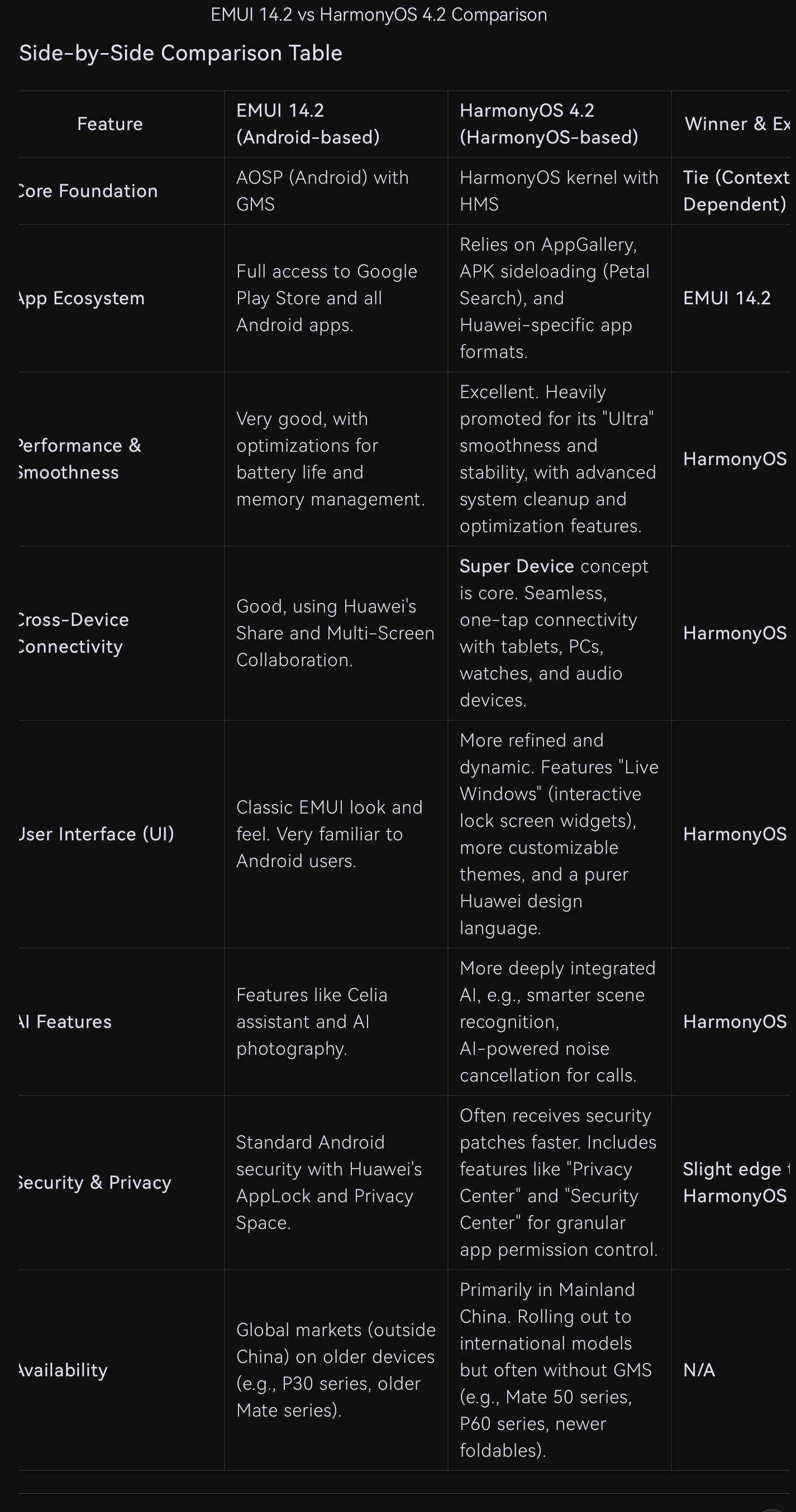
on of EMUI 14.2 (on Android) and HarmonyOS 4.2 (on the HarmonyOS kernel).

The Core Difference: The Foundation

This is the most critical distinction and dictates everything else.

· EMUI 14.2: It is an Android-based user interface. It runs on the Android Open Source Project (AOSP) core with Google Mobile Services (GMS) and the Google Play Store. You'll find it on older Huawei phones and in global markets outside of China.

· HarmonyOS 4.2: It is Huawei's proprietary operating system. While early versions were somewhat compatible with Android, HarmonyOS 4.2 is a further evolution of its own microkernel architecture, designed for a seamless experience across phones, tablets, watches, and other IoT devices. It uses Huawei Mobile Services (HMS) and the AppGallery.

---


d1ac4b04-91db-48d9-8b68-5411e4ef79ef.jpg

---

Which One Should You Choose?

This decision is usually made for you based on your device and region, but here’s the breakdown:

Choose EMUI 14.2 if:

· You are outside of China and rely heavily on Google Mobile Services (Gmail, Google Maps, YouTube, Google Drive, etc.).
· You own an older Huawei phone (pre-2019 ban) that was released with Google services.
· The familiarity of the Android ecosystem is important to you.

Choose HarmonyOS 4.2 if:

· You are in Mainland China, where Google services are unavailable anyway.
· You own a newer Huawei phone (post-2021, like the Mate 50, P60, or newer foldables) and want the latest software and features.
· You are deeply invested in the Huawei ecosystem (MatePad, MateBook, Watch, FreeBuds) and want the best possible "Super Device" connectivity.
· You prioritize system smoothness, battery optimization, and visual customization over the Google app suite.

The Big Picture: Huawei's Strategy

Huawei is clearly and decisively moving towards HarmonyOS as its sole, unified operating system. EMUI is effectively in maintenance mode for its legacy international devices. All new Huawei smartphones, even those sold internationally, are launching with HarmonyOS.

For global users, the main challenge with HarmonyOS remains the app ecosystem. While Huawei's AppGallery has grown immensely, and tools like Petal Search help find apps, the experience is not as seamless as having the native Google Play Store.

In summary:

· EMUI 14.2 is the past—a capable, Android-based skin for the global market.
· HarmonyOS 4.2 is the present and future—a more advanced, integrated, and smooth operating system that represents Huawei's ambition, held back primarily by the lack of Google services for users outside China.

 

chari-men

Master Member
Joined
Jul 14, 2025
Messages
2,884
Reaction score
1,226
https://www.hardwarezone.com.sg/mob...tri-fold-phone-singapore-specs-price-official

Oh local set is under EMUI 14.2

Before you decide in getting it

From deepseek
on of EMUI 14.2 (on Android) and HarmonyOS 4.2 (on the HarmonyOS kernel).

The Core Difference: The Foundation

This is the most critical distinction and dictates everything else.

· EMUI 14.2: It is an Android-based user interface. It runs on the Android Open Source Project (AOSP) core with Google Mobile Services (GMS) and the Google Play Store. You'll find it on older Huawei phones and in global markets outside of China.

· HarmonyOS 4.2: It is Huawei's proprietary operating system. While early versions were somewhat compatible with Android, HarmonyOS 4.2 is a further evolution of its own microkernel architecture, designed for a seamless experience across phones, tablets, watches, and other IoT devices. It uses Huawei Mobile Services (HMS) and the AppGallery.

---


d1ac4b04-91db-48d9-8b68-5411e4ef79ef.jpg

---

Which One Should You Choose?

This decision is usually made for you based on your device and region, but here’s the breakdown:

Choose EMUI 14.2 if:

· You are outside of China and rely heavily on Google Mobile Services (Gmail, Google Maps, YouTube, Google Drive, etc.).
· You own an older Huawei phone (pre-2019 ban) that was released with Google services.
· The familiarity of the Android ecosystem is important to you.

Choose HarmonyOS 4.2 if:

· You are in Mainland China, where Google services are unavailable anyway.
· You own a newer Huawei phone (post-2021, like the Mate 50, P60, or newer foldables) and want the latest software and features.
· You are deeply invested in the Huawei ecosystem (MatePad, MateBook, Watch, FreeBuds) and want the best possible "Super Device" connectivity.
· You prioritize system smoothness, battery optimization, and visual customization over the Google app suite.

The Big Picture: Huawei's Strategy

Huawei is clearly and decisively moving towards HarmonyOS as its sole, unified operating system. EMUI is effectively in maintenance mode for its legacy international devices. All new Huawei smartphones, even those sold internationally, are launching with HarmonyOS.

For global users, the main challenge with HarmonyOS remains the app ecosystem. While Huawei's AppGallery has grown immensely, and tools like Petal Search help find apps, the experience is not as seamless as having the native Google Play Store.

In summary:

· EMUI 14.2 is the past—a capable, Android-based skin for the global market.
· HarmonyOS 4.2 is the present and future—a more advanced, integrated, and smooth operating system that represents Huawei's ambition, held back primarily by the lack of Google services for users outside China.
Like not much difference except the gms portion which u predicted may affect battery life.. both also cannot use Google pay lol... Samsung trifold launching in 2 weeks... Probably cost about 3.7-4k SGD also... Dilemma dilemma.. but one thing their trifold cannot do two screen unfold ...
 

dash7869

Master Member
Joined
Oct 10, 2005
Messages
3,352
Reaction score
33
Did anyone get the contactless payment to work?

For mrt anyway

I managed to add ap-1 successfully after a few tries. Bits not super intuitive but so far seems ok in terms of set up on phone


But cannot take mrt. Haven't tried payment at normal pos cashiers.
 

1982-1994

Great Supremacy Member
Joined
Oct 10, 2016
Messages
60,041
Reaction score
29,693
Did anyone get the contactless payment to work?

For mrt anyway

I managed to add ap-1 successfully after a few tries. Bits not super intuitive but so far seems ok in terms of set up on phone


But cannot take mrt. Haven't tried payment at normal pos cashiers.
you got it working? china set?
 

cscs3

Arch-Supremacy Member
Joined
Jun 4, 2000
Messages
21,709
Reaction score
128
https://www.hardwarezone.com.sg/mob...tri-fold-phone-singapore-specs-price-official

Oh local set is under EMUI 14.2

Before you decide in getting it

From deepseek
on of EMUI 14.2 (on Android) and HarmonyOS 4.2 (on the HarmonyOS kernel).

The Core Difference: The Foundation

This is the most critical distinction and dictates everything else.

· EMUI 14.2: It is an Android-based user interface. It runs on the Android Open Source Project (AOSP) core with Google Mobile Services (GMS) and the Google Play Store. You'll find it on older Huawei phones and in global markets outside of China.

· HarmonyOS 4.2: It is Huawei's proprietary operating system. While early versions were somewhat compatible with Android, HarmonyOS 4.2 is a further evolution of its own microkernel architecture, designed for a seamless experience across phones, tablets, watches, and other IoT devices. It uses Huawei Mobile Services (HMS) and the AppGallery.

---


d1ac4b04-91db-48d9-8b68-5411e4ef79ef.jpg

---

Which One Should You Choose?

This decision is usually made for you based on your device and region, but here’s the breakdown:

Choose EMUI 14.2 if:

· You are outside of China and rely heavily on Google Mobile Services (Gmail, Google Maps, YouTube, Google Drive, etc.).
· You own an older Huawei phone (pre-2019 ban) that was released with Google services.
· The familiarity of the Android ecosystem is important to you.

Choose HarmonyOS 4.2 if:

· You are in Mainland China, where Google services are unavailable anyway.
· You own a newer Huawei phone (post-2021, like the Mate 50, P60, or newer foldables) and want the latest software and features.
· You are deeply invested in the Huawei ecosystem (MatePad, MateBook, Watch, FreeBuds) and want the best possible "Super Device" connectivity.
· You prioritize system smoothness, battery optimization, and visual customization over the Google app suite.

The Big Picture: Huawei's Strategy

Huawei is clearly and decisively moving towards HarmonyOS as its sole, unified operating system. EMUI is effectively in maintenance mode for its legacy international devices. All new Huawei smartphones, even those sold internationally, are launching with HarmonyOS.

For global users, the main challenge with HarmonyOS remains the app ecosystem. While Huawei's AppGallery has grown immensely, and tools like Petal Search help find apps, the experience is not as seamless as having the native Google Play Store.

In summary:

· EMUI 14.2 is the past—a capable, Android-based skin for the global market.
· HarmonyOS 4.2 is the present and future—a more advanced, integrated, and smooth operating system that represents Huawei's ambition, held back primarily by the lack of Google services for users outside China.
I understand it use AOSP (Android Open System Platform) and not Huawei HOS system too.
 

neptunesea

Junior Member
Joined
Sep 5, 2023
Messages
17
Reaction score
12
Anyone with china imported version of the XT/XTs can confirm if 5G works in singapore? As i understand the SG version is 4G only.

Also since the XT is now available in SG, will Huawei SG service centre repair XT/XTs under warranty bought in china?

Looks like our local version does not come with the 1 year 1x free screen replacement or the 2 year 4x screen protector replacement which Huawei provides everywhere else including malaysia.
 
Last edited:

Gadgetfreakloh

Senior Member
Joined
Dec 30, 2001
Messages
1,204
Reaction score
110
Anyone with china imported version of the XT/XTs can confirm if 5G works in singapore? As i understand the SG version is 4G only.

Also since the XT is now available in SG, will Huawei SG service centre repair XT/XTs under warranty bought in china?

Looks like our local version does not come with the 1 year 1x free screen replacement or the 2 year 4x screen protector replacement which Huawei provides everywhere else including malaysia.
Yes. 5G is working well. Warranty only in China. Just walk in to any Huawei service center in China and they will change screen protector without any receipt.
 

Ray1976

Master Member
Joined
Jan 22, 2012
Messages
2,730
Reaction score
325
I have a good deal on a used Huawei Mate XT...not sure wanna jump on it yet.
 

Ray1976

Master Member
Joined
Jan 22, 2012
Messages
2,730
Reaction score
325
I have a good deal on a used Huawei Mate XT...not sure wanna jump on it yet.
Just jumped on the Huawei Mate XT bandwagon...this is a local set with EMUI 14.2 OS. I am expecting most of the google apps will work fine out of the box, including Android Auto. Anyone with global rom have any issue with the following local apps?

1. DBS Internet Banking/DBS Paylah
2. SG Life
3. SingPass
 

Ray1976

Master Member
Joined
Jan 22, 2012
Messages
2,730
Reaction score
325
NO eSIM support (local global rom set sold in Singapore)

Never trust AI response. I asked, "Does huawei mate xt sold in singapore support eSIM"?
Gemini response: Yes, the Huawei Mate XT sold in Singapore supports eSIM, with newer global models offering full eSIM functionality for seamless connectivity, allowing you to add digital plans from carriers like those in Singapore, China, or Malaysia right in your phone settings. You'll find it in Settings > Mobile Network > SIM Management to add an eSIM, but carrier support and device variants (some might be Nano SIM + eSIM) are key for activation, so check with your provider.

To confirm, I did the IMEI check on the device by dialing *#06# on the dialer and true enough, there is no EID appear. Only 2 physical IMEI ID.

This is a big disappointment! For that, I have to re-apply for a physical SIM from my ISP. I guess most of Huawei phone will not support eSIM? Whatever the case, I am pissed.
 

1982-1994

Great Supremacy Member
Joined
Oct 10, 2016
Messages
60,041
Reaction score
29,693
NO eSIM support (local global rom set sold in Singapore)

Never trust AI response. I asked, "Does huawei mate xt sold in singapore support eSIM"?
Gemini response: Yes, the Huawei Mate XT sold in Singapore supports eSIM, with newer global models offering full eSIM functionality for seamless connectivity, allowing you to add digital plans from carriers like those in Singapore, China, or Malaysia right in your phone settings. You'll find it in Settings > Mobile Network > SIM Management to add an eSIM, but carrier support and device variants (some might be Nano SIM + eSIM) are key for activation, so check with your provider.

To confirm, I did the IMEI check on the device by dialing *#06# on the dialer and true enough, there is no EID appear. Only 2 physical IMEI ID.

This is a big disappointment! For that, I have to re-apply for a physical SIM from my ISP. I guess most of Huawei phone will not support eSIM? Whatever the case, I am pissed.
Omg you should have asked here
 

chari-men

Master Member
Joined
Jul 14, 2025
Messages
2,884
Reaction score
1,226
NO eSIM support (local global rom set sold in Singapore)

Never trust AI response. I asked, "Does huawei mate xt sold in singapore support eSIM"?
Gemini response: Yes, the Huawei Mate XT sold in Singapore supports eSIM, with newer global models offering full eSIM functionality for seamless connectivity, allowing you to add digital plans from carriers like those in Singapore, China, or Malaysia right in your phone settings. You'll find it in Settings > Mobile Network > SIM Management to add an eSIM, but carrier support and device variants (some might be Nano SIM + eSIM) are key for activation, so check with your provider.

To confirm, I did the IMEI check on the device by dialing *#06# on the dialer and true enough, there is no EID appear. Only 2 physical IMEI ID.

This is a big disappointment! For that, I have to re-apply for a physical SIM from my ISP. I guess most of Huawei phone will not support eSIM? Whatever the case, I am pissed.
Google search AI is more of convenience...not trustworthy one.. always check the official website or ask the official retail seller directly...
 

Ray1976

Master Member
Joined
Jan 22, 2012
Messages
2,730
Reaction score
325
Installation of Apps

Installed about 58 apps and I am surprised that the following apps having issue with GMS.

1. Straits Times (MyST) app - While there may be a warning dialog informing me of the GMS issue, I can still log in to my account and use the app. But I am very surprised that this app requires GMS to run?!

2. EZVIZ app - This is another app that it refused to run because of the lack of GMS?! For the uninitiated, the EZVIZ is door cam app. Again, this comes as a surprise for me.

3. WearOS or Pixel Watch app - This won't run as it requires an up to date GMS. There is no surprise here for me. Take note, I owned both Pixel watch and Samsung Galaxy Watch 8 Classic. In the past, Samsung was using her own watch ecosystem called, Tizen OS but since the last couple of models, Samsung has switched to Wear OS with Samsung's customised skin. Hence, BOTH google's pixel watch and Samsung Watch 8 Classic will not work because of WearOS.
 

1982-1994

Great Supremacy Member
Joined
Oct 10, 2016
Messages
60,041
Reaction score
29,693
Installation of Apps

Installed about 58 apps and I am surprised that the following apps having issue with GMS.

1. Straits Times (MyST) app - While there may be a warning dialog informing me of the GMS issue, I can still log in to my account and use the app. But I am very surprised that this app requires GMS to run?!

2. EZVIZ app - This is another app that it refused to run because of the lack of GMS?! For the uninitiated, the EZVIZ is door cam app. Again, this comes as a surprise for me.

3. WearOS or Pixel Watch app - This won't run as it requires an up to date GMS. There is no surprise here for me. Take note, I owned both Pixel watch and Samsung Galaxy Watch 8 Classic. In the past, Samsung was using her own watch ecosystem called, Tizen OS but since the last couple of models, Samsung has switched to Wear OS with Samsung's customised skin. Hence, BOTH google's pixel watch and Samsung Watch 8 Classic will not work because of WearOS.
Despite of those issues, any buyer's remorse?
 
Important Forum Advisory Note
This forum is moderated by volunteer moderators who will react only to members' feedback on posts. Moderators are not employees or representatives of HWZ. Forum members and moderators are responsible for their own posts.

Please refer to our Community Guidelines and Standards, Terms of Service and Member T&Cs for more information.
Top